The Salesforce Composite API packs up to 25 REST calls into a single HTTP request, runs them in order, and lets a later call reuse the id a previous call created. One round trip instead of five, and no half finished data when something fails.
That second part is the reason integration teams reach for it. Creating an account, then a contact that points at it, then a case that points at the contact, normally means three calls and three chances for a partial result. Here it is one call with a rollback option.
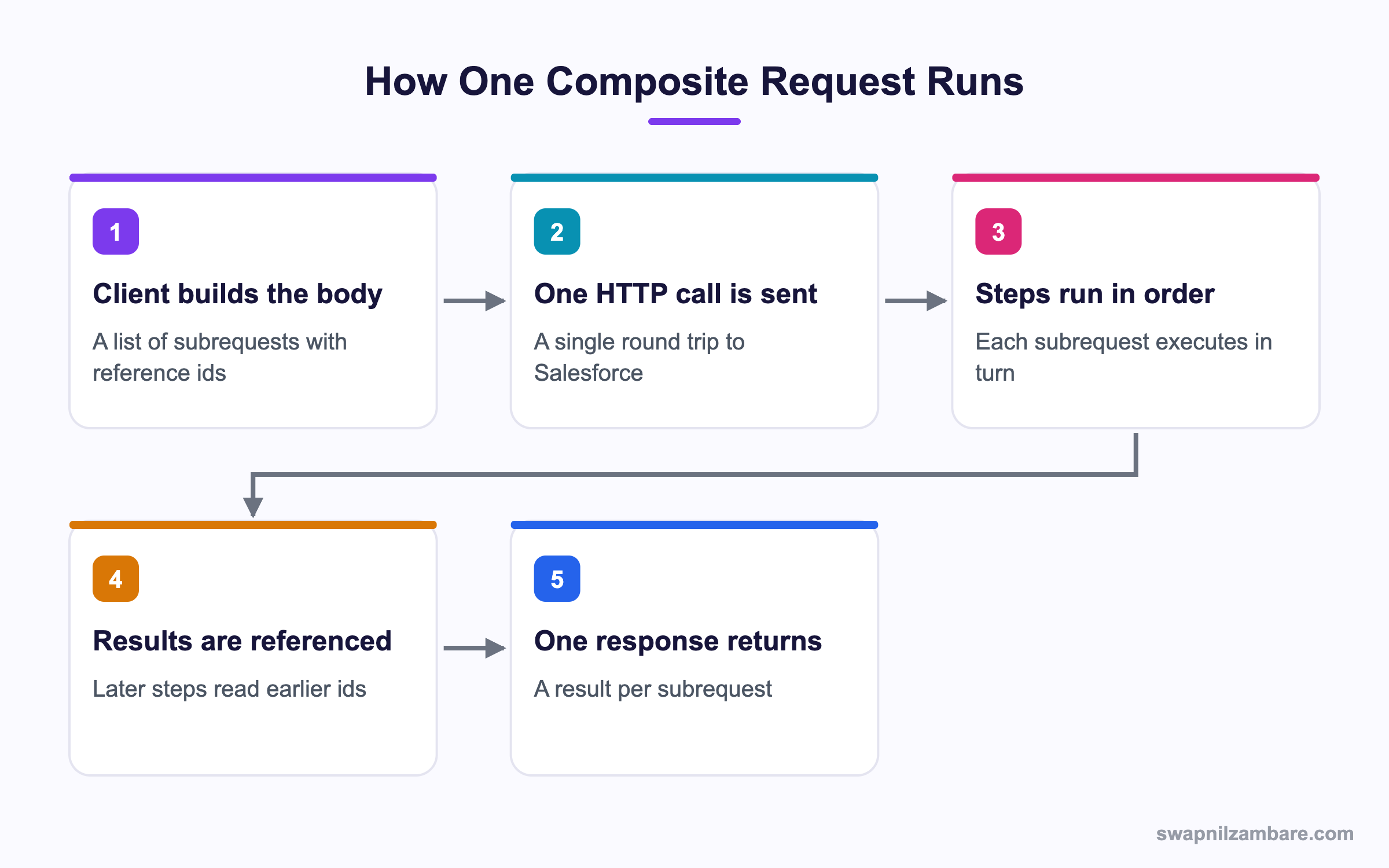
Caption: Reference ids are what make later steps able to use the records earlier steps created.
What Is the Salesforce Composite API
The Salesforce Composite API is a REST resource that accepts a list of subrequests. Each subrequest looks like a normal REST call, with a method, a URL, a body, and one extra field called referenceId.
POST /services/data/v62.0/composite

{
  "allOrNone": true,
  "compositeRequest": [
    {
      "method": "POST",
      "url": "/services/data/v62.0/sobjects/Account",
      "referenceId": "newAccount",
      "body": { "Name": "Bright Path Tutors" }
    },
    {
      "method": "POST",
      "url": "/services/data/v62.0/sobjects/Contact",
      "referenceId": "newContact",
      "body": {
        "LastName": "Mehta",
        "AccountId": "@{newAccount.id}"
      }
    }
  ]
}
The @{newAccount.id} token is the whole trick. When the second subrequest runs, Salesforce has already created the account and substitutes the real id.
What You Can Reference
| Token | What it gives you |
|---|---|
| @{ref.id} | The id a create step produced |
| @{ref.body.Name} | A field from a query or retrieve step |
| @{ref.httpStatusCode} | The status of an earlier step |
| @{ref.body.records[0].Id} | An id from a query result |
That last one is useful when the first step is a query rather than a create. Find the record, then update it, all inside one request.
Why the Salesforce Composite API Matters
| Benefit | What it saves you |
|---|---|
| Fewer round trips | Latency, which dominates slow integrations |
| All or nothing | Half written data after a failure |
| Fewer API calls counted | Your daily API limit |
| Simpler client code | Manual id juggling between calls |
The API limit line is worth reading twice. A composite request counts as one call against your daily limit even though it does 25 things. For a nightly job that creates thousands of related records, that difference is large.
If you are new to calling Salesforce from outside, the post on the REST API with Postman covers the basic request first.
The Three Salesforce Composite API Resources
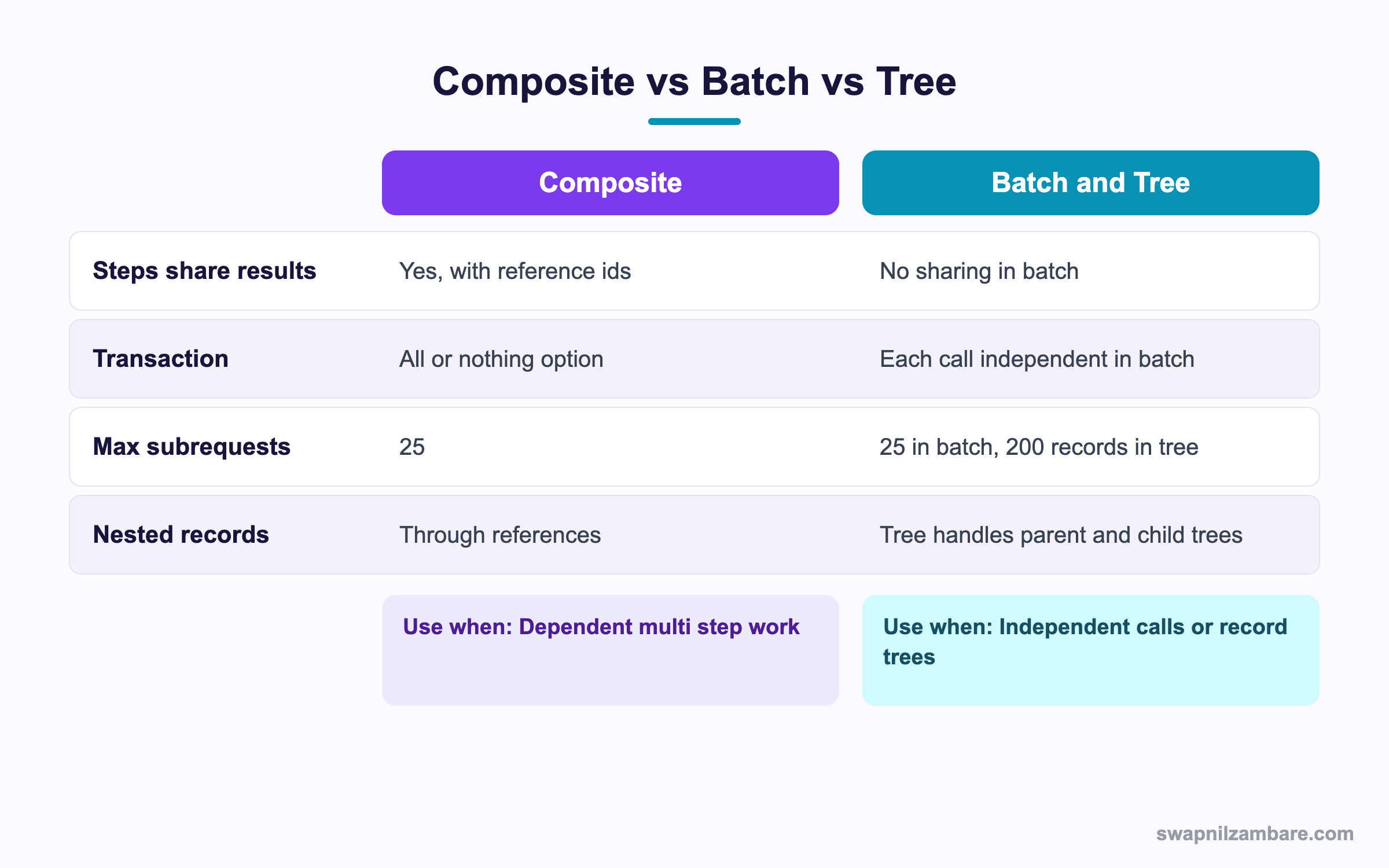
Caption: Pick composite for dependent steps, batch for independent ones, and tree for record hierarchies.
The Salesforce Composite API has three related resources and they are easy to confuse. For larger loads, see Bulk API 2.0.
| Resource | What it does | Steps share results |
|---|---|---|
| composite | Runs up to 25 subrequests in order | Yes |
| composite/batch | Runs up to 25 independent subrequests | No |
| composite/tree | Creates up to 200 records in a parent child tree | Through local ids |
| composite/sobjects | Creates, updates or deletes up to 200 records of one or more objects | No |
When Batch Is the Better Fit
Batch is the simpler cousin of the Salesforce Composite API, and it does not stop on a failure. If you need five unrelated queries, batch gives you all five answers even when one fails. Composite with allOrNone set to true would roll everything back.
When Tree Is the Better Fit
Tree is the part of the Salesforce Composite API built for one job, which is inserting a parent with its children in one go. You give each record a local reference, point the children at it, and Salesforce sorts out the order.
{
  "records": [{
    "attributes": { "type": "Account", "referenceId": "acc1" },
    "Name": "Bright Path Tutors",
    "Contacts": {
      "records": [{
        "attributes": { "type": "Contact", "referenceId": "con1" },
        "LastName": "Mehta"
      }]
    }
  }]
}
Salesforce Composite API Transactions and allOrNone
The Salesforce Composite API treats the whole request as one transaction when allOrNone is true. One failing step rolls back everything, including the steps that already succeeded.
| allOrNone | A step fails | What you get back |
|---|---|---|
| true | Everything rolls back | Errors, and no data changed |
| false | Later steps still run | A mix of successes and errors |
Set it to true whenever the records only make sense together. Set it to false when each step is independent and partial progress is useful.
One caveat that catches people. Even with allOrNone set to false, a subrequest whose reference points at a failed step cannot run, because the id it needs does not exist.
A Real Salesforce Composite API Example
Bright Path Tutors enrols students from a partner website. Each enrolment creates an Account if the family is new, a Contact for the student, and a Course_Enrolment__c record linking them to a course.
The first build used three separate REST calls from the partner system.
| Problem | What happened |
|---|---|
| Three round trips | Each enrolment took close to two seconds |
| Partial failures | An account with no contact, 14 times in one month |
| API call count | Three calls per enrolment against the daily limit |
| Client complexity | The partner stored ids between calls |
One composite request replaced all of it.
| Measure | Before | After |
|---|---|---|
| HTTP calls per enrolment | 3 | 1 |
| Average time | 1.9 seconds | 0.7 seconds |
| Orphan records in a month | 14 | 0 |
| Daily API calls used | 3 per enrolment | 1 per enrolment |
The orphan record count is the figure the business cared about. Those 14 records each took a support call to clean up.
Limits and Things to Watch
- 25 subrequests per composite request, and 5 of those may be query or query all calls
- The whole request runs in one Apex transaction, so governor limits are shared across every step
- A reference can only point at an earlier step, never a later one
- Each subrequest URL must include the API version
- The response is an array in the same order as the request, so match by position or reference id
- Composite does not batch Apex REST calls to different custom endpoints as efficiently as you might hope
The shared governor limits line is the one that bites on large jobs. Twenty five subrequests each touching 200 records can hit the DML row limit even though no single step would. The post on governor limits lists the numbers that apply.
Reading the Response
{
  "compositeResponse": [
    {
      "body": { "id": "001...", "success": true },
      "httpStatusCode": 201,
      "referenceId": "newAccount"
    },
    {
      "body": [{ "message": "Required field missing", "errorCode": "REQUIRED_FIELD_MISSING" }],
      "httpStatusCode": 400,
      "referenceId": "newContact"
    }
  ]
}
The Salesforce Composite API reports a status per step, so always read httpStatusCode there rather than only the outer HTTP status. The overall call can return 200 while one subrequest inside it failed with a 400.
Calling It from Apex
You can also build a Salesforce Composite API request inside Apex when one org talks to another.
HttpRequest req = new HttpRequest();
req.setEndpoint('callout:Partner_Org/services/data/v62.0/composite');
req.setMethod('POST');
req.setHeader('Content-Type', 'application/json');
req.setBody(JSON.serialize(payload));
HttpResponse res = new Http().send(req);
The callout: prefix points at a named credential, which keeps the token out of your code. The post on named credentials covers that setup properly.
Common Mistakes with the Salesforce Composite API
| Mistake | What you see | Fix |
|---|---|---|
| Reference to a later step | An unresolved reference error | Order the steps so the source comes first |
| Missing API version in a subrequest URL | A 404 on that step | Include the version in every URL |
| Reading only the outer status | Silent failures | Check httpStatusCode on each subrequest |
| More than 25 subrequests | The request is rejected | Split the work into several requests |
| allOrNone true for independent work | One bad row loses everything | Set it to false when steps stand alone |
| Many query subrequests | A limit error | Keep query calls to the allowed few per request |
Best Practices for the Salesforce Composite API
- Give every subrequest a reference id you would recognise in a log
- Set allOrNone to true whenever the records only make sense together
- Check the status of each subrequest, not only the outer response
- Keep the step count well under the maximum so a future field addition does not break the request
- Put the API version in a constant rather than repeating it in every URL
- Log the full response body on failure, since the error detail sits inside it
- Use a named credential when the caller is Apex in another org
Most Asked Salesforce Composite API Interview Questions
Q1: What problem does the composite resource solve?
It packs several dependent REST calls into one round trip and lets later steps use ids from earlier ones.
Q2: How many subrequests fit in one composite request?
Up to 25, of which a small number may be query calls.
Q3: How does a step use an id from an earlier step?
With a reference token that names the earlier reference id and the field, such as the created record id.
Q4: What does the allOrNone flag do?
When true, any failure rolls the whole request back. When false, independent steps still run.
Q5: Does a composite request count as one API call?
Yes, which is a real saving against the daily limit.
Q6: Are governor limits shared across the subrequests?
Yes. The whole request runs in one transaction, so the limits are shared.
Q7: What is the difference between composite and composite batch?
Composite runs steps in order and lets them share results. Batch runs independent calls with no sharing.
Q8: When would you pick batch?
For several unrelated reads, since one failure does not stop the others.
Q9: What is composite tree for?
Inserting a parent record with its children in one call, up to 200 records.
Q10: How do records reference each other in a tree request?
Through a reference id in the attributes of each record.
Q11: What is the sobjects collections resource for?
Creating, updating or deleting up to 200 records in one call, with no step sharing.
Q12: Can a reference point forward to a later step?
No. References only look backwards, so order matters.
Q13: Why must each subrequest URL include the API version?
Because each one is treated as a real REST call, and a missing version returns a 404.
Q14: Can the outer call return 200 while a step failed?
Yes. That is why you read the status of each subrequest.
Q15: Scenario: step three fails and allOrNone is false. What happens to step four?
It runs, unless it references step three, in which case it cannot resolve the id.
Q16: Scenario: a nightly job hits the DML row limit. Why?
The subrequests share one transaction, so their row counts add up.
Q17: Scenario: the partner reports orphan accounts. What is the fix?
Move the related creates into one composite request with allOrNone set to true.
Q18: Can you call a custom Apex REST endpoint as a subrequest?
Yes, by using its URL path like any other REST resource.
Q19: How do you call the composite resource from Apex?
Build the JSON body, send it with HttpRequest, and point the endpoint at a named credential.
Q20: Why use a named credential for that?
It keeps the token and endpoint out of code and handles the authentication for you.
Q21: How do you match a response to its request?
By reference id, which appears in both, rather than relying on position alone.
Q22: Does the Salesforce Composite API help with large data loads?
Not really. For millions of records, Bulk API 2.0 is the right tool.
Q23: Can you mix reads and writes in one request?
Yes. A common pattern is a query, then an update that uses an id from the query result.
Q24: What happens if two steps update the same record?
They run in order within one transaction, so the last write wins.
Q25: Is there a size limit on the request body?
Yes, a documented payload cap, so keep bodies lean and split very large work.
Q26: Why keep the step count below the maximum?
So a later requirement can add a step without a redesign.
Q27: What belongs in the log when a request fails?
The full response body, since the per step error detail is inside it.
Q28: What is the one habit that prevents most issues?
Check every subrequest status and name reference ids clearly enough to read in a log.
Official Resources
What Is Next
Next, read Salesforce GraphQL API Explained for Developers.


