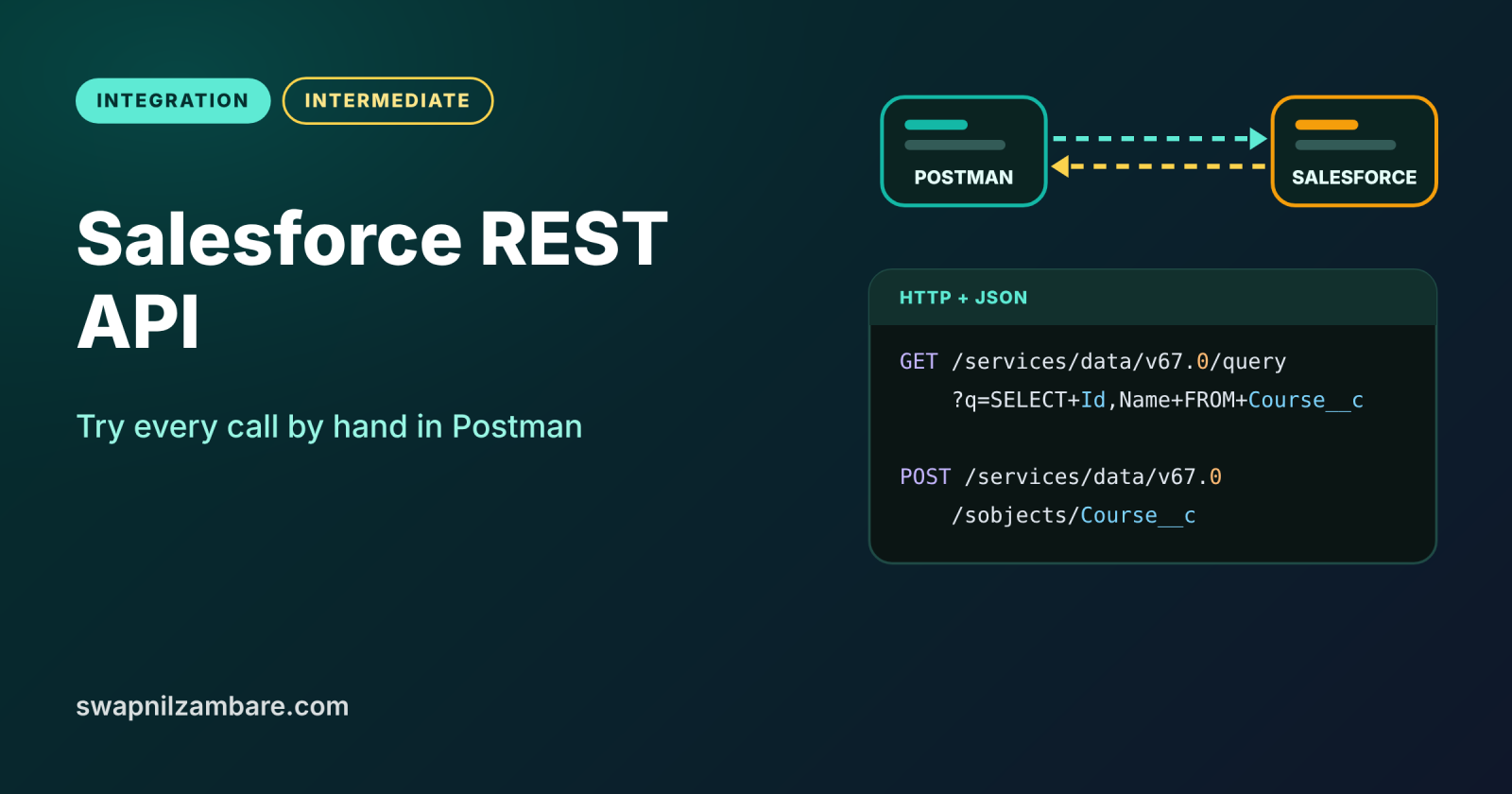
The Salesforce REST API lets any outside system read and change Salesforce data over plain HTTPS, using JSON. Postman is a free tool that sends those HTTP requests by hand, so you can see exactly what goes in and what comes back. Trying the API in Postman first makes later Apex and integration code much easier to understand.
In this post, you will set up an External Client App, get an access token in Postman, and then query, create, update and delete Course__c records. It builds on Salesforce Integration Patterns, SOQL basics and External Client Apps.
What is the Salesforce REST API?
The Salesforce REST API is a set of web addresses, called resources, that expose your org’s data and metadata. You send an HTTP method, such as GET or POST, to a URL like /services/data/v67.0/sobjects/Course__c. Salesforce then replies with a status code and a JSON body.
Think of a restaurant with a counter instead of waiters. The menu lists what you can order (the resources). You place an order with a clear request (the HTTP method and body), and the kitchen hands back your food with a receipt (the JSON response and status code).
Why the Salesforce REST API Matters
Most modern integrations talk REST. Here is why the Salesforce REST API matters at Bright Path Tutors.
- First, the company website creates leads and enrolments through it.
- Also, a mobile app reads course lists for students.
- Next, testers check data quickly without opening the Salesforce UI.
- Developers learn the exact request and response before writing code.
- Finally, Postman collections document the integration for the whole team.
So learning REST by hand pays off in every later integration post.
How the Salesforce REST API Works
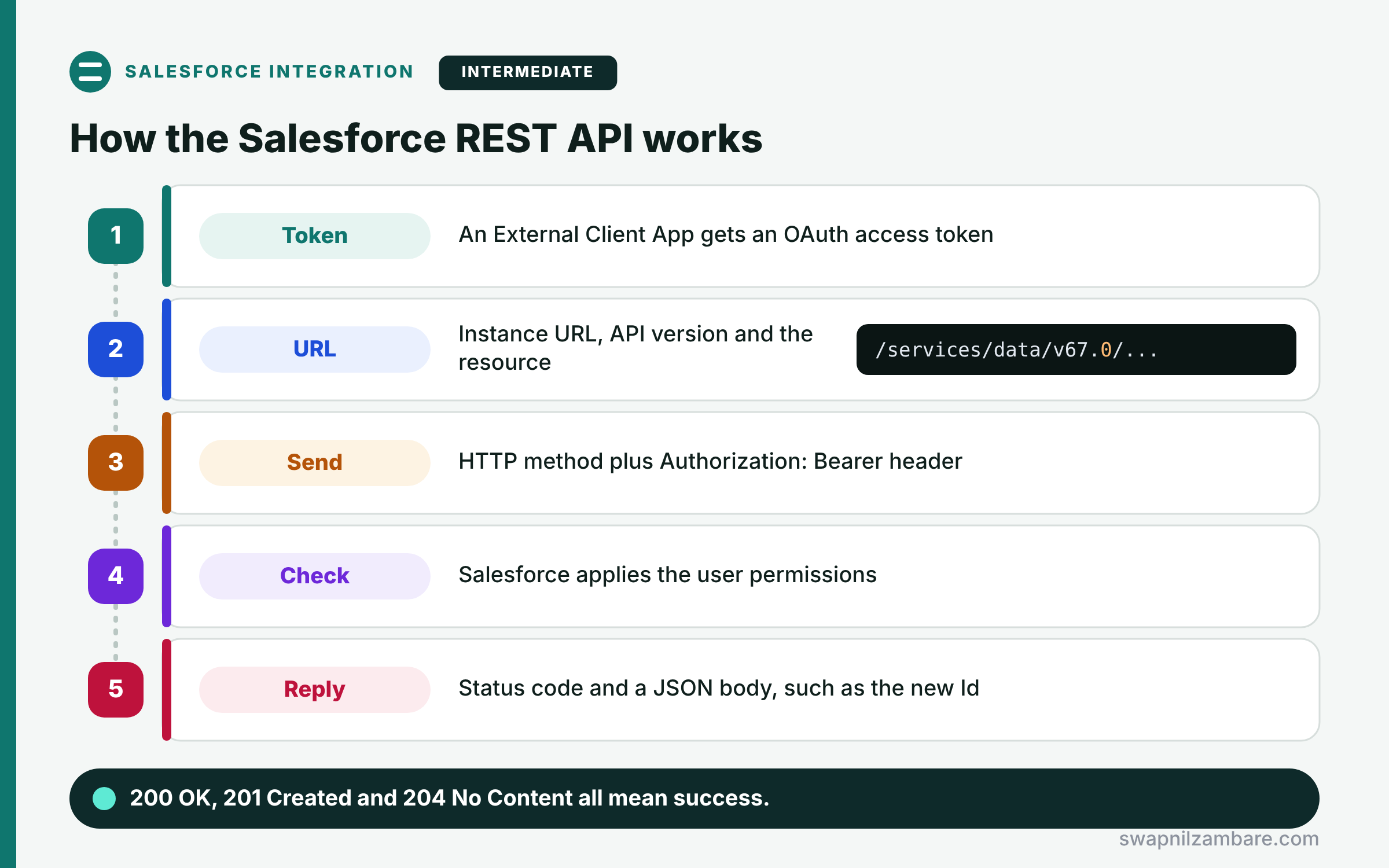
Every call to the Salesforce REST API follows the same steps. First, an app registered in Salesforce, such as an External Client App, gets an OAuth access token. Next, the client builds a URL with the instance domain, the API version and the resource. Then it sends the HTTP method with the header Authorization: Bearer and the token. After that, Salesforce checks the user’s permissions and runs the request. Finally, it returns a status code and a JSON body, such as the new record Id.
The Access Token
The token proves who is calling. Because it acts like a password, never share it or save it in public collections.
The Instance URL and Version
Calls go to your org’s My Domain URL, such as https://brightpath.my.salesforce.com. The version, such as v67.0, keeps responses stable after releases.
Resources
Common resources are sobjects for records, query for SOQL, composite for many calls in one, and limits for your API usage.
HTTP Methods
GET reads, POST creates, PATCH updates and DELETE removes. So each method maps to one kind of action.
Status Codes
200 means OK, 201 means created and 204 means success with no body. Also, 400 means a bad request, and 401 means the token is missing or expired.
Common Salesforce REST API Requests
The table below lists the requests you will use most.
| Task | Method | URL after /services/data/v67.0 |
|---|---|---|
| Check API limits | GET | /limits |
| Run a SOQL query | GET | /query?q=SELECT+Id,Name+FROM+Course__c |
| Create a record | POST | /sobjects/Course__c |
| Update a record | PATCH | /sobjects/Course__c/{id} |
| Delete a record | DELETE | /sobjects/Course__c/{id} |
| Describe an object | GET | /sobjects/Course__c/describe |
REST API vs SOAP API
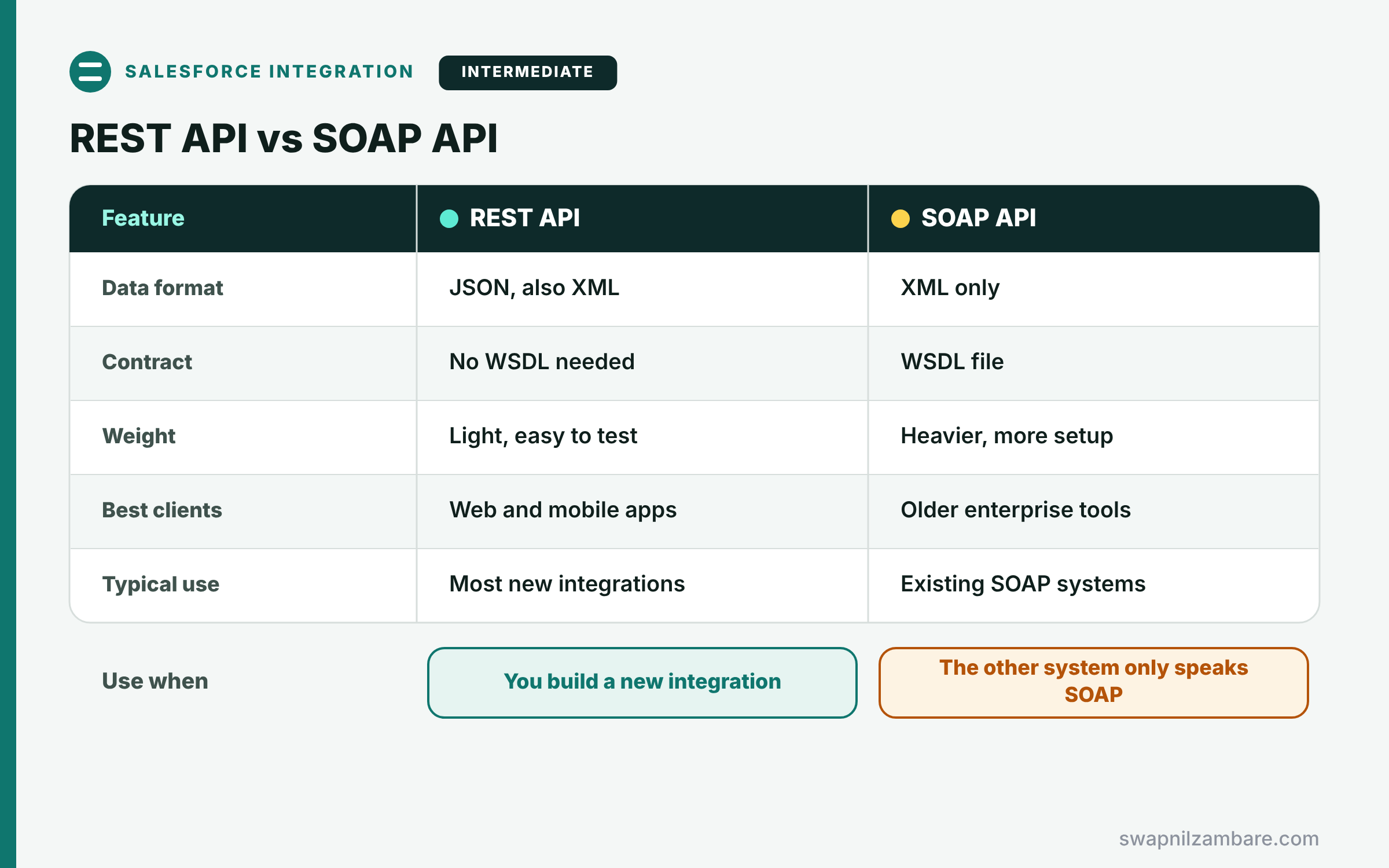
The table below compares the two main Salesforce APIs.
| Feature | REST API | SOAP API |
|---|---|---|
| Data format | JSON, also XML | XML only |
| Contract | No WSDL needed | WSDL file |
| Weight | Light, easy to test | Heavier, more setup |
| Best clients | Web and mobile apps | Older enterprise tools |
| Typical use | Most new integrations | Existing SOAP systems |
When to use which is simple. Use REST for new web and mobile integrations. Use SOAP only when the other system already speaks SOAP.
A Real Salesforce REST API Example
Let’s call the Salesforce REST API from Postman at Bright Path Tutors. We will query courses, then create, update and delete one.
Step 1: Prepare Salesforce and Postman
- In Setup, open External Client App Manager and click New External Client App.
- Enable OAuth, add the scopes api and refresh_token, and set the callback URL to https://oauth.pstmn.io/v1/callback.
- Copy the consumer key and consumer secret from the app’s settings.
- In Postman, fork the Salesforce Platform APIs collection from the Salesforce Developers workspace.
- On the collection’s Authorization tab, choose OAuth 2.0 with Authorization Code (With PKCE), then click Get New Access Token.
The login opens in a browser, and Postman saves the token and the instance URL for every request.
Step 2: Query and Create Records
GET {{_endpoint}}/services/data/v67.0/query?q=SELECT+Id,Name,Fee__c+FROM+Course__c+LIMIT+2

POST {{_endpoint}}/services/data/v67.0/sobjects/Course__c
Content-Type: application/json

{
  "Name": "Integration Basics",
  "Fee__c": 6000,
  "Is_Online__c": true
}
The GET runs SOQL with plus signs instead of spaces. Then the POST sends a JSON body, and Salesforce creates the record.
Here is the response for the POST request.
201 Created
{
  "id": "a01Kj00000Ab3xYIAR",
  "success": true,
  "errors": []
}
Step 3: Update and Delete the Record
PATCH {{_endpoint}}/services/data/v67.0/sobjects/Course__c/a01Kj00000Ab3xYIAR
Content-Type: application/json

{ "Fee__c": 6500 }

DELETE {{_endpoint}}/services/data/v67.0/sobjects/Course__c/a01Kj00000Ab3xYIAR
PATCH changes only the fields in the body, so the name stays the same. Both calls return 204 No Content when they succeed.
Salesforce REST API Limits
Each org has a daily API request allocation based on its edition and licences. So check GET /limits, or the Sforce-Limit-Info response header, before running big jobs. For thousands of records, use the composite resources or Bulk API instead of one call per record.
Common Mistakes with the Salesforce REST API
- Using login.salesforce.com as the data URL instead of the instance URL.
- Forgetting the API version in the path.
- Sending spaces in a SOQL query string instead of encoding them.
- Saving real tokens in a shared Postman collection.
- Making one call per record when composite or Bulk API fits better.
Best Practices for the Salesforce REST API
- Create a dedicated integration user with least privilege.
- Use OAuth flows, never passwords inside requests.
- Pin a tested API version and upgrade on purpose.
- Use upsert with an external ID to avoid duplicates.
- Watch the limits resource in busy integrations.
Practice Task
Use the composite tree resource to create a course with two related enrolments in one call. Hint: POST to /composite/tree/Course__c with a records array and nested child records.
Most Asked Interview Questions on the Salesforce REST API
REST questions appear in almost every integration interview. Here are the 22 questions asked most about the Salesforce REST API.
Basic Questions on the Salesforce REST API
Q1: What is the Salesforce REST API?
An HTTPS interface that lets outside systems work with Salesforce data using JSON or XML.
Q2: Which HTTP methods does it use?
GET reads, POST creates, PATCH updates and DELETE removes records.
Q3: How do you authenticate a REST call?
Get an OAuth access token, then send it in the Authorization: Bearer header.
Q4: What does status code 201 mean?
The record was created, and the body holds its new Id.
Q5: What does 204 mean after a PATCH?
The update worked, and there is no response body.
Q6: What does a 401 error usually mean?
The access token is missing, wrong or expired, so you must get a new one.
Q7: Why include the API version in the URL?
So responses stay stable when Salesforce releases new versions.
Code and Scenario Questions on the Salesforce REST API
Q8: How do you run a SOQL query through REST?
Send GET to /query with the SOQL in the q parameter, URL-encoded.
Q9: How do you get the next page of query results?
Call the nextRecordsUrl from the response until done is true.
Q10: How do you avoid duplicates when the website sends the same lead twice?
Use PATCH on /sobjects/Lead/External_Id__c/{value}, which upserts by external ID.
Q11: How do you create several related records in one call?
Use the composite tree or composite resource, so fewer calls hit your limits.
Q12: Where do you register the app that calls Salesforce?
In an External Client App, which replaces new connected apps since Spring ’26.
Q13: How do you check the remaining API calls?
Call GET /limits or read the Sforce-Limit-Info header on any response.
Q14: Why does Postman need a callback URL?
Because the OAuth web server flow returns the authorization code to that address.
Q15: What happens if the user lacks access to a field?
Salesforce returns an error or leaves the field out, because API calls respect permissions.
Advanced Questions on the Salesforce REST API
Q16: When should you use Bulk API instead of REST?
When you load or extract many thousands of records, because Bulk processes them asynchronously.
Q17: What is the composite resource for?
It runs up to 25 subrequests in one call and lets later ones reference earlier results.
Q18: How does the REST API respect sharing?
It runs as the authenticated user, so profiles, permission sets and sharing all apply.
Q19: What is the difference between the instance URL and the login URL?
The login URL handles OAuth, while the instance URL serves data for your org.
Q20: How do you handle token expiry in an integration?
Use a refresh token or request a new token with the client credentials flow.
Q21: Can you call custom Apex logic through REST?
Yes, because an @RestResource class exposes your own endpoint under /services/apexrest.
Q22: How do you keep Postman collections safe?
Store tokens in environment variables, mark them secret and never share real values.
Official Resources
- REST API Developer Guide (Salesforce Developers)
- List Available REST API Versions (REST API Developer Guide)
Quick Recap
- The Salesforce REST API uses HTTPS, JSON and OAuth tokens.
- Calls go to the instance URL with an API version.
- GET, POST, PATCH and DELETE map to read, create, update and delete.
- Status codes 200, 201 and 204 mean success.
- Use composite or Bulk API for many records.
What’s Next?
Now that you know the request shape, let Apex send it. Next, read our guide to Apex REST callouts.


