TypeScript in LWC means writing your component logic in a .ts file, letting the compiler check it, and deploying the JavaScript it produces. Salesforce never sees the TypeScript. The org receives an ordinary bundle, so runtime behaviour does not change at all.
What changes is when you find out about a mistake. A misspelled field name, a property that should be a number but holds a string, an Apex result read with the wrong key. All of those move from a broken page to a red line in your editor.
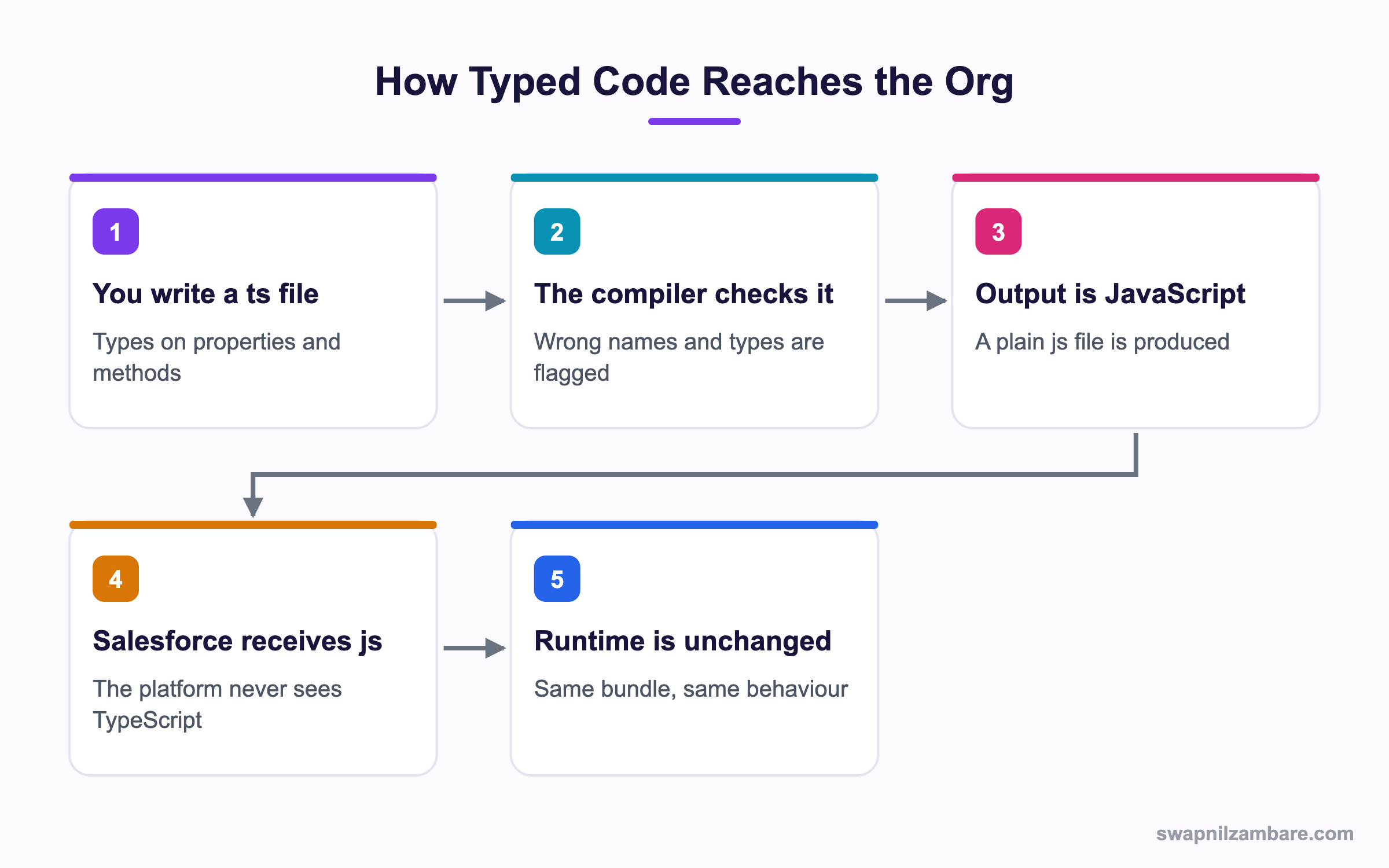
Caption: The compile step sits between your editor and the org, and nothing else in the pipeline changes.
What TypeScript in LWC Actually Does
TypeScript in LWC is plain JavaScript with type annotations added. You say what a value is, and the compiler checks every use of it.
import { LightningElement, api } from 'lwc';

interface Course {
  Id: string;
  Name: string;
  Fee__c: number | null;
}

export default class CourseCard extends LightningElement {
  @api courseId!: string;

  private courses: Course[] = [];

  get total(): number {
    return this.courses.reduce((sum, c) => sum + (c.Fee__c ?? 0), 0);
  }
}
That Course interface is the whole idea behind TypeScript in LWC. Once it exists, reading c.Fee_c with one underscore is an error you see while typing, not a blank column a user reports next week.
What the Exclamation Mark Means
A property marked with @api is set by the parent, so the compiler cannot see where it gets its value. The ! tells it that the value will arrive. Without it the compiler complains that the property is never assigned.
Setting Up TypeScript in LWC
Setting up TypeScript in LWC takes a config file and two packages. No change to the org is needed.
- Install the compiler and the Salesforce type packages as dev dependencies
- Add a
tsconfig.jsonat the project root - Write your component logic in
.tsfiles - Run the compiler, which writes a
.jsfile beside each one - Deploy as normal, since only the JavaScript is pushed
{
  "compilerOptions": {
    "target": "ES2022",
    "module": "ES2022",
    "moduleResolution": "bundler",
    "experimentalDecorators": true,
    "strict": true,
    "skipLibCheck": true
  },
  "include": ["force-app/**/*.ts"]
}
For TypeScript in LWC the decorator option is not optional. Without it, @api, @track and @wire are all syntax errors.
Ignoring the Generated Files
Add the compiled output to your ignore files so nobody edits the wrong copy.
force-app/**/lwc/**/*.jsPut that in a build ignore list rather than in your source ignore, since the .js file is what actually deploys. A short note in the project README saves the next developer a confused afternoon.
Typing Apex Calls
This is where TypeScript in LWC earns its keep. An Apex method returns a shape, and today you guess that shape from memory.
import getCourses from '@salesforce/apex/CourseService.getCourses';

interface CourseRow {
  Id: string;
  Name: string;
  Fee__c: number | null;
  Level__c: 'Beginner' | 'Intermediate' | 'Advanced';
}

const rows = (await getCourses({ level: 'Advanced' })) as CourseRow[];
That Level__c line is a small piece of magic. The compiler now refuses any value outside those three, so a typo in a filter is caught before it reaches a SOQL query. The post on calling Apex covers the call styles themselves.
Typing a Wire Result
import { wire } from 'lwc';
import { graphql } from 'lightning/uiGraphQLApi';

interface WireResult<T> {
  data?: T;
  error?: unknown;
}

@wire(graphql, { query: '$query' })
result!: WireResult<CourseConnection>;
TypeScript in LWC handles generics well, so a small type like that covers every wire adapter in the project, so each component stops reinventing the same two optional keys.
Plain JavaScript vs TypeScript in LWC
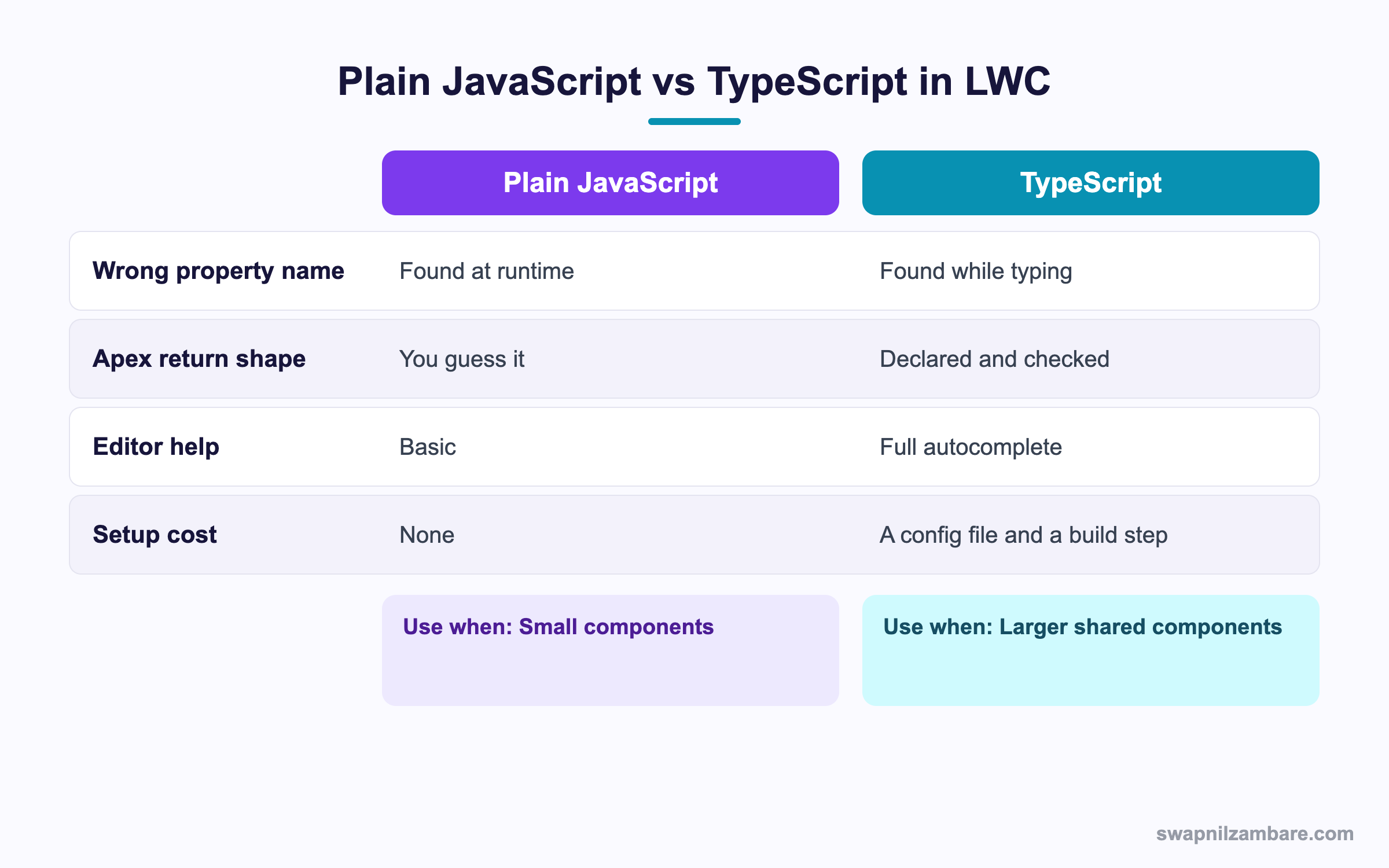
Caption: The setup cost is real, so small one off components are fine as plain JavaScript.
| Component | Reasonable choice |
|---|---|
| A ten line display card | Plain JavaScript |
| A shared component used by five teams | TypeScript |
| Anything with complex Apex payloads | TypeScript |
| A quick prototype | Plain JavaScript |
| A managed package bundle | TypeScript |
| A component with many public properties | TypeScript |
The honest summary is that TypeScript in LWC pays off with size and with sharing. A component only you touch rarely needs it. A component other teams pass props into benefits a great deal, because the compiler documents the contract.
A Real TypeScript in LWC Example
We tried TypeScript in LWC on one shared bundle first. Bright Path Tutors has a shared enrolment summary component used on three record pages. It takes six public properties and reads an Apex payload with nested objects.
Before the change, two bugs reached production in one quarter.
| Bug | Cause | Would TypeScript catch it |
|---|---|---|
| Blank fee column | Field read as Fee_c with one underscore | Yes |
| Wrong total on one page | A property passed as a string, added as a number | Yes |
| Spinner never stopped | A missing finally block | No |
Two out of three, and both were the expensive kind to find. Typed public properties also make a component contract clearer, which matters most on shared bundles like the ones in base components. The third was a logic mistake, and no compiler catches those.
| Measure | Before | After |
|---|---|---|
| Public properties documented | In a comment | In the type signature |
| Editor autocomplete on Apex results | None | Full |
| Build step | None | One compile command |
| Deployed files | Hand written js | Generated js |
What TypeScript in LWC Cannot Check
- The template, since HTML expressions are not type checked
- Field level security, so a typed field can still arrive as null
- Whether a field actually exists in the org
- Governor limits or any runtime behaviour
- Whether an Apex method really returns the shape you declared
- Event detail shapes across component boundaries, unless you type them yourself
That first item surprises people most. A template can bind to a property that no longer exists and the compiler stays silent, because the template is a separate file in a different language. Jest tests still matter for exactly this reason, and the post on Jest testing shows how to cover the markup.
The Apex item is the other one to keep in mind. The as CourseRow[] cast is a promise you make to the compiler, not something it verifies. If the Apex method changes, the types lie until someone updates them.
Common Mistakes with TypeScript in LWC
| Mistake | What you see | Fix |
|---|---|---|
| Decorator option missing | api and wire are syntax errors | Set experimentalDecorators to true |
| Editing the generated js | Changes vanish on the next build | Edit the ts file only |
| No exclamation on an api property | A not assigned error | Mark it with the definite assignment flag |
| Casting without checking | Runtime undefined values | Validate the payload shape in a guard |
| Deploying the ts file | A deployment error | Deploy only the compiled js |
| strict mode turned off | Most of the benefit is lost | Keep strict on from day one |
| Types copied into every component | They drift apart | Put shared types in one module |
Best Practices for TypeScript in LWC
- Keep shared interfaces in one types module and import them
- Turn strict mode on at the start, since switching it on later is painful
- Type the Apex payload next to the import so the two stay together
- Mark public properties with the definite assignment flag rather than a default value
- Treat a cast as a reminder to check the Apex signature when it changes
- Add the compile step to the same command the team already runs
- Start with one shared component rather than converting everything at once
Most Asked TypeScript in LWC Interview Questions
Q1: Does Salesforce run TypeScript in the org?
No. The compiler produces JavaScript, and only that JavaScript is deployed.
Q2: What does the compile step change at runtime?
Nothing. The bundle behaves exactly as the equivalent JavaScript would.
Q3: Which config option is required for decorators?
The experimentalDecorators option, otherwise api, track and wire fail to compile.
Q4: Why mark an api property with an exclamation mark?
Because the parent sets it, so the compiler cannot see the assignment and would otherwise complain.
Q5: Where should shared interfaces live?
In a single types module that every component imports, so the definitions do not drift.
Q6: How do you type an Apex result?
Declare an interface for the shape and cast the awaited result to it.
Q7: Does the compiler verify the Apex shape is correct?
No. A cast is your promise, so the types lie if the Apex method changes.
Q8: Are templates type checked?
No. The HTML file is separate, so a binding to a removed property compiles cleanly.
Q9: What still needs Jest tests?
The markup, the rendering and the behaviour, since none of that is checked by types.
Q10: Can TypeScript tell you a field does not exist in the org?
No. It only knows the interfaces you wrote, not the org schema.
Q11: Should every component use it?
No. Small single owner components rarely justify the setup.
Q12: Which components benefit most?
Shared components with many public properties, and anything reading complex Apex payloads.
Q13: How do you stop people editing the generated file?
Note it in the README and keep the generated files out of normal editing, since the js is what deploys.
Q14: What does a union type give you on a picklist field?
The compiler refuses any value outside the allowed list, so a typo is caught immediately.
Q15: How do you handle a nullable field?
Declare it as the type or null, then handle the null case with a default.
Q16: Why keep strict mode on?
Without it the compiler allows implicit any values, which removes most of the checking.
Q17: Does TypeScript in LWC change the deployment process?
Only by adding a compile command before the deploy, since the deployed files are the same kind.
Q18: Can you mix ts and js components in one project?
Yes. Convert one bundle at a time and leave the rest as they are.
Q19: Scenario: a build succeeds but a field is blank on screen. What happened?
Either field level security hid the value, or the template binds to something the types never covered.
Q20: Scenario: your change does nothing after a deploy. Why?
The generated js was deployed without a recompile, so the old output went up.
Q21: Scenario: the compiler reports an error on wire. What is missing?
The decorator option in tsconfig, which is the usual cause.
Q22: How do generics help with wire results?
One small result type with a data and error pair covers every adapter in the project.
Q23: Does it help with event payloads?
Only if you type the detail yourself, since custom event details are untyped by default.
Q24: Is there a runtime cost?
No. Types are removed during compilation and nothing extra ships.
Q25: How do you start on an existing project?
Pick one shared component, convert it, and keep the interfaces in a module the others can use later.
Q26: What is the strongest single argument for it?
Wrong field names and wrong property types are caught while typing instead of in production.
Q27: What is the clearest argument against it?
A build step and a second file per component, which is real overhead on a small project.
Q28: What habit keeps the types honest?
Update the interface in the same commit as any Apex signature change.
Official Resources
- Lightning Web Components Developer Guide
- Salesforce DX Developer Guide
- Lightning Web Components Recipes
What Is Next
Next, read Salesforce Composite API Explained with Examples.


