The Salesforce Streaming API turns polling on its head. Instead of a client asking every thirty seconds whether anything changed, Salesforce pushes a message the moment a record matches a query you defined. The client holds one connection open and waits.
That difference is not only tidier, it is cheaper. A client polling every thirty seconds burns 2,880 API calls a day whether anything changed or not. A streaming subscriber uses almost none.
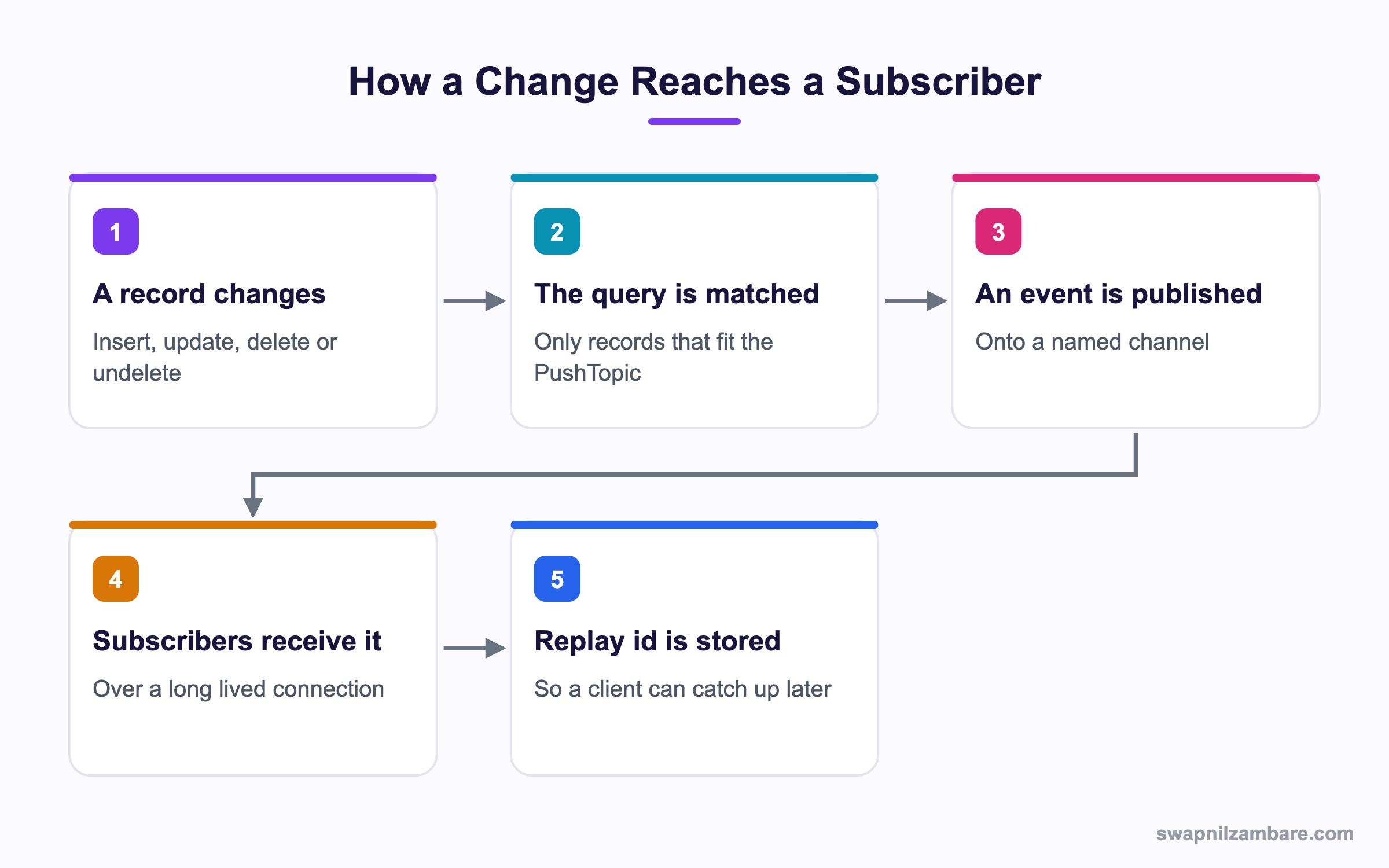
Caption: The replay id is what lets a client that was offline pick up where it left off.
What Is the Salesforce Streaming API
The Salesforce Streaming API is a publish and subscribe system built into the platform. You define what counts as interesting, and subscribers receive a message when it happens.
The oldest and simplest form is a PushTopic, which is a record holding a SOQL query.
PushTopic pt = new PushTopic();
pt.Name = 'CourseUpdates';
pt.Query = 'SELECT Id, Name, Fee__c FROM Course__c WHERE Is_Online__c = true';
pt.ApiVersion = 62.0;
pt.NotifyForOperationCreate = true;
pt.NotifyForOperationUpdate = true;
pt.NotifyForOperationDelete = false;
pt.NotifyForFields = 'Referenced';
insert pt;
Subscribers then listen on a channel named after the topic, which in this case is /topic/CourseUpdates.
The NotifyForFields Setting
This one field decides how chatty your topic is, and it is the setting people get wrong.
| Value | A message is sent when |
|---|---|
| All | Any field on the record changes |
| Referenced | A field in the SELECT or WHERE clause changes |
| Select | A field in the SELECT clause changes |
| Where | A field in the WHERE clause changes |
Referenced is the sensible default. All turns every unrelated edit into traffic, which is how teams hit their daily event limits by accident.
Why the Salesforce Streaming API Matters
| Benefit | What it gives you |
|---|---|
| No polling | Thousands of wasted API calls disappear |
| Near real time | A screen updates in a second, not a minute |
| Replay support | A client that was offline can catch up |
| Server side filtering | Only matching records travel |
| Works in the browser | A Lightning component can subscribe directly |
That last row is how live dashboards are built. An empApi component subscribes to a channel and refreshes a tile when a message arrives, with no refresh button anywhere. The post on platform events covers the custom event side of the same system.
Salesforce Streaming API Channels and Replay Ids
The Salesforce Streaming API gives every message a replay id, which is a number that increases within a channel. A subscriber tells Salesforce where to start.
| Replay option | What you receive |
|---|---|
| -1 | Only new messages from now on |
| -2 | Every message still stored, then new ones |
| A specific number | Everything after that message |
Messages are stored for 72 hours, or 24 hours for some event types. So a client that crashes at midnight and restarts at 8 in the morning can still catch up by sending the last replay id it processed.
That is the whole design rule for a reliable Salesforce Streaming API subscriber. Store the replay id after you have finished handling a message, not before, and never trust that a connection stays open.
Subscribing from a Lightning Web Component
import { subscribe, unsubscribe, onError } from 'lightning/empApi';

export default class CourseFeed extends LightningElement {
  subscription = {};

  async connectedCallback() {
    this.subscription = await subscribe(
      '/topic/CourseUpdates',
      -1,
      response => this.handleMessage(response)
    );
    onError(error => {
      this.error = 'Subscription problem';
    });
  }

  disconnectedCallback() {
    unsubscribe(this.subscription, () => {});
  }

  handleMessage(response) {
    const record = response.data.sobject;
    this.rows = [record, ...this.rows];
  }
}
With the Salesforce Streaming API the disconnectedCallback matters more than it looks. Without it, a user who clicks through ten record pages leaves ten live subscriptions behind. The post on lifecycle hooks covers when each hook runs.
The Four Salesforce Streaming API Event Types
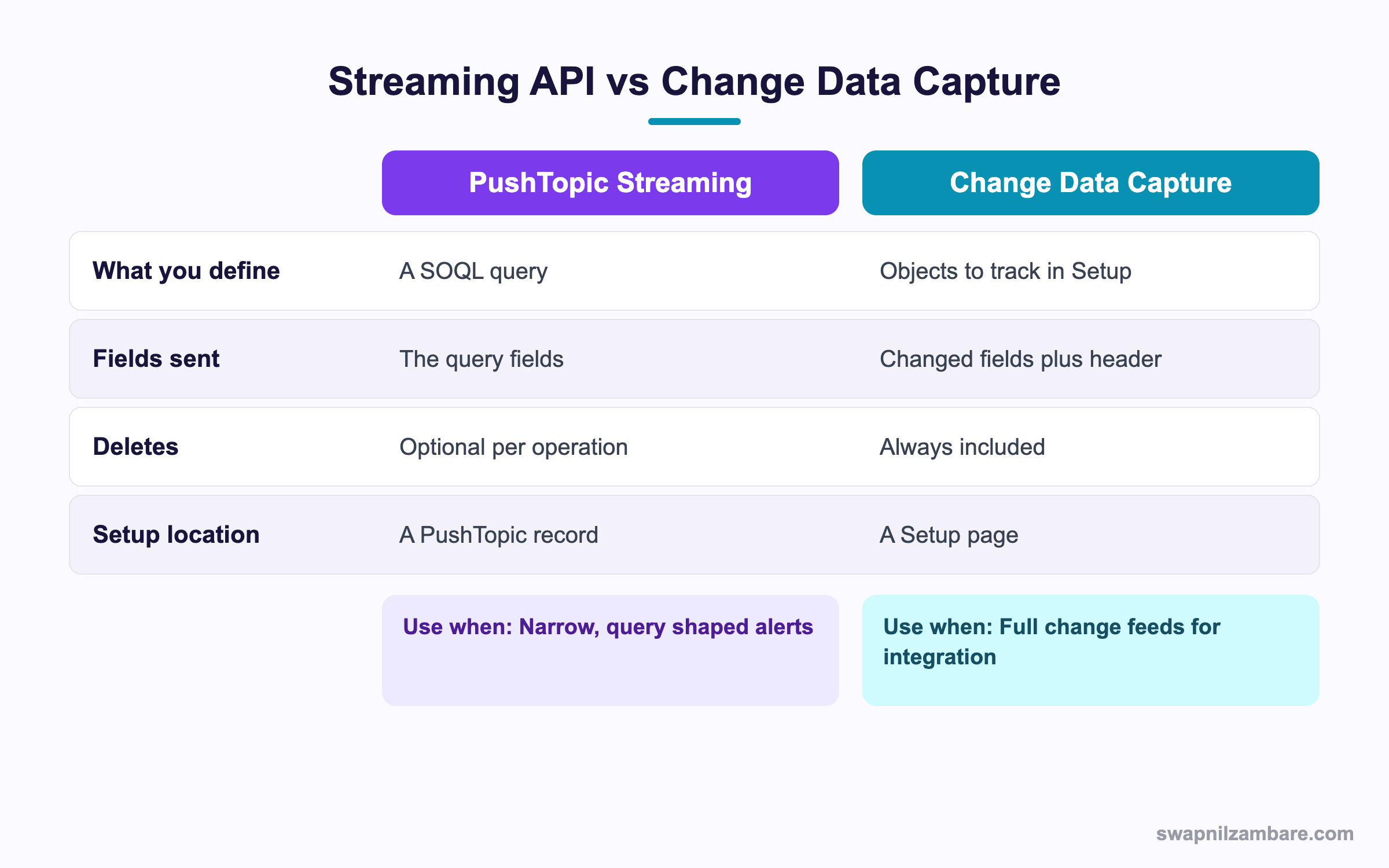
Caption: PushTopics are the narrow, query shaped option, and Change Data Capture is the broad one.
| Event type | Channel prefix | What it reports |
|---|---|---|
| PushTopic | /topic/ | Records matching your SOQL query |
| Generic event | /u/ | Anything you publish yourself, no object involved |
| Platform event | /event/ | A custom event you defined, with your own fields |
| Change Data Capture | /data/ | Every change to a tracked object |
When to Pick Each One
- A PushTopic when you want a narrow slice of one object defined by a query
- A generic event when the message has nothing to do with records at all
- A platform event when you want a defined contract with named fields
- Change Data Capture when an outside system needs a full change feed
For new work on the Salesforce Streaming API, Change Data Capture and platform events are the better starting point. Both are read in Apex much like the records covered in JSON in Apex. PushTopics are still supported and still useful, but the newer options carry more field detail and need no SOQL string in a record.
A Real Salesforce Streaming API Example
The Salesforce Streaming API replaced a polling screen for us. Bright Path Tutors runs a wall screen in the office showing live enrolments. The first version polled an Apex method every fifteen seconds.
| Problem | What it cost |
|---|---|
| Polling every 15 seconds | 5,760 API calls a day |
| A 15 second lag | Staff saw stale numbers |
| Server work with no changes | Most calls returned nothing new |
| Battery drain on a tablet | The screen was replaced twice |
We replaced the poll with a PushTopic and an empApi subscription.
| Measure | Polling | Streaming |
|---|---|---|
| API calls a day | 5,760 | Under 20 |
| Delay before the screen updates | Up to 15 seconds | Under a second |
| Code in the component | A timer and a refresh call | A subscribe call |
| Missed updates after a network blip | Silent | Recovered with the replay id |
The replay recovery was the unexpected win. The office network drops for a few seconds most mornings, and the old version simply missed whatever happened during the gap.
Limits and Things to Watch
- Messages are stored for 72 hours, so a client offline longer than that loses them
- Daily event delivery and publish limits apply, and NotifyForFields set to All burns through them
- A PushTopic query has restrictions, so no aggregates and a limited field set
- Delivery is at least once, so a subscriber must handle a repeated message safely
- Order is per channel, not global, so two channels give no ordering guarantee
- A failed subscriber does not block the publisher, so silence is not proof of success
The Salesforce Streaming API delivers at least once, and that is the point which causes data problems. Design every handler so running it twice does the same thing as running it once. A record update keyed on an id is safe. An increment is not.
Common Mistakes with the Salesforce Streaming API
| Mistake | What you see | Fix |
|---|---|---|
| NotifyForFields set to All | Event limits hit by lunchtime | Use Referenced |
| No unsubscribe in the component | Dozens of live subscriptions | Unsubscribe in disconnectedCallback |
| Storing the replay id before handling | Lost messages after a crash | Store it after the work succeeds |
| Assuming exactly once delivery | Double counted records | Make every handler idempotent |
| Relying on it as the only path | Silent gaps after long outages | Add a nightly reconciliation job |
| A broad PushTopic query | Traffic nobody reads | Filter in the WHERE clause |
| New work built on PushTopics | More effort than needed | Consider platform events or CDC |
Best Practices for the Salesforce Streaming API
- Filter as tightly as possible in the PushTopic query
- Keep NotifyForFields on Referenced unless you have a reason
- Store the replay id only after the message is fully handled
- Write every handler so a repeat run is harmless
- Always unsubscribe when a component is destroyed
- Pair streaming with a periodic reconciliation job for anything financial
- Prefer platform events or Change Data Capture for new integration work
Most Asked Salesforce Streaming API Interview Questions
Q1: What problem does streaming solve?
It removes polling, so a client is told about a change instead of asking repeatedly.
Q2: What is a PushTopic?
A record holding a SOQL query that defines which record changes produce a message.
Q3: What channel does a PushTopic use?
A channel under the topic prefix, named after the PushTopic record.
Q4: What does NotifyForFields control?
Which field changes produce a message, with options such as All, Referenced, Select and Where.
Q5: Which NotifyForFields value is the sensible default?
Referenced, since All sends a message for any field change on the record.
Q6: What is a replay id?
A number per channel that lets a subscriber ask for everything after a given message.
Q7: What do the replay values minus one and minus two mean?
Minus one means new messages only, and minus two means every stored message then new ones.
Q8: How long are messages stored?
Up to 72 hours, and less for some event types.
Q9: When should a subscriber store the replay id?
After the message is fully handled, so a crash does not skip work.
Q10: Is delivery exactly once?
No. It is at least once, so handlers must be safe to run twice.
Q11: What makes a handler idempotent?
Work keyed on a record id, such as an update, rather than an increment or an append.
Q12: Which module does a component use to subscribe?
The empApi module from the lightning namespace.
Q13: Why unsubscribe in disconnectedCallback?
Otherwise each visited page leaves a live subscription behind.
Q14: Name the four streaming event types.
PushTopic, generic event, platform event and Change Data Capture.
Q15: Which channel prefix does Change Data Capture use?
The data prefix, since it reports changes to tracked objects.
Q16: When is a generic event the right choice?
When the message has nothing to do with a record at all.
Q17: How does Change Data Capture differ from a PushTopic?
CDC is configured in Setup per object and always reports deletes, while a PushTopic is defined by a query.
Q18: Which option would you pick for new integration work?
Change Data Capture or platform events, since they carry more detail and need no SOQL string.
Q19: Are there aggregate queries in a PushTopic?
No. The query shape is restricted.
Q20: Does a failing subscriber stop the publisher?
No. The publish succeeds regardless, so silence does not prove delivery.
Q21: Is message order guaranteed?
Within a channel yes, but there is no ordering across channels.
Q22: Scenario: event limits are hit by midday. What is the first thing to check?
NotifyForFields set to All on a busy object.
Q23: Scenario: a client was offline for four days. What happens?
Messages older than the retention window are gone, so a reconciliation job is needed.
Q24: Scenario: a counter is double counting. Why?
At least once delivery resent a message, and the handler was not idempotent.
Q25: Scenario: users report dozens of duplicate rows on a dashboard. What is wrong?
Missing unsubscribe calls, so several subscriptions are feeding the same list.
Q26: Can Apex subscribe to a streaming channel?
Apex triggers can subscribe to platform events and CDC events, which is the usual in org pattern.
Q27: How does Pub/Sub API relate to this?
It is the newer gRPC based way to publish and subscribe from outside the platform.
Q28: Should streaming be the only path for financial data?
No. Pair it with a periodic reconciliation job so a missed message is found.
Q29: What is the one habit that keeps a subscriber reliable?
Idempotent handlers plus a replay id stored only after successful work.
Official Resources
- Streaming API Developer Guide
- Platform Events Developer Guide
- Lightning Web Components Developer Guide
What Is Next
Next, read Salesforce Outbound Messages Explained with Examples.


