Salesforce Outbound Messages send a SOAP message to a web service when a record changes, with no Apex anywhere. You pick the fields in Setup, point at an endpoint, and the platform handles delivery and retries for a full day.
That retry behaviour is the reason they are still in use. A callout written in Apex fails once and the work is gone unless you built a retry yourself. An outbound message keeps trying, backing off as it goes, until your service answers or 24 hours pass.
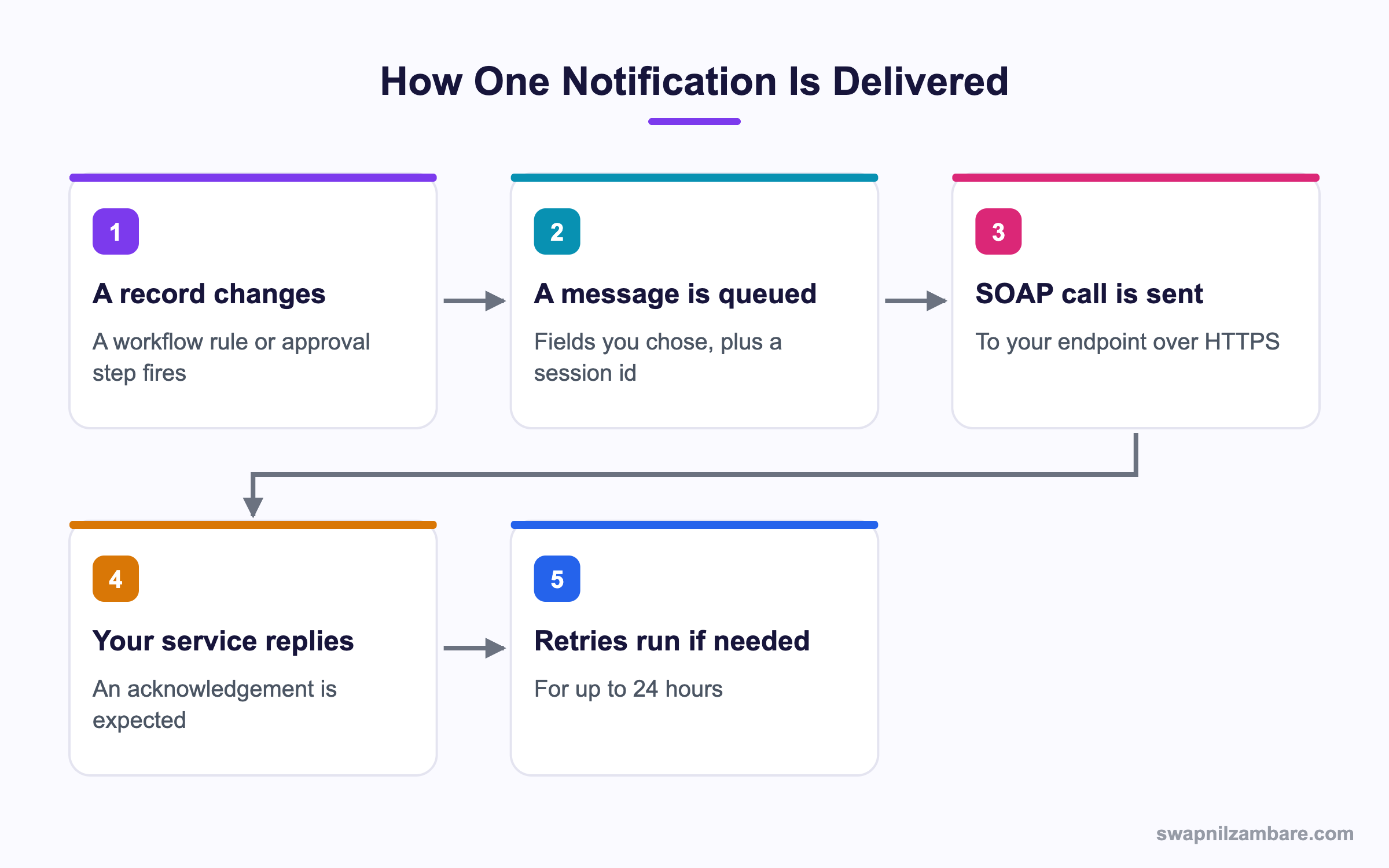
Caption: Your service must reply with an acknowledgement, or Salesforce treats the delivery as failed.
What Are Salesforce Outbound Messages
Salesforce Outbound Messages are workflow actions. You create it in Setup, choose the object, tick the fields to send, and give it an endpoint URL. A workflow rule or an approval process step then fires it.
| Setting | What it does |
|---|---|
| Endpoint URL | Where the SOAP message is posted |
| Object | Which record type the message describes |
| Fields to send | The payload contents |
| Send session id | Includes a token so your service can call back |
| User to send as | Whose permissions the session id carries |
Salesforce Outbound Messages come with a generated WSDL, and your service is built from that WSDL. The message body is a list of notifications, each holding one record.
<soapenv:Body>
  <notifications xmlns="http://soap.sforce.com/2005/09/outbound">
    <OrganizationId>00D...</OrganizationId>
    <SessionId>00D...!AQ...</SessionId>
    <Notification>
      <Id>04l...</Id>
      <sObject xsi:type="sf:Course__c">
        <sf:Id>a01...</sf:Id>
        <sf:Name>Apex Basics</sf:Name>
        <sf:Fee__c>4500.0</sf:Fee__c>
      </sObject>
    </Notification>
  </notifications>
</soapenv:Body>
The Acknowledgement Your Service Must Send
<notificationsResponse>
  <Ack>true</Ack>
</notificationsResponse>
Return true and Salesforce marks the message delivered. Return false, time out, or send anything unexpected and it goes back in the queue for another attempt.
This is where most Salesforce Outbound Messages problems live. A service that does its work and then crashes before replying will receive the same record again, so the handler has to be safe to run twice.
Why Salesforce Outbound Messages Still Matter
| Benefit | What it gives you |
|---|---|
| No code | An admin can build the whole integration |
| Automatic retries | A full day of attempts, with backoff |
| A visible queue | Setup shows what is waiting and what failed |
| A session id | Your service can call Salesforce back |
| No governor limits | The send happens outside your Apex transaction |
The visible queue is genuinely useful during an incident. You can see exactly how many messages are stuck and which endpoint is refusing them, which an Apex callout gives you only if someone built logging. The post on callouts in Apex covers the coded alternative.
Retry Behaviour in Detail
Salesforce Outbound Messages back off between attempts, so a failing endpoint is not hammered.
| Attempt | Roughly when |
|---|---|
| First | Immediately after the record change |
| Early retries | Within seconds, then minutes |
| Later retries | Spaced further apart |
| Final | Up to 24 hours after the first attempt |
After 24 hours Salesforce Outbound Messages drop the message. It does not sit in the queue waiting for a human, and there is no automatic report telling you it went. That gap is the single biggest argument against relying on outbound messages alone for anything financial.
Setup has a page listing the outbound message queue, with a delivery failure reason per row. Check it after any endpoint outage, because the count tells you how much work was lost.
Salesforce Outbound Messages vs Platform Events
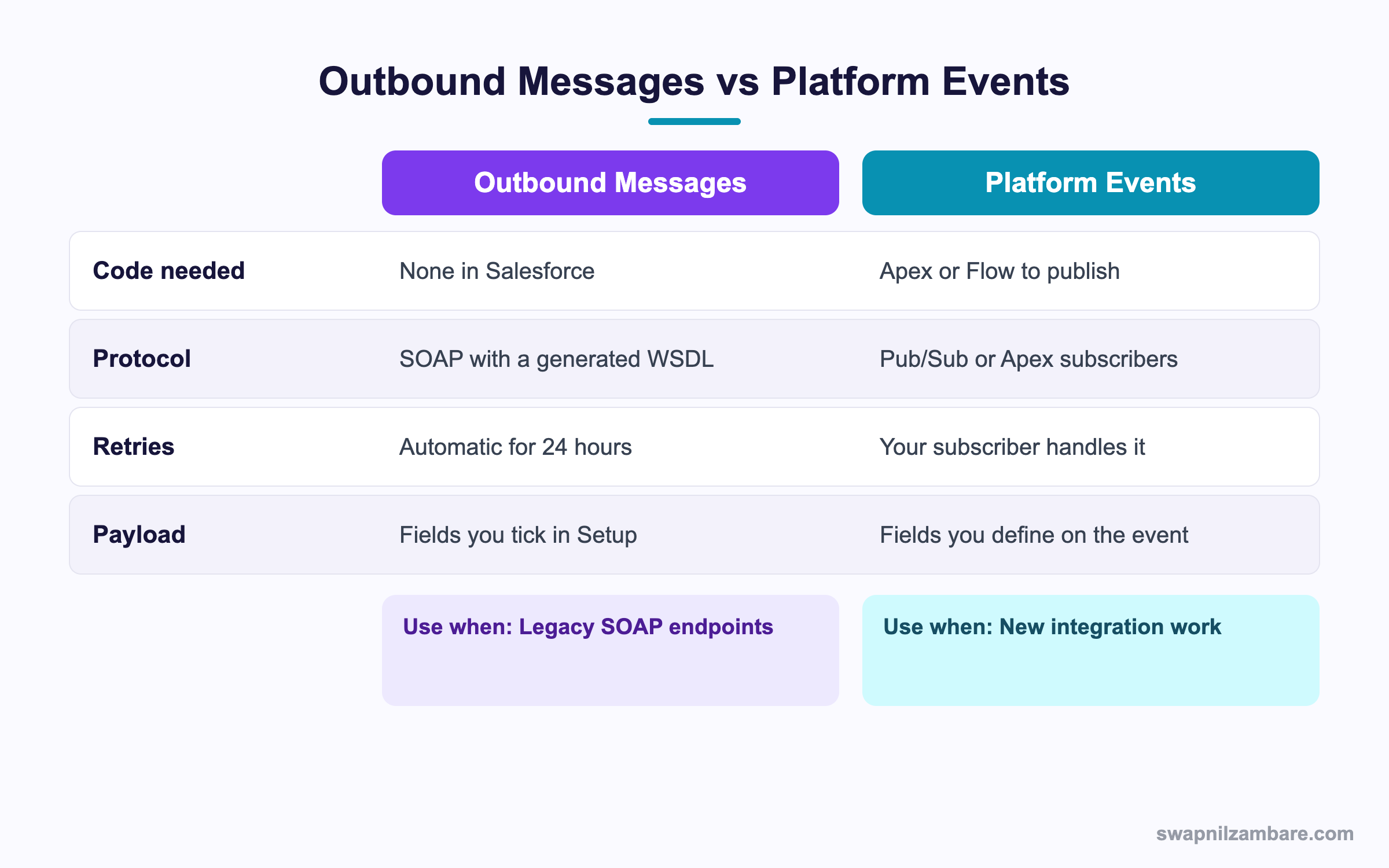
Caption: SOAP endpoints and admin owned integrations lean one way, and new work leans the other.
| Need | Pick |
|---|---|
| A legacy SOAP service already in place | Outbound message |
| An integration an admin must own | Outbound message |
| Automatic retries with no code | Outbound message |
| A modern REST or gRPC consumer | Platform event or Pub/Sub |
| A payload with fields from several objects | Platform event |
| Many subscribers to one change | Platform event |
| Ordering and replay guarantees | Platform event |
The honest view is that Salesforce Outbound Messages are a legacy feature that still earns its place in two situations. The endpoint is SOAP and will not change, or nobody on the team writes Apex. Everything else belongs with platform events, and the post on platform events sets out that pattern.
A Real Salesforce Outbound Messages Example
Salesforce Outbound Messages solved a real retry problem for us. Bright Path Tutors sends every new enrolment to a partner billing system. That system is a SOAP service built in 2016 and the partner will not change it.
The first attempt used Apex. A future method called the SOAP endpoint after insert.
| Problem | What happened |
|---|---|
| No retry logic | 31 enrolments lost during one outage |
| Callout limits in the transaction | Bulk loads failed |
| No visibility | Nobody knew until the partner asked |
| Apex to maintain | A class and a test class for a notification |
We replaced it with a workflow rule and an outbound message. Worth saying plainly that Salesforce has retired new workflow rule creation, so a fresh build today would use a platform event instead.
| Measure | Apex version | Outbound message |
|---|---|---|
| Lost records during an outage | 31 | 0 |
| Apex classes to maintain | 2 | 0 |
| Visibility during an incident | None | A queue page with reasons |
| Owner of the integration | A developer | An admin |
The owner row changed the team as much as the numbers did. An admin can now change which fields are sent without a deployment.
Using the Session Id Safely
Salesforce Outbound Messages can include a token when you tick Send session id your service can use to call Salesforce back. It is convenient and it is also the riskiest part of the feature.
- The token carries the permissions of the user you chose in Setup
- It expires, so your service cannot hold it for later
- Anything logging the raw message body is logging a live credential
- A dedicated integration user with a tight permission set is the right choice
Pick the narrowest user you can, and never tick the box if your service does not need a callback. The post on permission sets covers building that tight set.
Limits and Things to Watch
- The payload holds fields from one object, with no related record data
- Only workflow rules and approval processes can fire them, not a Flow action directly
- Retries stop after 24 hours and the message is then gone
- The endpoint must be HTTPS with a certificate Salesforce trusts
- The endpoint must be registered in Remote Site Settings
- SOAP means your service needs a SOAP stack, which modern teams rarely want
The one object limit in Salesforce Outbound Messages shapes designs. If your service needs the course and the student, it has to call back with the session id or query Salesforce itself, which is extra work the payload could have avoided. A platform event with the fields you choose solves that cleanly.
Common Mistakes with Salesforce Outbound Messages
| Mistake | What you see | Fix |
|---|---|---|
| No acknowledgement returned | The same record arrives again | Reply with an Ack of true |
| Work done before replying | Duplicate processing after a crash | Make the handler safe to run twice |
| Endpoint missing from Remote Site Settings | Delivery failures | Register the endpoint |
| Session id sent when not needed | A live credential in your logs | Leave the box unticked |
| A broad user chosen for the session id | Too much access handed out | Use a tight integration user |
| Relying on it for financial data | Silent loss after 24 hours | Add a reconciliation job |
| Expecting related record fields | Missing data in the payload | Query back or use a platform event |
Best Practices for Salesforce Outbound Messages
- Reply with an acknowledgement as soon as the message is safely stored
- Store first and process afterwards, so a slow job never causes a retry
- Write the handler so a repeated record changes nothing the second time
- Leave the session id off unless your service genuinely calls back
- Use a dedicated integration user with the narrowest permission set
- Watch the outbound message queue page after any endpoint outage
- Add a daily reconciliation job for anything that must not be lost
Most Asked Salesforce Outbound Messages Interview Questions
Q1: What is an outbound message?
A workflow action that sends a SOAP message about a record to an endpoint, with no code in Salesforce.
Q2: What protocol does it use?
SOAP, with a WSDL that Salesforce generates for you.
Q3: What fires one?
A workflow rule or an approval process step.
Q4: What must your service return?
An acknowledgement with Ack set to true.
Q5: What happens if your service does not acknowledge?
Salesforce retries the message, for up to 24 hours.
Q6: How long do retries continue?
Up to 24 hours from the first attempt, with increasing gaps.
Q7: What happens after 24 hours?
The message is dropped, with no automatic alert.
Q8: Where can you see pending and failed messages?
On the outbound message queue page in Setup, which shows a failure reason per row.
Q9: Can the payload include related records?
No. It covers fields from one object only.
Q10: What does the session id give your service?
A token to call Salesforce back, carrying the permissions of the chosen user.
Q11: Why is the session id risky?
Anything logging the raw message body is storing a live credential.
Q12: Which user should you choose for it?
A dedicated integration user with a tight permission set.
Q13: Does the endpoint need registering?
Yes, in Remote Site Settings, and it must be HTTPS with a trusted certificate.
Q14: Do governor limits apply?
Not in the way an Apex callout does, since the send happens outside your transaction.
Q15: Why would you still use this over Apex?
For free retries, a visible queue, and an integration an admin can own.
Q16: Why would you avoid it for new work?
SOAP, a single object payload, and a 24 hour ceiling on retries.
Q17: What is the modern replacement?
Platform events, consumed through Pub/Sub API or an Apex subscriber.
Q18: Scenario: the partner reports duplicate billing rows. What happened?
The service processed the record then failed before acknowledging, so the retry sent it again.
Q19: Scenario: 40 records went missing during a two day outage. Why?
Retries stopped after 24 hours and the messages were dropped.
Q20: Scenario: your service needs the student name and only gets the course. What now?
Call back with the session id, or move to a platform event with the fields you choose.
Q21: Scenario: delivery fails with a certificate error. What is wrong?
The endpoint certificate is not one Salesforce trusts, or the endpoint is not registered.
Q22: How do you make a handler idempotent here?
Key the work on the record id and the notification id, and ignore a repeat.
Q23: Can an outbound message update Salesforce itself?
Not directly. Your service calls back with the session id to do that.
Q24: Is there any ordering guarantee?
No. Retries mean a later change can arrive before an earlier one.
Q25: How does that affect design?
Your service should read the current record rather than assuming the payload is the newest state.
Q26: Are outbound messages counted against API limits?
The send itself is not an API call from your org, though any callback your service makes is.
Q27: How would you migrate away from them?
Publish a platform event from Flow or Apex and move the consumer to Pub/Sub API.
Q28: What is the one habit that avoids most duplicate data?
Store the message, acknowledge immediately, then process from your own queue.
Official Resources
What Is Next
Next, read Apex Continuation for Long Running Callouts Explained.


