Apex Continuation lets a component call a slow web service and get the answer back without holding a Salesforce worker thread while it waits. The request goes out, the thread is released, and a second method runs when the response arrives.
This exists for one reason. A normal Apex callout blocks until the service answers, and the platform counts that waiting time against your transaction. A service taking 50 seconds is a problem no amount of tuning on your side can fix.
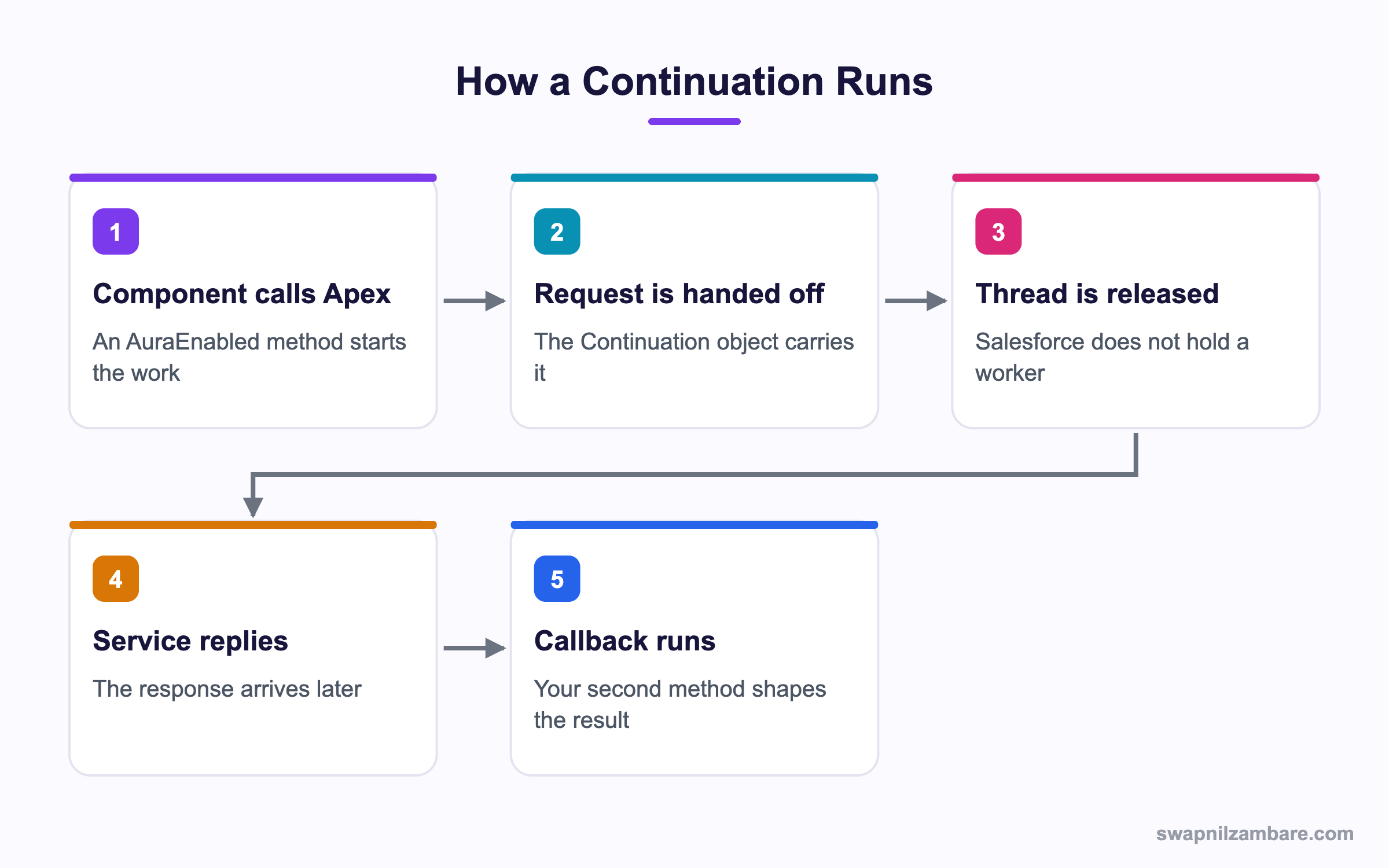
Caption: The user keeps waiting on screen, but Salesforce is not holding a thread while that happens.
What Is Apex Continuation
Apex Continuation is a pattern for asynchronous callouts from an AuraEnabled method. You write two methods instead of one. The first starts the callout and returns a Continuation object. The second receives the response.
public with sharing class QuoteService {

    @AuraEnabled(continuation=true cacheable=false)
    public static Object getQuote(String courseId) {
        Continuation con = new Continuation(60);
        con.continuationMethod = 'handleResponse';
        con.state = courseId;

        HttpRequest req = new HttpRequest();
        req.setEndpoint('callout:Partner_Quotes/quote?course=' + courseId);
        req.setMethod('GET');
        con.addHttpRequest(req);

        return con;
    }

    @AuraEnabled
    public static String handleResponse(List<String> labels, Object state) {
        HttpResponse res = Continuation.getResponse(labels[0]);
        if (res.getStatusCode() != 200) {
            throw new AuraHandledException('The quote service is unavailable');
        }
        return res.getBody();
    }
}
Three details carry the whole Apex Continuation pattern. The first method returns the Continuation rather than a value. The continuationMethod names the second method as a string. And state is how you pass context from the first method to the second, since they are separate transactions.
The Labels Argument
Apex Continuation gives you a label from each addHttpRequest call. The callback receives those labels in order, and you use each one to fetch its response.
String feeLabel = con.addHttpRequest(feeReq);
String seatLabel = con.addHttpRequest(seatReq);
Both requests go out together. The callback runs once, after every response has arrived, which is how you make three slow calls cost one wait rather than three.
Why Apex Continuation Matters
| Benefit | What it gives you |
|---|---|
| No held thread | Org wide concurrency stays healthy |
| Longer waits allowed | Up to two minutes of service time |
| Parallel callouts | Three requests in one wait |
| A live screen | The user gets the real answer, not a promise |
| Normal error handling | Exceptions still reach the component |
The concurrency point is the one that matters at scale. An org has a limit on long running synchronous requests, and a handful of slow callouts can use them all up, which slows every other user. The post on governor limits lists what those limits cover.
Calling It from a Component
From the component side an Apex Continuation looks like any other call. The method is called like any other imperative Apex call.
import getQuote from '@salesforce/apex/QuoteService.getQuote';

async handleClick() {
  this.loading = true;
  try {
    this.quote = await getQuote({ courseId: this.recordId });
  } catch (e) {
    this.error = e.body ? e.body.message : 'Could not load the quote';
  } finally {
    this.loading = false;
  }
}
The promise resolves with whatever the callback method returned. That is the quiet strength of the pattern, because the component never needs to know a continuation was involved. The post on calling Apex covers the call styles themselves.
A spinner is not optional here. The user may wait thirty seconds, so show progress and keep the button disabled while the call is in flight.
Chaining a Second Callout
An Apex Continuation callback can itself return another continuation, which is how a two step conversation with a service works.
@AuraEnabled
public static Object handleFirst(List<String> labels, Object state) {
    HttpResponse res = Continuation.getResponse(labels[0]);
    String token = parseToken(res.getBody());

    Continuation next = new Continuation(60);
    next.continuationMethod = 'handleSecond';
    HttpRequest req = new HttpRequest();
    req.setEndpoint('callout:Partner_Quotes/detail?token=' + token);
    req.setMethod('GET');
    next.addHttpRequest(req);
    return next;
}
There is a chain depth limit of three, so a four step conversation needs a different design. In practice, a service needing four round trips should expose one endpoint that does the work.
Apex Continuation vs a Queueable Callout
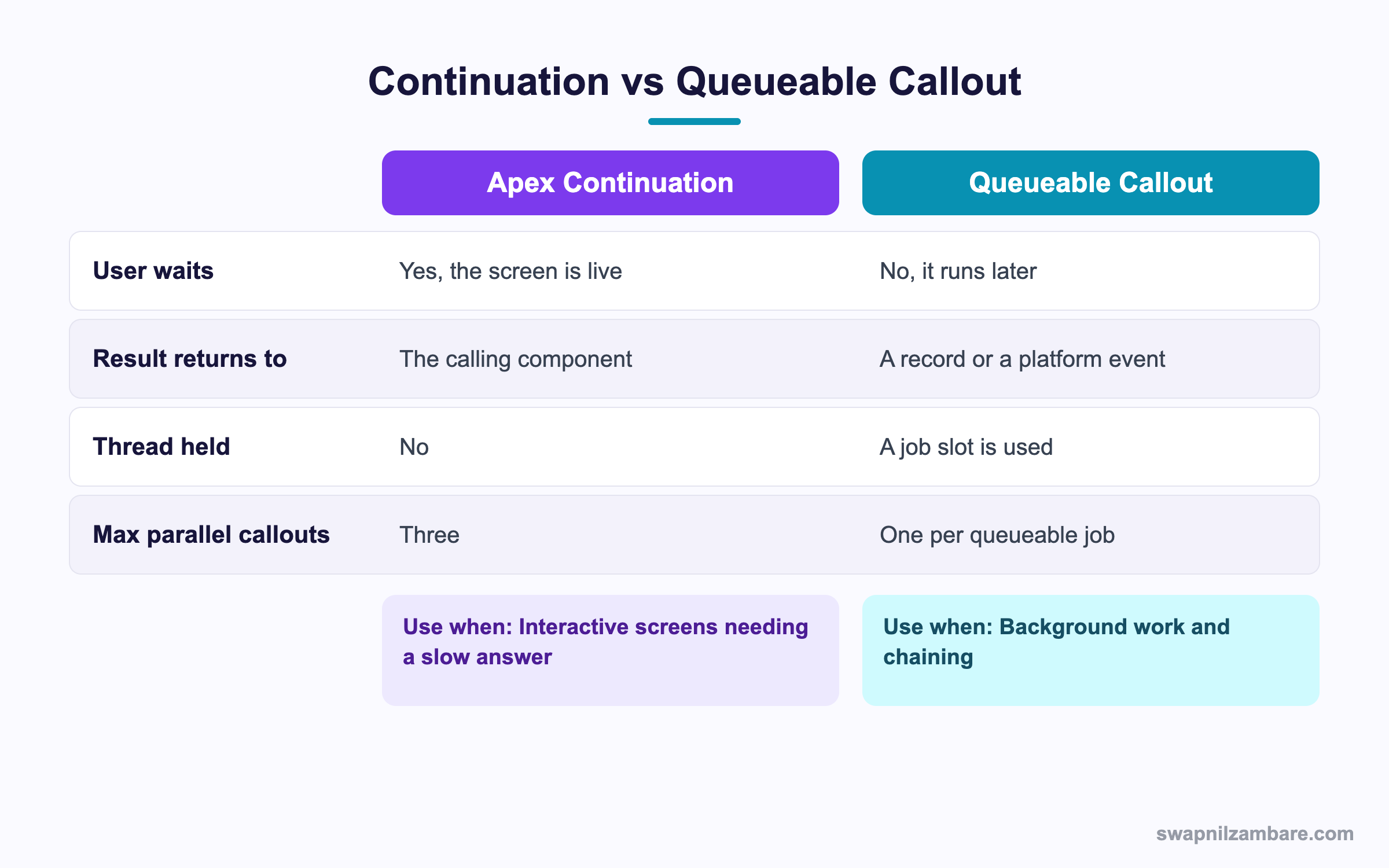
Caption: The question is whether a user is waiting for the answer right now.
| Situation | Pick |
|---|---|
| A price quote the user is staring at | Continuation |
| Three slow lookups for one screen | Continuation |
| A nightly sync of 10,000 records | Queueable |
| A callout after a record saves | Queueable |
| Work that should retry tomorrow | Queueable |
| A conversation of two or three steps during a click | Continuation |
The deciding question is simple. Is someone watching the screen for this specific answer? If yes, Apex Continuation. If the work can finish later and write a record, a queueable is simpler and gives you retries. The post on queueable jobs covers that route.
A Real Apex Continuation Example
Apex Continuation fixed a slow screen for us. Bright Path Tutors shows a live fee quote from a partner finance service on the enrolment screen. That service takes between 8 and 40 seconds depending on the day.
The first build used a plain synchronous callout.
| Problem | What happened |
|---|---|
| Thread held for 40 seconds | Other users saw slow page loads |
| Long running request limit hit | Six concurrent quotes blocked the org |
| Three lookups in sequence | Up to two minutes of waiting |
| No clear failure message | Users clicked again and made it worse |
We rebuilt it with one continuation holding three parallel requests.
| Measure | Synchronous | Continuation |
|---|---|---|
| Threads held during the wait | 1 per user | 0 |
| Worst case wait | 120 seconds | 42 seconds |
| Concurrency incidents a month | 4 | 0 |
| Requests per screen load | 3 in sequence | 3 in parallel |
The parallel requests halved the wait on their own. The concurrency fix is what stopped the support tickets from other teams.
Limits and Things to Watch
- Three callouts in one continuation, and a chain depth of three
- A timeout ceiling of 120 seconds per continuation
- Only from an AuraEnabled method, so Flows and triggers cannot use it
- The callback is a separate transaction, so instance state is gone
- Request and response size limits apply, so very large payloads fail
- No automatic retry, since the user is waiting and would see the delay
The separate transaction in an Apex Continuation causes the most confusion. Anything the first method knew has to travel in state, which is serialized. A class member variable set in the first method is simply not there in the callback.
Testing an Apex Continuation
Apex Continuation tests use dedicated helpers and a slightly different setup.
@IsTest
private class QuoteServiceTest {
    @IsTest
    static void returnsQuote() {
        Continuation con = (Continuation) QuoteService.getQuote('a01xx');
        HttpResponse res = new HttpResponse();
        res.setStatusCode(200);
        res.setBody('{"fee":4500}');

        Test.setContinuationResponse(con.getRequests().keySet().iterator().next(), res);
        Object result = Test.invokeContinuationMethod(new QuoteService(), con);
        System.assertEquals('{"fee":4500}', (String) result);
    }
}
Two helpers do the work. Test.setContinuationResponse supplies a fake response per label, and Test.invokeContinuationMethod runs the callback. The post on callout mocks covers mocking ordinary callouts.
Common Mistakes with Apex Continuation
| Mistake | What you see | Fix |
|---|---|---|
| Returning a value instead of the object | The callout never happens | Return the Continuation from the first method |
| State kept in a class field | Null in the callback | Pass it through the state property |
| Callback name misspelled | A runtime error on the call | Match the method name exactly |
| No spinner in the component | Users click twice | Disable the button and show progress |
| Sequential continuations for parallel work | Three waits instead of one | Add all requests to one continuation |
| Using it from a trigger | It will not compile that way | Use a queueable for trigger driven callouts |
| No error path | A silent empty panel | Throw AuraHandledException and catch it |
Best Practices for Apex Continuation
- Add every independent request to one continuation so they run in parallel
- Put all context in the state property, never in a class field
- Set a timeout you have actually measured, not the maximum by default
- Throw an AuraHandledException so the message reaches the user
- Show a spinner and disable the trigger button while the call is in flight
- Use a named credential so the endpoint and token stay out of code
- Reach for a queueable whenever nobody is waiting on the answer
Most Asked Apex Continuation Interview Questions
Q1: What problem does a continuation solve?
It lets a component wait on a slow web service without Salesforce holding a worker thread.
Q2: How many methods does the pattern need?
Two. One starts the callout and returns the object, and one handles the response.
Q3: What does the first method return?
The Continuation object itself, not a value.
Q4: How is the callback named?
As a string on the continuationMethod property.
Q5: How does context travel between the two methods?
Through the state property, since the callback runs in a separate transaction.
Q6: Why can you not use a class field for that?
The callback is a new transaction, so instance state from the first method is gone.
Q7: What are the labels in the callback for?
Each label identifies one request, and you use it to fetch that response.
Q8: How many callouts can one continuation hold?
Three, and they run in parallel.
Q9: What is the chain depth limit?
Three, so a callback can return another continuation up to that depth.
Q10: What is the maximum timeout?
120 seconds for a continuation.
Q11: Can a trigger use one?
No. It works only from an AuraEnabled method.
Q12: Can a Flow use one?
No. Flow needs an invocable method, so a queueable is the usual route there.
Q13: Does the user wait during the call?
Yes. The screen stays live, which is why a spinner is essential.
Q14: What is the difference from a queueable callout?
A queueable runs later and writes a result somewhere, while a continuation returns to the waiting component.
Q15: When would you pick a queueable instead?
Whenever nobody is watching for the answer right now, or when you want retries.
Q16: How do you make three slow calls cost one wait?
Add all three requests to the same continuation so they run in parallel.
Q17: How do you surface an error to the component?
Throw an AuraHandledException in the callback and catch it in the component.
Q18: Is there automatic retry?
No, because a user is waiting and a retry would extend the delay.
Q19: How do you test one?
With Test.setContinuationResponse per label and Test.invokeContinuationMethod to run the callback.
Q20: Scenario: the callout seems to never happen. What is the first thing to check?
Whether the first method returns the Continuation object rather than a value.
Q21: Scenario: the callback throws a null reference on a field you set earlier. Why?
That field belonged to the first transaction. Move the value into state.
Q22: Scenario: three lookups take two minutes. How do you fix it?
Put all three requests in one continuation instead of chaining them.
Q23: Scenario: users double click and create two quotes. What is missing?
A disabled button and a spinner while the call is in flight.
Q24: Does a continuation count against callout limits?
Yes, the callouts themselves count, though the waiting time is not held in your transaction.
Q25: Can you use a named credential with it?
Yes, with the callout prefix on the endpoint, which is the right way to do it.
Q26: Why is thread concurrency the real argument for this?
An org limits long running synchronous requests, and slow callouts can exhaust them for everyone.
Q27: What happens if the service exceeds the timeout?
The response is not available, so handle that case and show a clear message.
Q28: Is this pattern common in new builds?
Less so, since many teams move slow work to a queueable and notify the screen instead.
Q29: What is the one habit that keeps it reliable?
Everything in state, all requests in one continuation, and an honest error message.
Official Resources
What Is Next
Next, read Salesforce Connect Custom Adapters Built in Apex.


