Salesforce Connect Custom Adapters let you show data that lives in another system as if it were Salesforce records, without copying a single row. A user opens a list view, Salesforce calls your Apex, your Apex calls the service, and rows appear.
The appeal is storage and freshness together. A million historical invoices in an outside system cost nothing in Salesforce storage, and nobody has to run a nightly sync to keep them accurate.
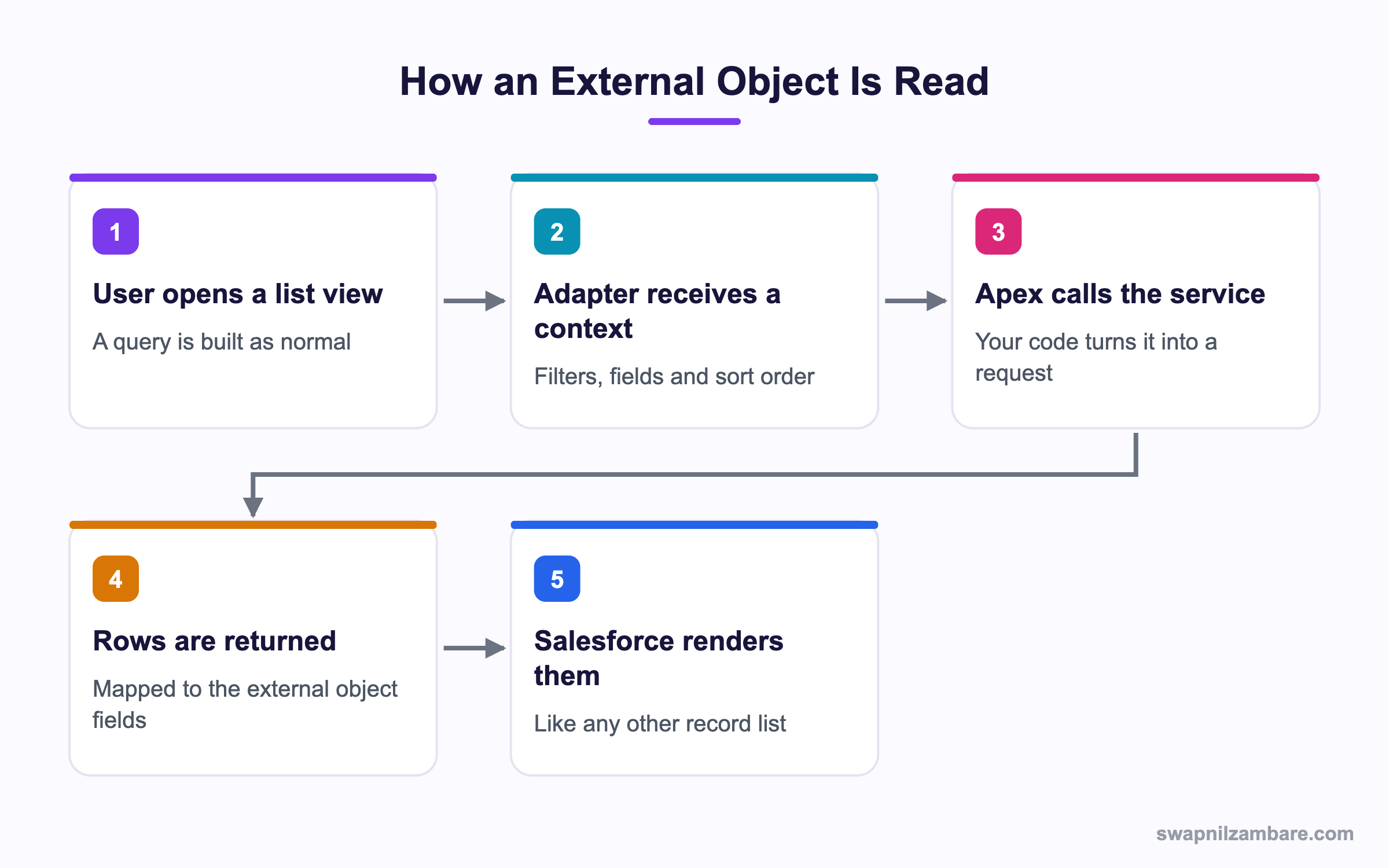
Caption: Your adapter receives the filters and fields the user asked for, so the service does the filtering.
What Are Salesforce Connect Custom Adapters
Salesforce Connect Custom Adapters are one of three options. Salesforce Connect has ready made adapters for OData and for another Salesforce org. A custom adapter is the option when your service speaks none of those, which in practice means most REST APIs.
You write two Apex classes.
| Class | What it does |
|---|---|
| A provider class | Declares what authentication and features you support |
| A connection class | Describes the tables and answers the queries |
The provider extends DataSource.Provider and is short.
global class CourseProvider extends DataSource.Provider {

    override global List<DataSource.AuthenticationCapability> getAuthenticationCapabilities() {
        return new List<DataSource.AuthenticationCapability>{
            DataSource.AuthenticationCapability.ANONYMOUS
        };
    }

    override global List<DataSource.Capability> getCapabilities() {
        return new List<DataSource.Capability>{
            DataSource.Capability.ROW_QUERY,
            DataSource.Capability.SEARCH
        };
    }

    override global DataSource.Connection getConnection(DataSource.ConnectionParams p) {
        return new CourseConnection();
    }
}
The Connection Class Does the Work
global class CourseConnection extends DataSource.Connection {

    override global List<DataSource.Table> sync() {
        List<DataSource.Column> cols = new List<DataSource.Column>{
            DataSource.Column.text('ExternalId', 255),
            DataSource.Column.text('DisplayUrl', 255),
            DataSource.Column.text('Title', 255),
            DataSource.Column.number('Fee', 16, 2)
        };
        return new List<DataSource.Table>{
            DataSource.Table.get('Archive_Course', 'Title', cols)
        };
    }

    override global DataSource.TableResult query(DataSource.QueryContext context) {
        List<Map<String, Object>> rows = fetchFromService(context);
        return DataSource.TableResult.get(context, rows);
    }
}
Salesforce Connect Custom Adapters build their own schema. The sync method is what creates the external object and its fields in Setup. Run it once from the external data source page and Salesforce builds the schema for you.
Two columns are required and easy to forget. ExternalId uniquely identifies a row, and DisplayUrl is where the View link points.
Reading the Query Context
The real craft in Salesforce Connect Custom Adapters is translating the query context into a request your service understands.
private List<Map<String, Object>> fetchFromService(DataSource.QueryContext context) {
    DataSource.Filter filter = context.tableSelection.filter;
    String title = null;

    if (filter != null && filter.columnName == 'Title') {
        title = String.valueOf(filter.columnValue);
    }

    HttpRequest req = new HttpRequest();
    String url = 'callout:Archive_Service/courses?limit=' + context.maxResults;
    if (title != null) {
        url += '&title=' + EncodingUtil.urlEncode(title, 'UTF-8');
    }
    req.setEndpoint(url);
    req.setMethod('GET');

    HttpResponse res = new Http().send(req);
    return (List<Map<String, Object>>) JSON.deserializeUntyped(res.getBody());
}| Context property | What it tells you |
|---|---|
| tableSelection.columnsSelected | Which fields the user asked for |
| tableSelection.filter | The WHERE clause, as a tree |
| tableSelection.order | The sort order |
| maxResults | How many rows to return |
| offset | Where to start, for paging |
| queryMoreToken | A continuation token for the next page |
Salesforce Connect Custom Adapters should push the filter down to the service whenever they can. An adapter that ignores the filter, fetches everything, and lets Salesforce filter afterwards works in a demo and falls over in production.
Filters Are a Tree
Salesforce Connect Custom Adapters receive filters as a tree, so a filter with AND or OR has subfilters rather than a single column. Handle the simple cases you support and return everything matching the parts you understood, rather than silently ignoring a condition.
if (filter.type == DataSource.FilterType.AND_) {
    for (DataSource.Filter sub : filter.subfilters) {
        applyFilter(sub);
    }
}
Being honest here matters. A wrong row count is worse than a clear error, because nobody checks a list they believe is complete.
Why Salesforce Connect Custom Adapters Matter
| Benefit | What it gives you |
|---|---|
| No storage cost | Millions of rows outside Salesforce |
| Always current | No sync job to go stale or fail |
| Real records in the interface | List views, detail pages, related lists |
| Works in Flow and Apex | SOQL queries the external object |
| One place for the logic | Every user sees the same mapping |
The Flow and Apex point is what makes this more than a web tab. An external object is queryable with SOQL, so automation can read outside data like any other record. The post on JSON in Apex covers shaping the service response.
Custom Adapter or Just Load the Data
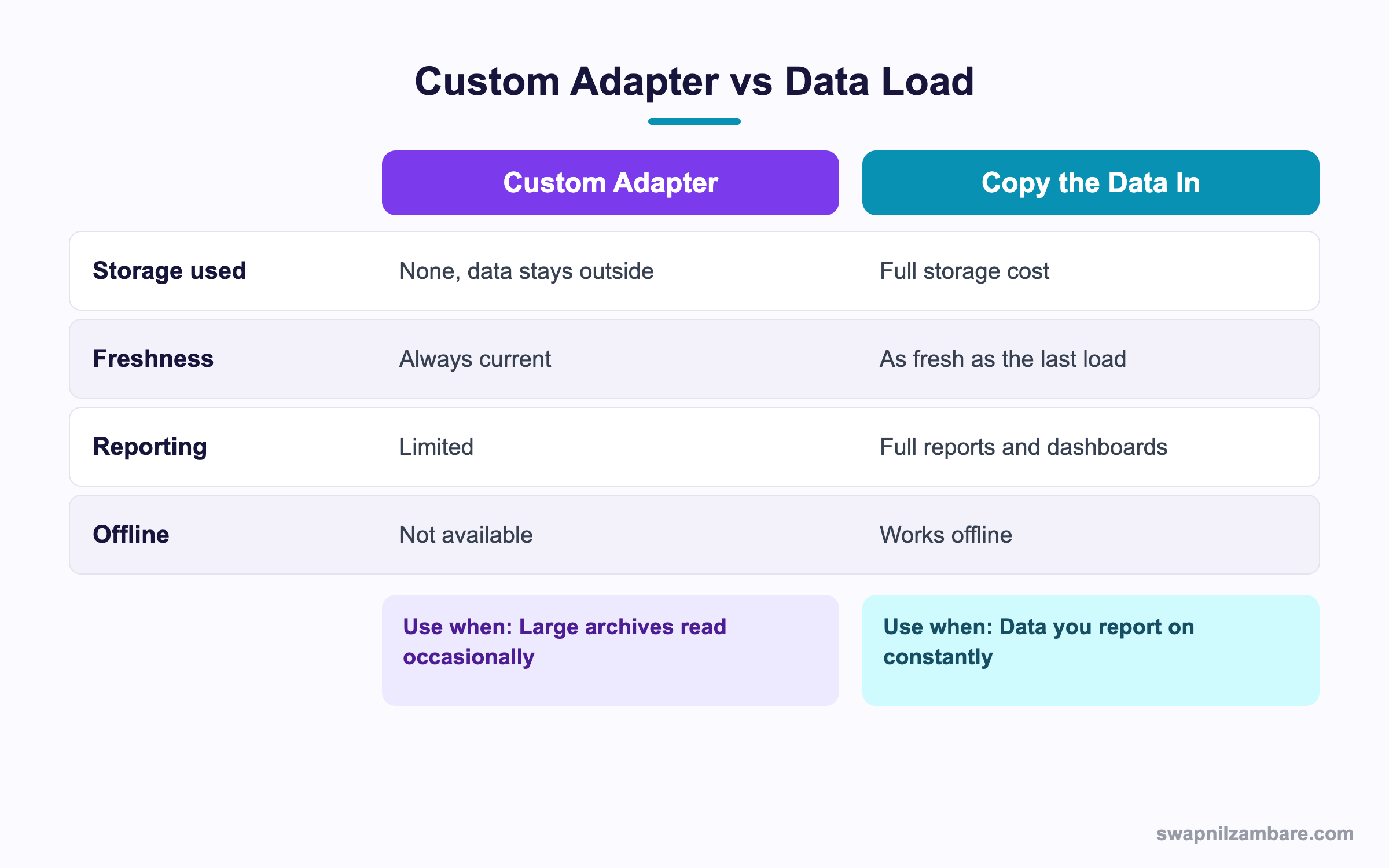
Caption: Reporting needs are usually what decide this, not storage.
| Need | Pick |
|---|---|
| Reports and dashboards on the data | Load it in |
| Millions of rows read occasionally | Custom adapter |
| Data that must be current to the second | Custom adapter |
| Offline mobile access | Load it in |
| Roll up summaries and formulas | Load it in |
| An archive nobody edits | Custom adapter |
| Triggers on the records | Load it in |
That reporting row decides most projects. External objects have real reporting limits, and discovering that after the build is a painful conversation.
A Real Salesforce Connect Custom Adapters Example
Salesforce Connect Custom Adapters solved an archive problem for us. Bright Path Tutors keeps eight years of completed enrolments in a separate archive service. Support staff need to look them up two or three times a day.
| Option considered | Why it lost |
|---|---|
| Load 2.4 million rows in | Storage cost, and a nightly job to maintain |
| A web tab to the archive | No search from the contact record |
| A custom adapter | Chosen |
| Measure | Result |
|---|---|
| Salesforce storage used | None |
| Lookups per day | Around 40 |
| Average response | Under two seconds |
| Nightly jobs added | Zero |
The support team reaches the records from the contact page through an indirect lookup, so it feels like ordinary Salesforce. The archive team changed nothing on their side beyond adding a filter parameter.
Limits and Things to Watch
- External objects support a limited set of reporting features
- No triggers, workflow rules or roll up summary fields on them
- Writing back needs the write capabilities implemented, and many adapters stay read only
- Callout limits apply, so one list view is one callout and it must be quick
- Relationships use indirect or external lookups, which behave differently from normal lookups
- A slow service makes Salesforce look slow, since the user is waiting on your callout
Salesforce Connect Custom Adapters put your service in the user path, so that last point is the one to design around. A list view that takes eight seconds will be blamed on Salesforce, not on the archive service. Set a timeout and return a clear error rather than letting the page hang.
Common Mistakes with Salesforce Connect Custom Adapters
| Mistake | What you see | Fix |
|---|---|---|
| Ignoring the filter | Everything fetched every time | Push the filter down to the service |
| Missing ExternalId or DisplayUrl | Rows that cannot be opened | Declare both columns in sync |
| Not handling filter trees | Wrong row counts on AND queries | Walk the subfilters |
| No paging support | Only the first page ever appears | Use offset or the query more token |
| No timeout on the callout | A hanging list view | Set a timeout and fail clearly |
| Expecting reports to work fully | A late surprise | Confirm reporting needs before building |
| Hard coded endpoint and token | A security review failure | Use a named credential |
Named credentials are the right home for the endpoint and the token, and the post on named credentials walks through the setup. For the callout itself, the patterns in Apex REST callouts apply unchanged inside an adapter, including timeouts and response handling.
Best Practices for Salesforce Connect Custom Adapters
- Push filters, sorting and limits down to the service every time
- Declare only the columns you can actually return
- Use a named credential so the endpoint and token stay out of code
- Set an explicit timeout and return a readable error message
- Implement paging from the start, since a list view will ask for it
- Keep the mapping in one place so every consumer sees the same fields
- Confirm reporting requirements before choosing this over loading the data
Most Asked Salesforce Connect Custom Adapters Interview Questions
Q1: What does Salesforce Connect do?
It shows data from an outside system as records in Salesforce without copying it.
Q2: When do you need a custom adapter?
When the service does not speak OData and is not another Salesforce org.
Q3: Which two Apex classes does a custom adapter need?
A provider class and a connection class.
Q4: What does the provider class declare?
The authentication options and the capabilities the adapter supports.
Q5: What does the sync method do?
It describes the tables and columns, which creates the external object and fields in Setup.
Q6: Which two columns are required?
ExternalId, which identifies a row, and DisplayUrl, which the View link uses.
Q7: What arrives in the query context?
The selected columns, the filter, the sort order, the row limit and paging information.
Q8: Why push the filter down to the service?
Otherwise every query fetches everything, which works in a demo and fails in production.
Q9: What shape is a filter?
A tree, so an AND or OR filter has subfilters rather than one column and value.
Q10: What happens if you ignore part of a filter?
The row count is wrong, which is worse than an error because nobody questions it.
Q11: How does paging work?
Through the offset, or a query more token your adapter returns and receives.
Q12: Can you write back through an external object?
Only if the adapter implements the write capabilities, and many stay read only.
Q13: Can you put a trigger on an external object?
No. Triggers, workflow rules and roll up summaries are not available.
Q14: Can you report on external objects?
In a limited way, which is usually the reason a project loads the data instead.
Q15: How do relationships work?
Through indirect lookups and external lookups, which behave differently from normal lookups.
Q16: What is an indirect lookup?
A relationship that matches an external object to a Salesforce record through a unique field value.
Q17: Do callout limits apply?
Yes. Each query is a callout, so the service must answer quickly.
Q18: How should authentication be handled?
With a named credential, so the endpoint and token stay out of the Apex.
Q19: Does this save storage?
Yes, entirely, since the data never enters Salesforce.
Q20: Does it need a sync job?
No, which is the other main benefit, since the data is always current.
Q21: Scenario: a list view takes nine seconds. Who gets blamed?
Salesforce. So set a timeout and return a clear error instead of hanging.
Q22: Scenario: a filtered search returns too many rows. What went wrong?
Part of the filter tree was ignored, so the service filtered on less than the user asked.
Q23: Scenario: users can see rows but not open them. What is missing?
The DisplayUrl column, which the View link needs.
Q24: Scenario: only the first 20 rows ever appear. Why?
Paging is not implemented, so the adapter answers the first request and nothing more.
Q25: Scenario: the business asks for a dashboard on this data. What now?
Expect to load the data in, since external object reporting is limited.
Q26: Can SOQL query an external object?
Yes, which is what makes it usable from Flow and Apex.
Q27: How do you test an adapter?
With callout mocks for the service and unit tests on the filter translation logic.
Q28: What is the quickest way to debug a wrong result?
Log the query context and the URL your adapter built, then compare the two.
Q29: What is the single habit that keeps an adapter usable?
Translate every filter you claim to support, and be explicit when you cannot support one.
Official Resources
What Is Next
Next, read Salesforce Event Relay to Amazon EventBridge Explained.


