Salesforce Event Relay sends platform events and change data capture events straight into Amazon EventBridge, with no middleware and no client to host. You create a channel, point a relay at an AWS named credential, switch it on, and events start arriving in AWS.
That is a real shift for integration teams. The usual alternative is a subscriber you write, host, monitor and restart. Here the platform does the delivery, and your AWS rules decide what happens next.
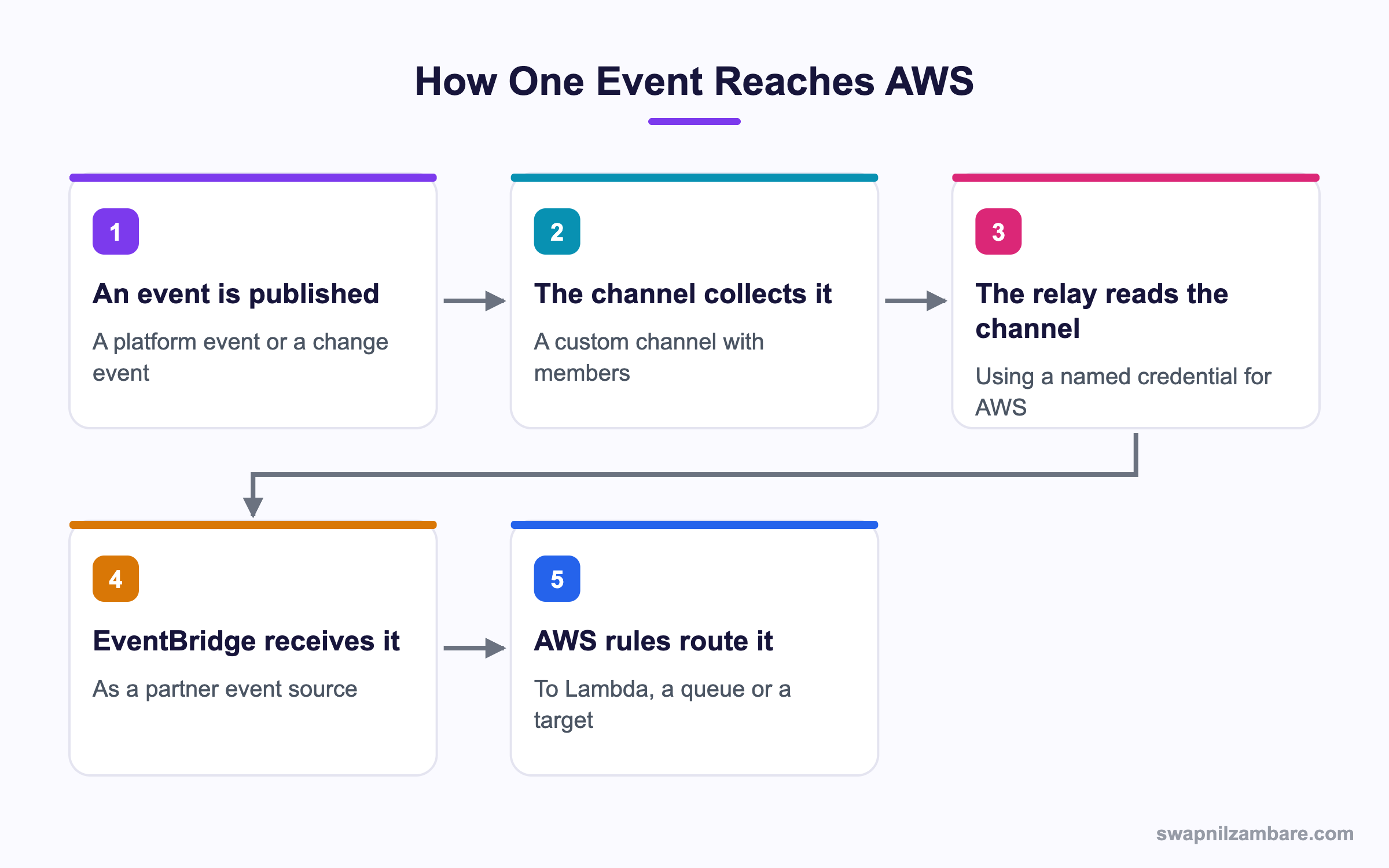
Caption: The relay reads a channel, so the channel members decide which events travel.
What Is Salesforce Event Relay
Salesforce Event Relay is configuration rather than code. Four things have to exist.
| Piece | What it is |
|---|---|
| An event channel | A custom channel record, named with a chn suffix |
| Channel members | Which platform events or change events feed the channel |
| A named credential | Your AWS account and region, with signature based auth |
| An EventRelayConfig | The relay itself, pointing at the channel and the credential |
The relay config is small.
<?xml version="1.0" encoding="UTF-8"?>
<EventRelayConfig xmlns="http://soap.sforce.com/2006/04/metadata">
  <destinationResourceName>callout:AWS_Account</destinationResourceName>
  <eventChannel>Course_Channel__chn</eventChannel>
  <label>Course Relay</label>
  <relayOption>{"ReplayRecovery":"LATEST"}</relayOption>
  <state>STOP</state>
</EventRelayConfig>
Two rules in a Salesforce Event Relay file catch people out. The destinationResourceName carries the callout: prefix and names a named credential, not an AWS ARN. And a new relay is created in the STOP state, since the AWS side has to be connected before anything flows.
The Four States
| State | What it means |
|---|---|
| STOP | Nothing is relayed, and current state information is cleared |
| RUN | Events are actively relayed to EventBridge |
| PAUSE | An admin paused it, and position information is kept |
| ERROR | The relay stopped because of a problem, such as a credential failure |
A Salesforce Event Relay allows only state and relayOption to be updated after creation. Changing the channel or the destination means a new relay, which is worth knowing before you name things.
Why Salesforce Event Relay Matters
| Benefit | What it saves you |
|---|---|
| No client to host | A service, its monitoring and its restarts |
| No middleware | A licence and a hop in the path |
| Native AWS routing | EventBridge rules reach Lambda, SQS, Step Functions |
| Recovery options | A choice between catching up and skipping ahead |
| Setup in metadata | The relay deploys like any other component |
That last row matters more than it sounds. Because the relay is a metadata component, it moves through the same pipeline as everything else, which the post on the Metadata API covers.
Setting It Up Step by Step
- Create the custom platform event channel, with a
chnsuffix on the name - Add channel members for each platform event or change event you want relayed
- Create a named credential holding the AWS account id and region, using signature based authentication
- Deploy the EventRelayConfig in the stopped state
- In the AWS console, find the new partner event source and associate it with an event bus
- Set the relay state to running
- Add EventBridge rules to route the events to a target
Step five is the Salesforce Event Relay step people miss. Until the partner event source is associated with a bus on the AWS side, the relay has nowhere to deliver and the state will not stay running.
sf data update record --use-tooling-api \
  --sobject EventRelayConfig --where "DeveloperName='Course_Relay'" \
  --values "Metadata={\"state\":\"RUN\"}"
Choosing a Channel Member
A Salesforce Event Relay channel can carry several event types, which is how one relay feeds a whole AWS workflow.
| Member type | Example |
|---|---|
| A custom platform event | Course_Enrolled__e |
| A change event for an object | Course__ChangeEvent |
| Several of each | One channel, one relay, many event types |
Keep a channel focused. A relay carrying twelve unrelated event types becomes hard to reason about, and the AWS rules end up filtering noise you could have left out.
Replay Recovery Explained
When a Salesforce Event Relay has to recover, the relayOption setting decides what happens to events it missed.
| Setting | What you get |
|---|---|
| LATEST | Start from new events, and skip whatever was missed |
| EARLIEST | Resend everything still in the event bus, then continue |
The event bus stores events for up to three days, so EARLIEST can only catch up inside that window. Pick LATEST for notifications where a missed message does not matter and EARLIEST for anything that must be processed.
There is a catch worth planning for. EARLIEST can resend events the AWS side already handled, so the target has to be safe to run twice. That is the same rule every event system asks for, and the post on platform events covers it from the Salesforce side.
Salesforce Event Relay vs a Pub/Sub API Client
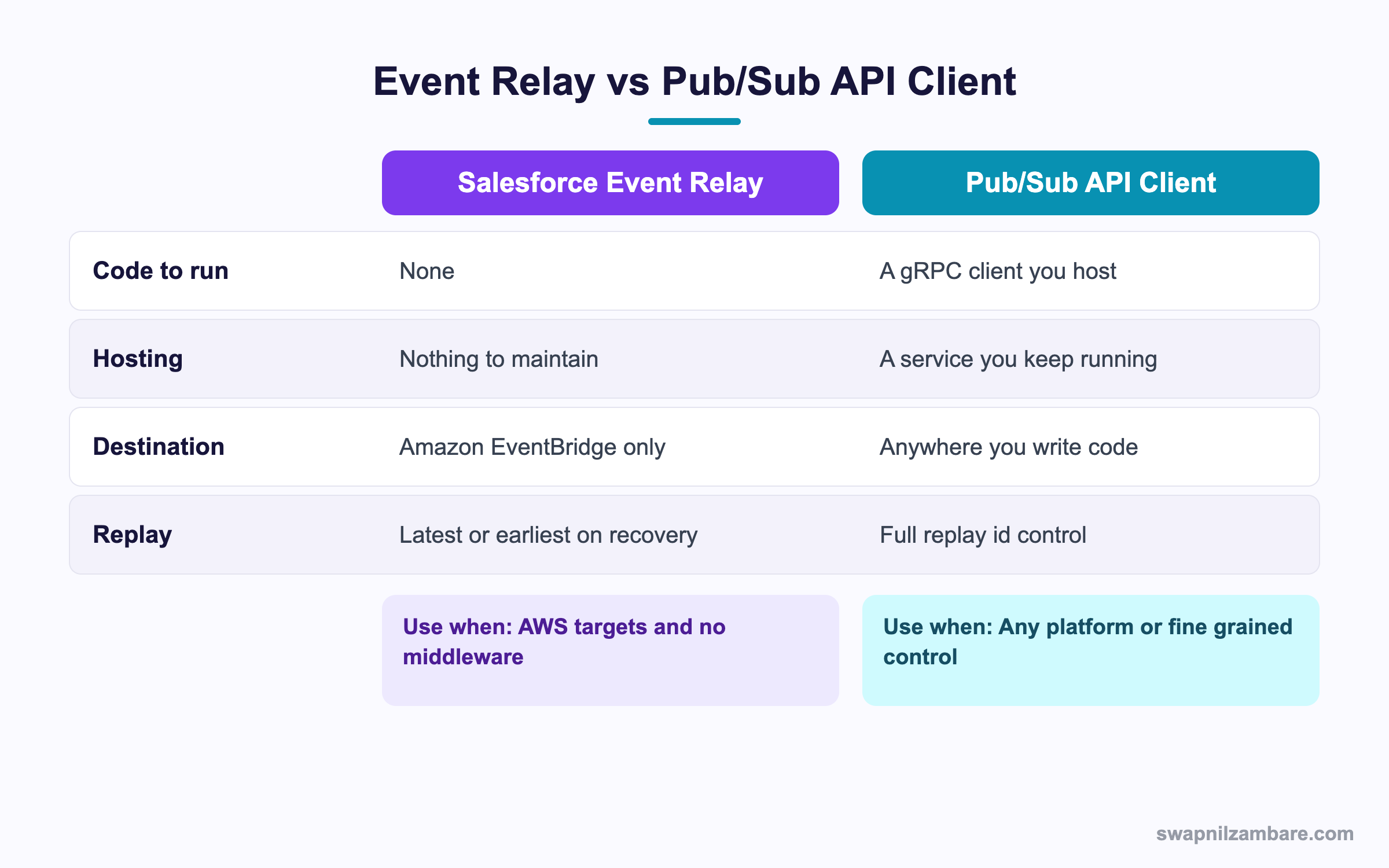
Caption: The relay wins on effort, and a client wins on control and choice of destination.
| Need | Pick |
|---|---|
| Events into Lambda with nothing to host | Event Relay |
| A destination outside AWS | Pub/Sub API client |
| Fine grained replay id control | Pub/Sub API client |
| No service for the team to maintain | Event Relay |
| Transformation before delivery | Pub/Sub API client, or an EventBridge rule |
| Several AWS targets from one stream | Event Relay |
The post on Pub/Sub API covers the client route in detail.
A Real Salesforce Event Relay Example
Salesforce Event Relay removed a server for us. Bright Path Tutors sends every new enrolment to an AWS pipeline that generates an invoice PDF and files it in storage. The first build used a hosted subscriber on a small server.
| Problem | What it cost |
|---|---|
| A server to maintain | Patching, monitoring, an on call rota |
| Restarts after deploys | Two missed batches in six months |
| A separate credential store | A yearly rotation task |
| No visibility in Salesforce | Nobody knew when it stopped |
We moved to a channel with two members and one relay.
| Measure | Hosted client | Event Relay |
|---|---|---|
| Servers to maintain | 1 | 0 |
| Missed batches in six months | 2 | 0 |
| Credential locations | 2 | 1, a named credential |
| Where the state is visible | A log file | The relay record in Salesforce |
Removing the server was the obvious saving. Seeing the relay state inside Salesforce is what the support team actually valued, since a stopped relay is now visible to the admin rather than hidden in a log.
Limits and Things to Watch
- The destination is Amazon EventBridge only, so other clouds need a different route
- Events are stored in the bus for up to three days, which caps how far back recovery reaches
- Only the state and the replay option can be changed after a relay is created
- Relayed events count against your event delivery allocations
- An error state needs a human, since the relay does not restart itself
- The named credential must use signature based authentication for AWS, not a bearer token
The Salesforce Event Relay error state is the one to build a habit around. Add a report or a scheduled check on the relay records so a stopped relay is noticed in hours rather than days.
Common Mistakes with Salesforce Event Relay
| Mistake | What you see | Fix |
|---|---|---|
| An ARN in destinationResourceName | A deployment or runtime error | Use the callout prefix and a named credential |
| Partner source never associated in AWS | The relay will not stay running | Associate the source with an event bus |
| Creating the relay in the running state | A rejected create | Create it stopped, then switch it on |
| Trying to change the channel later | An update error | Create a new relay instead |
| EARLIEST with a non idempotent target | Duplicate invoices or records | Make the AWS target safe to run twice |
| No monitoring of the relay state | Days of silence | Report on the relay records |
| Twelve event types on one channel | Noisy rules and confusion | Keep channels focused |
Best Practices for Salesforce Event Relay
- Keep one channel per business purpose rather than one channel for everything
- Name the channel and the relay after the purpose, since neither can be repointed later
- Choose the replay option deliberately and write down why
- Make every AWS target idempotent, because recovery can resend
- Monitor the relay state with a report or a scheduled job
- Keep the named credential in metadata so the setup deploys with the relay
- Filter in EventBridge rules rather than sending everything to one target
Most Asked Salesforce Event Relay Interview Questions
Q1: What does an event relay do?
It sends platform events and change data capture events from Salesforce to Amazon EventBridge with no client to host.
Q2: What four pieces are needed?
An event channel, channel members, a named credential for AWS, and an EventRelayConfig.
Q3: What suffix does a custom event channel use?
A chn suffix on the channel name.
Q4: What goes in destinationResourceName?
A named credential name with the callout prefix, not an AWS ARN.
Q5: What state is a new relay created in?
Stopped, since the AWS side must be connected first.
Q6: Name the four relay states.
Stopped, running, paused and error.
Q7: Which fields can you update after creation?
Only the state and the replay option.
Q8: What happens if you need a different channel?
You create a new relay, since the channel cannot be changed.
Q9: What does the LATEST replay option do?
It starts from new events after a recovery and skips what was missed.
Q10: What does EARLIEST do?
It resends everything still stored in the bus, then continues with new events.
Q11: How long are events stored in the bus?
Up to three days, which caps how far recovery can reach.
Q12: Why must an AWS target be idempotent?
Because recovery with EARLIEST can resend events the target already handled.
Q13: What has to happen on the AWS side?
The partner event source must be associated with an event bus.
Q14: What happens if that step is skipped?
The relay has nowhere to deliver, so it will not stay in the running state.
Q15: What authentication does the named credential use?
Signature based authentication for AWS, with the account id and region.
Q16: Can a channel carry both platform events and change events?
Yes. Channel members can mix both types.
Q17: Does the relay restart itself after an error?
No. An error state needs someone to look at it and switch it back on.
Q18: How do you monitor it?
With a report or a scheduled job over the relay records, since the state is visible in Salesforce.
Q19: How does it compare with a Pub/Sub API client?
The relay needs no hosting but only reaches EventBridge, while a client can deliver anywhere with full replay control.
Q20: When would you still write a client?
For a destination outside AWS, for transformation before delivery, or for precise replay handling.
Q21: Do relayed events count against limits?
Yes. They count against your event delivery allocations.
Q22: Which AWS targets are common?
Lambda functions, queues and step functions, routed by EventBridge rules.
Q23: Scenario: the relay flips to error every morning. Where do you look?
The named credential and the AWS side, since a credential or bus problem is the usual cause.
Q24: Scenario: duplicate invoices appear after an outage. Why?
EARLIEST recovery resent events and the AWS target was not idempotent.
Q25: Scenario: nothing arrives in AWS and the relay says stopped. What is missing?
Either the partner source association or the switch to the running state.
Q26: Scenario: the team wants to add a second object to the stream. What do you change?
Add a channel member for its change event, with no change to the relay itself.
Q27: Does the relay transform the event payload?
No. Transformation belongs in an EventBridge rule or in the target.
Q28: Can the relay be deployed through a pipeline?
Yes. It is a metadata component with an eventRelay suffix.
Q29: What is the habit that keeps a relay healthy?
Monitor the state, keep channels focused, and make every target safe to run twice.
Official Resources
What Is Next
Next, read Heroku AppLink for Salesforce Developers Explained.


