Heroku AppLink publishes a Heroku application into a Salesforce org so Apex, Flow and Agentforce can call it like any other action. The app can be written in any language, use any library, and run for as long as a dyno allows.
That last point is the reason teams reach for it. Apex is excellent for business logic close to the data, and genuinely awkward for a PDF renderer, an image pipeline, a machine learning model or a calculation over a hundred thousand rows.
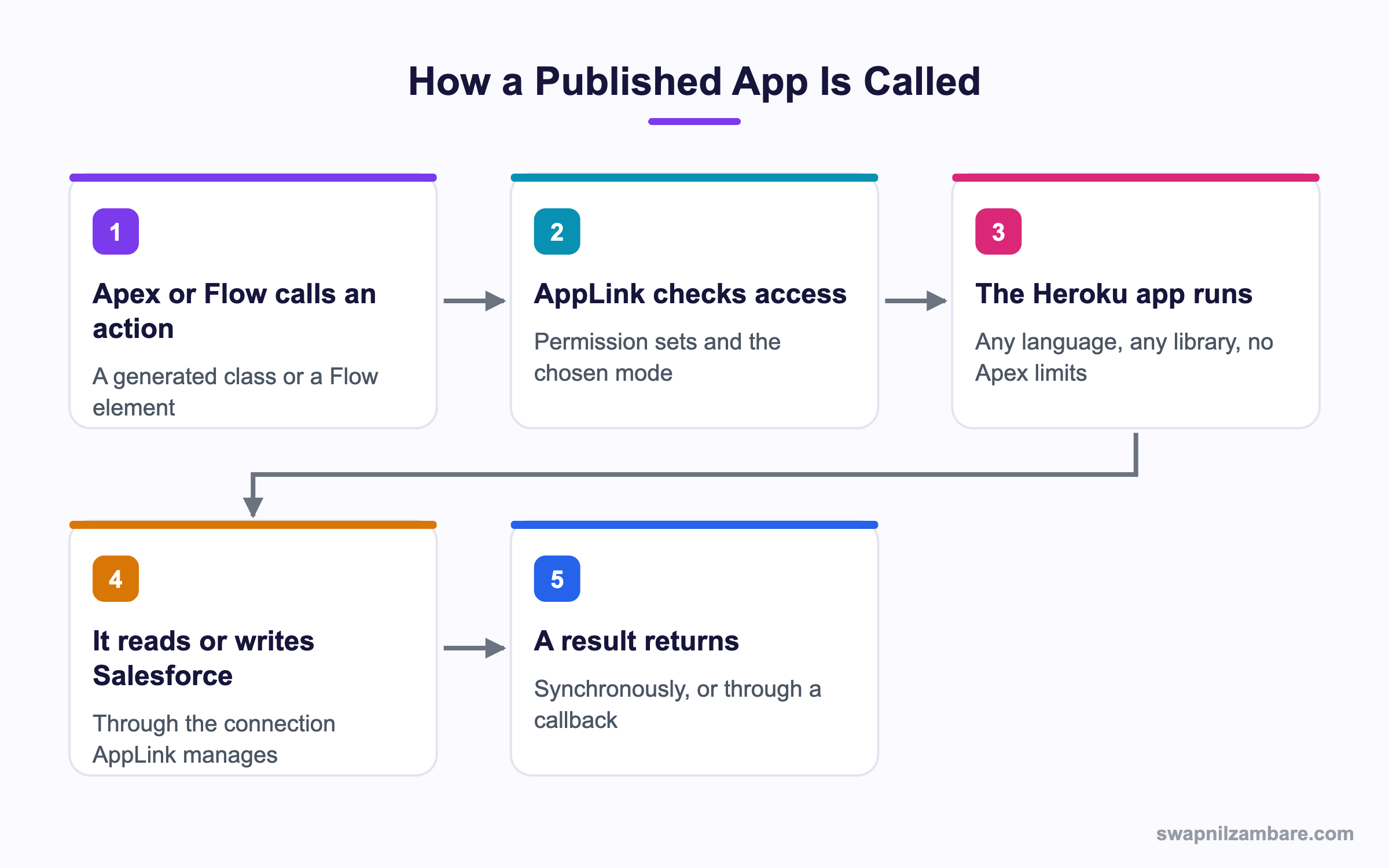
Caption: The add-on manages the connection, so the Heroku app reads Salesforce without you writing an auth layer.
What Is Heroku AppLink
Heroku AppLink is an add-on plus a set of command line steps. Add it to an app, connect an org, and publish an OpenAPI description of your endpoints.
heroku create
heroku addons:create heroku-applink --wait
heroku buildpacks:add --index=1 heroku/heroku-applink-service-mesh
heroku buildpacks:add heroku/nodejs
git push heroku main
heroku salesforce:connect my-org
heroku salesforce:publish api-docs.yaml \
  --client-name GenerateQuote \
  --connection-name my-org \
  --authorization-connected-app-name GenerateQuoteConnectedApp \
  --authorization-permission-set-name GenerateQuotePermissions
The publish step is where the work happens. Salesforce receives the OpenAPI schema and creates the pieces it needs on its side, including an external service and the permission set that controls who may call it.
| Command | What it does |
|---|---|
| addons:create heroku-applink | Adds the add-on to the Heroku app |
| salesforce:connect | Connects an org for publishing |
| salesforce:authorizations:add | Connects a named user for data access |
| salesforce:publish | Publishes the OpenAPI schema as an action |
The OpenAPI Schema Is the Contract
Heroku AppLink reads an OpenAPI file that describes your endpoints, and that file is what Salesforce reads. A missing description or a loose type produces an action that is hard to use in Flow, so the schema is worth writing carefully.
paths:
  /quote:
    post:
      operationId: generateQuote
      summary: Generate a course fee quote
      requestBody:
        content:
          application/json:
            schema:
              type: object
              properties:
                courseId:
                  type: string
Calling It from Apex
Once published through Heroku AppLink, the service appears as a generated Apex class.
GenerateQuote.generateQuote_Request req = new GenerateQuote.generateQuote_Request();
req.body = new GenerateQuote.QuoteInput();
req.body.courseId = courseId;

GenerateQuote service = new GenerateQuote();
GenerateQuote.generateQuote_Response res = service.generateQuote(req);
Heroku AppLink also supports an asynchronous style with a callback, defined in the OpenAPI file. That is the route for work that would outlast an Apex transaction, and it means the Heroku app finishes in its own time and calls Salesforce back.
| Style | When to use it |
|---|---|
| Synchronous | A quick answer a user is waiting for |
| Asynchronous with a callback | Long work that writes results back later |
Why Heroku AppLink Matters
| Benefit | What it gives you |
|---|---|
| Any language | Python, Node, Java, Go, whatever fits the job |
| Real libraries | Image, PDF, machine learning and numeric libraries |
| Managed authentication | No named credential or token handling to build |
| Discoverable actions | The endpoint shows up in Flow and Agentforce |
| Permission control | A permission set decides who may call it |
The discoverability row is what admins notice. A published endpoint becomes a Flow element, so automation built by an admin can call code a developer wrote, with no extra wiring. The post on named credentials covers what you would otherwise have to build yourself.
The Security Modes
Heroku AppLink runs a call in one of a few contexts, and the choice decides what the Heroku app can see.
| Mode | Whose permissions apply |
|---|---|
| User mode | The logged in Salesforce user, with their sharing and field access |
| Named user | A fixed user you connected, for system processes |
| Expanded access | An admin approved permission set, used deliberately |
User mode is the right default. The Heroku app sees exactly what the caller sees, so a support agent cannot read a record through your service that they could not open in the interface.
Named user mode suits scheduled work, where there is no logged in person and the permissions must be stable. Keep that user narrow, and treat it like any other integration user. The post on permission sets covers building a tight one.
Heroku AppLink vs a Plain Apex Callout
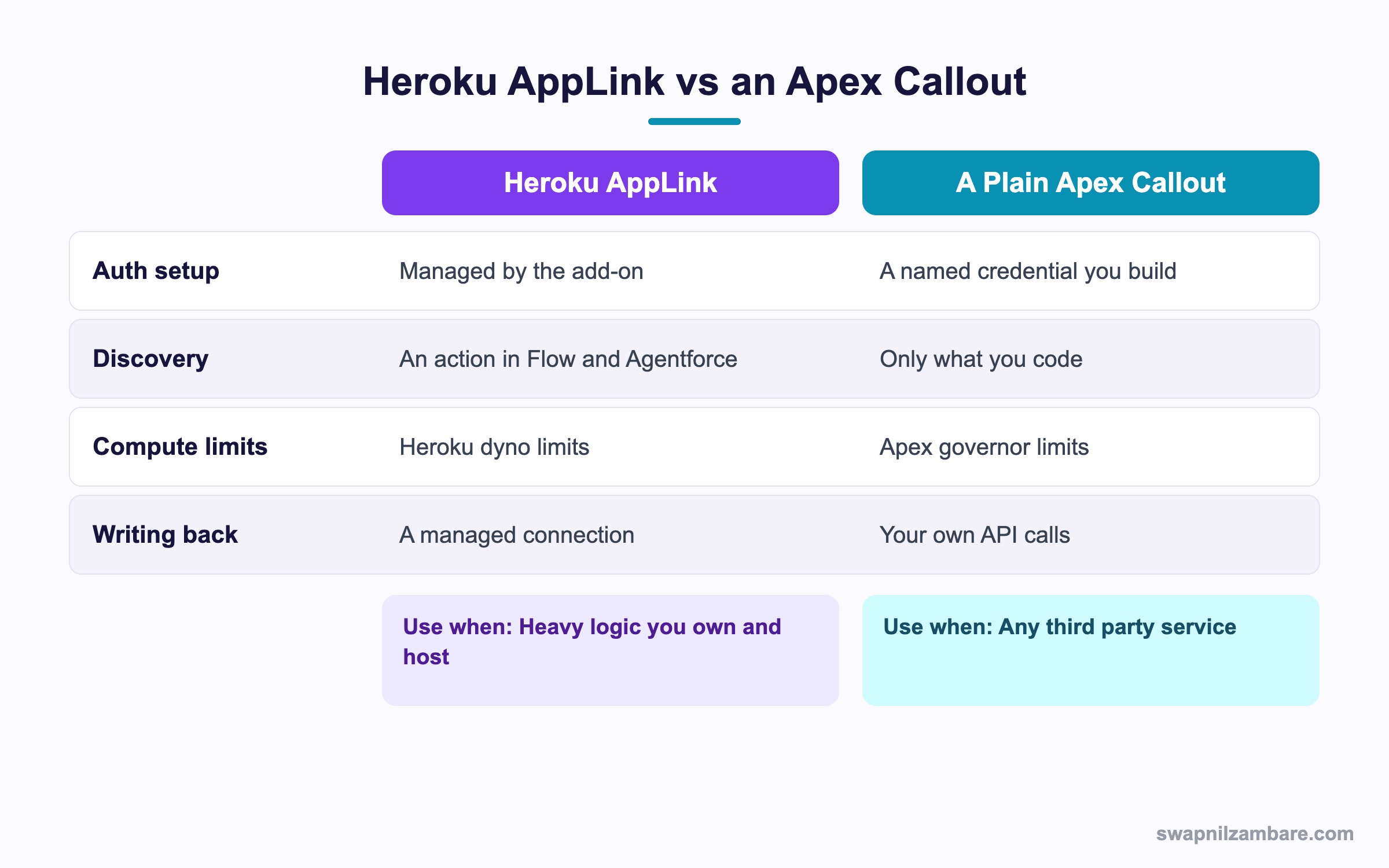
Caption: The difference is ownership, since AppLink is for code your own team hosts.
| Need | Pick |
|---|---|
| A PDF or image pipeline | Heroku AppLink |
| A machine learning model you trained | Heroku AppLink |
| A calculation over 100,000 rows | Heroku AppLink |
| A third party payment API | Apex callout with a named credential |
| A small lookup against a partner service | Apex callout |
| An Agentforce action needing real compute | Heroku AppLink |
| Work that must stay inside the platform | Apex, batch or queueable |
The honest line is that Heroku AppLink is not a replacement for Apex. It is where you put the work Apex is a poor fit for, and it keeps that work callable from the same tools your admins already use.
A Real Heroku AppLink Example
Heroku AppLink took over a job Apex handled badly. Bright Path Tutors produces a branded certificate PDF for every completed course, with a photo, a signature image and a QR code. The first version used an Apex class and a Visualforce PDF page.
| Problem | What happened |
|---|---|
| Heap limits on image data | Certificates failed above a certain size |
| No font control | The branding team was unhappy |
| No QR support | A separate manual step |
| 150 certificates in a batch | Timeouts on the Visualforce render |
We moved the rendering to a small Node service on Heroku and published it.
| Measure | Visualforce PDF | Heroku AppLink |
|---|---|---|
| Certificates per run before failure | About 40 | 2,000 |
| Average time for 150 | 150 seconds | 24 seconds |
| Font and layout control | Limited | Full |
| Who can trigger it | A developer, in Apex | An admin, from Flow |
That final row changed the process more than the speed did. The operations team now runs the batch from a Flow with a button, and nobody waits for a developer.
Limits and Things to Watch
- You are running a Heroku app, so dyno sizing, scaling and cost are yours to manage
- The OpenAPI schema is the contract, and a sloppy schema produces a poor Flow action
- Synchronous calls still live inside the calling Apex transaction, so keep them quick
- Long work needs the asynchronous callback pattern, which is more to build and test
- The Heroku app is another deployable, so it needs its own pipeline and monitoring
- Expanded access is powerful, so it deserves a review before anyone turns it on
The extra deployable is the Heroku AppLink point teams underestimate. A Heroku service brings its own release process, logs and alerts. If your team is not ready to own a service, a queueable inside Salesforce may be the better answer. The post on queueable jobs covers that route.
Common Mistakes with Heroku AppLink
| Mistake | What you see | Fix |
|---|---|---|
| A thin OpenAPI schema | An action nobody can use in Flow | Add summaries, types and operation ids |
| Using salesforce:connect for data access | The wrong connection type | Use authorizations:add for named user data access |
| Long work called synchronously | Apex transaction timeouts | Use the asynchronous callback pattern |
| Expanded access by default | More data exposed than intended | Start in user mode |
| No monitoring on the Heroku app | Silent failures outside Salesforce | Add logs and alerts on the dyno |
| The service mesh buildpack missing | Requests rejected | Add it at the first buildpack index |
| Treating it as free compute | A surprise bill | Size and scale the dynos deliberately |
Best Practices for Heroku AppLink
- Write the OpenAPI schema as carefully as you would write a public API
- Start every integration in user mode and widen only with a reason
- Keep synchronous endpoints fast and move anything slow to a callback
- Give the Heroku app its own pipeline, logs and alerts
- Name the client and permission set after the business action, not the technology
- Version the schema so a change does not break an existing Flow
- Keep a short document naming who owns the Heroku app
Most Asked Heroku AppLink Interview Questions
Q1: What does Heroku AppLink do?
It publishes a Heroku app into a Salesforce org so Apex, Flow and Agentforce can call it as an action.
Q2: How is it added to a Heroku app?
As an add-on, with a command line step, plus a service mesh buildpack.
Q3: What does the publish command take?
An OpenAPI schema describing your endpoints, plus names for the client and permission set.
Q4: What gets created on the Salesforce side?
The pieces Salesforce needs to call the service, including an external service and a permission set.
Q5: How do you call it from Apex?
Through a generated Apex class that mirrors your published operations.
Q6: Can Flow call it?
Yes. A published operation appears as a Flow element.
Q7: Can Agentforce call it?
Yes, which is one of the main reasons teams adopt it.
Q8: What are the two invocation styles?
Synchronous for a quick answer, and asynchronous with a callback for long work.
Q9: Why would you choose the asynchronous style?
Because the work would outlast an Apex transaction, so the app calls Salesforce back when it finishes.
Q10: What is user mode?
The call runs with the logged in user’s permissions, sharing and field access.
Q11: When is a named user the right choice?
For system processes and scheduled work, where no user is logged in.
Q12: What is expanded access for?
Deliberate cases needing more than the caller has, approved through a permission set.
Q13: Which mode should you start with?
User mode, since it matches what the caller could already see.
Q14: What is the difference between salesforce:connect and authorizations:add?
Connect is used for publishing the app to an org, and authorizations:add connects a named user for data access.
Q15: Does it remove Apex governor limits?
The work on Heroku is not bound by Apex limits, though a synchronous call still sits inside the calling transaction.
Q16: What language can the Heroku app use?
Any language Heroku supports, which is the point of the pattern.
Q17: What kind of work suits it best?
PDF and image generation, machine learning, and heavy numeric work over large data sets.
Q18: What work does not suit it?
Logic that belongs close to the data, and anything a third party already exposes as an API.
Q19: Why is the OpenAPI schema so important?
It is the contract Salesforce reads, so a thin schema produces a poor action for admins.
Q20: Can one Heroku app serve several orgs?
Yes. An app can be published into more than one org.
Q21: Who owns the running cost?
You do, since the dynos are yours to size and scale.
Q22: Scenario: a Flow action shows unnamed inputs. What went wrong?
The OpenAPI schema lacks summaries and clear types for the request body.
Q23: Scenario: a long render times out when called from Apex. What is the fix?
Move it to the asynchronous callback pattern so the app finishes in its own time.
Q24: Scenario: the Heroku app can read records a support agent cannot. Why?
It is running in a named user or expanded context rather than user mode.
Q25: Scenario: requests are rejected straight away after a deploy. What is missing?
The service mesh buildpack, or it is not at the first index.
Q26: How does this compare with an Apex callout to your own service?
AppLink manages the connection and makes the endpoint discoverable, where a callout needs a named credential and leaves it invisible to admins.
Q27: Does it replace Heroku Connect?
No. Heroku Connect synchronises data to Postgres, while AppLink exposes app logic as actions.
Q28: What should a team check before adopting it?
Whether they are ready to own a deployed service, with its own pipeline, logs and alerts.
Q29: What is the habit that keeps it manageable?
A well written versioned schema, user mode by default, and monitoring on the Heroku side.
Official Resources
What Is Next
Next, read Apex Stub API for Mocking in Unit Tests Explained.


