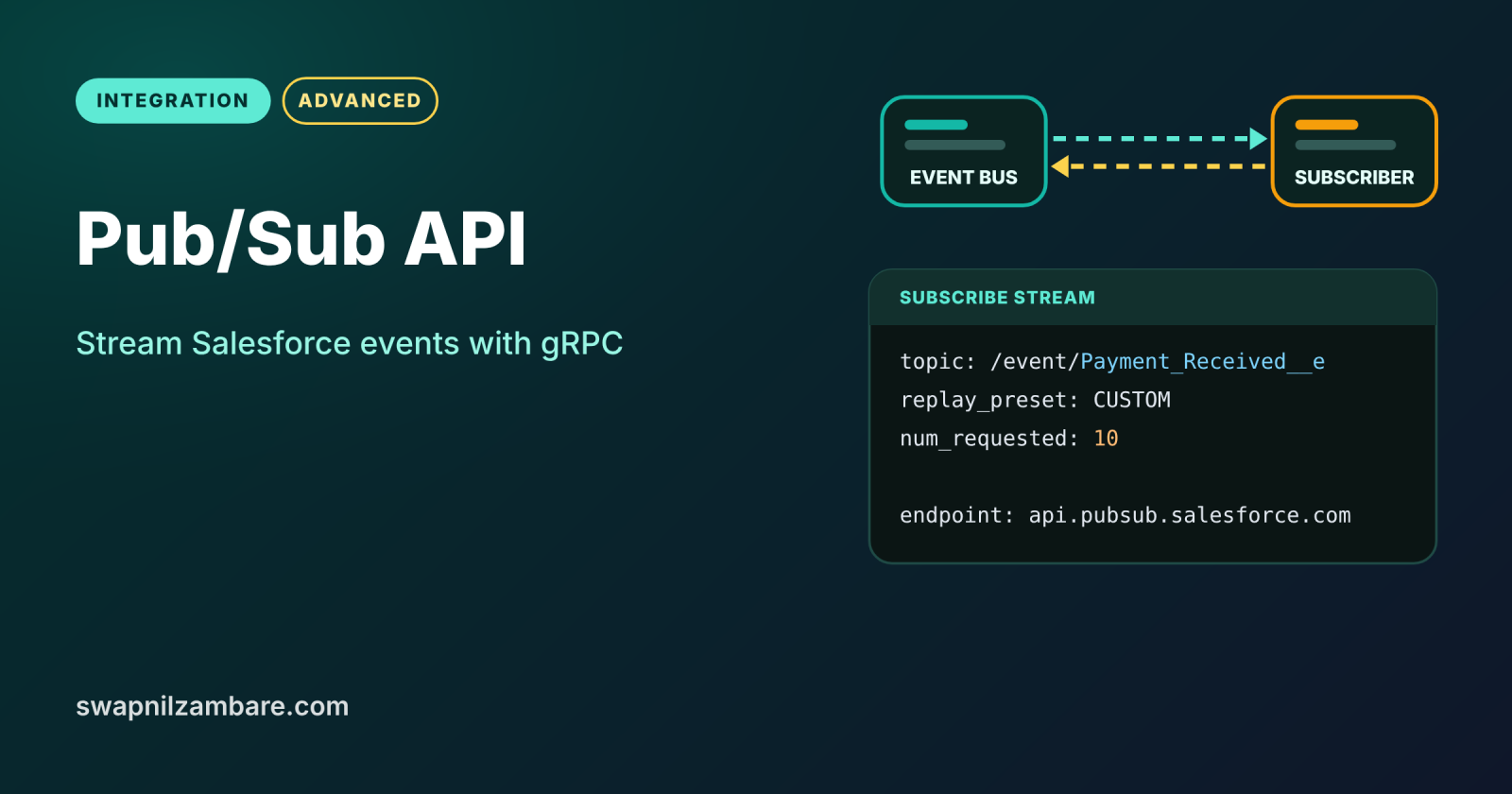
The Pub/Sub API is Salesforce’s modern way for outside systems to publish events into Salesforce and subscribe to events coming out of it, in real time. It uses gRPC over HTTP/2 and sends compact binary messages, so it is fast and efficient. With one API, a system can listen to platform events, Change Data Capture events and more.
In this post, you will learn topics, schemas, Subscribe and Publish calls, replay IDs and flow control, with a real event example. It builds on platform events in Apex, Change Data Capture and Salesforce Integration Patterns.
What is the Pub/Sub API?
The Pub/Sub API is a gRPC-based API for event streaming. A client connects to a Salesforce endpoint, picks a topic such as /event/Payment_Received__e, and then publishes or subscribes. Event payloads use Apache Avro, a binary format described by a schema that the client fetches from the API.
Think of a radio station. The station broadcasts on fixed channels, and anyone with a receiver can tune in. Listeners who switch on late can even replay the last few days of shows. Topics are the channels, and replay IDs let a listener pick up where it stopped.
Why the Pub/Sub API Matters
Real-time integrations need events, not constant polling. Here is why the Pub/Sub API matters at Bright Path Tutors.
- First, LearnHub must react within seconds when a payment arrives.
- Also, the data warehouse wants every change to Course__c as it happens.
- Next, PayQuick wants to send payment events into Salesforce without Apex.
- Polling the REST API every minute would waste API requests.
- Finally, it replaces the older CometD-based Streaming API for new clients.
So event-driven integrations become faster and cheaper.
How the Pub/Sub API Works
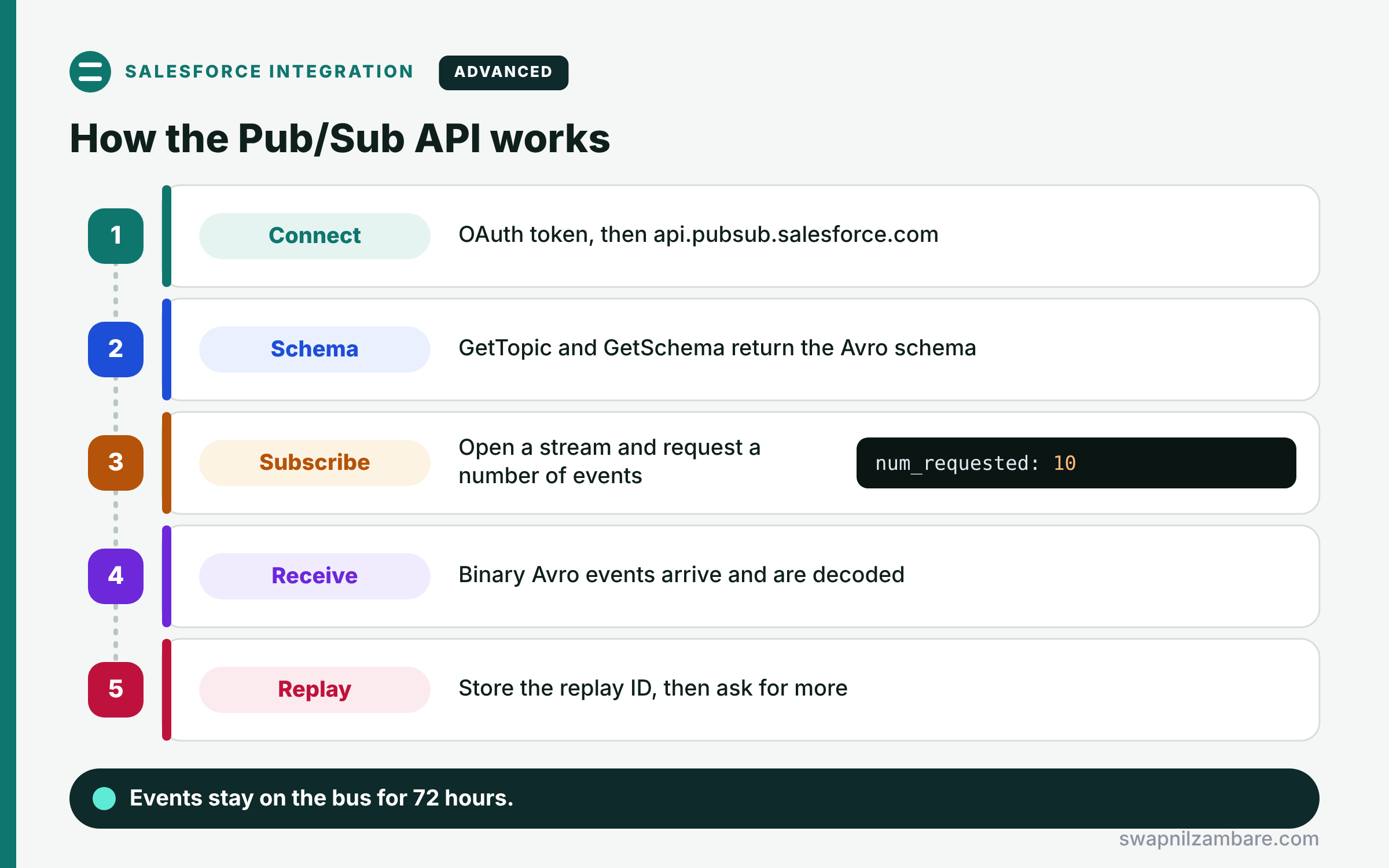
A typical subscriber follows five steps. First, it gets an OAuth access token and connects to api.pubsub.salesforce.com on port 443 or 7443. Next, it calls GetTopic and GetSchema to learn the event’s Avro schema. Then it opens a Subscribe stream and asks for a number of events, such as 10. After that, Salesforce sends up to that many events as binary Avro, and the client decodes them. Finally, the client stores the latest replay ID and requests more events when it is ready.
gRPC and HTTP/2
gRPC is an open source framework for fast calls between services. It runs over HTTP/2, which keeps one long connection open for streams.
Topics
A topic is the channel name. For example, platform events use /event/Name__e, and change events use /data/Course__ChangeEvent.
Avro Schemas
Each event type has a schema that describes its fields. So the client fetches the schema once by its ID and uses it to decode payloads.
Subscribe and Publish
Subscribe streams events to the client, while Publish and PublishStream send events into Salesforce. ManagedSubscribe also lets Salesforce track the replay position for you.
Replay IDs and Flow Control
Each event has a replay ID, so a client can restart from LATEST, EARLIEST or a stored ID. Also, the client controls speed by requesting a set number of events at a time.
Pub/Sub API Methods at a Glance
The table below lists the main RPC methods and their jobs.
| Method | What it does |
|---|---|
| GetTopic | Checks a topic and the caller’s access |
| GetSchema | Returns the Avro schema for an event |
| Subscribe | Streams events, with flow control |
| ManagedSubscribe | Streams events, Salesforce tracks replay |
| Publish | Sends a batch of events |
| PublishStream | Sends events over a long stream |
Pub/Sub API vs Streaming API
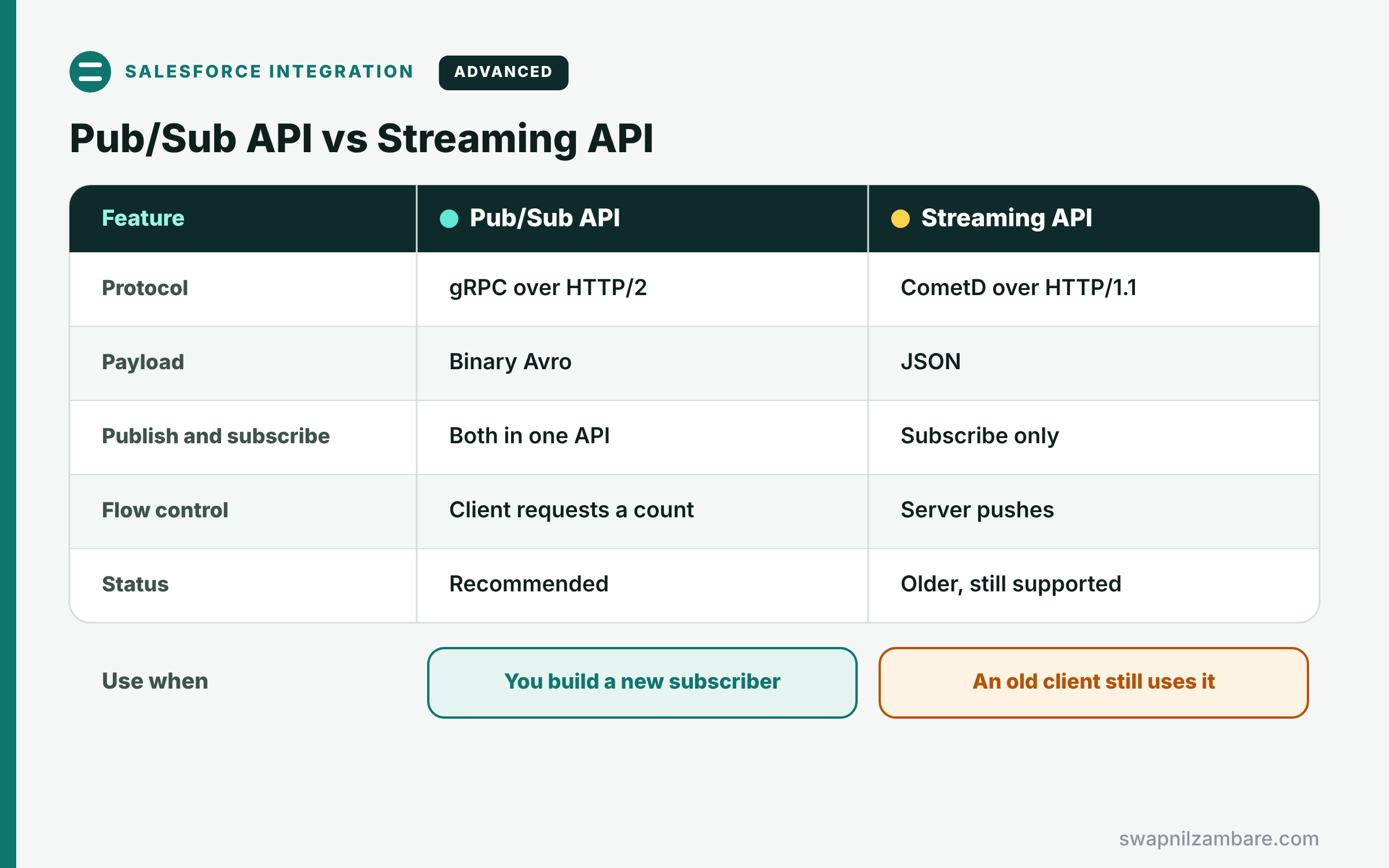
The table below compares it with the older CometD-based Streaming API.
| Feature | Pub/Sub API | Streaming API (CometD) |
|---|---|---|
| Protocol | gRPC over HTTP/2 | CometD over HTTP/1.1 |
| Payload | Binary Avro | JSON |
| Publish and subscribe | Both in one API | Subscribe only |
| Flow control | Client requests a count | Server pushes |
| Status | Recommended for new work | Older, still supported |
When to use which is simple. Use the Pub/Sub API for all new external subscribers. Keep CometD only for existing clients until you move them.
A Real Pub/Sub API Example
Let’s connect LearnHub to payments at Bright Path Tutors with the Pub/Sub API. Salesforce publishes Payment_Received__e, and LearnHub subscribes.
Step 1: Publish the Event in Salesforce
public with sharing class PaymentEventPublisher {
    public static void announce(List<Payment__c> payments) {
        List<Payment_Received__e> events = new List<Payment_Received__e>();
        for (Payment__c p : payments) {
            events.add(new Payment_Received__e(
                Enrolment_Id__c = p.Enrolment__c,
                Amount__c = p.Amount__c));
        }
        List<Database.SaveResult> results = EventBus.publish(events);
        for (Database.SaveResult r : results) {
            if (!r.isSuccess()) {
                System.debug('Publish failed: ' + r.getErrors()[0].getMessage());
            }
        }
    }
}
After a payment is saved, this method publishes one event per payment. Then it checks each result, so failed publishes are visible in the logs.
Step 2: The Subscriber’s Fetch Request
// Sent by LearnHub on the Subscribe stream (shown as JSON for reading)
{
  "topic_name": "/event/Payment_Received__e",
  "replay_preset": "CUSTOM",
  "replay_id": "<bytes of the last stored replay ID>",
  "num_requested": 10
}

// gRPC metadata headers sent with every call
accesstoken: <OAuth access token>
instanceurl: https://brightpath.my.salesforce.com
tenantid: <18-character org ID>
LearnHub asks for 10 events at a time, starting after the last replay ID it stored. Also, the three headers tell Salesforce who is calling and for which org.
Step 3: See the Result
Here is what LearnHub’s log shows after two payments.
Received 2 events (requested 10)
Payment_Received__e  Enrolment_Id__c=a05Kj00000Qw2Lm  Amount__c=5000  replay=...41
Payment_Received__e  Enrolment_Id__c=a05Kj00000Qw2Ln  Amount__c=7200  replay=...42
Stored replay ID ...42, activating 2 student accounts
LearnHub decoded both events with the Avro schema and saved the newest replay ID. So if it restarts, it continues from event 42 without missing anything.
Pub/Sub API and Event Retention
High-volume platform events and change events stay on the event bus for 72 hours. So a subscriber that is offline for a short time can catch up with its replay ID. After 72 hours, the events are gone, so plan alerts for long outages.
Common Mistakes with the Pub/Sub API
- Not storing the replay ID, so restarts miss or repeat events.
- Requesting huge numbers of events and overloading the client.
- Forgetting the tenantid or instanceurl headers.
- Decoding payloads without fetching the right schema.
- Assuming events last forever instead of 72 hours.
Best Practices for the Pub/Sub API
- Store the last processed replay ID after each batch.
- Request a small number of events, then ask for more when ready.
- Cache schemas by schema ID.
- Use a dedicated integration user with access only to needed topics.
- Make subscribers idempotent, because events can arrive more than once.
Practice Task
Subscribe to /data/Course__ChangeEvent with a sample client from Salesforce’s Pub/Sub API GitHub examples. Hint: enable Change Data Capture for Course__c first, then update a course and watch the event arrive.
Most Asked Interview Questions on the Pub/Sub API
Event-driven questions are growing in senior interviews. Here are the 22 questions asked most about the Pub/Sub API.
Basic Questions on the Pub/Sub API
Q1: What is the Pub/Sub API?
It is a gRPC API, so external systems can publish and subscribe to Salesforce events.
Q2: Which protocol does it use?
It uses gRPC over HTTP/2, so one connection carries long streams.
Q3: Which format do event payloads use?
They use binary Apache Avro, so messages stay small.
Q4: What is a topic?
It is the event channel name, such as /event/Payment_Received__e.
Q5: Which events can you subscribe to?
You can subscribe to platform events, change events and some real-time monitoring events.
Q6: What is the endpoint?
It is api.pubsub.salesforce.com, on port 443 or 7443.
Q7: How does a client authenticate?
It sends an OAuth access token, the instance URL and the org ID as headers.
Code and Scenario Questions on the Pub/Sub API
Q8: How do you get the schema of an event?
Call GetSchema with the schema ID from GetTopic or from the event.
Q9: How does flow control work?
The client sets num_requested, so Salesforce sends only that many events before waiting.
Q10: How do you resume after a crash?
Subscribe with replay_preset CUSTOM and the last stored replay ID.
Q11: What do LATEST and EARLIEST mean?
LATEST starts with new events, while EARLIEST starts from the oldest retained event.
Q12: How long are events kept?
High-volume platform events and change events stay for 72 hours.
Q13: Can an external system publish events?
Yes, so it calls Publish or PublishStream with Avro-encoded events.
Q14: What is ManagedSubscribe?
It is a subscribe method where Salesforce tracks the replay position for a managed subscription.
Advanced Questions on the Pub/Sub API
Q15: Why is it preferred over CometD?
It supports both publish and subscribe, uses efficient binary payloads and gives clients flow control.
Q16: How do you avoid processing an event twice?
Store processed event IDs or replay IDs, and make updates idempotent.
Q17: How do you subscribe to changes for one object only?
Use the object’s channel, such as /data/Course__ChangeEvent.
Q18: What happens if the subscriber is offline for four days?
It misses events older than 72 hours, so you need a full resync.
Q19: How do you limit what a subscriber can read?
Give its integration user access only to the needed objects and events.
Q20: Does publishing from an outside system run Apex triggers?
Yes, because event triggers subscribe to the same platform event.
Q21: How does this API fit integration patterns?
It supports fire and forget and UI updates based on data changes.
Q22: Which languages can use the Pub/Sub API?
Any language with gRPC support, such as Java, Python, Node.js or Go.
Official Resources
Quick Recap
- The Pub/Sub API streams Salesforce events over gRPC.
- Topics name channels, and Avro schemas describe payloads.
- Subscribe with flow control, and store the replay ID.
- Events are kept for 72 hours.
- External systems can also publish events in.
What’s Next?
You have finished Level 9: Integration. Next, read Apex Design Patterns: Singleton, Strategy, Factory and More.


