Large Data Volume Interview Questions are how an interviewer finds out whether you have worked in a big org. Code that is fine with ten thousand records can fail completely at ten million, and the reasons are specific.
Last reviewed for the Winter ’27 release (November 2026).
This post covers the questions asked, grouped into selectivity and indexes, skinny tables and skew, archiving, platform cache, and scenario questions where something times out.
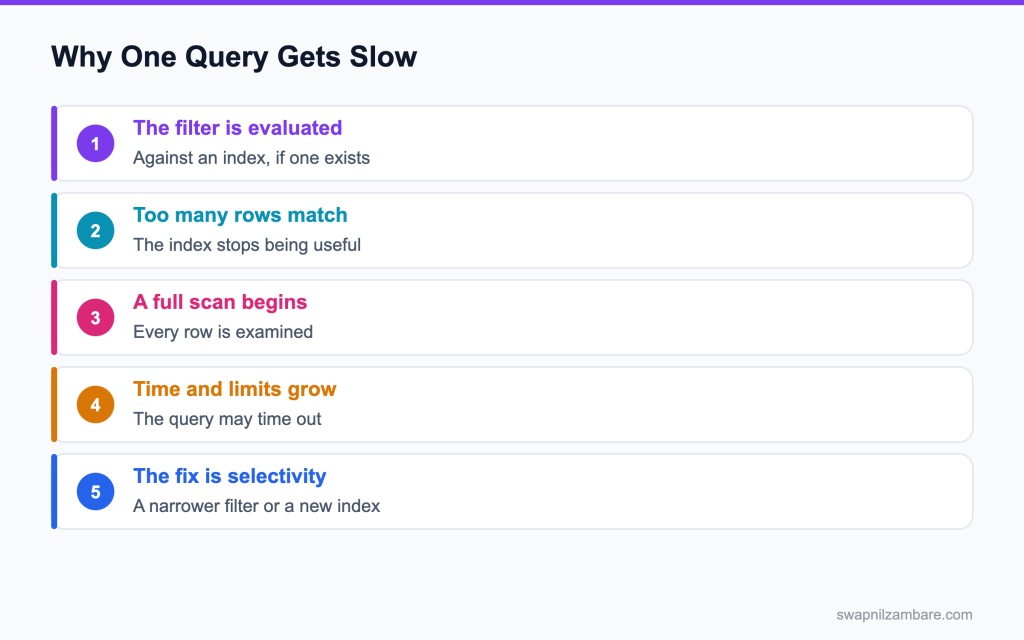
Caption: A filter that matches too many rows stops using the index, which is where the time goes.
What Large Data Volume Interview Questions Cover
Large Data Volume Interview Questions test whether you understand selectivity. A query is fast because it examines few rows, not because it returns few rows.
Think of it like a phone book. Looking up one surname is quick, and finding everyone in a city means reading every page. The archiving option behind all of this is covered in the post on big objects.
That distinction drives the rest of the topic. Indexes, skinny tables, skew and archiving are all ways of keeping the number of rows examined small.
Selectivity and Indexes
| Field | Indexed by default |
|---|---|
| Record id | Yes |
| Name | Yes |
| Owner id | Yes |
| Created and modified dates | Yes |
| Lookup and master detail fields | Yes |
| External id fields | Yes |
| A plain custom text field | No, unless requested |
| Thing that breaks an index | Why |
|---|---|
| A leading wildcard in a LIKE | The index cannot be walked |
| A not equal filter | Most rows match |
| A null check on a nullable field | Nulls are not always indexed |
| A non deterministic formula field | It cannot be indexed |
| An OR across unindexed fields | No single index serves it |
Those two tables answer most Large Data Volume Interview Questions about why a query is slow.
// not selective, because the wildcard leads
SELECT Id FROM Course__c WHERE Name LIKE '%basics%'

// selective, because the index can be used
SELECT Id FROM Course__c
WHERE External_Id__c = :code AND Is_Published__c = true
LIMIT 200
Those two queries settle many Large Data Volume Interview Questions, because the difference is the filter rather than the result.
Selective Query vs Full Scan
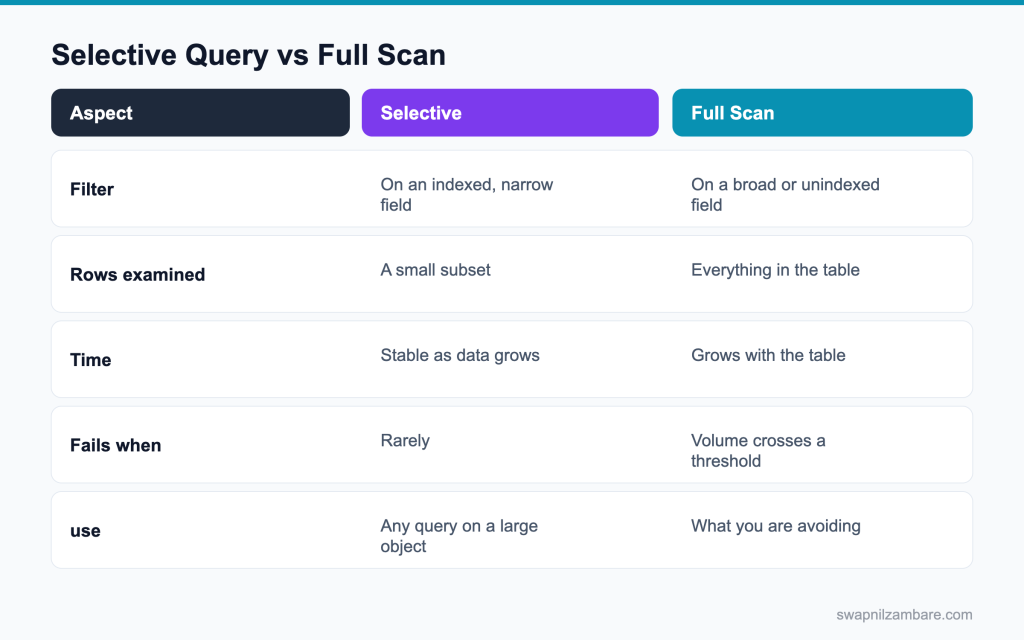
Caption: The number of rows examined decides whether a query survives growth.
| Need | Approach |
|---|---|
| Find one record by a business key | An external id field, which is indexed |
| Filter a large object by a custom field | Ask Salesforce for a custom index |
| Report over millions of rows | A skinny table, or a summary object |
| Keep history without the volume | Archive to a big object |
| Avoid repeated reads of stable data | Platform cache |
The posts on large data volumes and platform cache cover both halves.
Skinny Tables, Data Skew and Archiving
Interviewers use Large Data Volume Interview Questions here to see whether you know the names and what they actually do.
| Term | What it means |
|---|---|
| Skinny table | A Salesforce managed copy of selected fields, which avoids a join |
| Account data skew | Too many child records under one parent account |
| Ownership skew | Too many records owned by one user |
| Lookup skew | Too many records pointing at one lookup value |
| Chunking | Splitting a job by record id ranges so each piece stays small |
A skew problem shows up as record locking during loads rather than as a slow query. That difference is worth saying out loud in an interview, because it shows you have seen it happen.
Large Data Volume Interview Questions on Indexes
Q1: What makes a SOQL query selective?
The filter uses an indexed field, and the number of rows matching that filter is under the threshold Salesforce allows. Selectivity is about rows examined, not rows returned.
Q2: What are the selectivity thresholds?
For a standard index, roughly the first 1 million rows at 30 percent of the object, and for a custom index, roughly 10 percent and 333,333 rows. Treat the numbers as guidance and test in the org.
Interview tip: give the numbers: 30 and 10 percent of the first million rows, then 15 and 5 percent after that.
Q3: Which fields are indexed automatically?
Id, Name, OwnerId, CreatedDate, SystemModstamp, RecordTypeId, lookup and master detail fields, external id fields and unique fields.
Follow-up you may get: Is Email indexed? Yes on Contact and Lead.
Q4: How do you get a custom index?
Open a support case and ask Salesforce to index the field. There is no setup switch for it.
Q5: Can a formula field be indexed?
Only a deterministic formula. If it references another object, a date function like TODAY, or any value that can change on its own, it cannot be indexed.
Q6: Why does a leading wildcard make a query slow?
An index is sorted by the start of the value. A leading wildcard means the start is unknown, so the index cannot be walked and every row must be read.
Interview tip: suggest SOSL for search inside words. It is the practical alternative.
Q7: Is a not equal filter selective?
Almost never, because most rows match it. Rewrite it as a positive filter on the values you do want.
Q8: Are null values indexed?
Nulls are indexed for custom indexes only when Salesforce enables it for that index. Filtering on null on a large object is a common cause of a full scan.
Follow-up you may get: How do you avoid null filters? Use a default value or a checkbox that is always set.
Q9: What does the Query Plan tool tell you?
It shows which plans the optimizer considered, the cost of each, the leading operation type and how many rows it expects. Enable it in the Developer Console under preferences.
Q10: What does a cost above 1 mean in the Query Plan?
The optimizer does not consider that plan selective, so it will fall back to a table scan.
Interview tip: always say you check the plan before asking for an index.
Q11: What is a composite index?
An index on more than one field, created by Salesforce support, useful when a query always filters on the same pair of fields together.
Follow-up you may get: How do you request one? Through a Support case with the query and filter fields.
Q12: Does adding LIMIT make a query selective?
No. LIMIT caps the rows returned after filtering. The filter still decides how many rows are examined.
Q13: Does ORDER BY affect performance on a large object?
Yes. Sorting a large result set costs time, and sorting on an unindexed field can push a query over its time limit.
Q14: How do you page through millions of rows safely?
Order by Id and filter on Id greater than the last id you processed. Offset is capped at 2,000 and gets slower as it grows.
Interview tip: “keyset paging on Id” is the expected answer here.
Q15: What is the row limit for OFFSET in SOQL?
2,000. OFFSET cannot skip more than 2,000 rows.
It also gets slower as the offset grows, so for large data sets use keyset paging: ORDER BY Id and WHERE Id > :lastId.
Q16: What is a query timeout and when does it hit?
A synchronous SOQL query gets about 120 seconds. A non selective query on a large object is the usual cause.
Q17: Why is a report slower than the same SOQL query?
A report adds grouping, formulas, sharing checks and formatting on top of the query, and it may span more objects.
Q18: How does sharing affect a query on a large object?
With sharing enforced, the platform checks each row the user can see. On a large object with a complex sharing model this check can cost more than the query itself.
Q19: What is the difference between a standard and a custom index?
Standard indexes exist automatically on fields like Id, Name, OwnerId and lookups. Custom indexes are added by Salesforce Support on fields you ask for, or automatically on external ID and unique fields. Custom indexes have stricter selectivity thresholds.
Q20: How do you find which queries are slow in production?
Look at debug logs for long running SOQL, Event Monitoring’s API and report events if you have it, and Scale Center if your org has access. Then check those queries in the Query Plan tool.
Q21: Can you make a query faster by removing fields from the SELECT?
A little, because less data is returned, but the filter is what decides the time. Do not expect a large gain.
Interview tip: say the filter decides speed, not the field list. It shows you understand selectivity.
Large Data Volume Interview Questions on Skew
Q22: What is a skinny table?
A separate table Salesforce maintains that holds a chosen set of fields from one object, including some fields from the standard and custom tables, so a query or report avoids a join.
Follow-up you may get: Do skinny tables copy to sandboxes? Only full sandboxes, and only if requested.
Q23: Who creates a skinny table?
Salesforce Support, on request. You cannot create one yourself.
Open a case with the object, the fields and the slow queries or reports, and Support decides whether a skinny table will help.
Q24: How many fields can a skinny table hold?
Up to 100 columns.
Keep it to the fields the slow reports and queries actually use, because every extra field makes the table bigger.
Q25: Does a skinny table stay in sync?
Yes. Salesforce keeps it in sync with the source records automatically.
You do not write any code; changes to the main record are copied to the skinny table.
Q26: What are the limits of a skinny table?
It does not include soft deleted records, it is not copied to a sandbox by default, and it cannot contain fields from other objects except the supported standard ones.
Q27: What is account data skew?
More than about 10,000 child records under one parent account. Updates to those children contend for a lock on the parent.
Interview tip: give the 10,000 children rule and the lock error it causes.
Q28: What is ownership skew?
More than about 10,000 records of one object owned by a single user. Changing that user’s role forces the platform to recalculate sharing for every record.
Follow-up you may get: What is the recalculation called? Sharing recalculation, which can take hours for skewed owners.
Q29: How do you avoid ownership skew?
Spread records across several owners, or if you must use one integration user, keep that user out of the role hierarchy so the recalculation has nowhere to cascade.
Interview tip: the role hierarchy detail shows real experience.
Q30: What is lookup skew?
Many records pointing at the same value in a lookup field, which creates lock contention on that one target record during loads.
Q31: How do you fix lookup skew in a load?
Spread the lookup values if the data model allows it, or sort the incoming file so records with the same lookup value land in the same batch instead of being spread across parallel batches.
Q32: Why does sorting a data file help a load?
Records that share a parent end up in the same batch, so one batch holds the lock instead of several batches fighting for it.
Q33: What causes UNABLE_TO_LOCK_ROW?
Two transactions trying to update the same parent or related record at the same time. Skew and parallel batches are the usual cause.
Q34: How do you change the owner of millions of records safely?
Do it in batches outside business hours, defer sharing calculations if your org has that option, and make sure the new owner is not a source of new ownership skew. Test the timing in a full sandbox first.
Q35: What is deferred sharing calculation?
A setting, enabled by Support, that lets admins pause sharing rule recalculation during large changes and run it once at the end. It saves hours during big data loads or role changes.
Q36: Serial or parallel mode for a Bulk API load?
Parallel is faster and is the default. Switch to serial when lock errors appear and you cannot sort the data to avoid them.
Note: Bulk API 2.0 has no serial mode; Salesforce manages the batches. With 2.0, sort the file by parent ID, or use Bulk API 1.0 when you truly need serial processing.
Archiving and Big Object Questions
Q37: When should you archive?
When old records are needed for reference but not for reporting, automation or day to day work, and the volume is slowing queries or filling storage.
Q38: What is a big object?
A storage object built for billions of rows, queried by a defined index rather than by any field, with no triggers, no validation rules and no reports in the normal sense.
Follow-up you may get: Can big objects be reported on? Not with standard reports; use Async SOQL or CRM Analytics.
Q39: How do you query a big object?
With SOQL filtered on the leading fields of its index, or asynchronously with Async SOQL where that is available in the org.
Q40: How do you load data into a big object?
With the Bulk API, or from Apex with Database.insertImmediate.
Records with the same index values overwrite each other, so a load works like an upsert on the index fields.
Q41: Can a big object have a trigger?
No. Big objects do not support triggers, flows or validation rules.
That is part of the trade for the volume they can hold. Run any logic before the data is written.
Q42: How do you decide what to archive?
Agree retention rules with the business and legal teams per object, like closed cases older than three years. Archive what must be kept for reference, delete what has no value, and document the rule so it runs every year.
Q43: What is Salesforce Archive?
A Salesforce product for moving old records out of the main database into an archive that can still be searched and restored, with retention policies. It is an option when big objects or external stores need too much custom work.
Q44: What is the difference between archiving and deleting?
Archiving keeps the data somewhere cheaper to store and slower to query. Deleting removes it. Interviewers like to hear that you checked the retention rules before choosing either.
Large Data Volume Interview Questions on Cache
Large Data Volume Interview Questions often finish on cache, because it is the cheapest fix when the data is stable.
Q45: What is platform cache?
A memory layer in the org where Apex can store values and read them back faster than querying or recalculating them.
Q46: What is the difference between org cache and session cache?
Org cache is shared by all users and survives sessions. Session cache belongs to one user’s session and goes away when the session ends.
Interview tip: give one example of each cache type.
Q47: What belongs in org cache?
Data that is the same for everyone and changes rarely, such as configuration records, mapping tables, or a list of active products.
Follow-up you may get: How do you name a cache key? Partition plus key, like local.CoursePartition.activeCourses.
Q48: What belongs in session cache?
Data about the current user’s work in progress, like a wizard’s state across screens.
It is private to that user’s session and disappears when they log out, so never store anything there that must be kept.
Q49: What is a cache partition?
A named slice of the cache with its own capacity, so one feature cannot consume everything.
Q50: Is platform cache guaranteed?
No. A value can be evicted at any time. Always write code that falls back to the real source when the cache misses.
Interview tip: always mention the fallback. Cache without fallback is a bug.
public static List<Course__c> getActive() {
  Cache.OrgPartition p = Cache.Org.getPartition('local.Config');
  List<Course__c> cached = (List<Course__c>) p.get('activeCourses');
  if (cached != null) return cached;
  List<Course__c> fresh = [
    SELECT Id, Name, Fee__c FROM Course__c
    WHERE Is_Published__c = true LIMIT 1000
  ];
  p.put('activeCourses', fresh, 3600);
  return fresh;
}Q51: What is the time to live for a cached value?
Up to 48 hours for org cache and up to 8 hours for session cache. Set a shorter time when the data changes more often.
Q52: Does cache count against heap?
The value counts against heap once you read it into a variable in the transaction. The cache itself is separate storage.
Q53: How do you clear a cached value when the data changes?
Remove the key with Cache.Org.remove in the code that saves the data, for example in a trigger on the source object, so the next read gets fresh data. A short time to live is a backup if a change path is missed.
Q54: Can platform cache be used from an LWC?
Not directly. The component calls an Apex method, and that method reads from or writes to the cache. Combine it with a cacheable Apex method so the browser caches the result too.
Q55: What size limit applies to a single cached value?
A single put is limited to 100 KB of serialized data, so cache a summary rather than a large result set.
Follow-up you may get: What happens if you put more than 100 KB? The put fails, so cache smaller pieces.
Scenario Large Data Volume Interview Questions
Scenario style Large Data Volume Interview Questions put you in front of something that is already broken.
Q56: A nightly batch job on 8 million records started failing with a query timeout. What do you check?
The start query first. Run it through the Query Plan tool, check whether the filter is on an indexed field, and whether the filter still matches a small share of the table now that the data has grown. A filter that was selective at 1 million rows may not be at 8 million.
Q57: A list view takes 40 seconds to load. What do you do?
Check the filter and the sort field. Remove sorting on an unindexed text field, cut the number of columns, and ask support for a skinny table if the view is business critical.
Q58: A data load of 2 million rows keeps failing with lock errors. What now?
Look for skew on the parent or lookup field. Sort the file by that field so related rows share a batch, and switch to serial mode if sorting is not enough.
Q59: An integration user owns 4 million records and the team wants to move that user to a new role. What do you say?
Do not do it during business hours. The sharing recalculation will touch every record. Better still, keep the integration user out of the hierarchy entirely so the question never comes up.
Q60: Reports on a 20 million row object are unusable. What are the options?
A skinny table, a custom index on the filter field, a summary object populated by a nightly job, or archiving the old rows to a big object.
Q61: A trigger times out only in production. Why?
Production has more data. A query inside the trigger that is fine in a sandbox becomes a scan against the real volume, and the row counts in related lists are higher.
Interview tip: say you test at production volume. It is the real lesson here.
Q62: A page makes the same query on every load for data that changes once a week. What do you do?
Put it in org cache with a time to live that matches the change rate, and keep a fallback query for a cache miss.
Q63: Storage is at 95 percent. What is the plan?
Find the largest objects in Setup, check retention rules with the business, archive what must be kept to a big object or an external store, hard delete what does not need keeping, and empty the recycle bin.
Q64: Scenario: one account has 80,000 contacts and every update fails with lock errors. What do you do?
Fix the skew: split the contacts across several accounts if the model allows, or stop linking them to that account. In the short term, update them in small serial batches outside business hours.
Q65: Scenario: a dashboard on 30 million opportunities takes minutes. What do you suggest?
Build a summary object refreshed nightly by a batch job, report on that, and ask Support about a skinny table for the remaining detail reports. CRM Analytics is another option for very large data.
Q66: How do you test performance before go live?
Load production scale data into a full sandbox and run the real queries and jobs against it. Performance that was never tested at volume is the single most common cause of a slow go live.
Common Mistakes with Large Data Volumes
- Testing only with a few hundred records, then meeting the real volume in production
- Filtering on an unindexed custom field and assuming the index will appear by itself
- Using OFFSET to page through a large table
- Letting one integration user own millions of records inside the role hierarchy
- Caching a value with no fallback for a cache miss
- Archiving without checking the retention rules the business has to follow
Best Practices
| Practice | Why it helps |
|---|---|
| Filter on an indexed field | The query examines fewer rows |
| Check the Query Plan before shipping | You see the cost rather than guessing |
| Keep integration users out of the hierarchy | Sharing recalculation has nowhere to cascade |
| Sort load files by parent | Lock contention drops |
| Cache stable data with a fallback | Fewer queries, no breakage on a miss |
| Test with production volume | Problems appear before customers find them |
Working through Large Data Volume Interview Questions in your own org beats memorising the answers. Load a million rows into a custom object in a developer org, run a query on an unindexed field, then look at the Query Plan and watch the cost.
Where to Read More
Salesforce publishes the detail behind all of this. The best practices for deployments with large data volumes paper covers indexes, skew and chunking. The platform cache developer guide covers partitions and both cache types, and the Trailhead module on large data volumes walks through the same ground with exercises.
What’s Next?
The next post in the series covers big objects, cursors and DataWeave in Apex, which is the toolset for data that no longer fits in a normal object. Before that, the posts on governor limits and async apex are worth a read, since most volume problems hit a limit first.
If someone asks you Large Data Volume Interview Questions, start your answer with rows examined rather than rows returned. That one sentence tells an interviewer you have worked at scale.


