Troubleshooting Scenario Interview Questions test how you find and fix problems when something breaks in a live org. This is Post 11 of our scenario series, with real problems on access, login, email, data, automation and speed.
Each scenario matches a topic from Salesforce Troubleshooting Interview Questions. Our debug logs guide and audit trail guide show the tools you will use most.
How to Use These Troubleshooting Scenario Interview Questions
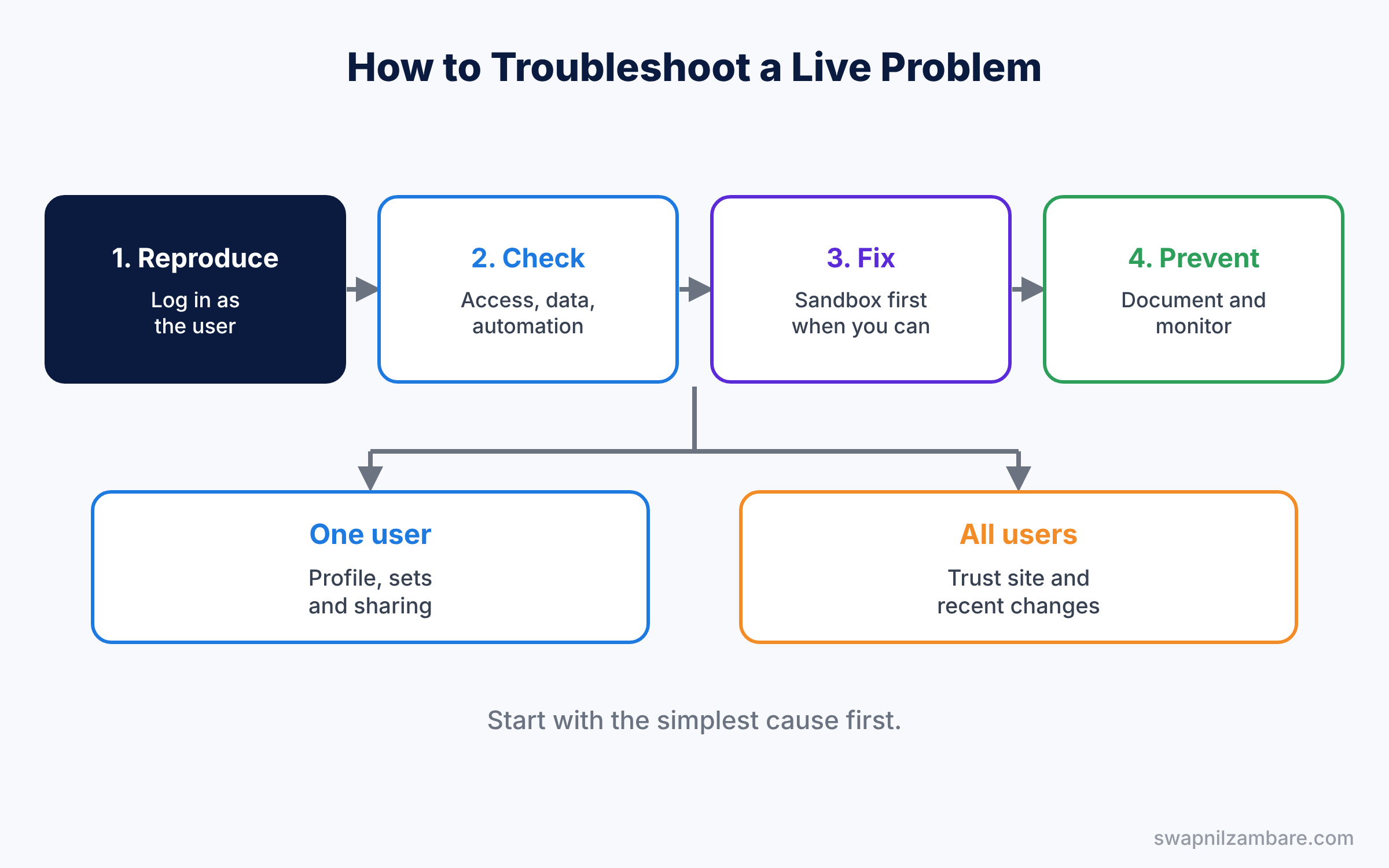
Answer every scenario in four short steps. First, repeat the problem in your own words. Next, say what you would check. Then name the exact feature or setting you would use, and say why. Finally, explain how you would test the fix with a real user.
Troubleshooting Scenario Interview Questions on Access Problems
Study with Profiles and Permission Sets.
- A new sales rep cannot see any accounts on day one. What do you check, in order?
- A user can see a record but gets “Insufficient Privileges” when they edit it. Why?
- After a role change, a manager lost access to their old team deals. What happened?
- A field is visible on one record type but not another for the same user. What do you check?
- A user sees a button on desktop but not on mobile. Why?
- Everyone in support lost access to a tab this morning. What do you look at first?
- A user can open a report but sees no rows. What could cause it?
- A permission set was assigned, but the user still cannot see the object. What do you check?
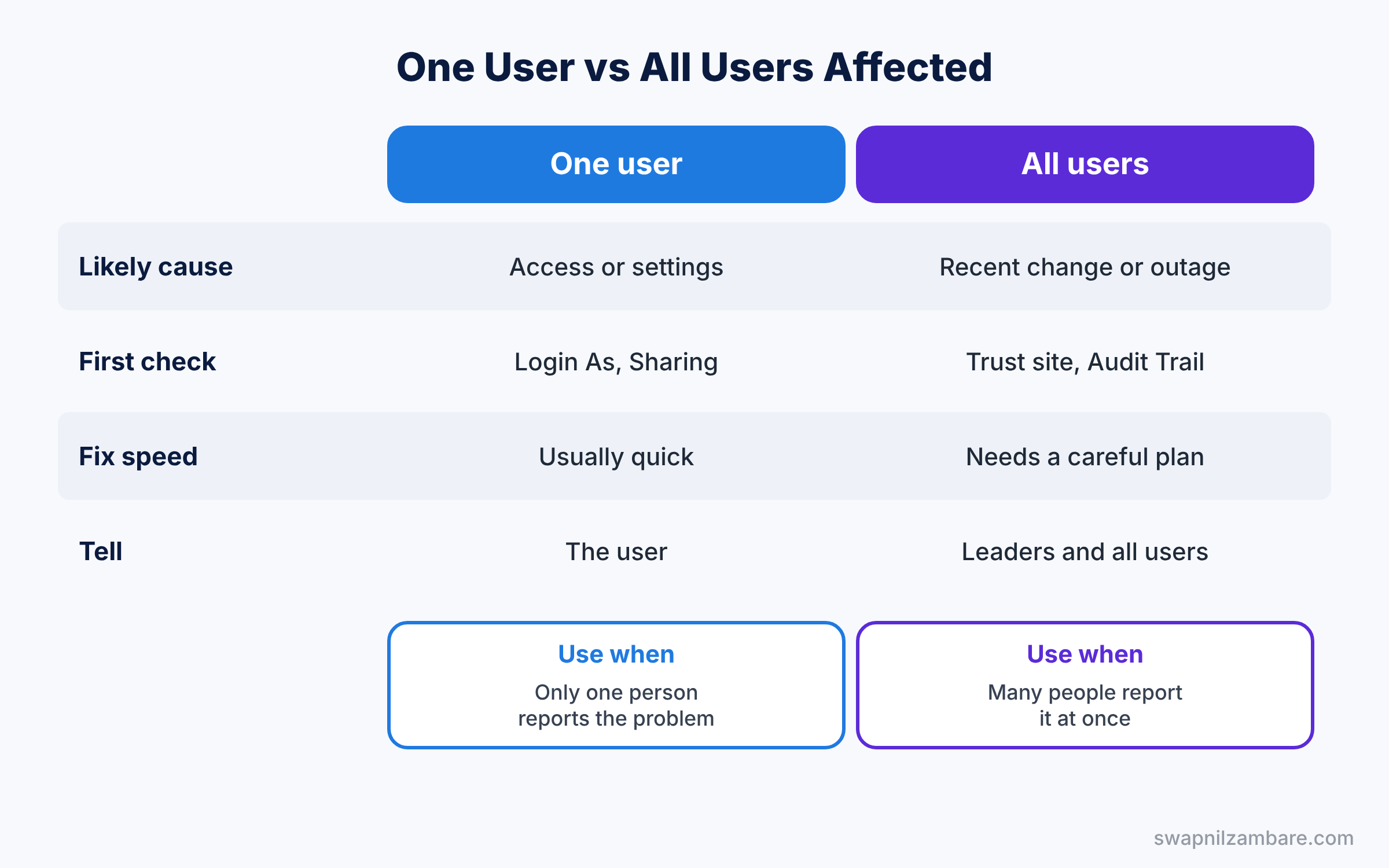
A good answer checks access in a fixed order: profile, permission sets, field-level security, OWD and sharing. Then use the Sharing button or Login As to prove the cause.
Login Problems Scenarios
Study with Org Security and MFA.
- A user is locked out ten minutes before a client meeting. What do you do?
- A user can log in from home but not from the office. What do you check?
- A new user never got the welcome email. How do you help them log in?
- After an SSO change, half the company cannot log in. What is your first step?
- A user lost their phone with the MFA app. How do you help safely?
- Login history shows logins from another country at night. What do you do?
- A user says “the page keeps logging me out”. What do you check?
Interviewers want calm steps: check Login History for the exact error, fix the cause and confirm the user can log in. For security events, say who you would inform.
Troubleshooting Scenario Interview Questions on Email Problems
Study with Email Templates and Alerts.
- Customers stopped getting case reply emails this morning. What do you check?
- Emails work in production but not in the new sandbox. Why?
- An email alert fires twice for the same record. How do you find the cause?
- Merge fields show blank in an email template. What do you check?
- Emails from Salesforce go to customer spam folders. What can you do?
- A user cannot send email from Salesforce at all. What do you check?
- The org hit the daily email limit. What do you change?
Name the email deliverability setting, the email log and the automation that sends the email. A strong answer also covers SPF and DKIM at a high level.
Data Problems Scenarios
Study with Data Loader and Import Wizard.
- A data load failed on 400 of 10,000 rows. How do you fix and reload only those rows?
- A field keeps changing back to an old value after users save. How do you find what changes it?
- Hundreds of accounts were deleted by mistake an hour ago. What do you do?
- Duplicate contacts appear every day. How do you find where they come from?
- A roll-up summary shows the wrong total. What do you check?
- Reports show different numbers from the same data. How do you find the cause?
- An import created records under the wrong owner. How do you fix it fast?
- A required field is blank on old records and blocks every edit. What do you do?
A good data answer finds the source first, such as a flow, an integration or a user. Then fix the data safely, with a backup, and stop it from happening again.
Troubleshooting Scenario Interview Questions on Automation Problems
Study with Fault Paths.
- Users see “An unhandled fault has occurred in this flow”. What do you do?
- A flow works for admins but fails for sales users. Why?
- Two automations update the same field and fight each other. How do you find them?
- A scheduled flow did not run last night. What do you check?
- An approval request went to the wrong approver. What do you check?
- A record save hits a CPU time limit error. What could cause it?
- Users get a validation error they cannot understand. How do you fix it?
- A flow change was deployed, but the old version still runs. Why?
Interviewers want to hear about the flow error email, debug runs and debug logs. Then say how you would fix the flow and add a fault path for the future.
Performance and Org-Wide Problems Scenarios
Study with Lightning Page Performance.
- The whole org feels slow on Monday morning. What do you check first?
- One record page takes 12 seconds to load. How do you speed it up?
- A report times out every time a manager runs it. What do you change?
- List views take a long time to load for one team. Why?
- Users report errors right after a Salesforce release. What do you check?
- A dashboard refresh fails during the leadership meeting. What do you do now, and later?
- Many problems start after a deployment on Friday. How do you find which change caused them?
A good answer checks the Trust site for platform issues first, then recent changes in the Setup Audit Trail. After that, measure, fix one thing and measure again.
Troubleshooting Scenario Interview Questions FAQ
How do I answer when I do not know the cause?
Say the steps you would take to find it. Interviewers care more about your method than a quick guess.
Which tool should I mention most?
Login As, the Sharing button, debug logs and the Setup Audit Trail cover most problems.
Official Resources
Quick Recap
- These Troubleshooting Scenario Interview Questions cover access, login, email, data, automation and speed.
- Always reproduce the problem before you fix it.
- Check access in a fixed order and prove the cause.
- Look at recent changes when many users are affected.
- Next, practise real project scenarios.
What’s Next?
Continue with the next set of scenarios. Read Project Scenario Interview Questions: Real Salesforce Admin Work.