Salesforce Troubleshooting Interview Questions check how you find and fix problems when users say “it does not work”. This is Part 18 of our 25-part series, with questions on access, login, email, reports, automation errors and debug tools.
Troubleshooting builds on Part 5 on security and Part 17 on flows. Our debug logs guide and field history and audit trail guide show the main tools.
How to Use These Salesforce Troubleshooting Interview Questions
Interviewers want a calm, step-by-step method. So for each question, say what you check first, second and third. Start with the simplest cause, such as a missing permission, before you look at complex ones. Then say how you would stop the problem from coming back.
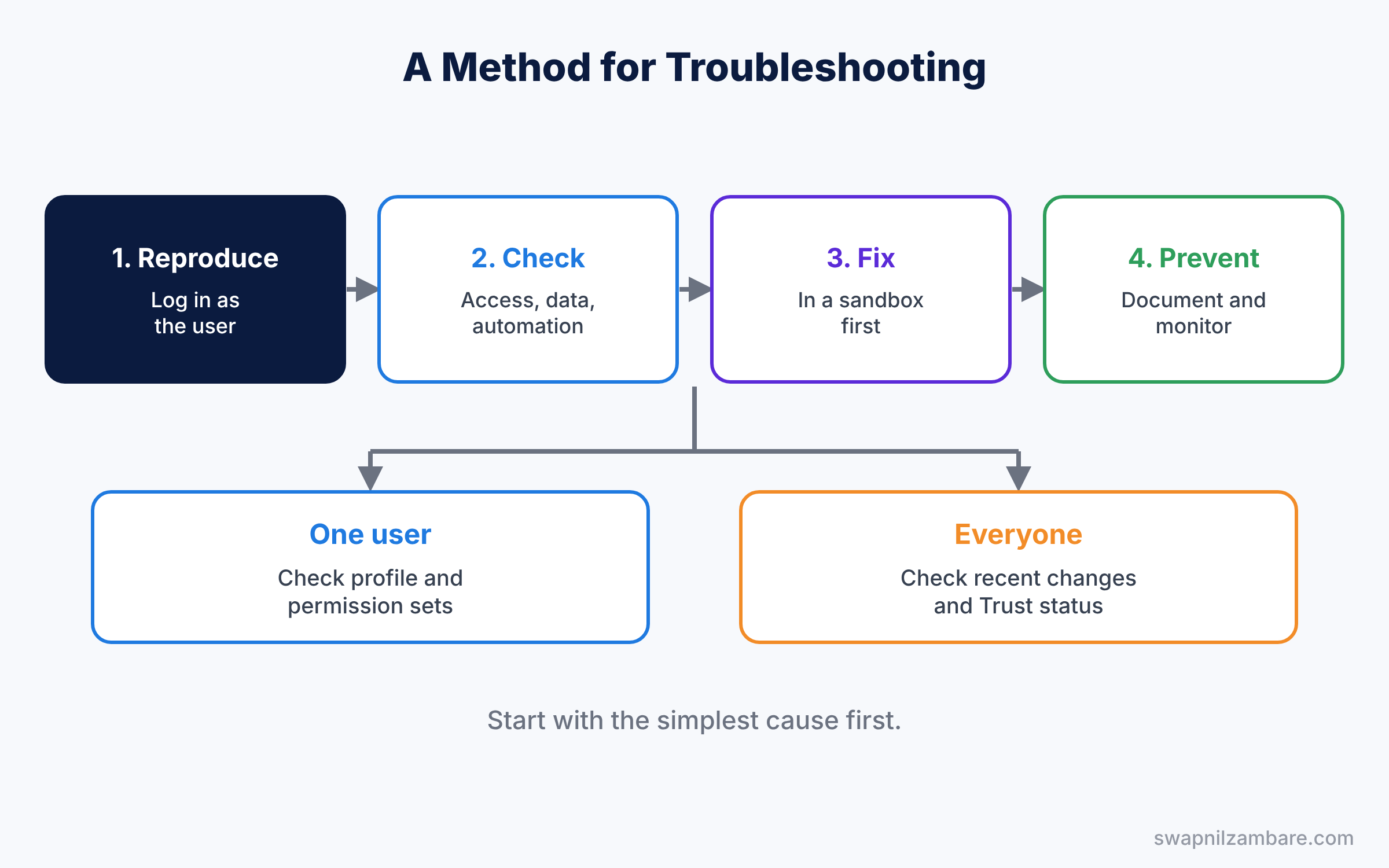
Salesforce Troubleshooting Interview Questions on A Method for Troubleshooting
- What steps do you follow when a user reports a problem?
- Why should you try to reproduce the problem first?
- What is the “Log in as” feature?
- How do you get login access to a user account?
- What questions do you ask the user first?
- How do you know if a problem affects one user or everyone?
- Why should you check recent changes in the Setup Audit Trail?
- How do you write up a fix so others can learn from it?
- Why should you test a fix in a sandbox first?
- How do you tell a user that a problem is fixed?
- What is a known issue, and where do you check it?
- Scenario: three users report the same error at the same time. Where do you start?
- Scenario: a user says “Salesforce is broken” with no details. What do you do?
Record and Field Access Questions
Study with Sharing Rules, Roles and OWD.
- A user cannot see a record. What do you check, in order?
- What does the Sharing button on a record show?
- Define the “View Sharing Hierarchy” option.
- A user cannot see a field. What do you check?
- A user cannot edit a record they can see. Why?
- A user cannot see a tab. What do you check?
- A user cannot see a button or action. What do you check?
- A user cannot see a related list. Why?
- Why can a manager see a record that the owner cannot share?
- What is the user access summary, at a high level?
- Why might a user see a record in a report but not open it?
- Why does a user get “Insufficient Privileges” on a record?
- How do you check if a permission set group mutes a permission?
- Scenario: a sales rep lost access to her accounts after a role change. What happened?
- Scenario: a field shows on the layout for some users only. What do you check?
Salesforce Troubleshooting Interview Questions on Login Problems
Study with Org Security and MFA.
- How do you check why a login failed?
- What is login history?
- What do you do when a user is locked out?
- Explain the difference between freezing and deactivating a user.
- How do you reset a password for a user?
- What are login IP ranges, and how can they block a user?
- What are login hours?
- Why might MFA stop a user from logging in?
- What happens if a user loses their MFA device?
- Why might single sign-on fail?
- How do you see the login IP of a failed login?
- What does “Login restricted by IP” mean?
- What do you check if a user never received a welcome email?
- Scenario: a user can log in from the office but not from home. What do you check?
- Scenario: a whole team cannot log in after an SSO change. What do you do first?
Email Problems Questions
Study with Email Templates and Alerts.
- Emails from Salesforce are not arriving. What do you check?
- What is the email deliverability setting?
- Why are emails from a sandbox not sent?
- What is the email log, and how do you request it?
- What are bounced emails?
- Why might emails go to spam?
- What are SPF and DKIM, at a high level?
- Why might an email alert not fire?
- Why might an email template show blank merge fields?
- How do you check the daily email limit?
- Why might an email template show the wrong language?
- Scenario: customers say they never get the case reply email. How do you find out why?
- Scenario: an email alert works for one record type but not another. What do you check?
Salesforce Troubleshooting Interview Questions on Report and Dashboard Problems
Study with Reports and Dashboards.
- A report shows no data. What do you check?
- Why might two users see different numbers in the same report?
- Why does a dashboard show old data?
- Briefly, why can a user not see a report folder?
- Why is a field missing from a report type?
- Why might a report time out?
- Briefly, why might a dashboard component show an error?
- Why do totals look wrong in a summary report?
- Why might a report filter remove records you expect?
- Briefly, why is a currency total different in a report and on a dashboard?
- How do you check who last changed a report?
- Scenario: a manager says the pipeline report is wrong. How do you check it?
- Scenario: a dynamic dashboard shows each user nothing. What happened?
Automation and Data Errors Questions
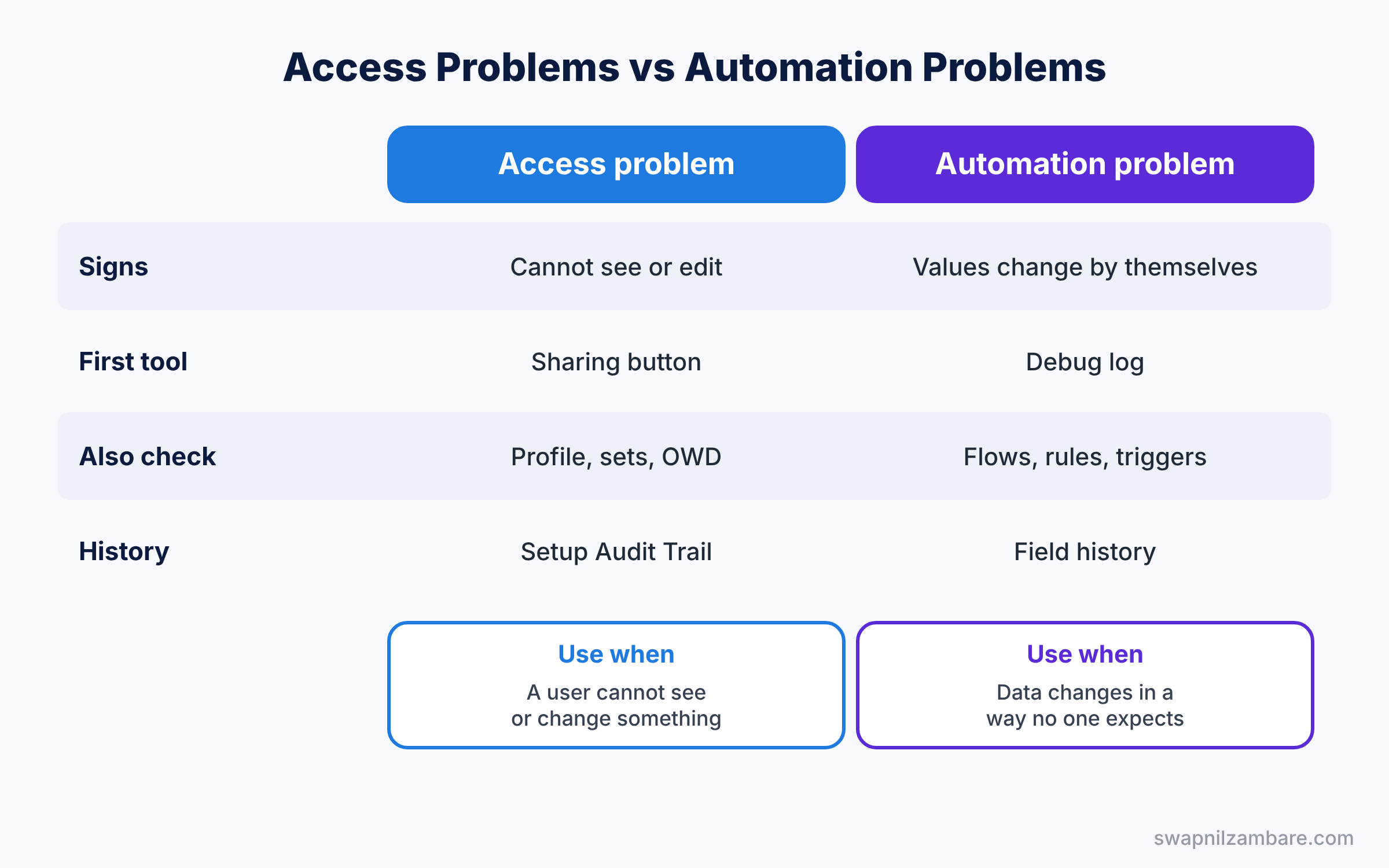
Study with Debug Logs.
- What is a debug log?
- How do you set a debug log for a user?
- What is a trace flag?
- How do you find which automation changed a field?
- Why might a validation rule block a data load?
- What does “FIELD_CUSTOM_VALIDATION_EXCEPTION” mean?
- What does “UNABLE_TO_LOCK_ROW” mean, at a high level?
- Briefly, what does “Too many SOQL queries” mean?
- How do you see who changed a record?
- What is the Setup Audit Trail used for in troubleshooting?
- How do you read a debug log for a flow?
- What does “Required fields are missing” mean during a load?
- What does “DUPLICATES_DETECTED” mean?
- Briefly, what is the Apex jobs page, and when do you check it?
- Scenario: a field keeps changing back after a user saves. How do you find the cause?
- Scenario: a data import fails on 300 rows. What do you do?
Salesforce Troubleshooting Interview Questions on Performance Problems
Study with Lightning Page Performance.
- Why might a record page load slowly?
- What is Lightning Page Analysis?
- How do too many components slow a page?
- Why might list views be slow?
- How do browser and network issues affect Salesforce speed?
- What is the Salesforce Trust site, and when do you check it?
- How do you check the browser version a user has?
- How can too many fields on a page layout slow it down?
- Scenario: the whole org feels slow this morning. What do you check first?
- Scenario: one record page takes 10 seconds to load. How do you fix it?
Salesforce Troubleshooting Interview Questions FAQ
How do I answer troubleshooting questions well?
Give a clear order of checks, start with simple causes, and end with how you would prevent the issue.
Which troubleshooting question is asked most?
“A user cannot see a record” is asked in almost every admin interview.
Official Resources
- Freeze or Unfreeze Users (Salesforce Help)
- Field History Tracking (Salesforce Help)
- Salesforce Platform Administrator Credential (Trailhead)
Quick Recap
- These Salesforce Troubleshooting Interview Questions cover access, login, email, reports, automation and speed.
- Always reproduce the problem before you fix it.
- Check profile, permission sets and sharing in a fixed order.
- Use debug logs and the Setup Audit Trail to find hidden causes.
- Next, learn the business side of the admin role.
What’s Next?
Continue with the next part. Read Business Analysis Interview Questions for Salesforce Admins (Part 19).