
Apex Collections Interview Questions test how well you use List, Set and Map, the three tools behind every bulk-safe trigger and class. Interviewers love them because good collection use shows you understand governor limits. If you can explain why a Map beats a nested loop, you are already ahead of many candidates.
Last reviewed for the Winter ’27 release (November 2026).
This is Part 3 of our Salesforce developer interview series. It covers collection questions from basic definitions to real trigger scenarios, each with a short answer. It builds on Apex collections: List, Set and Map, Apex loops and Apex Basics Interview Questions.
What are Apex Collections Interview Questions?
Apex Collections Interview Questions focus on List, Set and Map: how they store data, which methods they offer and when to use each. They also cover sObject maps, sorting and common errors. So they test practical, everyday coding skill.
Think of a school office. A list is the attendance sheet in order, a set is the list of unique clubs, and a map is the locker register that links each roll number to a locker. Each tool answers a different question quickly.
Why Apex Collections Interview Questions Matter
Collections are the heart of bulk-safe code. Here is why Apex Collections Interview Questions matter.
- First, triggers receive up to 200 records, so you must handle lists.
- Also, Sets remove duplicate Ids before a query.
- Next, Maps replace nested loops and save CPU time.
- Many coding rounds start with a collection task.
- Finally, collection errors are among the most common runtime bugs.
So knowing collections well improves both your code and your interview score.
How to Prepare for Apex Collections Interview Questions
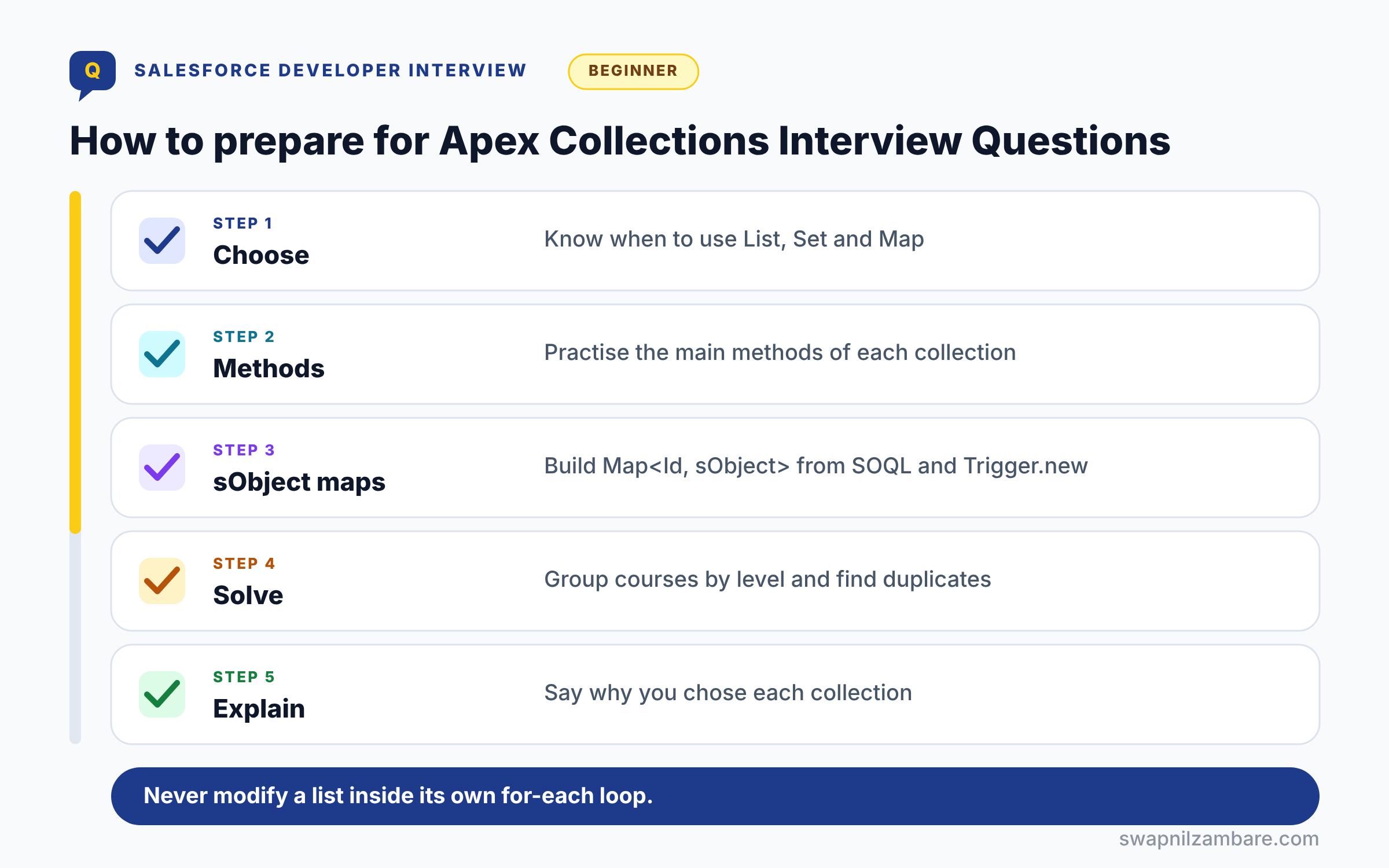
Preparing for Apex Collections Interview Questions follows five steps. First, learn when to use List, Set and Map. Next, practise the main methods of each in Anonymous Apex. Then build Map<Id, sObject> from a SOQL query and from Trigger.new. After that, solve two small problems, such as grouping courses by level. Finally, explain your choice of collection aloud for each problem.
Collection Methods at a Glance
The table below lists the methods interviewers ask about most.
| Collection | Common methods | Returns null for missing? |
|---|---|---|
| List | add, get, set, remove, size, contains, sort | No, throws index error |
| Set | add, contains, remove, addAll, retainAll | Not applicable |
| Map | put, get, containsKey, keySet, values | Yes, get returns null |
List vs Set vs Map
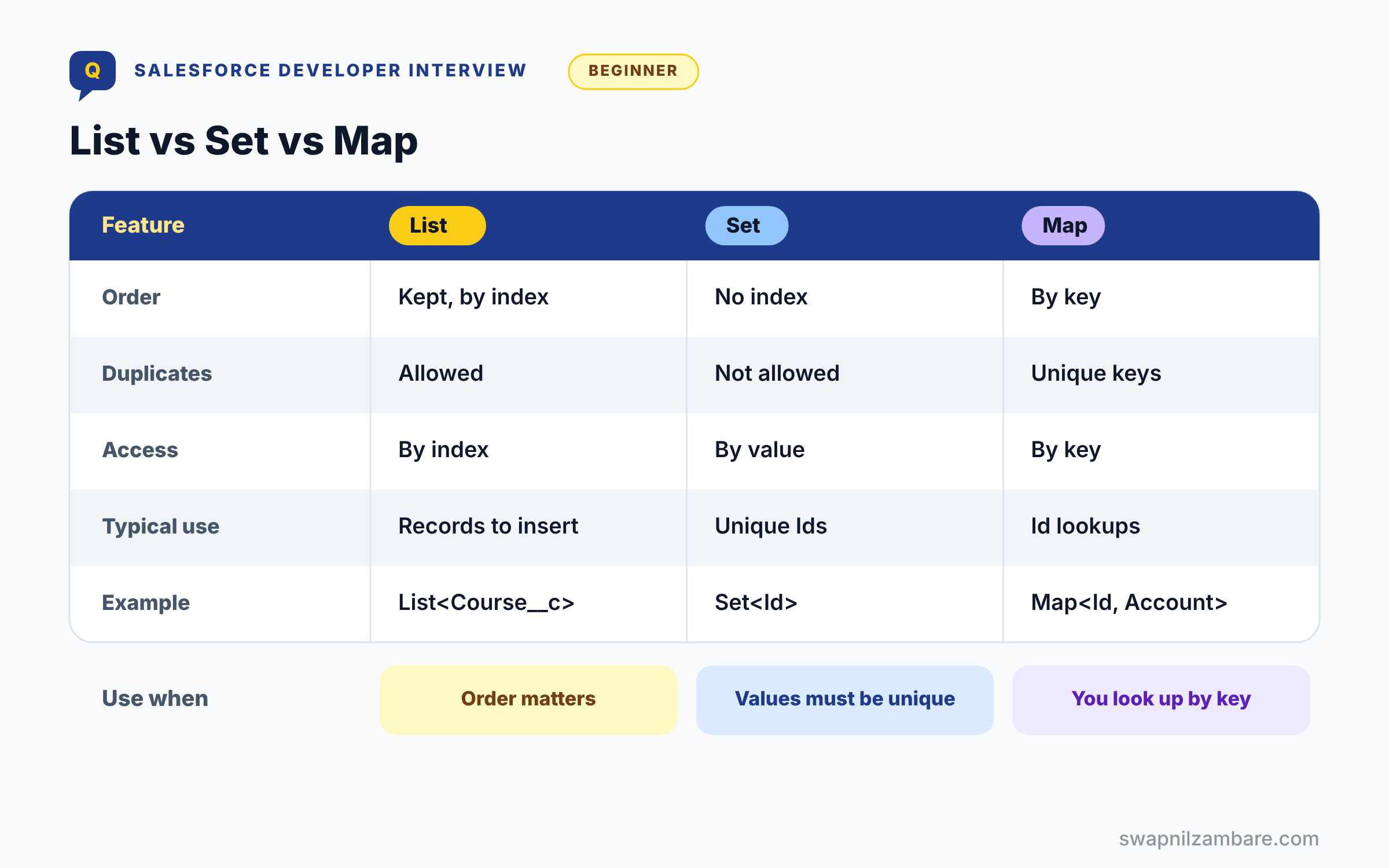
The table below compares the three collection types.
| Feature | List | Set | Map |
|---|---|---|---|
| Order | Kept, by index | Not by index | By key |
| Duplicates | Allowed | Not allowed | Unique keys only |
| Access | By index | By value | By key |
| Typical use | Records to insert | Unique Ids | Id to record lookups |
| Example | List<Course__c> | Set<Id> | Map<Id, Account> |
When to use which is a classic question. Use a List for ordered data, a Set for unique values and a Map for fast lookups by key.
Basic Apex Collections Interview Questions
These Apex Collections Interview Questions cover the definitions every fresher needs.
Questions on Lists
Q1: What is a List in Apex?
A List is an ordered collection that allows duplicates. So you access items by index, starting at 0.
Follow-up you may get: Can a List hold mixed types? Only a List<Object>, and you must cast items when reading.
Q2: How do you create a List?
Use List<String> names = new List<String>(); or a literal such as new List<String>{ ‘Apex’, ‘SOQL’ }. Both work.
Interview tip: mention that you can also write a List literal with values in braces. It shows you write real code.
Q3: Is String[] the same as List<String>?
Yes. String[] is array notation, and it creates a normal List<String> behind the scenes.
So String[] names = new String[]{‘Asha’, ‘Ravi’}; supports add(), size() and every other List method. Use whichever style your team prefers, but stay consistent.
Q4: How do you add and read items?
Use add() to append and get(index) or list[index] to read. Also, size() returns the count.
Q5: What happens if you read an index that does not exist?
Apex throws a System.ListException: List index out of bounds.
Indexes start at 0, so a list of 3 items has indexes 0, 1 and 2. Check size() before reading, or use a for each loop so you never read past the end.
Q6: How do you check if a List is empty?
Use isEmpty(), or size() == 0. First make sure the list itself is not null.
Calling isEmpty() on a null list throws a NullPointerException. The safe pattern is if (courses != null && !courses.isEmpty()), or initialise lists when you declare them so they are never null.
Q7: How do you remove an item?
Use remove(index). It returns the removed item, and the items after it move one place left.
Because later items shift, removing inside a forward loop skips items. Loop backwards, or build a new list of the items you want to keep.
Q8: What is the difference between a List and an array in Apex?
There is none in practice. Array syntax like Account[] is another way to write List<Account>, and both have the same methods. Arrays in Apex can grow, unlike in Java.
Q9: How do you sort a List?
Call sort(), which sorts primitives in ascending order. For custom order, use a Comparator or Comparable.
Follow-up you may get: Can you sort sObjects with sort()? Yes, by a default order, but use a Comparator for a specific field.
Questions on Sets
Q10: What is a Set?
A collection of unique values. Adding a value that is already there does nothing.
Sets are ideal for record IDs you want to query, because each ID appears once.
Example: Set<Id> accIds = new Set<Id>(); then accIds.add(c.AccountId) for each contact, and duplicates are dropped for you.
Q11: Does a Set keep order?
It has no index, so you cannot get items by position. Also, do not rely on any particular order.
Interview tip: say “no index, no guaranteed order”. Interviewers often follow up by asking how to sort one: copy it into a List.
Q12: How do you check if a value exists in a Set?
Use contains(value). It stays fast even for very large sets.
A Set uses hashing, so it finds a value directly instead of checking every item like a List does. That is why Sets suit lookups inside loops.
Q13: Is Set<String> contains() case-sensitive?
Yes, so ‘Apex’ and ‘apex’ are different values. Lower-case values first if you need case-insensitive checks.
Q14: How do you remove duplicates from a List?
Create a Set from it, such as new Set<Id>(idList). Then convert back if you need a list.
Interview tip: add the one line fix: new List<Id>(new Set<Id>(idList)).
Q15: Can a Set hold null?
Yes, a Set can hold one null value. Be careful when building ID sets from lookups, because a blank lookup adds null. Remove it with ids.remove(null) before using the set in a query.
Q16: What are union, intersection and difference in Sets?
addAll() gives the union, retainAll() keeps only common items, and removeAll() removes items. So set maths is simple.
Follow-up you may get: Do these methods change the original set? Yes, they change the set you call them on.
Questions on Maps
Q17: What is a Map?
A Map stores key and value pairs with unique keys. For example, Map<Id, Account> links each Id to its record.
Q18: What does map.get() return for a missing key?
It returns null, not an error.
So either check containsKey() first or handle the null. The common Map methods are worth knowing together:
| Method | What it does | Example |
|---|---|---|
| put(key, value) | Adds or replaces a value | m.put(acc.Id, acc) |
| get(key) | Returns the value or null | m.get(accId) |
| containsKey(key) | True if the key exists | m.containsKey(accId) |
| keySet() | Set of all keys | for (Id id : m.keySet()) |
| values() | List of all values | update m.values(); |
Q19: What happens if you put a key that already exists?
The new value replaces the old one, so keys stay unique.
This is handy for keeping the latest record per key, but it can also hide data by accident. If you need every value, use a Map of lists, like Map<Id, List<Contact>>.
Q20: How do you get all keys and all values?
Use keySet() for a Set of keys and values() for a List of values. Both are common in triggers.
Follow-up you may get: Is the keySet() in any order? No, so sort a copy if order matters.
Q21: Are String keys in a Map case-sensitive?
Yes. ‘Apex’ and ‘apex’ are different keys.
When keys come from users or files, normalise them first, for example with toLowerCase(), so the same email typed in two ways maps to one entry.
Q22: Is a Map’s key order guaranteed?
No. Apex does not promise any order for keys, even though it often looks like insertion order. If you need an order, copy the keys into a List and sort it.
Q23: Can a Map key be an sObject?
Yes, but avoid it, because changing a field changes the key’s hash. Use Ids as keys instead.
Interview tip: the reason (the key’s hash changes) is what they want. Just saying “avoid it” is half an answer.
Intermediate Apex Collections Interview Questions
These Apex Collections Interview Questions focus on sObjects and bulk patterns.
Questions on sObject Collections
Q24: How do you build a Map from a SOQL query?
Pass the query to the constructor, such as new Map<Id, Account>([SELECT Id, Name FROM Account]). So records are keyed by Id at once.
Q25: What are Trigger.newMap and Trigger.oldMap?
They are Maps of record Id to the new and old versions. So you compare values in update triggers.
Q26: Why is Trigger.newMap null in before insert?
Because records have no IDs before they are saved, so there is nothing to use as the map’s key.
In before insert, use Trigger.new, which is a list. Trigger.newMap is available in after insert, and in before and after update.
Q27: How do you collect parent Ids from child records?
Loop through the children and add each lookup Id to a Set. Then run one query with IN :idSet.
Q28: How do you group child records by parent?
Use Map<Id, List<Child>>, adding each child to its parent’s list. This pattern appears in many coding rounds.
Interview tip: write the containsKey check out loud. It is the line most candidates forget.
Q29: What does List.contains() do for sObjects?
It checks whether an equal record exists in the list. However, sObject equality compares field values, so it can surprise you.
Q30: How does a Set of sObjects decide uniqueness?
It compares field values, not just Ids. So two copies with different fields count as different.
Q31: How do you convert a Map’s values to a List for DML?
values() already returns a List, so you can write update accountMap.values(); directly. It is a common way to update records you changed while looking them up.
Q32: What is the difference between clone() and deepClone()?
clone() copies the list but shares the same records, while deepClone() copies the records too. Use deepClone for independent copies.
Follow-up you may get: What does deepClone(true) keep? The record IDs. Without it, clones have no ID.
Questions on Iteration and Errors
Q33: Can you remove items from a List inside a for-each loop?
No, Apex throws “Cannot modify a collection while it is being iterated”. Instead, loop with an index backwards or build a new list.
Interview tip: give both fixes, backwards loop and new list. Interviewers like the new list version because it is easier to read.
Q34: How do you iterate over a Map?
Loop over keySet() and call get(key), or loop over values(). So choose based on whether you need the key.
Q35: What happens if you loop over a null List?
Apex throws a NullPointerException.
A declared list with no value is null, not empty. Write List<Course__c> courses = new List<Course__c>(); so a loop over it simply does nothing.
Q36: How do you add one list to another?
Use addAll(otherList). It adds every item to the end, in order.
addAll also works on Sets, where it gives you the union and skips duplicates.
Q37: How do you find the position of an item?
Use indexOf(value). It returns the position, or -1 if the item is not in the list.
| List method | What it does |
|---|---|
| add(item) | Adds to the end |
| addAll(list) | Adds every item from another list |
| get(i) or list[i] | Reads by index |
| indexOf(item) | Position, or -1 |
| remove(i) | Removes and returns the item |
| contains(item) | True if present |
| sort() | Sorts in ascending order |
Q38: Can you change a Map while looping over its keySet()?
You can update values for existing keys, but adding or removing keys while looping throws an error. Collect the keys to remove in a Set, then remove them after the loop.
Q39: How do you join List items into one String?
Use String.join(list, ‘, ‘). So you can build readable messages quickly.
Example: String.join(new List<String>{‘Apex’, ‘SOQL’, ‘LWC’}, ‘, ‘) gives ‘Apex, SOQL, LWC’, which is handy for error messages.
Questions on Sorting and Nesting
Q40: How do you sort sObjects by a custom field?
Implement the Comparator interface and call list.sort(new MyComparator()). Older code uses a wrapper class with Comparable.
Q41: What is the Comparable interface?
It has one method, compareTo(), that returns negative, zero or positive. Then sort() uses it on your wrapper objects.
Follow-up you may get: Comparator or Comparable today? Comparator, because you can sort the same list in different ways.
Q42: Can collections be nested?
Yes, for example Map<Id, List<Course__c>> or List<List<String>>. So complex groupings are possible.
Q43: What does List<List<sObject>> come from?
A SOSL search. It returns one inner list per object in the RETURNING clause.
Example: List<List<sObject>> results = [FIND ‘Pune’ IN ALL FIELDS RETURNING Account(Name), Contact(Name)]; then (List<Account>) results[0] gives the accounts.
Q44: How do you sort a Set?
Sets have no order, so copy it into a List and sort that: List<String> names = new List<String>(nameSet); names.sort();
Q45: How large can a collection be?
There is no fixed item limit, but the heap size limit applies. So very large collections can fail.
Advanced Apex Collections Interview Questions
These Apex Collections Interview Questions test performance and design.
Questions on Performance
Q46: Why is a Map faster than a nested loop?
A nested loop checks every pair, while a Map finds a key directly. As a result, Maps save a lot of CPU time.
Interview tip: name the CPU time limit, 10 seconds in sync code. It ties the answer to a real risk.
Q47: What is the heap size limit for collections?
It is 6 MB in synchronous Apex and 12 MB in asynchronous Apex. So process large data in batches.
Follow-up you may get: How do you check heap use? Limits.getHeapSize() against Limits.getLimitHeapSize().
Q48: How do you keep heap low with large queries?
Use a SOQL for loop, which returns records in chunks of 200. Also, clear collections you no longer need.
Q49: Why should you query only needed fields?
Because every field you query adds to the heap, the memory your code uses.
Smaller queries mean smaller collections, faster code and less chance of hitting the heap limit. Avoid querying large text fields you do not use.
Q50: Why is list.contains() slower than set.contains() on large data?
A List checks items one by one until it finds a match, so the time grows with its size. A Set uses hashing and finds the value almost at once. Inside loops over thousands of records, use a Set for lookups.
Q51: How do you check if any Id from a list exists in a Set?
Loop through the list and use set.contains(id). It stays fast for large sets.
A faster way for many IDs is to copy the list into a Set and use retainAll() with the other set; whatever remains is the overlap.
Questions on Design
Q52: Why use Set<Id> in a WHERE IN clause?
Because it removes duplicates and binds cleanly, such as WHERE Id IN :accountIds. So the query is smaller.
Q53: How do you update only changed records?
Compare Trigger.newMap with Trigger.oldMap and add changed records to a list. Then run one DML statement.
Interview tip: show the check: if (newRec.Status__c != oldMap.get(newRec.Id).Status__c).
Q54: How do you avoid DML on an empty list?
Check isEmpty() first. Although DML on an empty list does not fail, skipping it keeps code clear.
Q55: Why should keys be Ids rather than names?
Because names can repeat or change, while Ids are unique and stable. So lookups stay correct.
Q56: What is a wrapper class used for with collections?
It combines a record with extra fields, such as a checkbox for selection. Then you keep a List of wrappers.
Q57: How do you return several values from one method?
Return a wrapper class with a field for each value, or a Map<String, Object> for quick cases. A wrapper is clearer and safer, because the fields have types.
Q58: How do you count records per value?
Use Map<String, Integer>, adding 1 each time a value appears. For large data, an aggregate query is better.
Scenario-Based Apex Collections Interview Questions
These Apex Collections Interview Questions are common in live coding rounds.
Questions on Real Tasks
Q59: Get all unique account Ids from a list of contacts.
Loop through contacts and add AccountId to a Set<Id>. Then use the set in one query.
Follow-up you may get: What if some contacts have no account? Skip null AccountIds before adding to the set.
Q60: Group courses by level.
Use Map<String, List<Course__c>>, creating a new list when a level first appears. Then add each course to its level’s list.
Q61: Find duplicate emails in a list of leads.
Use a Set to track seen emails and add repeats to a second Set. So you get the duplicates in one pass.
Interview tip: lower case the emails first. It shows you think about messy real data.
Q62: Update each contact’s mailing city from its account.
Query accounts into a Map by Id, then loop through contacts and copy the city. Finally, update the contacts once.
Q63: Remove inactive courses from a list.
Build a new list with only active courses, or loop backwards and remove by index. So you avoid iteration errors.
Q64: Merge two lists without duplicates.
Add both lists to one Set, then convert it back to a List. Order may change, so sort if needed.
Q65: Count enrolments per course from a list.
Use Map<Id, Integer> and increase the count for each Course__c Id. Then read counts with get().
Q66: Build a map of Account ID to its number of open cases.
Run an aggregate query: SELECT AccountId, COUNT(Id) total FROM Case WHERE IsClosed = false GROUP BY AccountId, then put each ar.get(‘AccountId’) and ar.get(‘total’) into a Map<Id, Integer>. One query, no loops over cases.
Q67: Check which of 500 emails already exist as contacts.
Put the emails in a Set, query contacts WHERE Email IN :emails, and collect found emails in another Set. Then compare.
Interview tip: mention that 500 values in one IN clause is one query. That is the bulk safe answer.
Questions on Harder Collection Tasks
These Apex Collections Interview Questions are a little harder.
Q68: Find the most expensive course in a list.
Loop once and keep the highest Fee__c seen so far.
Example: Course__c top = null; for (Course__c c : courses) { if (top == null || c.Fee__c > top.Fee__c) top = c; } This is faster than sorting the whole list.
Q69: Sort courses by fee descending.
Write a Comparator that compares Fee__c in reverse, then call courses.sort(new FeeDescComparator()).
Follow-up you may get: How does compare() decide the order? Return a negative number to put the first item before the second.
Q70: Split a list of 1,000 records into chunks of 200.
Loop with an index and start a new inner list every 200 items.
Example: List<List<Account>> chunks = new List<List<Account>>(); for (Integer i = 0; i < accs.size(); i++) { if (Math.mod(i, 200) == 0) chunks.add(new List<Account>()); chunks[chunks.size() – 1].add(accs[i]); }
Q71: Find records in list A but not in list B.
Put list B’s IDs in a Set, then keep the records from list A whose IDs are not in that set.
Example: Set<Id> bIds = new Map<Id, Account>(listB).keySet(); then add each record from A where !bIds.contains(a.Id). It is one pass over each list, so it stays fast.
Q72: Why does this fail: Map<Id, Account> m; m.put(a.Id, a);?
Because m was never initialised, so it is null. Write Map<Id, Account> m = new Map<Id, Account>(); first.
Interview tip: name the error, System.NullPointerException: Attempt to de-reference a null object.
Q73: How do you get the first record safely?
Check !list.isEmpty() before reading list[0]. Otherwise, an empty list throws an index error.
Q74: How do you check whether two Sets are equal?
Use ==, which compares the contents, so two sets with the same values are equal whatever order they were added in. Use equals() for the same result in a method call.
Q75: Store course names by level, without duplicates.
Use Map<String, Set<String>>, so each level keeps unique names.
Example: if (!m.containsKey(c.Level__c)) m.put(c.Level__c, new Set<String>()); then m.get(c.Level__c).add(c.Name). The inner Set removes duplicate names for you.
A Real Apex Collections Interview Questions Answer
A very common live task is “group courses by level”. Here is a clean answer.
List<Course__c> courses = [SELECT Id, Name, Level__c FROM Course__c WITH USER_MODE];
Map<String, List<Course__c>> byLevel = new Map<String, List<Course__c>>();

for (Course__c c : courses) {
    if (!byLevel.containsKey(c.Level__c)) {
        byLevel.put(c.Level__c, new List<Course__c>());
    }
    byLevel.get(c.Level__c).add(c);
}

for (String level : byLevel.keySet()) {
    System.debug(level + ': ' + byLevel.get(level).size() + ' courses');
}
Explain that the Map creates a list the first time a level appears. Then every course is added in one pass, with no nested loops.
Here is a sample output.
Beginner: 4 courses
Intermediate: 3 courses
Advanced: 2 courses
Common Mistakes with Apex Collections Interview Questions
- Using nested loops where a Map would work.
- Forgetting to initialise a List or Map before use.
- Removing items inside a for-each loop.
- Using names instead of Ids as keys.
- Forgetting that map.get() can return null.
Best Practices for Answering Apex Collections Interview Questions
- Say why you chose List, Set or Map, not just what it is.
- Always mention bulk safety and governor limits.
- Draw the key and value types before coding a Map.
- Use Set<Id> with WHERE IN for related queries.
- Keep one sample grouping solution ready to write.
Official Resources
Quick Recap
- Apex Collections Interview Questions cover List, Set and Map.
- Lists keep order and duplicates, Sets keep unique values.
- Maps give fast lookups by key, usually Ids.
- Never modify a list inside its own for-each loop.
- Use Map<Id, List<Child>> for grouping tasks.
What’s Next?
Next in the series, practise classes, interfaces and inheritance with our Apex OOP interview questions.


