An Apex Wrapper Class is a small class you write to hold several values together as one object. The classic case is a table where each row needs a record plus a checkbox. SOQL cannot return that checkbox, so you wrap the record and add the field yourself.
This post builds on Apex classes and objects and collections. We will build a course selection screen for Bright Path Tutors.
What is an Apex Wrapper Class?
An Apex Wrapper Class is an ordinary class whose job is to carry data, not to run logic. It usually holds one sObject plus a few extra fields. Many developers write it as an inner class inside the controller that uses it.
Think of a school file. The student record is the form inside, and the folder adds a label, a tick box and a note on the cover. The folder is the wrapper.
Why an Apex Wrapper Class Matters
Screens need more than the database holds. A table may need a Select checkbox, a running total, a status colour or a calculated label. None of those live on the object.
So an Apex Wrapper Class gives the UI exactly the shape it needs, without adding useless fields to your objects. It also keeps your Apex readable, because each value has a proper name.
How an Apex Wrapper Class Works
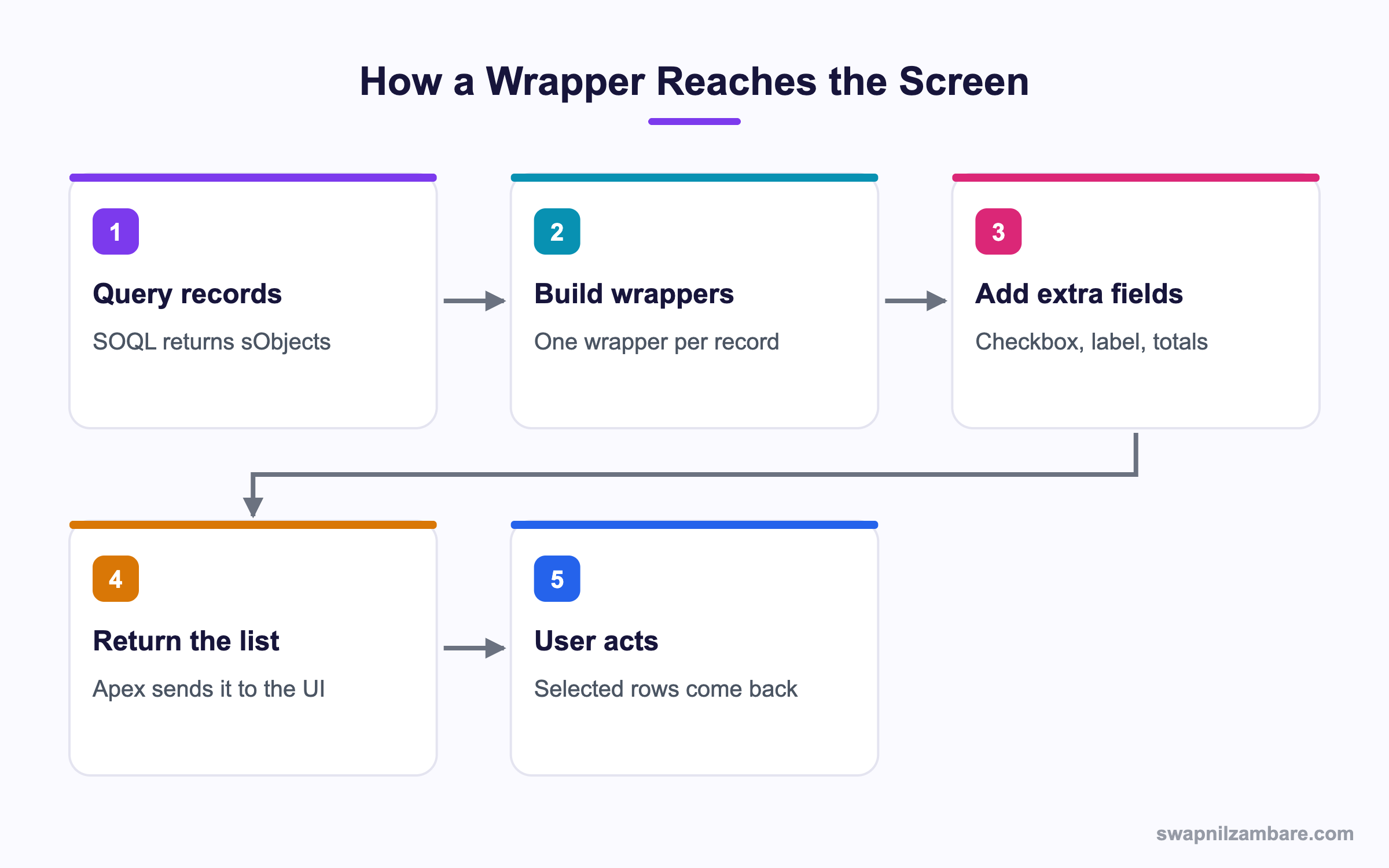
For an Apex Wrapper Class you query the records, loop over them, build one wrapper per record and return the list. The UI then reads both the record fields and your extra fields from the same row.
Writing the Wrapper
Fields must be public, or the UI layer cannot read them.
public class CourseWrapper {
    public Course__c course { get; set; }
    public Boolean selected { get; set; }
    public Decimal discountedFee { get; set; }

    public CourseWrapper(Course__c c, Decimal fee) {
        this.course = c;
        this.selected = false;
        this.discountedFee = fee;
    }
}
The { get; set; } part creates a property, which Visualforce and LWC can both read.
Building the List
public with sharing class CourseController {
    public static List<CourseWrapper> getRows() {
        List<CourseWrapper> rows = new List<CourseWrapper>();
        for (Course__c c : [SELECT Id, Name, Fee__c, Level__c
                            FROM Course__c
                            WHERE Is_Online__c = true
                            ORDER BY Name
                            LIMIT 200]) {
            Decimal fee = c.Fee__c == null ? 0 : c.Fee__c * 0.9;
            rows.add(new CourseWrapper(c, fee));
        }
        return rows;
    }
}
One query runs outside the loop, which keeps the code bulk safe. The discount is worked out per row.
Reading the Selected Rows Back
public static List<Id> chosen(List<CourseWrapper> rows) {
    List<Id> ids = new List<Id>();
    for (CourseWrapper w : rows) {
        if (w.selected == true) { ids.add(w.course.Id); }
    }
    return ids;
}
The debug output for two ticked rows looks like this.
(a01xx0000001AAA, a01xx0000001BBB)Inner Classes
An inner class is a class defined inside another class. An Apex Wrapper Class is often written this way, because they belong to one controller.
public with sharing class EnrolmentController {
    // Inner class, used only here
    public class Row {
        @AuraEnabled public String studentName { get; set; }
        @AuraEnabled public Decimal paid { get; set; }
    }

    @AuraEnabled(cacheable=true)
    public static List<Row> load() {
        List<Row> out = new List<Row>();
        Row r = new Row();
        r.studentName = 'Asha Mehta';
        r.paid = 4500;
        out.add(r);
        return out;
    }
}
For LWC, every field you want in JavaScript needs @AuraEnabled. Without it, the field simply does not arrive.
Inner Class Rules
Apex allows one level of nesting, so you cannot put an inner class inside an inner class. An inner class can be static or not, and outside code refers to it as Outer.Inner.
Apex Wrapper Class Field Checklist
This table shows what to mark on wrapper fields for each use.
| Where it is used | Field needs | Reason |
|---|---|---|
| Visualforce page | public with get set | Page reads properties |
| Lightning Web Component | @AuraEnabled | Data crosses to JavaScript |
| Apex only | public or private | No UI layer involved |
| Sorting a list | Class implements Comparable | compareTo decides order |
| JSON output | public | Serializer reads public members |
Wrapper Class vs Map
Both can carry extra data. This table shows the difference.
| Feature | Wrapper class | Map |
|---|---|---|
| Named fields | Yes | No, only keys |
| Type safety | Strong | Weak, often Object |
| Readability | High | Lower |
| Best for | Table rows | Lookup by key |
| Sorting | Comparable support | Manual |
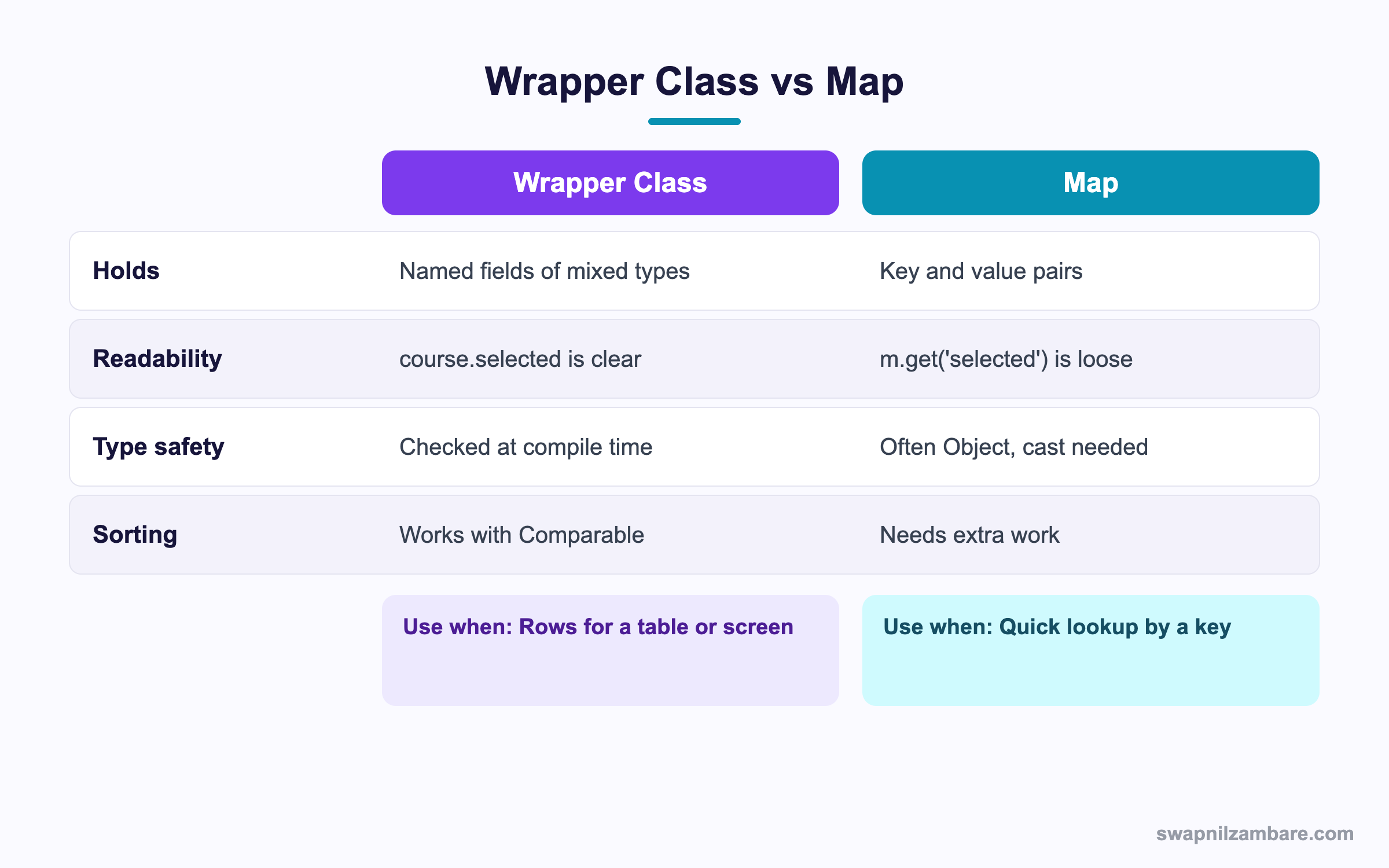
In short, use a wrapper when a row needs several named values. Use a Map when you only need to find something by a key.
A Real Apex Wrapper Class Example
Bright Path wants a screen that lists courses with a checkbox and the fee after discount. Counsellors tick courses and click Enrol.
Step 1: Define the Row
public with sharing class CourseSelector {
    public class CourseRow {
        @AuraEnabled public Id courseId { get; set; }
        @AuraEnabled public String name { get; set; }
        @AuraEnabled public Decimal fee { get; set; }
        @AuraEnabled public Decimal payable { get; set; }
        @AuraEnabled public Boolean selected { get; set; }
    }
Step 2: Fill the Rows
    @AuraEnabled(cacheable=true)
    public static List<CourseRow> listCourses() {
        List<CourseRow> rows = new List<CourseRow>();
        for (Course__c c : [SELECT Id, Name, Fee__c FROM Course__c LIMIT 200]) {
            CourseRow r = new CourseRow();
            r.courseId = c.Id;
            r.name = c.Name;
            r.fee = c.Fee__c;
            r.payable = (c.Fee__c == null) ? 0 : c.Fee__c - 500;
            r.selected = false;
            rows.add(r);
        }
        return rows;
    }
}
Step 3: Check the Output
Running CourseSelector.listCourses() in anonymous Apex and serialising it shows the shape JavaScript receives.
[{"courseId":"a01...","name":"Python Basics","fee":10000,"payable":9500,"selected":false}]These are the fields and why each one exists.
| Field | Source | Why |
|---|---|---|
| courseId | Record | Needed to save later |
| name | Record | Shown in the table |
| fee | Record | Original price |
| payable | Calculated | Not stored on the object |
| selected | UI only | Tracks the checkbox |
Common Mistakes with an Apex Wrapper Class
- Leaving fields private, so the UI shows blanks.
- Forgetting @AuraEnabled, so LWC receives nothing.
- Building wrappers inside a loop that also queries, which hits limits.
- Putting business logic in the wrapper instead of a service class.
- Returning hundreds of wrappers to a page that shows twenty rows.
Best Practices for an Apex Wrapper Class
- Keep wrappers small and name every field clearly.
- Query once, then loop to build rows.
- Mark fields @AuraEnabled only when the UI truly needs them.
- Use an inner class when only one controller uses it.
- Implement Comparable when the list must be sorted.
Practice Task
Write a wrapper called StudentRow with studentName, totalPaid and isOverdue. Fill it from a SOQL query on Enrolment. Hint: mark every field @AuraEnabled if you plan to use it in LWC.
Most Asked Apex Wrapper Class Interview Questions
These Apex Wrapper Class questions are asked in almost every Salesforce developer interview.
Basic Apex Wrapper Class Interview Questions
Q1: What is a wrapper class in Apex?
An Apex Wrapper Class is a custom class that holds several values as one object, usually an sObject plus extra fields.
Q2: Why do you need a wrapper class?
Because SOQL returns only stored fields, an Apex Wrapper Class fills the gap. A wrapper adds things like a checkbox or a calculated total.
Q3: Give a common use case.
A table with a Select checkbox beside each record, so users tick rows and act on them.
Q4: What is an inner class?
It is a class defined inside another class. An Apex Wrapper Class is often written this way.
Q5: How deep can inner classes nest in Apex?
One level only. You cannot define an inner class inside another inner class.
Q6: How do you refer to an inner class from outside?
With the outer name first, like Outer.Inner.
Q7: What must wrapper fields be for Visualforce?
Public, usually as properties with get and set.
Q8: What is needed for LWC?
Each field must be marked @AuraEnabled, or it will not reach JavaScript.
Intermediate Apex Wrapper Class Interview Questions
Q9: Can a wrapper class hold a list?
Yes. A wrapper can hold lists, maps, other wrappers and sObjects together.
Q10: How do you sort a list of wrappers?
Make the wrapper implement Comparable and write compareTo, then call sort on the list.
Q11: Can a wrapper class be used in a Flow?
Yes, if it is an @AuraEnabled inner class returned by an invocable method, or you expose fields as Apex-defined types.
Q12: Does a wrapper class count against SOQL limits?
No. The query counts, not the wrapper. However, building huge lists uses heap.
Q13: Should a wrapper contain business logic?
Keep it light. A small helper method is fine, but real logic belongs in a service class.
Q14: What is the difference between an inner class and a separate class file?
An inner class lives inside one file and is usually used by that class only. A separate class is reusable across the org.
Q15: Can an inner class be static?
Yes. A static inner class does not need an instance of the outer class.
Q16: How does JSON.serialize treat a wrapper?
It writes public members as JSON keys, so the output matches your field names.
Advanced Apex Wrapper Class Interview Questions
Q17: Scenario: a page times out with 5,000 wrapper rows. What do you change?
Page the data with LIMIT and OFFSET or a key-set filter, and return only the fields the table shows.
Q18: How do wrappers help heap limits?
They can hurt if you copy whole records. So keep only the fields you need rather than the full sObject.
Q19: How would you build a wrapper for a parent with children?
Hold the parent sObject and a List of child wrappers inside it, then build both in one or two queries.
Q20: Can a wrapper implement more than one interface?
Yes. A common pair is Comparable for sorting plus a custom interface for your own contract.
Q21: Scenario: LWC shows blank values but Apex debug looks fine. Why?
The fields are probably missing @AuraEnabled, so they are dropped in transit.
Q22: How do you test a wrapper class?
Build instances in the test, call the methods that return them and assert on the field values.
Q23: When is a Map better than a wrapper?
When you only need lookup by key, such as mapping record Id to a total.
Q24: How do wrappers work with Apex-defined types in Flow?
Flow can consume an @AuraEnabled class as an Apex-defined variable, so screens read its fields directly.
Q25: Does an Apex Wrapper Class need a constructor?
No. You can set fields one by one after calling new. However, a constructor keeps the building code short and readable.
Q26: Can an Apex Wrapper Class be reused across controllers?
Yes, if you make it a top-level class instead of an inner class. So choose top-level when two or more controllers need it.
Q27: How do you return an Apex Wrapper Class from a Visualforce controller?
Expose a public getter that returns the list, then loop it with apex:repeat or a pageBlockTable on the page.
Q28: What is the heap cost of wrappers?
Each wrapper holds references to its fields, so a full sObject copy is the expensive part. Therefore select only the columns you show.
Q29: Scenario: the table must show a running total per row. Where do you calculate it?
Work it out while building the wrapper list in Apex. So the UI just displays the number without extra logic.
Official Resources
- Apex Developer Guide: Classes
- Lightning Web Components: Wire Apex Methods
- Apex Developer Guide: Comparable Interface
Quick Recap
- An Apex Wrapper Class packages a record plus extra fields.
- Fields must be public for Visualforce and @AuraEnabled for LWC.
- Inner classes nest one level and suit single-controller use.
- Query once, then build rows in a loop.
- Use Comparable when the list must be sorted.
What’s Next?
Next, we look at Enums in Apex, a clean way to handle a fixed set of values.


