Advanced Admin Interview Questions focus on automation, the area that separates a fresher from an experienced Salesforce Admin. This is Part 2 of our 25-part series, with questions on Flow, the order of execution, approvals and notifications.
In Part 1, we covered basics, users and login security. Flow questions now appear in almost every interview, because Salesforce retired Workflow Rules and Process Builder. For hands-on practice, also see our Flow scenario questions.
How to Use These Advanced Admin Interview Questions
Experienced interviews move quickly from “what is” to “how would you”. So for each question, give a short definition first, then one real example. Build at least one flow of each type in your practice org, and read our Flow Builder guide if any term is new.
Advanced Admin Interview Questions on Automation Basics
Study with Migrate to Flow.
- What automation tools does Salesforce offer today?
- What happened to Workflow Rules and Process Builder?
- Can existing workflow rules still run?
- Why does Salesforce want all automation in Flow?
- When would you use a formula field instead of automation?
- When would you use a validation rule instead of a flow?
- Briefly, when should you ask a developer for Apex instead of a flow?
- How do you migrate a workflow rule to Flow?
- How do you decide which automation to build first?
- What is the difference between automation and integration?
- What tasks should you never automate without approval?
- Scenario: an org has 60 workflow rules and 20 processes. How do you plan the move to Flow?
- Scenario: a manager wants a field to update when another field changes. Which tool do you pick, and why?
Flow Types Questions
Study with Flow Types.
- What types of flows can you build?
- What is a screen flow?
- Define a record-triggered flow.
- What is a schedule-triggered flow?
- What is an autolaunched flow?
- Define a platform event-triggered flow.
- Where can users run a screen flow?
- How do you add a screen flow to a record page?
- How do you start a flow from a button or quick action?
- Can a flow run without any user?
- Can a screen flow run for guest users on a site?
- What is an orchestration, at a high level?
- Scenario: users must fill a short form to create a case and a task together. Which flow type do you use?
- Scenario: every night, expired course offers must be closed. Which flow type do you use?
Advanced Admin Interview Questions on Flow Elements and Resources
Study with Flow Builder.
- What do Get Records, Create Records, Update Records and Delete Records do?
- What is a Decision element?
- Define an Assignment element.
- What is a Loop element?
- Why should you never put Get or Update Records inside a loop?
- What is a variable in Flow?
- What is a collection variable?
- Define a record variable.
- What is a formula resource?
- What is a text template?
- Define a constant.
- What does the Collection Filter element do?
- What does the Transform element do?
- Briefly, what is an Action element, and give two examples?
- What is a Screen element, and what components can it show?
- What is a picklist choice set?
- Define a record choice set.
- What does the Sort Collection element do?
- Scenario: you must update 300 related contacts when an account changes. How do you build it without hitting limits?
- Scenario: a flow should send a different email for each course level. Which elements do you use?
Record-Triggered Flows Questions
Study with Flow Types.
- What are entry conditions, and why do they matter?
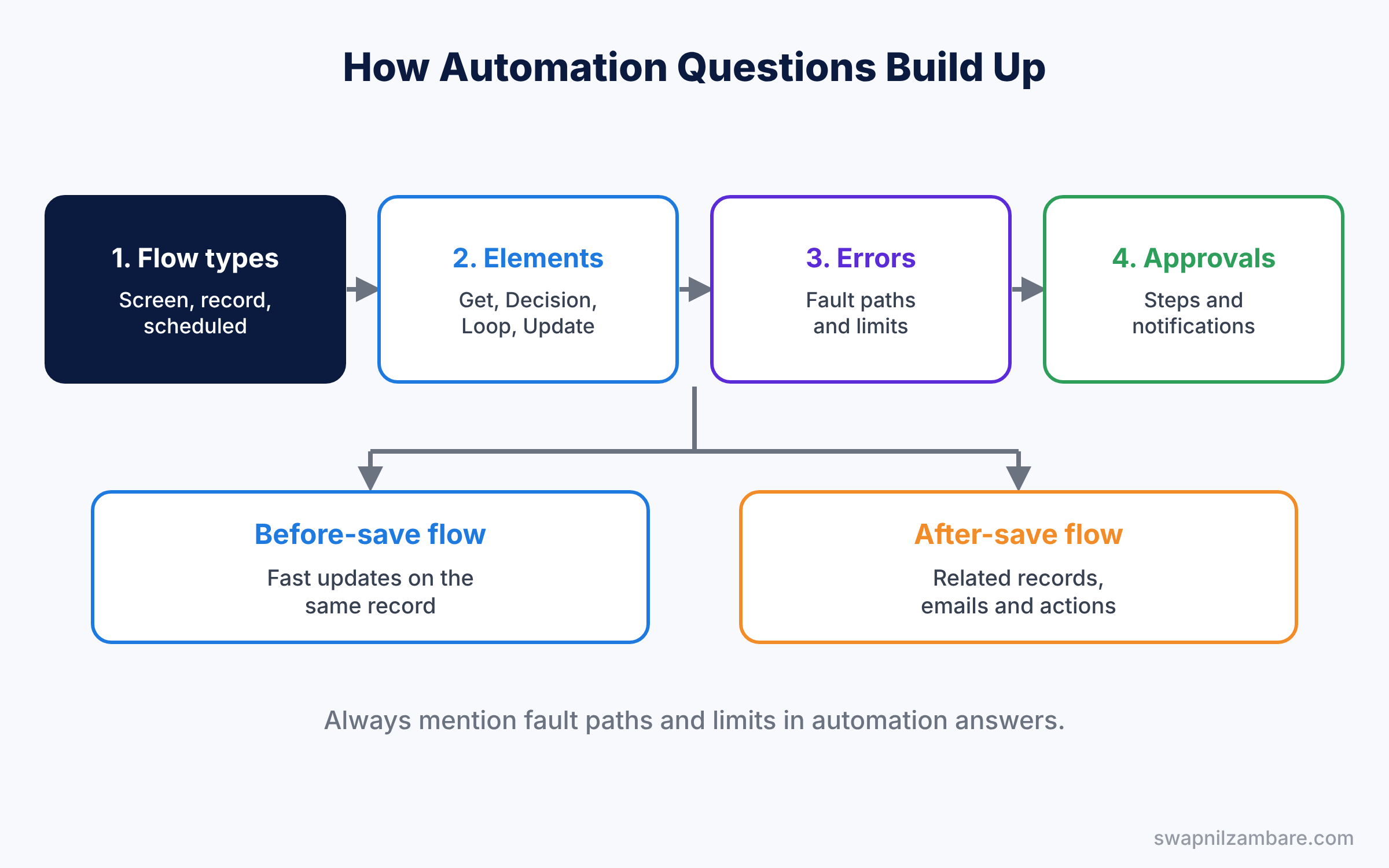
- What is the difference between a before-save and an after-save flow?
- Why are before-save flows faster?
- What can an after-save flow do that a before-save flow cannot?
- What is $Record?
- Define $Record__Prior.
- How do you run a flow only when a field changes?
- What does “Only when a record is updated to meet the condition requirements” mean?
- Can a record-triggered flow run on delete?
- How many record-triggered flows can one object have?
- What is flow trigger order?
- Can a record-triggered flow call a subflow?
- Can a before-save flow send an email?
- How do you stop a flow from running for an integration user?
- Scenario: when a course is set to Online, the Start Date must fill in automatically. Before-save or after-save?
- Scenario: a welcome task must be created for every new contact. Before-save or after-save?
Advanced Admin Interview Questions on Scheduled Paths and Subflows
Study with Advanced Flows.
- What is a scheduled path?
- How is a scheduled path different from a schedule-triggered flow?
- What happens to a scheduled path if the record changes?
- Where do you see paused or waiting flow interviews?
- What is a subflow, and why use one?
- How do you pass values into a subflow?
- What is a flow interview?
- What is a Pause element in a flow?
- Can a scheduled path run before a date, not after?
- What is the time source for a scheduled path?
- How do you test a scheduled path without waiting days?
- Scenario: a follow-up task must be created 30 days after an enrollment starts. How do you build it?
- Scenario: three flows repeat the same ten steps. How do you clean this up?
Errors, Debugging and Limits Questions
Study with Advanced Flows and Debug Logs for Admins.
- What is a fault path?
- Why should every data element in a flow have a fault path?
- What is a Custom Error element?
- How do you debug a flow in Flow Builder?
- What does a flow error email tell you?
- How do you use debug logs for a flow?
- What are governor limits?
- What does “Too many SOQL queries” mean in a flow?
- Briefly, what does bulkification mean for flows?
- How do you test a flow before you activate it?
- How do you roll back to an older flow version?
- What is the difference between a fault path and a Custom Error element?
- What is the “Run as system” option?
- How do you check how many times a flow runs each day?
- Scenario: a flow fails with “Too many SOQL queries” during a data load. What is the likely cause, and how do you fix it?
- Scenario: users see an unclear error from a flow. How do you show a helpful message instead?
Advanced Admin Interview Questions on Order of Execution
Study with Order of Execution.
- What is the order of execution?
- Which runs first: before-save flows or validation rules?
- When do duplicate rules run?
- When do after-save flows run?
- Briefly, when do assignment rules and escalation rules run?
- What happens when automation updates the same record again?
- Why can automation run twice on one save?
- When are emails actually sent during a save?
- Do before-save flows run before or after Apex before triggers?
- When do roll-up summary fields recalculate during a save?
- What is a recursive update, and how do you avoid it?
- Scenario: a validation rule blocks a value that a flow sets. Why, and how do you fix it?
- Scenario: automation runs twice when a user saves. How do you investigate?
Approval Processes Questions
Study with Approval Processes.
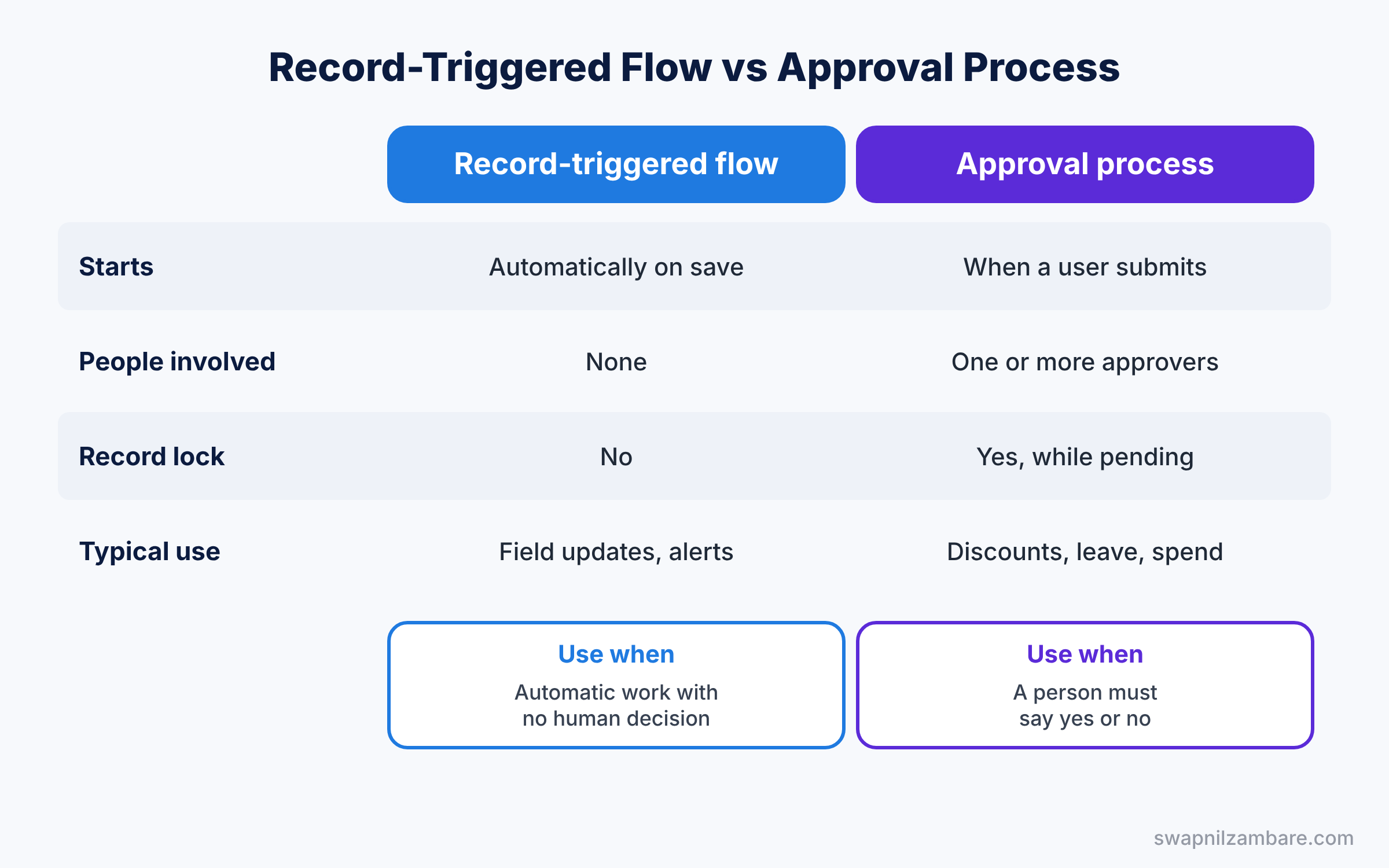
- What is an approval process?
- What are entry criteria in an approval process?
- Define an approval step.
- What are initial submission, approval, rejection and recall actions?
- Can one object have more than one approval process?
- What is record locking during approval?
- Who can edit a locked record?
- Can approvers approve from email or mobile?
- How do you start an approval automatically?
- What is a delegated approver?
- Can approval go to a queue?
- How do you see pending approvals?
- What is a parallel approval step?
- What are approval history and comments?
- Can a flow submit a record for approval?
- Scenario: discounts over 20% need manager approval, and over 40% need director approval too. How do you build it?
- Scenario: an approver is on leave for two weeks. How do you stop approvals from getting stuck?
Advanced Admin Interview Questions on Notifications and Email Alerts
Study with Custom Notifications and Email Templates and Alerts.
- What is an email alert?
- What can send an email alert?
- Define a custom notification.
- Where do users see custom notifications?
- How do you send a custom notification from a flow?
- What is the daily limit on email alerts?
- How do you send an email to a contact from a flow?
- What is a Send Email action?
- How do you post to Chatter or Slack from a flow?
- What is an email template merge field?
- Can a flow send an email with an attachment?
- What is an organization-wide email address?
- How do you stop duplicate notifications?
- Scenario: sales wants a phone alert, not an email, when a big deal closes. What do you build?
- Scenario: emails from a flow stop arriving. What do you check?
Advanced Admin Interview Questions FAQ
Do I still need to know Workflow Rules?
Know why they were retired and how to move them to Flow. Interviewers still ask that.
How deep do Flow questions go?
Freshers get types and elements. Experienced candidates get limits, errors and order of execution, so prepare those well.
Official Resources
Quick Recap
- These Advanced Admin Interview Questions cover Flow, order of execution, approvals and notifications.
- Know the flow types and when to use each one.
- Explain before-save and after-save with an example.
- Always mention fault paths and limits.
- Each section ends with two scenario questions.
What’s Next?
Continue with the next part. Read Data Model Interview Questions for Salesforce Admins (Part 3).