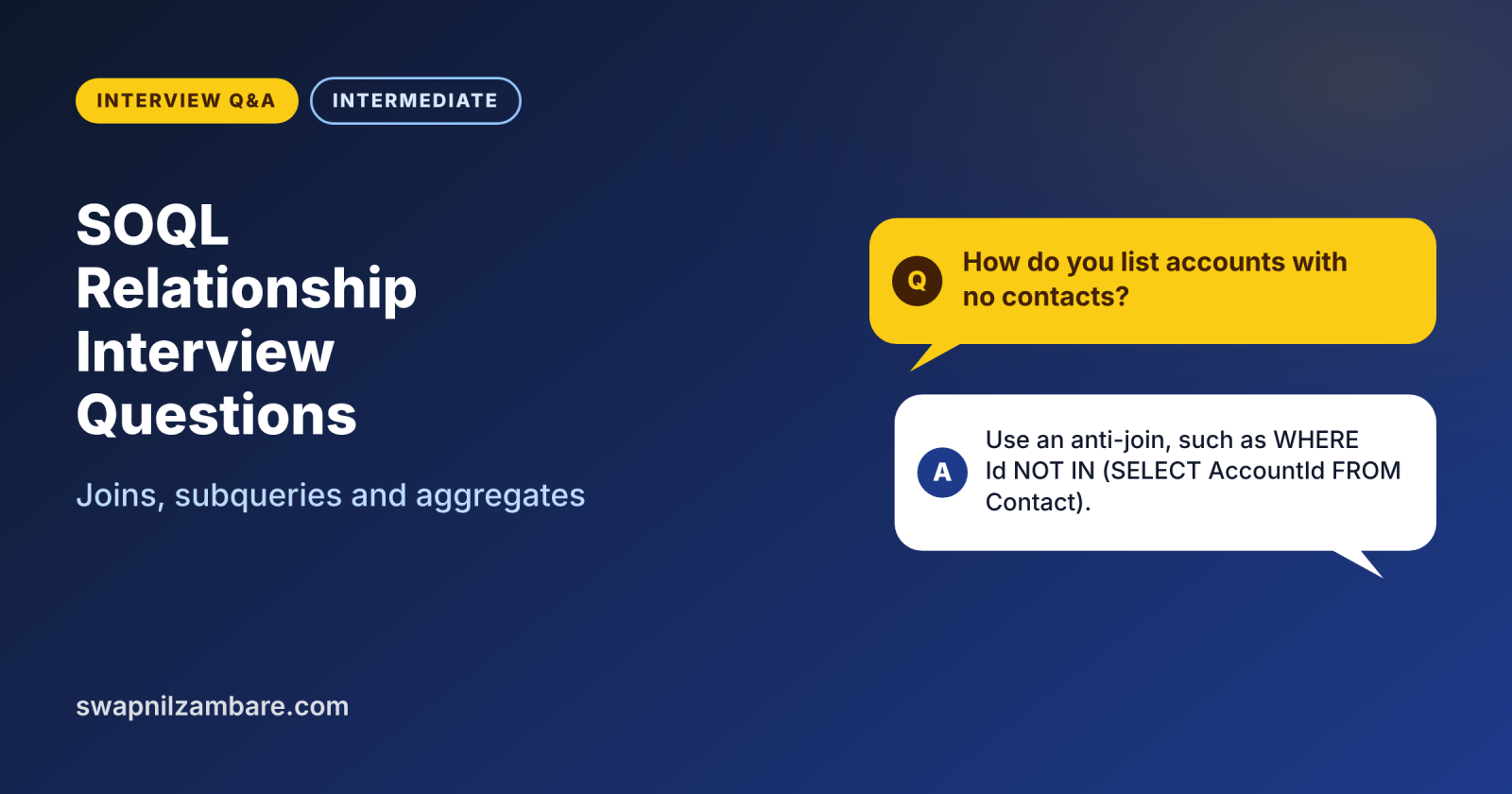
SOQL Relationship Interview Questions come up in almost every developer interview, because real code rarely reads one object alone. Interviewers ask how to read parents and children in one query, how to filter with joins and how to count or sum records. So these questions show whether you can save queries and stay inside limits.
Last reviewed for the Winter ’27 release (November 2026).
This is Part 7 of our Salesforce developer interview series. It covers relationship queries, semi-joins, anti-joins and aggregate functions, from simple to tricky, with short answers. It builds on SOQL relationship queries, SOQL aggregate functions and GROUP BY and Part 6 on SOQL basics and filters.
What are SOQL Relationship Interview Questions?
SOQL Relationship Interview Questions test how you query related objects and summarise data. A relationship query follows a lookup or master-detail field, either up to the parent or down to the children. An aggregate query, by contrast, returns totals such as COUNT or SUM instead of rows.
Think of a school register. Looking up a student’s class teacher is child-to-parent, because many students share one teacher. Listing every student in one class is parent-to-child. Counting students per class is an aggregate.
Why SOQL Relationship Interview Questions Matter
One good relationship query often replaces three or four plain queries. Here is why SOQL Relationship Interview Questions matter.
- First, fewer queries keep you far from the 100-query limit.
- Also, relationship names such as Contacts and Account__r confuse many candidates.
- Next, semi-joins solve “records with or without children” tasks in one line.
- Aggregates replace slow loops that count records in Apex.
- Finally, interviewers often ask you to write one of these queries live.
So a clear answer here proves you write bulk-safe code.
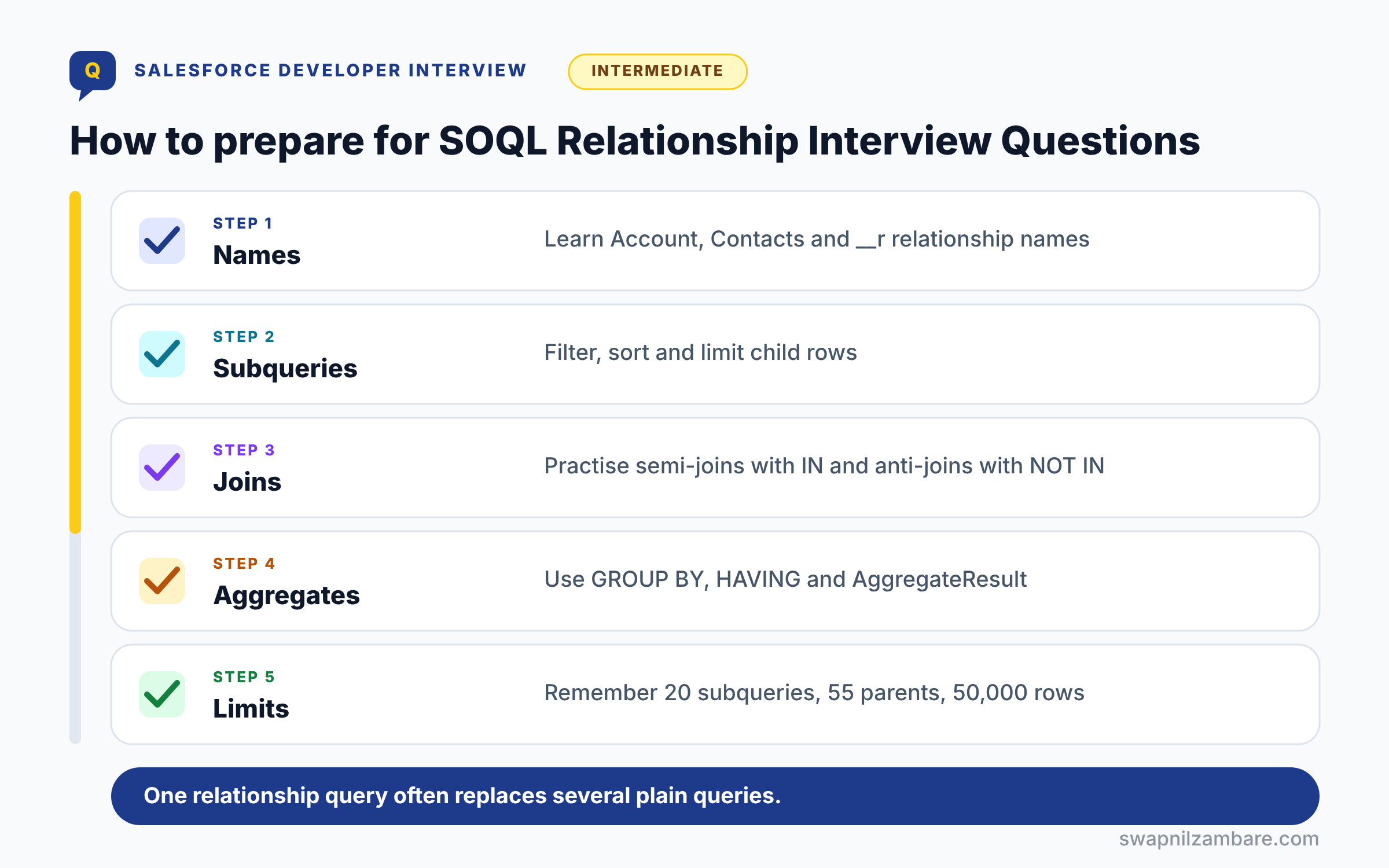
How to Prepare for SOQL Relationship Interview Questions
Preparing for SOQL Relationship Interview Questions follows five steps. First, learn relationship names, such as Account for child-to-parent and Contacts for parent-to-child. Next, practise subqueries with their own WHERE and ORDER BY. Then write semi-joins and anti-joins with IN and NOT IN. After that, learn GROUP BY, HAVING and AggregateResult. Finally, memorise the main limits and say each query aloud.
Relationship Query Types at a Glance
The table below lists the query shapes you must know.
| Query type | What it does | Example |
|---|---|---|
| Child-to-parent | Reads parent fields with dot notation | SELECT Name, Account.Name FROM Contact |
| Parent-to-child | Reads child records in a subquery | SELECT Name, (SELECT LastName FROM Contacts) FROM Account |
| Semi-join | Keeps rows that have a match | WHERE Id IN (SELECT AccountId FROM Case) |
| Anti-join | Keeps rows with no match | WHERE Id NOT IN (SELECT AccountId FROM Case) |
| Aggregate | Returns totals per group | SELECT Level__c, COUNT(Id) FROM Course__c GROUP BY Level__c |
| Polymorphic | Reads a field that can point to many objects | SELECT TYPEOF What WHEN Account THEN Name END FROM Task |
Parent-to-Child vs Child-to-Parent Queries
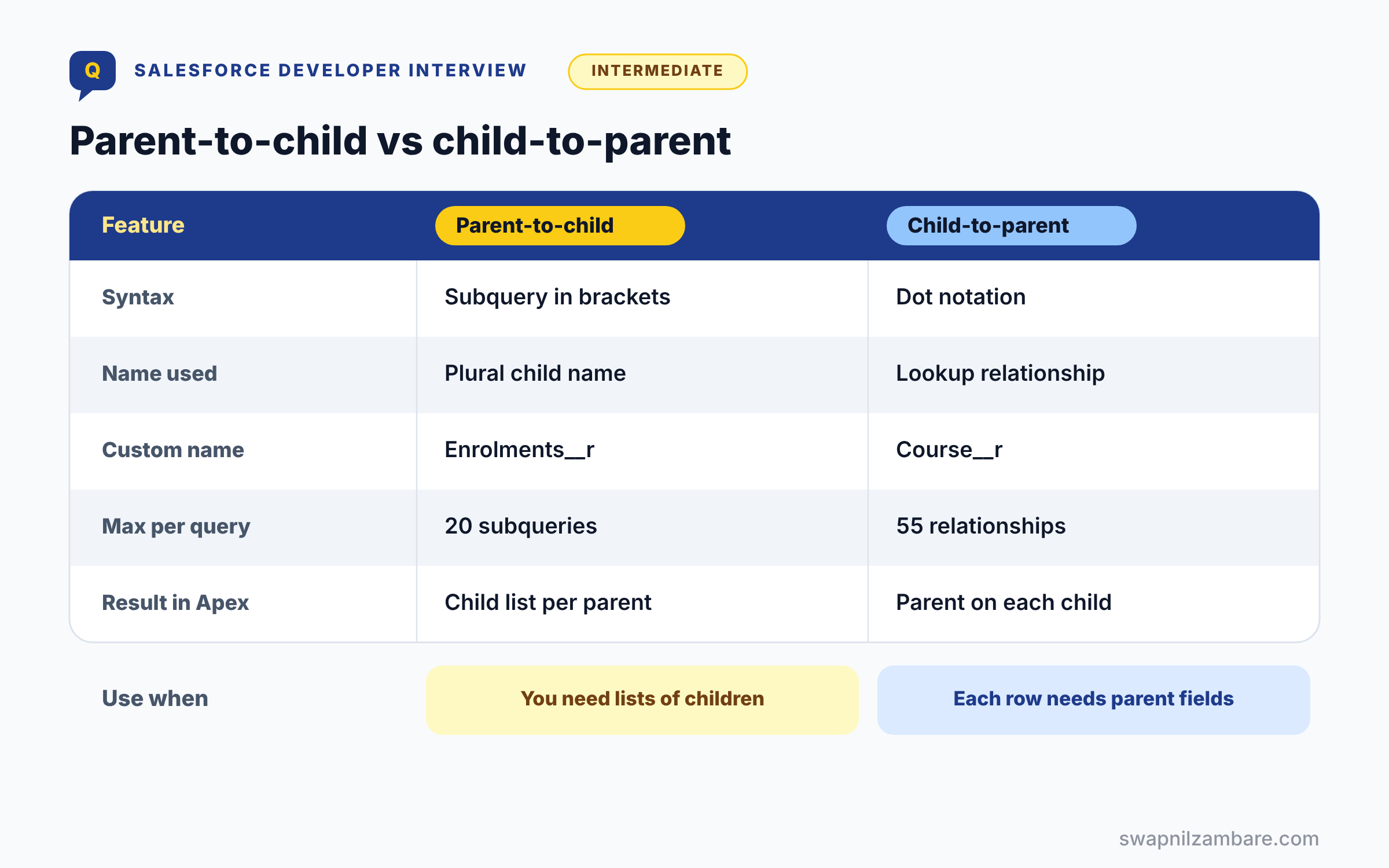
The table below compares the two directions, the most common question in this topic.
| Feature | Parent-to-child | Child-to-parent |
|---|---|---|
| Syntax | Subquery in brackets | Dot notation |
| Name used | Child relationship name, plural | Lookup field relationship name |
| Custom name | Enrolments__r | Course__r |
| Max per query | 20 subqueries | 55 relationships |
| Max depth | 5 levels in API 58.0 and later | 5 levels |
| Result in Apex | A child List on each parent | A parent sObject on each child |
When to use which is simple. Use parent-to-child when you need lists of children, while child-to-parent fits when each row needs a few parent fields.
Basic SOQL Relationship Interview Questions
These SOQL Relationship Interview Questions cover the core syntax every developer must know.
Questions on Child-to-Parent Queries
Q1: What is a relationship query in SOQL?
It is a query that reads fields from related objects through a lookup or master-detail field. So you get related data without a second query.
Follow-up you may get: How many queries does a relationship query use? One.
Q2: What is a child-to-parent query?
It reads parent fields from the child using dot notation. For example, SELECT LastName, Account.Name FROM Contact.
Interview tip: give the query and the Apex read together, like con.Account.Name. It shows you have used it.
Q3: How do you reference a custom parent in dot notation?
Replace __c with __r on the lookup field name. Course__c becomes Course__r.Name.
__c is the field that holds the parent’s ID, and __r is the relationship you travel through to reach the parent’s fields. Example: SELECT Name, Course__r.Name, Course__r.Trainer__r.Name FROM Enrolment__c.
Q4: How many levels up can a child-to-parent query go?
Up to five levels, such as Contact.Account.Owner.Manager.Name. However, each extra level makes the query harder to read.
Interview tip: give a five level example from memory. It is a common follow up.
Q5: How many child-to-parent relationships can one query use?
Up to 55 child to parent relationships in one query.
Using the same relationship several times, like Account.Name and Account.Industry, counts once. Hitting 55 is rare; it usually means the query is doing too much.
Q6: What happens if the parent lookup is empty?
The parent reference is null, so Account.Name returns null. Therefore, use safe navigation, such as c.Account?.Name, in Apex.
Q7: Can you filter on a parent field?
Yes, for example WHERE Account.Industry = ‘Education’. So you filter children by parent data in one query.
Follow-up you may get: Does filtering on a parent field use an index? Only if that parent field is indexed and the filter is selective.
Q8: Can you sort by a parent field?
Yes, for example ORDER BY Account.Name.
Example: SELECT LastName, Account.Name FROM Contact ORDER BY Account.Name, LastName lists contacts grouped by their company name.
Q9: How do you read a parent field in Apex after the query?
Use the relationship, such as con.Account.Name. However, you must include that field in the SELECT, or Apex throws an error.
Q10: Can you use a parent field in a GROUP BY or WHERE of a child query at the same time?
Yes. Example: SELECT Account.Industry, COUNT(Id) FROM Contact WHERE Account.Rating = ‘Hot’ GROUP BY Account.Industry filters and groups by parent fields in one query.
Q11: What error appears when you read a field you did not query?
“SObject row was retrieved via SOQL without querying the requested field”. So always add every field you use to the SELECT.
Interview tip: mention that adding the field to the SELECT is the fix, not a null check.
Questions on Parent-to-Child Queries
Parent-to-child SOQL Relationship Interview Questions focus on subqueries and child relationship names.
Q12: What is a parent-to-child query?
It reads child records inside a subquery in the SELECT. For example, SELECT Name, (SELECT LastName FROM Contacts) FROM Account.
Follow-up you may get: Can the subquery select parent fields of the child? Yes, like (SELECT Name, Owner.Name FROM Contacts).
Q13: What name goes in the subquery FROM clause?
The child relationship name, not the object name. For example, Contacts for Contact and Enrolments__r for a custom child.
Interview tip: say “relationship name, not object name”. This is the most common mistake in written tests.
Q14: Where do you find the child relationship name?
Open the lookup field on the child object and check Child Relationship Name. Also, Schema describe calls return it.
Q15: How many subqueries can one query have?
Up to 20 parent to child subqueries in one query.
Each subquery reads a different child relationship, like Contacts, Opportunities and Cases on Account. In practice, more than three or four makes the query slow and hard to read.
Q16: How deep can parent-to-child queries go?
In API 58.0 and later, up to five levels through REST, SOAP and Apex. Before that, only two levels were allowed.
Q17: Can a subquery have WHERE, ORDER BY and LIMIT?
Yes, each subquery can filter, sort and limit its own rows. For example, (SELECT Name FROM Contacts ORDER BY CreatedDate DESC LIMIT 3).
Follow-up you may get: Does the LIMIT apply to each parent? Yes, each parent gets up to that many children.
Q18: How do you read subquery results in Apex?
Each parent has a child list, such as acc.Contacts. Then loop over it like any other List.
Q19: What does the child list hold when a parent has no children?
An empty list, not null. You can loop over it without a null check.
Example: for (Contact c : acc.Contacts) simply does nothing when the account has no contacts. Use acc.Contacts.isEmpty() to find accounts with none.
Q20: Do subquery rows count toward the 50,000 row limit?
Yes, every parent and child row counts. As a result, wide subqueries can hit the row limit fast.
Interview tip: name the risk: a query on 1,000 accounts with 60 contacts each passes the 50,000 row limit.
Q21: How do you query the Account’s owner and the Account’s contacts in one query?
Combine both styles: SELECT Name, Owner.Name, (SELECT LastName, Email FROM Contacts) FROM Account WHERE Id IN :ids. Dot notation goes up to the owner, and the subquery goes down to the contacts.
Q22: Can you query parent-to-child in a single statement with child-to-parent?
Yes, for example SELECT Name, Owner.Name, (SELECT Name FROM Contacts) FROM Account. Also, the subquery itself can use dot notation.
Intermediate SOQL Relationship Interview Questions
These SOQL Relationship Interview Questions test joins, polymorphic fields and limits.
Questions on Semi-Joins and Anti-Joins
Q23: What is a semi-join?
It filters a query with IN and a subquery on another object. For example, accounts that have at least one case.
Q24: What is an anti-join?
It uses NOT IN with a subquery, so it keeps rows with no match. For example, accounts with no open cases.
Follow-up you may get: Can an anti join use a null check instead? Not reliably; NOT IN with a subquery is the right tool.
Q25: Write a query for courses that have enrolments.
SELECT Id, Name FROM Course__c WHERE Id IN (SELECT Course__c FROM Enrolment__c). So you need no Apex loop.
Q26: What field types can the inner query select?
It must select exactly one ID or reference field, and the outer field must be the same type.
Example: WHERE Id IN (SELECT Course__c FROM Enrolment__c) works, because Course__c is a reference to Course__c records. Selecting Name inside would fail.
Q27: How many semi-joins and anti-joins can one query have?
Up to two semi joins and anti joins in total in one query. You cannot nest a semi join inside another one.
If you need more, split the logic into two queries and combine the ID sets in Apex.
Q28: Can you use OR with a semi-join?
No, semi-joins and anti-joins cannot sit inside an OR condition. Instead, run two queries or rethink the filter.
Interview tip: give the workaround, two queries or a different filter, not just “no”.
Q29: Can a semi-join inner query use ORDER BY or LIMIT?
No, the inner query cannot use ORDER BY or LIMIT. However, it can have its own WHERE filter.
Q30: Find contacts on accounts that have an open opportunity.
SELECT Id, Name FROM Contact WHERE AccountId IN (SELECT AccountId FROM Opportunity WHERE IsClosed = false). The inner query returns account IDs, and the outer query keeps contacts on those accounts.
Q31: What is the difference between a semi-join and a parent-to-child subquery?
A semi-join only filters the outer rows. In contrast, a parent-to-child subquery returns child records in the result.
Questions on Polymorphic Relationships
Q32: What is a polymorphic field?
It is a lookup that can point to more than one object, such as WhatId on Task or OwnerId on Case. So the parent type changes per record.
Q33: How do you filter by the parent type?
Use the Type field, such as WHERE What.Type = ‘Account’. Then only tasks on accounts return.
Follow-up you may get: Does Type work on OwnerId? Yes, Owner.Type tells you if a queue or a user owns the record.
Q34: What is TYPEOF?
TYPEOF picks different fields based on the parent type. For example, WHEN Account THEN Phone WHEN Opportunity THEN Amount.
Interview tip: write a short TYPEOF from memory. Few candidates can, so it stands out.
Q35: Why does TYPEOF count more than once against limits?
Each object named in TYPEOF counts as a relationship. So What, Account and Opportunity count as three.
Q36: How do you find tasks related to opportunities above 10 lakh?
Filter on the polymorphic field’s type first, then use a semi join: SELECT Id, Subject FROM Task WHERE What.Type = ‘Opportunity’ AND WhatId IN (SELECT Id FROM Opportunity WHERE Amount > 1000000).
Q37: Which fields can you read on What without TYPEOF?
Only common Name fields, such as What.Name and What.Type. For other fields, use TYPEOF or a second query.
Questions on Relationship Limits
Q38: Can you filter on a long text area field in a subquery?
No, you cannot filter on long text area or rich text bodies. However, you can select them.
Q39: Can you use USING SCOPE in a parent-to-child query?
No, USING SCOPE does not limit parent-child relationship results. So filter with WHERE instead.
Q40: Do relationship queries work like SQL joins?
No, a relationship field must already exist between the objects. Unlike SQL, you cannot join on any matching value.
Interview tip: explain that relationships must exist in the schema. It is the key difference from SQL.
Q41: How do you query a many-to-many relationship?
Query the junction object, such as Enrolment__c, with dot notation to both parents. For example, SELECT Course__r.Name, Student__r.Name FROM Enrolment__c.
Follow-up you may get: Can you query from the parent side too? Yes, with two subqueries on the junction’s relationship names.
Q42: What happens in a for loop over a query with subqueries and many children?
Salesforce returns child rows in chunks through queryMore. So loop over the child list inside a SOQL for loop to avoid errors.
Q43: Can you query a child object’s children from the grandparent?
Yes, since API 58.0 you can nest parent to child subqueries up to five levels. Example: SELECT Name, (SELECT Name, (SELECT Subject FROM Cases) FROM Contacts) FROM Account. Keep it shallow, because row counts grow fast.
Q44: What error appears for very large child lists?
“Aggregate query has too many rows for direct assignment”. To fix it, iterate the child list with a for loop instead of assigning it.
Advanced SOQL Relationship Interview Questions
These SOQL Relationship Interview Questions cover aggregate functions and grouping.
Questions on Aggregate Functions
Q45: Which aggregate functions does SOQL support?
COUNT(), COUNT(field), COUNT_DISTINCT(field), SUM, AVG, MIN and MAX. They summarise data without loops.
| Function | What it returns | Example |
|---|---|---|
| COUNT() | Number of rows, as an Integer | SELECT COUNT() FROM Case |
| COUNT(field) | Rows where the field is not null | COUNT(Email) |
| COUNT_DISTINCT(field) | Number of unique non null values | COUNT_DISTINCT(City__c) |
| SUM(field) | Total of a number field | SUM(Amount) |
| AVG(field) | Average | AVG(Fee__c) |
| MIN and MAX | Smallest and largest value | MAX(CloseDate) |
Q46: What does an aggregate query return in Apex?
A List of AggregateResult objects. You read each value with get(‘alias’).
Example: for (AggregateResult ar : [SELECT Level__c lvl, COUNT(Id) total FROM Course__c GROUP BY Level__c]) { String level = (String) ar.get(‘lvl’); Integer n = (Integer) ar.get(‘total’); }
Q47: What is the difference between COUNT() and COUNT(Id)?
COUNT() returns an Integer and cannot be used with GROUP BY. In contrast, COUNT(Id) returns AggregateResult rows and works with GROUP BY.
Interview tip: COUNT() vs COUNT(Id) with GROUP BY is a favourite trap. Give both return types.
Q48: How do you give an aggregate an alias?
Write the alias after the function, such as SUM(Fee__c) total. Otherwise, Salesforce names it expr0, expr1 and so on.
Follow-up you may get: Can an alias match a field name? No, it must not clash with a field or reserved word.
Q49: How do you read an aggregate value in Apex?
Use (Decimal) ar.get(‘total’). get returns an Object, so you must cast it.
Cast to the type that matches the function: SUM and AVG give Decimal, COUNT gives Integer, and MIN or MAX on a date gives Date.
Q50: Does COUNT_DISTINCT count null values?
No. COUNT_DISTINCT ignores nulls, and so does COUNT(field).
COUNT() and COUNT(Id) count every row, so the numbers can differ. Example: 100 contacts with 80 emails give COUNT(Id) = 100 and COUNT(Email) = 80.
Q51: Do aggregated rows count toward the 50,000 row limit?
Yes, every record the query aggregates counts, not just the groups returned. Therefore, a COUNT over 60,000 records fails.
Q52: Can you use an aggregate query in a Batch Apex start method?
No. A QueryLocator in start cannot use aggregate functions. Group the data in execute, or use an Iterable start that runs the aggregate and returns the results.
Q53: Can you use LIMIT in an aggregate query?
Not with an aggregate function that has no GROUP BY. However, with GROUP BY, LIMIT works on the groups.
Questions on GROUP BY and HAVING
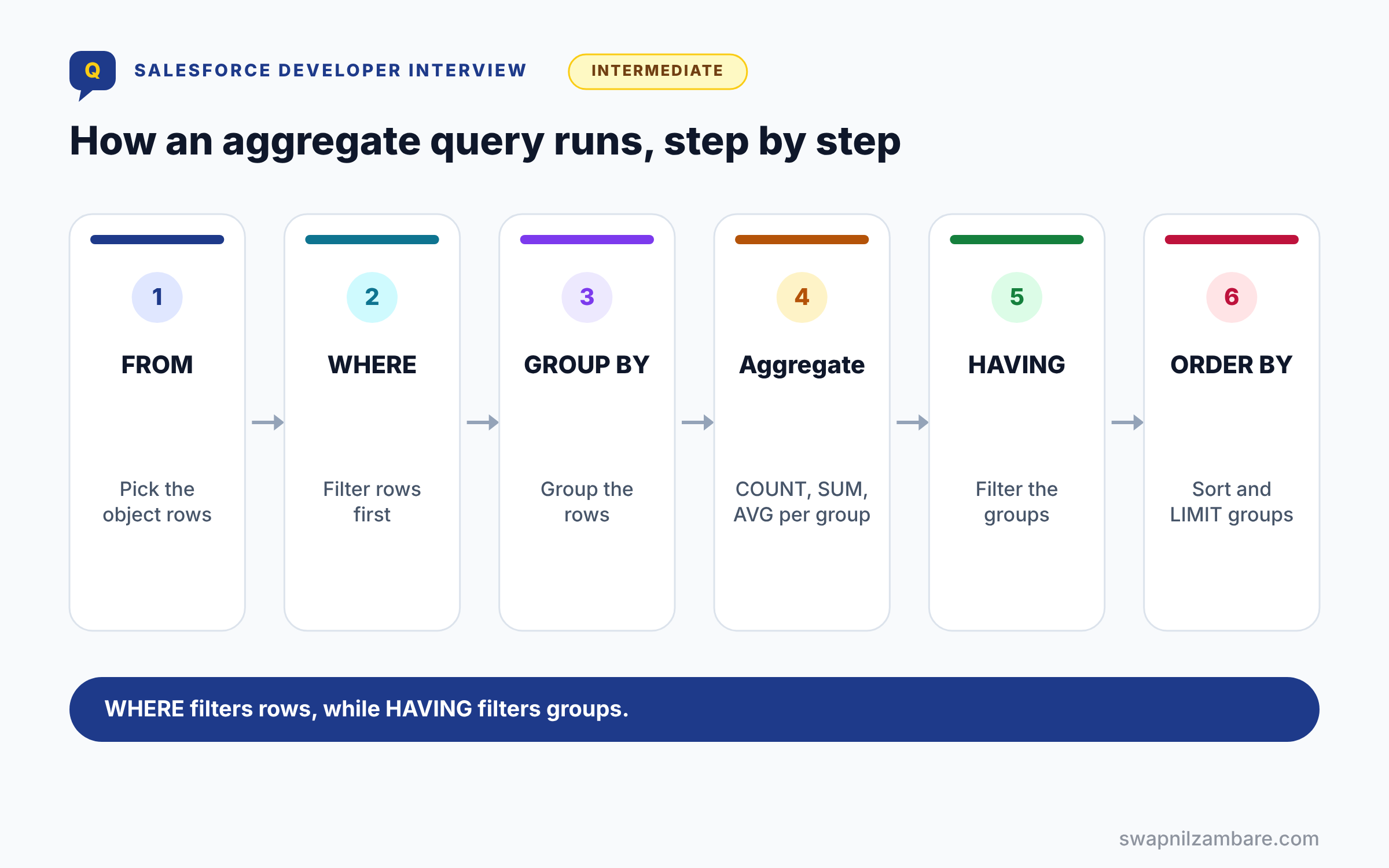
The diagram below shows the order in which an aggregate query runs, so you can see where WHERE and HAVING apply.
Q54: What does GROUP BY do?
It groups rows by a field, so aggregates run per group. For example, count courses per Level__c.
Interview tip: say the field in GROUP BY must also be in the SELECT if you want to read it.
Q55: What is HAVING?
HAVING filters groups after aggregation, while WHERE filters rows before it.
| Point | WHERE | HAVING |
|---|---|---|
| When it runs | Before grouping | After grouping |
| Filters on | Field values in each row | Aggregate results, like COUNT(Id) |
| Example | WHERE Status__c = ‘Active’ | HAVING COUNT(Id) > 5 |
| Needs GROUP BY | No | Yes |
You can use both together: WHERE removes rows first, then HAVING removes small groups.
Q56: Can you GROUP BY a parent field?
Yes, for example GROUP BY Account.Industry.
That lets you summarise children by parent data. Example: SELECT Account.Industry, COUNT(Id) FROM Contact GROUP BY Account.Industry counts contacts per industry in one query.
Q57: What are GROUP BY ROLLUP and CUBE?
ROLLUP adds subtotal rows for each group level and a grand total. CUBE, in contrast, adds subtotals for every combination of the grouped fields.
Follow-up you may get: How many fields can ROLLUP take? Up to three in GROUP BY ROLLUP.
Q58: What does the GROUPING function do?
It tells you whether a row is a subtotal from ROLLUP or CUBE. So you can label total rows.
Q59: Which fields cannot be grouped?
Long text area, rich text and some formula or encrypted fields. Also, check the groupable flag in describe results.
Q60: How do you order groups by their total?
Use ORDER BY with the aggregate, such as ORDER BY SUM(Fee__c) DESC. Then the largest group comes first.
Q61: How do you get totals per month for the current year?
SELECT CALENDAR_MONTH(CloseDate) m, SUM(Amount) total FROM Opportunity WHERE CloseDate = THIS_YEAR GROUP BY CALENDAR_MONTH(CloseDate) ORDER BY CALENDAR_MONTH(CloseDate). Use FISCAL_MONTH if the business follows a fiscal year.
Q62: Can you use date functions in GROUP BY?
Yes, for example GROUP BY CALENDAR_MONTH(CreatedDate). So you build monthly totals in one query.
Scenario-Based SOQL Relationship Interview Questions
Scenario-based SOQL Relationship Interview Questions ask you to write or fix a query on the spot.
Questions on Writing Queries
Q63: List each course with its three newest enrolments.
SELECT Name, (SELECT Name FROM Enrolments__r ORDER BY CreatedDate DESC LIMIT 3) FROM Course__c. So one query covers every course.
Q64: Find contacts whose account is in the Education industry.
SELECT Id, Name FROM Contact WHERE Account.Industry = ‘Education’. It filters by a parent field with no join.
Q65: Find accounts with no contacts.
SELECT Id FROM Account WHERE Id NOT IN (SELECT AccountId FROM Contact). Also, add a filter if the object is large.
Q66: Count enrolments per course, but only courses with more than ten.
SELECT Course__c, COUNT(Id) total FROM Enrolment__c GROUP BY Course__c HAVING COUNT(Id) > 10.
Interview tip: point out that HAVING uses the aggregate, not the alias. Writing HAVING total > 10 fails.
Q67: Find the account with the most contacts.
SELECT AccountId, COUNT(Id) total FROM Contact WHERE AccountId != null GROUP BY AccountId ORDER BY COUNT(Id) DESC LIMIT 1. Then read AccountId and total from the single AggregateResult.
Q68: Find the total fee per course level.
SELECT Level__c, SUM(Fee__c) total FROM Course__c GROUP BY Level__c. Then read each total with get(‘total’).
Questions on Fixing Code
Q69: Code queries contacts inside a loop over accounts. How do you fix it?
Use one parent-to-child query, such as SELECT Id, (SELECT Id FROM Contacts) FROM Account WHERE Id IN :ids. So the loop needs no queries.
Q70: A subquery fails with “Didn’t understand relationship Contact”. Why?
The subquery used the object name, Contact. Use the child relationship name, Contacts, instead.
Inside a parent to child subquery, the FROM part takes the relationship name. For a custom child, check the Child Relationship Name on the lookup field and add __r, like Enrolments__r.
Q71: A COUNT over 80,000 records hits the row limit. What do you do?
Move the count to Batch Apex or a report, or keep a roll-up summary field. Also, a narrower filter may reduce rows.
Q72: c.Account.Name throws a null pointer error. How do you fix it?
Some contacts have no account, so c.Account is null. Use c.Account?.Name, or check AccountId != null first.
The safe navigation operator returns null instead of throwing. If you need a default, write c.Account?.Name ?? ‘No account’.
Q73: An aggregate query returns expr0 and the code reading get(‘total’) gets null. Why?
The aggregate has no alias, so Salesforce named it expr0. Add an alias after the function, like COUNT(Id) total, or read get(‘expr0’).
Q74: Code loops 10,000 records to sum fees. How do you improve it?
Use SELECT SUM(Fee__c) total FROM Course__c instead. As a result, you save CPU time and heap.
A Real SOQL Relationship Interview Questions Answer
A classic live task is “show each course with its seat count and fee total by level, using as few queries as possible”. Here is a strong answer.
Map<Id, Course__c> courses = new Map<Id, Course__c>([
    SELECT Id, Name, Owner.Name,
        (SELECT Id FROM Enrolments__r WHERE Status__c = 'Active')
    FROM Course__c
    WHERE Start_Date__c = NEXT_N_DAYS:30
    WITH USER_MODE
]);
for (Course__c c : courses.values()) {
    System.debug(c.Name + ' has ' + c.Enrolments__r.size() + ' students');
}

for (AggregateResult ar : [
    SELECT Level__c lvl, SUM(Fee__c) total
    FROM Course__c
    GROUP BY Level__c
]) {
    System.debug(ar.get('lvl') + ': ' + (Decimal) ar.get('total'));
}
Explain that the first query reads parents, a parent field and children together. Next, the aggregate query sums fees per level without a loop. So the whole task uses two queries.
Here is a sample debug output.
Apex Basics has 12 students
Beginner: 4500
Intermediate: 7200
Common Mistakes with SOQL Relationship Interview Questions
- Using the object name, not the relationship name, in subqueries.
- Forgetting __r when reading custom parent fields.
- Using COUNT() with GROUP BY.
- Putting a semi-join inside an OR condition.
- Forgetting that aggregated records count toward row limits.
Best Practices for Answering SOQL Relationship Interview Questions
- State the direction, child-to-parent or parent-to-child, before writing.
- Name the relationship fields out loud, such as Enrolments__r.
- Prefer one relationship query over several plain queries.
- Use aggregates for totals instead of Apex loops.
- Mention the row limit when an object is large.
Official Resources
- Relationship Queries (SOQL and SOSL Reference)
- Understanding Relationship Query Limitations
- Aggregate Functions (SOQL and SOSL Reference)
Quick Recap
- SOQL Relationship Interview Questions cover both query directions, joins and aggregates.
- Child-to-parent uses dot notation, while parent-to-child uses subqueries.
- Semi-joins use IN, and anti-joins use NOT IN.
- GROUP BY groups rows, and HAVING filters the groups.
- Aggregated records still count toward the 50,000 row limit.
What’s Next?
Next, continue with SOSL and dynamic SOQL interview questions, Part 8 of the series.


