SOQL Interview Questions appear in every Salesforce developer interview, because almost all Apex reads data with SOQL. Interviewers check basic syntax, filters, sorting, limits and the errors that catch beginners. They also love asking you to write a query on the spot.
Last reviewed for the Winter ’27 release (November 2026).
This is Part 6 of our Salesforce developer interview series. It covers the SOQL questions asked most about basics and filtering, from simple to tricky, with short answers. It builds on SOQL basics and your first query, WHERE, ORDER BY and LIMIT and date literals and bind variables.
What are SOQL Interview Questions?
SOQL Interview Questions test your knowledge of the Salesforce Object Query Language. SOQL reads records from one object, plus related objects, using SELECT, FROM, WHERE, ORDER BY and LIMIT. So these questions check both syntax and safe, efficient use inside Apex.
Think of asking a librarian for books. You name the shelf (FROM), the details you want (SELECT) and the rules, such as “only books after 2020” (WHERE). A clear request gets a fast answer, while a vague one takes ages.
Why SOQL Interview Questions Matter
Query mistakes cause most governor limit failures. Here is why SOQL Interview Questions matter.
- First, every trigger and class depends on correct queries.
- Also, the 100-query limit is the most famous governor limit.
- Next, wrong filters cause slow queries on large objects.
- Security keywords, such as WITH USER_MODE, protect data.
- Finally, writing a query live is a standard interview task.
So confident SOQL answers make a strong first impression.
How to Prepare for SOQL Interview Questions
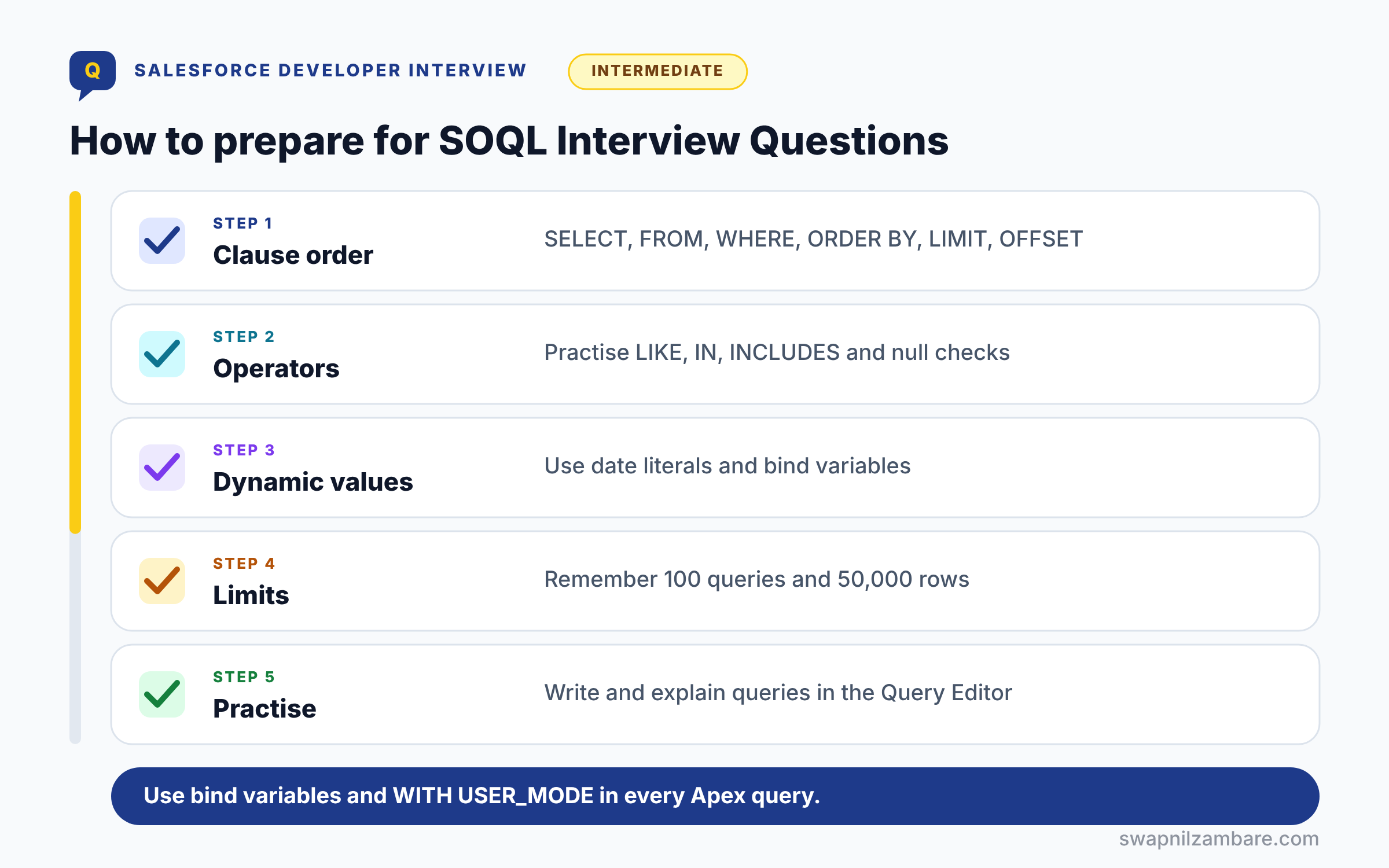
Preparing for SOQL Interview Questions follows five steps. First, learn the clause order: SELECT, FROM, WHERE, ORDER BY, LIMIT, OFFSET. Next, practise every operator, including LIKE, IN and INCLUDES. Then write queries with date literals and bind variables. After that, memorise the main limits, such as 100 queries and 50,000 rows. Finally, practise in the Developer Console Query Editor and explain each query aloud.
SOQL Clauses at a Glance
The table below lists the clauses in the order they appear.
| Clause | Purpose | Example |
|---|---|---|
| SELECT | Fields to return | SELECT Id, Name, Fee__c |
| FROM | Object to query | FROM Course__c |
| WHERE | Filter rows | WHERE Level__c = ‘Beginner’ |
| WITH | Security mode | WITH USER_MODE |
| ORDER BY | Sort results | ORDER BY Fee__c DESC |
| LIMIT | Max rows | LIMIT 10 |
| OFFSET | Skip rows | OFFSET 20 |
SOQL vs SQL
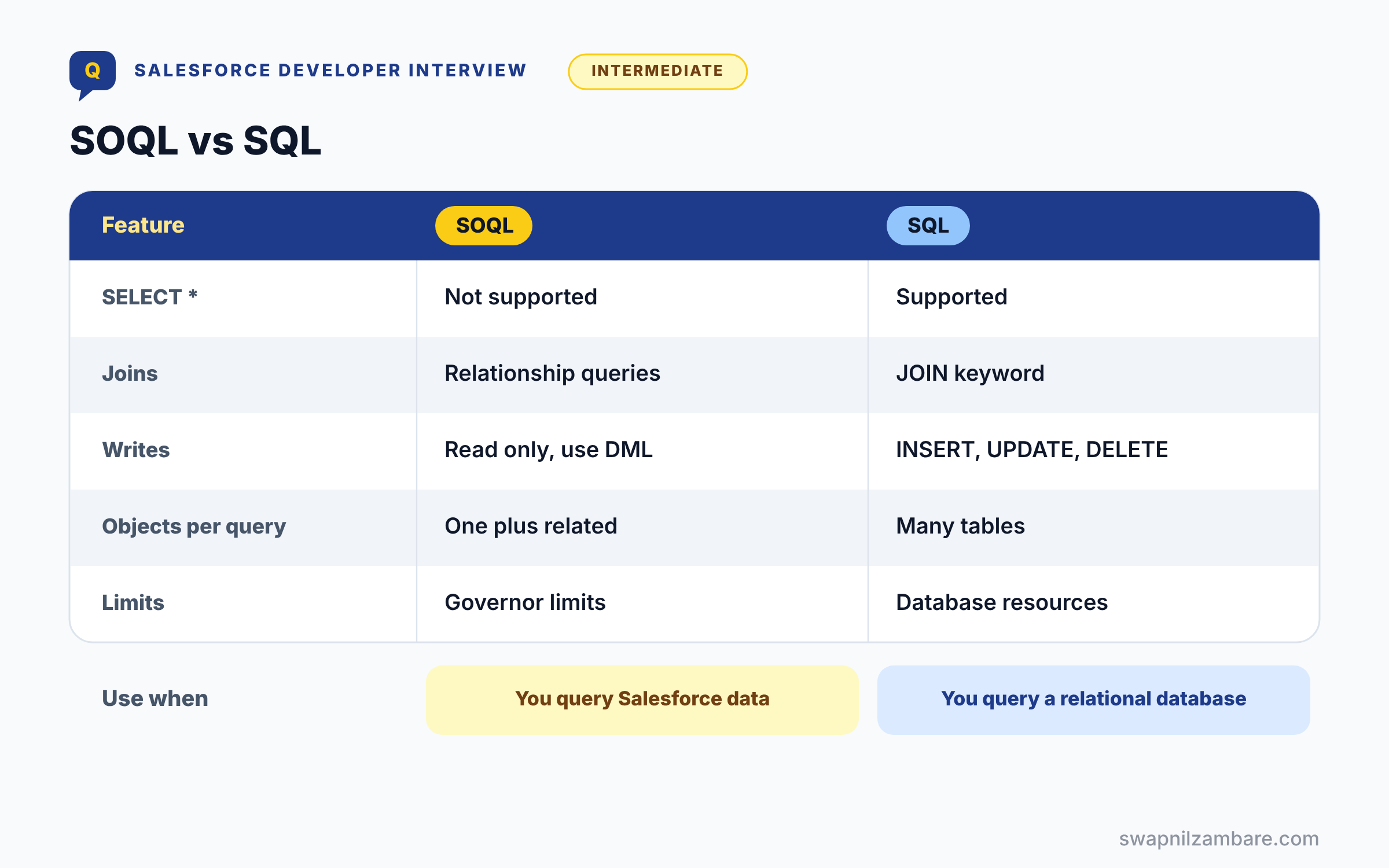
The table below compares SOQL with standard SQL, a very common question.
| Feature | SOQL | SQL |
|---|---|---|
| SELECT * | Not supported, list fields | Supported |
| Joins | Relationship queries | JOIN keyword |
| Writes | Read only, DML is separate | INSERT, UPDATE, DELETE |
| Objects per query | One main object plus related | Many tables |
| Limits | Governor limits | Database resources |
When to use which is simple. SOQL is for Salesforce data inside the platform, while SQL works on relational databases outside it.
Basic SOQL Interview Questions
These SOQL Interview Questions cover syntax and core rules.
Questions on SOQL Fundamentals
Q1: What is SOQL?
SOQL is Salesforce Object Query Language, used to read records. So it is like SQL SELECT, but for Salesforce objects.
Interview tip: say how SOQL differs from SQL in one line: no SELECT *, no joins written by you, and governor limits.
Q2: Can SOQL insert or update data?
No. SOQL only reads data. To insert, update or delete, use DML statements like insert and update, or Database methods.
Example: query the courses with SOQL, change Fee__c in a loop, then call update courses; once.
Q3: Does SOQL support SELECT *?
No. You must list the fields you need.
FIELDS(STANDARD) returns all standard fields without listing them, and FIELDS(ALL) or FIELDS(CUSTOM) need LIMIT 200. In production code, listing fields is still best, because it keeps queries small and fast.
Q4: Where can you run SOQL?
In Apex, the Developer Console, VS Code, the CLI, Workbench and the REST API. So you can test queries before coding.
Q5: What does a SOQL query return in Apex?
It returns a List of sObjects. Also, you can assign it to a single sObject when exactly one row comes back.
Follow-up you may get: What happens if a single sObject query returns two rows? It throws a QueryException, “List has more than 1 row for assignment”.
Q6: What error appears if a single-record query finds no rows?
“List has no rows for assignment to SObject”. So assign to a List and check isEmpty() first.
Interview tip: give the exact error text. It shows you have hit it in real code.
Q7: Are SOQL keywords case-sensitive?
No. Keywords like SELECT, FROM and WHERE are case insensitive, and so are most text comparisons in WHERE.
So WHERE Name = ‘apex basics’ also finds ‘Apex Basics’. Field and object API names are not case sensitive either, but write them the way they appear in Setup so code is easy to read.
Q8: What is the order of SOQL clauses?
SELECT, FROM, WHERE, WITH, GROUP BY, ORDER BY, LIMIT, OFFSET. Wrong order causes a syntax error.
Follow-up you may get: Where does WITH go? After WHERE and before GROUP BY.
Q9: How do you count records?
Use SELECT COUNT() FROM Course__c, which returns an Integer in Apex. So you avoid loading the records.
Q10: What is the difference between SELECT COUNT() and SELECT COUNT(Id)?
COUNT() returns a plain Integer in Apex and cannot be used with other fields. COUNT(Id) is an aggregate function that returns AggregateResult rows, so you can use it with GROUP BY, like counting courses per level.
Q11: How do you query custom objects and fields?
Use API names ending in __c, such as SELECT Fee__c FROM Course__c.
Relationship fields end in __r instead, like Trainer__r.Name, when you read a field from a related custom object.
Questions on WHERE Filters
Q12: Which comparison operators does SOQL support?
=, !=, <, <=, >, >=, LIKE, IN, NOT IN, INCLUDES and EXCLUDES. Also, AND, OR and NOT combine filters.
Q13: How does LIKE work?
LIKE matches patterns with % for any characters and _ for one character. For example, WHERE Name LIKE ‘Apex%’.
Interview tip: mention that _ matches exactly one character. Few candidates remember it.
Q14: Is LIKE case-sensitive?
No. LIKE ignores case in SOQL.
WHERE Name LIKE ‘apex%’ finds ‘Apex Basics’ and ‘APEX Advanced’. That is different from many SQL databases, where it depends on settings.
Q15: How do you filter by several values?
Use IN, such as WHERE Level__c IN (‘Beginner’, ‘Intermediate’). It is shorter than many ORs.
Q16: How do you filter a multi-select picklist?
Use INCLUDES or EXCLUDES, such as WHERE Days__c INCLUDES (‘Mon’). So you match selected values.
Follow-up you may get: How do you match two values in one INCLUDES? Write INCLUDES (‘Mon;Wed’) to need both, or (‘Mon’,’Wed’) to need either.
Q17: How do you check for empty fields?
Use WHERE Field__c = null, or != null for fields that have a value.
SOQL has no IS NULL keyword like SQL. Example: SELECT Name FROM Course__c WHERE Trainer__c = null finds courses with no trainer yet.
Q18: How do you filter by a picklist value?
Compare with the API value, such as WHERE Level__c = ‘Beginner’. Labels may differ from API values.
Q19: How do you write a date in a filter?
Use YYYY-MM-DD without quotes, such as WHERE Start_Date__c > 2026-09-01. Datetimes add a time and Z.
Interview tip: say “no quotes around dates”. It is the most common syntax mistake in written tests.
Q20: How do you filter on a checkbox field?
Compare with true or false, without quotes: WHERE Is_Active__c = true. Writing ‘true’ in quotes causes an error.
Q21: How do you combine AND and OR safely?
Use brackets, such as WHERE A = 1 AND (B = 2 OR C = 3). Otherwise, results may surprise you.
Questions on Sorting and Limiting
Q22: How do you sort results?
Use ORDER BY Field ASC or DESC. ASC is the default.
Example: SELECT Name, Fee__c FROM Course__c ORDER BY Fee__c DESC lists the most expensive course first. Without ORDER BY, Salesforce does not promise any order.
Q23: Where do null values appear in sorting?
In ascending order, null values come first by default. Add NULLS LAST to move them to the end.
Example: ORDER BY Start_Date__c ASC NULLS LAST shows dated courses first and undated ones at the end.
Q24: What does LIMIT do?
It caps the number of rows returned.
LIMIT 1 is handy when you need one record, and LIMIT with ORDER BY gives the top results. It also protects your code from loading far more rows than you expected.
Q25: What does OFFSET do?
It skips a number of rows, often for paging. OFFSET cannot go beyond 2,000.
Example: LIMIT 20 OFFSET 40 gives page 3 with 20 rows per page. For deeper paging, filter on the last seen value instead, like WHERE Name > :lastName ORDER BY Name.
Q26: Can you ORDER BY a field you did not select?
Yes. SOQL can sort by any sortable field on the object, even if it is not in the SELECT list. Long text area and multi select picklist fields cannot be used to sort.
Q27: Can you sort by several fields?
Yes, separate them with commas, such as ORDER BY Level__c, Fee__c DESC.
Each field can have its own direction, so ORDER BY Level__c ASC, Fee__c DESC sorts by level, then by fee from high to low within each level.
Intermediate SOQL Interview Questions
These SOQL Interview Questions cover dynamic values, security and limits.
Questions on Bind Variables and Date Literals
Q28: What is a bind variable?
It is an Apex variable used in a query with a colon, such as WHERE Level__c = :level. So values are passed safely.
Follow-up you may get: Can you bind an expression? Yes, like WHERE CreatedDate > :Date.today().addDays(-7).
Q29: Why are bind variables safer?
Because Salesforce treats them as data, not code. As a result, they prevent SOQL injection.
Interview tip: use the word “injection” and give the fix. That is the full answer.
Q30: Can you bind a collection?
Yes. WHERE Id IN :courseIds binds a List or Set of values.
This is the standard bulk pattern: collect IDs in a Set inside a loop, then run one query with IN outside the loop. An empty set returns no rows, without an error.
Q31: What are date literals?
Keywords for relative dates, like TODAY, YESTERDAY, THIS_MONTH and LAST_N_DAYS:30. Filters using them stay correct as time passes.
| Literal | Meaning | Example filter |
|---|---|---|
| TODAY | Today, in the user’s time zone | CreatedDate = TODAY |
| LAST_N_DAYS:n | From n days ago up to now | CreatedDate = LAST_N_DAYS:30 |
| NEXT_N_DAYS:n | From now up to n days ahead | Start_Date__c = NEXT_N_DAYS:7 |
| THIS_MONTH | The current calendar month | CloseDate = THIS_MONTH |
| LAST_QUARTER | The previous calendar quarter | CloseDate = LAST_QUARTER |
Q32: What is the difference between LAST_N_DAYS:7 and THIS_WEEK?
LAST_N_DAYS:7 counts back from today, while THIS_WEEK follows the calendar week. So results differ near weekends.
Q33: How do you query records between two dates?
Use two filters: WHERE Start_Date__c >= :fromDate AND Start_Date__c <= :toDate. With bind variables the dates stay typed, so there are no format mistakes.
Q34: How do you find records created today?
Use WHERE CreatedDate = TODAY. It respects the user’s time zone.
The same works for other date literals, like CreatedDate = YESTERDAY or LastModifiedDate = LAST_N_DAYS:7.
Questions on Security Keywords
Q35: What does WITH USER_MODE do?
It runs the query with the user’s object, field and record access. So inaccessible data causes an error or is not returned.
Follow-up you may get: How do you run DML in user mode? Database.insert(records, AccessLevel.USER_MODE).
Q36: What is WITH SECURITY_ENFORCED?
It is the older way to enforce object and field access. However, USER_MODE is now recommended.
Interview tip: say why USER_MODE is better: it also checks fields in WHERE and ORDER BY and applies sharing.
Q37: Does SOQL in Apex respect sharing by default?
It follows the class’s sharing keyword and access mode. So with sharing classes respect record access.
Q38: What happens when a WITH USER_MODE query includes a field the user cannot read?
The query throws a QueryException that names the field, instead of silently returning the data. If you would rather drop the field, query normally and use Security.stripInaccessible on the results.
Q39: How do you strip fields the user cannot read?
Use Security.stripInaccessible on the results. It removes fields the user cannot see.
Example: SObjectAccessDecision d = Security.stripInaccessible(AccessType.READABLE, courses); return d.getRecords(); Use it when you want to drop hidden fields instead of failing.
Questions on Limits
Q40: How many SOQL queries can one transaction run?
100 in synchronous Apex and 200 in asynchronous Apex.
The main SOQL limits in one transaction are worth knowing together:
| Limit | Synchronous | Asynchronous |
|---|---|---|
| SOQL queries | 100 | 200 |
| Rows returned in total | 50,000 | 50,000 |
| Rows from a Batch Apex QueryLocator | Not used | 50 million |
| Length of one SOQL statement | 100,000 characters | 100,000 characters |
Q41: How many rows can SOQL return in one transaction?
50,000 rows in total across all queries in the transaction.
The count includes every query, not each one separately. For more rows, use Batch Apex, where start can return up to 50 million records.
Q42: Why do queries inside loops fail?
Because each loop pass uses a query, so 101 records break the limit. Instead, query once outside the loop.
Interview tip: say “101st query”, not “101 records”. The limit is about queries, and interviewers notice the difference.
Q43: What is a SOQL for loop?
It is for (List<Course__c> chunk : [SELECT …]), which returns records in chunks of 200. As a result, heap stays low.
Follow-up you may get: Can you do DML inside a SOQL for loop? Yes, on each chunk list, which keeps it to one DML per 200 records.
Q44: Does a SOQL for loop avoid the 50,000-row limit?
No. It keeps heap low by working in chunks, but every row still counts toward the 50,000 limit.
For larger volumes, Batch Apex gives each chunk its own limits, so millions of rows are fine.
Q45: Do SOQL queries in a test count toward limits?
Yes, the same limits apply in tests. Test.startTest() gives the code under test a fresh set, so the queries your setup ran do not count against it.
Q46: How do you check queries used so far?
Use Limits.getQueries() against Limits.getLimitQueries().
Logging these numbers in long running code helps you see which part of a transaction uses the most queries.
Advanced SOQL Interview Questions
These SOQL Interview Questions test performance and special keywords.
Questions on Special Keywords
Q47: What does FOR UPDATE do?
It locks the returned records until the transaction ends. So two users cannot update them at the same time.
Interview tip: mention the risk of UNABLE_TO_LOCK_ROW errors when locks are held too long.
Q48: What does ALL ROWS do?
It includes deleted and archived records, such as items in the Recycle Bin. It works in Apex only.
Follow-up you may get: How do you find only deleted records? Add WHERE IsDeleted = true with ALL ROWS.
Q49: What is TYPEOF?
It queries polymorphic fields, such as What on Task, with different fields per type. So one query handles several objects.
Follow-up you may get: Which fields are polymorphic? Fields like WhatId and WhoId on Task, and OwnerId when queues can own records.
Q50: What is a semi-join?
A filter with a subquery, such as WHERE Id IN (SELECT Course__c FROM Enrolment__c). So you find parents with children.
Q51: What is an anti-join?
It uses NOT IN with a subquery, such as courses with no enrolments. It is useful for clean-up jobs.
Q52: What is the WITH SECURITY_ENFORCED clause replaced by in new code?
WITH USER_MODE. It covers field access in every clause, applies record sharing, and reports all inaccessible fields at once, so Salesforce recommends it for new code.
Q53: What is FIELDS(STANDARD)?
It returns all standard fields without listing them. However, FIELDS(ALL) and FIELDS(CUSTOM) need LIMIT 200.
Questions on Performance
Q54: What is a selective query?
A query with an indexed filter that returns a small share of records. So it runs fast on big objects.
Interview tip: give the thresholds: under about 30 percent of records for standard indexes and about 10 percent for custom ones, within the first million.
Q55: Which fields are indexed by default?
Id, Name, OwnerId, CreatedDate, SystemModstamp, lookups, master-detail, External ID and unique fields.
Follow-up you may get: How do you get a custom index? Ask Salesforce Support, or mark the field as an External ID.
Q56: Why are negative filters slow?
Because != and NOT LIKE usually cannot use indexes, so Salesforce scans every row.
Rewrite them as positive filters where you can, like Status__c IN (‘Open’, ‘In Progress’) instead of Status__c != ‘Closed’.
Q57: Why avoid leading wildcards?
Because LIKE ‘%text’ cannot use an index, so every row is checked.
An index is sorted from the first letter, so LIKE ‘text%’ can use it. If users need to search inside words, SOSL is usually the better tool.
Q58: What tool shows how a query will run?
The Query Plan tool in the Developer Console. A cost below 1 means the query is selective.
Turn it on from Help, then Preferences, Enable Query Plan. It shows each plan Salesforce considered, like an index or a full table scan, and which one it would use.
Q59: Why query only the fields you need?
Because every extra field adds to heap size and makes the query slower.
On large objects and in batch jobs this adds up fast. List only the fields the code uses; avoid FIELDS(ALL) in production code.
Q60: How do you make a query on a large object faster without changing the code much?
Add a selective filter on an indexed field, like a date range or an external ID, and ask Support for a custom index on the main filter field. For reports and large reads, a skinny table can also help.
Q61: What is the difference between static and dynamic SOQL?
Static SOQL is written in square brackets and checked at compile time. Dynamic SOQL is a String run with Database.query at runtime.
Follow-up you may get: How do you bind values in dynamic SOQL? Use :variable in the String, or Database.queryWithBinds with a map.
Scenario-Based SOQL Interview Questions
These SOQL Interview Questions are common in live coding rounds.
Questions on Writing Queries
Q62: Get the 5 most expensive beginner courses.
SELECT Name, Fee__c FROM Course__c WHERE Level__c = ‘Beginner’ ORDER BY Fee__c DESC LIMIT 5.
Q63: Find courses starting in the next 30 days.
SELECT Name FROM Course__c WHERE Start_Date__c = NEXT_N_DAYS:30
NEXT_N_DAYS:30 covers from now up to 30 days ahead, so the query keeps working every day without changing the dates.
Q64: Find accounts whose name starts with “Bright”.
SELECT Id, Name FROM Account WHERE Name LIKE ‘Bright%’
The trailing % matches any ending, like Bright Academy or Bright Solutions. Because the wildcard is at the end, the query can still use the Name index.
Q65: Find courses with no fee set.
SELECT Id, Name FROM Course__c WHERE Fee__c = null
SOQL uses = null rather than IS NULL. This kind of query is common in data clean up jobs.
Q66: Find contacts created this month.
SELECT Id, Name FROM Contact WHERE CreatedDate = THIS_MONTH
THIS_MONTH follows the calendar month in the user’s time zone, so on 22 November it covers 1 to 30 November.
Q67: Find accounts that have at least one open case.
SELECT Id, Name FROM Account WHERE Id IN (SELECT AccountId FROM Case WHERE IsClosed = false).
Interview tip: say this is a semi join, and that it needs no Apex loop at all.
Q68: Find the 3 newest contacts for each of a list of accounts.
Use a parent to child subquery: SELECT Name, (SELECT Name FROM Contacts ORDER BY CreatedDate DESC LIMIT 3) FROM Account WHERE Id IN :accIds. The LIMIT inside the subquery applies to each account.
Q69: Find courses with no enrolments.
SELECT Id FROM Course__c WHERE Id NOT IN (SELECT Course__c FROM Enrolment__c).
This is an anti join. It is handy for clean up jobs, like finding courses nobody enrolled in so they can be archived.
Questions on Fixing Code
Q70: A trigger fails with “Too many SOQL queries: 101”. How do you fix it?
Move the query out of the loop, collect Ids in a Set and query once with IN. Then use a Map to look up results.
Q71: A query on 3 million records times out. What do you check?
Check the filter is selective and indexed, using the Query Plan tool. Also, add a narrower date filter.
Q72: Code throws “List has no rows for assignment”. How do you fix it?
Assign the query result to a List and check isEmpty() before reading the first row.
Example: List<Course__c> found = [SELECT Id FROM Course__c WHERE Code__c = :code LIMIT 1]; if (!found.isEmpty()) { Course__c c = found[0]; }
Q73: Users see records they should not. What do you change?
Run the query WITH USER_MODE and declare with sharing on the class.
with sharing applies record access, and user mode also checks object and field permissions. Then test it with System.runAs as a user who should not see the records.
Q74: You need page 3 of results, 20 per page. How?
Use LIMIT 20 OFFSET 40. Beyond 2,000 rows, switch to keyset paging.
Keyset paging remembers the last value on the page, like the last Name, and the next query starts after it: WHERE Name > :lastName ORDER BY Name LIMIT 20.
Q75: A query with OR is slow even though both fields are indexed. Why?
For an OR filter to use indexes, every part of the OR must be selective. If one side matches too many rows, Salesforce scans the table. Split it into two selective queries, or narrow each side with another filter.
Q76: A filter on Status__c != ‘Closed’ is slow. How do you improve it?
Rewrite it as Status__c IN (‘Open’, ‘In Progress’), so the filter is positive. Also, consider an index.
Interview tip: mention testing the change with the Query Plan tool. It shows you check, not guess.
A Real SOQL Interview Questions Answer
A classic live task is “count enrolments for a list of courses without hitting limits”. Here is a strong answer.
Set<Id> courseIds = new Set<Id>();
for (Enrolment__c e : Trigger.new) {
    courseIds.add(e.Course__c);
}

Map<Id, Course__c> courses = new Map<Id, Course__c>([
    SELECT Id, Name, Seats_Left__c
    FROM Course__c
    WHERE Id IN :courseIds
    WITH USER_MODE
]);
System.debug('Queries used: ' + Limits.getQueries());
Explain that the Set removes duplicate course Ids, and the Map gives fast lookups later. Also, the bind variable and USER_MODE keep the query safe.
Here is a sample debug line.
Queries used: 1Common Mistakes with SOQL Interview Questions
- Writing SELECT * from SQL habits.
- Putting queries inside loops.
- Assigning a query directly to one record without checks.
- Using string concatenation instead of bind variables.
- Forgetting OFFSET stops at 2,000.
Best Practices for Answering SOQL Interview Questions
- Say the clause order before writing a query.
- Use bind variables and WITH USER_MODE in examples.
- Mention selectivity when the object is large.
- Write the query, then explain the limit it respects.
- Practise ten common queries until they are automatic.
Official Resources
Quick Recap
- SOQL Interview Questions cover syntax, filters, sorting and limits.
- SOQL reads data only and needs explicit field lists.
- Use bind variables and WITH USER_MODE in Apex.
- Remember 100 queries and 50,000 rows per transaction.
- Keep filters selective on large objects.
What’s Next?
Next, continue with SOQL relationship and aggregate interview questions, Part 7 of the series.


