Schema Describe lets your Apex ask the org what objects and fields actually exist, while the code is running. So you can build a tool that works on any object, check whether a user may see a field, or read picklist values without hard-coding them.
This post builds on Apex sObjects and Dynamic SOQL. We will build a small field inspector for Bright Path Tutors.
What is Schema Describe?
Schema Describe is a set of Apex classes that return metadata about your org. You can list every object, read an object’s label and key prefix, list its fields, and read each field’s type, length and picklist values.
Think of a library catalogue. The books are your records. The catalogue tells you which shelves exist, what each one is called and what kind of book sits there, without opening a single book.
Why Schema Describe Matters
Hard-coded field names break when an admin renames or removes something. Worse, code that assumes a field exists fails in a different org.
Schema Describe lets you check first. It also powers generic tools, such as a component that renders any object’s fields, and it is how you check field-level security before showing data.
How Schema Describe Works
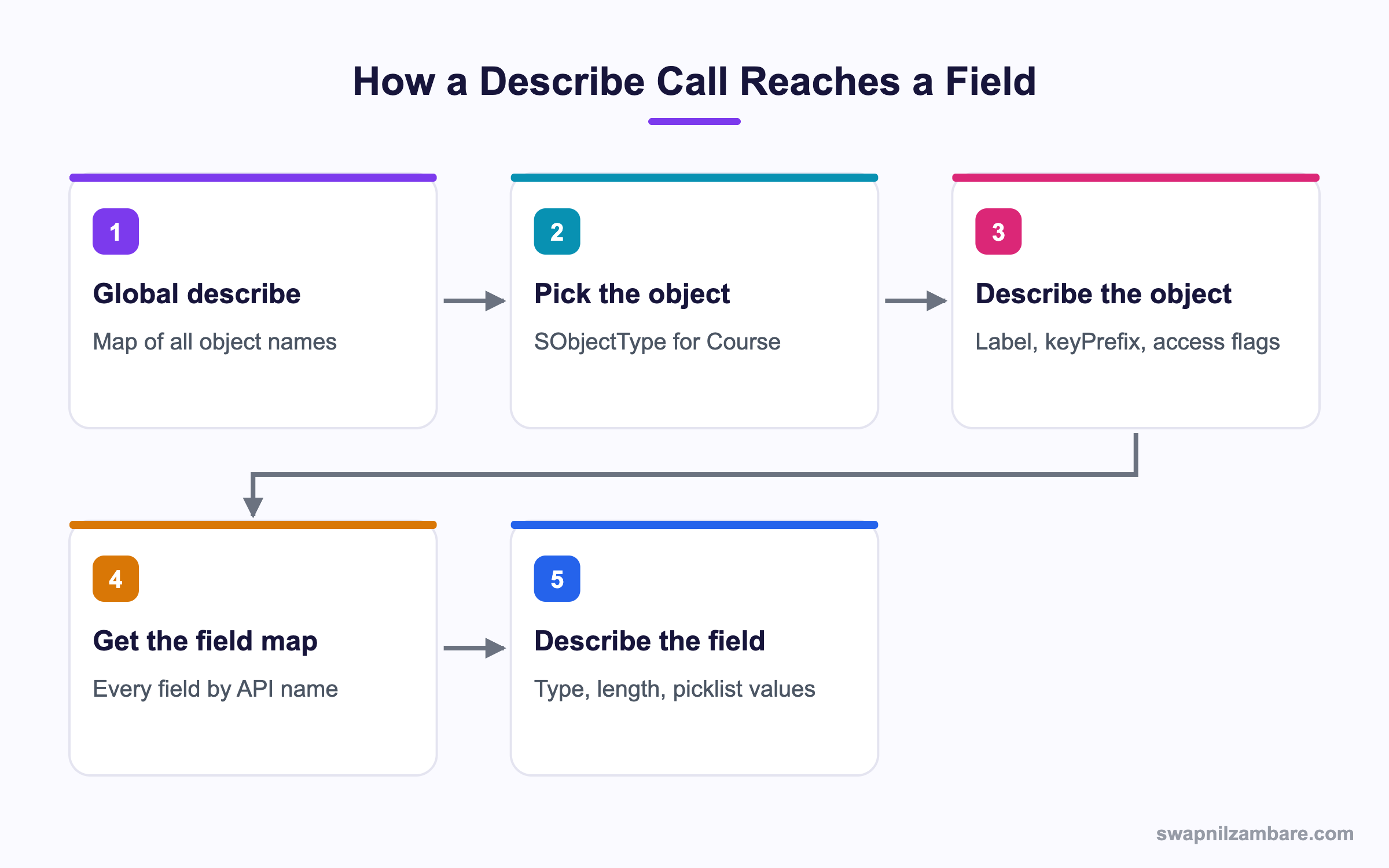
With Schema Describe you start wide and narrow down. Global describe gives every object, then you describe one object, then its field map, then one field.
Describing an Object
The shortest route uses the object’s token directly.
Schema.DescribeSObjectResult d = Course__c.SObjectType.getDescribe();
System.debug('Label: ' + d.getLabel());
System.debug('Key prefix: ' + d.getKeyPrefix());
System.debug('Createable: ' + d.isCreateable());
The log shows the user-facing label, the three-character Id prefix and whether this user may create records.
Label: Course
Key prefix: a01
Createable: true
The Global Describe
When you only have the object name as text, use the global map.
Map<String, Schema.SObjectType> all = Schema.getGlobalDescribe();
Schema.SObjectType t = all.get('Course__c');
if (t != null) {
    System.debug('Found ' + t.getDescribe().getLabel());
}
Global describe is heavy, so call it once and reuse the result rather than putting it in a loop.
Describing Fields
Map<String, Schema.SObjectField> fields =
    Course__c.SObjectType.getDescribe().fields.getMap();

for (String apiName : fields.keySet()) {
    Schema.DescribeFieldResult f = fields.get(apiName).getDescribe();
    System.debug(f.getLabel() + ' | ' + f.getType() + ' | accessible: ' + f.isAccessible());
}
A few lines of that log look like this.
Name | STRING | accessible: true
Fee | CURRENCY | accessible: true
Duration in Weeks | DOUBLE | accessible: true
Reading Picklist Values
List<String> levels = new List<String>();
for (Schema.PicklistEntry e : Course__c.Level__c.getDescribe().getPicklistValues()) {
    if (e.isActive()) { levels.add(e.getValue()); }
}
System.debug(levels);
This is how a component shows the current picklist without anyone updating the code when values change.
Schema Describe Access Methods
These methods answer the security questions you should ask before reading or writing.
| Method | Level | Question it answers |
|---|---|---|
| isAccessible() | Object or field | May this user read it? |
| isCreateable() | Object or field | May this user set it on insert? |
| isUpdateable() | Object or field | May this user change it? |
| isDeletable() | Object | May this user delete records? |
| isQueryable() | Object | Can it appear in SOQL? |
| getType() | Field | What data type is it? |
Static Apex vs Dynamic Apex
Dynamic Apex builds names at runtime. This table shows the trade-off.
| Feature | Static Apex | Dynamic Apex |
|---|---|---|
| Field names | Fixed in code | Built at runtime |
| Compile safety | Full | None |
| Refactor safety | High | Low |
| Flexibility | Low | High |
| Typical use | Business logic | Generic tools |
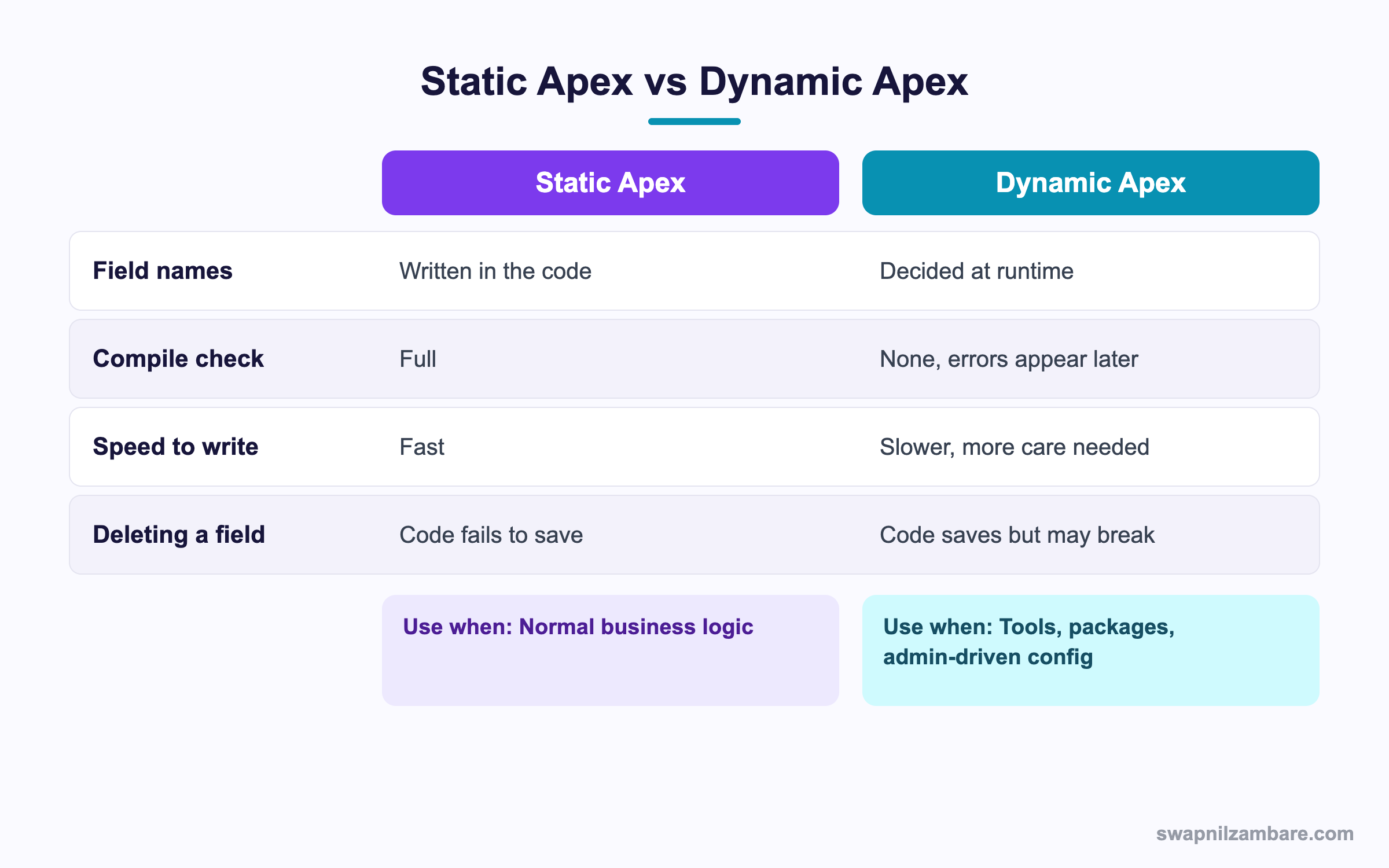
In short, write static Apex by default. Reach for dynamic Apex only when the object or field genuinely is not known until runtime.
A Real Schema Describe Example
Bright Path wants a screen that shows any object’s fields with their types, so admins can check the data model without opening Setup.
Step 1: Return the Field List
public with sharing class FieldInspector {
    public class FieldRow {
        @AuraEnabled public String label { get; set; }
        @AuraEnabled public String apiName { get; set; }
        @AuraEnabled public String dataType { get; set; }
    }

    @AuraEnabled(cacheable=true)
    public static List<FieldRow> describe(String objectName) {
        List<FieldRow> rows = new List<FieldRow>();
        Schema.SObjectType t = Schema.getGlobalDescribe().get(objectName);
        if (t == null) { return rows; }
        for (Schema.SObjectField f : t.getDescribe().fields.getMap().values()) {
            Schema.DescribeFieldResult d = f.getDescribe();
            if (!d.isAccessible()) { continue; }
            FieldRow r = new FieldRow();
            r.label = d.getLabel();
            r.apiName = d.getName();
            r.dataType = String.valueOf(d.getType());
            rows.add(r);
        }
        return rows;
    }
}
The isAccessible check means users never see a field they are not allowed to read.
Step 2: Build a Safe Dynamic Query
Dynamic SOQL is where describe really pays off, because you can prove every field exists first.
public static List<SObject> safeQuery(String objectName, List<String> wanted) {
    Schema.SObjectType t = Schema.getGlobalDescribe().get(objectName);
    Map<String, Schema.SObjectField> fieldMap = t.getDescribe().fields.getMap();

    List<String> safe = new List<String>();
    for (String w : wanted) {
        Schema.SObjectField f = fieldMap.get(w.toLowerCase());
        if (f != null && f.getDescribe().isAccessible()) { safe.add(f.getDescribe().getName()); }
    }
    String soql = 'SELECT ' + String.join(safe, ', ') +
                  ' FROM ' + t.getDescribe().getName() + ' LIMIT 50';
    return Database.query(soql);
}
Only names that came back from describe reach the query string, so a user cannot inject text.
Step 3: Test It
List<SObject> rows = FieldInspector.safeQuery('Course__c',
    new List<String>{ 'Name', 'Fee__c', 'Hacker__c' });
System.debug(rows.size() + ' rows, bad field ignored');
The fake field is dropped silently, and the query still runs.
These are the describe calls we used and what each returned.
| Call | Returned |
|---|---|
| getGlobalDescribe() | Map of all object names |
| getDescribe().getLabel() | Course |
| fields.getMap() | Every field by API name |
| getType() | CURRENCY, STRING and so on |
| isAccessible() | True or false per user |
Common Mistakes with Schema Describe
- Calling getGlobalDescribe inside a loop, which is slow and heavy.
- Building dynamic SOQL from raw user text instead of describe results.
- Forgetting isAccessible, which can expose fields a user should not read.
- Using field labels as keys, since labels change and are not unique.
- Assuming the field map keys match your casing, when they are lower case.
Best Practices for Schema Describe
- Call global describe once and cache the result in a static variable.
- Prefer the direct token, like Course__c.SObjectType, when you know the object.
- Always check access before reading or writing.
- Use String.escapeSingleQuotes for any value you must inline.
- Write static Apex unless the object really is unknown until runtime.
Practice Task
Write a method that takes an object API name and returns only its currency fields. Hint: compare getType() with Schema.DisplayType.CURRENCY.
Most Asked Schema Describe Interview Questions
These Schema Describe and Dynamic Apex questions appear in senior developer interviews.
Basic Schema Describe Interview Questions
Q1: What is Schema Describe in Apex?
Schema Describe is the set of Apex classes that return metadata about objects and fields at runtime, such as labels, types and access.
Q2: What does getGlobalDescribe return?
It returns a Map of every object API name to its SObjectType token in the org.
Q3: How do you get an object’s fields?
Call getDescribe().fields.getMap() on the SObjectType. Then you get a Map of API name to field token.
Q4: What is a key prefix?
It is the first three characters of a record Id, which identify the object. For example, accounts start with 001.
Q5: How do you read picklist values in Apex?
Call getDescribe().getPicklistValues() on the field and loop the PicklistEntry list.
Q6: What is Dynamic Apex?
It is code that decides object or field names while it runs. So the names are not fixed at compile time.
Q7: Which method checks read access?
isAccessible() on the object or field describe result.
Q8: How do you run a query built as text?
With Database.query for a list, or Database.getQueryLocator for large volumes.
Intermediate Schema Describe Interview Questions
Q9: Why is getGlobalDescribe considered expensive?
It builds a map of every object in the org. So call it once and store the result rather than repeating it.
Q10: How do you prevent SOQL injection in dynamic queries?
Build field and object names from describe results, use bind variables for values, and escape any text you must inline.
Q11: What is the difference between isAccessible and isUpdateable?
isAccessible means the user can read it. isUpdateable means the user can change it on an existing record.
Q12: What does getType() return?
A Schema.DisplayType value, such as STRING, CURRENCY, REFERENCE or PICKLIST.
Q13: How do you find the parent object of a lookup field?
Call getReferenceTo() on the field describe, which returns a list of possible parent types.
Q14: Are describe calls subject to governor limits?
There is no separate describe limit in modern Apex, but the calls still cost CPU time and heap. So cache them.
Q15: How do you check whether a field exists?
Look it up in the field map and test for null, rather than referencing it directly in code.
Q16: What is stripInaccessible used for?
It removes fields the user cannot access from records or query results, which is an easier alternative to manual checks.
Advanced Schema Describe Interview Questions
Q17: Scenario: build a component that renders any object. What do you need?
Global describe to validate the object, the field map for columns, access checks per field and a dynamic query built only from describe results.
Q18: How would you cache describe results across a transaction?
Store the maps in a static variable in a utility class, so later calls in the same transaction reuse them.
Q19: Why is USER_MODE often better than manual access checks?
Because the platform enforces object and field security for the whole query or DML, so you cannot forget a field.
Q20: Scenario: a dynamic query fails only in one customer org. What do you check?
Whether the field exists there, whether the profile can access it and whether a namespace prefix is missing.
Q21: How do namespaces affect describe in packages?
Packaged field names carry the namespace prefix. So build names from describe rather than string concatenation.
Q22: What is the risk of dynamic Apex during refactoring?
Deleting a field no longer breaks the save, so problems surface only at runtime. Therefore add tests that cover each dynamic path.
Q23: How do you list only the required fields on an object?
Check isNillable, isDefaultedOnCreate and isCreateable together, since a required field is not nillable and has no default.
Q24: When should you avoid dynamic Apex entirely?
In normal business logic, where fixed field names give you compile-time safety and clearer code.
Q25: Is Schema Describe needed for simple triggers?
Usually not. Because you know the object and fields there, static references are clearer and safer.
Q26: How does Schema Describe help in a managed package?
It lets your code adapt to each subscriber org. So optional fields and different layouts do not break the package.
Q27: Can Schema Describe tell you about record types?
Yes. The object describe exposes record type infos, so you can list the record types a user can see.
Q28: Scenario: an admin renames a field label. Does your describe code break?
Not if you key on the API name. However, code that matched on labels will break, which is why labels make poor keys.
Q29: How do you keep dynamic code testable?
Write a test per dynamic path with the real object, and assert both the allowed and the blocked cases.
Official Resources
- Apex Developer Guide: Dynamic Apex
- Apex Reference: DescribeFieldResult Class
- Apex Developer Guide: Dynamic SOQL
Quick Recap
- Schema Describe reads object and field metadata at runtime.
- Global describe is heavy, so call it once and cache it.
- Access methods let you check security before reading data.
- Build dynamic SOQL only from describe results.
- Prefer static Apex for ordinary business logic.
What’s Next?
Next, we sort lists properly with Comparable and Comparator in Apex.


