Platform Events Interview Questions are a good test of whether someone has built an event driven integration or only read the diagram. The interesting answers are about delivery, ordering and what happens when a subscriber fails.
Last reviewed for the Winter ’27 release (November 2026).
This post covers the questions asked, grouped into publishing, subscribing, delivery and replay, Change Data Capture, and scenario questions where events are lost or duplicated.
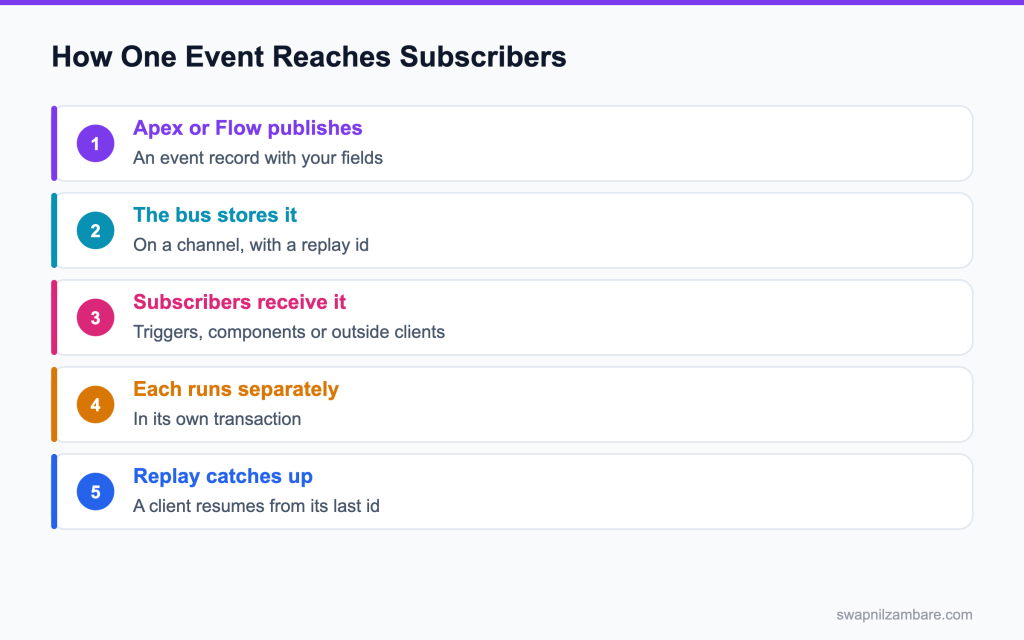
Caption: Each subscriber runs in its own transaction, so one failure does not affect the others.
What Platform Events Interview Questions Cover
Platform Events Interview Questions test whether you can design around at least once delivery. A platform event is a message with fields you define, published to a bus that subscribers read.
Think of it like a noticeboard rather than a phone call. The gRPC client side is covered in the post on Pub/Sub API. The publisher pins the notice and walks away, and whoever is interested reads it.
That separation is the point Platform Events Interview Questions keep returning to. The publisher does not know who is listening, which is why one event can feed a trigger, a component and an outside system at once.
Publishing and Subscribing
| Piece | What it is |
|---|---|
| The event definition | An object with an e suffix and your own fields |
| Publish behaviour | Publish immediately, or publish after commit |
| EventBus.publish | The Apex call that publishes |
| An after insert trigger | How Apex subscribes in the org |
| empApi | How a component subscribes in the browser |
| Pub/Sub API | How an outside client subscribes |
That publish behaviour setting is the one Platform Events Interview Questions return to, because it decides whether a rollback takes your event with it.
public with sharing class EnrolmentPublisher {

    public static void announce(List<Enrolment__c> rows) {
        List<Enrolment_Created__e> events = new List<Enrolment_Created__e>();
        for (Enrolment__c r : rows) {
            events.add(new Enrolment_Created__e(
                Enrolment_Id__c = r.Id,
                Course_Id__c = r.Course__c,
                Fee__c = r.Fee__c
            ));
        }
        List<Database.SaveResult> results = EventBus.publish(events);
        for (Database.SaveResult sr : results) {
            if (!sr.isSuccess()) {
                Logger.warn(sr.getErrors()[0].getMessage(), 'EnrolmentPublisher');
            }
        }
    }
}
Checking those save results is the detail Platform Events Interview Questions reward that separates a careful answer from a vague one, because a publish can fail quietly.
Platform Events vs Change Data Capture
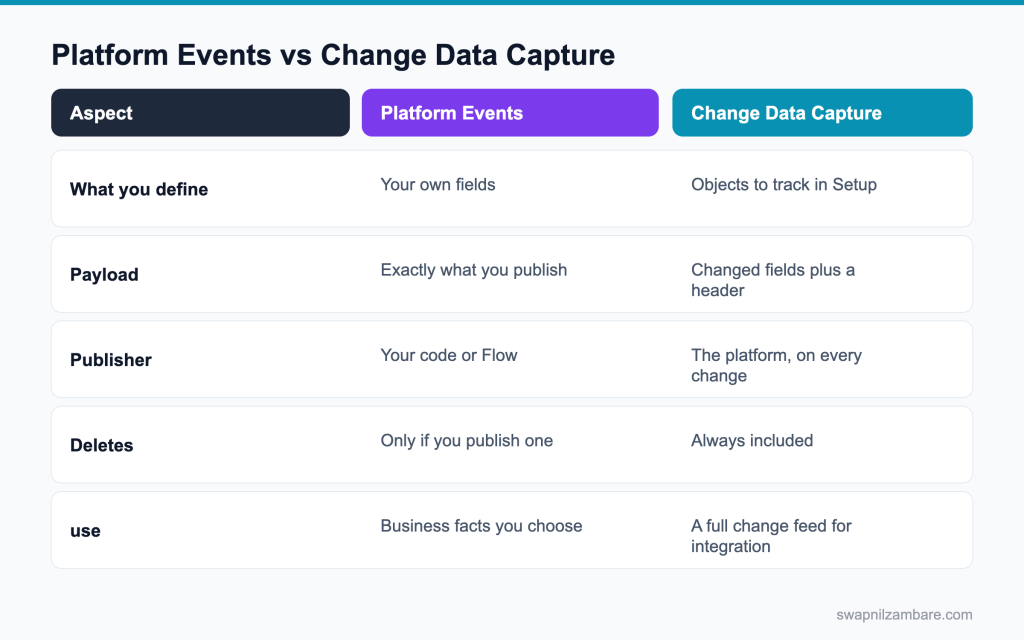
Caption: Define your own fields for a business fact, and use the change feed when a system needs every change.
| Need | Pick |
|---|---|
| A business fact such as an enrolment created | Platform event |
| Every field change on an object | Change Data Capture |
| A payload you control exactly | Platform event |
| Deletes and undeletes included | Change Data Capture |
| A message with no object behind it | Platform event |
Platform Events Interview Questions usually describe a requirement and ask which row fits.
The posts on platform events in Apex and Change Data Capture cover both.
Platform Events Interview Questions on Publishing
Q1: What is a platform event?
A message with fields you define, published to an event bus for any number of subscribers to read.
Example: an Order_Shipped__e event with OrderId__c and Carrier__c fields. The warehouse publishes it, and Salesforce triggers, flows and outside systems react on their own.
Interview tip: give a business example in the first answer, like order shipped.
Q2: What suffix does the definition use?
__e, like Order_Shipped__e.
Fields on the event end in __c as usual, so you set evt.OrderId__c = order.Id.
Q3: How do you publish from Apex?
With EventBus.publish, passing one event or a list.
Example: EventBus.publish(new Order_Shipped__e(OrderId__c = o.Id, Carrier__c = ‘BlueDart’)); For many events, publish a list in one call.
Follow-up you may get: Does publishing count as DML? Yes, it counts toward DML statements.
Q4: What does publish return?
A list of Database.SaveResult, one per event, which you should check.
Example: for (Database.SaveResult r : EventBus.publish(events)) { if (!r.isSuccess()) log(r.getErrors()[0].getMessage()); }
Interview tip: say you always check the results. Silent publish failures are a common bug.
Q5: Can a publish fail?
Yes, for example when you pass the publishing allocation or a required field is missing. Without checking the results, the failure is silent.
Your code keeps running as if the event went out, and subscribers never hear about the change.
Q6: What are the two publish behaviours?
Publish Immediately and Publish After Commit, set on the event definition.
| Behaviour | When the event goes out | If the transaction rolls back | Good for |
|---|---|---|---|
| Publish Immediately | Straight away | Event is still delivered | Logging errors, progress updates |
| Publish After Commit | When the transaction commits | Event is never sent | Telling subscribers about saved data |
Interview tip: give one use case for each behaviour.
Q7: What does publish immediately mean?
The event goes out straight away, even if the transaction later rolls back.
Subscribers might act on data that was never saved, so use it only where that is acceptable.
Follow-up you may get: Which is the default? Publish Immediately for most event definitions.
Q8: Why is that useful?
It lets platform events carry error logs out of a failing transaction.
The log event is delivered even though the records in the failing transaction roll back.
Q9: What does publish after commit mean?
The event goes out only if the transaction commits successfully.
If anything fails and the save rolls back, the event is dropped.
Q10: When would you want that?
When subscribers should only act on data that is definitely saved.
Example: a shipping system should only get Order_Confirmed__e for orders that really exist.
Q11: Can Flow publish an event?
Yes, with a Create Records element on the event.
Flows can also subscribe: a platform event triggered flow starts when the event arrives.
Follow-up you may get: How do flows subscribe? With a platform event triggered flow.
Q12: Can an outside system publish?
Yes, through the REST API, the SOAP API or the Pub/Sub API.
Example: the warehouse system posts to /services/data/v68.0/sobjects/Order_Shipped__e with the event fields.
Q13: Can you update or delete a published event?
No. Events are immutable and are not stored as records you can query or change.
If you need a lasting record, have a subscriber write one.
Q14: Do events count against data storage?
No. They are kept on the event bus for a retention window, not stored as records.
They do count toward event publishing and delivery allocations instead.
Q15: How long are they retained?
Up to 72 hours for high volume platform events and change events.
Within that window, subscribers can replay missed events using a replay ID.
Q16: What is the difference between a platform event and a custom object for messages?
A platform event is a message on a bus: it is published once, delivered to subscribers and not stored as a record. A custom object is data that you query, report on and update. Use events for notifications between systems, and objects for anything you must keep.
Q17: What is a high volume platform event?
The standard type of platform event today, built to handle large numbers of events with 72 hour retention and delivery through the Pub/Sub API. Older standard volume events are retired for new definitions.
Q18: Do published events count against limits?
Yes, against your publish and delivery allocations.
Check usage in Setup, Platform Events, and design to publish one event per batch where you can, not one per record.
Platform Events Interview Questions on Subscribing
Q19: How does Apex subscribe?
With an after insert trigger on the event object.
Example: trigger OrderShippedTrigger on Order_Shipped__e (after insert) { … } Only after insert is supported.
Follow-up you may get: Why only after insert? Events are messages, not records you update.
Q20: Which user does that trigger run as?
The Automated Process user by default, so its access and sharing differ from a normal user.
You can set a different running user and batch size with a PlatformEventSubscriberConfig record, which helps when the trigger needs specific access.
Interview tip: mention PlatformEventSubscriberConfig. Few candidates know it.
Q21: How many events does a trigger receive at once?
A batch of up to 2,000 events by default, so the trigger must be bulk safe.
Collect IDs from all events in Trigger.new, query once, and do DML on lists, like any other trigger.
Q22: How do you control that batch size?
With a PlatformEventSubscriberConfig record, which sets the batch size and the running user for the trigger.
Smaller batches help when each event does heavy work and the trigger hits limits.
Q23: What is a resume checkpoint for?
Telling the platform how far the trigger got, with EventBus.TriggerContext.currentContext().setResumeCheckpoint(replayId).
If the trigger fails later in the batch, the next run starts after the last checkpoint, so finished events are not processed again.
Follow-up you may get: Where does the replay ID come from? From each event’s ReplayId field.
Q24: What happens if an event trigger throws?
The events in that batch are not retried, unless you throw EventBus.RetryableException, which retries the batch up to 9 times.
After the retries, or after any other uncaught exception, the trigger moves on and those events are lost to it. That is why catching and logging errors matters.
Interview tip: name RetryableException and the 9 retry limit.
Q25: How do you avoid an infinite retry?
Catch your own errors, log them, set a resume checkpoint, and throw RetryableException only for problems that a retry can fix.
Example: a lock error is worth retrying; a bad field value is not, so log it and move on.
Q26: How does a component subscribe?
With the lightning/empApi module: call subscribe with the channel and a callback.
Example: subscribe(‘/event/Order_Shipped__e’, -1, (msg) => this.handle(msg.data.payload)).then((s) => { this.sub = s; });
Q27: What must a component do when it is destroyed?
Unsubscribe, or the subscription stays alive and duplicates handlers.
Call unsubscribe(this.sub) in disconnectedCallback.
Q28: How does an outside client subscribe?
Through the Pub/Sub API over gRPC, or the older CometD based streaming endpoints.
Pub/Sub API is faster and more efficient, and new integrations should use it.
Follow-up you may get: What is a managed event subscription? A Pub/Sub API feature where Salesforce tracks the subscriber’s position.
Q29: Can several subscribers read the same event?
Yes. Each subscriber gets its own copy and runs in its own transaction.
A trigger, a flow and an outside system can all react to the same event.
Q30: If one subscriber fails, do the others still receive it?
Yes. Subscribers are independent of each other.
One failing trigger does not stop a flow or an outside system from receiving the event.
Q31: How do you test a platform event trigger?
Publish the event inside Test.startTest and Test.stopTest, or call Test.getEventBus().deliver() to deliver it immediately. Then assert on the records the trigger created or updated.
Q32: Can a platform event trigger make callouts?
Not directly. Enqueue a queueable that implements Database.AllowsCallouts from the trigger, and make the callout there.
Q33: Can a subscriber publish another event?
Yes, and that is how event chains are built, with care about loops.
Guard against loops: never let a subscriber publish the same event type it listens to without a stop condition.
Platform Events Interview Questions on Delivery and Replay
Q34: What delivery guarantee applies?
At least once, so a subscriber may receive the same event twice.
Delivery is reliable, but not exactly once, so your code must cope with repeats.
Interview tip: “at least once” must be followed by “so handlers are idempotent”.
Q35: What does that mean for your code?
Handlers must be idempotent: processing the same event again changes nothing.
Example: an event that sets a status to Shipped is safe; one that adds 1 to a counter is not.
Q36: How do you make a handler idempotent?
Base the work on a stable ID and check whether it is already done.
Example: store the event’s unique key or the order ID on the record you create, and skip the event if a record with that key exists.
Q37: What is a replay id?
A number per event that lets a subscriber ask for everything after a given event.
| Replay value | What the subscriber gets |
|---|---|
| -1 | Only new events from now on |
| -2 | All events still retained, then new ones |
| A stored replay ID | Events after that one, if still retained |
Interview tip: give the -1 and -2 values from memory.
Q38: What does a replay id of minus one mean?
Only new events from now on.
Use it when old events do not matter, like a live dashboard that only shows what happens after the user opens it.
Q39: What does minus two mean?
Every event still in the retention window, then new ones.
Use it carefully, because a subscriber can receive a lot of old events at once.
Q40: When should a client store its replay id?
After the event is fully handled, not before.
Save the replay ID in the same step that saves the result, so they stay in sync.
Q41: Why that order?
So a crash replays the event instead of skipping it.
If you saved the ID first and then crashed, that event would never be processed.
Q42: Is ordering guaranteed?
Order is kept within one channel, but there is no guarantee across channels.
If two kinds of events depend on each other, use one channel or design each handler to work in any order.
Follow-up you may get: How do you keep order for one record? Publish its events on the same channel in sequence.
Q43: What happens if a client is offline for four days?
Events older than the retention window are gone, so a reconciliation job is needed.
Query the records changed since the last successful sync, using LastModifiedDate, and process them directly.
Interview tip: always mention a reconciliation job for long outages.
Q44: Does a failing subscriber block the publisher?
No. Publishing succeeds whatever subscribers do.
That decoupling is the point of events, but it also means failures are not visible to the publisher.
Q45: How do you monitor platform event usage?
Check Setup, Platform Events, and the PlatformEventUsageMetric object for publish and delivery numbers against your allocations. Alert someone before you reach the daily limit.
Q46: How do you see subscribers and their status?
In Setup, Platform Events, open the event and look at its subscriptions. It shows each trigger or flow, its last processed replay ID and any errors, and lets you suspend or resume it.
Q47: So what does silence prove?
Nothing. You need monitoring on the subscriber side.
Monitor subscriber errors, the age of the last processed event, and use Event Monitoring or custom logs to see failures.
Platform Events Interview Questions on Change Data Capture
Q48: What is Change Data Capture?
A platform feature that publishes an event for each create, update, delete and undelete on objects you choose.
You write no publishing code; Salesforce sends change events automatically.
Interview tip: compare CDC with platform events in one line: automatic record changes versus your own messages.
Q49: Where is it configured?
In Setup, Change Data Capture, by selecting the objects to track.
Each selected object gets a change event channel, like /data/AccountChangeEvent.
Q50: What does the payload contain?
The changed fields plus a header that describes the change.
Example: an update to an account’s Industry sends Industry and the header, not every field on the account.
Q51: What is in that header?
The change type, the record IDs, the commit timestamp, the user who made the change, and the entity name.
Read it in Apex from event.ChangeEventHeader, like header.getChangeType() and header.getRecordIds().
Follow-up you may get: How do you skip changes made by your own integration? Check the header’s commitUser against the integration user.
Q52: Which change types are reported?
CREATE, UPDATE, DELETE and UNDELETE, plus GAP and OVERFLOW types when events could not be generated normally.
Gap events mean some changes were not captured in detail, so the subscriber should read the records directly.
Q53: How does Apex subscribe to it?
With an after insert trigger on the change event object.
Example: trigger AccountCdcTrigger on AccountChangeEvent (after insert) { … }
Follow-up you may get: Does a CDC trigger run in the same transaction as the change? No, it runs after the commit, in its own transaction.
Q54: What is the naming pattern for that object?
The object name followed by ChangeEvent, like AccountChangeEvent or Course__ChangeEvent for a custom object.
Custom objects drop the __c and add __ChangeEvent.
Q55: Can a single event cover several records?
Yes. One change event can list several record IDs when the same change was made to many records.
Example: a mass update of 50 accounts’ Rating may come through as one event with 50 IDs.
Interview tip: this catches many candidates. Say handlers must loop over record IDs.
Q56: Why does that matter?
Your handler must loop over the record IDs, not assume there is one.
Read getRecordIds() and process every ID in the list.
Q57: Does it include fields that did not change?
No, only the changed fields, which keeps the payload small.
If your handler needs other fields, query the records, or add enriched fields to the change event channel.
Q58: Can you pick which fields are reported?
You choose objects, not fields, for change events. With channel enrichment, you can add extra fields that are always sent.
Enrichment is useful when a subscriber always needs a key field, like an external ID, even if it did not change.
Q59: When would you use it over a trigger?
When an outside system needs a feed of changes, or several subscribers need them, without you writing publish code.
For logic inside Salesforce on the same transaction, a trigger is still the simpler choice.
Q60: How do you avoid processing changes your own integration made?
Check the change event header’s commitUser. If it is the integration user, skip the event, so a sync from System A does not bounce straight back to System A.
Q61: What is the difference between CDC and field history tracking?
CDC streams changes as events for other systems to consume within 72 hours. Field history tracking stores old and new values on the record for people to review later, for up to 18 months, or longer with Field Audit Trail.
Q62: Can it feed AWS directly?
Yes, through Event Relay, which the post on that topic covers.
Event Relay sends platform events and change events to Amazon EventBridge without middleware.
Scenario Based Platform Events Interview Questions
Q63: Scenario: an event is published and the transaction then fails. Does the subscriber see it?
With publish immediately yes, and with publish after commit no.
Follow-up you may get: Can you choose per publish call? No, the behaviour is set on the event definition.
Q64: Scenario: a counter is double counted. What happened?
At least once delivery sent the event twice, and the handler was not idempotent.
Change the handler to set a value instead of adding to it, or record each processed event key and skip repeats.
Q65: Scenario: a dashboard shows duplicate rows after navigating around. Why?
Components did not unsubscribe, so several subscriptions feed the same list.
Unsubscribe in disconnectedCallback and keep only one subscription per component instance.
Q66: Scenario: an event trigger fails and keeps retrying. What do you add?
Error handling plus a resume checkpoint so progress is preserved.
Q67: Scenario: a client was down for a day and needs to catch up. What do you use?
Its stored replay ID, as long as the events are still inside the 72 hour retention window.
The client subscribes with that ID and receives everything that happened after it, in order.
Q68: Scenario: it was down for four days. What now?
The events are gone, so run a reconciliation query against the records.
Interview tip: suggest LastModifiedDate based reconciliation. It shows practical sense.
Q69: Scenario: events arrive out of order across two channels. Is that a bug?
No. Order is guaranteed only within one channel, so the design must not depend on order across channels.
Put related events on one channel, or make each handler check the record’s current state before acting.
Q70: Scenario: a publish silently does nothing. What did the code skip?
It skipped checking the save results from EventBus.publish.
Loop over the results, log failures with their error messages, and alert someone when publishing fails.
Q71: Scenario: an event trigger cannot read a field. Why?
It runs as the Automated Process user, whose access differs from normal users.
Set a running user with PlatformEventSubscriberConfig, or give the needed access through that user’s permissions.
Q72: Scenario: the business wants a full audit of every change. Which feature?
Change Data Capture, or field history and Shield depending on retention needs.
Q73: Scenario: events are hitting the daily allocation. What do you look at?
Publishing one event per record instead of per batch, and tracked objects or events nobody consumes.
Combine changes into fewer events, turn off CDC for objects no subscriber uses, and check usage against the daily allocation in Setup.
Q74: Scenario: a flow and a trigger both subscribe to the same event, and you see different results. Why?
They run independently, in their own transactions and possibly as different users, so each sees data at a slightly different moment and with different access. Make each one idempotent and avoid them changing the same records.
Q75: Scenario: an outside system needs every account change in real time. What do you propose?
Turn on Change Data Capture for Account and have the system subscribe through the Pub/Sub API with stored replay IDs. Add channel enrichment for the external ID field, and a nightly reconciliation for safety.
Q76: Scenario: an interviewer asks how you make an event driven design reliable. What do you say?
Idempotent handlers, replay ids stored after success, monitoring on subscribers, and a reconciliation job.
Idempotent handlers, replay IDs stored after success, monitoring on the subscriber side, and a reconciliation job for anything outside the retention window.
Common Mistakes Candidates Make
- Assuming exactly once delivery, the first thing Platform Events Interview Questions test
- Ignoring the save results from a publish
- Forgetting that an event trigger runs as the automated process user
- Storing a replay id before the work succeeds
- Expecting ordering across different channels
- Treating a successful publish as proof of delivery
Best Practices to Mention in an Interview
- Make every handler safe to run twice
- Check the publish results and log failures
- Choose the publish behaviour deliberately and write down why
- Store the replay id only after the event is handled
- Unsubscribe in components when they are destroyed
- Monitor subscribers, since silence proves nothing
- Add a reconciliation job for anything that must not be lost
Official Resources
Quick Recap
- Platform Events Interview Questions centre on at least once delivery
- You define the fields, and Change Data Capture reports what changed
- Publish immediately survives a rollback, and after commit does not
- Each subscriber runs in its own transaction
- Replay ids let a client catch up inside the retention window
- Idempotent handlers are the whole defence
What Is Next
Coming soon: Streaming interview questions on Pub/Sub API and PushTopics.


