Metadata API Interview Questions come up for any role that owns releases. Every deployment tool sits on this API, so understanding it explains why releases behave the way they do.
Last reviewed for the Winter ’27 release (November 2026).
This post covers the questions asked, grouped into manifests, retrieve and deploy, destructive changes and profiles, the Tooling API, and scenario questions where a release has gone wrong.
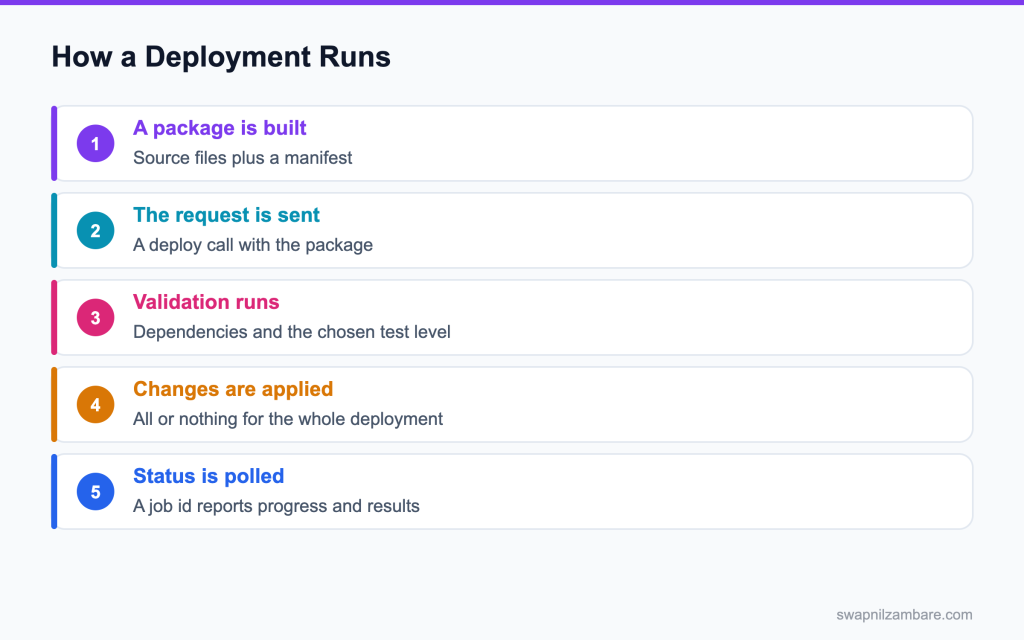
Caption: A deployment is one transaction, so either every component lands or none of them do.
What Metadata API Interview Questions Cover
Metadata API Interview Questions test whether you understand that configuration is deployable. This API moves objects, fields, classes, layouts, Flows and permissions rather than records.
Think of it like shipping the blueprints rather than the furniture. The pipeline around it is covered in the post on CI and CD. Nothing in it is data.
Metadata API Interview Questions almost always reach the manifest. A package is a set of metadata files plus a manifest naming what is inside. The manifest is where most of the arguments happen.
The Manifest and the Verbs
| Manifest entry | What it fetches |
|---|---|
| A named member | Just that component |
| An asterisk | Every component of that type |
| Several types | A mixed package |
| A version number | The API version for the request |
| Verb | What it does |
|---|---|
| Retrieve | Pulls configuration out of an org into files |
| Deploy | Pushes files into an org |
| Check only deploy | Validates without changing anything |
| Quick deploy | Applies a recently validated package |
That check only option is the one Metadata API Interview Questions value most, because it proves a release will work before the window opens.
<?xml version="1.0" encoding="UTF-8"?>
<Package xmlns="http://soap.sforce.com/2006/04/metadata">
  <types>
    <members>Course__c</members>
    <name>CustomObject</name>
  </types>
  <types>
    <members>CourseService</members>
    <name>ApexClass</name>
  </types>
  <version>62.0</version>
</Package>
Named members rather than wildcards is the habit Metadata API Interview Questions reward, because a wildcard retrieve on a large org takes a very long time.
Metadata API vs Tooling API
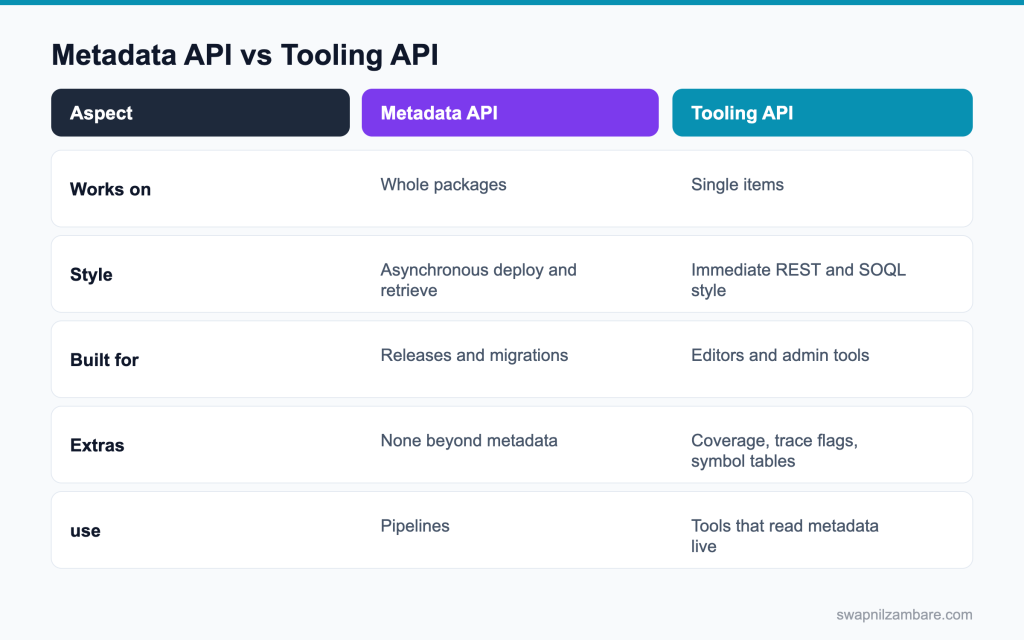
Caption: Pipelines use one, and editors and admin tools use the other.
| Need | Pick |
|---|---|
| Deploy 300 components | Metadata API |
| Read one Apex class body quickly | Tooling API |
| Create a debug log trace flag | Tooling API |
| Read code coverage results | Tooling API |
| Retrieve every profile | Metadata API |
Metadata API Interview Questions often describe a task and ask which API you would reach for.
The posts on the Metadata API and Tooling API and the Salesforce CLI cover the detail.
Metadata API Interview Questions on Manifests and Deploys
Q1: What does the Metadata API move?
Configuration, not records: objects, fields, Apex classes, layouts, flows, permission sets and much more.
It is how tools like the Salesforce CLI, DevOps Center and change sets move your org’s setup between orgs.
Interview tip: say “configuration, not data” in the first sentence.
Q2: What is the manifest file called?
It sits at the root of a deploy or retrieve and tells the API which components to include.
Follow-up you may get: Do you need package.xml with the CLI? Not always; you can deploy by source path.
Q3: What does it contain?
The metadata types, the members of each type, and the API version for the request.
Example: <types><members>CourseService</members><name>ApexClass</name></types><version>68.0</version>
Q4: What does an asterisk member mean?
Every component of that type, which makes a retrieve slow on a large org.
Example: <members>*</members> for ApexClass retrieves every class, including ones unrelated to your change.
Interview tip: mention that wildcards do not retrieve standard objects. It is a common trap.
Q5: Why name members explicitly in a release package?
It is faster, and the manifest becomes an exact record of what shipped.
Reviewers can see in one file which components the release touches.
Q6: Are deployments synchronous?
No. You get a job ID and poll it until the deployment finishes.
Example: sf project deploy start returns an ID, and the CLI waits and polls unless you pass –async.
Interview tip: name the job ID and polling. It shows you understand async deploys.
Q7: What happens if a pipeline does not poll?
It reports success too early, because the first response only says the job was queued.
Always wait for a final status of Succeeded or Failed before marking the release done.
Q8: What is a check only deployment?
A validation that runs tests and checks dependencies without saving any change.
Example: sf project deploy validate –test-level RunLocalTests runs everything a real deploy would, then rolls back.
Follow-up you may get: What CLI command validates? sf project deploy validate.
Q9: What is a quick deploy?
Deploying a recently validated package without running the tests again.
It works within 10 days of a successful validation, as long as nothing changed in the target org that affects the components.
Interview tip: give the 10 day window. It is a frequent follow up.
Q10: Why is that useful?
It shortens the release window, because the slow part, the tests, already ran.
Teams validate in the afternoon and quick deploy in the evening window in minutes.
Q11: What test levels are available?
NoTestRun, RunSpecifiedTests, RunLocalTests and RunAllTestsInOrg.
| Test level | What runs | Typical use |
|---|---|---|
| NoTestRun | No tests | Sandboxes, metadata with no Apex |
| RunSpecifiedTests | Only the listed test classes | Fast, targeted releases with enough coverage |
| RunLocalTests | All tests except managed package tests | Default for production with Apex |
| RunAllTestsInOrg | Every test, including packages | Rare, full regression checks |
Q12: Which suits a production release?
RunLocalTests at a minimum, so every test you own runs.
RunSpecifiedTests is faster, but each class in the deploy must still reach 75 percent from the listed tests.
Interview tip: explain why RunSpecifiedTests can still fail on coverage.
Q13: What happens if one test fails?
In production, the whole deployment rolls back, because it is one transaction.
Fix the test or the code, validate again, then deploy.
Follow-up you may get: Can sandboxes allow partial deploys? Yes, with rollbackOnError false, but not production.
Q14: Is there a limit on components per deployment?
Yes: up to 10,000 files and a 39 MB zipped (about 400 MB unzipped) package per deployment.
Very large releases need splitting into several deployments.
Q15: How would you split one?
By feature or object, deployed in an order that satisfies dependencies.
Example: objects and fields first, then Apex and flows that use them, then layouts and permission sets.
Follow-up you may get: Do unlocked packages help? Yes, they make dependency order explicit.
Q16: What is the difference between source format and metadata format?
Source format splits components into small files that suit version control. Metadata format is what the API itself deploys and retrieves.
Example: in source format an object is a folder with one file per field; in metadata format it is one large .object file. The CLI converts between them.
Q17: What is sfdx-project.json?
The project file for Salesforce DX. It lists the package directories, like force-app, the sourceApiVersion and package details. The CLI reads it to know where source lives and which API version to use.
Q18: What is the difference between deploy and push?
Deploy sends chosen components to any org, often with tests. With source tracking, sf project deploy start can send only changed files to scratch orgs and tracked sandboxes. The older push command did the same for scratch orgs only.
Q19: Can you retrieve with no manifest?
Tools can build one for you from a source directory or a package name.
Example: sf project retrieve start –source-dir force-app or –manifest package.xml, or –package-name for a package.
Metadata API Interview Questions on Destructive Changes and Profiles
Q20: How do you delete components?
With a destructiveChanges.xml manifest alongside a package.xml that can be empty.
Example: list the class or field to delete in destructiveChanges.xml and deploy both files together.
Interview tip: name the pre and post files and when each runs.
Q21: What are the two destructive files?
destructiveChangesPre.xml and destructiveChangesPost.xml, which run before or after the rest of the package.
| File | Runs | Use for |
|---|---|---|
| destructiveChangesPre.xml | Before the deploy | Removing something that blocks new components |
| destructiveChanges.xml | With the deploy | Simple deletions |
| destructiveChangesPost.xml | After the deploy | Removing old components once their replacements exist |
Follow-up you may get: Can you delete components with change sets? No.
Q22: When do you use the post file?
When a new component replaces an old one and must exist first.
Example: deploy a new field and update the Apex to use it, then delete the old field in the post file.
Q23: What is the risk with a field deletion?
The field’s data is deleted with it, and a validation run does not make that obvious.
Deleted fields can be restored for 15 days in Setup, but relying on that is risky.
Interview tip: always mention exporting data before deleting a field.
Q24: What do you do before any destructive change?
Export the data, and confirm the change with the business owner.
Also check reports, flows and integrations that use the component, using Where is this used where available.
Q25: Why does retrieving a profile give almost nothing?
Profile permissions come back only for components that are also in the package.
Retrieving a profile alone returns its login and system settings, not its object and field access.
Interview tip: this is the most common profile surprise. Explain it clearly.
Q26: How do you get a full profile?
Retrieve it together with the objects, fields, classes and pages it gives access to.
That is slow and messy on large orgs, which is one reason teams avoid managing access in profiles.
Q27: Why do profiles cause merge conflicts?
Because the file changes whenever related components change, and everyone edits it.
Two developers adding different fields both change the same profile file, so conflicts are constant.
Follow-up you may get: Should profiles be in Git at all? Only minimal ones, if any.
Q28: How do teams avoid that?
Permission sets and permission set groups, with profiles kept minimal.
Each feature ships its own permission set, so changes stay small and separate.
Interview tip: say profiles should hold almost nothing. It shows modern practice.
Q29: Can you deploy a permission set instead?
Yes, and it is much easier to manage in version control.
A permission set file only lists what it grants, so it is small and readable.
Q30: Does every setting deploy?
No. A short list stays manual, so those steps belong in a go live checklist.
Settings like some org preferences, certain feature licences and some security settings must be set by hand in each org.
Q31: How do you deploy custom metadata records?
Include the CustomMetadata type with each record’s full name, like Discount_Rule.Gold, in the manifest, or keep the record files under customMetadata in source. They deploy like other metadata.
Q32: How do you roll back a bad deployment?
There is no automatic undo. Redeploy the previous version from Git, or a destructive change for new components. Keep each release tagged in Git so the last good version is easy to find.
Q33: How do you find out which ones?
The Metadata Coverage Report, which lists what each deployment channel supports.
It shows, for each type, whether the Metadata API, change sets, packages and source tracking support it.
Metadata API Interview Questions on the Tooling API
Q34: What is the Tooling API for?
Reading and changing single metadata items quickly, which suits editors and developer tools.
VS Code, the Developer Console and many CLI commands use it behind the scenes.
Follow-up you may get: Can Tooling API run tests? Yes, through runTestsAsynchronous or runTestsSynchronous.
Q35: How do you query with it?
A SOQL style query against the Tooling API endpoint, over REST.
Example: GET /services/data/v68.0/tooling/query?q=SELECT+Name+FROM+ApexClass, or sf data query –use-tooling-api.
Q36: Name three things it exposes that the Metadata API does not.
Code coverage results, trace flags and the symbol table for a class.
It also exposes debug logs and test run results, which the Metadata API does not.
Interview tip: name ApexCodeCoverageAggregate. Specific names stand out.
Q37: Why does a code editor use it?
It returns or saves a class body in one quick call, without a full deployment.
That makes saving and compiling in an editor feel instant.
Q38: Can it deploy a whole package?
No. Deploying a whole package is the Metadata API’s job.
Tooling API works on individual items; use the Metadata API or the CLI for releases.
Q39: What is a trace flag?
A record that turns on debug logging for a user, an Apex class or a trigger for a set period.
It has a debug level that sets how much detail each log category records, and lasts up to 24 hours.
Follow-up you may get: How long can a trace flag last? Up to 24 hours.
Q40: Why create one through the API?
So a tool can turn on logging without an admin clicking in Setup.
Example: a support script creates a trace flag for the integration user for one hour while you reproduce a bug.
Q41: How do you read coverage per class?
Query the coverage objects it exposes, like ApexCodeCoverageAggregate.
Example: SELECT ApexClassOrTrigger.Name, NumLinesCovered, NumLinesUncovered FROM ApexCodeCoverageAggregate
Q42: What is a container and a member in Tooling API terms?
Objects used to stage and compile a change: a MetadataContainer holds members like ApexClassMember, and a ContainerAsyncRequest compiles them.
That is how editors save code without a deployment.
Q43: Can both APIs be used in one pipeline?
Yes, and it is common: deployments on the Metadata API, and coverage or log reports from the Tooling API.
Example: a pipeline deploys with the CLI, then queries coverage through the Tooling API for a report.
Q44: Which API do change sets use?
Change sets use the same Metadata API underneath, wrapped in a Setup interface with no version control.
They only work between connected orgs and cannot delete components.
Follow-up you may get: What replaces change sets for admins? DevOps Center.
Q45: How do you list all metadata types an org supports?
Call describeMetadata through the API, or run sf org list metadata-types. It returns each type’s name and whether it is in a folder, which helps when building manifests.
Q46: What is the difference between Metadata API and Tooling API for Apex classes?
Both can read and write classes. Metadata API moves them in bulk as part of a deploy with tests. Tooling API changes one class at a time quickly, and gives coverage and symbol data, but is not for production releases.
Q47: Why move from change sets to a pipeline?
Repeatability, review and a record of exactly what shipped.
A pipeline also lets you run tests and code scans automatically on every change.
Scenario Based Metadata API Interview Questions
Q48: Scenario: a retrieve takes forty minutes. What is the cause?
Wildcards in the manifest pulling every component of several types.
Name only the members you need, or retrieve by source path, so the retrieve finishes in minutes.
Q49: Scenario: a pipeline says success and production is unchanged. What happened?
It never polled the job, so it read the queued response as the result.
Use the CLI’s wait option or poll the deploy status until it reaches a final state, and fail the pipeline if it is not Succeeded.
Interview tip: “wait for a final status” is the practical fix interviewers want.
Q50: Scenario: a release fails on one test during the window. What would have prevented it?
A validation run earlier in the day.
Validate a few hours before the window, fix anything that fails, then quick deploy during the window.
Q51: Scenario: a field was deleted and the data is gone. Was that avoidable?
Yes, with a data export before the destructive deployment.
Also review destructive changes in the pull request, so deleting a field is a visible decision.
Q52: Scenario: a profile file conflicts on every pull request. What do you change?
Move permissions into permission sets, and keep profiles minimal and out of most releases.
Each feature then ships its own permission set file, and the profile rarely changes.
Q53: Scenario: a deployment fails on a missing dependency. What do you do?
Add the missing component to the package, or deploy it first in an earlier package.
The error message names the component it could not find, which tells you what to add.
Q54: Scenario: a setting did not deploy and nobody noticed until go live. What is missing?
A go live checklist of manual steps, built from the Metadata Coverage Report.
Add each manual setting to the release runbook, with an owner and a check after deployment.
Q55: Scenario: a release of 4,000 components is rejected. What now?
Split it by feature and deploy in dependency order.
Smaller deployments are also easier to test and roll back.
Q56: Scenario: a developer needs to see coverage in the editor. Which API?
The Tooling API, through the code coverage objects.
VS Code’s Salesforce extensions use it to highlight covered and uncovered lines.
Q57: Scenario: a hotfix must ship in ten minutes. How do you shorten the window?
Validate first, then use a quick deploy so the tests do not run again.
If there is no time to validate, deploy with RunSpecifiedTests and only the relevant tests, if coverage rules allow.
Q58: Scenario: two developers retrieve different versions of the same object. Why?
Different manifests or API versions, which is why the manifest belongs in Git.
Pin sourceApiVersion in sfdx-project.json so every developer retrieves in the same format.
Q59: Scenario: a validation passes, but the quick deploy option is greyed out. Why?
The validation is older than 10 days, ran without the required tests, or something changed in the target org since it ran. Validate again with RunLocalTests or the needed specified tests, then quick deploy.
Q60: Scenario: a deployment fails because a flow is active in production. What do you do?
Deploy the flow as a new version; active flows cannot be overwritten, but a new version can be deployed and activated. Check the org setting that allows deploying flows as active if your process needs it.
Q61: Scenario: an interviewer asks how you would set up releases from scratch. What do you say?
Source in Git, a named manifest, check only validation on every pull request, and a quick deploy at the window.
Source in Git, a named manifest or package, validation on every pull request, quick deploy in the release window, permission sets instead of profiles, and a checklist for manual steps.
Common Mistakes Candidates Make
- Using wildcards in a release manifest, which Metadata API Interview Questions pick up on
- Treating a deploy as synchronous
- Skipping check only validation before a release
- Deleting fields with no data export
- Retrieving profiles on their own and wondering why they are empty
- Assuming every setting is deployable
More Metadata API Interview Questions
Q62: What format does a Metadata API deploy use?
A zip file containing package.xml and the component files, in the folder structure the API expects.
Q63: What does the version in package.xml control?
The API version used to read and write the metadata, which decides which fields and types are available.
Q64: What does the ignore warnings option do?
It lets a deployment succeed even when there are warnings, such as a missing optional component. Use it with care.
Q65: What does rollback on error mean?
If any component fails, nothing is saved. Production deployments always roll back on error, while sandboxes can allow partial success.
Q66: Can Apex use the Metadata API?
Partly. Apex can deploy some metadata, such as custom metadata records and page layouts, through the Metadata namespace, and it runs asynchronously.
Q67: Does an asterisk retrieve standard objects?
No. For objects, an asterisk returns custom objects only. Standard objects must be named one by one.
Q68: What is the difference between file based and CRUD based calls?
Deploy and retrieve move whole sets of files in a zip. The CRUD calls, such as createMetadata and updateMetadata, change single components directly.
Q69: What is a deployment id used for?
To check status, cancel a running deployment, or run a quick deploy of a validation that passed.
Q70: Can a running deployment be cancelled?
Yes, through the API or the Deployment Status page in Setup, though work already done may still roll back first.
Q71: How do you run only chosen tests in a deployment?
Use the RunSpecifiedTests level and list the test classes. They must still meet coverage for the classes and triggers being deployed.
Q72: How do you find who deployed what?
Check Deployment Status in Setup for recent deployments and the setup audit trail for changes and who made them.
Q73: How do you track metadata changes made directly in production?
Check the Setup Audit Trail, which records who changed what in Setup, and compare the org with Git regularly using a retrieve. Some teams block direct changes with permission sets and a clear process.
Q74: What is DevOps Center?
Salesforce’s tool for managing changes and pipelines from inside Salesforce, backed by GitHub. It suits admins and mixed teams who want version control without using the CLI.
Q75: What does source tracking add?
It keeps a record of what changed in the org and in your local files, so the CLI can push and pull only the differences.
Scratch orgs and sandboxes with source tracking on let sf project deploy start and retrieve start move only what changed.
Best Practices to Mention in an Interview
- Keep the manifest in Git next to the source
- Name members explicitly in a release package
- Validate with a check only deployment on every pull request
- Use a quick deploy to shorten the release window
- Export data before any destructive change
- Prefer permission sets over profiles for everything new
- Keep a documented list of manual go live steps
Official Resources
Quick Recap
- Metadata API Interview Questions are really release questions
- The manifest decides what moves, so avoid wildcards
- Deploys are asynchronous, so a pipeline must poll
- Check only validation plus a quick deploy shortens the window
- Destructive changes take the data with them
- The Tooling API serves editors, coverage and trace flags
What Is Next
Coming soon: Integration patterns interview questions and OAuth flows.


