Bulk API Interview Questions sort out candidates who have moved real data from those who have only used the REST API for single records. The answers are about volume, batching and what happens to the rows that fail.
Last reviewed for the Winter ’27 release (November 2026).
This post covers the questions asked, grouped into Bulk API 2.0, the Composite API, the GraphQL API, API limits, and scenario questions where a load has gone wrong.
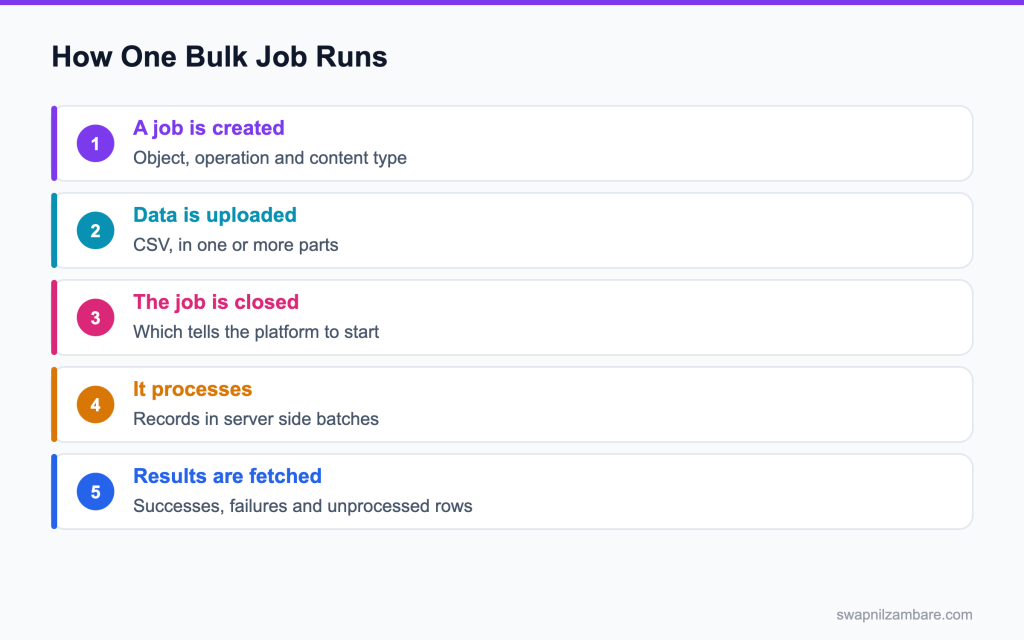
Caption: Closing the job is what starts it, which surprises people on their first load.
What Bulk API Interview Questions Cover
Bulk API Interview Questions test whether you pick the right tool for a volume. Salesforce has several APIs, and choosing between them is most of the skill.
Think of it like moving house. Reading the records precisely is covered in the post on the GraphQL API. One box goes in the car, and a van is better for the whole flat.
Bulk API Interview Questions centre on one of those options. Bulk API 2.0 is asynchronous and built for volume. You create a job, upload CSV data, close the job, and collect the results when it finishes.
The APIs and Their Jobs
| API | Built for |
|---|---|
| Bulk API 2.0 | Loading and extracting very large volumes |
| Composite API | Up to 25 dependent calls in one request |
| Composite sObjects | Up to 200 records in one call, no dependencies |
| GraphQL API | Precise reads, with exact fields and nesting |
| REST API | Ordinary single record work |
That table is the shape of most Bulk API Interview Questions, and the follow up is always a record count.
POST /services/data/v62.0/jobs/ingest

{
  "object": "Course__c",
  "operation": "upsert",
  "externalIdFieldName": "External_Id__c",
  "contentType": "CSV",
  "lineEnding": "LF"
}
That external id field is the detail Bulk API Interview Questions ask about, because an upsert without one is just an insert waiting to create duplicates.
Bulk API vs Composite API
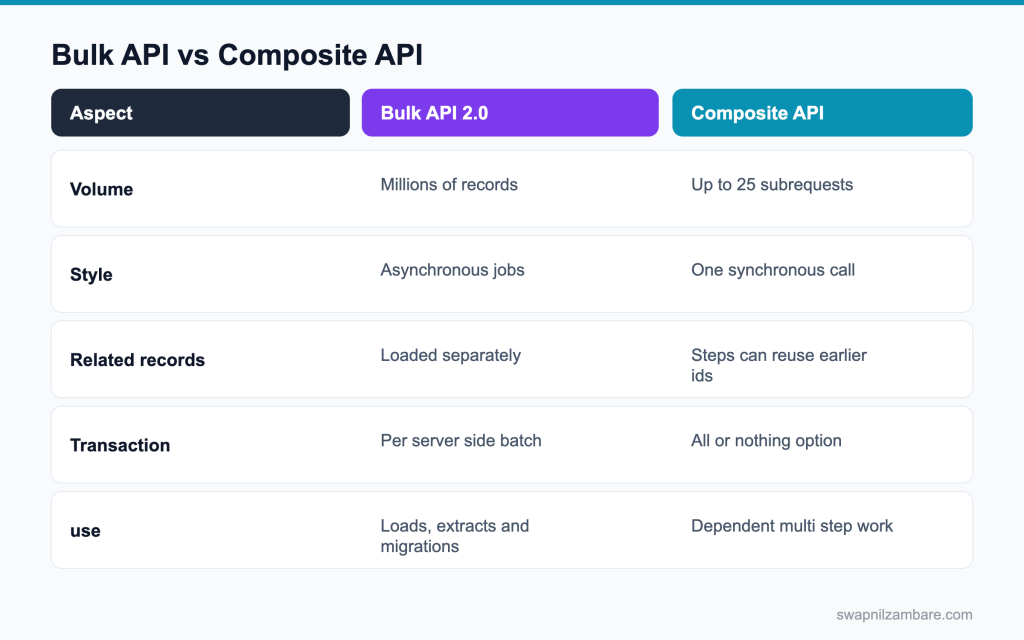
Caption: Volume and dependencies decide this, and most integrations end up using both.
| Need | Pick |
|---|---|
| Two million records overnight | Bulk API 2.0 |
| An account, contact and case created together | Composite API |
| 200 unrelated records in one call | Composite sObjects |
| Exactly four fields for a mobile screen | GraphQL API |
| One record read or updated | REST API |
Bulk API Interview Questions almost always give you a volume and ask which row fits.
The posts on Bulk API 2.0 and the Composite API cover these in detail.
Bulk API Interview Questions on Bulk API 2.0
Q1: What is Bulk API 2.0 for?
Loading and extracting very large numbers of records in the background.
| API | Best for | Records per call | API calls used |
|---|---|---|---|
| REST API | Single records, apps | 1 | One per record |
| sObject Collections | Small batches of one type | Up to 200 | One per call |
| Composite API | Several related steps in one call | Up to 25 subrequests | One per call |
| Bulk API 2.0 | Thousands to millions of rows | Files up to 150 MB | Very few per job |
| GraphQL API | Reading exactly the fields needed | Many, with paging | One per query |
Interview tip: compare the APIs by records per call. It answers most “which API” questions.
Q2: What are the steps to load data?
Create a job, upload the CSV data, close the job, then fetch the results.
Example: POST /jobs/ingest to create it, PUT the CSV to /jobs/ingest/{jobId}/batches, PATCH the state to UploadComplete, then GET the successful and failed results.
Q3: What starts the processing?
Closing the job by setting its state to UploadComplete.
Until then, Salesforce waits for more data; after it, the job is queued and processed in the background.
Q4: Which operations are supported?
insert, update, upsert, delete and hardDelete.
hardDelete skips the Recycle Bin and needs the Bulk API Hard Delete permission.
Interview tip: mention hardDelete needs a special permission. It shows care.
Q5: What does an upsert need?
An external ID field, which Salesforce uses to match existing records.
Example: set externalIdFieldName to SAP_Id__c; rows with a matching SAP_Id__c are updated and the rest are inserted.
Follow-up you may get: Must the external ID be unique? It should be, or upsert fails for rows matching several records.
Q6: What happens without one?
You cannot upsert, so you would have to insert, which creates duplicates when the same data is loaded twice.
Add an external ID field to the object before the first load.
Q7: What content type does it take?
CSV.
The first row holds the field API names, like Name,Industry,SAP_Id__c, and each later row is one record. Save the file as UTF-8 so names with special characters load correctly.
Q8: How is the data split into batches?
Salesforce splits the data into batches itself, which is the main simplification over the older Bulk API.
In Bulk API 1.0 you had to create and size each batch yourself.
Interview tip: say Salesforce handles batching in 2.0. It is the main difference from 1.0.
Q9: How do you check progress?
Query the job’s status, which shows the state and the number of records processed and failed.
Example: GET /jobs/ingest/{jobId} returns state, numberRecordsProcessed and numberRecordsFailed.
Follow-up you may get: What are the job states? Open, UploadComplete, InProgress, JobComplete, Failed and Aborted.
Q10: How do you get the failures?
Request the failed results, which return the rows with their error messages.
Example: GET /jobs/ingest/{jobId}/failedResults gives a CSV with sf__Error, so you can fix and reload just those rows.
Interview tip: always mention reading failed results. Many candidates forget it.
Q11: What are unprocessed records?
Rows the job never processed, usually because it was aborted or failed partway.
Get them from /unprocessedrecords and load them in a new job.
Q12: Is the whole job one transaction?
No. Each internal batch runs as its own transaction.
Salesforce processes chunks of records separately, so one chunk can fail while others succeed.
Q13: Why does that matter?
One bad row fails its own row or chunk, not the whole load.
That is why you must always read the failed results after a job.
Q14: Do triggers fire during a bulk load?
Yes. Triggers, flows and validation rules all run, which is why bulk safe code matters so much.
A trigger that queries inside a loop fails on its first chunk of a bulk load.
Interview tip: connect bulk loads to bulk safe triggers. Interviewers like the link.
Q15: What batch size does a trigger see?
Up to 200 records per trigger execution, within each internal batch.
A chunk of 10,000 rows runs the trigger 50 times, sharing that chunk’s limits.
Q16: How do you extract millions of rows?
A bulk query job, which produces results you download in pages.
Example: POST /jobs/query with a SOQL query, then GET the results with a locator until all pages are read.
Follow-up you may get: Can a query job include related fields? Yes, like Account.Name in a contact query.
Q17: What is the serial processing option for?
Avoiding row lock errors, at the cost of speed. It was a Bulk API 1.0 option.
In Bulk API 2.0, Salesforce manages parallelism, so you reduce locks mainly by sorting the file by parent ID.
Q18: When would you use it?
When many records share the same parent, so parallel batches would lock each other.
Example: thousands of contacts under one account, all updated in one load.
Q19: Can you abort a running job?
Yes, by setting its state to Aborted.
Records already processed stay saved; the rest are left unprocessed.
Q20: What is the difference between Bulk API 1.0 and Bulk API 2.0?
In 1.0 you created batches yourself and chose serial or parallel mode. In 2.0 you upload data and Salesforce handles batching, retries and chunking, with simpler endpoints and OAuth. New integrations should use 2.0.
Q21: How do you load records with a lookup to another object?
Use a column for the relationship and the parent’s external ID, like Account.SAP_Id__c, so Salesforce finds the parent for you. Load parents first, so the external IDs exist when children are loaded.
Q22: How does Bulk API affect API limits?
It uses far fewer API calls per record than REST, which is one of its biggest advantages.
Loading 1 million records through REST would take 1 million calls; Bulk API needs only a handful.
Interview tip: give the math: a million records, a handful of calls.
Bulk API Interview Questions on the Composite API
Q23: What does the composite resource do?
Runs up to 25 subrequests in order, in one HTTP call.
Example: create an account, then a contact for it, then an opportunity, all in one request.
Follow-up you may get: What is composite graph? A newer resource for larger sets of related steps, each graph all or nothing.
Q24: What makes it different from batch?
Later steps can use IDs created by earlier ones.
Composite batch cannot do that, because its subrequests are independent.
Interview tip: references are the key feature. Give the @{ref.id} syntax.
Q25: How does that reference work?
A token naming an earlier subrequest’s referenceId and the field, like @{newAccount.id}.
Example: the contact subrequest sets AccountId to @{newAccount.id}.
Follow-up you may get: Can you reference a field other than id? Yes, any field in the earlier response.
Q26: What does allOrNone do?
When true, any failure rolls back every step.
Set allOrNone: true when the steps only make sense together, like an order and its lines.
Q27: When would you set it false?
When the steps are independent and partial progress is useful.
Then each subrequest reports its own success or failure.
Q28: Are governor limits shared across the subrequests?
Yes. The composite request runs in one transaction, so limits are shared across subrequests.
Triggers fired by each step all count toward the same limits.
Q29: What is composite batch for?
Up to 25 independent calls in one request, with no reference sharing.
| Resource | What it does | Size |
|---|---|---|
| Composite | Ordered steps that can reference earlier results | Up to 25 subrequests |
| Composite batch | Independent calls | Up to 25 |
| Composite graph | Several composite graphs, each all or nothing | Up to 500 nodes per graph |
| Composite tree | A parent with nested children | Up to 200 records |
| sObject Collections | Create, update or delete many records of one type | Up to 200 records |
Q30: What is composite tree for?
Creating a parent with its children in one call, up to 200 records in total.
Example: an account with three contacts and two opportunities, sent as one nested JSON.
Follow-up you may get: How do you link children to the parent? Nest them under the parent’s relationship name in the JSON.
Q31: What is the sObject collections resource for?
Creating, updating or deleting up to 200 records in one call.
Example: PATCH /composite/sobjects with 150 contacts to update them all at once, with allOrNone if needed.
Q32: Can the outer response be 200 while a step failed?
Yes. The outer response can be 200 while a step failed, so read each subrequest’s status.
Each subrequest has its own httpStatusCode in the response body.
Interview tip: this silent failure is a favourite trick question.
Q33: Why include the API version in every subrequest URL?
Each subrequest is handled like a real REST call, so a URL without the version returns a 404.
Example: url should be /services/data/v68.0/sobjects/Contact, not /sobjects/Contact.
Q34: Can a reference point at a later step?
No. References can only point at earlier steps.
Order your subrequests so every value a step needs is created before it.
Q35: How do you handle errors in a composite request?
Read each subrequest’s httpStatusCode and body. With allOrNone true, one failure rolls back everything and every step reports an error; with false, fix and resend only the failed steps.
Q36: When would you choose composite over Bulk API?
Composite suits small sets of related records that must be saved together right now, like an order with its lines. Bulk API suits large volumes that can be processed in the background.
Q37: How many API calls does a composite request consume?
One, even though it performs several operations.
That is one of the main reasons to use composite resources for multi step work.
Bulk API Interview Questions on GraphQL and Limits
Q38: What does the GraphQL API give you?
One endpoint where the client asks for exactly the fields it needs, including related records.
Example: one query can return an account’s name, its top five contacts and their open cases, nothing more.
Q39: Why does that help a mobile client?
Smaller payloads and fewer round trips on a weak connection.
A screen that needed four REST calls can often load with one GraphQL query.
Q40: Is it read only?
It started as read only. Recent releases have added mutations for creating, updating and deleting records, so check the current documentation before relying on them.
Many teams still use REST or composite for writes and GraphQL for reads.
Interview tip: say it is mainly used for reads, and check the current release notes for write support.
Q41: Why are records nested under edges and nodes?
The connection pattern: each record (node) sits in an edge that carries a cursor for paging.
It looks verbose at first, but it lets you page through large lists in a standard way.
Q42: How does paging work there?
With cursors: ask for pageInfo with endCursor and hasNextPage, then pass endCursor as after on the next query.
Example: first: 50, after: “abc123” fetches the next 50 records.
Follow-up you may get: Can you sort in GraphQL? Yes, with orderBy on the query.
Q43: What are the main API limits to know?
A daily API request allowance per org, which depends on edition and licences, plus limits on long running concurrent requests.
Bulk jobs and streaming have their own allocations on top of that.
Q44: What counts as one API call?
Each REST or SOAP request counts as one call, and so does one composite request. Bulk jobs use a few calls per job, not per record.
That is why batching work into composite or bulk calls saves so much allowance.
Follow-up you may get: Do Bulk API jobs count toward the daily API limit? Yes, but with very few calls per job.
Q45: Which API is cheapest per record?
Bulk API, by a wide margin.
A million records can load with a handful of calls, against a million single REST calls.
Q46: What happens when the daily allowance runs out?
Calls are refused until usage drops in the rolling 24 hour window, which stops integrations.
Users in the UI keep working, but every integration using the API fails at the same time.
Interview tip: say all integrations stop at once. It shows you understand the risk.
Q47: How do you avoid that?
Batch work, use Bulk API for volume, and avoid one call per record.
Also cache data you read often, and use Change Data Capture instead of polling for changes.
Q48: Where do you monitor API usage?
On the System Overview and Company Information pages in Setup, and through API usage notifications.
The REST /limits resource also returns current usage, which monitoring tools can read.
Q49: How do you check remaining API calls from code?
Call the REST /services/data/v68.0/limits resource, which returns DailyApiRequests with Max and Remaining. In Apex, OrgLimits.getMap().get(‘DailyApiRequests’) gives the same numbers.
Q50: Do API calls from Salesforce to outside systems count toward the API limit?
No. The daily API allowance counts calls into Salesforce. Outbound callouts have their own per transaction limits instead.
Q51: What is an API usage notification for?
Alerting an admin when usage crosses a set percentage of the limit in a set period.
Example: email the integration team when usage passes 80 percent in 24 hours, so they can act before calls start failing.
Pair it with a dashboard of API usage by integration user, so you know who uses the most.
Scenario Based Bulk API Interview Questions
Q52: Scenario: a partner sends 5,000 records in one REST call. What do you advise?
Bulk API for volume, or smaller batches so each transaction stays within limits.
5,000 records in one REST call would run every trigger and flow against one set of limits and likely fail.
Q53: Scenario: a load of 500,000 rows fails on row locks. What do you change?
Sort the file by parent ID so related records are processed together, and load in smaller jobs if needed.
Also check for data skew, like one account with 50,000 contacts, which causes locks whatever you do.
Q54: Scenario: a load created duplicates. What went wrong?
An insert was used where an upsert on an external ID was needed.
Delete the duplicates with a careful matched list, then reload with upsert so repeats update instead.
Interview tip: “upsert with external IDs” is the expected answer for duplicates.
Q55: Scenario: 40 rows failed and nobody noticed. What was missing?
Fetching the failed results and acting on them.
Every load should end with a step that downloads failures, alerts someone, and records the count in a log.
Q56: Scenario: triggers slow the load to a crawl. What do you look at?
Queries and DML inside loops in triggers or flows, which a bulk load exposes straight away.
Also check heavy flows on the object; consider a bypass for one off loads, with the logic run in a batch afterwards.
Q57: Scenario: an account and contact must be created together. Which API?
Composite, with allOrNone set to true, or composite tree for a nested parent and children.
Either way, both records save together or neither does.
Q58: Scenario: the composite call returns 200 and one record is missing. Why?
A subrequest failed, and only that step’s status shows it.
Loop through compositeResponse and check each httpStatusCode, not just the outer 200.
Q59: Scenario: the daily API allowance is exhausted every afternoon. What do you investigate?
One call per record somewhere, which Bulk or composite would replace.
Check which integration user makes most calls in the API usage logs or Event Monitoring, then batch its work.
Q60: Scenario: a mobile app downloads 40 fields to show four. What do you propose?
The GraphQL API, so the app asks only for what it shows.
A query for four fields returns a much smaller payload, which loads faster on mobile data.
Follow-up you may get: Can LWC use GraphQL? Yes, with the lightning/uiGraphQLApi wire adapter.
Q61: Scenario: a nightly extract of two million rows times out. What do you use?
A bulk query job, downloading the results in pages.
Bulk API 2.0 splits large queries automatically, so you avoid timeouts from one huge REST query.
Q62: Scenario: a job is stuck in progress. What do you check?
The job state and failed results, and whether it needs aborting and resubmitting.
Large jobs can take a while; check numberRecordsProcessed over time before assuming it is stuck.
Q63: Scenario: an integration must be idempotent. How do you build it?
Upsert on an external ID, so a repeat sends the same rows with no duplicates.
Send the same external ID values every time, and never use insert for data that may be sent again.
Q64: Scenario: a load must not fire welcome emails to 100,000 migrated contacts. What do you do?
Turn off or bypass the flows and email alerts for the migration user, using a custom permission or setting checked in the automation, and confirm in a sandbox rehearsal that no email is sent.
Q65: Scenario: a partner polls Salesforce every minute for changes. What do you suggest?
Switch them to Change Data Capture through the Pub/Sub API, so they get changes as they happen without using API calls on empty polls.
Q66: Scenario: an interviewer asks how you would plan a one off migration. What do you say?
Bulk API with external ids, parents first, serial where locks threaten, and failures reviewed each run.
Bulk API with external IDs, load parents first, sort to reduce locks, disable or bypass heavy automation, check failed results after every job, and rehearse the whole run in a full sandbox.
Common Mistakes Candidates Make
- Using REST for volume because it is familiar, the first thing Bulk API Interview Questions catch
- Running an upsert with no external id
- Forgetting that closing the job is what starts it
- Never fetching the failed results
- Assuming a composite 200 means every step succeeded
- Loading children before parents
More Bulk API Interview Questions
Q67: How large can one Bulk API 2.0 upload be?
Up to 150 MB per upload, so split larger files into several jobs.
Base64 encoding of files or large text adds to the size, so leave room. Many teams split files at around 100 MB to be safe.
Q68: How do you set a lookup by external id in a CSV?
Use a column header with the relationship name and the external id field, such as Account.External_Id__c.
Q69: How do you clear a field value in a bulk load?
Put #N/A in that column. An empty cell leaves the existing value unchanged.
Example: to clear Phone for a row, write #N/A in its Phone column; leaving it blank keeps the old phone number.
Q70: Which date formats does Bulk API expect?
ISO 8601: 2026-12-01 for a date and 2026-12-01T09:00:00.000Z for a date and time.
Datetimes are read as UTC unless you include an offset, like 2026-12-01T14:30:00.000+05:30 for India time.
Q71: Can you change the CSV delimiter and line ending?
Yes. The job settings accept other column delimiters, such as a tab or pipe, and either LF or CRLF line endings.
Q72: How does Bulk API 2.0 handle very large queries?
It splits the work automatically. In the older Bulk API you turned on PK chunking yourself.
Q73: What permission does a hard delete need?
The Bulk API Hard Delete permission. Hard deleted records skip the recycle bin, so grant it carefully.
Follow-up you may get: Can you hard delete through Data Loader? Yes, with the Bulk API setting on and the Hard Delete permission.
Q74: Does Data Loader use the Bulk API?
It can. Data Loader uses the SOAP API by default and switches to the Bulk API when that setting is turned on.
Q75: What is a bulk query with queryAll?
A query job with the queryAll operation, which also returns deleted and archived records. Use it for audits or to sync deletes to another system.
Q76: How do you speed up a large bulk load?
Load in a full sandbox first to time it, turn off non essential automation, sort by parent to avoid locks, use smaller fields only, and run during quiet hours when other integrations are idle.
Q77: How long are Bulk API 2.0 jobs and results kept?
For a limited time, about seven days, so download failed and successful results soon after a job finishes.
Download both successful and failed results right after each job and keep them with your migration logs.
Best Practices to Mention in an Interview
- Bulk API for volume, composite for dependencies, REST for single records
- Upsert on an external id so reruns are safe
- Load parents before children, every time
- Read the failed results after every job and act on them
- Serial processing when records share parents
- Check each subrequest status in a composite response
- Watch API usage and alert before the allowance runs out
Official Resources
Quick Recap
- Bulk API Interview Questions start from the record count
- Create, upload, close and then collect the results
- Upsert needs an external id, or you are inserting duplicates
- Each server side batch is its own transaction
- Composite runs 25 dependent steps, with an all or nothing option
- GraphQL trims payloads for read heavy clients
What Is Next
Coming soon: Metadata API interview questions and the Tooling API.


