Custom Metadata in Apex lets your code read rules and settings that admins manage in Setup, so business changes do not need a code deployment. Instead of hard-coding a 10% discount or an API path, the code reads it from a custom metadata type record. Because these records are metadata, they also move between orgs with your deployments.
In this post, you will read custom metadata with getAll, getInstance and SOQL, build a config-driven discount rule, and test it. It builds on the admin guide to custom metadata types vs custom settings, Apex Design Patterns and Apex governor limits.
What is Custom Metadata in Apex?
A custom metadata type is like a custom object, but its records are metadata, and its API name ends in __mdt. Custom Metadata in Apex means reading those records from code, using methods such as Discount_Rule__mdt.getAll() or a SOQL query. Admins can change the values in Setup, while developers keep the logic in Apex.
Think of a restaurant menu board. The kitchen’s recipes stay the same, but the manager can change prices on the board any day. Custom metadata is that board, and Apex is the kitchen that reads it before cooking.
Why Custom Metadata in Apex Matters
Hard-coded values cause deployments for every small change. Here is why Custom Metadata in Apex matters at Bright Path Tutors.
- First, discount percentages change every term.
- Also, each course level has a different maximum class size.
- Next, the LearnHub API path differs between test and live systems.
- Feature switches let the team turn new logic on or off safely.
- Finally, the records deploy with the code, so sandboxes match production.
So with Custom Metadata in Apex, admins own the values, and developers own the logic.
How Custom Metadata in Apex Works
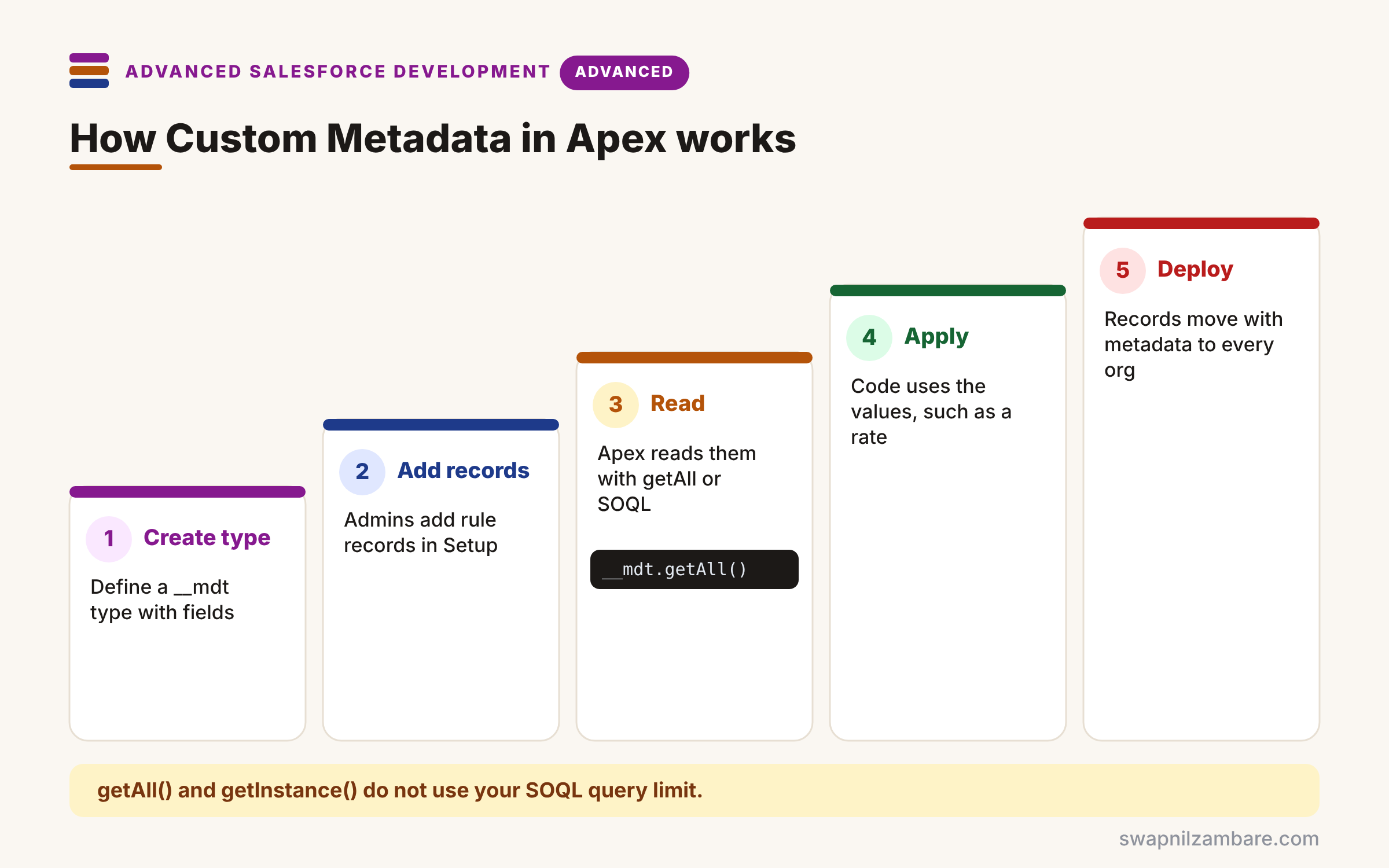
Using Custom Metadata in Apex follows a few steps. First, an admin or developer creates a custom metadata type with fields, such as Level__c and Percent__c. Next, they add records in Setup or in source files. Then Apex reads them with getAll(), getInstance() or SOQL. After that, the code applies the values, such as a discount rate. Finally, the records deploy with metadata, so every org gets the same settings.
getAll()
getAll() returns a map of all records, keyed by DeveloperName. It needs no SOQL, so it does not use your query limit.
getInstance()
getInstance(‘Beginner’) returns one record by DeveloperName or Id. It is the quickest way to read one setting.
SOQL on __mdt
You can query __mdt types with normal SOQL. Use it when you need filters, relationships or full long text values.
Long Text Fields
getAll() and getInstance() return only the first 255 characters of long text area fields. So query with SOQL when you need the full text.
Changing Records from Apex
Apex cannot insert or update __mdt records with normal DML. Instead, the Metadata API classes deploy changes asynchronously.
Ways to Read Custom Metadata
The table below compares the three ways to read records in Apex.
| Method | Returns | Best for |
|---|---|---|
| getAll() | Map of all records | Small rule tables |
| getInstance(name) | One record | A single setting |
| SOQL query | Filtered list | Filters and full long text |
Custom Metadata Types vs Custom Settings
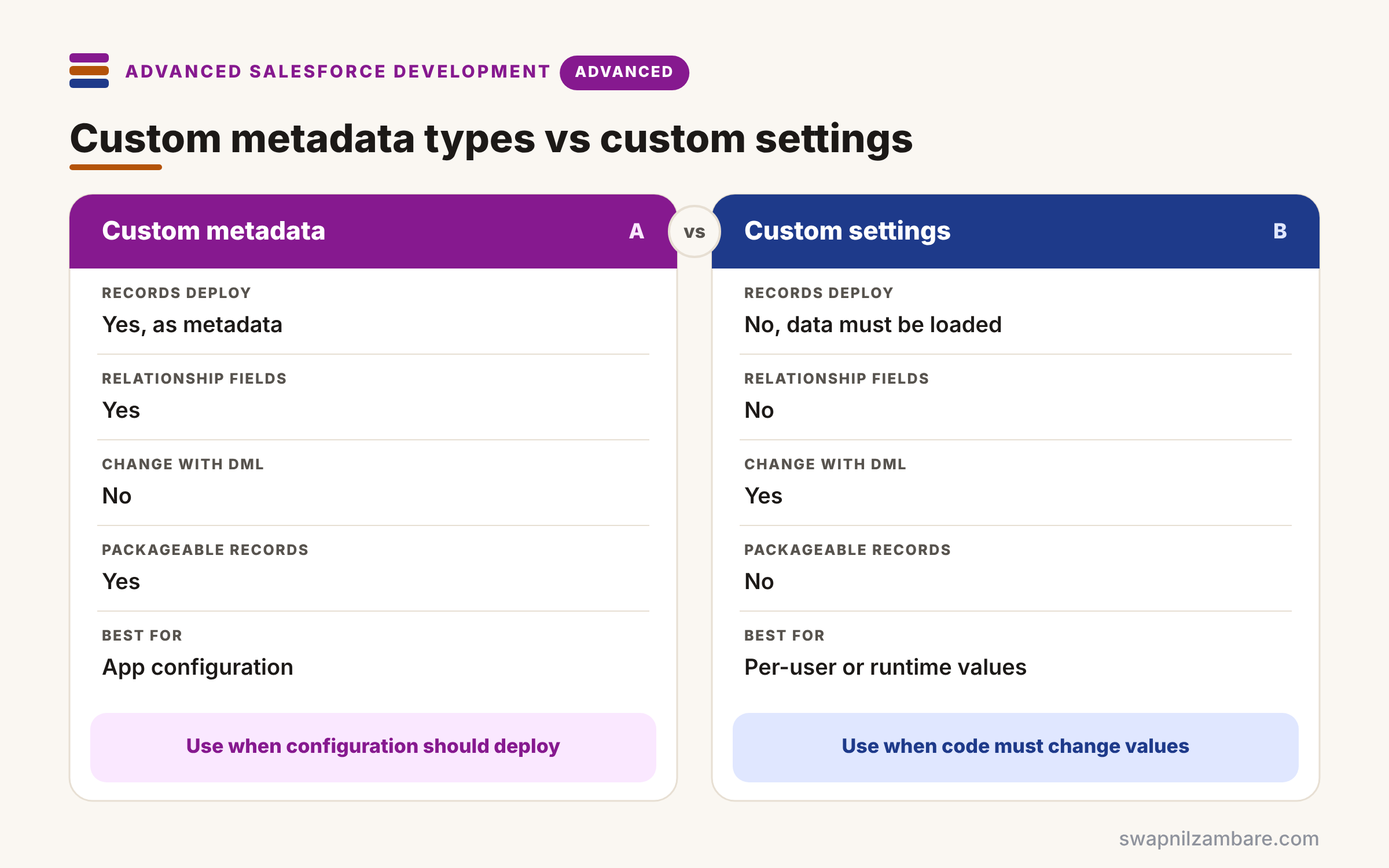
The table below compares custom metadata types with list custom settings for configuration.
| Feature | Custom metadata types | Custom settings |
|---|---|---|
| Records deploy with metadata | Yes | No, data must be loaded |
| Relationship fields | Yes, metadata relationships | No |
| Change with DML in Apex | No | Yes |
| Packageable records | Yes | No |
| Best for | App configuration | Per-user or runtime values |
When to use which is clear. Use custom metadata for configuration that should deploy. Use custom settings only for values that code must change at runtime.
A Real Custom Metadata in Apex Example
Let’s build Custom Metadata in Apex at Bright Path Tutors. Discounts per course level live in Discount_Rule__mdt, with fields Level__c, Percent__c and Active__c.
Step 1: The Records in Setup
The table below shows the records an admin creates in Setup > Custom Metadata Types > Discount Rule > Manage Records.
| Label | Level__c | Percent__c | Active__c |
|---|---|---|---|
| Beginner | Beginner | 10 | true |
| Intermediate | Intermediate | 5 | true |
| Advanced | Advanced | 0 | false |
Step 2: Read the Rules in Apex
public with sharing class DiscountRules {
    private static Map<String, Decimal> percentByLevel;

    public static Decimal percentFor(String level) {
        if (percentByLevel == null) {
            percentByLevel = new Map<String, Decimal>();
            for (Discount_Rule__mdt r : Discount_Rule__mdt.getAll().values()) {
                if (r.Active__c) {
                    percentByLevel.put(r.Level__c, r.Percent__c);
                }
            }
        }
        Decimal p = percentByLevel.get(level);
        return p == null ? 0 : p;
    }

    public static Decimal discountedFee(Course__c c) {
        return (c.Fee__c * (100 - percentFor(c.Level__c)) / 100).setScale(2);
    }
}
getAll() loads every rule once and caches the active ones in a static map. Then discountedFee works out the price, and unknown levels get no discount.
Step 3: Test the Logic
@IsTest
private class DiscountRulesTest {
    @IsTest
    static void beginnerGetsConfiguredDiscount() {
        Course__c c = new Course__c(Name = 'Apex Basics', Fee__c = 5000, Level__c = 'Beginner');
        Decimal expected = (5000 * (100 - DiscountRules.percentFor('Beginner')) / 100).setScale(2);
        Assert.areEqual(expected, DiscountRules.discountedFee(c));
    }
}
Custom metadata records are visible in tests without SeeAllData. Also, the test reads the configured percent, so it keeps passing when admins change the value.
Here is the test result.
DiscountRulesTest.beginnerGetsConfiguredDiscount Pass (12 ms)Custom Metadata in Apex and Deployments
Records live in source files under customMetadata, such as Discount_Rule.Beginner.md-meta.xml. So add them to Git and deploy them with your classes. Protected records in managed packages stay hidden from subscriber code.
Common Mistakes with Custom Metadata in Apex
- Trying to insert or update __mdt records with DML.
- Reading long text with getAll() and losing text after 255 characters.
- Querying custom metadata inside loops.
- Hard-coding record names that admins later rename.
- Using custom metadata for data that changes every minute.
Best Practices for Custom Metadata in Apex
- Load records once per transaction and cache them in a static map.
- Use clear DeveloperNames, because code may depend on them.
- Add an Active__c field, so admins can switch rules off.
- Keep records in source control with the code.
- Write tests that read the configured values instead of fixed numbers.
Practice Task
Add a Max_Seats__c field to a new Level_Setting__mdt type and use it to block enrolments when a course is full. Hint: read it with getInstance(level) in a before insert trigger handler.
Most Asked Interview Questions on Custom Metadata in Apex
Configuration questions are common in developer interviews. Here are the 21 questions asked most about Custom Metadata in Apex.
Basic Questions on Custom Metadata in Apex
Q1: What is a custom metadata type?
It is a configurable type whose records are metadata, with an API name ending in __mdt.
Q2: How do you read all records in Apex?
Call TypeName__mdt.getAll(), which returns a map keyed by DeveloperName.
Q3: How do you read one record?
Call getInstance with the DeveloperName or record Id.
Q4: Do getAll() and getInstance() use SOQL limits?
No, they read from the metadata cache, so they do not count as queries.
Q5: Can you query custom metadata with SOQL?
Yes, so you can filter records or read full long text values.
Q6: Do custom metadata records deploy?
Yes, because they are metadata, so they move with change sets and the CLI.
Q7: Can Apex change custom metadata with DML?
No, so you use the Metadata API classes, which deploy changes asynchronously.
Code and Scenario Questions on Custom Metadata in Apex
Q8: Why might a long text value look cut off?
Because getAll() and getInstance() return only the first 255 characters.
Q9: Are custom metadata records visible in tests?
Yes, tests can read them without SeeAllData.
Q10: How do you avoid hard-coded discount rates?
Store them in a custom metadata type and read them at runtime.
Q11: How do you make a feature switch?
Add a checkbox record, such as Enable_LearnHub_Sync, and check it before running logic.
Q12: How can custom metadata choose an Apex class?
Store the class name in a field, then create it with Type.forName.
Q13: Where do records live in source control?
In the customMetadata folder as .md-meta.xml files.
Q14: How do you load rules efficiently?
Read them once into a static map and reuse it during the transaction.
Advanced Questions on Custom Metadata in Apex
Q15: When would you choose custom settings instead?
When code must change values at runtime or values differ per user or profile.
Q16: What are metadata relationship fields?
Fields that link a custom metadata record to objects, fields or other __mdt records.
Q17: What does protected mean in a managed package?
Protected records are hidden from code outside the package namespace.
Q18: How do you update records from Apex?
Build Metadata.CustomMetadata objects and enqueue a deployment with Metadata.Operations.
Q19: How do you test logic with records that do not exist?
Read records through a small class you can replace with test data in memory.
Q20: Why is custom metadata good for integrations?
Because endpoint paths, mappings and switches can change per org without code changes.
Q21: What is a risk of too much configuration?
Logic becomes hard to follow, so document what each record controls.
Official Resources
Quick Recap
- Custom Metadata in Apex reads admin-managed settings.
- getAll() and getInstance() avoid SOQL limits.
- Use SOQL for filters and full long text.
- Records deploy with metadata, but DML cannot change them.
- Cache rules once per transaction.
What’s Next?
Admins can also call your Apex directly from Flow. Next, read our guide to Apex invocable methods.


