Asynchronous Apex Interview Questions separate developers who have shipped background jobs from developers who have only read about them. The four options look similar on a slide and behave very differently in production.
Last reviewed for the Winter ’27 release (November 2026).
This post covers the questions interviewers actually ask, grouped into the basics, future methods, queueable, batch and scheduled Apex, and the scenario questions where a job is failing and you have to say why.
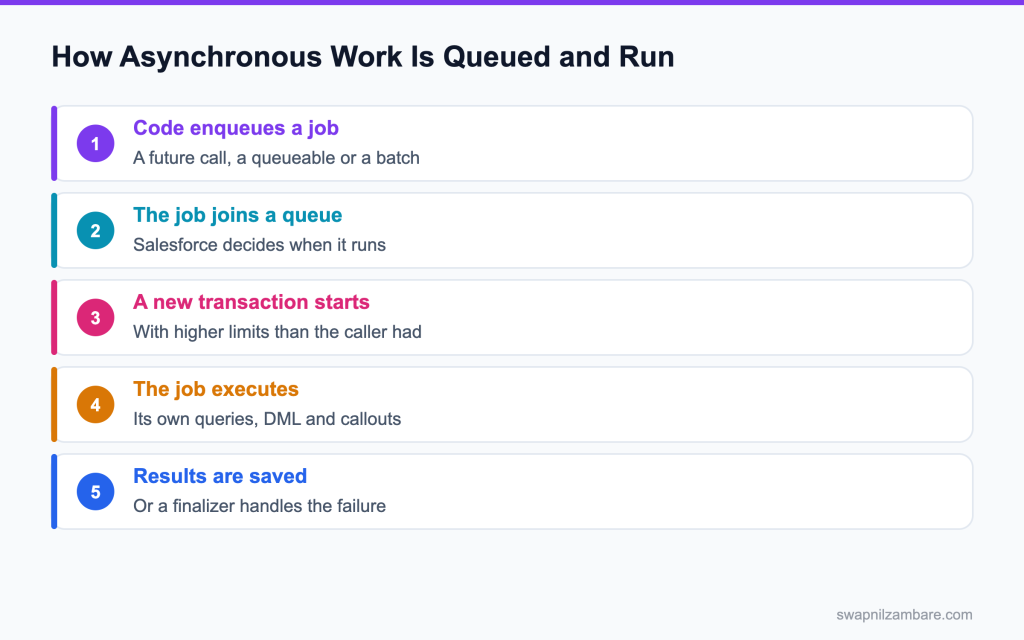
Caption: An asynchronous job runs in its own transaction, which is why its limits are higher than the caller’s.
What Asynchronous Apex Interview Questions Cover
Asynchronous Apex Interview Questions begin with one definition. Asynchronous Apex means code that runs later, in its own transaction, rather than while the user waits. The platform queues the work and runs it when resources allow.
Think of it like leaving a note for the kitchen instead of standing at the counter. The limit differences behind all of this are covered in the post on governor limits. You get on with your day, and the work happens shortly afterwards.
Interviewers use Asynchronous Apex Interview Questions to check three things. Whether you know the four options, whether you can pick between them for a real requirement, and whether you understand what happens when a job fails.
The Four Options at a Glance
| Option | Best for | Key trait |
|---|---|---|
| Future method | A quick callout from a trigger | Fire and forget, no chaining |
| Queueable | Chained work and callouts | Takes objects, returns a job id |
| Batch Apex | Very large data volumes | Processes in chunks |
| Scheduled Apex | Work on a timetable | Runs a class at set times |
Those traits answer most Asynchronous Apex Interview Questions about selection. A future method cannot be chained or monitored well, a queueable can, batch handles volume, and scheduled handles timing.
public with sharing class FeeSyncQueueable implements Queueable, Database.AllowsCallouts {

    private List<Id> courseIds;

    public FeeSyncQueueable(List<Id> courseIds) {
        this.courseIds = courseIds;
    }

    public void execute(QueueableContext context) {
        // one callout per chunk, not per record
        HttpRequest req = new HttpRequest();
        req.setEndpoint('callout:Partner_Fees/sync');
        req.setMethod('POST');
        req.setBody(JSON.serialize(courseIds));
        new Http().send(req);
    }
}
That interface list is worth memorising for Asynchronous Apex Interview Questions. Without AllowsCallouts the job cannot call an outside service, and the error message is not always obvious.
Queueable vs Batch Apex
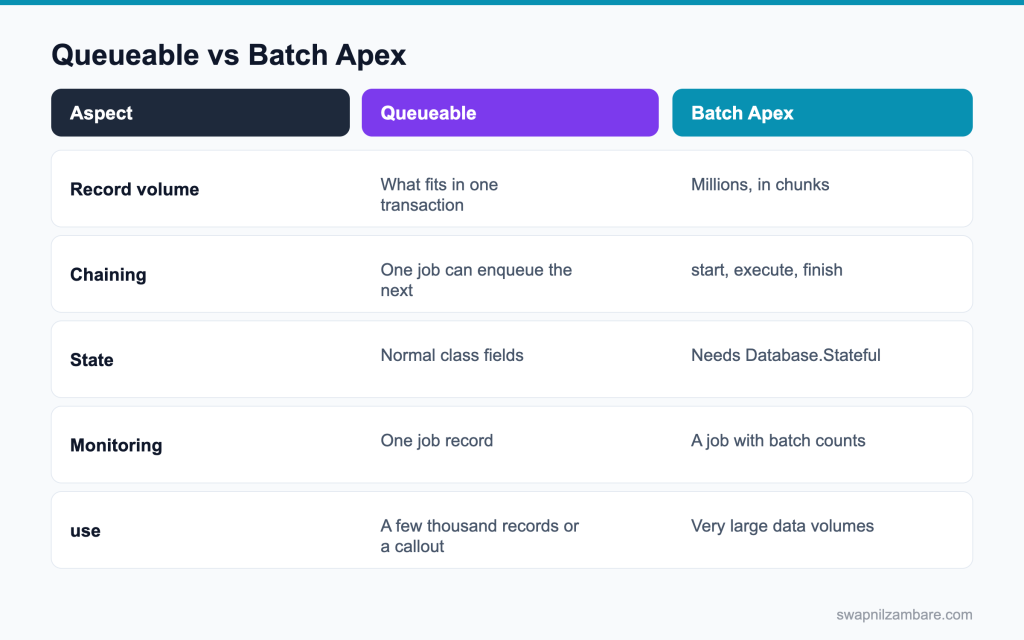
Caption: Volume decides this more than anything else.
| Question | Queueable | Batch |
|---|---|---|
| Can it take a list of objects | Yes, in the constructor | Through the start method |
| Can it chain | Yes, one job per execution | Through finish, to another job |
| Keeps state between chunks | Normal fields | Only with Database.Stateful |
| Handles a million records | No | Yes |
| Reports progress per chunk | No | Yes, through the job record |
Asynchronous Apex Interview Questions often end with a volume number, so answer with the option that fits it.
The post on queueable jobs and the post on batch Apex cover each in full.
Asynchronous Apex Interview Questions on the Basics
Q1: Why does asynchronous Apex exist?
To run work later in its own transaction, with higher limits, without making a user wait.
Things like callouts after a save, recalculating millions of records, or a nightly clean up should not slow down the user’s click. Async Apex moves that work to the background.
Interview tip: give one example per reason: a callout, a big data job and a slow calculation.
Q2: Name the four options.
Future methods, Queueable Apex, Batch Apex and Scheduled Apex.
| Option | Best for | Can chain | Returns a job ID |
|---|---|---|---|
| Future method | Simple fire and forget work, often a callout | No | No |
| Queueable Apex | Most async work, callouts, passing objects | Yes | Yes |
| Batch Apex | Large data sets, up to 50 million records | Yes, from finish | Yes |
| Scheduled Apex | Running something at a set time | Starts other jobs | Yes |
For new code, Queueable is the usual default, with Batch for big volumes and Scheduled for timing.
Q3: Which limits are higher asynchronously?
SOQL queries double to 200, CPU time rises to 60 seconds and heap doubles to 12 MB.
DML limits (150 statements, 10,000 rows) and the 50,000 query row limit stay the same, so async is not a cure for code that does DML inside loops.
Q4: Does an asynchronous job run immediately?
No. It joins a queue and runs when resources allow, usually within seconds.
At busy times it can take longer, so never build logic that expects the job to finish within a set time. Show users a status instead.
Follow-up you may get: Can you set when a queueable runs? Yes, System.enqueueJob(job, delayInMinutes) can delay it up to 10 minutes.
Q5: Can you guarantee the order of two enqueued jobs?
No, unless you chain them, so one job enqueues the next.
Two jobs enqueued side by side can run in any order or at the same time. If order matters, start the second from the first job’s execute or finish.
Interview tip: say “chain them” quickly. It is the one line answer they want.
Q6: Why can a trigger not make a callout directly?
The callout would hold the record save open while waiting on a remote server, so Salesforce blocks it.
Use a queueable with Database.AllowsCallouts or a future method with callout=true, started from the trigger, so the callout runs after the commit.
Q7: What is the daily limit on asynchronous executions?
The greater of 250,000 or the number of user licences times 200, per 24 hours.
It counts executions across future, queueable, batch and scheduled jobs. Each batch execute counts too, so a job of 10,000 chunks uses 10,000 of the allowance.
Interview tip: mention that each batch execute counts. Few candidates know it.
Q8: Do asynchronous jobs share the caller’s limits?
No. Each job runs in a fresh transaction with its own counters.
The calling transaction’s 100 queries are not shared, and the job gets the higher async limits of its own.
Q9: Can an asynchronous job enqueue more work?
Yes. A queueable can enqueue one child job, and a batch can start another job from finish.
Chaining is how you split long work into steps that each get fresh limits.
Q10: Where do you monitor these jobs?
In Setup under Apex Jobs, and by querying the AsyncApexJob object.
Apex Jobs shows status, errors and progress for each job. Scheduled ones also appear under Scheduled Jobs.
Follow-up you may get: How do you find scheduled jobs in SOQL? Query CronTrigger joined to CronJobDetail.
Q11: Which fields on AsyncApexJob matter most?
Status, JobType, NumberOfErrors, JobItemsProcessed and TotalJobItems.
Example: SELECT Status, NumberOfErrors, JobItemsProcessed, TotalJobItems FROM AsyncApexJob WHERE Id = :jobId lets a page show “Processing 40 of 120 batches”.
Q12: What is the difference between synchronous and asynchronous Apex?
Synchronous Apex runs while the user or caller waits, under tighter limits. Asynchronous Apex runs later in its own transaction with higher limits, and the caller does not wait for the result. Use async for callouts after saves, big data work and anything slow.
Q13: Can asynchronous Apex run as a different user?
It runs as the user whose action enqueued it. Scheduled jobs run as the user who scheduled them, and platform event triggers run as the Automated Process user by default, which you can change to a chosen user.
Q14: Can a test run asynchronous code?
Yes. The work executes when Test.stopTest is called.
Any job enqueued between Test.startTest and Test.stopTest runs at stopTest, so put your assertions after it.
Asynchronous Apex Interview Questions on Future Methods
Q15: How do you declare a future method?
Add @future to a static void method.
Example: @future public static void recalc(Set<Id> courseIds) { … } You call it like any static method, and Salesforce queues it.
Q16: What parameter types are allowed?
Primitives and collections of primitives, like Id, String, List<Id> or Set<String>. No sObjects.
If you need more, pass IDs and query inside the method, or switch to a queueable, which accepts any type.
Interview tip: always add “pass IDs and requery”. It explains the rule.
Q17: Why not sObjects?
Because the record could change before the job runs, so the method would work on stale data.
Passing IDs and querying inside the method gives you the latest values at the time the job actually runs.
Q18: Can a future method return a value?
No. A future method must be void.
Since nothing waits for it, it writes results to records or logs instead of returning them.
Q19: Can a future method call another future method?
No. A future method cannot call another future method.
Calling one from a future context throws an error. Queueables can chain, which is one reason they replaced future methods for most work.
Follow-up you may get: How do you check if you are in a future context? System.isFuture().
Q20: How do you allow a callout from one?
Add callout=true to the annotation: @future(callout=true).
Without it, any HTTP callout inside the method fails. The same method can then also do DML after the callout.
Q21: Can you track a future method?
Not really, because it returns no job ID.
You can find it in Apex Jobs, but your code cannot get its ID to check status. If you need tracking, use a queueable.
Q22: How many future calls are allowed per transaction?
50 future method calls per transaction.
A trigger that calls a future method per record would fail on a large load, so collect IDs and make one call per chunk.
Interview tip: link 50 calls to bulk triggers. It shows you think about volume.
Q23: When would you still choose a future method?
For a simple fire and forget task, like one callout, where nothing needs chaining, objects or monitoring.
Many teams now use queueables for everything new and keep future methods only in older code.
Q24: Why are future methods called with a Set of IDs instead of one ID?
So one call handles a whole chunk of records. Calling a future method per record would hit the 50 call limit and waste daily async executions.
Q25: Can a batch job call a future method?
No. Future methods cannot be called from a batch job’s execute or finish. Use a queueable instead, or do the work inside the batch itself.
Q26: What is the modern alternative?
Queueable Apex, which takes objects, returns a job id and supports chaining.
Queueables also support Transaction Finalizers and can be monitored, so they cover everything a future method does and more.
Asynchronous Apex Interview Questions on Queueable
Q27: Which interface does a queueable implement?
The Queueable interface, with an execute(QueueableContext ctx) method.
Example: public class SyncCourses implements Queueable { public void execute(QueueableContext ctx) { … } }
Q28: How do you start one?
With System.enqueueJob, which returns the job ID.
Example: Id jobId = System.enqueueJob(new SyncCourses(courseIds)); You can store the ID to check the job later.
Follow-up you may get: How many queueables can a trigger enqueue? Up to 50 in one synchronous transaction.
Q29: Why is that job id useful?
You can query AsyncApexJob with it to report the job’s status to a user.
Example: an LWC polls an Apex method every few seconds and shows Queued, Processing or Completed.
Q30: Can a queueable take sObjects?
Yes. Its constructor can take any type, which is a big advantage over future methods.
Example: new InvoiceJob(List<Invoice__c> invoices, Map<Id, Decimal> rates) passes records and a map straight into the job.
Interview tip: name the three advantages together: objects, job ID, chaining.
Q31: Which interface allows callouts?
Database.AllowsCallouts, added next to Queueable.
Example: public class SendToErp implements Queueable, Database.AllowsCallouts { … } Without it, a callout in execute fails.
Q32: How do you chain jobs?
Call System.enqueueJob for the next job inside the current execute method.
Example: at the end of execute, if more records remain, System.enqueueJob(new SyncCourses(nextIds)); Each job gets fresh limits.
Q33: How many jobs can one queueable enqueue?
One child job per execute, when enqueueing from inside a queueable.
That keeps chains in a single line. A synchronous transaction can enqueue up to 50 queueables at once.
Q34: Is there a depth limit to chaining?
In production there is no fixed depth limit for chained queueables, except in Developer and Trial orgs, where the depth is 5.
You can set your own maximum with AsyncOptions and a maximum queueable stack depth, which is a good safety net against endless chains.
Q35: What is a transaction finalizer?
A class that runs after a queueable finishes or fails, so you can log errors and retry.
It runs in its own transaction, even if the job threw an uncaught exception that rolled back its work.
Follow-up you may get: Can a finalizer make callouts? Yes, it runs in its own transaction.
Q36: Which interface does it implement?
The System.Finalizer interface, attached with System.attachFinalizer inside the queueable’s execute.
Its execute(FinalizerContext ctx) method can read ctx.getResult() and ctx.getException() to decide what to do.
Q37: Why is a finalizer valuable?
Without it, an uncaught exception in a queueable rolls back the work and leaves only a failed job, with no retry.
A finalizer can write a log record, alert someone and enqueue a retry, so failures do not go unnoticed.
Interview tip: finalizers are newer, so mentioning them signals current knowledge.
Q38: Can a finalizer enqueue a retry?
Yes. That is the common pattern for a short lived failure, like a timeout.
Keep a retry counter in the job, so the finalizer stops after a few attempts instead of looping forever.
Q39: What is the difference between a queueable and a platform event for async work?
A queueable runs one known piece of work after the current transaction. A platform event broadcasts a message that any number of subscribers, inside or outside Salesforce, can react to. Use a queueable for a task, an event when several systems need to know something happened.
Q40: How do you delay a queueable?
Pass a delay in minutes, from 0 to 10, as the second argument: System.enqueueJob(new RetryJob(ids), 5); This is handy for retries, giving a busy external system time to recover.
Q41: How do you pass state between chained jobs?
Through the constructor of the next job, since each is a new object.
Example: System.enqueueJob(new StepTwo(processedIds, runningTotal)); The next job receives what it needs through its constructor.
Asynchronous Apex Interview Questions on Batch and Scheduled
Q42: Which three methods does a batch class have?
start runs once and returns the records. execute runs for each chunk with fresh limits. finish runs once at the end.
Q43: What does start return?
A Database.QueryLocator, or an Iterable, defining the records to process.
QueryLocator handles up to 50 million records from a SOQL query. An Iterable suits data from other sources, but it is limited to the normal 50,000 row query limit.
Q44: What is the default batch size?
200 records per execute call. You can pass a size from 1 to 2,000 to Database.executeBatch.
Example: Database.executeBatch(new RecalcBatch(), 50); runs chunks of 50.
Follow-up you may get: What is the maximum batch size? 2,000 for a QueryLocator.
Q45: Why would you lower the batch size?
Because heavy logic per record, or callouts, can hit limits at 200.
Lowering the size gives each execute less work. With callouts, the size must keep the calls within 100 per execute.
Q46: How many records can a query locator return?
Up to 50 million records for Batch Apex.
That is much more than the 50,000 row limit of a normal query, because records are read in chunks.
Interview tip: compare 50 million with the normal 50,000 row limit.
Q47: How do you keep a running total across chunks?
Implement Database.Stateful, which keeps instance fields between chunks.
Example: a Decimal totalAmount field adds up each chunk’s amounts, and finish emails the grand total.
Q48: What is the cost of Stateful?
The state is serialised between chunks, which takes time and heap, so keep it small.
Store counts and IDs, not full records. Large stateful collections can slow the job and hit the heap limit.
Follow-up you may get: Does Stateful keep static variables? No, only instance fields.
Q49: Which interface allows callouts in batch?
Database.AllowsCallouts, added to the batch class.
Each execute can then make up to 100 callouts. Use a small batch size so the callouts fit.
Q50: How many batch jobs can run at once?
Five batch jobs can be active at once. Up to 100 more can wait in the flex queue.
Jobs in the flex queue start as active slots free up.
Interview tip: say five active plus 100 in the flex queue. Numbers make the answer complete.
Q51: What is the flex queue?
A holding queue where pending batch jobs wait, up to 100 of them, and where admins can reorder them.
In Setup, Apex Flex Queue lets you move an urgent job to the front.
Q52: When does the finish method run?
Once, after every chunk has completed.
It runs even if some chunks failed, so it is the right place to report what happened.
Q53: What belongs in finish?
A summary email or record, and starting the next job in a chain.
Example: finish queries AsyncApexJob for NumberOfErrors and sends the admin a short report, then calls Database.executeBatch for the next step.
Q54: If one chunk fails, do the others continue?
Yes. Each chunk is its own transaction, so one failed chunk does not stop the others.
Only the failed chunk’s changes roll back. That is why logging per chunk matters.
Follow-up you may get: Does finish run if start fails? No, the job fails before any chunk runs.
Q55: How do you know which chunks failed?
Through NumberOfErrors on the AsyncApexJob, plus your own logging inside execute.
Use Database methods with allOrNone false inside execute, and save failures to an error log object, so you know exactly which records failed.
Q56: How do you schedule a class?
Implement Schedulable and register it with System.schedule, or from Setup under Apex Classes, Schedule Apex.
Example: System.schedule(‘Nightly recalc’, ‘0 0 2 * * ?’, new RecalcScheduler()); runs at 2 AM every day.
Q57: What is the cron expression for a nightly job?
0 0 2 * * ? runs every day at 2 AM.
Salesforce cron expressions start with seconds:
| Position | Field | Example |
|---|---|---|
| 1 | Seconds | 0 |
| 2 | Minutes | 0 |
| 3 | Hours | 2 |
| 4 | Day of month | * (every day) |
| 5 | Month | * (every month) |
| 6 | Day of week | ? (no specific day) |
| 7 | Year (optional) | 2027 |
Q58: How many scheduled Apex jobs can an org have?
100 scheduled Apex jobs per org.
Check Scheduled Jobs in Setup before adding more, and remove old ones that are no longer needed.
Follow-up you may get: How do you list them? Query CronTrigger, or open Setup, Scheduled Jobs.
Q59: Can a scheduled class run a batch job?
Yes, and that is the normal pattern: execute calls Database.executeBatch.
Example: public void execute(SchedulableContext sc) { Database.executeBatch(new RecalcBatch(), 200); }
Q60: Can you schedule a job to run every five minutes?
Not with one cron expression, because Salesforce does not support every N minutes for Apex.
Teams schedule several jobs at offsets, like :00, :15, :30 and :45, or have the job reschedule itself at the end. Check whether the work really needs to run that often.
Interview tip: suggest an event based option too. It shows you question the requirement.
Q61: How do you stop a scheduled job?
Abort it with System.abortJob(jobId), or delete it from the Scheduled Jobs page in Setup.
Find the ID with SELECT Id FROM CronTrigger WHERE CronJobDetail.Name = ‘Nightly recalc’.
Q62: How do you abort a running batch job?
Call System.abortJob with the job’s ID from AsyncApexJob, or click Abort in Setup, Apex Jobs. Chunks already finished stay committed; the rest do not run.
Q63: Should you use Batch Apex or Apex cursors for very large data?
Batch Apex is the standard, well understood choice for millions of records with a fixed query. Apex cursors give more control, like processing in custom sized pieces across chained queueables or going back to earlier positions. Pick batch unless you need that flexibility.
Q64: Why keep a scheduled class thin?
So the real logic lives in a testable class rather than inside a scheduler.
Example: the Schedulable class only calls new RecalcService().run(), and tests call the service directly.
Scenario Based Asynchronous Apex Interview Questions
Q65: Scenario: a trigger must call an outside service. What do you use?
A queueable that implements Database.AllowsCallouts, enqueued from the trigger handler.
Collect the record IDs for the whole chunk and enqueue one job, not one per record. The job makes the callout and updates the records with the response.
Q66: Scenario: 2 million records need a field recalculated. What do you use?
Batch Apex, or Apex cursors with a chained queueable.
At 200 records per chunk, Batch Apex runs 10,000 executes, each with fresh limits. Keep the logic per record light and test with a realistic chunk first.
Q67: Scenario: a queueable fails silently every night. What is missing?
A Transaction Finalizer, which would log the failure and allow a retry.
Attach it with System.attachFinalizer in execute. Also add an alert, like an email or a platform event, so someone sees the failure the same morning.
Interview tip: mention alerting, not just logging. Logs nobody reads do not help.
Q68: Scenario: a batch job hits a CPU limit on some chunks only. What do you change?
Lower the batch size, because the heaviest records set the pace.
Chunks with more related records do more work. Profile one heavy chunk with a debug log and fix nested loops too.
Q69: Scenario: a job must run after another finishes. How?
Chain it: start it from the finish method of a batch, or inside a queueable’s execute.
That guarantees the second job starts only after the first one has done its work.
Follow-up you may get: Can a scheduled job start a queueable? Yes, from its execute method.
Q70: Scenario: a future method needs a record’s new values. What do you pass?
Pass the record IDs, then query the records again inside the method.
Future methods cannot take sObjects, and querying inside gets the values as they are when the job runs.
Q71: Scenario: five batch jobs are running and a sixth is submitted. What happens?
It waits in the flex queue until one of the five active slots frees up.
The flex queue holds up to 100 jobs. Admins can reorder them in Setup if one is urgent.
Q72: Scenario: the daily asynchronous limit is being hit. What do you look at?
Look for jobs enqueued per record instead of per chunk, which multiplies executions.
Also check batch jobs with a tiny batch size, and scheduled jobs running more often than needed. Each execute counts toward the daily allowance.
Q73: Scenario: an admin wants a job every 15 minutes. What do you propose?
Several scheduled jobs at 15 minute offsets, or a job that reschedules itself, with the trade offs explained.
Four jobs at :00, :15, :30 and :45 is simple and visible. A self rescheduling job uses one slot but can stop if one run fails. Also ask whether a platform event or record triggered flow could react to the change instead.
Q74: Scenario: a test for a queueable has no effect. Why?
The assertions run before Test.stopTest, so the job has not executed.
Enqueue the job between startTest and stopTest, then query again and assert after stopTest.
Q75: Scenario: a chained job runs twice. What causes that?
Enqueueing inside a loop, or a retry path that does not check whether the work is already done.
Enqueue once per chunk, and make the job idempotent: check a status field or an external ID before creating records, so a second run changes nothing.
Q76: Scenario: users must see the result of a long calculation they started. How do you design it?
Enqueue a queueable, return the job ID to the LWC, and poll its status, or publish a platform event when it finishes that the component listens to. Save the result on a record, so the user can come back to it later.
Q77: Scenario: a nightly batch must not run while another batch updates the same records. How?
Chain them so the second starts from the first one’s finish, or check AsyncApexJob for a running job of the other class in start and reschedule if one is found. Parallel jobs on the same records cause lock errors.
Q78: Scenario: a scheduled job stopped running after a deployment. What happened?
The scheduled job was removed or the class changed in a way that broke the schedule, so it needs rescheduling.
Salesforce blocks deploying changes to a class that is used by a scheduled job unless the Deployment Settings option for pending Apex jobs is turned on. Check the Scheduled Jobs page after every release, and reschedule if the job is missing.
Common Mistakes Candidates Make
- Naming the four options without being able to choose between them, which Asynchronous Apex Interview Questions always test
- Saying a future method can be chained or monitored
- Forgetting that sObjects cannot be future method parameters
- Not knowing the five concurrent batch job limit
- Leaving queueable failures with no finalizer and no log
- Treating asynchronous as a fix for inefficient code
Best Practices to Mention in an Interview
- Prefer queueable over future for anything new
- Pass ids and requery, rather than passing stale records
- Attach a finalizer to every queueable that matters
- Size batch chunks for the heaviest record, not the average
- Keep scheduled classes thin, with the logic in a testable class
- Enqueue one job per batch of work, never one per record
- Log a summary at the end of every long job
Official Resources
Quick Recap
- Asynchronous Apex Interview Questions test selection, not just naming
- Future methods are fire and forget, with primitive parameters only
- Queueable takes objects, returns a job id and supports chaining and finalizers
- Batch Apex handles very large volumes, five jobs at a time
- Scheduled Apex handles timing and usually calls a batch job
- Each job runs in its own transaction with higher limits
What Is Next
Next, read Apex Security Interview Questions: Sharing, CRUD and FLS.


