Apex Security Interview Questions are where many candidates lose marks, because Apex runs in system mode by default and most people have never had to say what that actually skips. The honest answer is almost everything.
Last reviewed for the Winter ’27 release (November 2026).
This post covers the questions interviewers ask, grouped into sharing keywords, object and field access, user mode and stripInaccessible, injection and secure coding, and scenario questions where something leaks.
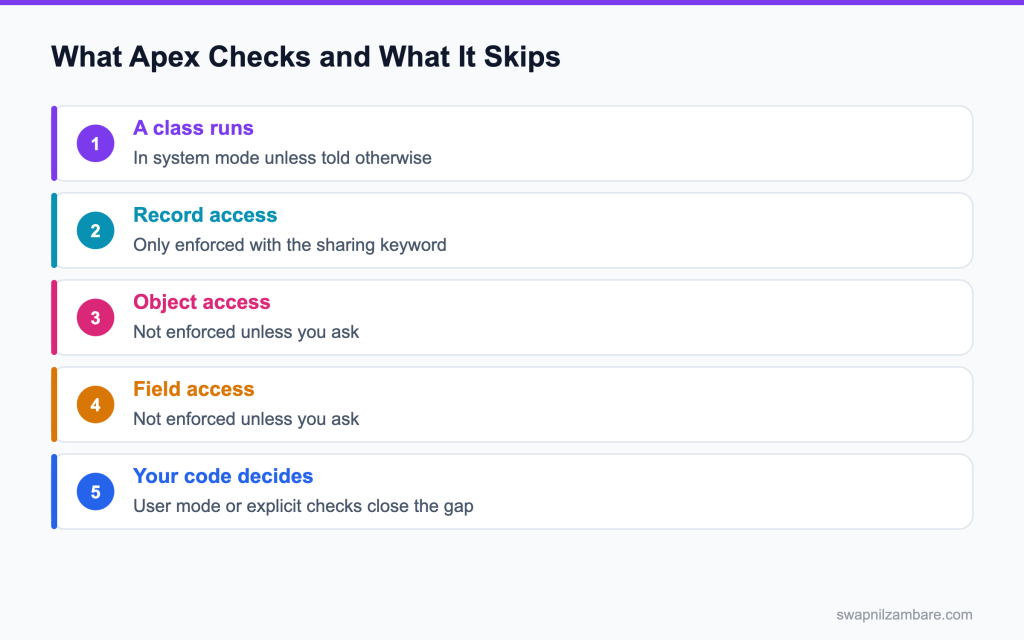
Caption: By default Apex skips record, object and field checks, so your code has to close each gap.
What Apex Security Interview Questions Cover
Apex Security Interview Questions test one idea first. Apex runs in system mode, which means it ignores the running user’s permissions unless you do something about it.
Think of it like a master key. Writing code that resists injection is covered in the post on secure coding. It opens every door in the building, so the person holding it has to decide which doors they should actually walk through.
Apex Security Interview Questions mirror a real review, which finds the same handful of problems every time. The code worked, and nobody told it to check anything.
The Three Checks and the Keywords
| Check | What enforces it |
|---|---|
| Record access, through sharing | The with sharing keyword, or user mode |
| Object access, such as create or delete | A describe check, or user mode |
| Field access, read or edit | A describe check, stripInaccessible, or user mode |
| Keyword | What it does |
|---|---|
| with sharing | Applies sharing rules to records in that class |
| without sharing | Explicitly ignores sharing rules |
| inherited sharing | Takes the mode of whatever called the class |
| No keyword at all | System mode, which is the dangerous default |
That last row is the single most useful fact in Apex Security Interview Questions. A class with no keyword does not inherit anything by default, so it runs in system mode.
public with sharing class CourseSearch {

    @AuraEnabled(cacheable=true)
    public static List<Course__c> find(String term) {
        String like = '%' + String.escapeSingleQuotes(term) + '%';
        return [
            SELECT Id, Name, Fee__c
            FROM Course__c
            WHERE Name LIKE :like
            WITH USER_MODE
            LIMIT 50
        ];
    }
}
Three things in that short class answer most Apex Security Interview Questions. The sharing keyword, the bind variable instead of string concatenation, and user mode on the query.
System Mode vs User Mode
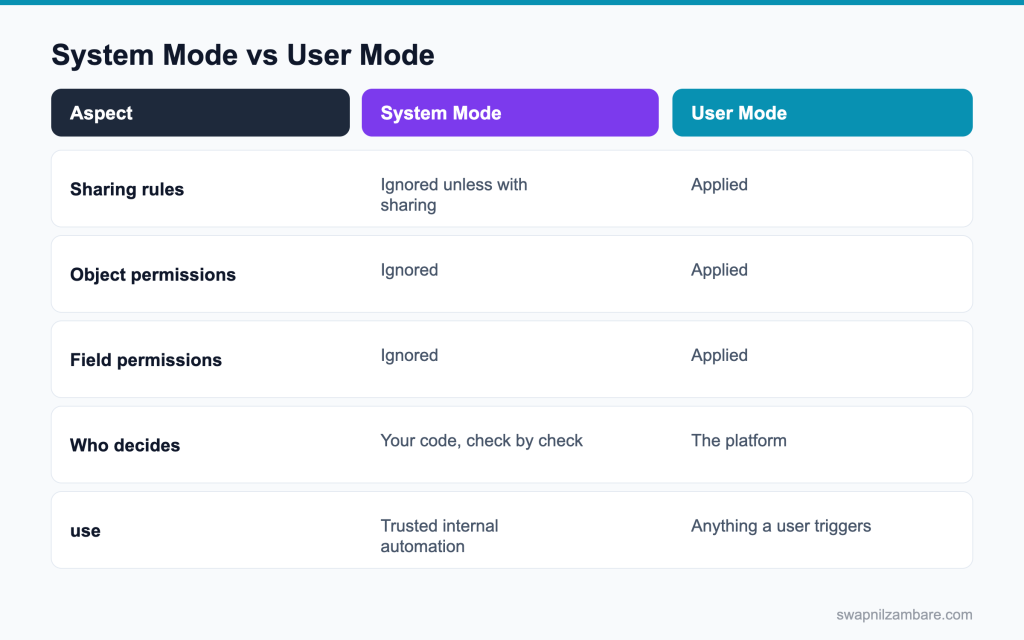
Caption: User mode hands the checks to the platform, which is why new code should start there.
| Need | Pick |
|---|---|
| A component a user clicks | User mode |
| A managed package class | User mode, with exceptions justified |
| A trigger that must see all records | System mode, deliberately |
| A guest site catalogue | System mode with a filter that does the work |
| An integration acting as a service account | User mode, with a tight integration user |
Apex Security Interview Questions usually end on that table, so be ready to justify each row.
The posts on sharing keywords and CRUD and FLS cover the detail behind these answers.
Apex Security Interview Questions on Sharing
Q1: What mode does Apex run in by default?
System mode, which ignores the running user’s object and field permissions.
Apex was built to run business logic that may need more access than the user has. That power is why you must choose, class by class and query by query, when to respect the user’s access.
Interview tip: say “system mode ignores CRUD and FLS” first, then explain how you turn checks on.
Q2: What does with sharing do?
It applies the running user’s record sharing, so the class only sees records the user can access.
Example: a sales rep in Pune calling a with sharing controller sees only the accounts the role hierarchy and sharing rules give her.
Follow-up you may get: Does with sharing apply to SOSL too? Yes, record access applies to searches.
Q3: Does with sharing enforce object and field permissions?
No. with sharing covers record access only. This is the most common wrong answer.
For object and field permissions, use WITH USER_MODE on queries, AccessLevel.USER_MODE on DML, or Security.stripInaccessible.
Interview tip: this is the trap question in most security rounds. Answer it confidently.
Q4: What does without sharing do?
It ignores sharing, so the class can see and change every record. That is sometimes right, and it should always have a comment explaining why.
Example: a nightly clean up job that must close every stale case, whoever owns it.
Q5: What does inherited sharing do?
It takes the sharing mode of the calling code, and defaults to with sharing when it is the entry point.
| Keyword | Record access | Typical use |
|---|---|---|
| with sharing | The user’s sharing applies | Controllers for user facing pages |
| without sharing | Ignores sharing | System jobs, carefully documented |
| inherited sharing | Follows the caller; with sharing if entry point | Shared services and utilities |
| No keyword | Usually without sharing, unless called from a with sharing class | Avoid; always declare one |
Follow-up you may get: Which keyword should a service class use? Usually inherited sharing.
Q6: Why is inherited sharing useful in a package?
A utility class then behaves correctly whether a user facing controller or a system job calls it.
Called from a with sharing controller, it respects the user. Called from a without sharing batch, it sees everything. One class, no copies.
Q7: What happens with no keyword at all?
The class runs without sharing by default, unless it is called from a class that has with sharing, in which case sharing still applies.
That makes behaviour depend on the caller and hard to reason about. Security reviews flag classes with no keyword, so always declare one, usually inherited sharing for shared code.
Interview tip: say you always declare a keyword. Reviewers treat a missing one as a finding.
Q8: Does an inner class inherit the outer class keyword?
No. Inner classes do not inherit the outer class’s sharing keyword.
Declare the keyword on each inner class that runs queries or DML, or the inner class may behave differently from what you expect.
Interview tip: few candidates know inner classes do not inherit. It is a strong detail.
Q9: Does with sharing affect a trigger?
Triggers always run in system mode, so the sharing keyword on the handler class decides record access.
Declare the handler with sharing or without sharing on purpose, based on whether automation must see records the user cannot.
Q10: What is Apex managed sharing?
Creating share records in code, like Project__Share, to give access that sharing rules cannot express.
Example: when a user is added to a project team object, insert a share record giving them read access to that project.
Follow-up you may get: Which access levels can an Apex share give? Read or Edit.
Q11: What is the row cause on a share record?
The reason for the share. For Apex sharing it is usually a custom Apex sharing reason, like Team_Member__c.
Standard values include Owner, Manual and Rule. A custom row cause marks shares your code owns.
Q12: Why use a custom sharing reason?
So your shares survive an owner change and a sharing recalculation, and you can find and remove them later.
Manual shares are deleted when the owner changes. Shares with your own row cause stay, and only Apex can add or remove them.
Interview tip: mention that manual shares vanish on owner change. That is the real reason for row causes.
Q13: What is the difference between implicit sharing and Apex managed sharing?
Implicit sharing is built in: for example, a user who can see a child record like a contact gets read access to its parent account. Apex managed sharing is access your code creates on purpose with share records and a custom reason.
Q14: How do you share a record with a group of users in Apex?
Insert a share record with UserOrGroupId set to a public group’s ID, or a role’s group ID, instead of a user’s ID. Everyone in the group gets the access, and membership changes do not need code.
Q15: Can you delete a sharing record created by a rule?
No. Shares created by sharing rules are managed by Salesforce. Code can delete only manual and Apex managed shares.
To remove rule based access, change the rule or the data it matches.
Apex Security Interview Questions on CRUD and FLS
Q16: What does CRUD mean here?
Create, read, update and delete permissions on an object.
They come from the user’s profile and permission sets. Example: a support agent may read Accounts but not delete them.
Q17: What does FLS mean?
Field level security, which controls whether a user can read or edit each field.
Example: the Salary field on an Employee object is hidden from everyone except HR, even if they can see the record.
Follow-up you may get: Do formula fields have FLS? Yes, formula fields can be hidden like any other field.
Q18: Does Apex enforce either by default?
No. Apex in system mode ignores CRUD and FLS until you ask for them.
That is why a controller can return a field the user is not allowed to see, unless you use user mode or a stripping step.
Q19: How do you check object access manually?
With describe calls, like Schema.sObjectType.Course__c.isCreateable() or isUpdateable().
They return true or false for the running user. Use them before DML when you are not using user mode.
Q20: How do you check a single field?
With the field describe, like Schema.sObjectType.Course__c.fields.Fee__c.isAccessible() for read or isUpdateable() for edit.
Each field needs its own check, which is why manual checks get long quickly.
Q21: What is the problem with manual checks?
They are easy to forget when fields are added, so the class drifts out of date and security holes appear.
A new field added to the SELECT without a matching check is exposed straight away.
Q22: What is the modern alternative?
User mode on the query or the DML, which applies every check for you.
It checks record sharing, object access and field access in one go, for every field the statement uses.
Interview tip: name both forms, WITH USER_MODE and AccessLevel.USER_MODE.
Q23: How do you write a query in user mode?
Add WITH USER_MODE to the SOQL statement.
Example: [SELECT Name, Fee__c FROM Course__c WITH USER_MODE] throws a QueryException naming the field if the user cannot read Fee__c.
Follow-up you may get: Can you use WITH USER_MODE in SOSL? Yes, SOSL supports it too.
Q24: How do you write DML in user mode?
Use the as user form, such as insert as user, or the Database methods with an access level.
Q25: What does WITH SECURITY_ENFORCED do?
It enforces field and object access on a query, and it throws when something is inaccessible.
Q26: How is that different from user mode?
User mode covers more: it applies sharing, checks fields in WHERE and ORDER BY, and reports every inaccessible field at once.
| Tool | Sharing | Object and field access | When a field is not allowed |
|---|---|---|---|
| with sharing | Yes | No | No check |
| WITH SECURITY_ENFORCED | No | Fields in SELECT and FROM | Throws an error |
| WITH USER_MODE / AccessLevel.USER_MODE | Yes | All fields used | Throws an error naming them |
| Security.stripInaccessible | No | Fields on the records | Removes them quietly |
Q27: What does stripInaccessible do?
It removes fields the user cannot access from a list of records, and tells you what it removed.
Example: SObjectAccessDecision d = Security.stripInaccessible(AccessType.READABLE, courses); return d.getRecords();
Follow-up you may get: Which access types exist? CREATABLE, READABLE, UPDATABLE and UPSERTABLE.
Q28: When is stripInaccessible the right tool?
When you have records from an outside payload, like a component or an integration, and must drop fields the user cannot edit before DML.
Use AccessType.UPDATABLE or CREATABLE, then save d.getRecords() instead of the original list.
Q29: Does it throw if a field is inaccessible?
No. It strips quietly and tells you what it removed, which is often better for users.
The page still loads, just without the hidden fields, instead of failing with an error.
Interview tip: compare it with user mode’s error. Choosing between them is the real skill.
Q30: How do you know what it removed?
Through getRemovedFields() on the SObjectAccessDecision result.
It returns a map of object name to the set of removed field names, which you can log or use to warn the user.
Q31: Which approach would a security review prefer?
User mode by default, with stripInaccessible for payloads and a justified exception anywhere else.
Q32: What is the difference between Security.stripInaccessible and WITH USER_MODE?
WITH USER_MODE checks access when the query runs and throws an error if a field is not allowed. stripInaccessible works on records you already have and removes the fields quietly. Use user mode for queries, and stripInaccessible for records that came from the client or an integration.
Q33: How do you enforce access on DML in a Database method?
Pass AccessLevel.USER_MODE as an argument, like Database.update(records, false, AccessLevel.USER_MODE). The save then checks sharing, object and field access, and returns errors for anything the user cannot change.
Q34: Does user mode slow a query down?
There is some cost to enforcement, and it is rarely the reason a transaction is slow.
The safety benefit is far bigger than the cost. If a query is slow, look at selectivity and indexes first.
Apex Security Interview Questions on Injection and Secure Coding
Q35: What is SOQL injection?
Building a query from user input so the input changes what the query does.
Example: a search box value of x’ OR Name != ‘ turns a filter into one that returns every record.
Q36: How do you prevent it?
Use bind variables, which keep the input as data, never as query text.
Example: WHERE Name = :searchTerm. Whatever the user types, Salesforce treats it as a value to compare.
Interview tip: give the injection example and the bind fix together.
Q37: What if you must build dynamic SOQL?
Use String.escapeSingleQuotes on values, and check field and object names against an allow list.
Better still, use Database.queryWithBinds so values are bound even in a dynamic query.
Q38: Does escaping protect a field or object name?
No. Escaping only protects values in quotes. A dynamic field or object name needs an allow list.
Check names against a fixed Set or against Schema describe results before adding them to the query.
Q39: What is the safer dynamic query option?
Database.queryWithBinds, which takes the bind values in a Map instead of joining them into text.
Example: Database.queryWithBinds(‘SELECT Id FROM Course__c WHERE Level__c = :lvl’, new Map<String, Object>{‘lvl’ => level}, AccessLevel.USER_MODE);
Q40: What is cross site scripting in a Salesforce context?
Output rendered without escaping, so user entered content runs as script in someone’s browser.
Example: a comment field containing a script tag that runs when a manager opens the record page.
Follow-up you may get: Which Visualforce functions encode output? HTMLENCODE, JSENCODE, JSINHTMLENCODE and URLENCODE.
Q41: Where does that usually appear?
In Visualforce with escape=”false”, and in HTML built by hand in Apex or JavaScript.
Never turn off escaping for user data, and never set innerHTML with user values in components.
Q42: Does Lightning escape output by default?
Yes. LWC and Aura templates escape values by default, which is one reason they are safer than hand built markup.
The risk returns if you use lwc:dom=”manual” and set innerHTML with user data.
Q43: What is CRUD or FLS bypass through a wire adapter?
No. Wire adapters like getRecord use Lightning Data Service, which applies the user’s sharing and field access for you.
The bypass risk lives in custom Apex called from components. An @AuraEnabled method in system mode can return data the user could never open in the UI, so that is where your checks belong.
Q44: Where should secrets live?
In named credentials and external credentials for callout secrets, or protected custom metadata or custom settings in packages. Never in code.
Named credentials keep the secret out of Apex completely, and admins can rotate it without a deploy.
Q45: Why is a hard coded key an automatic review failure?
Because anyone with code access can read the credential, and changing it needs a deployment.
Keys in code also end up in version control and in every sandbox copy.
Interview tip: mention rotation. A key you cannot rotate quickly is a lasting risk.
Q46: What does a named credential give you?
Authentication handled outside your code, with the endpoint and credentials managed in Setup.
Your Apex only writes callout:Payment_API/charge, and access is granted through a permission set on the external credential.
Follow-up you may get: How do users get access to an external credential? Through principal access in a permission set.
Q47: Which tool scans for these problems locally?
Salesforce Code Analyzer, which runs PMD and other rule engines on Apex, LWC and more.
Run it from the CLI or VS Code, and in your CI pipeline, so issues are caught on every pull request.
Q48: How do you protect an LWC from showing unsafe HTML?
Let the template bind values normally, which escapes them. For rich text, use lightning-formatted-rich-text, which removes unsafe tags. Never put user data into innerHTML in your JavaScript.
Q49: What is Lightning Web Security?
The newer security architecture that isolates components from each other using standard browser sandboxing. It replaces Lightning Locker, is faster, and allows more third party libraries, while still stopping one component from reading another’s data.
Q50: Should you run it before a security review?
Yes. It catches most findings while they are still cheap to fix.
Fixing a finding before submission is much cheaper than a failed AppExchange security review and a resubmission.
Scenario Based Apex Security Interview Questions
Q51: Scenario: a user sees a record in your component that they cannot open normally. Why?
The controller has no keyword or uses without sharing, so it ignores the user’s record access.
Declare with sharing, or use WITH USER_MODE on the query, and test with System.runAs as that user.
Q52: Scenario: a user sees a field they have no access to. What is missing?
Field level enforcement. Use user mode or strip the fields before returning the records.
with sharing alone does not hide fields, so a controller that returns Salary__c shows it to everyone who can see the record.
Q53: Scenario: a reviewer flags a class with no keyword. What do you say?
That no keyword makes behaviour depend on the caller and usually means without sharing, so the class should declare with sharing, inherited sharing or user mode.
Add the keyword, and a comment if without sharing is truly needed.
Q54: Scenario: a guest site must list published courses. Which mode?
Run with sharing, and give the guest user read access through a guest user sharing rule that matches published courses.
Guest users are locked down by default. Avoid system mode for guest pages, return only the fields the page needs, and never accept record IDs from the browser without checking them.
Interview tip: guest access is a common real breach area. Say you lock it down first.
Q55: Scenario: an integration user needs to see everything. How do you handle it?
Give the access through a permission set on a dedicated integration user, not by removing security checks in code.
The code stays safe for every other caller, and the integration’s access is visible and easy to review.
Q56: Scenario: a dynamic SOQL method takes a field name from the client. What is the risk?
Injection through the field name, which escaping does not fix. Use an allow list.
Check the name against a fixed set or Schema describe results, and fall back to a safe default if it does not match.
Q57: Scenario: a method takes a whole sObject from a component and saves it. What do you add?
Security.stripInaccessible with AccessType.UPDATABLE before the DML, so fields the user cannot edit are dropped.
Also check the record ID belongs to something the user may edit, and save with AccessLevel.USER_MODE.
Follow-up you may get: Should the method also check the record ID? Yes, confirm the user may edit that record.
Q58: Scenario: a trigger must update records the user cannot see. Is that acceptable?
Yes, if it is deliberate. Automation often needs system mode, like updating a parent the user cannot see.
Document the reason in a comment, keep the system mode part small, and make sure it never returns that data to the user.
Q59: Scenario: a package fails review on CRUD and FLS. What is the quickest fix?
Move queries to WITH USER_MODE and DML to AccessLevel.USER_MODE, then justify any remaining exceptions.
Add stripInaccessible where records come from the client, and re-run Code Analyzer before resubmitting.
Q60: Scenario: a test passes as an admin and the feature fails for a sales user. Why?
The test never used System.runAs, so it never ran with the sales user’s access.
Create a user with the sales profile and permission sets in the test, run the code inside runAs, and assert what that user sees.
Interview tip: name runAs and a realistic profile. It shows you test like production.
Q61: Scenario: an API key is in a static resource. Is that safer than Apex?
No. A static resource is readable by anyone who can load it, so it is the same problem in another place.
Move the key to a named credential or external credential, and rotate it, since it may already be exposed.
Q62: Scenario: a user edits a record through your component and bypasses a validation rule. How?
Validation rules still run on every save, so the likely cause is logic that updates the record again in system mode afterwards, with values the rule does not check.
Look for after triggers or flows that change fields after validation, and move the changes before validation where possible.
Q63: Scenario: a manager must see all records of her team, including private ones, in a custom page. How?
Use the role hierarchy first: with Grant Access Using Hierarchies on, she already sees records owned by her team. Run the controller with sharing so the hierarchy applies, instead of switching to without sharing.
Q64: Scenario: a batch job must update records for all users. Which sharing mode do you use?
without sharing on the batch class, with a comment explaining why, because the job must reach every record. Keep it narrow: the batch should never return that data to a user, and it should run as a dedicated integration user.
Q65: Scenario: an interviewer asks for one change to make all your Apex safer. What do you pick?
User mode on every query and DML by default, with exceptions justified in comments.
It covers sharing, object and field access in one consistent way, and it is easy for reviewers to check.
Common Mistakes Candidates Make
- Saying with sharing covers field access, the most common error in Apex Security Interview Questions
- Thinking a class with no keyword inherits the caller’s mode
- Relying on manual describe checks that drift as fields are added
- Escaping input and assuming a dynamic field name is safe
- Keeping secrets in code or a static resource
- Testing only as an administrator
More Apex Security Interview Questions
Q66: What does AccessLevel.SYSTEM_MODE do?
It runs a query or DML statement without checking the user’s sharing, object or field access. Use it only for work that genuinely needs it, and keep that code small and reviewed.
Q67: What is the difference between WITH USER_MODE and AccessLevel.USER_MODE?
WITH USER_MODE is a clause inside a SOQL query. AccessLevel.USER_MODE is passed to Database methods such as Database.query, Database.insert and Database.update.
Q68: Can one class use both user mode and system mode?
Yes. The mode is chosen per query or DML statement, so a class can read data in user mode and update a rollup in system mode where that is justified.
Q69: Does System.runAs enforce field level security in a test?
No. System.runAs applies the user’s record sharing, but not their object or field permissions. Test field access by checking the results of user mode queries or stripInaccessible.
Q70: Why must every @AuraEnabled method check access?
Anyone who can run the Apex class can call the method directly, not just through your component. The method itself has to respect sharing and field access.
Follow-up you may get: Can you restrict who calls @AuraEnabled methods? Yes, through Apex class access on profiles and permission sets.
Q71: How do you control which users can run an Apex class?
Grant Apex class access in permission sets or profiles. Users without access cannot call its @AuraEnabled methods or web services.
Q72: How do you check a custom permission in Apex?
Call FeatureManagement.checkPermission with the custom permission name. It lets admins turn features on for chosen users through permission sets.
Q73: What is CSRF, and how does Salesforce protect against it?
Cross site request forgery tricks a logged in user into sending an unwanted request. The platform adds anti forgery tokens to its forms. Your code should never change data on a simple page load or GET request.
Q74: How do you log a security problem without exposing data?
Log the record id, the user and the type of failure, never the sensitive field values or tokens.
Q75: What is the Einstein Trust Layer, and why does it matter for Apex developers?
It is the layer between Salesforce and the AI model that masks sensitive data, checks responses and keeps prompts out of model training. When your Apex actions feed data to Agentforce, the Trust Layer applies, but your actions must still run in user mode so the agent only sees what the user may see.
Q76: How do you review a codebase for security quickly?
Run Code Analyzer, search for classes without a sharing keyword, dynamic SOQL that joins strings, escape=”false” in Visualforce, and hard coded keys. Fix the high risk findings first, then add user mode as the default for new code.
Q77: A query works for admins but returns nothing for users. Is that a bug?
Often it is the security model working correctly. Check the user’s sharing and field access before changing code, and never fix it by switching to system mode without a business reason.
Best Practices to Mention in an Interview
- Declare a sharing keyword on every class, as you write it
- Query and write in user mode by default
- Use stripInaccessible for records that arrive from a client
- Use bind variables, and an allowed list for anything dynamic
- Keep secrets in protected settings, custom metadata or named credentials
- Test with runAs for each persona the feature serves
- Run Code Analyzer before a review, not after
Official Resources
Quick Recap
- Apex Security Interview Questions start with system mode and what it skips
- with sharing covers records only, not objects or fields
- No keyword means system mode, not inherited
- User mode applies sharing, object and field checks for you
- stripInaccessible is for records arriving from a client
- Bind variables stop injection, and an allowed list protects dynamic names
What Is Next
Next, read Custom Metadata Interview Questions and Config Driven Apex.


