Apex Exception Interview Questions sound basic until an interviewer asks what happens to your log record after a rollback. That one question separates people who have supported production code from people who have not.
Last reviewed for the Winter ’27 release (November 2026).
This post covers the questions that get asked, grouped into exception basics, DML errors, custom exceptions, logging and rollback, and scenario questions where something failed and nobody knows why.
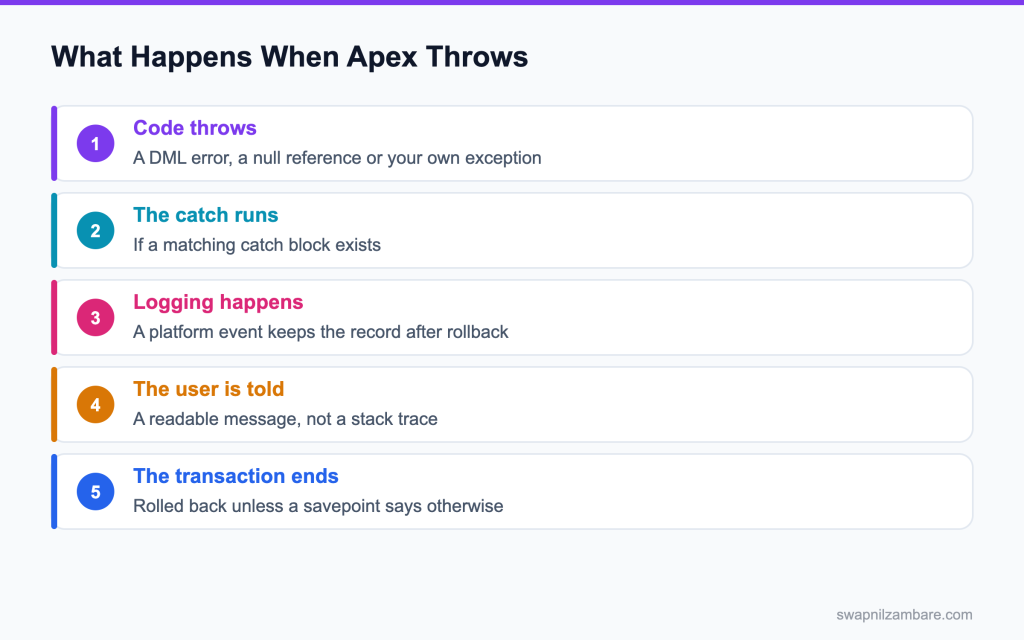
Caption: A thrown exception rolls the transaction back, which takes any log record you inserted with it.
What Apex Exception Interview Questions Cover
Apex Exception Interview Questions test whether your error handling helps anyone. Catching an exception and doing nothing is worse than letting it throw, because the failure becomes invisible.
Think of it like a smoke alarm with the battery taken out. Handling failures in bulk DML is covered in the post on the Database class. The house is quieter, and that is the problem.
Apex Exception Interview Questions start with one fact. An exception in Apex is an object. It has a message, a type name, a stack trace and sometimes a line number, and each of those is useful to someone investigating later.
The Exception Types to Know
| Type | When it is thrown |
|---|---|
| DmlException | An insert, update or delete fails |
| NullPointerException | A null reference is used |
| QueryException | A query returns no rows into a single record variable |
| ListException | An index outside the list is used |
| CalloutException | An HTTP callout fails or times out |
| LimitException | A governor limit is hit |
| AuraHandledException | You want a readable message to reach a component |
That last one comes up in most Apex Exception Interview Questions, and it is not an error the platform throws. You throw it, so a component shows a sentence rather than a stack trace.
public with sharing class EnrolmentService {

    public class EnrolmentException extends Exception {}

    public void enrol(Id courseId, Id contactId) {
        try {
            Course__c c = [
                SELECT Id, Seats_Left__c FROM Course__c
                WHERE Id = :courseId WITH USER_MODE LIMIT 1
            ];
            if (c.Seats_Left__c <= 0) {
                throw new EnrolmentException('This course is full');
            }
            insert as user new Enrolment__c(Course__c = courseId, Contact__c = contactId);
        } catch (EnrolmentException e) {
            throw new AuraHandledException(e.getMessage());
        } catch (Exception e) {
            Logger.error(e, 'EnrolmentService.enrol');
            throw new AuraHandledException('We could not complete the enrolment');
        }
    }
}
Two catch blocks, two different messages, which is what Apex Exception Interview Questions are looking for. The business rule reaches the user word for word, and anything unexpected is logged and replaced with a sentence that gives nothing away.
Catchable vs Uncatchable
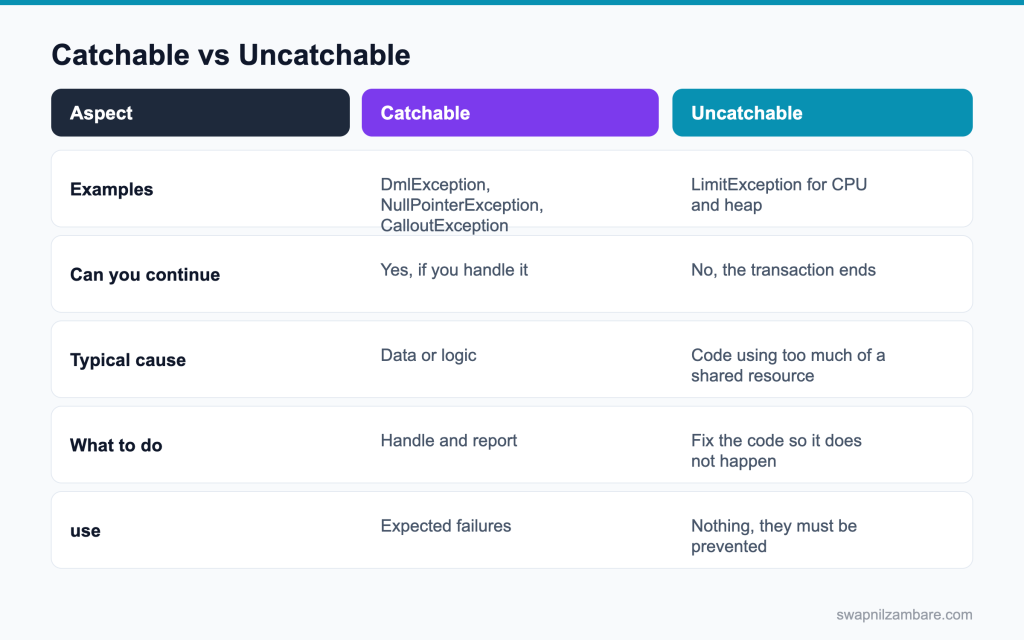
Caption: Limit exceptions for CPU and heap cannot be handled, so they have to be prevented.
| Need | Approach |
|---|---|
| A DML failure on one row | Database methods with allOrNone false |
| A missing record | Query into a list and check the size |
| A failed callout | Catch CalloutException and retry or report |
| A broken business rule | Throw your own exception type |
| A CPU limit | Fix the code, since it cannot be caught |
Apex Exception Interview Questions often work down that table one row at a time.
The post on error logging covers the logging side, and the post on governor limits covers prevention.
Apex Exception Interview Questions on the Basics
Q1: What is an exception in Apex?
An object thrown when something goes wrong, carrying a message, a type and a stack trace.
If nothing catches it, the transaction stops and every change rolls back. Example: reading acc.Name when acc is null throws a NullPointerException.
Interview tip: say what happens when nothing catches it: the whole transaction rolls back.
Q2: What does try and catch do?
It runs the code in try and, if a matching exception is thrown, jumps to the catch block.
Example: try { insert course; } catch (DmlException e) { course.addError(e.getDmlMessage(0)); } The rest of the try block after the error does not run.
Q3: Does a finally block always run?
Yes, whether or not an exception was thrown, which makes it the place for clean up.
Example: closing a log context or resetting a static flag, so it happens even when the main work fails.
Follow-up you may get: Does finally run if the exception is a LimitException? No, the transaction ends immediately.
Q4: Can you have several catch blocks?
Yes, ordered from the most specific type to the most general.
Example: catch (DmlException e) first, then catch (Exception e) last for anything unexpected.
Q5: What happens if the order is wrong?
The general catch runs first and handles everything, so the specific catch blocks never get a chance.
Always put specific types like DmlException or QueryException before a final catch (Exception e).
Interview tip: give the right order as a rule: specific first, Exception last.
Q6: Which methods does an exception give you?
getMessage(), getTypeName(), getStackTraceString(), getLineNumber() and getCause().
For logging, save the type, message, line number and stack trace, so the failure can be found later without guessing.
Follow-up you may get: What does getTypeName return? The full type, like System.DmlException.
Q7: What is getCause for?
The original exception you wrapped, so the first failure is not lost.
Example: throw new PaymentException(‘Charge failed’, e); keeps e as the cause, and the log can show both.
Q8: What is a null pointer exception usually caused by?
Using a variable or field that holds nothing, often an empty lookup or a list that was never created.
Example: c.Account.Name when the contact has no account, or results.add(x) when results was declared but not initialised.
Q9: How do you avoid one on a query result?
Query into a List and check isEmpty() before reading the first row.
Example: List<Account> found = [SELECT Id FROM Account WHERE Code__c = :code LIMIT 1]; if (!found.isEmpty()) { … }
Interview tip: show the list pattern in one line. It is the most practical answer.
Q10: What happens if a single row query returns nothing?
A QueryException: “List has no rows for assignment to SObject”.
That is why assigning to a single record variable is risky whenever the record might not exist.
Q11: What happens if it returns more than one row?
A QueryException too: “List has more than 1 row for assignment to SObject”.
Add LIMIT 1 when you only need one, or handle the list when several are possible.
Follow-up you may get: How do you safely get one optional record? Query with LIMIT 1 into a list.
Q12: What is a safe navigation operator?
The ?. operator. It returns null instead of throwing when the left side is null.
Example: String city = con.Account?.BillingCity; gives null for contacts with no account. Combine with ?? for a default.
Q13: Does catching an exception stop the rollback?
Catching it keeps the transaction going, but DML that already ran stays unless you roll back to a savepoint.
So a catch that logs and carries on can leave half finished data. Decide on purpose: roll back, or let the error stop the save.
Interview tip: many candidates think catching undoes the DML. Correct that clearly.
Q14: Which exceptions cannot be caught?
System.LimitException, for any governor limit like CPU time, heap, SOQL queries or DML statements, cannot be caught.
The transaction always ends and rolls back. A few other platform errors, like internal Salesforce errors, also cannot be handled in code.
Interview tip: say “LimitException cannot be caught at all”. Hedging here loses marks.
Q15: Why not?
Because the transaction has already used more than its fair share of the shared servers, so it must end.
Allowing code to catch it and carry on would defeat the purpose of the limit.
Q16: What is the difference between throw and rethrow?
throw new MyException(‘…’) starts a new exception. Writing throw e; inside a catch rethrows the same exception, keeping its type and stack trace. To add context, throw a new exception with the original as its cause.
Q17: Can you catch a generic Exception?
Yes, catch (Exception e) catches every catchable exception. Use it at boundaries to log and translate errors, but avoid it deep in the code, where it can hide bugs you should fix.
Q18: Can you catch a limit exception for queries?
No. A limit exception cannot be caught, including the SOQL query limit.
The only fix is to prevent it: check Limits.getQueries() before risky steps, bulkify, and move heavy work to async.
Apex Exception Interview Questions on DML Errors
Q19: What is thrown when an insert fails?
A DmlException.
These are the exception types you meet most often:
| Exception | Typical cause |
|---|---|
| DmlException | A record failed to save, like a validation rule or a missing required field |
| QueryException | No rows or too many rows for a single record assignment |
| NullPointerException | Using a variable or field that is null |
| ListException | Reading an index that does not exist |
| LimitException | A governor limit was passed; cannot be caught |
| CalloutException | A callout failed or timed out |
| TypeException | A bad conversion, like Integer.valueOf(‘abc’) |
Q20: What does getNumDml give you?
The number of rows that failed in that DML operation.
Loop from 0 to getNumDml() – 1 to read each failure.
Q21: How do you read the error for one row?
With getDmlMessage(i), getDmlFieldNames(i) and getDmlId(i) for that index.
getDmlIndex(i) gives the position of the failed record in your original list, so you can show the error on the right row.
Follow-up you may get: What does getDmlFieldNames give? The fields that caused the error, for showing messages next to them.
Q22: How do you let the good rows save?
Use Database.insert (or update) with allOrNone set to false.
Example: Database.SaveResult[] results = Database.insert(courses, false); Valid rows save, and failed rows return errors instead of throwing.
Q23: What does that return?
A list of SaveResult objects, one per row in the same order, each with isSuccess() and getErrors().
Example: if (!results[i].isSuccess()) log(courses[i], results[i].getErrors()[0].getMessage());
Q24: Why is that pattern important in batch work?
Because one bad row should not fail ten thousand good ones.
With all or none, a single bad email address in a chunk would roll back the other 199 records too.
Interview tip: tie partial success to batch jobs and integrations, where it matters most.
Q25: How do you log the failures?
Loop over the results, and for each failure log the record, its index and the error messages.
Write the logs in bulk at the end, ideally through a logging service or platform event, so logging does not use a DML statement per failure.
Q26: What is a common cause of a DML exception that is not a bug?
A validation rule or a required field, which is the org saying the data is wrong.
Example: FIELD_CUSTOM_VALIDATION_EXCEPTION means a rule blocked it. That is working as designed, so report it, do not hide it.
Q27: How should you report that to a user?
With the rule’s own message, because it was written for users.
Show getDmlMessage(0) on the record or in a toast, not a technical stack trace.
Q28: What is a mixed DML exception?
An error from changing setup objects, like User, and normal records, like Account, in one transaction.
The message is MIXED_DML_OPERATION. Salesforce blocks it because setup changes affect access to other records.
Interview tip: name the two fixes: async in code, runAs in tests.
Q29: How do you avoid it?
Do the setup object work in an async method, like a queueable or future method, or use System.runAs in tests.
Example: create the user in the trigger’s transaction, then assign the permission set from a queueable.
Follow-up you may get: Can a future method fix mixed DML? Yes, it runs the second part in its own transaction.
Q30: Which objects count as setup objects?
User, UserRole, Group, GroupMember, PermissionSetAssignment, QueueSObject and similar configuration objects.
Changing these together with business records in one transaction causes the mixed DML error.
Q31: What is a row lock error?
Two transactions trying to update the same records, or children of the same parent, at the same time.
The error is UNABLE_TO_LOCK_ROW. Salesforce locks a record while it is being updated, and the second transaction waits, then gives up.
Q32: How do you reduce them?
Update records in a consistent order, keep transactions short, and avoid many children updating one parent at the same time.
Sort by parent ID in batches, reduce batch size for heavy parents, and avoid data skew of more than about 10,000 children under one parent.
Q33: What does UNABLE_TO_LOCK_ROW tell you about the design?
Usually that many transactions update the same parent or records at the same time, often because of data skew or parallel jobs. Fix the cause with consistent ordering, serial batches or spreading children across parents, then add a retry for the rare cases left.
Q34: How do you handle DUPLICATE_VALUE errors?
They mean a unique field, like an external ID, already has that value. Use upsert on the external ID instead of insert, or check for the existing record first, so retries do not fail.
Q35: What does FOR UPDATE do?
Locks the queried rows so another transaction waits, which can help and can also cause timeouts.
Use FOR UPDATE only for short critical sections, like reserving the last seat on a course, and never across a callout.
Apex Exception Interview Questions on Custom Exceptions
Q36: How do you define a custom exception?
A class that extends Exception, with a name ending in Exception.
Example: public class SeatLimitException extends Exception {} then throw new SeatLimitException(‘Course is full’);
Q37: Does it need a constructor?
No. Extending Exception gives you the standard constructors automatically.
You can pass a message, a cause, or both, without writing any constructor code.
Q38: Why create one at all?
So callers can catch your business failure separately from technical failures.
Example: a controller catches SeatLimitException and shows “This course is full”, while unexpected errors go to the general handler and the log.
Follow-up you may get: Can a custom exception hold extra fields? Yes, add properties like an error code.
Q39: Where should it live?
Usually as an inner class of the service it belongs to, or in a shared exceptions class.
Example: EnrollmentService.SeatLimitException keeps the exception next to the code that throws it.
Q40: What is AuraHandledException for?
Sending a readable message from Apex to a Lightning web component or Aura component.
Example: throw new AuraHandledException(‘This course is full. Please pick another date.’); The component shows that text instead of a system error.
Q41: What happens without it?
The component gets a generic internal server error, with no useful message for the user.
Real exception messages are hidden from the client for security, unless you throw an AuraHandledException.
Interview tip: mention that hiding real messages is a security feature, not a bug.
Q42: Can you read the message in a component?
Yes, from error.body.message in the catch block of the imperative call.
Example: try { await enroll({ courseId }); } catch (error) { this.showToast(error.body.message); }
Follow-up you may get: What is in error.body for a DML error? Often pageErrors and fieldErrors arrays.
Q43: Should you put a stack trace in an AuraHandledException?
No. A stack trace means nothing to users and tells an attacker how your code works.
Send a short, plain sentence, and log the technical details on the server.
Q44: How do you keep the detail then?
Log the full exception on the server, and send the user one clear sentence.
Include a reference, like a log ID, in the message if support may need to find the details.
Q45: Should every method catch exceptions?
No. Catch where you can do something useful, and let the rest reach a boundary that logs.
Catching everywhere hides errors and makes code harder to read. Typical boundaries are controller methods, REST endpoints and job execute methods.
Interview tip: “catch where you can act” is a phrase interviewers like.
Q46: What is an exception boundary?
The outermost method of an entry point, like an @AuraEnabled method or a batch execute, where errors are logged and turned into a clear response.
Inside the boundary, code throws freely. At the boundary, one catch logs and translates.
Q47: How do you show field level errors from Apex in an LWC form?
Return the field names and messages from the DmlException, through getDmlFieldNames and getDmlMessage, in a structured response. The component then calls setCustomValidity on the matching input and reportValidity to show the message under the field.
Q48: When should you use addError instead of throwing an exception?
In triggers, use addError on the record or field, so only that record fails and the user sees a clear message. Throwing an exception from a trigger fails the whole operation with a less friendly error.
Q49: Why is swallowing an exception bad?
The failure disappears, so the bug survives and nobody knows.
If you catch something you cannot handle, log it and rethrow, so it still reaches the boundary.
Apex Exception Interview Questions on Rollback and Logging
Q50: What happens to data when an exception escapes?
The transaction rolls back, so nothing it changed remains.
That includes records inserted early in the transaction and any log records you inserted along the way.
Q51: What happens to a log record you inserted?
It rolls back too, which is why logging often uses a platform event.
| Logging approach | Survives a rollback | Notes |
|---|---|---|
| Insert a log record directly | No | Lost when the transaction fails |
| Platform event set to Publish Immediately | Yes | A subscriber trigger writes the log in its own transaction |
| System.debug | Only in debug logs | Kept 24 hours, needs a trace flag |
| Transaction Finalizer (queueables) | Yes | Runs after the job, even on failure |
Interview tip: platform event logging is the answer most strong candidates give.
Q52: Why does a platform event survive?
A platform event set to Publish Immediately is sent right away, outside the transaction, so a subscriber trigger writes the log record in its own transaction.
Even if the original transaction rolls back, the event has already gone out.
Follow-up you may get: What if the event is set to Publish After Commit? It is lost on rollback, like a record.
Q53: What is a savepoint?
A marker you can roll back to, which undoes part of a transaction without ending it.
Example: set a savepoint before inserting an order and its lines, and roll back to it if a line fails.
Q54: How do you use one?
Set it with Database.setSavepoint(), then call Database.rollback(sp) in the catch block.
Example: Savepoint sp = Database.setSavepoint(); try { insert order; insert lines; } catch (Exception e) { Database.rollback(sp); throw e; }
Q55: What is the cost of a savepoint?
Setting a savepoint and rolling back each count as a DML statement, so avoid creating them in loops.
They also make code harder to follow when overused, so keep them for real multi step work.
Q56: Do variables reset when you roll back to a savepoint?
No. Only database changes are undone, so your variables may now be wrong.
Records inserted before the rollback still have IDs in memory. Clear them or clone without IDs before you try to insert again.
Interview tip: mention the ID problem on retry. It is a common follow up.
Q57: When is a savepoint genuinely needed?
For multi step work where a later failure should undo earlier writes, without failing the whole request.
Example: an LWC save of an invoice and its lines, where the user should see a clear message and no half saved invoice.
Q58: Should every service use one?
No. Most work is fine with the normal all or nothing behaviour.
If an exception escapes, Salesforce already rolls everything back. A savepoint is only needed when you catch the error and keep going.
Q59: What should a log entry contain?
The message, stack trace, class and method, a request ID, the user and the time.
Also add the record ID it concerned, when there is one, but not the record’s sensitive field values.
Follow-up you may get: Is there a ready logging tool? Nebula Logger is a popular open source option.
Q60: Why the request id?
It groups every log line from one transaction, which makes a trace readable.
Request.getCurrent().getRequestId() gives the same ID that appears in Salesforce’s own logs, so you can match them.
Q61: What should never go in a log?
Personal data, passwords, tokens and full record payloads, because logs are readable and reportable.
Logs often have wider access than the data itself. Log IDs and error types, not Aadhaar numbers, card numbers or customer addresses.
Q62: How do you catch failures in a queueable?
Attach a Transaction Finalizer, which runs even when the job throws an uncaught exception.
In its execute, check ctx.getResult() and ctx.getException(), log the failure, and enqueue a retry if it makes sense.
Q63: How do you handle a callout that throws a CalloutException?
Catch it, log the endpoint and error without secrets, and decide: retry later from a queueable with a delay, mark the record as failed for follow up, or show the user a message. Never let a timeout leave the record in an unknown state.
Q64: How do you build a simple logging service in Apex?
Create a Logger class with methods like error(Exception e, String context) that collect entries in a static list, and a flush() that publishes them as one batch of platform events. A subscriber trigger inserts Log__c records. Call flush() at each boundary.
Q65: How do you catch failures in a Flow?
A fault path, which can publish the same logging platform event.
In the fault path, publish the logging event or call an invocable logger, then show the user a friendly screen.
Scenario Based Apex Exception Interview Questions
Q66: Scenario: users report an error and the log table is empty. What went wrong?
The log was inserted inside the failing transaction, so the rollback removed it.
Publish the log as a platform event set to Publish Immediately, and let a subscriber write the record.
Interview tip: this scenario tests whether you know logs roll back. Say so first.
Q67: Scenario: a component shows an internal server error. What is missing?
An AuraHandledException with a readable message.
Catch errors in the @AuraEnabled method, log the details, and throw new AuraHandledException(‘Plain message for the user’).
Q68: Scenario: a nightly job silently skips rows. What is missing?
Per row result handling with allOrNone false, and a log entry for each failure.
Read every SaveResult, log the failures, and have finish send a summary, so a skipped row is always visible.
Q69: Scenario: a test fails with a mixed DML error. What do you change?
Create the user inside System.runAs, or separate the setup object work from the rest.
Example: System.runAs(new User(Id = UserInfo.getUserId())) { insert testUser; } then insert the account outside the block.
Q70: Scenario: a user triggers the same action twice and gets two records. What do you add?
A duplicate check in the service, and a disabled button while the call is in progress.
On the server, check for an existing record with the same key before inserting. On the client, set a saving flag that disables the button until the response arrives.
Q71: Scenario: a CPU limit error appears only at month end. Why?
Volume. The work grows faster than the record count somewhere, usually a nested loop.
Month end brings more records per account or more lines per invoice. Profile one heavy transaction and replace inner loops with Maps.
Follow-up you may get: How do you catch it before month end? Test with production like volumes in a full sandbox.
Q72: Scenario: a catch block logs and continues, and the data is wrong afterwards. What happened?
Part of the work finished, so data is now inconsistent. Either roll back to a savepoint or stop the operation.
A catch block that only logs should be used for steps that are truly optional, like sending a notification.
Q73: Scenario: row lock errors appear during a data load. What do you suggest?
Smaller batches, a consistent update order, and no parent roll ups fired by every child.
Sort records by parent ID, and for heavy parents load children in separate, serial batches.
Q74: Scenario: an integration partner says your API returns no detail on failure. What do you fix?
Return a structured error with a code and a message, not a generic failure.
Example: set RestContext.response.statusCode = 400 and return {“errorCode”: “INVALID_COURSE”, “message”: “Course code not found”}. Partners can then handle each case.
Q75: Scenario: a validation rule message reaches a user as raw text with field names. What do you do?
Catch the DmlException and show the rule’s message cleanly, keeping its wording.
Use getDmlMessage(0) for the text and getDmlFieldNames(0) to place it next to the right field, instead of the raw exception string.
Q76: Scenario: an Agentforce action fails and the agent gives a vague answer. What do you fix?
Catch errors in the invocable method and return a short, clear result like “No order found with that number”, while logging the details. The agent can then explain the problem to the user instead of guessing.
Q77: Scenario: an exception message includes a customer’s phone number. Why is that a problem and how do you fix it?
Messages end up in logs, emails and screens that more people can see than the original record. Build messages from IDs and error types, not field values, and mask any personal data before logging.
Q78: Scenario: an interviewer asks how you would find a failure from last Tuesday. What do you say?
Query the log object by date and source, which is why logging to a record matters.
Include a request ID and the user in each log record, so you can follow one failure from start to end.
Common Mistakes Candidates Make
- Catching an exception and doing nothing with it, the first thing Apex Exception Interview Questions look for
- Inserting a log record inside the transaction that is about to roll back
- Showing a stack trace to a user
- Thinking every limit exception can be caught
- Using a single row query where no row is a valid outcome
- Creating savepoints inside loops
Best Practices to Mention in an Interview
- Catch where you can act, and log at the entry point
- Publish a platform event for logging, so the record survives a rollback
- Throw AuraHandledException so components get a readable message
- Use Database methods with allOrNone false for bulk work, and log each failure
- Query into lists and check sizes rather than relying on a single row
- Define a custom exception per business failure
- Attach a finalizer to queueable jobs and fault paths to Flows
Official Resources
Quick Recap
- Apex Exception Interview Questions reward handling that helps someone later
- A thrown exception rolls back the transaction, log records included
- Platform events keep a log entry after a rollback
- Limit exceptions for CPU and heap must be prevented, not caught
- Custom exceptions separate business failures from technical ones
- AuraHandledException is what gives a component a readable message
What Is Next
Next, read Visualforce Interview Questions and Controllers (60+ Q&A).


