Apex REST Services let you build your own API inside Salesforce, so outside systems can call your Apex logic over HTTPS. You mark a global class with @RestResource and its methods with annotations such as @HttpGet and @HttpPost. Salesforce then exposes them under /services/apexrest, with the same OAuth security as the standard REST API.
In this post, you will build a course API with GET and POST, read the request, set status codes and write tests. It builds on the Salesforce REST API with Postman, Apex classes and objects and Apex exception handling.
What are Apex REST Services?
Apex REST Services are global Apex classes annotated with @RestResource(urlMapping=’/path/*’). Each static method with an HTTP annotation handles one HTTP method for that URL. Salesforce reads the JSON request, calls your method and turns its return value back into JSON.
Think of the standard REST API as a supermarket with fixed shelves. You can buy any product, but only in its standard pack. An Apex REST service is a custom counter where you prepare a meal kit exactly as the customer asked, using several products at once.
Why Apex REST Services Matter
The standard API covers simple record work, but some callers need business logic. Here is why Apex REST Services matter at Bright Path Tutors.
- First, the website needs one call that creates a student, an enrolment and a payment record together.
- Also, the mobile app wants a small, custom response, not full records.
- Next, partner schools must only see open courses, filtered by rules in Apex.
- Validation can run in one place for every caller.
- Finally, fewer calls mean fewer API requests used.
So custom services keep outside systems simple and your rules in one place.
How Apex REST Services Work
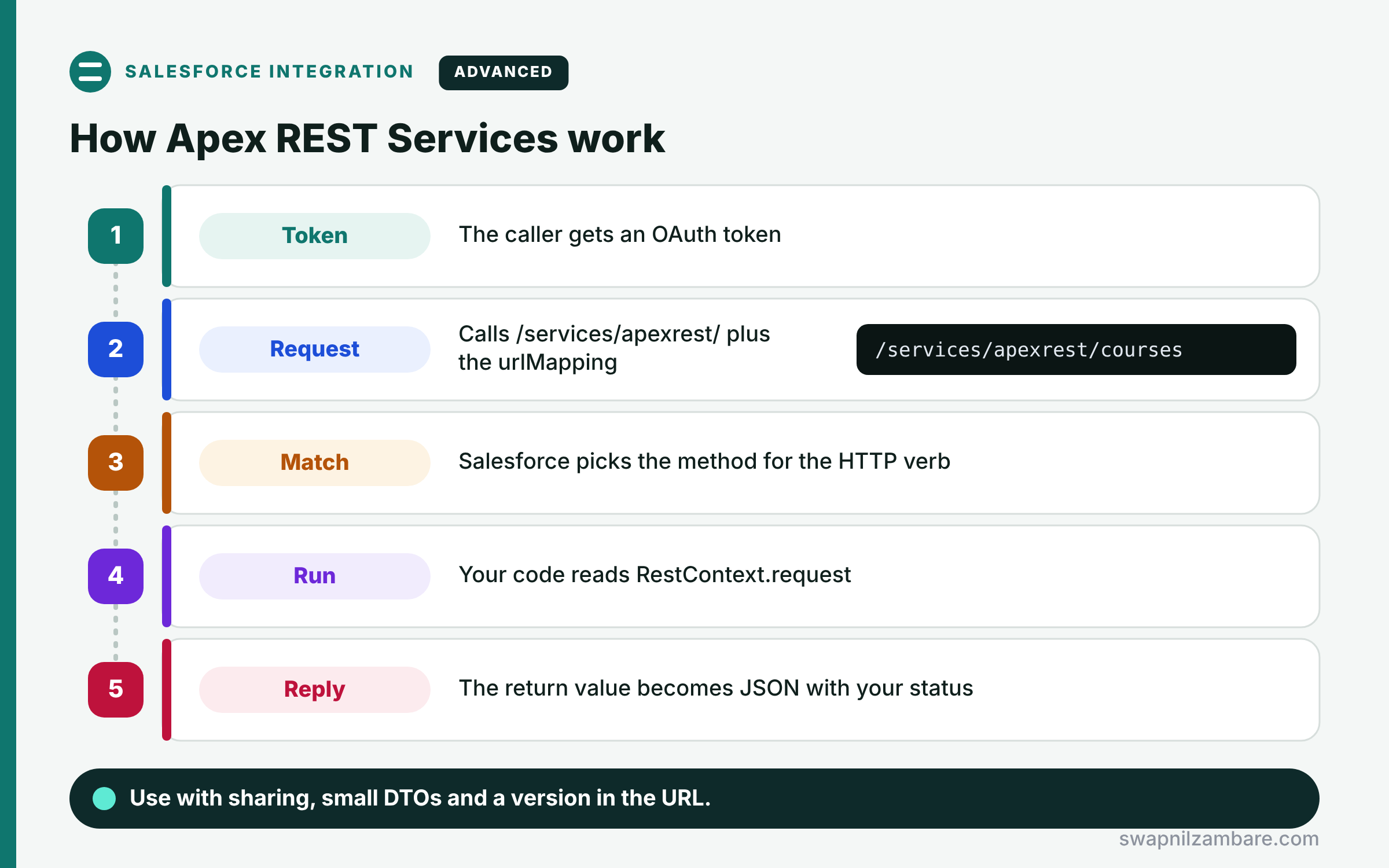
Apex REST Services follow a clear request path. First, the caller gets an OAuth token for an integration user. Next, it sends a request to https://yourdomain.my.salesforce.com/services/apexrest/ plus the urlMapping path. Then Salesforce finds the class and the method that matches the HTTP verb. After that, your method reads RestContext.request, runs the logic and returns a value. Finally, Salesforce serializes the result to JSON and sends it with the status code you set.
@RestResource and urlMapping
The class must be global and use @RestResource. The urlMapping, such as /courses/*, is case-sensitive and can end with a wildcard.
HTTP Method Annotations
Use @HttpGet, @HttpPost, @HttpPut, @HttpPatch and @HttpDelete. Each must be on a global static method, and each verb appears once per class.
RestContext
RestContext.request gives the URI, parameters, headers and body. RestContext.response lets you set the status code and headers.
Parameters and Return Values
Method parameters are filled from the JSON body by name. Return values, such as a wrapper class, become the JSON response.
Security
The service runs as the calling user. So use with sharing and user mode queries to respect access.
Apex REST Annotations at a Glance
The table below lists the annotations and their usual jobs.
| Annotation | HTTP method | Typical use |
|---|---|---|
| @HttpGet | GET | Read records |
| @HttpPost | POST | Create records or run actions |
| @HttpPut | PUT | Create or replace |
| @HttpPatch | PATCH | Update some fields |
| @HttpDelete | DELETE | Remove a record |
Apex REST Services vs the Standard REST API
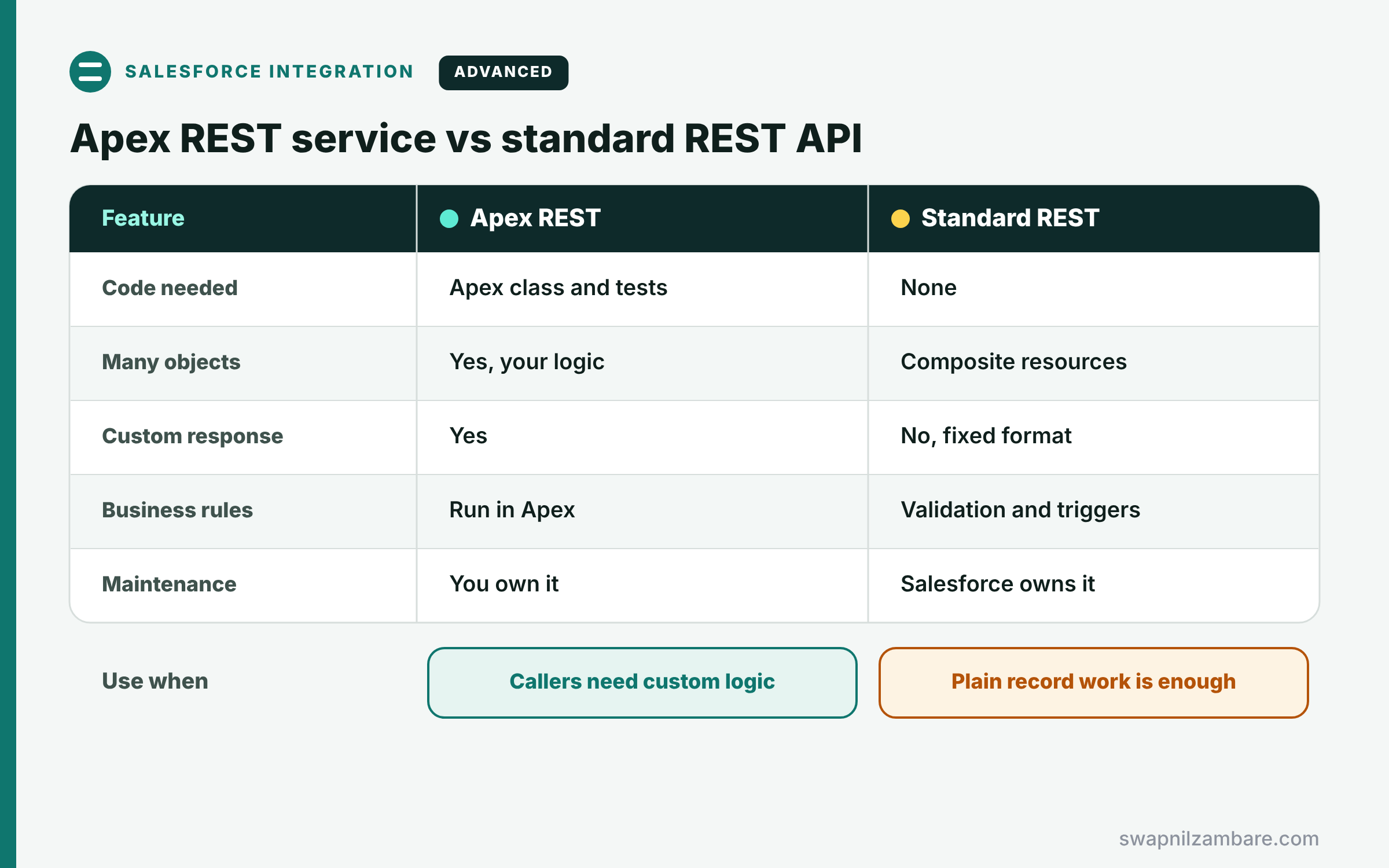
The table below compares a custom service with the standard API.
| Feature | Apex REST service | Standard REST API |
|---|---|---|
| Code needed | Apex class and tests | None |
| Many objects in one call | Yes, your logic | Composite resources |
| Custom response shape | Yes | No, fixed format |
| Business rules | Run in Apex | Validation and triggers only |
| Maintenance | You own it | Salesforce owns it |
When to use which is simple. Use the standard API for plain record work. Build Apex REST Services when callers need custom logic or a custom response.
A Real Apex REST Services Example
Let’s build Apex REST Services at Bright Path Tutors. Partner schools can list open courses and request an enrolment.
Step 1: The Service Class
@RestResource(urlMapping='/courses/*')
global with sharing class CourseApi {

    global class CourseDto {
        public Id id; public String name; public Decimal fee;
        CourseDto(Course__c c) { id = c.Id; name = c.Name; fee = c.Fee__c; }
    }

    @HttpGet
    global static List<CourseDto> getOpenCourses() {
        String level = RestContext.request.params.get('level');
        List<CourseDto> result = new List<CourseDto>();
        for (Course__c c : [SELECT Id, Name, Fee__c FROM Course__c
                            WHERE Status__c = 'Open' AND Level__c = :level
                            WITH USER_MODE ORDER BY Name LIMIT 50]) {
            result.add(new CourseDto(c));
        }
        return result;
    }

    @HttpPost
    global static String requestEnrolment(Id courseId, String studentEmail) {
        if (String.isBlank(studentEmail)) {
            RestContext.response.statusCode = 400;
            return 'studentEmail is required';
        }
        Enrolment_Request__c r = new Enrolment_Request__c(
            Course__c = courseId, Student_Email__c = studentEmail);
        insert as user r;
        RestContext.response.statusCode = 201;
        return r.Id;
    }
}
GET reads the level from the URL and returns a small DTO list. POST takes courseId and studentEmail from the JSON body, checks input and returns 201 with the new Id.
Step 2: Call It
GET /services/apexrest/courses/?level=Beginner
200 OK
[ { "id": "a01Kj00000Ab3xY", "name": "Apex Basics", "fee": 5000 } ]

POST /services/apexrest/courses/
{ "courseId": "a01Kj00000Ab3xY", "studentEmail": "ravi@school.example" }
201 Created
"a05Kj00000Qw2Lm"
The JSON keys match the method parameter names, so Salesforce fills them in. Then the response shows the new request record Id.
Step 3: Test the Service
@IsTest
private class CourseApiTest {
    @IsTest
    static void rejectsBlankEmail() {
        RestContext.request = new RestRequest();
        RestContext.response = new RestResponse();
        String result = CourseApi.requestEnrolment(null, '');
        Assert.areEqual(400, RestContext.response.statusCode);
        Assert.areEqual('studentEmail is required', result);
    }
}
The test builds a fake request and response, then calls the method directly. So no HTTP call is needed to cover the code.
Apex REST Services and Versioning
Callers depend on your URL and response shape. So add a version to the mapping, such as /v1/courses/*, and create /v2 for breaking changes. Old callers keep working while partners move over.
Common Mistakes with Apex REST Services
- Forgetting global on the class or methods.
- Using without sharing and exposing records the caller should not see.
- Returning full sObjects with fields the partner should not get.
- Leaving every error as a 500 instead of setting clear status codes.
- Changing the response shape without a new version.
Best Practices for Apex REST Services
- Return small DTO classes, not full records.
- Use with sharing and WITH USER_MODE queries.
- Validate input and return 400 for bad requests.
- Version your urlMapping from day one.
- Keep logic in service classes, so the REST class stays thin.
Practice Task
Add an @HttpPatch method that changes an enrolment request’s status. Hint: read the record Id from the end of RestContext.request.requestURI.
Most Asked Interview Questions on Apex REST Services
Custom API questions are common for integration roles. Here are the 22 questions asked most about Apex REST Services.
Basic Questions on Apex REST Services
Q1: What is an Apex REST service?
A global Apex class exposed as a REST endpoint with @RestResource.
Q2: What is the base URL of Apex REST services?
/services/apexrest/ followed by the urlMapping path.
Q3: Which access modifier must the class use?
Global, so code outside the org’s namespace can reach it.
Q4: Which annotations map HTTP methods?
@HttpGet, @HttpPost, @HttpPut, @HttpPatch and @HttpDelete.
Q5: Can a class have two @HttpGet methods?
No, because each HTTP verb can appear only once per class.
Q6: What is RestContext?
A class that gives access to the current RestRequest and RestResponse.
Q7: How do callers authenticate?
With an OAuth access token, the same as the standard REST API.
Code and Scenario Questions on Apex REST Services
Q8: How do you read a URL parameter?
Use RestContext.request.params.get(‘name’).
Q9: How do you read a record Id from the URL?
Take the part after the last slash in RestContext.request.requestURI.
Q10: How do you set a 404 status?
Set RestContext.response.statusCode = 404 before returning.
Q11: How do you receive a raw JSON body?
Use a method with no parameters and read RestContext.request.requestBody.toString().
Q12: How do you return a custom JSON shape?
Return a wrapper or DTO class, and Salesforce serializes it.
Q13: How do you test an Apex REST service?
Set RestContext.request and response in the test, then call the static method directly.
Q14: How do you stop partners seeing private records?
Use with sharing, user mode queries and a least-privilege integration user.
Advanced Questions on Apex REST Services
Q15: How do you version an Apex REST API?
Put a version in urlMapping, such as /v1/courses/*, and add new versions for breaking changes.
Q16: When do you choose Apex REST over the composite API?
When you need business rules or a custom response that standard resources cannot give.
Q17: How are governor limits applied?
Each request is one transaction, so normal synchronous limits apply.
Q18: How do you handle errors consistently?
Catch exceptions, set a matching status code and return a standard error object.
Q19: Can Apex REST services accept XML?
Yes, because Salesforce can deserialize XML into parameters, though JSON is more common.
Q20: How do you make POST requests safe to retry?
Accept a unique request key and upsert on an external ID field.
Q21: What is the difference between PUT and PATCH here?
PUT usually replaces a whole resource, while PATCH changes some fields.
Q22: How do Experience Cloud guest users affect Apex REST?
Guest access needs a site and strict guest security, so most APIs require authenticated users.
Official Resources
Quick Recap
- Apex REST Services expose your Apex under /services/apexrest.
- The class is global and uses @RestResource with a urlMapping.
- HTTP annotations map verbs to global static methods.
- RestContext gives the request and lets you set status codes.
- Use with sharing, DTOs and versioned URLs.
What’s Next?
Some enterprise systems still speak SOAP and XML. Next, read our guide to the Salesforce SOAP API and SOAP callouts.


