Experience Cloud Interview Questions check how well you build websites and portals where customers and partners log in and work with Salesforce data. This is Part 11 of our 25-part series.
We touched on portals in Part 6. Here we cover sites, licences, external sharing and guest user security in detail. Our Experience Cloud guide explains the basics.
How to Use These Experience Cloud Interview Questions
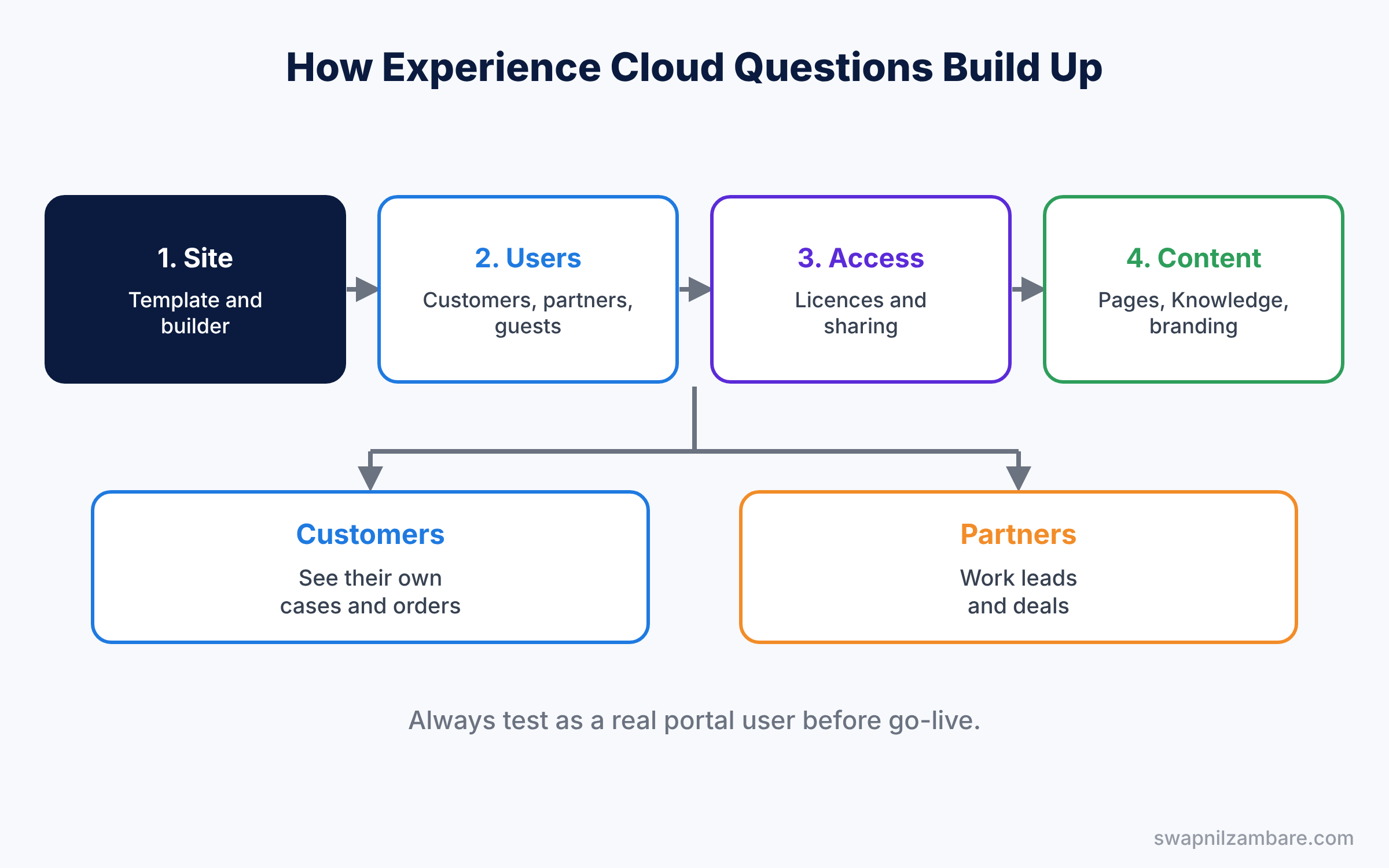
First, learn who the users are: customers, partners or guests. Next, learn how each type gets access, because most interview questions are about sharing and security. Then practise the troubleshooting scenarios, where a portal user sees too much or too little.
Experience Cloud Interview Questions on Experience Cloud Basics
Study with Experience Cloud Sites.
- What is Experience Cloud?
- What can you build with Experience Cloud?
- Briefly, what was Experience Cloud called before?
- What is a site template?
- What is Experience Builder?
- Explain the difference between an Aura site and an LWR site, at a high level.
- How do you create a new site?
- What is a site URL?
- How do you activate a site?
- Can one org have many sites?
- What is a community, and why did Salesforce rename it?
- What is the difference between a site and a portal?
- Can you build a site without code?
- What is an Experience Cloud site preview?
- What is a site domain?
- How do you use a custom domain for a site?
- Scenario: the school wants a portal for parents to see fees and classes. Where do you start?
- Scenario: marketing wants a public help center without login. What do you build?
Licences and External Users Questions
Study with User Management.
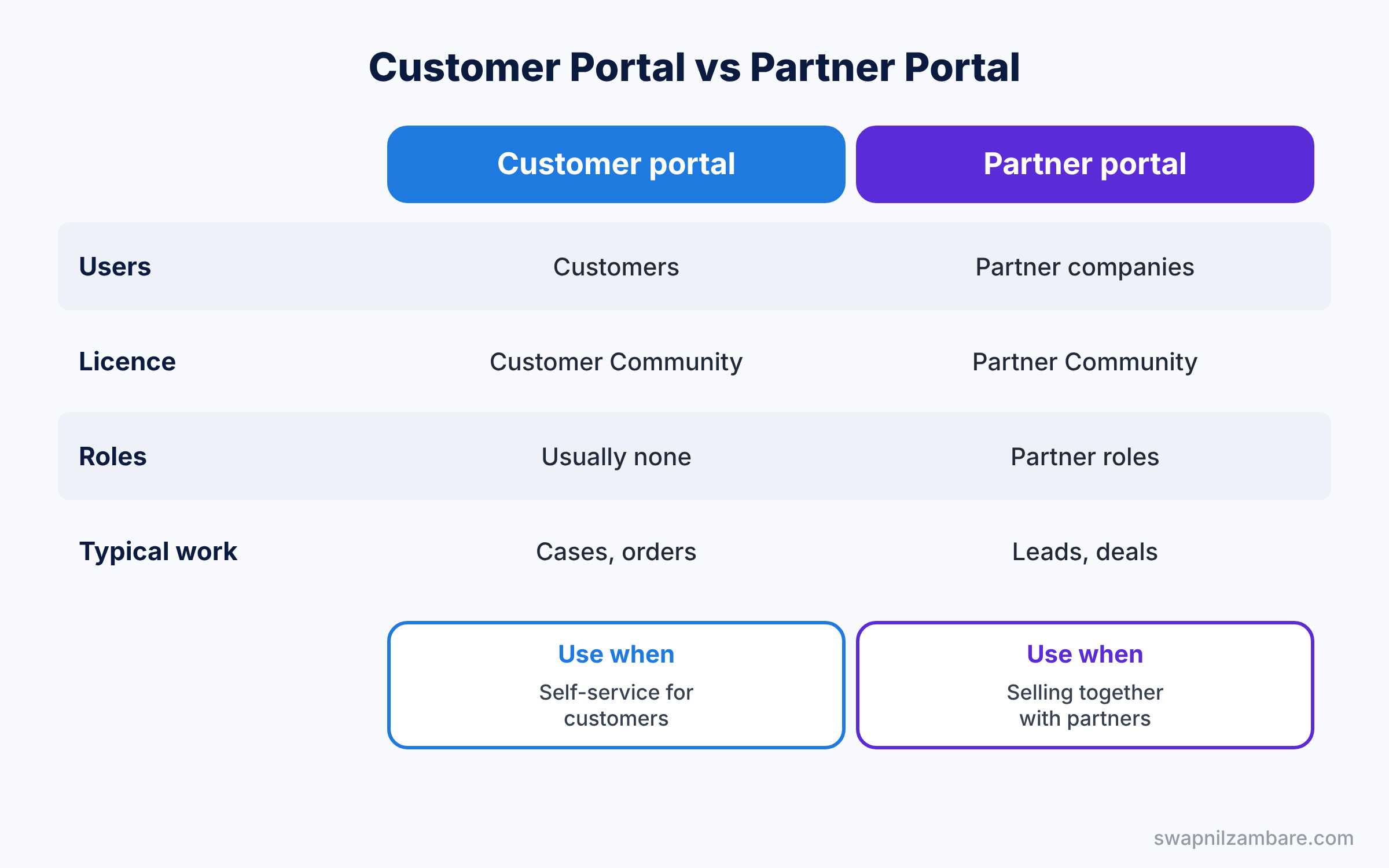
- What licences do external users need?
- What is a Customer Community licence?
- Define a Customer Community Plus licence.
- What is a Partner Community licence?
- What is the difference between login-based and member-based licences?
- How do you create an external user?
- Must an external user be a contact?
- What is a person account used for in portals?
- How do you deactivate a portal user?
- What is an External Apps licence, at a high level?
- Can an external user be an internal user too?
- How do you convert a contact into a portal user?
- What happens to portal users when the contact is deleted?
- How do you bulk create portal users?
- Can external users have permission sets?
- Scenario: 50,000 customers log in once a month. Which licence type do you consider?
- Scenario: partners need roles and reports. Which licence do they need?
Experience Cloud Interview Questions on Sharing for External Users
Study with Sharing.
- What is the external OWD?
- What is a sharing set?
- Define a share group.
- What are external roles?
- What is account role optimization, at a high level?
- How do partner users share records with each other?
- Can sharing rules include external users?
- What is the default external access for a new object?
- How do external users see records of their own account?
- What is a high-volume portal user?
- Why do high-volume users not have roles?
- How do you share a custom object with customer users?
- What is the “Account Role” for partner users?
- Can you use restriction rules for external users?
- Scenario: customers must see only their own cases. How do you set it up?
- Scenario: a partner manager must see all deals of their company. What do you use?
Guest Users and Security Questions
Study with Org Security.
- What is a guest user?
- What can a guest user see by default?
- Define the guest user profile.
- What are guest user sharing rules?
- Why did Salesforce tighten guest user security?
- Can a guest user own records?
- How do you check what a guest user can access?
- What is clickjack protection?
- Can a guest user update records?
- What is “Secure guest user record access”?
- How do you limit API access for guest users?
- What is the Guest User Access Report?
- How often should you review guest access?
- What is CSP in site security, at a high level?
- Scenario: a guest user can see records it should not. How do you find the cause?
- Scenario: a public form must create a case but not show any data. How do you set it up?
Experience Cloud Interview Questions on Login and Registration
Study with Single Sign-On.
- What is self-registration?
- What is a login page in Experience Cloud?
- Can portal users log in with social accounts?
- What is passwordless login?
- How do you set a default account for self-registered users?
- How do you customise the welcome email?
- What is a custom login flow for sites?
- How do you add MFA for portal users?
- What is single sign-on for a site?
- How do you block a user from logging into a site?
- What happens when a portal user forgets their username?
- Scenario: customers must sign up using their order number. What do you build?
- Scenario: users cannot reset their portal password. What do you check?
Content, Knowledge and Branding Questions
Study with Knowledge.
- What is a CMS workspace?
- How do you show Knowledge articles in a site?
- What are topics in a site?
- How do you change the theme and branding?
- What are audience targeting and page variations?
- How do you add a custom component to a site page?
- How do you show a flow in a site?
- What is a navigation menu in a site?
- What are record pages in a site?
- How do you add a list view to a site?
- How do you show a dashboard to portal users?
- Explain how you translate a site.
- What is a theme layout?
- Scenario: partners and customers must see different home pages. How do you do it?
- Scenario: marketing wants to publish news posts on the portal. What do you use?
Experience Cloud Interview Questions on Partner Relationship Management
Study with Lead Management.
- What is a partner portal used for?
- What is lead distribution to partners?
- Define deal registration.
- What are partner accounts?
- How do you enable an account as a partner?
- What is a partner user role hierarchy?
- What are channel programs, at a high level?
- How do partners see their leads?
- What is market development funds, at a high level?
- How do you report on partner performance?
- Scenario: partners must submit deals for approval before working them. What do you build?
- Scenario: leads must go to the right partner by region. How do you route them?
Site Administration and Troubleshooting Questions
Study with Page Performance.
- How do you add members to a site?
- What is the Administration page of a site?
- How do you check site performance?
- How do you deploy a site to production?
- What is Experience Workspaces?
- How do you see site usage reports?
- How do you clone a site?
- What is a site deployment with change sets?
- How do you check which profiles can access a site?
- What is the site maintenance page?
- How do you add an analytics tool to a site?
- Scenario: a page shows a blank component for portal users only. What do you check?
- Scenario: a site is slow on mobile phones. What do you check?
Experience Cloud Interview Questions FAQ
Is Experience Cloud asked in admin interviews?
Yes, when the company has a portal. Licences, sharing sets and guest users are the most common topics.
What is the most important security topic?
Guest user access. Always explain how you keep public pages from showing private data.
Official Resources
Quick Recap
- These Experience Cloud Interview Questions cover sites, licences, external sharing, guest users and partner portals.
- Know which licence each user type needs.
- Use sharing sets for customer users.
- Lock down guest user access.
- Test as a real portal user before go-live.
What’s Next?
Continue with the next part. Read Salesforce Collaboration Interview Questions: Chatter, Email and Mobile (Part 12).