Apex Callout Interview Questions are where integration experience shows. The syntax is easy, and the hard parts are the transaction rules, the limits, the credentials and what happens when the other system is slow.
Last reviewed for the Winter ’27 release (November 2026).
This post covers the questions asked, grouped into the basics, named credentials, SOAP, limits and transaction rules, testing, and scenario questions where a callout is failing in production.
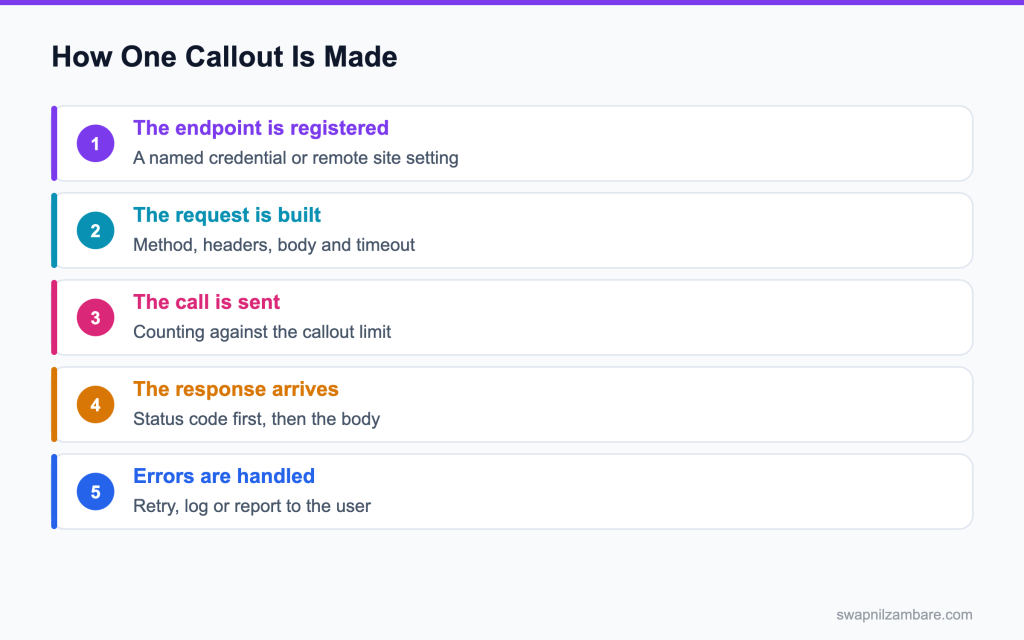
Caption: The endpoint has to be registered before any of the rest of it works.
What Apex Callout Interview Questions Cover
Apex Callout Interview Questions test three things. Whether you can write the request, whether you handle the response honestly, and whether you know the rules that stop a callout running at all.
Think of it like posting a letter. Mocking the response in a test is covered in the post on callout mocks. Writing it is the easy part, and the address, the postage and what happens if nobody replies are what matter.
Apex Callout Interview Questions rest on one definition. A callout is an HTTP request your Apex makes to a system outside Salesforce. The platform places real limits on when and how often that can happen.
The Request and the Response
| Piece | What it does |
|---|---|
| HttpRequest | Holds the endpoint, method, headers and body |
| setTimeout | Caps the wait, up to 120 seconds |
| Http send | Performs the call and returns the response |
| HttpResponse | Carries the status code, headers and body |
| getStatusCode | The first thing to check, before the body |
Apex Callout Interview Questions nearly always include that last row.
public with sharing class FeeClient {

    public FeeResult fetch(Id courseId) {
        HttpRequest req = new HttpRequest();
        req.setEndpoint('callout:Partner_Fees/quote?course=' + courseId);
        req.setMethod('GET');
        req.setHeader('Accept', 'application/json');
        req.setTimeout(20000);

        HttpResponse res = new Http().send(req);
        if (res.getStatusCode() != 200) {
            throw new CalloutException('Fee service returned ' + res.getStatusCode());
        }
        return (FeeResult) JSON.deserialize(res.getBody(), FeeResult.class);
    }
}
Three details there answer many Apex Callout Interview Questions outright. The callout prefix points at a named credential, the timeout is explicit, and the status code is checked before the body is read.
Named Credential vs Manual Headers
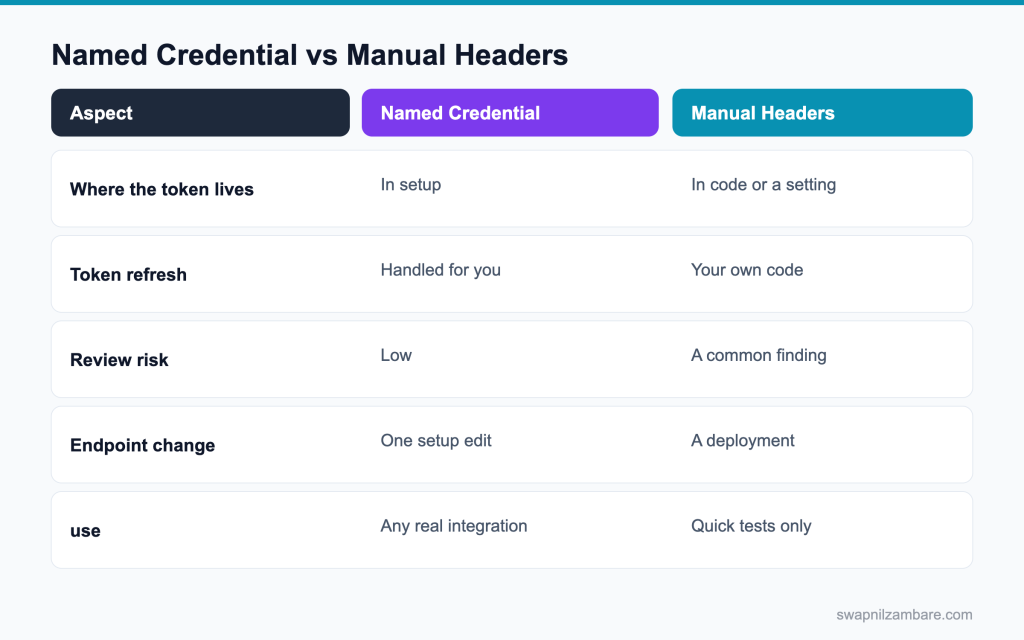
Caption: A named credential keeps the token out of your code, which is the whole point.
| Need | Pick |
|---|---|
| Any production integration | Named credential |
| OAuth with refresh | Named credential with an external credential |
| A quick spike in a scratch org | Either, and clean it up |
| An endpoint that changes per environment | Named credential |
| A partner using a static API key | Named credential with a custom header |
Apex Callout Interview Questions often ask you to justify a row in that table.
The posts on Apex REST callouts and named credentials cover both sides.
Apex Callout Interview Questions on the Basics
Q1: What is a callout?
An HTTP request made from Apex to a system outside Salesforce.
Example: sending a new order to a warehouse API, or fetching exchange rates from a bank service.
Interview tip: give a real example from a project in your first answer.
Q2: Which classes do you use?
HttpRequest to build the request, Http to send it, and HttpResponse to read the result.
Example: HttpRequest req = new HttpRequest(); req.setEndpoint(‘callout:Warehouse/orders’); req.setMethod(‘POST’); HttpResponse res = new Http().send(req);
Q3: What must be registered before a callout works?
The endpoint must be allowed, through a named credential or a remote site setting.
Without one, the callout fails with an “Unauthorized endpoint” error.
Follow-up you may get: Where do you add a remote site setting? Setup, Remote Site Settings.
Q4: Which is preferred now?
A named credential, because it also handles authentication and can change per environment.
Remote site settings only allow the URL; your code would still need to handle keys and tokens.
Interview tip: say why: authentication and environment changes without code.
Q5: How do you set a header?
With setHeader on the request, naming the header and its value.
Example: req.setHeader(‘Content-Type’, ‘application/json’); req.setHeader(‘Accept’, ‘application/json’);
Q6: How do you send a JSON body?
Set the Content-Type header to application/json and pass the serialised body with setBody.
Example: req.setBody(JSON.serialize(new OrderPayload(order))); Using a small Apex class for the payload keeps the JSON shape clear.
Q7: What is the maximum timeout?
120 seconds for one callout.
The same 120 seconds is also the total for all callouts in the transaction.
Follow-up you may get: Can one slow call use the whole budget? Yes, a 120 second call leaves nothing for others.
Q8: What is the default timeout?
10 seconds, so a slow service needs an explicit timeout.
Example: req.setTimeout(30000); allows 30 seconds.
Interview tip: give both numbers, 10 default and 120 maximum.
Q9: Why set a timeout at all?
Without a sensible value, a slow service can hold your transaction until it fails, wasting the user’s time and the total callout budget.
Pick a timeout that matches the service’s normal speed, and handle the timeout error clearly.
Q10: What is the response size limit?
Request and response bodies count toward heap: 6 MB in synchronous Apex and 12 MB in asynchronous Apex.
A large response also needs memory to parse, so very large payloads can fail even below the limit.
Q11: How do you read a large response safely?
Ask the service to page the results, or switch to a file based transfer handled outside Apex.
Apex cannot stream a response, so the whole body is held in memory at once. Ask for smaller pages, like 500 records per call.
Q12: What does getBodyAsBlob give you?
The raw bytes of the response, which suits file downloads like PDFs or images.
Example: Blob file = res.getBodyAsBlob(); then save it as a ContentVersion.
Follow-up you may get: How do you send binary data? setBodyAsBlob with the right content type.
Q13: How do you send a file?
Set the body as a Blob with setBodyAsBlob, and the right Content-Type header.
For multipart uploads, build the body with the boundary markers the service expects.
Q14: What status codes should you treat as success?
The 200 range, but read the service’s documentation for its own conventions.
| Status | Meaning | What your code does |
|---|---|---|
| 200, 201, 204 | Success | Read the result, if any |
| 400 | Bad request | Log it; fix the data, do not retry |
| 401, 403 | Not authorised | Check the credential and permissions |
| 404 | Not found | Treat as a data problem |
| 429 | Too many requests | Back off and retry later |
| 500, 502, 503 | Server problem | Retry later if the call is safe to repeat |
Q15: What do you do with a 429?
Back off and retry later, because the service is rate limiting you.
Read the Retry-After header if the service sends one, and schedule the retry from a queueable with a delay.
Interview tip: mention the Retry-After header. It shows real integration experience.
Q16: What do you do with a 500?
Log it, and retry later if the operation is safe to repeat.
A 500 means the problem is on their side, so retrying straight away in a loop rarely helps.
Q17: How do you parse a JSON response?
Deserialize it into an Apex class that matches the shape: OrderResponse r = (OrderResponse) JSON.deserialize(res.getBody(), OrderResponse.class); For unknown shapes, use JSON.deserializeUntyped and read the Map.
Q18: How do you send query parameters safely?
Encode each value with EncodingUtil.urlEncode(value, ‘UTF-8’) before adding it to the URL. A city like New Delhi or a name with an ampersand would otherwise break the request.
Q19: How do you know whether a retry is safe?
Whether the operation is idempotent, which the service should tell you.
Ask the partner which operations are idempotent, and send an idempotency key where the API supports one.
Apex Callout Interview Questions on Named Credentials
Q20: What does a named credential hold?
The endpoint URL and, through its external credential, the authentication details for an outside service.
Your code never sees the secret; it just names the credential.
Q21: How do you use it in code?
Start the endpoint with callout: and the credential’s name.
Example: req.setEndpoint(‘callout:Warehouse_API/v1/orders’); Salesforce fills in the base URL and the authentication.
Interview tip: write the callout: prefix from memory.
Q22: What is an external credential?
The authentication part of the newer model. A named credential points at it.
The external credential holds the auth protocol and secrets, and permission sets give users access to it through principals.
Follow-up you may get: What is a legacy named credential? The older type that held auth itself, now replaced by external credentials.
Q23: Which authentication types are supported?
Basic authentication, OAuth 2.0 with several flows like client credentials and JWT bearer, AWS Signature Version 4, and custom headers.
Pick the one the service supports; OAuth is the most common for modern APIs.
Q24: Who refreshes an OAuth token?
Salesforce does, which is one of the main reasons to use a named credential.
Your code never handles token expiry, so hourly token problems disappear.
Interview tip: token refresh is the strongest practical reason for named credentials.
Q25: How does a user get permission to use one?
Through a principal on the external credential, which a permission set grants access to.
Assign that permission set to the integration user or to the users whose actions make the callout.
Q26: Why is that better than a hard coded key?
The secret is never in code, it can be rotated without a deployment, and access is controlled and visible.
Keys in code also end up in Git history and every sandbox.
Q27: Can you change the endpoint without a deployment?
Yes. Admins can change the URL in Setup, so each sandbox can point at a test endpoint.
After a sandbox refresh, check the credentials, because production values are copied into the sandbox.
Follow-up you may get: What is a post refresh task? An Apex class that runs after a sandbox refresh, often used to fix endpoints.
Q28: Do you still need a remote site setting?
Not for an endpoint covered by a named credential.
Keep remote site settings only for old code that still uses full URLs.
Q29: What is a certificate used for here?
Mutual TLS, where the service checks a certificate from your org to confirm who is calling.
You create or import the certificate in Setup, Certificate and Key Management, and reference it on the named credential.
Q30: Where do you store a client secret?
In the external credential, never in Apex, custom labels or static resources.
Packages can also use protected custom metadata or settings, but named credentials are the standard choice.
Q31: What is the difference between a legacy named credential and the new model?
A legacy named credential held both the URL and the authentication. The new model splits them: the named credential holds the URL, and an external credential holds the authentication, with access given through permission sets. New work should use the new model.
Q32: How do you call an API that needs a per user token?
Use an external credential with a per user principal, so each user authenticates once and Salesforce stores and refreshes their own token. The callout then runs with that user’s access at the partner.
Q33: What happens in a security review if a key is in code?
It is a finding, and usually a failure.
Fix it before submission: move the key to a named credential and rotate it.
Apex Callout Interview Questions on SOAP and Limits
Q34: How do you call a SOAP service from Apex?
Generate an Apex class from the WSDL, or build the SOAP envelope by hand with HttpRequest.
The generated class gives typed methods for each operation; the hand built way gives full control over the XML.
Q35: Which approach is more common now?
Both are used. Generated classes are quick when the WSDL imports cleanly; hand built requests are common when it does not.
Large or complex WSDLs often fail to import, so teams build only the few operations they need by hand.
Follow-up you may get: What tool generates the class? Setup, Apex Classes, Generate from WSDL.
Q36: What does the generated class give you?
Typed request and response classes, plus a stub method per operation.
Example: OrderService.OrderPort port = new OrderService.OrderPort(); OrderService.Result r = port.createOrder(…);
Q37: What breaks a generated class?
Schema features Apex does not support, like some imports or complex types, so some WSDLs cannot be imported.
You can sometimes simplify the WSDL before importing, or build the requests by hand.
Q38: How many callouts are allowed per transaction?
| Callout limit | Value |
|---|---|
| Callouts per transaction | 100 |
| Timeout for one callout | 10 seconds default, 120 maximum |
| Total callout time per transaction | 120 seconds |
| Request or response size | 6 MB sync, 12 MB async (heap) |
Q39: What is the total callout time limit?
120 seconds across all callouts in the transaction.
So ten callouts that each take 15 seconds would fail on the ninth.
Q40: Can a trigger make a callout?
Not directly. The callout must run asynchronously.
Salesforce throws “Callout from triggers are currently not supported” if you try.
Interview tip: name the exact error. It shows you have hit it.
Q41: Why that rule?
A callout would hold the record save open while an outside system responds.
Records would stay locked, and a slow partner would slow down every save in your org.
Q42: How do you call out from a trigger then?
Enqueue a queueable that implements Database.AllowsCallouts.
Collect the IDs for the whole chunk and enqueue one job, which makes the callout after the record is committed.
Follow-up you may get: Can a future method do it? Yes, @future(callout=true).
Q43: Which interface allows a callout in a queueable?
Database.AllowsCallouts, added next to Queueable.
Example: public class NotifyPartner implements Queueable, Database.AllowsCallouts { … }
Q44: What is the rule about DML and callouts?
You cannot make a callout after an uncommitted DML statement in the same transaction.
The error is “You have uncommitted work pending. Please commit or rollback before calling out”.
Interview tip: this rule is asked in almost every integration round.
Q45: How do you work around that?
Do the callout first, or move it to an asynchronous method.
Example: a controller makes the callout, then saves the response; or saves first and enqueues a queueable for the callout.
Q46: Does a callout count against CPU time?
No. Waiting for the response does not count as CPU time.
Building the request and parsing the response do count, so very large JSON parsing can still use CPU.
Follow-up you may get: What does count? JSON parsing and loops over the response.
Q47: Can a batch job make callouts?
Yes, with Database.AllowsCallouts, and the 100 callout limit applies to each execute.
Use a small batch size, like 50, so each chunk stays within the callout limits.
Q48: Can you make a callout from a scheduled job?
Not directly from the Schedulable execute method. Have it enqueue a queueable or start a batch that implements Database.AllowsCallouts, and make the callout there.
Q49: How do you make a callout from a flow?
Use an HTTP Callout action in Flow Builder, which creates an External Service from a sample request, or call an invocable Apex method that makes the callout. Both still need a named credential.
Q50: How do you handle a partner that is slow at peak?
A timeout, a retry with backoff, and work moved to asynchronous jobs.
Also show users a pending status instead of making them wait on the partner.
Apex Callout Interview Questions on Testing
Q51: Can a test make a real callout?
No. Tests cannot make real callouts, so the response must be mocked.
A test that tries one fails, and mocks also make tests fast and repeatable.
Q52: Which interface mocks an HTTP callout?
HttpCalloutMock, whose respond method returns your fake HttpResponse.
Example: public class WarehouseMock implements HttpCalloutMock { public HttpResponse respond(HttpRequest req) { HttpResponse r = new HttpResponse(); r.setStatusCode(201); r.setBody(‘{“id”:”W-100″}’); return r; } }
Interview tip: write a mock class from memory. It is a common written task.
Q53: How do you register it?
With Test.setMock, passing the interface type and the mock.
Example: Test.setMock(HttpCalloutMock.class, new WarehouseMock()); before calling the code.
Q54: How do you test an error status?
Return a 500 from the mock and assert the handling.
Check the code logs the failure, marks the record for retry, or shows a clear message.
Q55: How do you test a timeout?
Throw a CalloutException from the mock.
Example: throw new CalloutException(‘Read timed out’); then assert your code handled it.
Q56: Can one mock serve several endpoints?
Yes, by branching on the request endpoint or method.
Example: if (req.getEndpoint().endsWith(‘/token’)) return a token response; else return the data response.
Follow-up you may get: What is MultiStaticResourceCalloutMock? A mock that maps endpoints to different static resources.
Q57: Which interface mocks a SOAP call?
WebServiceMock, for classes generated from a WSDL.
Its doInvoke method puts the fake response into the response map.
Q58: How do you test the retry path?
Have the mock return a failure on the first call and a success on the second.
Keep a counter in the mock, then assert the code retried once and saved the successful result.
Q59: Should you assert on the request as well as the response?
Yes. Checking the body and headers proves you built the request correctly.
Store the last HttpRequest in the mock, then assert on its endpoint, method and JSON body.
Interview tip: asserting the request is a sign of strong tests. Mention it.
Q60: Where do mock response bodies belong?
In a static resource or a constant, so they are reused across tests.
Copy real responses from the service’s documentation, so tests use realistic data.
Q61: Can you use a static resource as a mock response?
Yes, with StaticResourceCalloutMock, or MultiStaticResourceCalloutMock for several endpoints.
Example: StaticResourceCalloutMock m = new StaticResourceCalloutMock(); m.setStaticResource(‘WarehouseResponse’); m.setStatusCode(200); Test.setMock(HttpCalloutMock.class, m);
Q62: How do you test code that makes two different callouts?
Write one mock that branches on the endpoint, or use MultiStaticResourceCalloutMock with a static resource per endpoint. Then assert both calls happened and the combined result is right.
Q63: Do callouts in tests count toward limits?
Yes. A mocked callout still counts toward the 100 per transaction, so a bulk test can catch code that calls out per record.
Q64: Why is that useful?
A realistic payload is easier to maintain as a file than as a string in Apex.
The same file can be updated when the partner changes their format, without touching Apex.
Scenario Based Apex Callout Interview Questions
Q65: Scenario: a callout works in a test and fails in the org. What do you check first?
The named credential or remote site setting, and the permission set that grants access to the external credential.
Tests skip real authentication, so a missing principal or wrong URL only shows up in the org.
Q66: Scenario: a trigger needs to notify a partner. What do you build?
A queueable that allows callouts, enqueued once per chunk from the trigger handler.
Pass the record IDs, query inside the job, send the data, and store the partner’s response on the records.
Q67: Scenario: a callout after an update throws about uncommitted work. What is the rule?
No callout after DML in the same transaction, so move the callout to an async job.
Or reorder the work so the callout happens before any DML.
Q68: Scenario: a bulk load fires 200 callouts. What do you change?
Send one call per chunk with a combined payload, or enqueue a queueable per chunk instead of per record.
200 single callouts would pass the 100 callout limit and use the full 120 second budget.
Q69: Scenario: the partner is slow and users complain. What do you do?
Move the call out of the user’s transaction and show the result when it arrives.
Save the record straight away, run the callout in a queueable, and update a status field the page shows or refreshes.
Q70: Scenario: duplicate records appear at the partner. What went wrong?
A retry on an operation that is not safe to repeat. Send an idempotency key, or check before sending.
Many APIs accept an Idempotency-Key header; send the Salesforce record ID so a second call is recognised as the same one.
Interview tip: “idempotency key” is the term interviewers look for.
Q71: Scenario: a token expires every hour and the job fails. What is the fix?
A named credential with OAuth, so Salesforce refreshes the token automatically.
Remove the custom token handling code once the credential is in place.
Q72: Scenario: a response is nine megabytes. What do you do?
Ask the partner for paging, or move to a file based transfer.
A 9 MB response passes the 6 MB synchronous heap limit and is close to the 12 MB async one once parsed.
Q73: Scenario: a reviewer finds an API key in a class. What do you say?
It must move to a named credential or external credential before release, and the key should be rotated.
The old key is already in Git history and sandboxes, so treat it as exposed.
Q74: Scenario: the service returns 429 at month end. What do you build?
Backoff with a retry schedule, and a queue so nothing is lost.
Store pending requests in a custom object or platform events, and process them with a scheduled or chained queueable at a rate the partner allows.
Q75: Scenario: a callout fails only in one sandbox. What do you check?
Whether the named credential, external credential and permission set assignments exist and are correct in that sandbox.
After a refresh, production values are copied, so the sandbox may still point at production or use invalid secrets.
Follow-up you may get: How do you avoid this? A post refresh script that resets credentials and endpoints.
Q76: Scenario: a partner asks for mutual authentication. What do you set up?
A certificate in Setup, referenced by the named credential.
Share the certificate’s public part with the partner, and note its expiry date so it is renewed in time.
Q77: Scenario: a partner API changes its JSON fields. How do you limit the impact?
Keep the mapping in one class, or in custom metadata, so only that piece changes. Parse with a typed class that ignores unknown fields, and add a test using the new sample response.
Q78: Scenario: an Agentforce action must call an external pricing API. What do you build?
An invocable Apex method that uses a named credential, a sensible timeout and clear error messages. Keep it fast, because the agent waits for it, and return a short result the agent can explain.
Q79: Scenario: an interviewer asks how you make an integration reliable. What do you say?
Timeouts, idempotency, retries with backoff, logging, and work outside the user transaction.
Timeouts, idempotency, retries with backoff, logging, and keeping slow work outside the user’s transaction.
Common Mistakes Candidates Make
- Hard coding an endpoint and a key in Apex, the first failure Apex Callout Interview Questions look for
- Reading the response body before checking the status code
- Relying on the default timeout
- Trying to call out directly from a trigger
- Retrying an operation that is not safe to repeat
- Writing a test with no mocked failure
Best Practices to Mention in an Interview
- Named credentials for every endpoint and secret
- An explicit timeout on every request
- Check the status code, then parse the body
- One call per batch, never one per record
- Idempotency keys so a retry is safe
- Callouts in asynchronous code when a user is not waiting
- Mock the success, the failure and the timeout in tests
Official Resources
Quick Recap
- Apex Callout Interview Questions test the rules as much as the syntax
- Register the endpoint, and prefer a named credential
- Set a timeout, and check the status before the body
- No callouts from a trigger, and none after uncommitted DML
- 100 callouts and 120 seconds per transaction
- Mock success, failure and timeout in every test
What Is Next
Coming soon: Apex REST interview questions on building your own API.


