Salesforce Development is the part of Salesforce work where you write code to make the platform do things that clicks alone cannot do. If you have followed our Admin posts, you already know how to build objects, fields and flows without code. This post starts a new series. It shows what changes when you move from admin work to developer work.
We will look at what a developer builds and which tools they use. We will also see how a normal day looks. If you are new to the platform, first read What is Salesforce? and Salesforce Admin vs Developer. Both give you the background this post builds on.
What is Salesforce Development?
Salesforce Development means building custom logic, screens and integrations on the Salesforce Platform with code. The main languages are Apex for server logic, SOQL for reading data, and JavaScript for Lightning Web Components. You still use admin tools too, because good developers mix clicks and code.
Think of Salesforce as a fully furnished flat. An admin moves the furniture, paints the walls and sets up the rooms. A developer adds new wiring, a smart lock and a custom kitchen when the standard fittings are not enough.
Why Salesforce Development Matters
Most companies start with clicks. Over time, however, their needs grow beyond what Flow and formulas can handle well. That is when they call a developer.
Here are common situations where code is the better choice.
- A business rule needs complex logic across many related records.
- A screen needs a custom design that standard page layouts cannot show.
- Salesforce must talk to another system, such as a payment app or an ERP.
- Large data jobs must process thousands of records every night.
- A process must run fast and stay inside platform limits.
In short, Salesforce Development fills the gaps that clicks leave. It also lets a team build features that match the business exactly.
How Salesforce Development Works
Every change in Salesforce Development follows a simple loop. First, you write code or change metadata on your computer. Next, you push it to a test org and check that it works. Finally, you move it to production after review and testing.
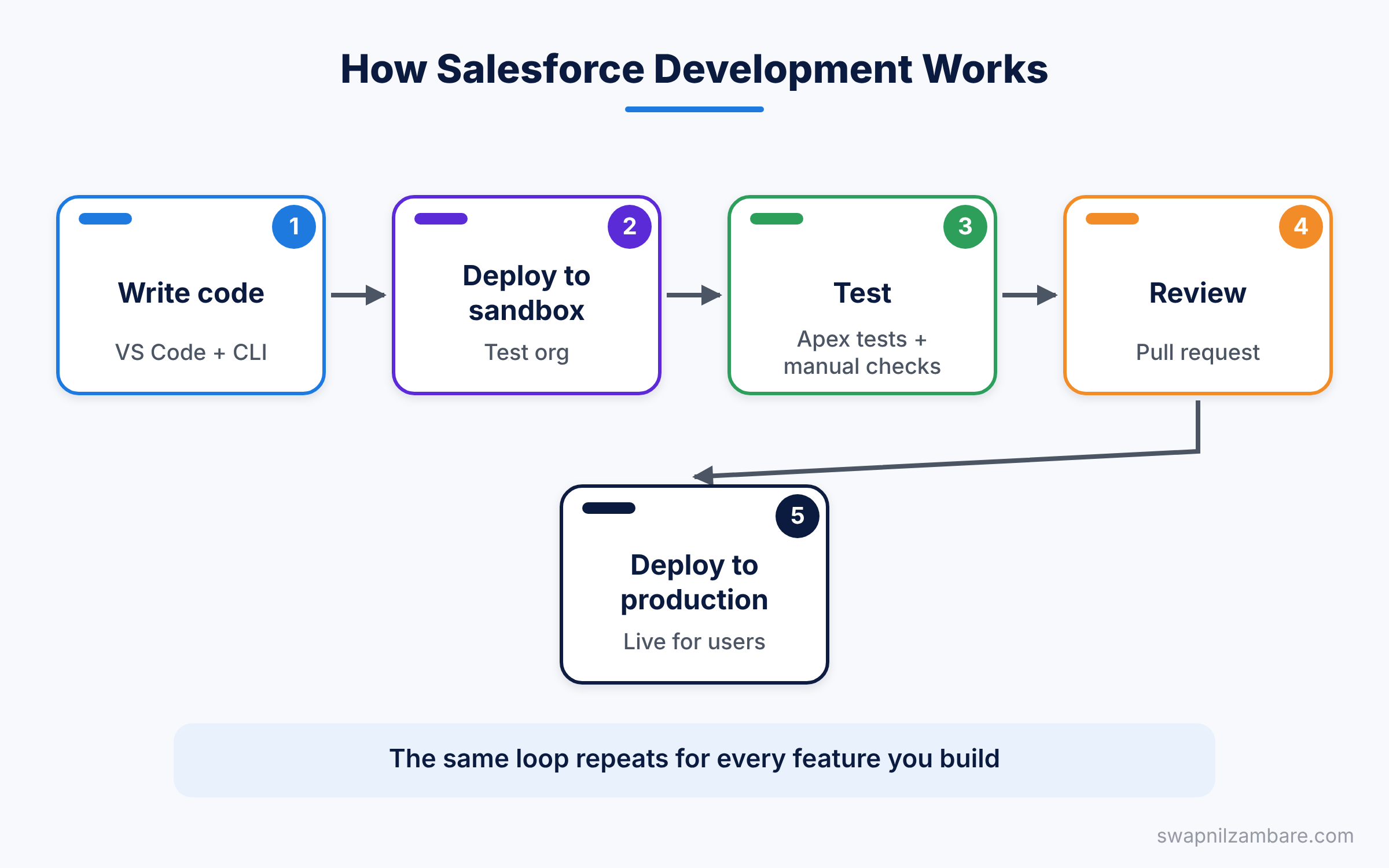
This loop repeats for every feature. For example, take our practice company Bright Path Tutors. A developer may need to block any Course with a fee below 500. So they write a small trigger, test it in a sandbox, and then deploy it.
Where the Code Runs
Your code does not run on your laptop. Instead, it runs on Salesforce servers, inside your org. This is why you need an org to practice, such as the free one from our Developer Edition setup guide.
What Metadata Means
Metadata is the description of your org. Objects, fields, page layouts and Apex classes are all metadata. When developers “deploy”, they move metadata from one org to another. We will cover this idea in detail later in this series.
The Main Parts of Salesforce Development
A developer works with a few key tools and languages. Each one has a clear job, so it helps to learn them one at a time.
Apex
Apex is the main programming language of Salesforce. It looks a lot like Java. You use it for triggers, classes, batch jobs and web services.
Here is a very small Apex class for Bright Path Tutors. It returns a welcome message for a course.
public class CourseWelcome {
    // Builds a short welcome line for a course name
    public static String getMessage(String courseName) {
        return 'Welcome to ' + courseName + '!';
    }
}
The class is public, so other code can use it. The method is static, so you can call it without creating an object first. It joins three strings and returns the result.
SOQL and SOSL
SOQL is the query language for reading records. It looks like SQL, but it only reads data. SOSL searches text across many objects at once.
SELECT Name, Fee__c, Level__c
FROM Course__c
WHERE Is_Online__c = true
ORDER BY Fee__c DESC
This query reads the name, fee and level of every online course. Then it sorts them from the highest fee to the lowest.
Lightning Web Components
Lightning Web Components, or LWC, are the building blocks for custom screens. They use standard HTML, JavaScript and CSS. So if you know basic web development, you will feel at home quickly.
Developer Tools
Developers write code in VS Code with the Salesforce Extension Pack. They also use the Salesforce CLI to talk to orgs from the terminal. For quick tasks, the browser-based Developer Console is handy too.
Salesforce Development vs Admin Work
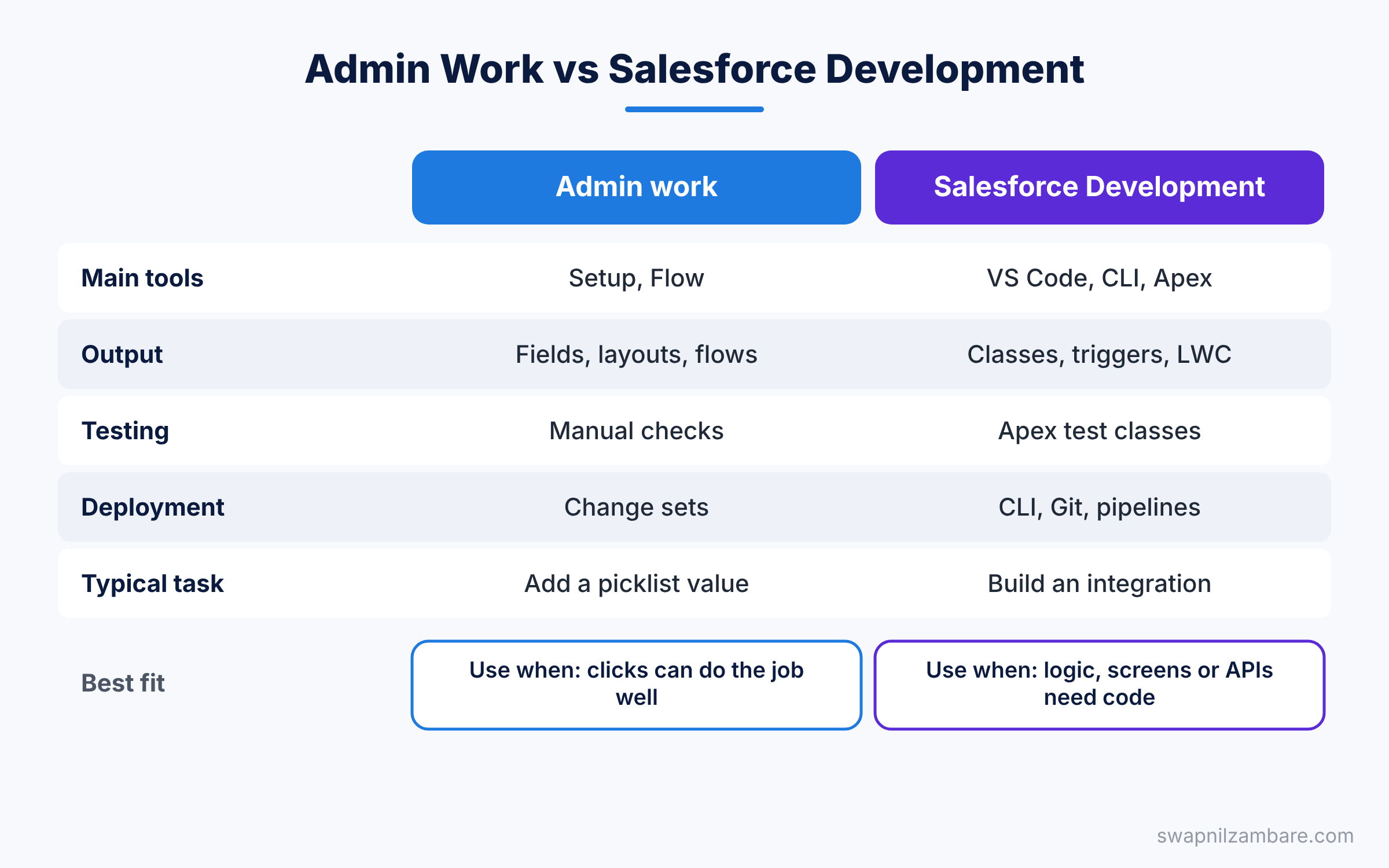
The table below compares the two roles side by side. It shows the main tools, outputs and skills for each.
| Feature | Admin work | Salesforce Development |
|---|---|---|
| Main tools | Setup, Object Manager, Flow | VS Code, Salesforce CLI, Apex |
| Output | Fields, layouts, flows, reports | Classes, triggers, components, APIs |
| Skill needed | Business process and configuration | Programming and data logic |
| Testing | Manual checks in a sandbox | Apex test classes plus manual checks |
| Deployment | Change sets, mostly | CLI, Git and pipelines |
| Typical task | Add a picklist value | Build a custom integration |
When to use which is simple. Use clicks first, and write code only when clicks cannot do the job well.
A Real Salesforce Development Example
Let’s walk through one small task from start to finish. Bright Path Tutors wants a rule that blocks any Course with a fee below 500. A validation rule could do this, but they also want to set a default level. So the team chooses a trigger.
- The developer opens VS Code and connects it to a sandbox with the Salesforce CLI.
- Next, they create a trigger on Course__c that runs before insert.
- Then they write the logic to check Fee__c and set Level__c.
- After that, they write a test class to prove the logic works.
- Finally, they deploy both files to production.
Here is a simple version of that trigger.
trigger CourseTrigger on Course__c (before insert) {
    for (Course__c c : Trigger.new) {
        // Block very low fees
        if (c.Fee__c != null && c.Fee__c < 500) {
            c.Fee__c.addError('Fee must be at least 500.');
        }
        // Give new courses a default level
        if (c.Level__c == null) {
            c.Level__c = 'Beginner';
        }
    }
}
The trigger loops through every new Course in Trigger.new. If a fee is below 500, addError stops the save and shows a message on the field. If the level is empty, the code fills in “Beginner”. Because this runs before insert, the code needs no extra save.
If someone tries to save a course with a fee of 300, the record does not save. They see this message on the screen.
Fee must be at least 500.Skills You Need for Salesforce Development
You do not need a computer science degree to start. However, a few skills make learning much easier. The table below lists them with a simple reason for each.
| Skill | Why it helps |
|---|---|
| Admin basics | You must know objects, fields and security |
| Basic programming | Variables, loops and conditions appear everywhere |
| SQL ideas | SOQL feels familiar if you know SQL |
| HTML and JavaScript | Needed for Lightning Web Components |
| Git basics | Teams track every code change in Git |
If one of these feels new, that is fine. This series will teach each skill step by step.
A Day in Salesforce Development
What does a developer actually do all day? The answer changes from team to team. Still, most days follow a similar pattern.
The morning often starts with a short stand-up call. Each person shares what they finished yesterday and what they plan today. Then the developer picks a story from the team board, such as “Send a welcome email when a student joins a course”.
Next comes the build. The developer pulls the latest code from Git, opens VS Code and writes the change. They also write a test class at the same time. After that, they deploy to a sandbox and test the screen like a real user would.
In the afternoon, a teammate reviews the code in a pull request. If they ask for changes, the developer fixes them and pushes again. Once the review passes, the change joins the next release.
So Salesforce Development is not only about typing code. It also includes reading requirements, asking good questions, testing and working with admins.
How to Start Learning Salesforce Development
You can start with zero cost. Salesforce gives you a free org and free training on Trailhead. Here is a simple order that works well for most beginners.
- Finish the admin basics, such as objects, fields, security and Flow.
- Set up a free Developer Edition org for practice.
- Install VS Code and the Salesforce CLI on your computer.
- Learn Apex basics, then SOQL, then triggers.
- Move on to Lightning Web Components and integrations.
Practice a little every day. Even 30 minutes of hands-on Salesforce Development each day builds strong skills within a few months.
Common Mistakes Beginners Make
New developers often repeat the same Salesforce Development errors. Knowing them early saves hours of debugging.
- Writing code when a flow or validation rule would work. Always check the click option first.
- Writing a query or DML inside a loop. This quickly hits platform limits, so work on lists instead.
- Skipping admin basics. Without them, you will not understand sharing and field security.
- Testing only in production. Always build and test in a sandbox or scratch org.
- Ignoring test classes. Salesforce needs at least 75% code coverage before you deploy Apex to production.
Best Practices for Salesforce Development
Good habits in Salesforce Development make your code easier to read and safer to change.
- Think in bulk, because triggers can receive up to 200 records at once.
- Keep logic in classes, not inside triggers, so you can reuse and test it.
- Use clear names like
CourseService, so others understand your code fast. - Store your work in Git, because it gives you history and safe rollbacks.
- Learn the order of execution, since it explains when your code runs.
Practice Task
Sign up for a free Developer Edition org if you do not have one. Then open the Developer Console and create the CourseWelcome class from this post. Hint: in the console, go to File > New > Apex Class.
Official Resources
Quick Recap
- Salesforce Development means writing code on the Salesforce Platform.
- Apex handles server logic, while SOQL reads data.
- Lightning Web Components build custom screens with HTML and JavaScript.
- Developers use VS Code, the Salesforce CLI and Git.
- Always try clicks first, and use code when clicks are not enough.
What’s Next?
In the next post, we compare declarative and programmatic tools in more detail. You will learn a simple way to decide when to write code and when to stick with clicks.