Salesforce Security Release Updates are changes Salesforce makes to tighten security, which admins must review, test and turn on before a deadline. Winter ’27 brings several that affect everyday admin work. Some change who can see profiles, and others change who can read the Setup Audit Trail.
In this post, you will learn the key security changes in Winter ’27, what each one means in plain words, and how to test them safely. This builds on our guide to release updates and seasonal releases. It also connects to field history tracking and Setup Audit Trail and manual sharing and teams.
What are Salesforce Security Release Updates?
A release update is a change that Salesforce announces in advance and enforces later. Before the enforcement date, you can test it and turn it on yourself. Salesforce Security Release Updates are the ones that change access, visibility or permissions. You find them in Setup on the Release Updates page.
Think of a school announcing that from next term, only staff with a new badge can enter the records room. The school tells everyone early, so they can apply for badges in time. Release updates work the same way.
Why Salesforce Security Release Updates Matter
If you ignore a release update, Salesforce turns it on for you on the enforcement date. Users may then lose access without warning. Here is why Salesforce Security Release Updates matter at Bright Path Tutors.
- First, the support lead uses the Setup Audit Trail to track changes every week.
- Also, community users must not see internal profile names.
- Next, managers transfer accounts often and want manual shares to stay.
- The HR team wants a history of changes to user records.
- Finally, auditors expect proof that security changes were tested.
So a little planning avoids surprise access problems on release day.
How Salesforce Security Release Updates Work
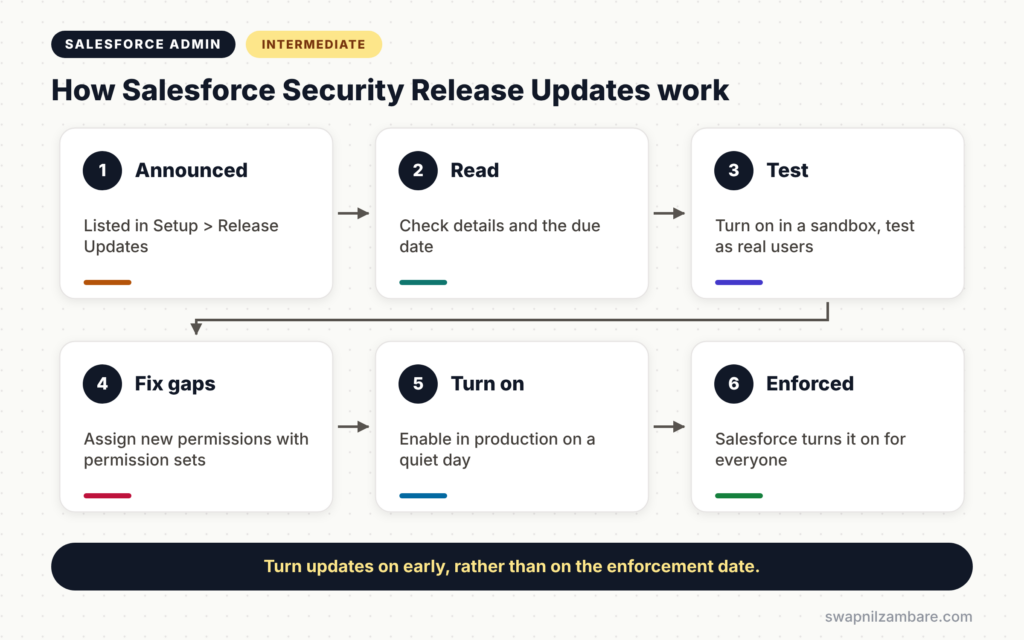
Salesforce Security Release Updates follow a clear cycle. First, Salesforce lists the update in Setup > Release Updates with a due date. Next, you read the details and test it in a sandbox. Then you fix any permission gaps, such as assigning a new permission. After that, you turn it on in production. Finally, Salesforce enforces it for everyone on the due date.
Enable Profile Filtering
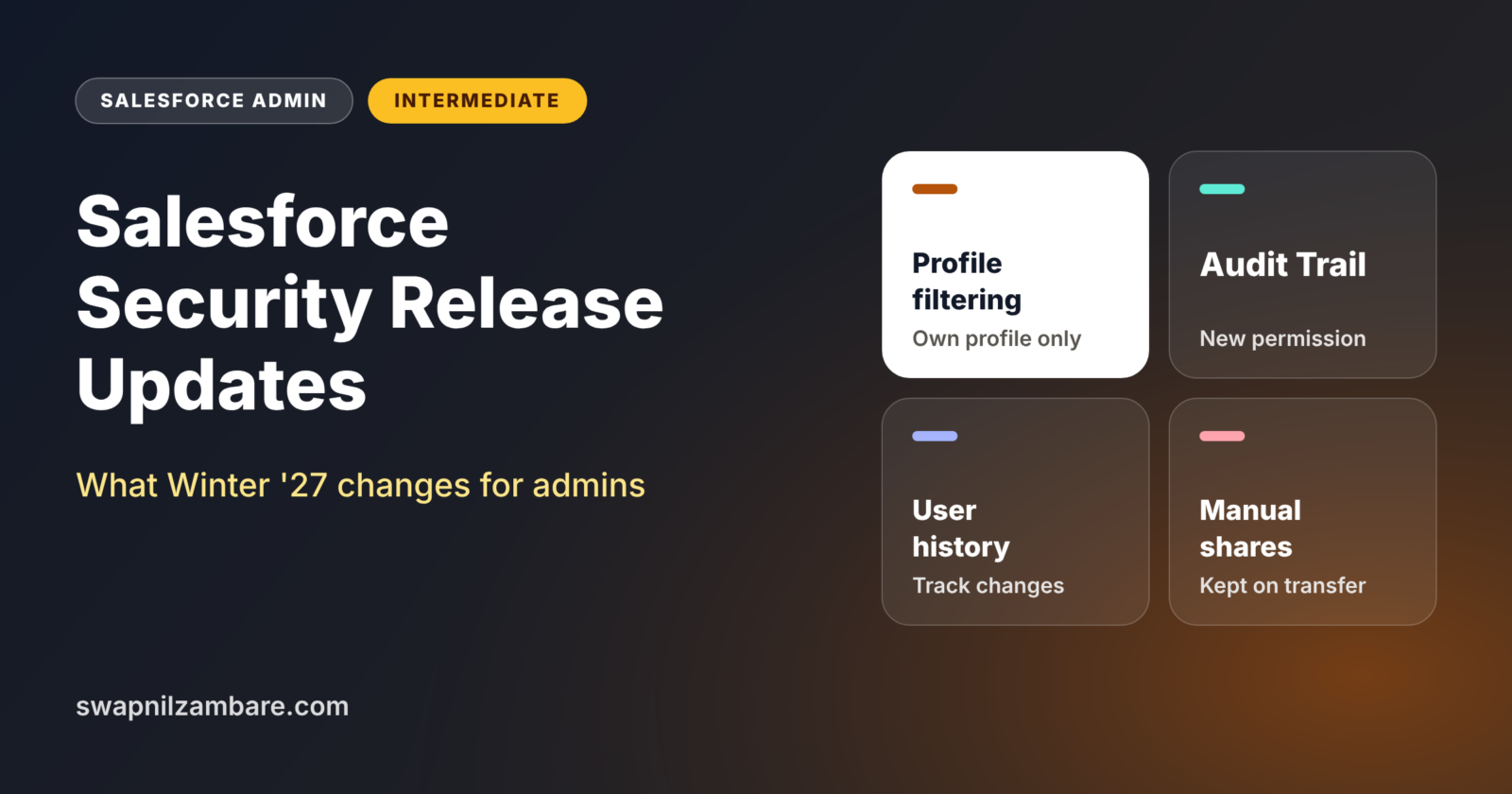
With profile filtering, users can only see their own profile name. Users with the View All Profiles permission can still see all profiles. This stops guests and external users from learning about internal profiles. Salesforce Ben reports that this update is enforced in Winter ’27.
View Setup Audit Trail Permission
Access to the Setup Audit Trail now needs a dedicated permission called View Setup Audit Trail. Users who read the audit trail today through other permissions may need this new one.
Field History Tracking on Users
You can now track field history on the User object. This shows who changed a user’s role, profile or email, and when.
Keep Manual Shares When Transferring Records
A new sharing setting lets you keep manual shares when a record changes owner. Before, transferring ownership removed them.
Flows That Enforce User Permissions
Flow Builder now offers a run option that always uses the running user’s permissions, however the flow is started. This helps flows follow least privilege.
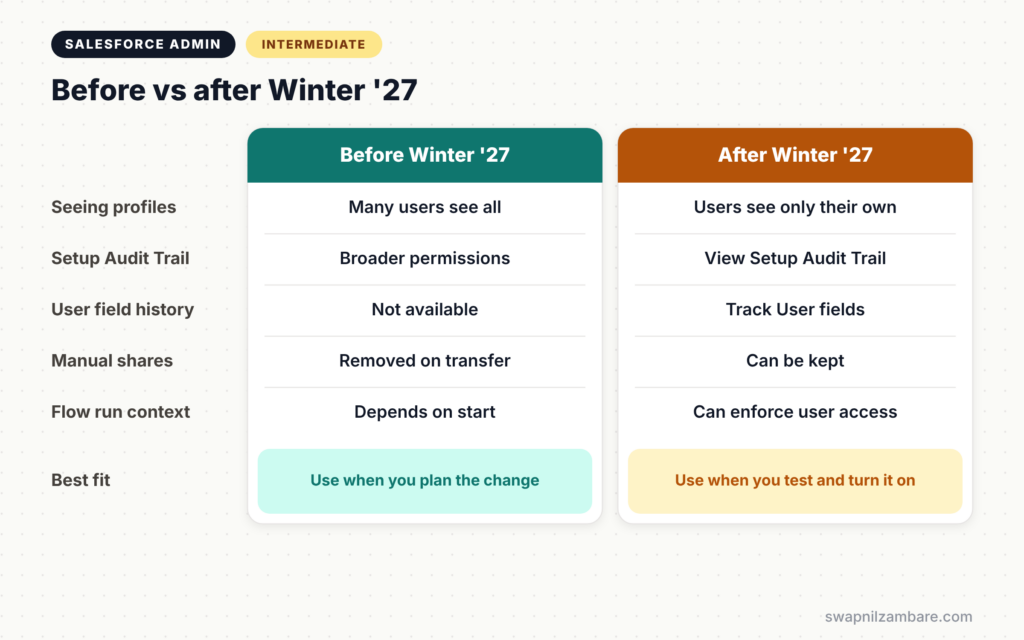
Before vs After Winter ’27
The table below shows how each change affects your org.
| Area | Before Winter ’27 | After Winter ’27 |
|---|---|---|
| Seeing profiles | Many users see all profile names | Users see only their own |
| Setup Audit Trail | Covered by broader permissions | Needs View Setup Audit Trail |
| User field history | Not available | Track changes on User fields |
| Manual shares on transfer | Removed on owner change | Can be kept with a setting |
| Flow run context | Depends on how the flow starts | Option to always enforce user permissions |
When to act is simple. Test each item in a sandbox now, rather than waiting for the enforcement date.
How to Test Salesforce Security Release Updates Step by Step
Let’s test Salesforce Security Release Updates at Bright Path Tutors in a full sandbox.
Step 1: Review the Release Updates Page
- Go to Setup and type “Release Updates” in Quick Find.
- Next, open each security-related update and read the details.
- Then note the enforcement date in your admin log.
Step 2: Test Profile Filtering
- Turn on profile filtering in the sandbox.
- Next, log in as Asha Mehta, a sales rep, and open a user record.
- Confirm she sees only her own profile name.
- Then check reports and list views that show profile names still work for admins.
Step 3: Assign the Audit Trail Permission
- Create a permission set called “Audit Trail Viewers”.
- Next, enable View Setup Audit Trail in its system permissions.
- Then assign it to the support lead and the security team.
Step 4: Turn On User Field History
- Go to Object Manager > User > Fields & Relationships.
- Click Set History Tracking.
- Next, select the fields from the table below and save.
The table below shows the user fields Bright Path Tutors chose to track.
| Field | Why track it |
|---|---|
| Profile | Access changes |
| Role | Sharing changes |
| Login and recovery changes | |
| Active | Starts and leavers |
| Manager | Approval routing |
Step 5: Keep Manual Shares
- Go to Setup > Sharing Settings.
- Next, tick “Keep manual shares when transferring records”.
- Then transfer a test account and confirm its manual shares remain.
Step 6: Turn On in Production
After testing, turn on each update in production on a quiet day. Then tell users what changed, and watch for access issues during the first week.
Checking Salesforce Security Release Updates with the Audit Trail
After you turn on Salesforce Security Release Updates, review the Setup Audit Trail to confirm who changed what. Also run Health Check to see if your security score changed. These two checks give auditors clear proof.
Common Mistakes with Salesforce Security Release Updates
- Waiting until Salesforce enforces the update automatically.
- Testing only as an admin, so user problems stay hidden.
- Forgetting to assign the new View Setup Audit Trail permission.
- Turning on updates in production without a sandbox test.
- Not telling users and support teams about the change.
Best Practices for Salesforce Security Release Updates
- Review the Release Updates page at the start of every release.
- Test each security update in a sandbox with real user profiles.
- Use permission sets to give any new permissions.
- Record each update and its test result in your admin log.
- Turn updates on early, on a quiet day, rather than on the deadline.
Practice Task
Open the Release Updates page in your Developer Edition org. List every update with a due date in the next six months and plan when you will test each one. Hint: sort them by due date in a simple table.
Most Asked Interview Questions on Salesforce Security Release Updates
Questions on Salesforce Security Release Updates show interviewers that you keep your org current. Here are the ones asked most.
Basic Questions on Salesforce Security Release Updates
Q1. What is a release update?
It is a change Salesforce announces early and enforces later. Admins can test it and turn it on before the due date.
Q2. Where do you find release updates?
In Setup, on the Release Updates page. Each update shows details, steps and the enforcement date.
Q3. What does profile filtering do?
It lets users see only their own profile, unless they have the View All Profiles permission.
Q4. What changed for the Setup Audit Trail in Winter ’27?
Access now needs a dedicated View Setup Audit Trail permission.
Practical Questions on Salesforce Security Release Updates
Q5. How do you test a release update safely?
First, turn it on in a sandbox. Next, test as real users with different profiles. Then fix any gaps and turn it on in production.
Q6. What happens if you never turn on a release update?
Salesforce turns it on automatically on the enforcement date, which can surprise users.
Q7. How do you track who changed a user’s profile?
Turn on field history tracking for the User object and track the Profile field. The Setup Audit Trail also records many user changes.
Q8. How do you keep manual shares when an account changes owner?
Turn on the sharing setting to keep manual shares when transferring records.
Official Resources
Quick Recap
- Salesforce Security Release Updates tighten access before an enforcement date.
- Profile filtering hides other profiles from most users.
- The Setup Audit Trail now needs its own permission.
- User field history and kept manual shares give admins more control.
- Test in a sandbox and turn updates on early.
What’s Next?
Release updates are one part of a bigger idea. Next, read our guide to the Principle of Least Privilege and Zero Trust in Salesforce.