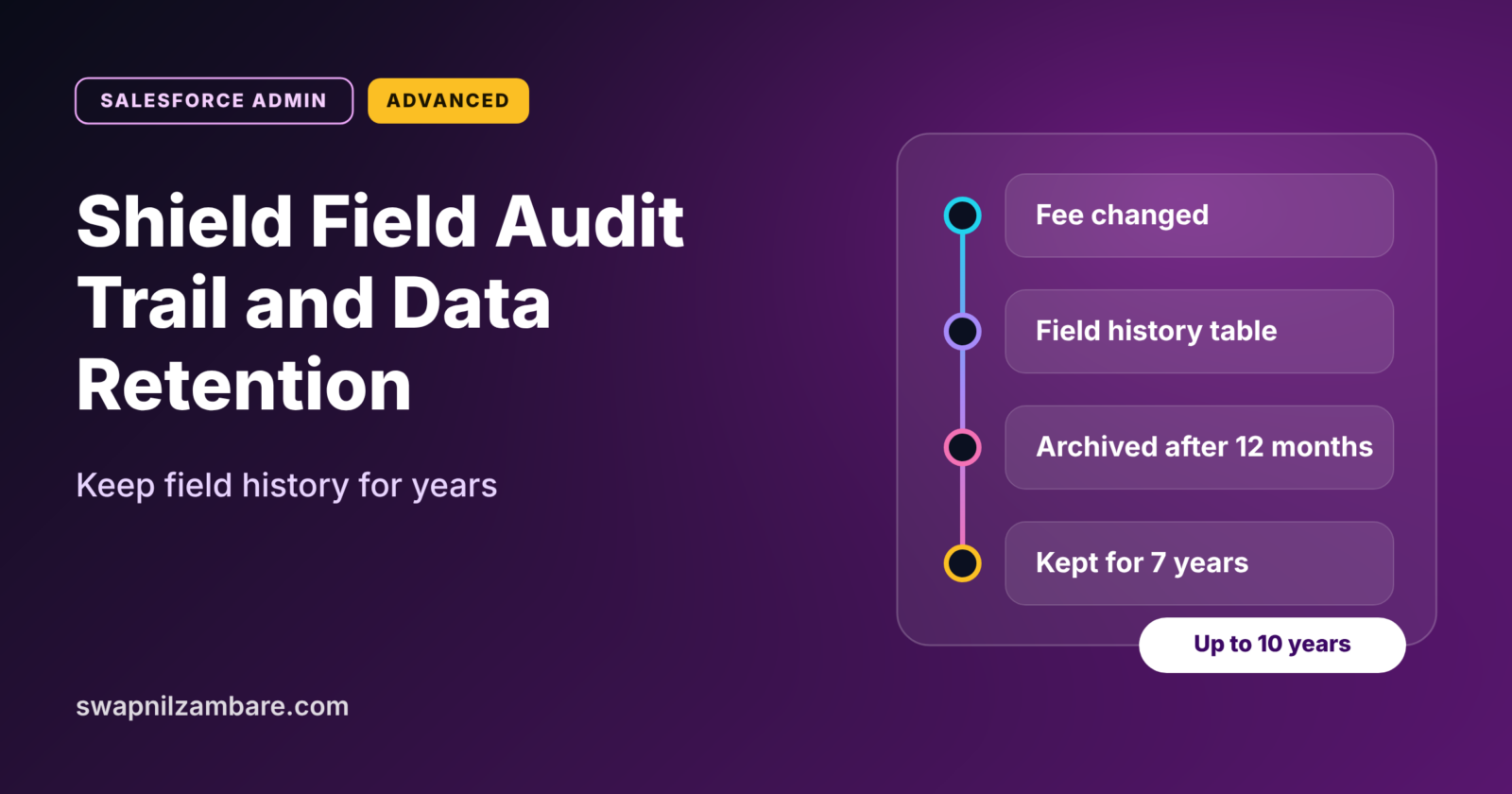
Shield Field Audit Trail lets you keep field change history for up to ten years, far longer than standard field history tracking. It also lets you track more fields on each object. For companies with strict audit or legal rules, this long memory is often a must.
In this post, you will learn how Shield Field Audit Trail extends field history, how retention policies work, and how to query archived history. It builds directly on our guide to field history tracking and Setup Audit Trail. It also connects to the other Shield tools, Platform Encryption and Event Monitoring and login history.
What is Shield Field Audit Trail?
Shield Field Audit Trail is a paid Salesforce feature, sold as part of Salesforce Shield or as an add-on. It keeps a long-term record of field value changes. You decide how long history stays in the normal history tables and when it moves into a long-term archive.
Think of a school’s exam records. Recent marks stay in the teacher’s register for quick access. Older marks move to the school archive room, where they stay safe for years. Shield Field Audit Trail gives your org both the register and the archive room.
Why Shield Field Audit Trail Matters
Standard field history works well for everyday questions, such as “Who changed this fee last week?” However, it keeps data for a limited time and tracks a limited number of fields. Here is why Shield Field Audit Trail matters at Bright Path Tutors.
- First, finance rules require fee change history for several years.
- Also, a past student may dispute a refund from three years ago.
- Next, auditors want proof of who changed contract values and when.
- The company wants to track more fields on Course than the standard limit allows.
- Finally, the legal team wants a clear policy for how long history is kept.
So Field Audit Trail turns short-term history into a long-term, reliable record.
How Shield Field Audit Trail Works
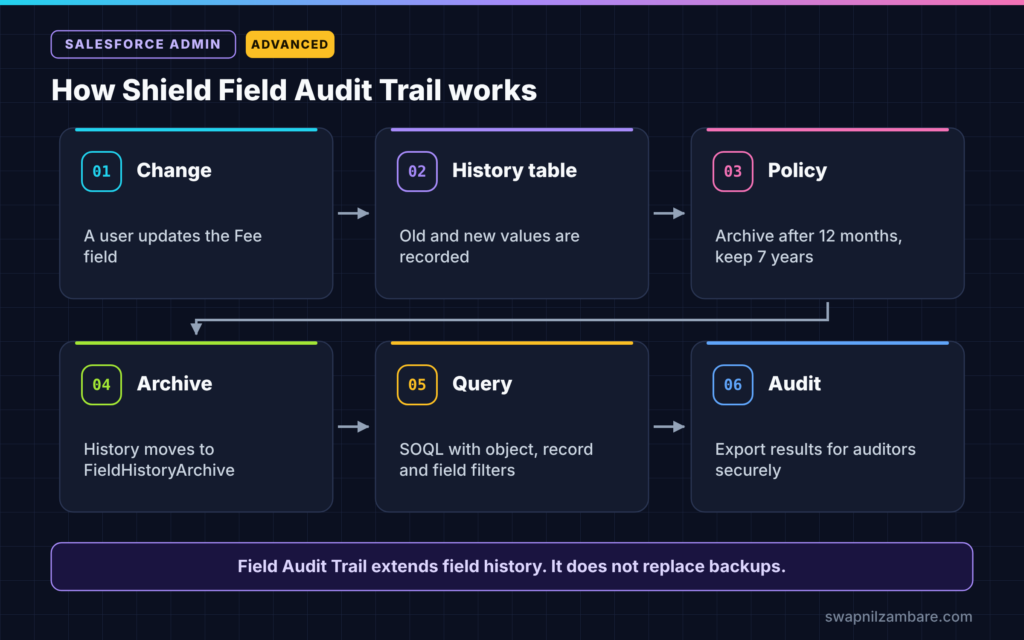
Shield Field Audit Trail follows a simple path. First, a user changes a tracked field. Next, Salesforce writes the change to the normal field history table. Then, after the number of months set in your retention policy, the history moves to an archive object called FieldHistoryArchive. Finally, it stays there for the number of years you choose, up to ten.
Field History Tracking
Field history tracking records old and new values when tracked fields change. Field Audit Trail builds on this, so you still turn on tracking for each field as usual.
Retention Policies
A retention policy sets two numbers for an object. The first is how many months history stays in the normal table before archiving. The second is how many years archived history is kept. Admins set the policy through metadata, often with a developer’s help.
FieldHistoryArchive
FieldHistoryArchive is a big object that stores archived history. Big objects hold huge amounts of data, but you query them in a more limited way than normal objects.
More Tracked Fields
With Field Audit Trail, you can track more fields per object than with standard field history. So important objects like Opportunity or Contract can have a fuller history.
Standard Field History vs Shield Field Audit Trail
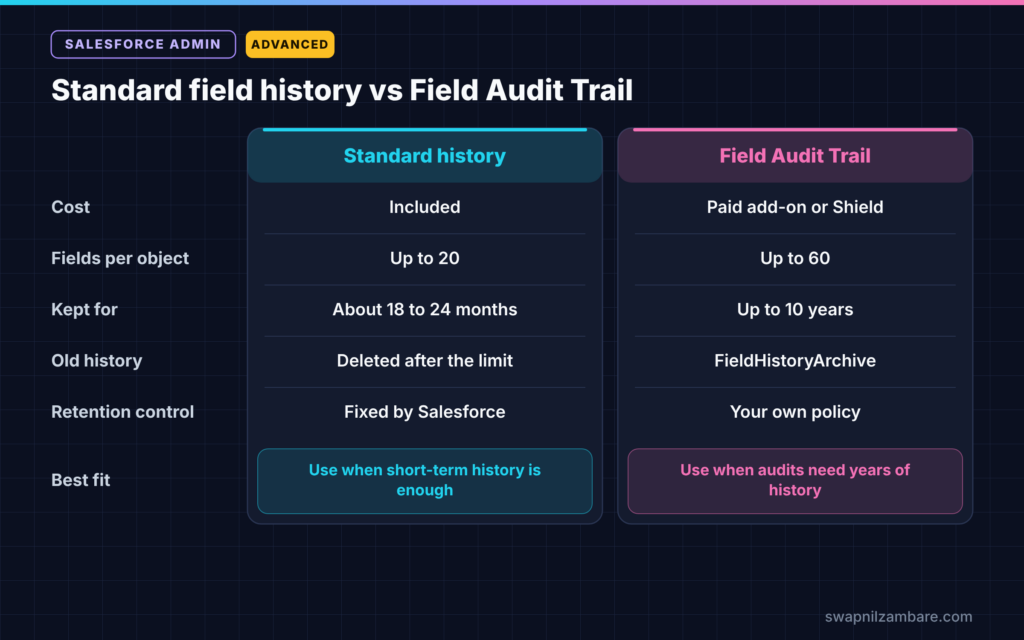
The table below compares the two options.
| Feature | Standard field history | Shield Field Audit Trail |
|---|---|---|
| Cost | Included | Paid add-on or part of Shield |
| Tracked fields per object | Up to 20 | Up to 60 |
| How long history is kept | Limited, about 18 to 24 months | Up to 10 years |
| Where old history lives | Deleted after the limit | FieldHistoryArchive big object |
| Retention control | Fixed by Salesforce | Your own policy per object |
| Best for | Everyday change questions | Audits and legal holds |
When to use which depends on your rules. If short-term history answers your questions, standard tracking is enough. If laws or auditors need years of history, use Field Audit Trail.
How to Set Up Shield Field Audit Trail Step by Step
Let’s set up Shield Field Audit Trail for the Course object at Bright Path Tutors. Finance wants fee changes kept for seven years.
Step 1: Confirm the Licence
- Check with your Salesforce account team that Field Audit Trail is active in your org.
- Then confirm which objects support it in your edition.
Step 2: Track the Fields
- Go to Object Manager > Course > Fields & Relationships.
- Click Set History Tracking.
- Next, tick Fee, Level, Start Date and Is Online.
- Then click Save.
Step 3: Define the Retention Policy
The table below shows the policy finance agreed.
| Setting | Value |
|---|---|
| Object | Course |
| Archive after | 12 months |
| Keep archived history for | 7 years |
A developer or admin then adds this policy to the object’s metadata and deploys it. Here is a simple example of the policy in the object file.
<historyRetentionPolicy>
    <archiveAfterMonths>12</archiveAfterMonths>
    <archiveRetentionYears>7</archiveRetentionYears>
    <description>Course fee history for finance audits</description>
</historyRetentionPolicy>
Step 4: Query Archived History
After history is archived, you can query it with SOQL. For example, this query finds archived changes to the Fee field.
SELECT ParentId, FieldHistoryType, Field, OldValue, NewValue, CreatedDate
FROM FieldHistoryArchive
WHERE FieldHistoryType = 'Course__c' AND Field = 'Fee__c'
Big object queries need filters that match how the data is indexed. So start with FieldHistoryType and ParentId, then narrow down.
Step 5: Share Results with Auditors
- Export the query results to a CSV file.
- Next, remove columns auditors do not need.
- Then store the export in a secure, access-controlled location.
A Real Shield Field Audit Trail Example
A former corporate client of Bright Path Tutors disputes an invoice from three years ago. They say the agreed fee was lower. The admin queries FieldHistoryArchive for that course and finds the exact change, the old value, the new value and who made it. As a result, finance resolves the dispute in one day instead of searching old emails for weeks.
Data Retention Beyond Field History
Field history is only one part of data retention. Also think about how long you keep whole records, files and emails. Many companies write a simple retention plan, such as “Delete leads with no activity after three years”. Then they use reports, flows or tools to follow it. Our guide to Salesforce Backup and Recover explains the other side, keeping copies so you can restore data.
Common Mistakes with Shield Field Audit Trail
- Assuming standard field history keeps data forever.
- Buying Field Audit Trail but never defining a retention policy.
- Tracking every field instead of the ones auditors need.
- Querying FieldHistoryArchive without the right filters.
- Forgetting to agree on retention years with the legal team.
Best Practices for Shield Field Audit Trail
- Agree on retention rules with legal, finance and security first.
- Track only fields with a clear business or legal reason.
- Document each object’s policy in your admin log.
- Test archive queries before an audit, not during one.
- Combine Field Audit Trail with Event Monitoring and backups for full coverage.
Practice Task
List five fields in your org that auditors might ask about. For each one, write how long history should be kept and why. Hint: start with money, status and ownership fields.
Most Asked Interview Questions on Shield Field Audit Trail
Questions on Shield Field Audit Trail are common for admins in banking, healthcare and other regulated industries. Here are the ones asked most.
Basic Questions on Shield Field Audit Trail
Q1. What is Field Audit Trail?
It is a paid Salesforce feature that keeps field history for up to ten years and allows more tracked fields per object.
Q2. How is it different from standard field history?
Standard history keeps data for a limited time and tracks up to 20 fields per object. Field Audit Trail keeps data for years and tracks up to 60 fields.
Q3. Where is archived history stored?
In the FieldHistoryArchive big object.
Q4. What are the parts of Salesforce Shield?
The main parts are Platform Encryption, Event Monitoring and Field Audit Trail. Some packages include more tools.
Practical Questions on Shield Field Audit Trail
Q5. How do you set how long history is kept?
Define a retention policy for the object with months before archiving and years to keep. Then deploy it through metadata.
Q6. How do you find an old fee change?
Query FieldHistoryArchive with SOQL, filtering by object type, record Id and field.
Q7. Why might a FieldHistoryArchive query fail?
Big objects need filters that match their index. So filter on the right fields in the right order.
Q8. Does Field Audit Trail replace backups?
No. It keeps change history, but it does not restore deleted records or files. You still need a backup plan.
Official Resources
Quick Recap
- Shield Field Audit Trail keeps field history for up to ten years.
- It tracks more fields per object than standard history.
- Retention policies decide when history archives and how long it stays.
- Archived history lives in the FieldHistoryArchive big object.
- It works best together with backups and Event Monitoring.
What’s Next?
Long-term data rules often shape how many orgs a company needs. Next, read our guide to Salesforce org strategy, single org vs multi-org.