Salesforce Org Strategy is the decision about how many production orgs a company should run and how they work together. Some companies run everything in one org. Others run several orgs for different regions or businesses. The right choice affects cost, speed, reporting and security for years.
In this post, you will learn the main org models, the factors that drive the decision, and how to make a choice with a simple scorecard. You will also follow a real example at Bright Path Tutors. This builds on multi-tenant architecture and metadata, which explains what an org really is. It also connects to Data 360 basics and DevOps Center, because both matter once you run more than one org.
What is Salesforce Org Strategy?
An org is one Salesforce environment with its own data, users, settings and limits. A Salesforce Org Strategy decides whether the company uses one production org or many. It also decides how data, users and changes move between them.
Think of a family deciding between one big house and several smaller flats. One house makes sharing meals easy, but everyone must agree on the rules. Separate flats give each person freedom, but meeting up takes more effort. Choosing an org strategy is the same kind of trade-off.
Why Salesforce Org Strategy Matters
Changing org strategy later is slow and expensive. Merging two orgs can take many months of data migration and rework. So a thoughtful decision early saves a lot of pain. Here is why Salesforce Org Strategy matters at Bright Path Tutors.
- First, the company just bought CodeKids, a coding school in Singapore with its own org.
- Also, leaders want one report of all students across both businesses.
- Next, CodeKids has different sales processes and different privacy rules.
- Each team wants to release changes on its own schedule.
- Finally, licence and admin costs must stay under control.
So the company must decide: merge into one org, keep two, or connect them.
How Salesforce Org Strategy Works
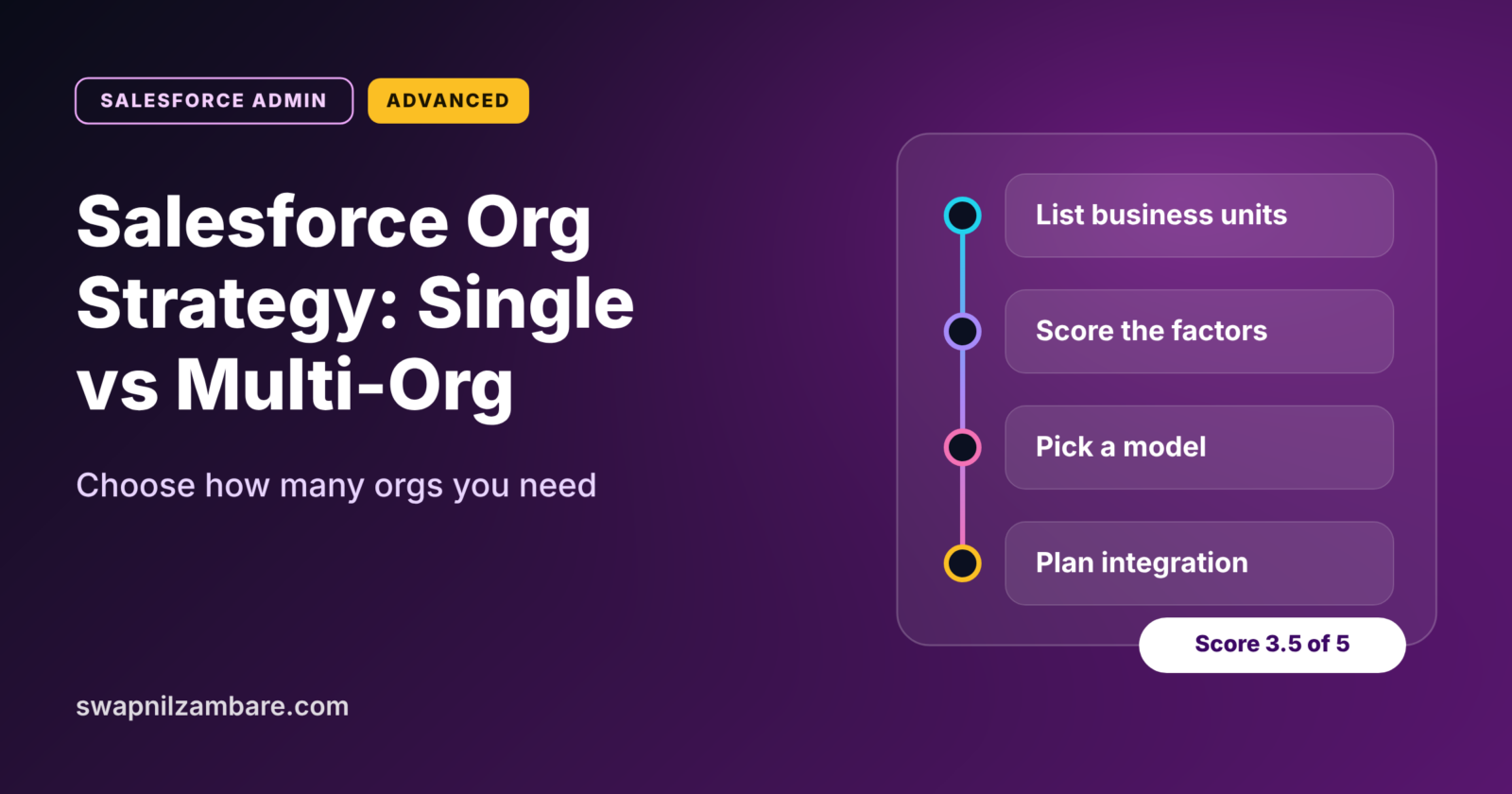
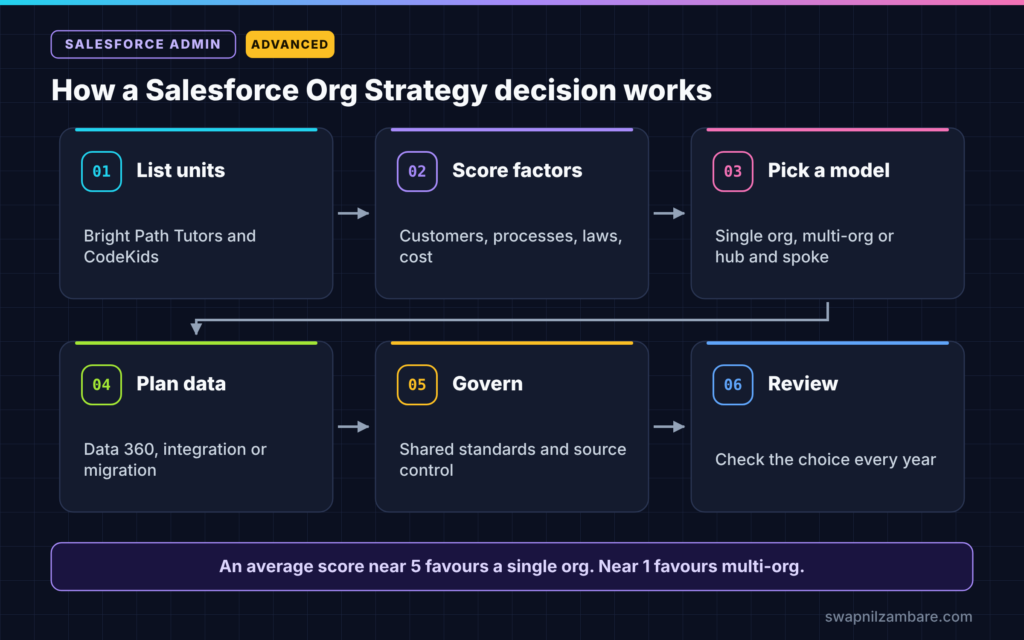
A Salesforce Org Strategy decision follows clear steps. First, list the business units and how they work. Next, score each decision factor, such as shared customers and regulation. Then pick a model: single org, multi-org or hub and spoke. After that, plan how data and users will connect. Finally, review the choice every year as the business changes.
Single Org
All business units share one production org. Data and reports are in one place, and users see a single view of each customer. However, every team shares the same limits, release schedule and governance.
Multi-Org
Each business unit runs its own org. Teams move fast and customise freely. However, reporting across orgs needs integration, and costs for admins and tools grow.
Hub and Spoke
One central org, the hub, holds shared data such as customers or products. Several spoke orgs run local processes and sync key data with the hub. This mixes some benefits of both models, but it needs careful integration.
Single Org vs Multi-Org
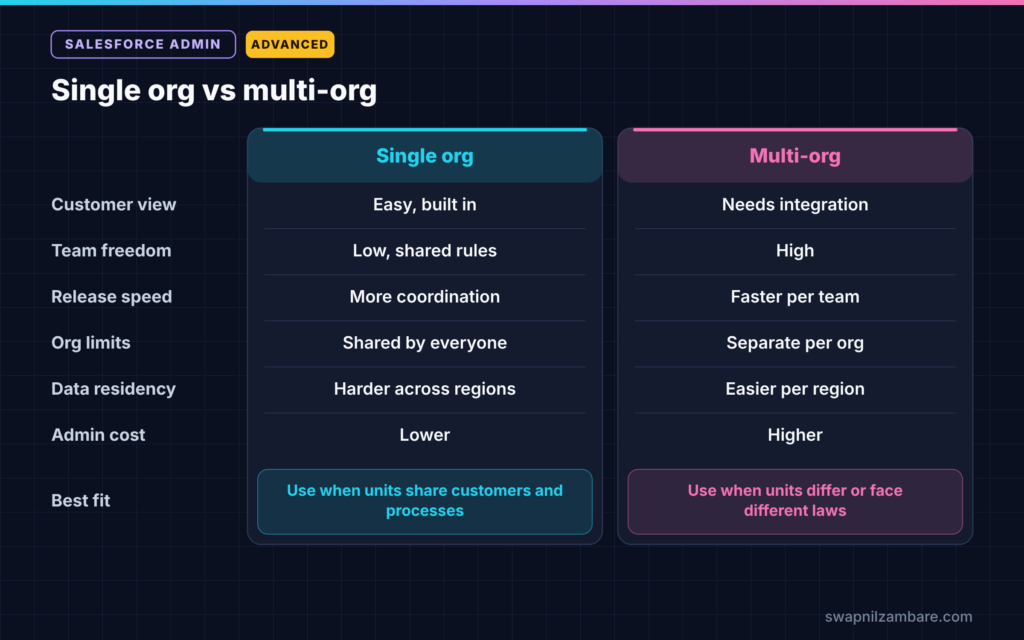
The table below compares the two main models.
| Factor | Single org | Multi-org |
|---|---|---|
| Single view of customer | Easy, built in | Needs integration |
| Team independence | Low, shared rules | High |
| Release speed | Slower, more coordination | Faster per team |
| Org limits | Shared by everyone | Separate per org |
| Data residency rules | Harder if regions differ | Easier per region |
| Admin cost | Lower | Higher |
When to use which depends on how much the business units share. If they share customers and processes, a single org usually wins. If they work very differently or face different laws, multi-org can make sense.
Key Factors in Salesforce Org Strategy
Every Salesforce Org Strategy comes down to a few questions. Answer them honestly before you pick a model.
- Do the business units share customers? If yes, a single org helps.
- Are the processes similar? If yes, a single org is simpler to run.
- Do laws require data to stay in certain regions? If yes, separate orgs may help.
- How large is the data and how many users? Very large orgs can hit limits.
- Do teams need to release on different schedules? If yes, multi-org gives freedom.
- What can the company afford in admins, licences and integration?
A Real Salesforce Org Strategy Example
Let’s walk through the Bright Path Tutors decision. Leaders scored each factor from 1 to 5, where 5 strongly favours a single org.
The table below shows the scorecard.
| Factor | Score | Reason |
|---|---|---|
| Shared customers | 4 | Many parents also buy adult courses |
| Similar processes | 3 | Enrolment is similar, sales differs |
| Data residency | 2 | Singapore data has its own rules |
| Data volume | 4 | Both orgs are small |
| Release independence | 3 | Teams can share a monthly release |
| Cost | 5 | One org saves admin and licence cost |
The average is 3.5, which leans towards a single org. However, the low data residency score is a real concern. So the team chose a careful plan.
- First, keep the CodeKids org for six months while legal reviews data rules.
- Next, use Data 360 to unify student profiles for leadership reports.
- Then, if legal approves, migrate CodeKids into the main org in phases.
- Finally, retire the CodeKids org once all users and data have moved.
Connecting Multiple Orgs
If your Salesforce Org Strategy includes several orgs, plan how they share data. Common options include Salesforce Connect for live views of data in another org, integration tools for regular syncs, and Data 360 for unified profiles and reporting. Our post on Salesforce Connect and external objects explains the live-view option.
Also plan for users who need both orgs. Single sign-on through your identity provider makes switching easier.
Governance Across Orgs
A multi-org Salesforce Org Strategy needs more governance. So agree on shared naming rules, security standards and a release calendar. Then track every org’s changes in source control, using tools like DevOps Center. Without this, orgs drift apart and become hard to merge later.
Common Mistakes with Salesforce Org Strategy
- Creating a new org for every new team without a clear reason.
- Merging orgs quickly without checking legal and data rules.
- Ignoring reporting needs until leaders ask for one global view.
- Underestimating the cost of integration between orgs.
- Never reviewing the strategy as the company grows.
Best Practices for Salesforce Org Strategy
- Start with a single org unless there is a strong reason not to.
- Score the decision factors with business and IT leaders together.
- Ask legal about data residency before any merge or split.
- Plan integration and reporting before you add a second org.
- Review the org strategy every year.
Practice Task
Imagine Bright Path Tutors opens an office in Germany. Score each factor in the scorecard for this new office. Hint: think carefully about European privacy rules and whether German customers overlap with Indian ones.
Most Asked Interview Questions on Salesforce Org Strategy
Questions on Salesforce Org Strategy are common for senior admin and architect roles. Here are the ones asked most.
Basic Questions on Salesforce Org Strategy
Q1. What is an org strategy?
It is the decision about how many production orgs a company runs and how they share data, users and changes.
Q2. What are the main org models?
Single org, multi-org, and hub and spoke, where one central org shares key data with several spoke orgs.
Q3. What is the biggest benefit of a single org?
It gives one view of each customer, with shared data and reports, and usually lower admin cost.
Q4. What is the biggest benefit of multi-org?
Teams get independence, with their own limits, customisations and release schedules.
Practical Questions on Salesforce Org Strategy
Q5. Your company buys another company with its own org. What do you do?
First, score the decision factors with leaders. Next, check legal rules and data overlap. Then decide whether to merge, connect or keep both, and plan in phases.
Q6. How do you report across two orgs?
Use integration to bring data together, or use Data 360 to unify profiles and report on them.
Q7. When does data residency push towards multi-org?
When laws require some customer data to be stored or handled in a specific region, separate orgs can make compliance simpler.
Q8. How do you stop multiple orgs from drifting apart?
Agree on shared standards, keep changes in source control and review all orgs on a regular schedule.
Official Resources
- Single Org Architecture (Salesforce Architects)
- Single-Org versus Multi-Org Strategy (Salesforce Developers Blog)
Quick Recap
- Salesforce Org Strategy decides how many orgs a company runs and how they connect.
- A single org gives one customer view and lower cost.
- Multi-org gives team freedom and helps with regional rules.
- Hub and spoke shares key data from a central org.
- Score the factors, plan integration and review every year.
What’s Next?
You have finished the advanced admin topics in this set. Coming soon: more Salesforce Developer posts on Apex, starting with SOQL basics.