LWC Static Resources are files you upload to Salesforce once and then reuse inside any Lightning Web Component. A static resource can be a single JavaScript file, a stylesheet, an image, or a whole zipped library folder. Instead of pointing your component at a public web address, you point it at a file that lives inside your own org.
This matters because a Lightning Web Component cannot pull a script straight from the open internet. The platform blocks that for security. So every charting library, date picker, PDF writer or spreadsheet reader you want to use has to come in through a static resource first.
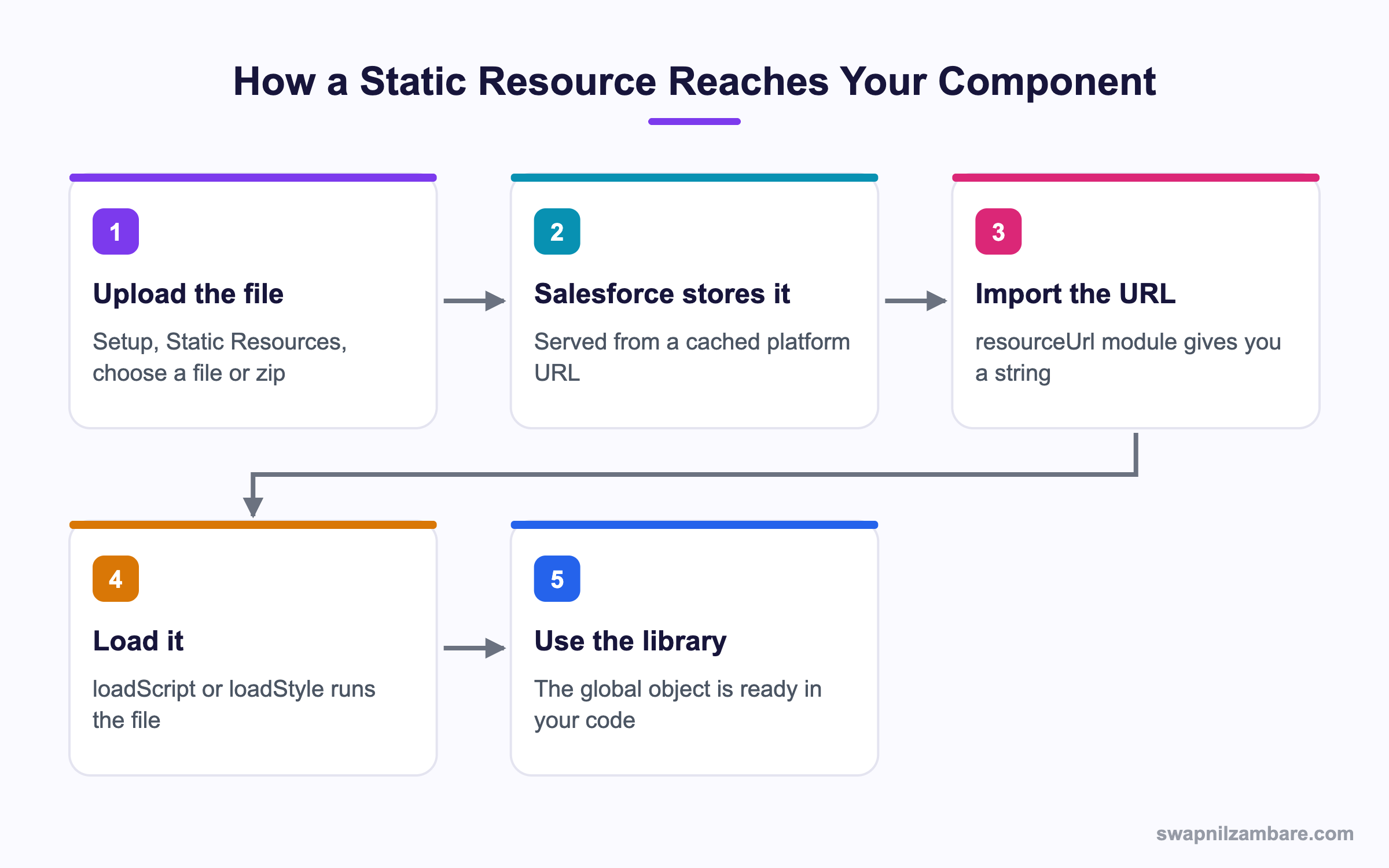
Caption: The four steps every outside library follows before your component can call it.
What Are LWC Static Resources
A static resource is a stored file with a name you choose. Salesforce serves it from a cached URL that never changes until you upload a new version. In Setup you give it a name, pick a cache control setting, and attach the file.
Think of it like a shared drawer in your office. You put a tool in the drawer once, label the drawer, and then anyone on the team opens the same drawer instead of buying the tool again.
The name you type in Setup becomes the import name in your code. If you name the resource chartjs, you import it as @salesforce/resourceUrl/chartjs. The import gives you a plain string, which is the URL of that file.
What You Can Store
- A single
.jsfile, such as a small helper library - A single
.cssfile, such as a print stylesheet - An image, a font or a small data file
- A
.ziparchive holding a whole library folder
LWC Static Resources have a size ceiling. The hard limit is 5 MB for one resource and 250 MB across the org. Most libraries fit easily once you use the minified build.
Why LWC Static Resources Matter
There are four solid reasons teams rely on LWC Static Resources rather than outside links.
| Reason | What it gives you |
|---|---|
| Security | The file is inside your org, so no outside domain is involved |
| Speed | Salesforce caches the file close to the user |
| Version control | You decide when the library version changes |
| Offline safety | The file still loads if the vendor site goes down |
That last point catches teams out. A library loaded from a public CDN stops working the day the CDN changes a path. A static resource keeps working because you own the copy.
How LWC Static Resources Work
The flow has four parts. Upload, import, load, then use.
Creating the Resource
Go to Setup, search for Static Resources, and click New. Fill in the Name, pick the file, and set Cache Control. Public means proxy servers may cache it for everyone. Private means it is cached per user session, which you want for anything tied to one person.
Importing the URL
import myLib from '@salesforce/resourceUrl/myLib';This is a build time import. The value is just a string, so you can log it, join it with a folder path, or pass it to an image src attribute.
Loading a Script or Style
For a library you need the platform loader. It adds the script tag for you and tells you when the file has finished running.
import { loadScript, loadStyle } from 'lightning/platformResourceLoader';

async renderedCallback() {
  if (this.ready) {
    return;
  }
  this.ready = true;
  await loadScript(this, myLib + '/lib.min.js');
  await loadStyle(this, myLib + '/lib.min.css');
  this.buildChart();
}
Two details decide whether this works. First, the guard flag, because renderedCallback runs again after every re-render and you do not want the same script added ten times. Second, the await, because the global object the library creates does not exist until the file has run. If you need a refresher on when each hook fires, the post on lifecycle hooks walks through the full order.
Loading Several Files in Order
Some libraries need a core file first and a plugin second. Chain the promises so the order is fixed.
await loadScript(this, myLib + '/core.js');
await loadScript(this, myLib + '/plugin.js');
If the files are independent, load them together and save a round trip.
await Promise.all([
  loadScript(this, myLib + '/a.js'),
  loadStyle(this, myLib + '/a.css')
]);
Zip Files and Folder Paths
A real library is rarely one file. It ships with a script, a stylesheet, fonts and maybe a licence file. Zip the folder, upload the zip as one static resource, and Salesforce unpacks it for you at the URL.
So if your zip contains dist/chart.min.js, the path in code is the resource URL plus /dist/chart.min.js. Keep the folder shape simple, because a deep nested path is easy to mistype and the error you get back is a plain 404.
One habit saves time. Open the resource URL in a browser tab and add the path by hand. If the file loads there, your code path is right and the problem is somewhere else.
LWC Static Resources vs Public Asset Files
Salesforce gives you two places to park a file, and people mix them up.
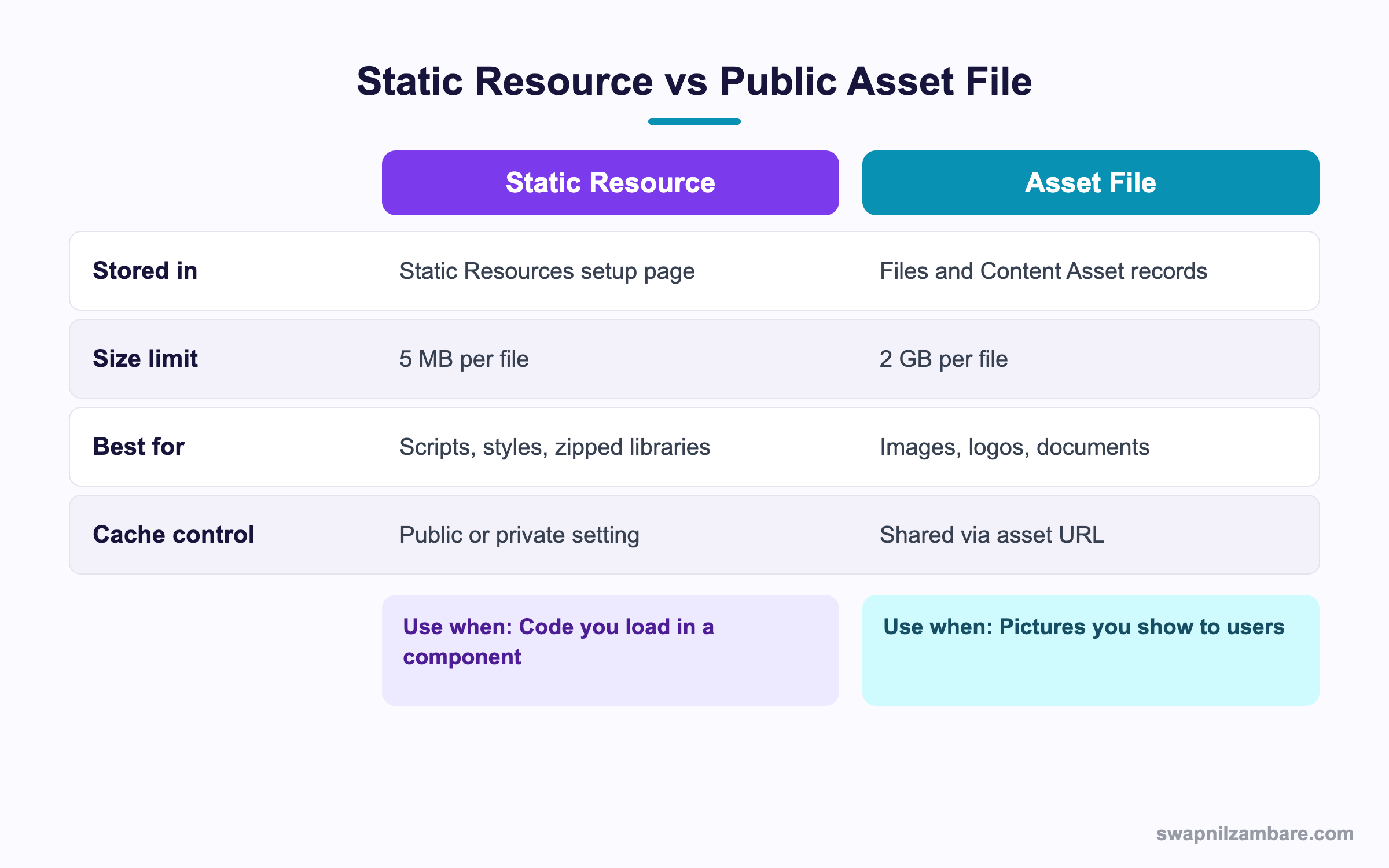
Caption: Pick a static resource for code and an asset file for pictures you show to users.
LWC Static Resources sit on the left of that table. Asset files are built for images that appear in email templates, Experience Cloud pages and rich text fields. They handle much larger files. LWC Static Resources are built for code you load and run, and they give you the cache control switch that scripts need.
A Real LWC Static Resources Example
Our practice org for Bright Path Tutors has a Course__c object with a Fee__c field. Management wants a bar chart of fees by course level on the home page.
Here is the order we follow.
- Download the minified charting library and zip the
distfolder - Upload the zip as a static resource named
chartjswith Cache Control set to Public - Import the resource URL and the loader in the component
- Load the script inside a guarded
renderedCallback - Pull the fee data with a wire call and draw the chart
The component markup is one canvas element and a spinner.
<template>
  <lightning-card title="Fees by Level">
    <canvas class="chart"></canvas>
  </lightning-card>
</template>
The data part uses a normal Apex call. If wire calls and imperative calls still feel blurry, the post on calling Apex from a component covers both styles side by side.
One warning for charting libraries. They write into a canvas element, and the canvas has to exist in the DOM before the library runs. That is exactly why the load happens in renderedCallback and not in connectedCallback.
Caching and Cache Control
Cache control on LWC Static Resources has two values, and the difference is real.
| Setting | Meaning | When to pick it |
|---|---|---|
| Public | Shared caches may store the file | Libraries, fonts, logos |
| Private | Cached only for the current user session | Anything tied to one user |
A public resource loads faster on a second visit because the browser and any proxy in between keep a copy. The catch is that a new upload can take a while to reach every user. For a library that is fine. For a file that changes weekly, give the resource a version in its name, such as chartjs_4, and switch the import when you upgrade.
Lightning Web Security and Outside Libraries
Lightning Web Security replaced Locker Service, and it changed how outside code behaves. Scripts now run inside a sandbox with their own view of the window object. Most libraries work without a change, but three kinds give trouble.
- Libraries that reach for
document.write - Libraries that walk up the DOM past your component root
- Libraries that expect jQuery or another global to already exist
Test the library in a scratch org with Lightning Web Security switched on before you commit to it. A library that fails here will fail in production too. The post on component performance has more on keeping heavy libraries off the first paint.
Common Mistakes with LWC Static Resources
These are the ones that eat an afternoon.
| Mistake | What you see | Fix |
|---|---|---|
| No guard flag | The script loads many times | Set a boolean before the first load |
| Loading in connectedCallback | The target element is missing | Move the load to renderedCallback |
| Wrong folder path inside the zip | A 404 in the network tab | Open the URL by hand and check |
| Using the full source build | The resource is over 5 MB | Upload the minified build |
| No await on loadScript | The global is undefined | Await the promise before you use it |
| Same resource name in two packages | A namespace clash | Prefix the name with your team initials |
Best Practices for LWC Static Resources
- Upload the minified build, never the full source tree
- Put a version number in the resource name so upgrades are a one line change
- Keep the zip folder shape flat and predictable
- Load the library in one wrapper component and pass data down to children
- Guard the load with a flag, every single time
- Wrap the load in a try and catch so a failed file shows a message instead of a blank card
- Set Cache Control to Public for libraries and fonts
- Record the library version and licence in a comment at the top of the component
That wrapper idea pays off quickly. One component owns the library, and the rest of your app stays free of load logic. If you are also styling those child components, styling hooks shows the supported way to do it.
Quick Reference Table
| Need | What to use |
|---|---|
| A URL string for a stored file | resourceUrl import |
| Run a JavaScript file | loadScript from platformResourceLoader |
| Apply a stylesheet | loadStyle from platformResourceLoader |
| A library with a core and a plugin | await each loadScript in order |
| Two files with no dependency | Promise.all |
| A large image for users | Asset file instead of a static resource |
Most Asked LWC Static Resources Interview Questions
Q1: What is a static resource in Salesforce?
It is a file stored in your org and served from a cached URL. Scripts, styles, images, fonts and zip archives all qualify.
Q2: Why can a component not load a script from a public CDN?
The platform blocks outside script sources for security. So the file has to live in your org as a static resource first.
Q3: How do you get the URL of a static resource in a component?
Import it from the resourceUrl module using the resource name. The import gives you a plain string.
Q4: What does loadScript do that a script tag cannot?
It adds the file in a way the platform allows and returns a promise. Therefore you know exactly when the code has finished running.
Q5: Which module holds loadScript and loadStyle?
The platformResourceLoader module under the lightning namespace.
Q6: Why guard the load with a boolean flag?
Because renderedCallback runs after every re-render. Without the flag the same file is added again and again.
Q7: Should you load a library in connectedCallback or renderedCallback?
Use renderedCallback when the library needs a DOM element such as a canvas. Use connectedCallback only when the library touches no markup.
Q8: What is the size limit on one static resource?
5 MB per resource, with 250 MB across the whole org.
Q9: How do you store a library that has many files?
Zip the folder and upload the zip as one resource. Then add the inner path to the resource URL.
Q10: What is the difference between Public and Private cache control?
Public lets shared caches keep a copy for everyone. Private keeps the copy inside one user session.
Q11: Which cache setting suits a charting library?
Public, because the file is the same for every user and the cache saves a download.
Q12: How do you force users onto a new library version?
Put the version in the resource name and change the import. A new name is a new URL, so the old cache is skipped.
Q13: Can you use LWC Static Resources for images in markup?
Yes. Import the URL and bind it to the src attribute of an img tag.
Q14: When is an asset file the better choice?
For large images and documents shown to users, since asset files allow far bigger files than LWC Static Resources.
Q15: Why does the library global come back as undefined?
The script has not finished running yet. So await the loadScript promise before you touch the global.
Q16: How do you load a core file and a plugin in the right order?
Await the core loadScript first, then await the plugin. Each await holds the next line until the file has run.
Q17: When should you use Promise.all instead?
When the files do not depend on each other, such as a script and its stylesheet.
Q18: What happens if a loadScript call fails?
The promise rejects. Catch it and show a message, otherwise the user sees an empty card with no reason.
Q19: Does Lightning Web Security change how outside libraries behave?
Yes. Scripts run in a sandbox with their own window view, so code that walks up the DOM or writes to the document can break.
Q20: How do you test a library against Lightning Web Security?
Switch the setting on in a scratch org and run the component there before you commit to the library.
Q21: Scenario: the chart renders on first load but disappears after a refresh button. Why?
The guard flag stops the reload but the canvas was replaced, so the chart object points at a dead element. Redraw instead of reloading.
Q22: Scenario: the file path works in one org and 404s in another. What changed?
Most likely the zip was rebuilt with a different top folder. Open the resource URL by hand and compare the inner path.
Q23: Can two packages hold a resource with the same name?
Yes, because each package has its own namespace. Still, prefix your own names so unmanaged work stays clear.
Q24: Do LWC Static Resources work in Aura components too?
Yes. Aura uses the ltng:require tag for the same files, so one resource can serve both models.
Q25: Is a static resource deployable with metadata tools?
Yes. It has a metadata file and the binary, so it moves through source tracking like any other component.
Q26: How do you keep a heavy library off the first page paint?
Load it only when the user opens the panel that needs it, rather than on component load.
Q27: Should every component load its own copy of the library?
No. Put the load in one wrapper component and pass data to children, so the file runs once per page.
Q28: Where do you record the library version and licence?
In a comment at the top of the component and in the resource name. Reviewers then see both without digging.
Q29: What is the quickest way to debug a failed load?
Open the network tab and look for the file. A 404 means the path is wrong and a 200 means the problem is in the library call.
Q30: Can you store a font as a static resource?
Yes. Zip the font files with a stylesheet that declares them, then load the stylesheet with loadStyle.
Official Resources
- Lightning Web Components Developer Guide
- Static Resources in Salesforce Help
- Lightning Web Components Basics on Trailhead
What Is Next
Next, read LWC Shadow DOM vs Light DOM Explained with Examples.


