LWC Form Validation covers two jobs: stopping bad input before it is sent, and showing a clear message when the server rejects a save. Base components handle most of the first job for you, as long as you ask them to run the check.
This post builds on Lightning Base Components and record forms. We will validate an enrolment form for Bright Path Tutors.
What is LWC Form Validation?
LWC Form Validation is the set of attributes and methods that check user input in a Lightning Web Component. Base components such as lightning-input support HTML constraint attributes, and they expose methods to add your own rules.
Think of airport security. The first gate checks the obvious things quickly, and a person handles the unusual case. Built in attributes are the first gate, and your custom code is the second.
Why LWC Form Validation Matters
A user who clicks Save and waits three seconds for a server error has a worse experience than one who sees the problem as they type.
LWC Form Validation also protects your Apex. Most bad data never reaches the server, so your code handles fewer edge cases. Even so, client checks are a convenience, not a security control.
How LWC Form Validation Works
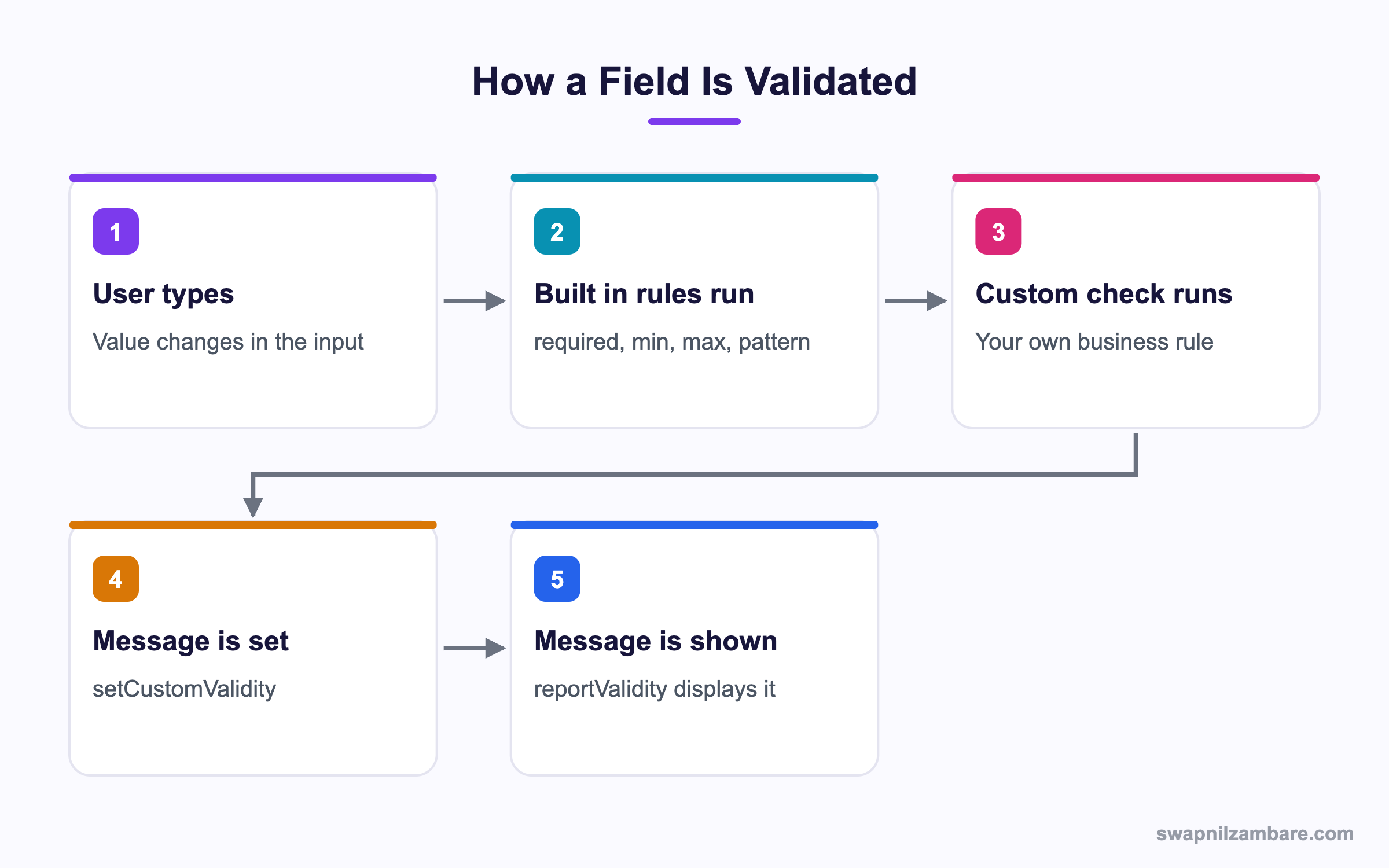
LWC Form Validation runs the built in rules first, then any custom message you set, and shows the result when you ask.
Built in Attributes
<lightning-input
    label="Student name"
    required
    max-length="80"
    message-when-value-missing="Please enter the student name">
</lightning-input>

<lightning-input
    type="number"
    label="Fee"
    required
    min="0"
    max="50000"
    message-when-range-overflow="Fee cannot be more than 50,000">
</lightning-input>

<lightning-input
    type="email"
    label="Parent email"
    required
    message-when-type-mismatch="Enter a valid email address">
</lightning-input>
Each rule has its own message attribute, so you never show a generic error.
| Attribute | Matching message attribute |
|---|---|
| required | message-when-value-missing |
| min | message-when-range-underflow |
| max | message-when-range-overflow |
| pattern | message-when-pattern-mismatch |
| max-length | message-when-too-long |
| type email or url | message-when-type-mismatch |
| step | message-when-step-mismatch |
Checking Every Field Before Save
Built in rules do not block a save on their own. You must run the check.
handleSave() {
    const inputs = [...this.template.querySelectorAll('lightning-input')];
    const allValid = inputs.reduce((valid, input) => {
        input.reportValidity();
        return valid && input.checkValidity();
    }, true);

    if (!allValid) { return; }
    this.save();
}
checkValidity returns true or false silently. reportValidity does the same and also shows the message. So call both, as above.
Custom Business Rules
When the rule is about your business, not the data type, use setCustomValidity.
handleFeeChange(event) {
    const input = event.target;
    const value = Number(input.value);

    if (value > this.maxAllowed) {
        input.setCustomValidity('Fee is above your approved limit of ' + this.maxAllowed);
    } else {
        input.setCustomValidity('');
    }
    input.reportValidity();
}
Setting an empty string clears the error. Forgetting that line is the single most common bug, because the field stays red forever.
Comparing Two Fields
validateDates() {
    const start = this.template.querySelector('[data-id="start"]');
    const end = this.template.querySelector('[data-id="end"]');

    if (start.value && end.value && end.value < start.value) {
        end.setCustomValidity('End date must be after the start date');
    } else {
        end.setCustomValidity('');
    }
    end.reportValidity();
}
Using data-id attributes keeps the selector stable when labels change.
Showing Server Errors
Client checks never catch everything. A validation rule or a duplicate rule fires on save, and that message must reach the user.
import { ShowToastEvent } from 'lightning/platformShowToastEvent';
import { reduceErrors } from 'c/ldsUtils';

async save() {
    try {
        await createEnrolment({ record: this.record });
        this.dispatchEvent(new ShowToastEvent({
            title: 'Saved', variant: 'success'
        }));
    } catch (error) {
        this.dispatchEvent(new ShowToastEvent({
            title: 'Could not save',
            message: reduceErrors(error).join(', '),
            variant: 'error',
            mode: 'sticky'
        }));
    }
}
Salesforce errors arrive in several shapes, which is why a helper like reduceErrors is worth having.
| Error source | Where the message sits |
|---|---|
| Apex exception | error.body.message |
| Field errors from DML | error.body.output.fieldErrors |
| Page level errors | error.body.output.errors |
| Network failure | error.body is a plain string |
Client vs Server Validation
This table shows why you need both.
| Feature | Client side | Server side |
|---|---|---|
| When it runs | As the user types | On save |
| Speed | Instant | After a round trip |
| Bypassable | Yes | No |
| Enforces data integrity | No | Yes |
| Best for | User guidance | Data protection |
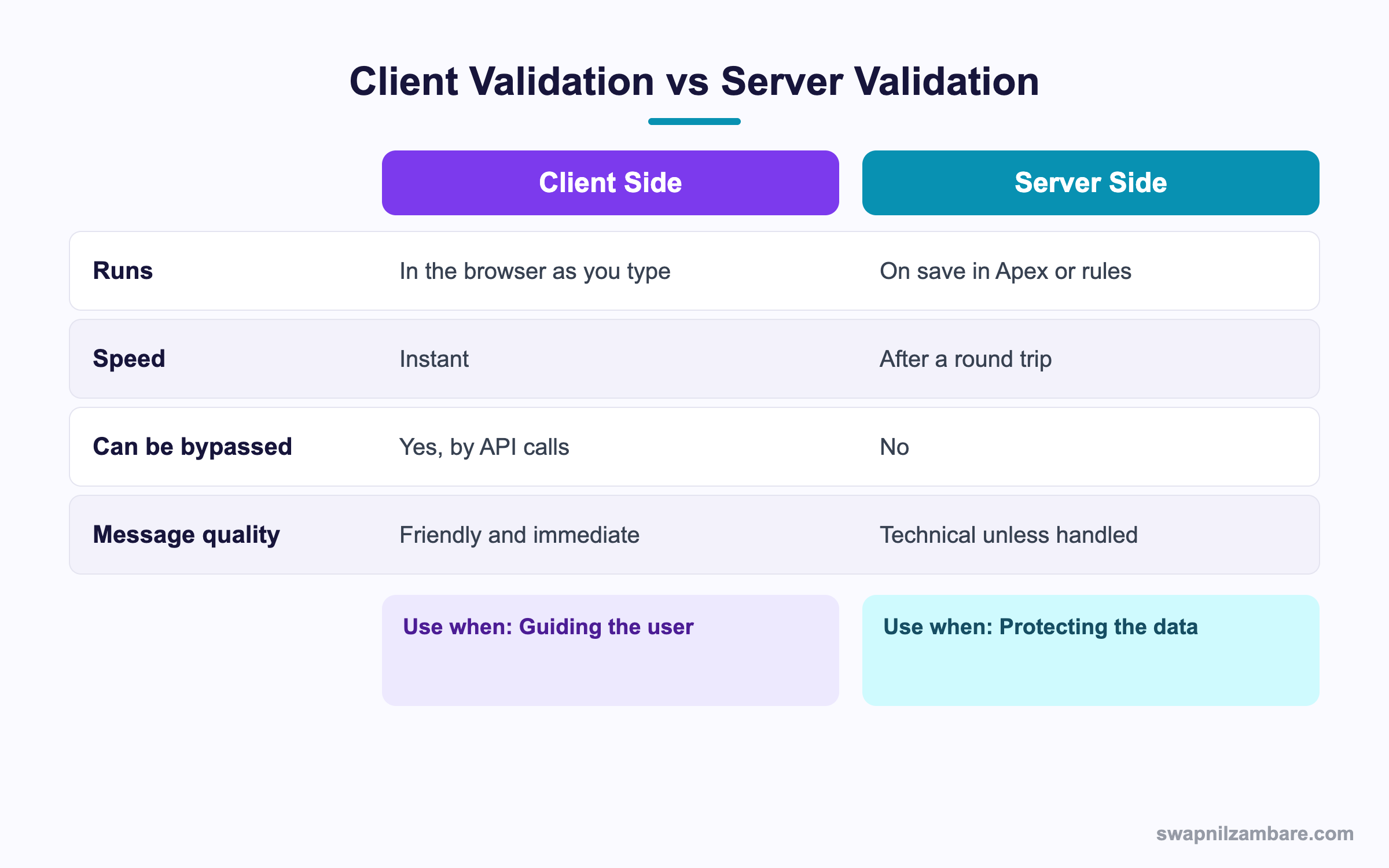
In short, client checks make the form pleasant. Server rules keep the data correct.
A Real LWC Form Validation Example
Bright Path enrols a student. The form must require a name and email, cap the fee by the user’s limit, and show any Apex error clearly.
Step 1: The Template
<template>
    <lightning-card title="New enrolment">
        <div class="slds-var-m-around_medium">
            <lightning-input
                data-id="name"
                label="Student name"
                required
                message-when-value-missing="Student name is required">
            </lightning-input>

            <lightning-input
                data-id="email"
                type="email"
                label="Parent email"
                required
                message-when-type-mismatch="Enter a valid email">
            </lightning-input>

            <lightning-input
                data-id="fee"
                type="number"
                label="Fee"
                required
                min="0"
                onchange={handleFeeChange}>
            </lightning-input>

            <lightning-button
                label="Enrol"
                variant="brand"
                onclick={handleSave}>
            </lightning-button>
        </div>
    </lightning-card>
</template>
Step 2: The Logic
import { LightningElement, wire } from 'lwc';
import getLimit from '@salesforce/apex/DiscountGuard.maxFee';

export default class EnrolForm extends LightningElement {
    maxAllowed = 0;

    @wire(getLimit) wiredLimit({ data }) {
        if (data) { this.maxAllowed = data; }
    }

    handleFeeChange(event) {
        const input = event.target;
        const over = Number(input.value) > this.maxAllowed;
        input.setCustomValidity(over
            ? 'Fee is above your limit of ' + this.maxAllowed
            : '');
        input.reportValidity();
    }

    handleSave() {
        const inputs = [...this.template.querySelectorAll('lightning-input')];
        const valid = inputs.reduce(
            (ok, i) => { i.reportValidity(); return ok && i.checkValidity(); }, true);
        if (!valid) { return; }
        this.save();
    }
}
Step 3: What the User Sees
These are the messages the form produces.
| Situation | Message shown |
|---|---|
| Name left blank | Student name is required |
| Email missing the at sign | Enter a valid email |
| Fee above the limit | Fee is above your limit of 10000 |
| Validation rule fails on save | The rule’s own message in a toast |
| Network drops | Could not save, with the raw error |
Common Mistakes with LWC Form Validation
- Forgetting to clear setCustomValidity with an empty string.
- Calling checkValidity without reportValidity, so nothing is shown.
- Relying on client checks for security, which an API call bypasses.
- Querying inputs by label, which breaks when the label changes.
- Swallowing the catch block, so the user sees nothing after a failed save.
Best Practices for LWC Form Validation
- Use built in attributes first, since they handle accessibility.
- Give every rule its own message attribute.
- Clear custom validity on every change, not only on failure.
- Use data-id attributes for stable selectors.
- Always enforce the real rule in Apex or a validation rule as well.
Practice Task
Build a form with a required text field and a number field capped at 100. Show a custom message when the number is too high, and clear it when corrected. Hint: setCustomValidity with an empty string clears it.
Most Asked LWC Form Validation Interview Questions
These LWC Form Validation questions come up in component interviews.
Basic LWC Form Validation Interview Questions
Q1: What is LWC Form Validation?
LWC Form Validation is how a component checks user input, using built in attributes on base components plus your own custom rules.
Q2: Which attribute makes a field mandatory?
In LWC Form Validation, the required attribute on lightning-input does it.
Q3: What does checkValidity do?
It returns true or false for the field, but it shows nothing to the user.
Q4: What does reportValidity do?
It checks the field and also displays the error message on screen.
Q5: How do you set your own error message?
Call setCustomValidity on the input with your text, and then call reportValidity to show it.
Q6: How do you clear a custom error?
Call setCustomValidity with an empty string.
Q7: Which attribute limits text length?
The max-length attribute, with message-when-too-long for the message.
Q8: Do client side checks protect data?
No. They guide the user, while Apex and validation rules protect the data.
Intermediate LWC Form Validation Interview Questions
Q9: How do you validate every field at once?
Query all the inputs, call reportValidity on each and combine the checkValidity results.
Q10: Why use data-id instead of a class selector?
Because it is a stable hook that does not change when styling or labels change.
Q11: How do you compare two fields, such as dates?
Read both values in a handler, then set a custom validity message on the second field.
Q12: How do you show an Apex error to the user?
Catch it, read the message from error.body and display a toast or inline text.
Q13: Why is reading the error message awkward?
Because Salesforce returns different shapes for Apex, field and page level errors, so a helper is useful.
Q14: Does lightning-record-form need manual validation?
No. It validates through the UI API, so required fields and rules are handled for you.
Q15: What is a pattern attribute?
A regular expression the value must match, with message-when-pattern-mismatch for the error.
Q16: Can you validate on blur rather than on change?
Yes. Handle the blur event and run the same check there.
Advanced LWC Form Validation Interview Questions
Q17: Scenario: a rule depends on data only Apex knows. How do you handle it?
Fetch the limit with a wire, check it in the browser for speed, then enforce it again in Apex on save.
Q18: Why should the same rule exist in two places?
Because the client check is for user experience and the server check is for integrity. An API call skips the browser entirely.
Q19: How do you handle asynchronous validation, such as a duplicate check?
Call Apex on blur, await the result, then set the custom validity based on the answer.
Q20: Scenario: the field stays red after the user fixes it. What is wrong?
setCustomValidity was never cleared with an empty string on the successful path.
Q21: How do you make errors accessible?
Let the base components render them, since they wire up aria attributes and announce changes.
Q22: How do you test validation with Jest?
Render the component, set values, dispatch change events and assert on the validity state and rendered messages.
Q23: How do you surface duplicate rule errors?
Catch the DML exception, read the field errors from the output and show them against the right field.
Q24: What is the risk of heavy validation on every keystroke?
Slow typing and wasted Apex calls. So debounce the check or run it on blur instead.
Q25: Does LWC Form Validation work inside a Flow screen?
Yes. The component validates the same way, and Flow blocks Next when you report an invalid field.
Q26: How do you validate a lightning-combobox?
The same methods apply, since it also supports checkValidity and setCustomValidity. So the pattern stays consistent.
Q27: Scenario: a user pastes a value and no check runs. Why?
The handler is probably on keyup rather than change. Therefore use the change event, which fires on paste too.
Q28: Should LWC Form Validation block the save button?
Disabling the button hides why it is disabled. So leave it enabled, run the check on click and show the messages instead.
Q29: How much validation belongs in the browser?
Enough to stop obvious mistakes quickly. However, anything that protects data must also live in Apex or a validation rule.
Official Resources
Quick Recap
- LWC Form Validation combines built in attributes with custom checks.
- checkValidity is silent, while reportValidity shows the message.
- setCustomValidity sets your message, and an empty string clears it.
- Server errors arrive in several shapes, so use a helper to read them.
- Always repeat the real rule in Apex or a validation rule.
What’s Next?
Next, we bring in outside code with Static Resources and Third-Party Libraries.


