The lightning-datatable component does far more than show rows. It handles sorting, selection, inline editing, row actions and infinite loading, all through column configuration rather than markup. So a full featured table takes one tag and a JavaScript array.
This post builds on Lightning Base Components and calling Apex from LWC. We will build a course table for Bright Path Tutors.
What is lightning-datatable?
The lightning-datatable component renders a table from an array of data and an array of column definitions. Each column object says what to show, how to format it and whether users can edit it. The component handles the rest.
Think of a spreadsheet template. You define the headers and the cell types once, then pour the rows in. The grid takes care of alignment, sorting and editing.
Why lightning-datatable Matters
Hand built tables in Salesforce age badly. They miss keyboard navigation, screen reader support and the hover and focus states users expect.
Using lightning-datatable gives all of that for free. More importantly, inline editing with bulk save is hard to write correctly, and the component already does it.
How lightning-datatable Works
Data and columns go in, and events come back out when users act.
Column Types
const COLUMNS = [
    { label: 'Course', fieldName: 'Name', sortable: true },
    { label: 'Fee', fieldName: 'Fee__c', type: 'currency', editable: true },
    { label: 'Starts', fieldName: 'Start_Date__c', type: 'date' },
    { label: 'Online', fieldName: 'Is_Online__c', type: 'boolean' },
    { label: 'Level', fieldName: 'Level__c', sortable: true }
];
Supported types include text, number, currency, percent, date, email, phone, url, boolean, button and action.
Making a Link Column
A common need is linking to the record. Build the URL in Apex or JavaScript and use the url type.
{
    label: 'Course',
    fieldName: 'recordLink',
    type: 'url',
    typeAttributes: { label: { fieldName: 'Name' }, target: '_self' }
}
this.rows = data.map(row => ({
...row,
recordLink: '/' + row.Id
}));Sorting
<lightning-datatable
    key-field="Id"
    data={rows}
    columns={columns}
    sorted-by={sortedBy}
    sorted-direction={sortDirection}
    onsort={handleSort}>
</lightning-datatable>
handleSort(event) {
const { fieldName, sortDirection } = event.detail;
const cloned = [...this.rows];
cloned.sort((a, b) => {
const x = a[fieldName] ?? '';
const y = b[fieldName] ?? '';
return sortDirection === 'asc'
? (x > y ? 1 : x < y ? -1 : 0)
: (x < y ? 1 : x > y ? -1 : 0);
});
this.rows = cloned;
this.sortedBy = fieldName;
this.sortDirection = sortDirection;
}The component does not sort for you. It raises the event and you reorder the array.
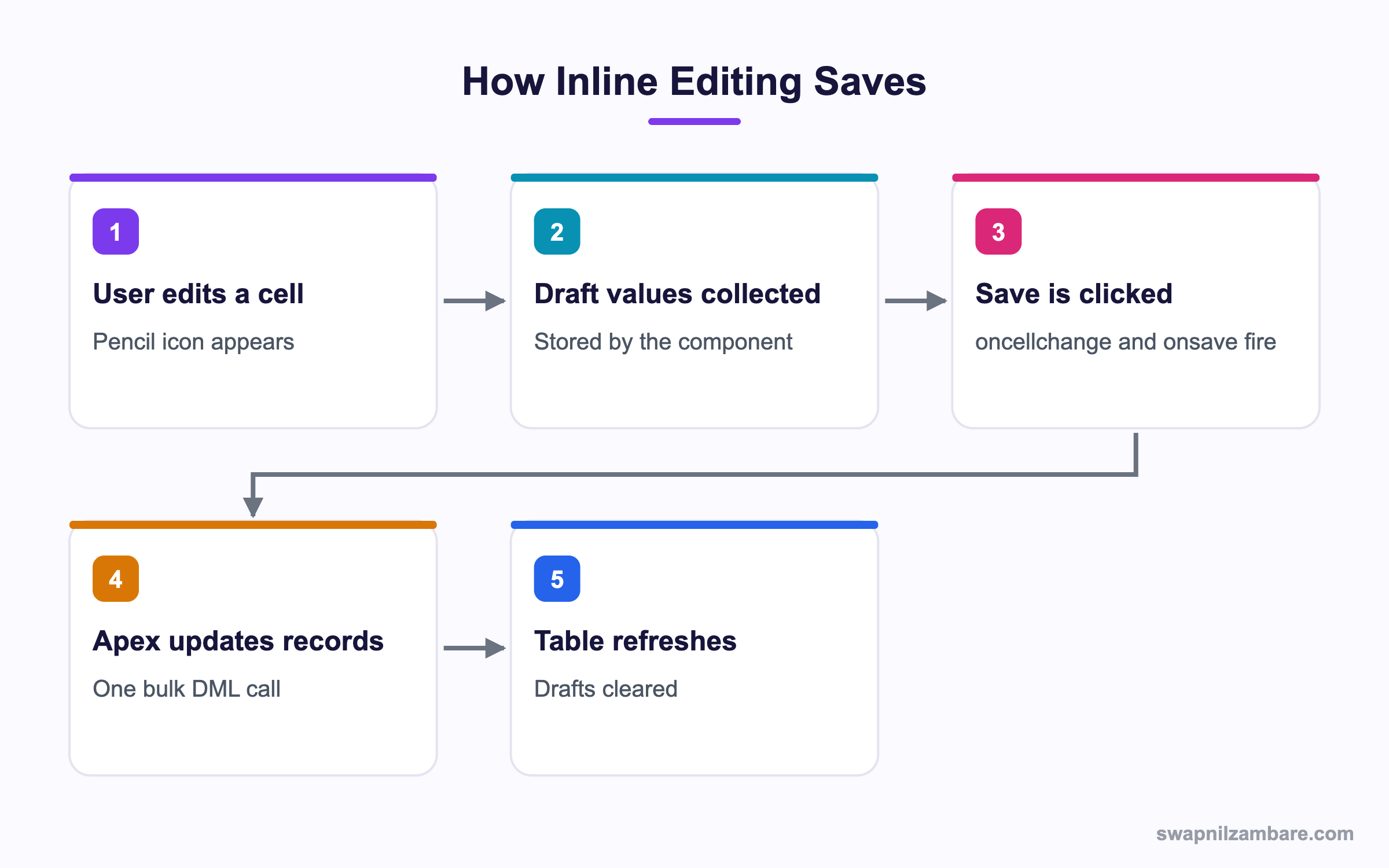
Inline Editing and Bulk Save
<lightning-datatable
    key-field="Id"
    data={rows}
    columns={columns}
    draft-values={draftValues}
    onsave={handleSave}>
</lightning-datatable>
import { updateRecord } from 'lightning/uiRecordApi';
import { refreshApex } from '@salesforce/apex';
async handleSave(event) {
const records = event.detail.draftValues.map(draft => ({ fields: { ...draft } }));
try {
await Promise.all(records.map(rec => updateRecord(rec)));
this.draftValues = [];
await refreshApex(this.wiredResult);
} catch (error) {
console.error(error);
}
}Each draft already contains the Id, because key-field told the component which field identifies a row.
Datatable Attribute Reference
This table lists the attributes you will set most.
| Attribute | Purpose |
|---|---|
| key-field | Unique field per row, required |
| data | The array of rows |
| columns | The column definitions |
| hide-checkbox-column | Removes row selection |
| max-row-selection | Limits how many rows can be ticked |
| draft-values | Holds pending inline edits |
| enable-infinite-loading | Turns on load more |
| load-more-offset | How close to the end before loading |
| is-loading | Shows the loading indicator |
Infinite Loading in lightning-datatable
For large result sets, load a page at a time rather than everything at once.
<lightning-datatable
    key-field="Id"
    data={rows}
    columns={columns}
    enable-infinite-loading
    load-more-offset="20"
    onloadmore={loadMore}>
</lightning-datatable>
async loadMore(event) {
const target = event.target;
target.isLoading = true;
const next = await getCourses({ offset: this.rows.length });
this.rows = [...this.rows, ...next];
target.isLoading = false;
if (next.length === 0) { target.enableInfiniteLoading = false; }
}Turning off infinite loading at the end stops the component asking forever. Because each page is a separate Apex call, the first paint is fast and the user scrolls into the rest. So a table of several thousand rows stays responsive, while loading everything up front would freeze the browser.
Custom Column Types for lightning-datatable
When no built-in type fits, extend the component itself.
import LightningDatatable from 'lightning/datatable';
import levelBadge from './levelBadge.html';

export default class CourseDatatable extends LightningDatatable {
    static customTypes = {
        levelBadge: {
            template: levelBadge,
            standardCellLayout: true,
            typeAttributes: ['level']
        }
    };
}
<template>
<lightning-badge label={typeAttributes.level}></lightning-badge>
</template>You then use c-course-datatable in place of the standard tag, with a column of type levelBadge. Because your class extends the real component, every other feature still works. So you keep sorting, selection and inline editing while adding the one cell style you needed.
Datatable vs Tree Grid
These two look similar. This table separates them.
| Feature | Datatable | Tree grid |
|---|---|---|
| Row structure | Flat | Parent and child |
| Expand and collapse | No | Yes |
| Inline editing | Full | Limited |
| Large data | Handles well | Heavier |
| Typical use | Record lists | Hierarchies |
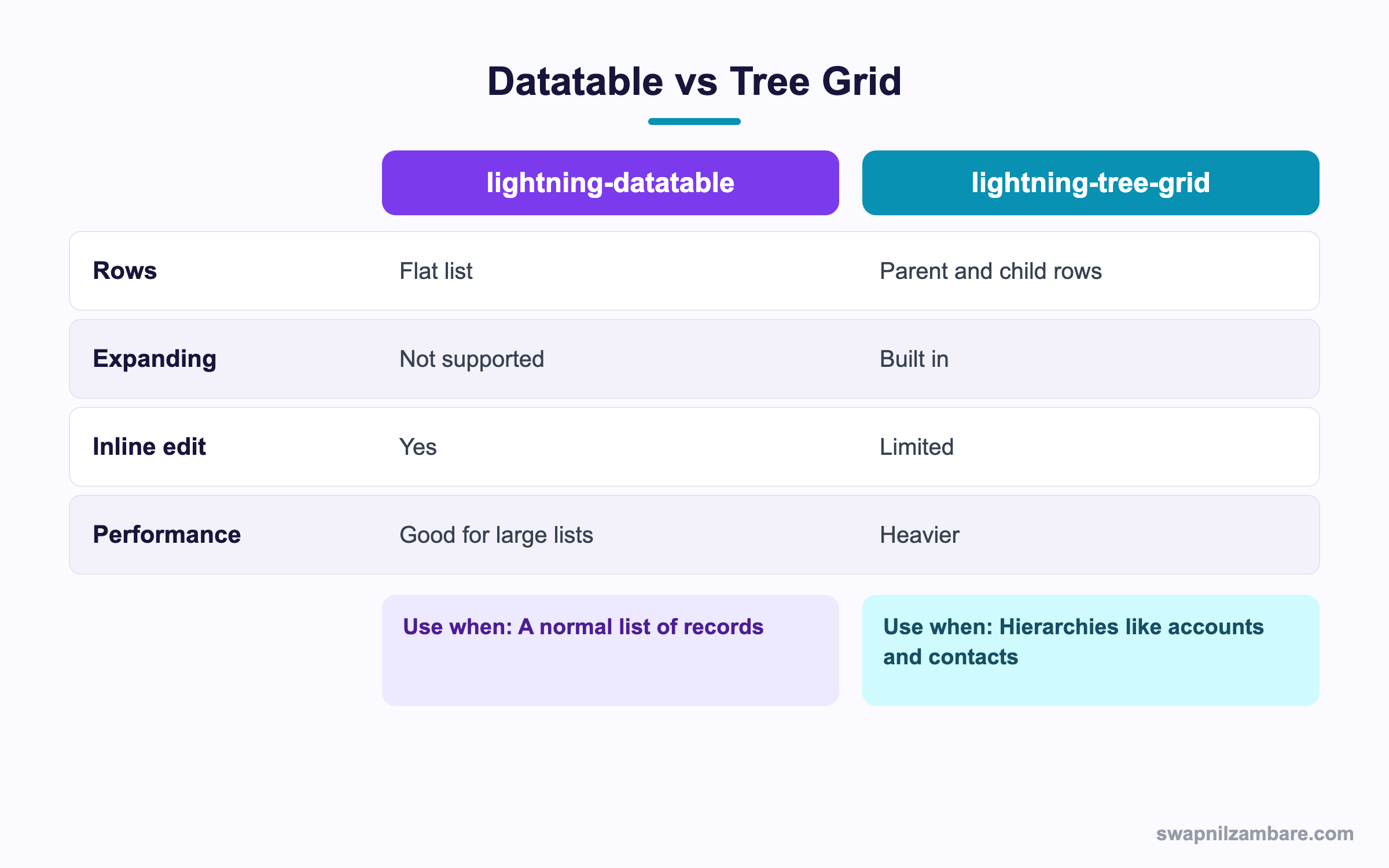
In short, use a datatable for a list. Use a tree grid only when rows genuinely nest.
A Real lightning-datatable Example
Bright Path wants a course table where counsellors edit fees inline, sort by any column and open the record in one click.
Step 1: Apex
public with sharing class CourseTableCtrl {
    @AuraEnabled(cacheable=true)
    public static List<Course__c> getCourses(Integer offset) {
        Integer skip = (offset == null) ? 0 : offset;
        return [SELECT Id, Name, Fee__c, Level__c, Start_Date__c
                FROM Course__c
                ORDER BY Name
                LIMIT 50 OFFSET :skip];
    }
}
Step 2: The Component
import { LightningElement, wire } from 'lwc';
import getCourses from '@salesforce/apex/CourseTableCtrl.getCourses';

const COLUMNS = [
    { label: 'Course', fieldName: 'link', type: 'url',
      typeAttributes: { label: { fieldName: 'Name' } }, sortable: true },
    { label: 'Fee', fieldName: 'Fee__c', type: 'currency', editable: true },
    { label: 'Level', fieldName: 'Level__c', sortable: true }
];

export default class CourseTable extends LightningElement {
    columns = COLUMNS;
    rows = [];
    draftValues = [];
    wiredResult;

    @wire(getCourses, { offset: 0 })
    wired(result) {
        this.wiredResult = result;
        if (result.data) {
            this.rows = result.data.map(r => ({ ...r, link: '/' + r.Id }));
        }
    }
}
Keeping the wired result in a property is what lets you call refreshApex later.
Step 3: Check the Behaviour
These are the features the table now has.
| Feature | How it was enabled |
|---|---|
| Clickable name | url column type with typeAttributes |
| Editable fee | editable true on the column |
| Sorting | sortable true plus an onsort handler |
| Bulk save | draft-values and onsave |
| Refresh after save | refreshApex on the stored wire result |
Common Mistakes with lightning-datatable
- Leaving out key-field, which breaks row tracking and editing.
- Expecting the component to sort for you, when it only raises the event.
- Mutating the rows array directly instead of replacing it.
- Loading thousands of rows at once rather than paging.
- Forgetting refreshApex, so saved values do not reappear.
Best Practices for lightning-datatable
- Always set key-field to Id.
- Replace arrays rather than pushing into them, so reactivity fires.
- Use infinite loading beyond a few hundred rows.
- Keep editable columns to the few that users actually change.
- Clear draft values after a successful save.
Practice Task
Build a table with three columns where one is editable, and clear the drafts after save. Hint: the draft values already include the record Id.
Most Asked lightning-datatable Interview Questions
These lightning-datatable questions appear in most LWC interviews.
Basic lightning-datatable Interview Questions
Q1: What is lightning-datatable?
The lightning-datatable component renders a table from a data array and a column definition array, with sorting, selection and editing built in.
Q2: What does key-field do?
It names the unique field per row, usually Id, so lightning-datatable can track rows across edits and sorts.
Q3: How do you make a column editable?
Set editable to true in that column definition, and a pencil icon then appears on hover.
Q4: Which event fires when a user saves inline edits?
The onsave event fires, and its detail holds the draft values the user changed.
Q5: How do you remove the checkbox column?
Add the hide-checkbox-column attribute to the tag.
Q6: What column types are available?
The lightning-datatable types include text, number, currency, percent, date, email, phone, url, boolean, button and action.
Q7: How do you add a menu to each row?
Use a column of type action with rowActions, then handle onrowaction.
Q8: Does the component sort automatically?
No. It fires onsort and you reorder the array yourself.
Intermediate lightning-datatable Interview Questions
Q9: How do you link to a record from a cell?
Add a url field to each row in JavaScript, then use a url column with typeAttributes for the label.
Q10: What is refreshApex used for?
It re-runs a wired Apex call, so the table shows fresh data after a save.
Q11: Why must you store the wire result?
Because refreshApex needs the whole result object, not just the data array.
Q12: How does infinite loading work?
Set enable-infinite-loading, handle onloadmore, fetch the next page and append it to the array.
Q13: How do you stop infinite loading at the end?
Set enableInfiniteLoading to false on the target once an empty page comes back.
Q14: Why replace the array instead of pushing to it?
Because reactivity watches the reference. Pushing mutates in place, so the component may not re-render.
Q15: How do you limit row selection?
Set max-row-selection to the number of rows allowed.
Q16: Do inline edits respect validation rules?
Yes. The update goes through normal DML, so rules, triggers and flows all run.
Advanced lightning-datatable Interview Questions
Q17: How do you create a custom column type?
Extend LightningDatatable, declare customTypes with a template, then use your component instead of the standard tag.
Q18: Scenario: a table of 10,000 rows is unusable. What do you change?
Page the data in Apex with LIMIT and OFFSET, use infinite loading and reduce the number of columns.
Q19: What is the problem with large OFFSET values?
SOQL caps OFFSET at 2,000. So for deep paging use a key-set filter on the last Id or sort value instead.
Q20: Scenario: saved edits vanish after refresh. Why?
The draft values were not cleared or refreshApex was not called, so the old cached data came back.
Q21: How do you show a toast after a bulk save?
Handle onsave, await the updates, then dispatch a ShowToastEvent with the count.
Q22: How does the component handle field level security?
It renders whatever your Apex returns. So enforce security in the query, because the table does not.
Q23: How do you test a datatable component?
With Jest, asserting on the rendered rows and firing the events the component listens for.
Q24: When should you not use lightning-datatable?
When rows nest, when the design is far from a grid, or when users need rich editing that the cell types do not cover.
Q25: Can lightning-datatable show a row number?
Yes, with the show-row-number-column attribute. So long tables become easier to discuss with a colleague.
Q26: How do you pre-select rows?
Set selected-rows to an array of key field values. Then the component ticks those rows on load.
Q27: Does lightning-datatable work on mobile?
Yes, and it scrolls horizontally on small screens. However, fewer columns make it far more usable on a phone.
Q28: Scenario: currency shows the wrong symbol. What do you check?
The user locale and the org currency settings, since the column formats by user locale rather than by record.
Q29: How do you export the rows to CSV?
Build the CSV string in JavaScript from your data array and trigger a download. The component has no export of its own.
Official Resources
- Component Reference: lightning-datatable
- LWC Guide: Create a Custom Data Type
- Apex Reference: refreshApex
Quick Recap
- lightning-datatable builds a full table from data and column arrays.
- key-field is required and should be Id.
- Sorting fires an event, but you reorder the array.
- Inline edits arrive as draft values on the onsave event.
- Use infinite loading and paging for large result sets.
What’s Next?
Next, we handle user input properly with LWC Form Validation.


