LWC Shadow DOM is the invisible wall Salesforce puts around the markup your component renders. Everything inside that wall belongs to your component. Page styles cannot reach in, outside scripts cannot easily read it, and your own queries cannot look out.
Light DOM is the opposite choice. The same template renders straight into the page, with no wall at all. One line of code switches between them, and that one line changes styling, testing and tool access.
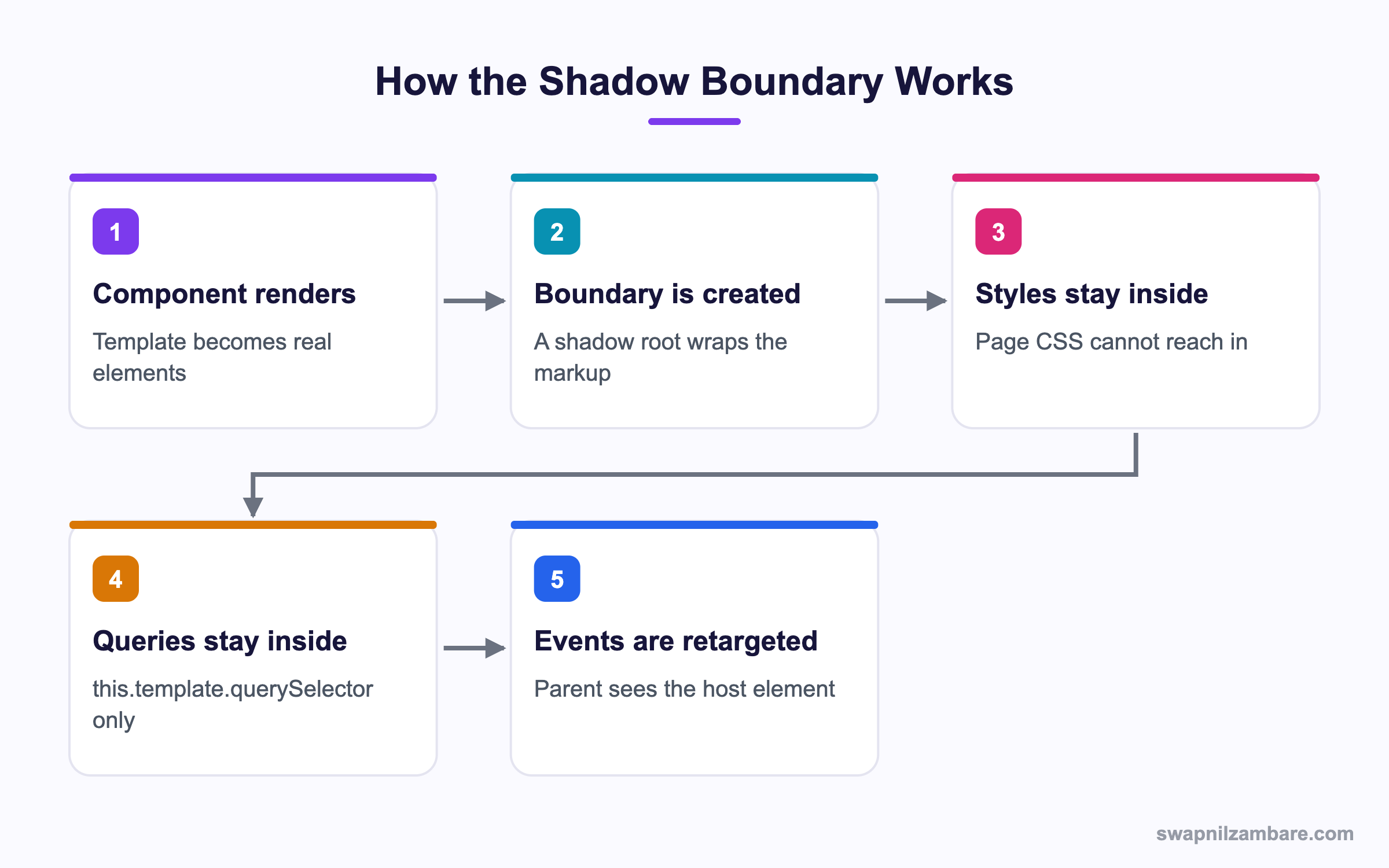
Caption: The boundary is created once, during the first render, and everything after that respects it.
What Is LWC Shadow DOM
When a Lightning Web Component renders, the browser attaches a shadow root to the host element. Your template lives under that root instead of in the open page.
Picture a hotel room. The corridor is the page. Your furniture is the markup. The door is the shadow boundary. Guests in the corridor cannot rearrange your furniture, and you cannot borrow a lamp from the corridor.
That is why this.template.querySelector exists. It searches inside your room only. A plain document.querySelector searches the corridor and finds nothing of yours.
Synthetic and Native Shadow
LWC Shadow DOM ships in two versions. Synthetic shadow is a JavaScript copy of the behaviour, built for older browsers. Native shadow uses the browser feature directly and is faster.
Native shadow is stricter. Code that quietly worked under synthetic shadow can fail once native shadow is on, usually because it reached across the boundary. Test with native shadow enabled in a scratch org before you trust it.
Why LWC Shadow DOM Matters
| Benefit | What it protects you from |
|---|---|
| Style isolation | A page stylesheet breaking your layout |
| Markup privacy | Another team querying your internals |
| Safe class names | A clash with a class used elsewhere |
| Stable upgrades | Outside code depending on your DOM shape |
LWC Shadow DOM is the reason base components stay reliable. Nobody can reach inside lightning-input and move things, so Salesforce can change its internals without breaking your page. The post on base components shows how much sits behind each of those tags.
How LWC Shadow DOM Changes Your Code
Four habits come straight from LWC Shadow DOM.
Querying Elements
const row = this.template.querySelector('.row');
const all = this.template.querySelectorAll('lightning-input');
Run these in renderedCallback or later. In connectedCallback the markup does not exist yet, so the result is null.
Using Refs Instead
A lwc:ref attribute is cleaner than a class selector, because a styling change cannot break it.
<input lwc:ref="fee" type="number" />this.refs.fee.focus();Styling
Your component CSS is scoped automatically, so a .row rule only hits your rows. To style the host element itself, use the host selector.
' :host { display: block; padding: 0.5rem; }To let a parent pass a value in, expose a CSS custom property. That is the supported route, and styling hooks covers the full set Salesforce publishes.
Events
An event that crosses the boundary is retargeted. The parent sees your host element as the target, not the inner button that was clicked. So put the data you need in the event detail rather than reading the target.
LWC Shadow DOM vs Light DOM
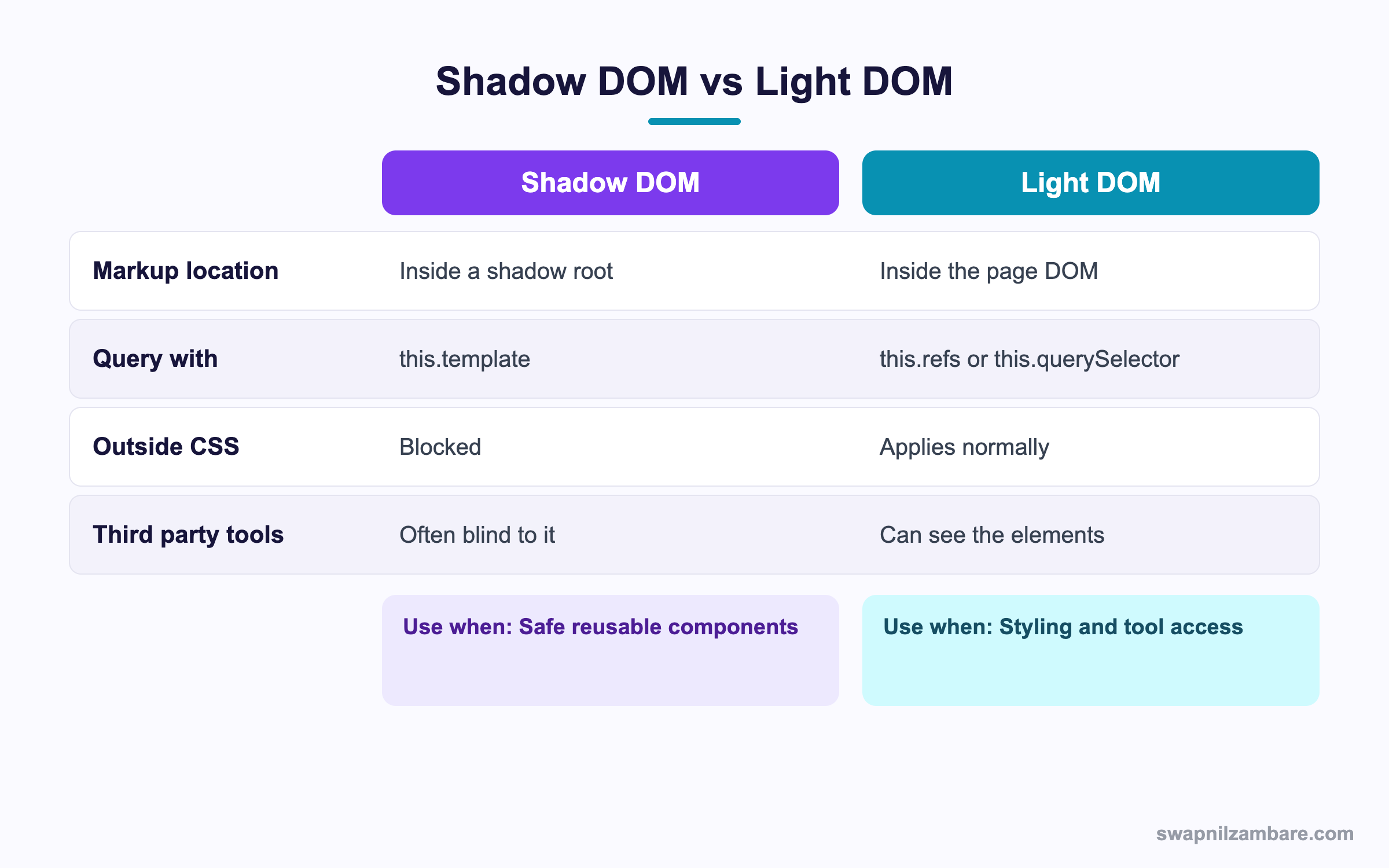
Caption: Light DOM trades protection for access, so pick it only when you need the access.
LWC Shadow DOM is the default, and light DOM is switched on with a single static field.
export default class CourseCard extends LightningElement {
  static renderMode = 'light';
}
The template then needs a matching attribute, otherwise the markup still renders in a shadow root.
<template lwc:render-mode="light">
  <div class="card">Course details</div>
</template>
Once that is in place, three things change. Page CSS applies to your markup. this.querySelector works instead of this.template.querySelector. Outside scripts and testing tools can read the elements.
When Light DOM Is the Right Call
- An analytics or accessibility tool has to read your markup
- A third party library needs to attach to your elements
- A design team wants to restyle the component from a page level stylesheet
- You are building an Experience Cloud component that must inherit site branding
When to Stay with LWC Shadow DOM
- The component ships in a managed package
- Many teams drop the component on their own pages
- The internal markup is likely to change
- You want class names you never have to think about
The default is shadow for a reason. Switch to light DOM when a real requirement asks for it, not as a shortcut around a styling problem.
A Real LWC Shadow DOM Example
In our Bright Path Tutors org we built a course card that shows Course__c fields with a fee badge. The marketing team then asked to restyle the badge from the site stylesheet so it matched a campaign.
Our first attempt added CSS to the Experience Cloud page, and LWC Shadow DOM stopped it. Nothing happened, because the badge sat behind the boundary. We had two honest options.
| Option | What we did | Result |
|---|---|---|
| Keep shadow | Exposed a CSS custom property for the badge colour | Marketing sets one value, internals stay safe |
| Switch to light | Set renderMode to light on the card | Full styling freedom, no privacy left |
We kept shadow and exposed the property. The campaign shipped, and six months later we renamed the inner markup with no calls from marketing. That is the payoff.
Testing Across Both Modes
Jest sees whichever mode the component declares, so LWC Shadow DOM shapes your test selectors too. A test written for shadow markup, fails after a switch to light. Query through the component root rather than document, and keep selectors on lwc:ref values where you can. The post on Jest testing walks through setting that up.
For manual checks on LWC Shadow DOM, open the browser inspector. Shadow markup appears under a shadow root node. Light markup sits in the normal tree with no such node.
Common Mistakes with LWC Shadow DOM
| Mistake | What you see | Fix |
|---|---|---|
| document.querySelector for your own markup | Always null | Use this.template or this.refs |
| Querying in connectedCallback | Null element | Move the query to renderedCallback |
| Page CSS aimed at inner classes | No visible change | Expose a CSS custom property |
| Reading event.target in the parent | The host element, not the button | Pass values in event detail |
| Light DOM field with no template attribute | Still renders in shadow | Add the render mode attribute |
| Native shadow turned on late | Old code suddenly breaks | Test with native shadow early |
Best Practices for LWC Shadow DOM
- Treat the boundary as a contract and keep your internals private
- Use
lwc:refrather than class selectors for element access - Expose CSS custom properties for anything a parent may want to change
- Put all data a parent needs into the event detail
- Enable native shadow in a scratch org and fix what breaks there
- Document the render mode at the top of the component
- Switch to light DOM only when a tool or library genuinely requires it
Quick Reference Table
| Task | Shadow DOM | Light DOM |
|---|---|---|
| Find an element | this.template.querySelector | this.querySelector |
| Named element | this.refs.name | this.refs.name |
| Style the wrapper | host selector | normal class selector |
| Outside CSS reach | Blocked | Allowed |
| Declare the mode | Nothing, it is the default | renderMode plus template attribute |
Most Asked LWC Shadow DOM Interview Questions
Q1: What is shadow DOM in one sentence?
It is a boundary around a component’s markup that keeps styles and queries from crossing in either direction.
Q2: Why does this.template.querySelector exist?
Because the markup sits inside a shadow root. The template property is the handle on that root.
Q3: What does document.querySelector return for your component markup?
Null under shadow DOM, since the elements are not in the open page tree.
Q4: What is light DOM?
A render mode where the template renders into the page DOM with no boundary at all.
Q5: How do you switch a component to light DOM?
Set the static renderMode field to light and add the matching render mode attribute to the template.
Q6: What breaks if you set the field but forget the template attribute?
The component still renders in a shadow root, so your page CSS and queries keep failing.
Q7: What is the difference between synthetic and native shadow?
Synthetic shadow is a JavaScript stand in for older browsers. Native shadow uses the real browser feature and enforces the rules more strictly.
Q8: Why test with native shadow turned on?
Code that leaked across the boundary often works under synthetic shadow and fails under native shadow.
Q9: How do you style the component wrapper itself?
With the host selector in the component stylesheet.
Q10: How does a parent change a colour inside a shadow component?
The child exposes a CSS custom property and the parent sets its value.
Q11: Why does event.target in the parent point at the host element?
Events crossing the boundary are retargeted, so the parent sees the component rather than the inner element.
Q12: What is the safe way to send data up from a child?
Put it in the event detail object when you create the custom event.
Q13: Does LWC Shadow DOM affect accessibility?
It can, because an aria reference cannot point across the boundary. Keep the label and the input in the same component.
Q14: Which selector survives a styling refactor better, a class or a ref?
A ref, since class names move around during styling work and refs do not.
Q15: When should a packaged component use light DOM?
Almost never. A package benefits most from the privacy that shadow DOM gives.
Q16: Scenario: a page stylesheet styles your button and nothing changes. Why?
The button is behind the shadow boundary. Expose a custom property or move to light DOM.
Q17: Scenario: a test passed yesterday and fails after a render mode switch. Why?
The test queries through this.template and the markup is now in the page tree. Query through the component root instead.
Q18: Can a shadow component contain a light component?
Yes. Render mode is per component, so the two mix freely in one tree.
Q19: Does light DOM make a component faster?
Slightly, since there is no boundary to maintain, but the difference is rarely the reason to switch.
Q20: How do slots behave under each mode?
Slotted content works in both, though in light DOM the slotted elements end up in the page tree.
Q21: Can an outside script read a light DOM component?
Yes. That access is the main reason teams pick light DOM.
Q22: How do you see the boundary in the browser?
The inspector shows a shadow root node above your markup. Light DOM has no such node.
Q23: Does LWC Shadow DOM block Apex or wire calls?
No. The boundary is about markup and styles only, so data calls work the same way.
Q24: Is scoped CSS the same thing as shadow DOM?
No. Scoped CSS is a build step that rewrites selectors, while shadow DOM is a runtime boundary in the browser.
Q25: What is the one habit that avoids most boundary bugs?
Never reach outside your own component. Pass data down with properties and up with events.
Q26: How do you decide between the two modes on a new component?
Start with shadow. Move to light only when a named tool, library or branding requirement needs the open markup.
Q27: Does light DOM remove style scoping inside the component?
Your stylesheet is still scoped to the component, but page rules can now also reach your elements.
Q28: Can you change render mode after a component ships?
Yes, but treat it as a breaking change, because styling and tests both depend on it.
Official Resources
- Lightning Web Components Developer Guide
- Lightning Web Components Basics on Trailhead
- Lightning Web Components Recipes
What Is Next
Next, read Lightning Web Security vs Lightning Locker Explained.


