Lightning Web Security is the sandbox Salesforce runs your component JavaScript inside. It replaced Lightning Locker, and the switch changed which outside libraries work, how globals behave, and what you need to test before a release.
Both systems exist for the same reason. A Salesforce page can hold components from your team, from a consultant, and from three managed packages. None of them should be able to read each other’s data or rewrite each other’s markup.
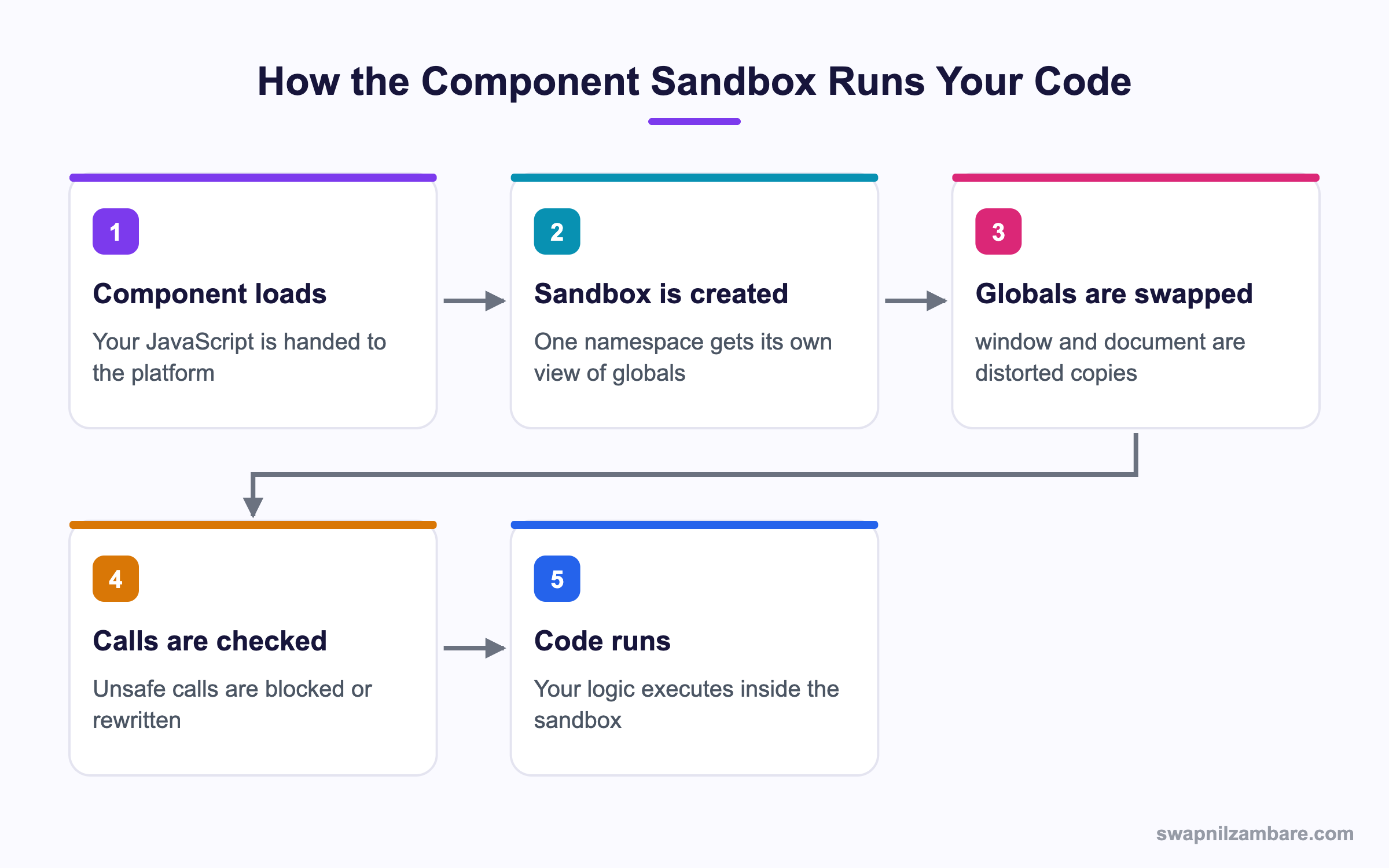
Caption: Each namespace gets its own sandbox, so one component cannot see another one’s variables.
What Is Lightning Web Security
Lightning Web Security gives every namespace a separate JavaScript sandbox. Inside that sandbox your code sees distorted copies of the browser globals. The window object looks normal, but a few properties are changed or removed to stop one component reaching another.
Think of a shared kitchen with a separate cupboard per family. Everyone cooks with the same stove, and nobody opens the wrong cupboard.
The key difference from the old model is where the protection sits. Lightning Locker wrapped every object in a secure proxy, so a plain library call often hit something that was not quite a real object. Lightning Web Security leaves the objects real and changes only the risky entry points.
What Distortion Means
A distortion is a small change to a global so it cannot be used to cross a boundary. Here are four you may meet.
document.cookiereturns nothing usefulwindow.toppoints at your own framelocalStorageis partitioned per namespace- Some
iframetricks are blocked
Your code still reads as ordinary JavaScript. Most of the time you never notice the distortions at all.
Why Lightning Web Security Matters
| Benefit | What it gives you |
|---|---|
| Library support | Charting and date libraries run with no patching |
| Real objects | No proxy surprises during debugging |
| Namespace isolation | A package cannot read your component state |
| Modern JavaScript | Newer syntax and APIs are allowed |
Library support is the headline. Teams that spent days patching a library for Lightning Locker usually find the same library runs untouched under Lightning Web Security. If you load libraries from stored files, the pattern is in the post on static resources.
How to Turn Lightning Web Security On
It is a single setting, but the order of work matters.
- Open Setup and search for Session Settings
- Find the Lightning Web Security option
- Switch it on in a sandbox or scratch org first
- Run every component that loads an outside library
- Run your Jest suite and your UI tests
- Fix what breaks, then schedule the production change
New orgs have it on already. Older orgs may still sit on Lightning Locker, which is why this check is worth doing before any release that touches components.
Checking What Is Active
The Session Settings page shows the current state. For a quick runtime check, log a distorted global and look at the result.
console.log(typeof window.top);
console.log(document.cookie);
A silent empty cookie value is a good sign the sandbox is active.
Lightning Locker vs Lightning Web Security
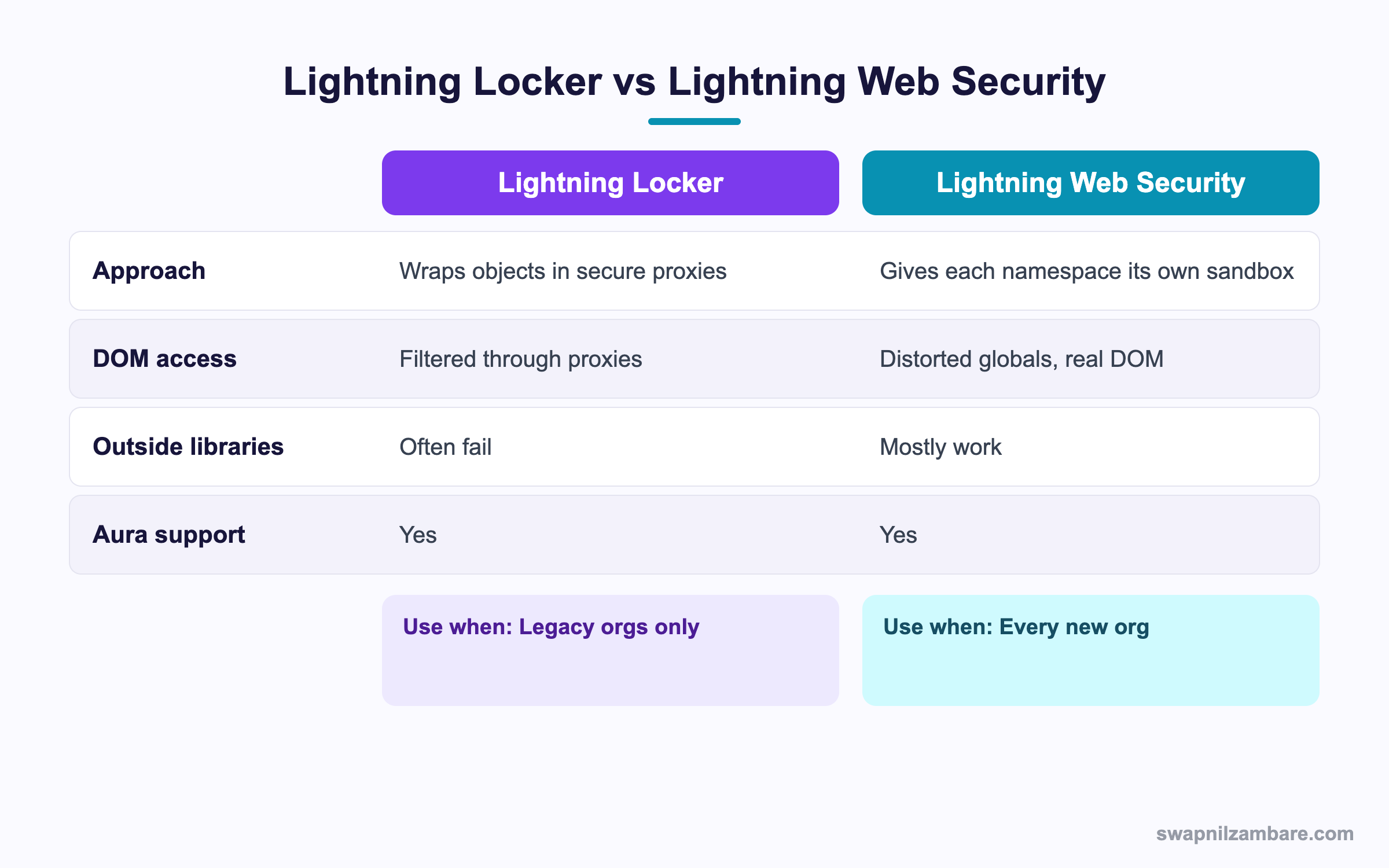
Caption: Both protect the page, but only one lets normal libraries behave normally.
Lightning Locker is the older model. It wrapped DOM nodes, arrays and objects in secure wrappers. The wrapper looked close enough to the real thing for your own code, but library code that checked object types or walked the DOM often tripped over it.
Lightning Web Security took a different route. Each namespace runs in its own sandbox, and the objects inside are real. Only a short list of globals is distorted. The result is that your code and your libraries behave the way the documentation says they should.
| Question | Lightning Locker | Lightning Web Security |
|---|---|---|
| Are DOM nodes real objects | No, they are proxies | Yes |
| Can two namespaces share a variable | No | No |
| Does a charting library work | Often needs patching | Usually works as shipped |
| Is it on by default in new orgs | No | Yes |
| Does it cover Aura components | Yes | Yes |
Aura support arrived later, so an org with many Aura components should test those as carefully as the Lightning Web Components. The post on Aura basics covers what those components still do.
What Breaks Under Lightning Web Security
Most code survives the switch. The failures fall into five groups.
| Pattern | Why it fails | What to do |
|---|---|---|
| Reading document.cookie | The value is distorted | Store state in a record or in Apex |
| Reaching window.top or parent | It points at your own frame | Pass data with events or messages |
| Shared localStorage across namespaces | Storage is partitioned | Keep each namespace self contained |
| Libraries using document.write | The call is blocked | Pick a library version that builds DOM nodes |
| Global jQuery expected by a plugin | Globals are per sandbox | Load both files in the same component |
That last one catches people. A plugin that expects a jQuery global cannot see one loaded by a different component, because each sandbox has its own globals. Load the core library and the plugin together in one component.
import { loadScript } from 'lightning/platformResourceLoader';
import jq from '@salesforce/resourceUrl/jquery';

await loadScript(this, jq + '/jquery.min.js');
await loadScript(this, jq + '/plugin.min.js');
A Real Lightning Web Security Example
Our Bright Path Tutors org had a fee report component that drew a chart and remembered the chosen level in localStorage. Two components used the same storage key, one in our namespace and one from a package.
After the switch, each component read its own copy and the two stopped agreeing. The fix was honest and simple.
| Before | After |
|---|---|
| Shared localStorage key | A field on a custom setting |
| Each namespace saw a different value | One value every component reads |
| No audit of who changed it | Field history on the setting record |
The replacement read is a plain Apex call, so every component gets the same answer.
public with sharing class FeeReportService {
    @AuraEnabled(cacheable=true)
    public static String defaultLevel() {
        return Report_Settings__c.getOrgDefaults().Default_Level__c;
    }
}
The change took an hour and the data became easier to support. Lightning Web Security pushed us toward the better design.
Testing Before You Switch
- Enable it in a scratch org, not in your main sandbox first
- Open every component that loads an outside library and watch the console
- Run the Jest suite, since some mocks assume the old globals
- Click through any component that uses an iframe or a popup window
- Check components from managed packages, because vendors move at their own pace
Jest runs outside the browser sandbox, so a green test suite is not proof on its own. Pair it with a manual pass. The post on Jest testing explains what those tests do cover.
Common Mistakes with Lightning Web Security
| Mistake | What you see | Fix |
|---|---|---|
| Switching it on in production first | Live pages break | Test in a scratch org |
| Trusting Jest alone | Browser only failures slip through | Add a manual click through |
| Loading a plugin in a different component | The global is undefined | Load core and plugin together |
| Using cookies for state | Empty values | Move state to a record or setting |
| Assuming Aura is unaffected | Aura components fail too | Test both models |
Best Practices for Lightning Web Security
- Keep every component self contained, with no shared globals
- Load a library and its plugins in the same component
- Store state in Salesforce records rather than browser storage
- Pass data between components with events or Lightning Message Service
- Pin and record the library versions you have tested
- Retest after any library upgrade, not only after a platform release
- Read the vendor release notes for managed packages before you switch
Most Asked Lightning Web Security Interview Questions
Q1: What is Lightning Web Security in one line?
It is a per namespace JavaScript sandbox that keeps components on the same page from reading or changing each other.
Q2: What did it replace?
Lightning Locker, which protected the page by wrapping objects in secure proxies.
Q3: What is the main technical difference between the two?
Locker wrapped objects in proxies, while the newer model keeps objects real and distorts a small set of globals.
Q4: What is a distortion?
A deliberate change to a browser global so it cannot be used to cross a namespace boundary.
Q5: Give three examples of distorted globals.
document.cookie returns nothing useful, window.top points at your own frame, and localStorage is partitioned per namespace.
Q6: Why do outside libraries work better under the newer model?
Because they receive real DOM objects instead of proxies, so type checks and DOM walks behave normally.
Q7: Is Lightning Web Security on by default?
Yes in new orgs. Older orgs may still run Lightning Locker until an admin switches it.
Q8: Where do you turn it on?
On the Session Settings page in Setup.
Q9: Does it cover Aura components?
Yes. Support for Aura arrived after the first release, so Aura code needs testing too.
Q10: Why can one component not see a jQuery global loaded by another?
Each namespace has its own sandbox with its own globals. So load the library and its plugins in one component.
Q11: What happens to localStorage across namespaces?
Each namespace gets its own partition, so two components no longer share a key.
Q12: Why does document.cookie stop working?
Cookies are a cross component leak, so the value is distorted. Keep state in a record instead.
Q13: Does Lightning Web Security block Apex calls?
No. It governs JavaScript and the DOM, so wire calls and imperative Apex calls are unaffected.
Q14: Will a Jest suite catch problems with the switch?
Not reliably. Jest runs outside the browser sandbox, so pair it with a manual pass.
Q15: Scenario: a chart worked under Locker and now shows nothing. Where do you look first?
The console. A blocked document.write call or a missing global is the usual cause.
Q16: Scenario: a package component breaks after you switch. What is the right move?
Check the vendor release notes and log a case with them, rather than patching their code.
Q17: How should you test the switch safely?
Enable it in a scratch org, exercise every component that loads a library, then plan the sandbox and production changes.
Q18: Does Lightning Web Security affect performance?
It is generally faster than Locker, since there are no proxy layers around every object.
Q19: Can you use an iframe under the newer model?
Yes, but some cross frame tricks are blocked. Keep communication inside the platform where you can.
Q20: What replaces a shared browser storage key?
A custom setting or a record field, which every component reads the same way.
Q21: How do components talk to each other safely?
With custom events inside a hierarchy, or Lightning Message Service across the page.
Q22: Is Lightning Web Security the same as CSP?
No. Content Security Policy controls which outside resources load, while this sandbox governs what your JavaScript can touch.
Q23: Does it change how CSP trusted sites work?
No. You still register outside endpoints and resources the same way.
Q24: What should you do before any library upgrade?
Retest the component in a sandbox, since a new library build can reach for a distorted global.
Q25: Why is per namespace isolation useful for consultants?
Their code cannot read your component state, and yours cannot read theirs, so one page can hold work from several teams.
Q26: Can you opt a single component out of the sandbox?
No. The setting is org wide, so plan the change as one piece of work.
Q27: What is the single best habit for life under this model?
Keep every component self contained, with no reliance on shared globals or browser storage.
Q28: How do you explain the change to an admin?
One setting swaps the old protection model for the newer one, outside libraries behave better, and the whole org moves together.
Official Resources
- Lightning Web Components Developer Guide
- Session Settings in Salesforce Help
- Lightning Web Components Basics on Trailhead
What Is Next
Next, read GraphQL Wire Adapter in LWC Explained with Examples.


