Aura Components are the older Salesforce framework for building Lightning UI, and many orgs still have dozens of them. As an LWC developer, you rarely build new Aura, but you will read, fix and slowly replace it. Knowing the basics also helps you wrap LWC inside Aura when a feature still needs it.
In this post, you will learn the Aura bundle files, attributes and expressions, controllers and helpers, calling Apex, Aura events, and how LWC and Aura work together. It builds on Lightning Web Components basics, LWC custom events and LWC performance. This is the last post of Level 8.
What are Aura Components?
Aura Components are UI building blocks written with Salesforce’s Aura framework. Each component is a bundle with a .cmp markup file, a JavaScript controller, an optional helper and other optional files. They use Aura-specific syntax, such as aura:attribute and {!v.courseName}, instead of standard web features.
Think of an older car model that a garage still services. It runs well, and many customers drive it. However, new cars use modern parts, and mechanics learn the old model mainly to maintain it. Aura is the older model, and LWC is the modern one.
Why Aura Components Matter for LWC Developers
Even in new projects, Aura appears often. Here is why Aura Components matter for LWC developers at Bright Path Tutors.
- First, the org has an old Aura course calendar that still needs fixes.
- Also, a few features, such as some console and utility patterns, were Aura-only in the past.
- Next, migration to LWC needs someone who can read both.
- LWC components can be placed inside Aura wrappers.
- Finally, interviews often ask how Aura and LWC differ.
So reading Aura is a practical skill, even if you write LWC.
How Aura Components Work
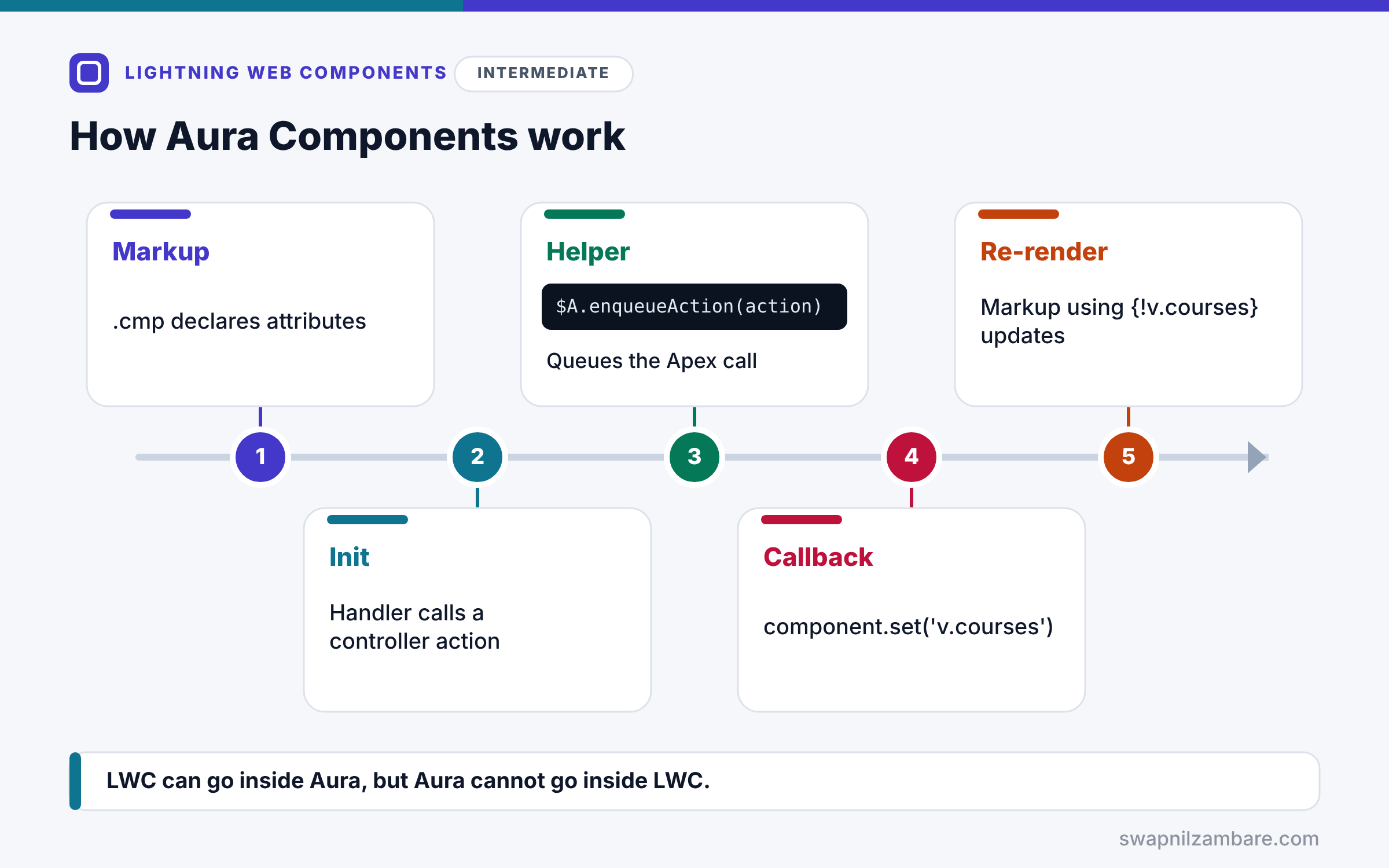
Aura Components follow their own pattern. First, the .cmp file declares attributes and markup. Next, an init handler calls a controller action when the component loads. Then the controller passes work to the helper, which often calls an Apex method with $A.enqueueAction. After that, the Apex result arrives in a callback, and the helper sets an attribute with component.set. Finally, the markup re-renders where it uses that attribute, such as {!v.courses}.
The Bundle Files
A bundle has courseCalendar.cmp for markup, courseCalendarController.js for event actions and courseCalendarHelper.js for shared logic. It can also have a style, renderer, design and documentation file.
Attributes and Expressions
aura:attribute declares data, such as name=”courses” type=”List”. Markup reads it with {!v.courses}. In JavaScript, use component.get(“v.courses”) and component.set(“v.courses”, value).
Controller and Helper
The controller holds small action functions called from markup. The helper holds reusable logic. Controllers call helpers, never each other.
Calling Apex
Aura calls Apex with component.get(“c.methodName”), setParams, setCallback and $A.enqueueAction. Apex methods still need @AuraEnabled.
Aura Events
Aura has component events, which bubble to parents, and application events, which any component can handle. Today, LWC uses DOM events and Lightning Message Service instead.
LWC Inside Aura
You can place an LWC inside Aura with <c:courseCard>. Aura listens to LWC custom events with an on-attribute. However, you cannot place Aura inside LWC.
Aura Syntax vs LWC Syntax
The table below maps common Aura syntax to its LWC version.
| Task | Aura | LWC |
|---|---|---|
| Declare data | aura:attribute | Class field or @api property |
| Show a value | {!v.courseName} | {courseName} |
| Read in JavaScript | component.get(“v.courseName”) | this.courseName |
| Run on load | aura:handler name=”init” | connectedCallback |
| Call Apex | $A.enqueueAction(action) | Import and wire or call |
Aura Components vs Lightning Web Components
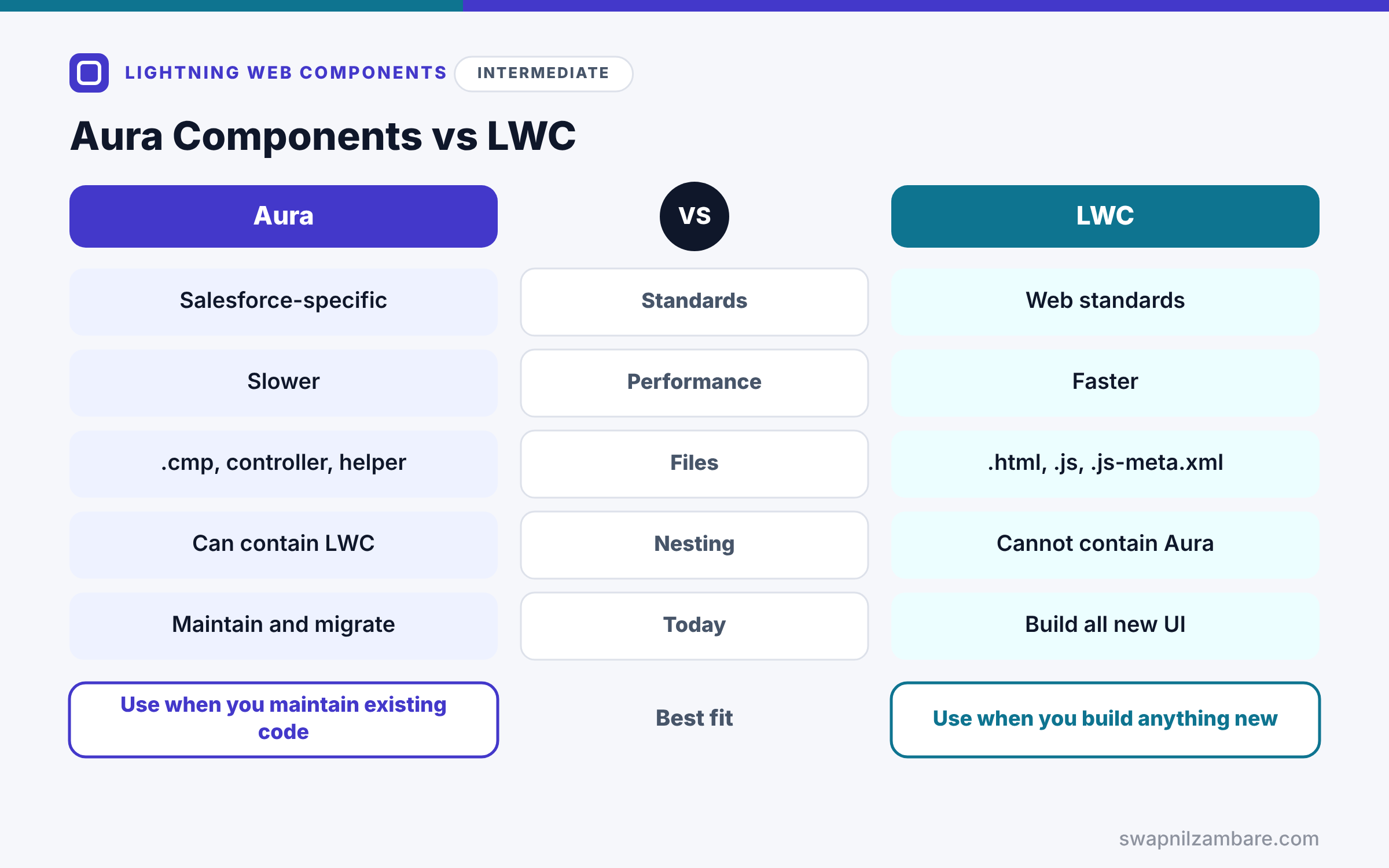
The table below compares the two frameworks.
| Feature | Aura Components | Lightning Web Components |
|---|---|---|
| Standards | Salesforce-specific | Web standards |
| Performance | Slower | Faster |
| Files | .cmp, controller, helper | .html, .js, .js-meta.xml |
| Nesting | Can contain LWC | Cannot contain Aura |
| Today | Maintain and migrate | Build all new UI |
When to use which is clear. Build new UI in LWC. Keep Aura only for existing components, and wrap LWC in Aura where an old container requires it.
A Real Aura Components Example
Let’s read a small Aura component at Bright Path Tutors that loads courses from Apex, and then wrap an LWC inside it.
Step 1: The Markup
<aura:component controller="CourseController" implements="flexipage:availableForAllPageTypes">
    <aura:attribute name="courses" type="List" default="[]"/>
    <aura:handler name="init" value="{!this}" action="{!c.doInit}"/>

    <lightning:card title="Courses (Aura)">
        <aura:iteration items="{!v.courses}" var="course">
            <c:courseCard course="{!course}" onenrol="{!c.handleEnrol}"/>
        </aura:iteration>
    </lightning:card>
</aura:component>
The component declares a courses attribute and runs doInit on load. aura:iteration loops over the list and renders the courseCard LWC for each course. It also listens to the LWC’s enrol event.
Step 2: The Controller and Helper
// courseCalendarController.js
({
    doInit: function (component, event, helper) {
        helper.loadCourses(component);
    },
    handleEnrol: function (component, event, helper) {
        var courseId = event.getParam('courseId');
        console.log('Enrol clicked for ' + courseId);
    }
})
// courseCalendarHelper.js
({
loadCourses: function (component) {
var action = component.get('c.searchCourses');
action.setParams({ searchKey: '' });
action.setCallback(this, function (response) {
if (response.getState() === 'SUCCESS') {
component.set('v.courses', response.getReturnValue());
}
});
$A.enqueueAction(action);
}
})doInit hands the work to the helper. Then the helper prepares the Apex call, sets a callback and queues it. When the result arrives, component.set updates the attribute, and the list renders. handleEnrol reads the detail value from the LWC event with getParam.
Step 3: See the Result
Here is what the Aura card shows on an app page.
Courses (Aura)
[ Apex Basics  | Enrol ]
[ SOQL Basics  | Enrol ]
Console: Enrol clicked for a01A
The Aura shell loads data, while the modern LWC card handles the display. This mix is a common first step in a migration.
Migrating Aura Components to LWC
Migrate from the leaves up. First, rebuild small child components in LWC and use them inside the existing Aura parents. Then, once all children are LWC, rebuild the parent. Finally, remove the Aura component and update the pages.
Common Mistakes with Aura Components
- Building new features in Aura instead of LWC.
- Calling one controller action from another, instead of using the helper.
- Forgetting $A.enqueueAction, so the Apex call never runs.
- Trying to place an Aura component inside an LWC.
- Using application events where a simple parent and child event works.
Best Practices for Aura Components
- Build all new UI in LWC.
- Keep Aura controllers thin and logic in helpers.
- Wrap new LWC components inside old Aura parents during migration.
- Replace Aura events with LMS or DOM events as you migrate.
- Track remaining Aura components and retire them over time.
Practice Task
Rebuild the Aura course calendar as an LWC that wires searchCourses and renders courseCard children. Hint: reuse the courseSearch component from the Apex post as a starting point.
Most Asked Interview Questions on Aura Components
Aura still appears in many interviews, especially for migration roles. Here are the 21 questions asked most about Aura Components.
Basic Questions on Aura Components
Q1: What are Aura Components?
UI components built with Salesforce’s older Aura framework.
Q2: Which files make up an Aura bundle?
A .cmp file, a controller and a helper, plus optional style, renderer and design files.
Q3: How do you declare data in Aura?
Use aura:attribute with a name and type.
Q4: How do you show an attribute in markup?
Use {!v.attributeName}.
Q5: How do you read an attribute in JavaScript?
Call component.get(“v.attributeName”).
Q6: What is the helper for?
It holds reusable logic, so controller actions stay small.
Q7: Should you build new UI in Aura?
No, because Salesforce recommends LWC for all new development.
Code and Scenario Questions on Aura Components
Q8: How do you run code when an Aura component loads?
Add an init handler that calls a controller action.
Q9: How does Aura call Apex?
Get the action with component.get(“c.method”), set params and callback, then call $A.enqueueAction.
Q10: How do you check if an Apex call succeeded?
Check response.getState() for SUCCESS in the callback.
Q11: How do you loop in Aura markup?
Use aura:iteration with items and var.
Q12: Can you place an LWC inside Aura?
Yes, so you use it like <c:courseCard>.
Q13: How does Aura handle an event from an LWC?
It uses an on-attribute, such as onenrol, and reads values with event.getParam.
Q14: What are the two types of Aura events?
Component events and application events.
Advanced Questions on Aura Components
Q15: Why is LWC faster than Aura?
Because LWC uses native browser features, so less framework code runs.
Q16: Why can’t LWC contain Aura?
Because LWC is built on web standards, and Aura components cannot run inside that model.
Q17: How do you migrate Aura to LWC?
Start with leaf components, wrap them in Aura parents, then replace the parents.
Q18: What replaces Aura application events in LWC?
Lightning Message Service.
Q19: What does $A.enqueueAction do?
It queues a server action, so Aura sends it to Apex.
Q20: Do Apex methods for Aura need special annotations?
Yes, they need @AuraEnabled, the same as for LWC.
Q21: How do you decide what to migrate first?
Pick small, often-used or often-changed components with few dependencies.
Official Resources
- Component Library (Lightning Component Reference)
- Migrate Aura Components to Lightning Web Components (LWC Developer Guide)
Quick Recap
- Aura Components are the older Lightning UI framework.
- Bundles use .cmp markup, a controller and a helper.
- Aura calls Apex with $A.enqueueAction and a callback.
- LWC can go inside Aura, but Aura cannot go inside LWC.
- Build new UI in LWC and migrate Aura from the leaves up.
What’s Next?
You have finished Level 8: Lightning Web Components. Next, start Level 9 with our guide to Salesforce integration patterns.


