Lightning Web Components are the modern way to build custom user interfaces in Salesforce. They use standard HTML, JavaScript and CSS, so the skills you learn also work outside Salesforce. As a result, almost every new custom page element, from a course list to a booking form, is built with LWC.
In this post, you will learn what Lightning Web Components are, which files make up a component, why they are fast, and how they compare with the older Aura framework. It builds on what Salesforce development is, the Salesforce DX project structure and Apex classes and objects. This is the first post of Level 8: Lightning Web Components.
What are Lightning Web Components?
Lightning Web Components (LWC) is a Salesforce framework for building reusable UI building blocks with web standards. Each component is a small bundle of HTML, JavaScript and metadata that Salesforce can place on record pages, app pages, home pages, flows, quick actions and Experience Cloud sites.
Think of Lego bricks. Each brick has a clear shape, so it connects easily to others. You build small bricks, such as a course card or a search box, and then snap them together into a full page. In the same way, Lightning Web Components are those bricks for Salesforce pages.
Why Lightning Web Components Matter
However, point-and-click tools cannot cover every screen a business needs. Here is why Lightning Web Components matter at Bright Path Tutors.
- First, tutors want a course list with filters that page layouts cannot provide.
- Also, students need a booking form that checks seats before saving.
- Next, managers want a dashboard card that refreshes when a course changes.
- LWC runs fast because browsers do most of the work natively.
- Finally, web standards skills transfer to jobs outside Salesforce too.
So LWC is the default choice for any custom UI in a modern org.
How Lightning Web Components Work
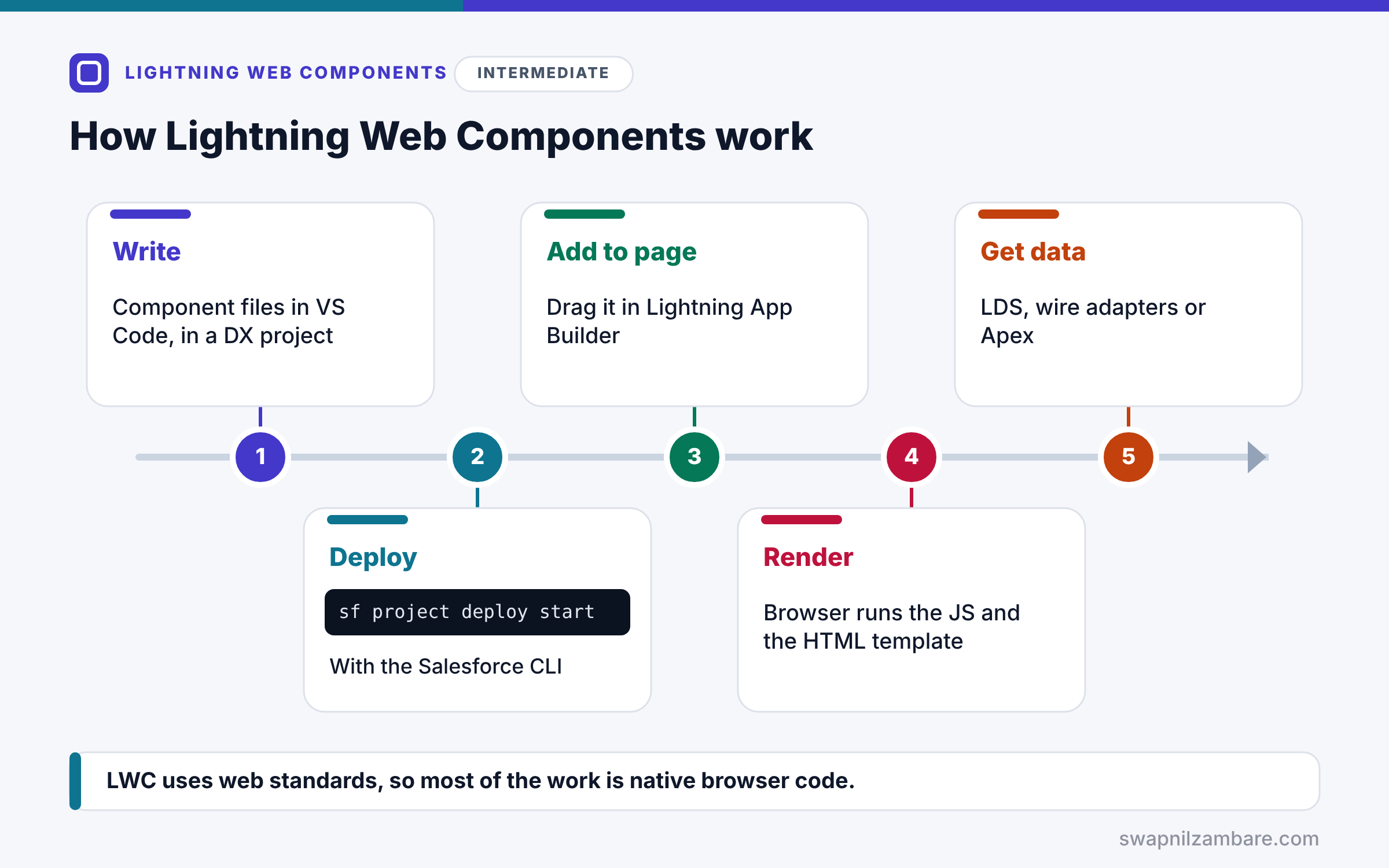
Lightning Web Components follow a clear path from code to screen. First, you write the component files in VS Code inside your Salesforce DX project. Next, you deploy them to an org with the Salesforce CLI. Then an admin or developer adds the component to a page in Lightning App Builder, if its metadata allows it. After that, when a user opens the page, the browser creates the component, runs its JavaScript and renders its HTML template. Finally, the component talks to Salesforce data through Lightning Data Service, wire adapters or Apex.
The HTML Template
The .html file holds a <template> tag with the markup. It uses curly braces, such as {courseName}, to show values from JavaScript.
The JavaScript Class
The .js file exports a class that extends LightningElement. For example, it holds properties, getters and event handlers.
The Metadata File
The .js-meta.xml file says where the component can be used. It sets isExposed and lists targets, such as lightning__RecordPage.
Optional Files
You can add a .css file for styles, an SVG icon, and a __tests__ folder for Jest tests. Also, CSS in a component only affects that component.
Shadow DOM
Because of the Shadow DOM, each component renders inside its own shadow tree. So its styles and markup are protected from other components on the page.
Files in a Component Bundle
The table below lists the files in a component named courseCard.
| File | Purpose | Required |
|---|---|---|
| courseCard.html | Template markup | Yes, for UI components |
| courseCard.js | JavaScript class | Yes |
| courseCard.js-meta.xml | Where it can be used | Yes |
| courseCard.css | Component styles | No |
| __tests__/courseCard.test.js | Jest unit tests | No |
Lightning Web Components vs Aura
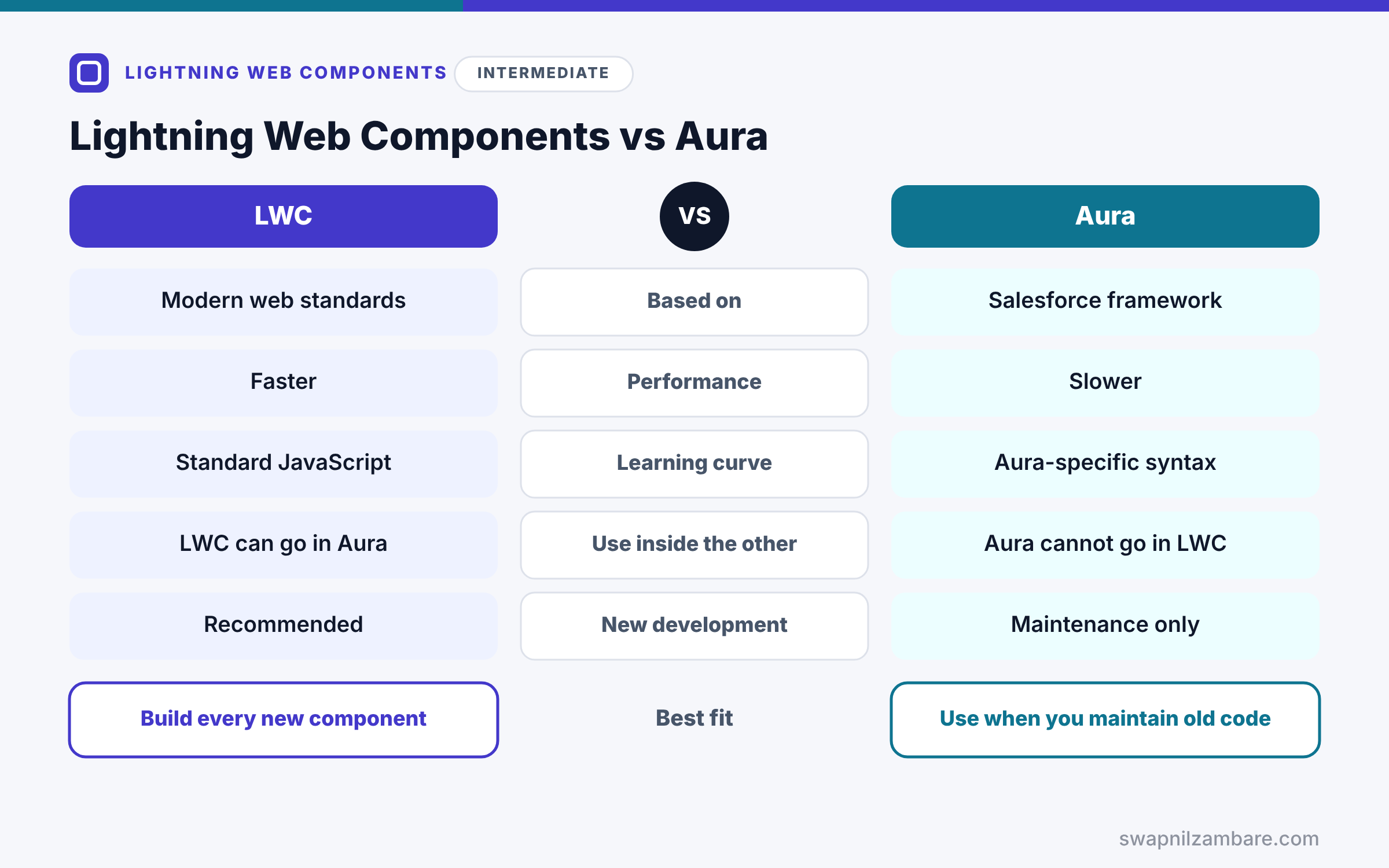
Next, the table below compares LWC with the older Aura framework.
| Feature | Lightning Web Components | Aura Components |
|---|---|---|
| Based on | Modern web standards | Salesforce-specific framework |
| Performance | Faster, more native browser work | Slower, more framework code |
| Learning curve | Standard JavaScript skills | Aura-specific syntax |
| Use inside the other | LWC can go inside Aura | Aura cannot go inside LWC |
| New development | Recommended | Maintenance only |
When to use which is simple. So build every new component with LWC. Keep Aura only for existing components or the rare features LWC does not support yet.
A Real Lightning Web Components Example
Let’s look at a tiny Lightning Web Components example for Bright Path Tutors: a card that shows one course name and fee.
Step 1: The Template
<template>
    <lightning-card title="Course" icon-name="custom:custom63">
        <div class="slds-p-around_medium">
            <p>{courseName}</p>
            <p>Fee: {fee}</p>
        </div>
    </lightning-card>
</template>
The template uses a base component, lightning-card, which gives the standard Salesforce card look. Then the values in curly braces come from the JavaScript class.
Step 2: The JavaScript Class
import { LightningElement } from 'lwc';

export default class CourseCard extends LightningElement {
    courseName = 'Apex Basics';
    fee = 5000;
}
The class extends LightningElement, the base class for every component. As a result, its fields become values the template can show.
Step 3: The Metadata File
<?xml version="1.0" encoding="UTF-8"?>
<LightningComponentBundle xmlns="http://soap.sforce.com/2006/04/metadata">
    <apiVersion>66.0</apiVersion>
    <isExposed>true</isExposed>
    <targets>
        <target>lightning__AppPage</target>
        <target>lightning__RecordPage</target>
    </targets>
</LightningComponentBundle>
isExposed set to true makes the component visible in Lightning App Builder. Also, the targets allow app pages and record pages.
Step 4: The Result
Here is what the card shows on the page.
Course
Apex Basics
Fee: 5000
The values are fixed for now. In the next posts, we will build the component step by step and load real data.
Lightning Web Components and Base Components
Salesforce ships ready-made base components, such as lightning-card, lightning-button and lightning-datatable. They also follow the Salesforce design and handle accessibility for you. So always check the base component library before you build your own button or table.
Common Mistakes with Lightning Web Components
- Forgetting isExposed or targets, so the component never appears in App Builder.
- Trying to put an Aura component inside an LWC.
- Writing global CSS and expecting it to reach inside other components.
- Rebuilding base components instead of using them.
- Using camelCase in the folder name inconsistently with the file names.
Best Practices for Lightning Web Components
- Use LWC for every new custom UI.
- Keep components small and focused on one job.
- Use base components and SLDS classes for a native look.
- Store data logic in Apex or Lightning Data Service, not in templates.
- Add Jest tests for important components.
Practice Task
Change the courseCard so it also shows the course level, such as Intermediate. Hint: add a new field in the class and a new paragraph in the template with {level}.
Most Asked Interview Questions on Lightning Web Components
LWC questions appear in almost every Salesforce developer interview today. Here are the 21 questions asked most about Lightning Web Components.
Basic Questions on Lightning Web Components
Q1: What is LWC?
A Salesforce framework for building UI components with standard HTML, JavaScript and CSS.
Q2: Which files does an LWC bundle need?
A JavaScript file and a .js-meta.xml file, plus an HTML template for components that render UI.
Q3: What does the .js-meta.xml file do?
For example, it sets the API version, whether the component is exposed, and where it can be used.
Q4: What class does every LWC extend?
LightningElement, imported from the lwc module.
Q5: What are base components?
Ready-made Salesforce components, such as lightning-card and lightning-button.
Q6: Can you use LWC inside Aura?
Yes, so you can nest LWC components inside Aura components.
Q7: Can you use Aura inside LWC?
No, because Aura components cannot go inside LWC.
Code and Scenario Questions on Lightning Web Components
Q8: How do you show a JavaScript value in the template?
Use curly braces, such as {courseName}.
Q9: How do you make a component appear in Lightning App Builder?
Set isExposed to true and add the right targets in the .js-meta.xml file.
Q10: How is a component named in markup?
With the c namespace and kebab case, such as c-course-card for courseCard.
Q11: Does CSS in one component affect others?
No, because Shadow DOM scopes styles to the component.
Q12: How do you deploy an LWC?
First save it, then deploy the component folder with the Salesforce CLI or VS Code.
Q13: Which targets are common for LWC?
lightning__RecordPage, lightning__AppPage, lightning__HomePage, lightning__FlowScreen and Experience Cloud targets.
Q14: How do LWCs get Salesforce data?
They use Lightning Data Service, wire adapters or Apex methods, depending on the need.
Advanced Questions on Lightning Web Components
Q15: Why is LWC faster than Aura?
It relies on native browser features, so less framework code runs.
Q16: What is the Shadow DOM?
It is a browser feature, so a component’s markup and styles stay separate from the rest of the page.
Q17: What security model protects LWC?
Lightning Web Security, which isolates components by namespace.
Q18: When would you still use Aura?
To maintain old components or for rare features not yet available in LWC.
Q19: Can LWC be used outside Salesforce?
Yes, because the open source LWC framework can build apps outside Salesforce.
Q20: How do you migrate from Aura to LWC?
First rebuild the leaf components, then move up one by one, and wrap them in Aura where needed.
Q21: What makes a good LWC?
In short, small scope, base components, a clear public API, data logic outside the template and tests.
Official Resources
Quick Recap
- Lightning Web Components build custom UI with web standards.
- A bundle has HTML, JavaScript and a .js-meta.xml file.
- isExposed and targets control where it can be used.
- LWC is faster and recommended over Aura for new work.
- LWC can sit inside Aura, but not the other way round.
What’s Next?
Now let’s build one from scratch. Next, read our guide to creating your first Lightning Web Component.


