The GraphQL Wire Adapter lets a Lightning Web Component ask Salesforce for the exact fields it needs, with no Apex class behind it. You write the query inside the component, wire it, and the records arrive shaped the way you asked.
That is the real appeal. A wire call to the UI API returns a fixed shape whether you need two fields or twenty. An Apex method returns whatever the developer decided months ago. Here the component decides, and the payload shrinks to match.
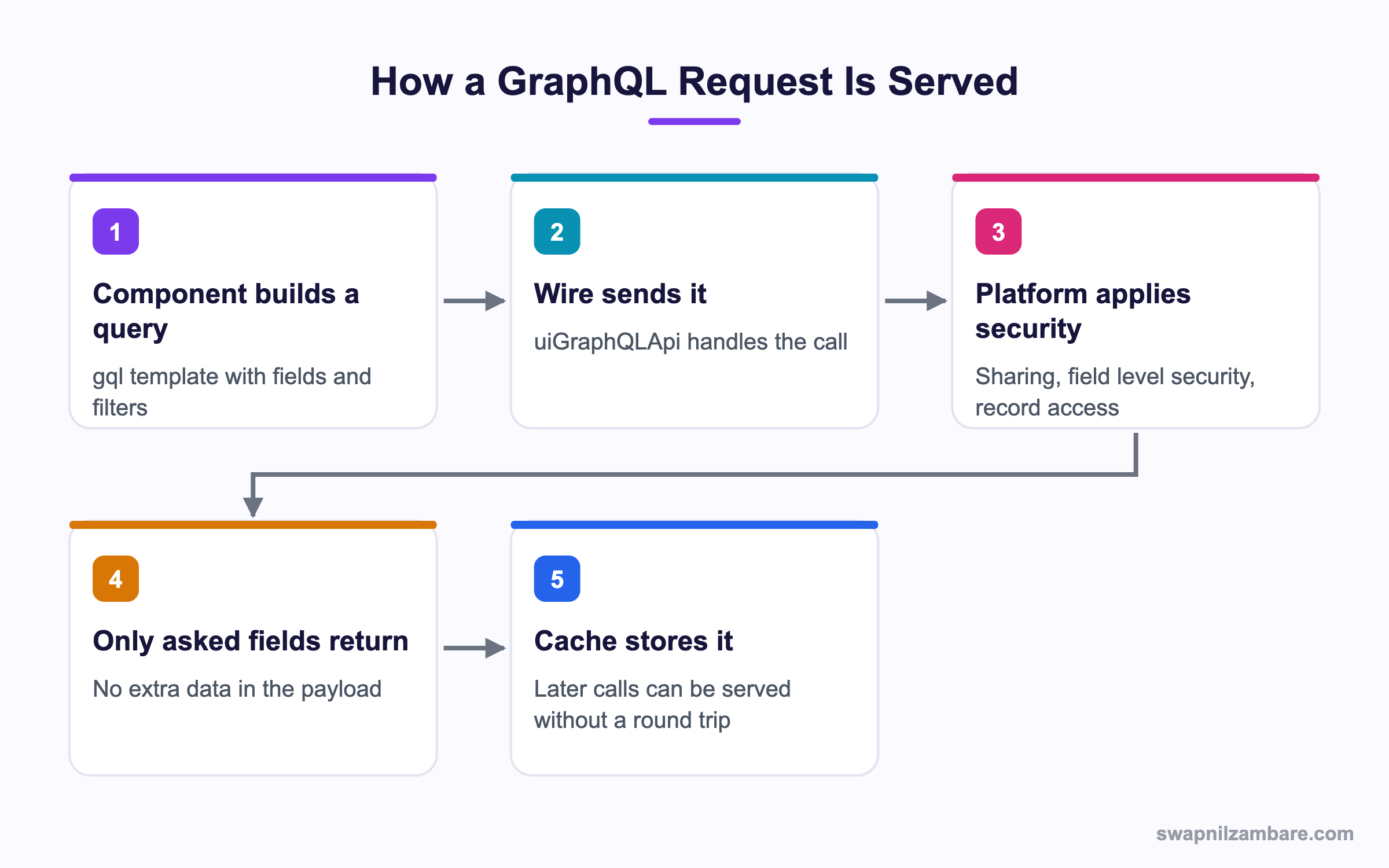
Caption: Security still runs on the server, so a query cannot read a field the user is not allowed to see.
What Is the GraphQL Wire Adapter
It is a wire adapter from the lightning/uiGraphQLApi module. You import two things, a tag function called gql and the adapter itself called graphql.
import { LightningElement, wire } from 'lwc';
import { gql, graphql } from 'lightning/uiGraphQLApi';
Then you build a query as a template string and wire it.
export default class CourseList extends LightningElement {
  courses = [];

  query = gql`
    query courses {
      uiapi {
        query {
          Course__c(first: 10) {
            edges {
              node {
                Id
                Name { value }
                Fee__c { value displayValue }
              }
            }
          }
        }
      }
    }
  `;

  @wire(graphql, { query: '$query' })
  handleResult({ data, errors }) {
    if (data) {
      this.courses = data.uiapi.query.Course__c.edges.map(e => e.node);
    }
  }
}
Three things in that shape surprise people the first time. Fields come back as objects with a value and often a displayValue. Records sit under edges and node. And the whole thing is nested under uiapi and query.
Why Fields Have value and displayValue
A currency field has a raw number and a formatted string. A picklist has an API name and a label. A lookup has an id and a record name. The GraphQL Wire Adapter gives you both, so you never format a value twice.
| Field type | value | displayValue |
|---|---|---|
| Currency | 4500 | INR 4,500.00 |
| Date | 2026-03-01 | 1 March 2026 |
| Picklist | Advanced | Advanced |
| Lookup | The record id | The record name |
Why the GraphQL Wire Adapter Matters
| Benefit | What it saves you |
|---|---|
| No Apex | No class, no test class, no deployment for a read |
| Smaller payloads | Only the fields the screen shows |
| Platform security | Sharing and field level security applied for you |
| Built in caching | Repeat views served without a round trip |
| One call, several objects | Related data in a single request |
That last point is the one teams feel most. A dashboard that needed three Apex calls can often become one query. If you are weighing this against a normal Apex call, the post on wire and imperative calls sets out both styles.
Filtering, Sorting and Paging
A query with no filter is rarely useful, and the GraphQL Wire Adapter gives you three tools for that. The GraphQL Wire Adapter takes a where argument, an orderBy argument, and cursor based paging.
Course__c(
  where: { Fee__c: { gt: { value: 3000 } } }
  orderBy: { Name: { order: ASC } }
  first: 20
) {
To pass a value from the component, build the query with a variable and declare it.
get query() {
  return gql`
    query courses($level: String) {
      uiapi { query { Course__c(where: { Level__c: { eq: $level } }) {
        edges { node { Id Name { value } } }
      } } }
    }
  `;
}

@wire(graphql, { query: '$query', variables: '$variables' })
results;

get variables() {
  return { level: this.selectedLevel };
}
The getter matters. When selectedLevel changes, the variables getter returns a new object, the wire refires, and fresh records arrive. No manual refresh needed.
Paging Through Results
The GraphQL Wire Adapter uses cursor paging. Ask for pageInfo alongside the edges and keep the cursor.
pageInfo { hasNextPage endCursor }Pass the cursor back as the after argument for the next page. This is why the shape uses edges and nodes, since each edge can carry its own cursor.
GraphQL Wire Adapter vs Apex SOQL
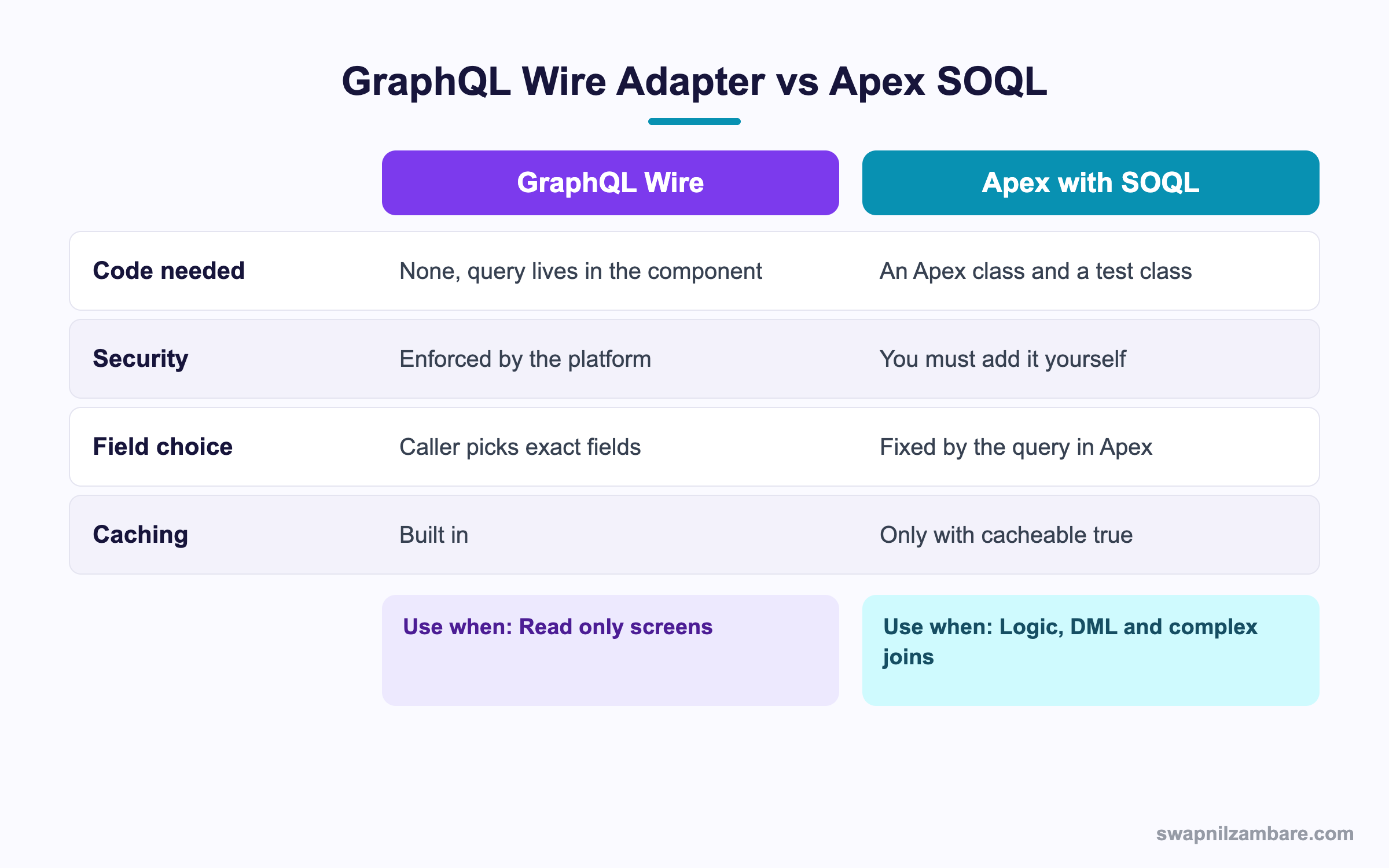
Caption: Read only screens lean one way, and anything with logic or DML leans the other.
The GraphQL Wire Adapter is not the winner everywhere. Aggregates in particular are still easier with SOQL aggregate functions. The honest rule is that a read only screen belongs to the GraphQL Wire Adapter, and anything that writes, calculates or joins awkwardly belongs in Apex.
| Need | Pick |
|---|---|
| Show a list of records with chosen fields | GraphQL wire |
| Filter on a user selection | GraphQL wire |
| Aggregate with GROUP BY and HAVING | Apex |
| Insert, update or delete | Apex |
| Call an outside system | Apex |
| Complex multi object logic | Apex |
| Reuse the same read in Flow and Apex | Apex |
A Real GraphQL Wire Adapter Example
Our Bright Path Tutors org needed a course browser. The screen shows name, fee, duration and level, with a level picker at the top. The original build used an Apex class with a dynamic SOQL string and a test class.
We replaced it with one query inside the component. The results were easy to measure.
| Measure | Apex version | GraphQL version |
|---|---|---|
| Apex classes to maintain | 2 | 0 |
| Fields returned | 11 | 4 |
| Security code written by us | 14 lines | 0 |
| Deployment needed for a field change | Yes | No, edit the component |
The field change point is the quiet win. When marketing asked to show the start date, we added one line to the query. No Apex, no test, no sharing check to rewrite.
Limits and Things to Watch
- The adapter is read only, so every write still goes through Apex or a record form
- Aggregates are limited, so counts and sums are often better in Apex
- The nesting depth is capped, so very deep relationship chains fail
- Errors arrive in an
errorsarray rather than as a thrown exception - Custom metadata and some objects are not available through the UI API
- A query that asks for a field the user cannot see returns null, not an error
That last behaviour is worth repeating. Field level security is applied silently, so a blank column on one user’s screen is a permission problem and not a bug in your query. The post on field level security covers where those checks come from.
Handling Errors Properly
@wire(graphql, { query: '$query' })
handleResult({ data, errors }) {
  this.error = errors ? errors[0].message : undefined;
  this.courses = data
    ? data.uiapi.query.Course__c.edges.map(e => e.node)
    : [];
}
The GraphQL Wire Adapter can return a partial answer, so always read both keys. A partial result can arrive with data and errors together, and ignoring the errors array hides the reason a column is empty.
Common Mistakes with the GraphQL Wire Adapter
| Mistake | What you see | Fix |
|---|---|---|
| Reading the field directly | undefined instead of a number | Read the value property |
| Forgetting edges and node | A type error on map | Walk edges then node |
| Inline variables object | The wire never refires | Return it from a getter |
| Ignoring the errors array | Silent blank columns | Read data and errors together |
| Asking for every field | Large payloads and slow screens | List only what the screen shows |
| Expecting a write to work | Nothing saves | Use a record form or Apex |
Best Practices for the GraphQL Wire Adapter
- List only the fields the screen actually renders
- Build the query in a getter when any part of it depends on component state
- Return variables from a getter so changes refire the wire
- Keep paging cursors in a property rather than recomputing them
- Read data and errors in the same handler, every time
- Keep writes in Apex or a record form and reads in the query
- Name the query so it is easy to find in the network tab
Most Asked GraphQL Wire Adapter Interview Questions
Q1: Which module gives you the GraphQL Wire Adapter?
The lightning/uiGraphQLApi module, which exports gql and graphql.
Q2: What does gql do?
It is a tag function that turns your template string into a query the adapter can send.
Q3: Why are records nested under edges and node?
That is the connection pattern, which lets each record carry a cursor for paging.
Q4: Why does a field have value and displayValue?
The value is raw data and the displayValue is formatted for the user locale.
Q5: Is the GraphQL Wire Adapter read only?
Yes. Writes go through a record form, the record API or Apex.
Q6: Does it apply sharing rules?
Yes. The platform applies sharing, object permissions and field level security on the server.
Q7: What happens when a user cannot see a requested field?
The field returns null rather than an error, so a blank column often means a permission gap.
Q8: How do you pass a filter value from the component?
Declare a query variable, then return the variables object from a getter.
Q9: Why must variables come from a getter?
A getter returns a new object when state changes, which is what makes the wire refire.
Q10: How do you sort results?
With the orderBy argument on the object, naming the field and the order.
Q11: How do you page through a long list?
Request pageInfo, keep the endCursor, and pass it back as the after argument.
Q12: How do you limit the number of records?
With the first argument on the object.
Q13: Where do errors arrive?
In an errors array on the wire result, alongside any partial data.
Q14: Can a single query read two objects?
Yes. Add both under the query block, which is one of the strongest reasons to use it.
Q15: When is Apex still the better choice?
For writes, aggregates, outside callouts, and logic you want to reuse in Flow.
Q16: Does the GraphQL Wire Adapter cache results?
Yes. It uses the same client cache as other UI API wire adapters.
Q17: How do you force fresh data?
Refresh the wire with refreshApex or change a variable so the wire refires.
Q18: Scenario: the list never updates when the picker changes. What is wrong?
The variables object is probably a plain field rather than a getter, so the wire sees no change.
Q19: Scenario: map throws an error on the result. What did you miss?
The edges level. Walk data.uiapi.query.Object.edges and then take each node.
Q20: Scenario: one user sees a blank fee column and another does not. Why?
Field level security on the fee field, since the platform returns null instead of refusing the query.
Q21: Can you query custom metadata types this way?
Not generally, since the UI API does not expose every object. Check before you design around it.
Q22: Does it work in Experience Cloud sites?
Yes, with guest access depending on the site profile and sharing settings.
Q23: How deep can relationship nesting go?
There is a documented depth cap, so very long chains fail and need a different design.
Q24: Is there a test class to write?
No, which is part of the appeal. Component level Jest tests still make sense.
Q25: How does the payload compare with a wire call to getRecord?
Usually smaller, since getRecord returns a fixed shape and this returns only what you asked for.
Q26: What is a good first project for it?
A read only list or detail panel that currently uses an Apex method with one simple SOQL query.
Q27: How do you debug a failing query?
Log the errors array, then check the object and field API names and the nesting shape.
Q28: What is the one habit that prevents most problems?
Ask for the fewest fields the screen needs, and read both data and errors in the handler.
Official Resources
- GraphQL API Developer Guide
- Lightning Web Components Developer Guide
- Lightning Web Components Basics on Trailhead
What Is Next
Next, read LWC Dynamic Components Explained with Real Examples.


