LWC Dynamic Components let one container decide at runtime which component to render. Instead of a template full of conditional blocks, you load a module, keep its constructor in a property, and let the framework draw it.
This is the pattern behind configurable screens. A wizard that shows a different step per product, a record panel that changes with record type, a plugin slot a partner can fill. All of them need the choice made while the page runs, not while you write the markup.
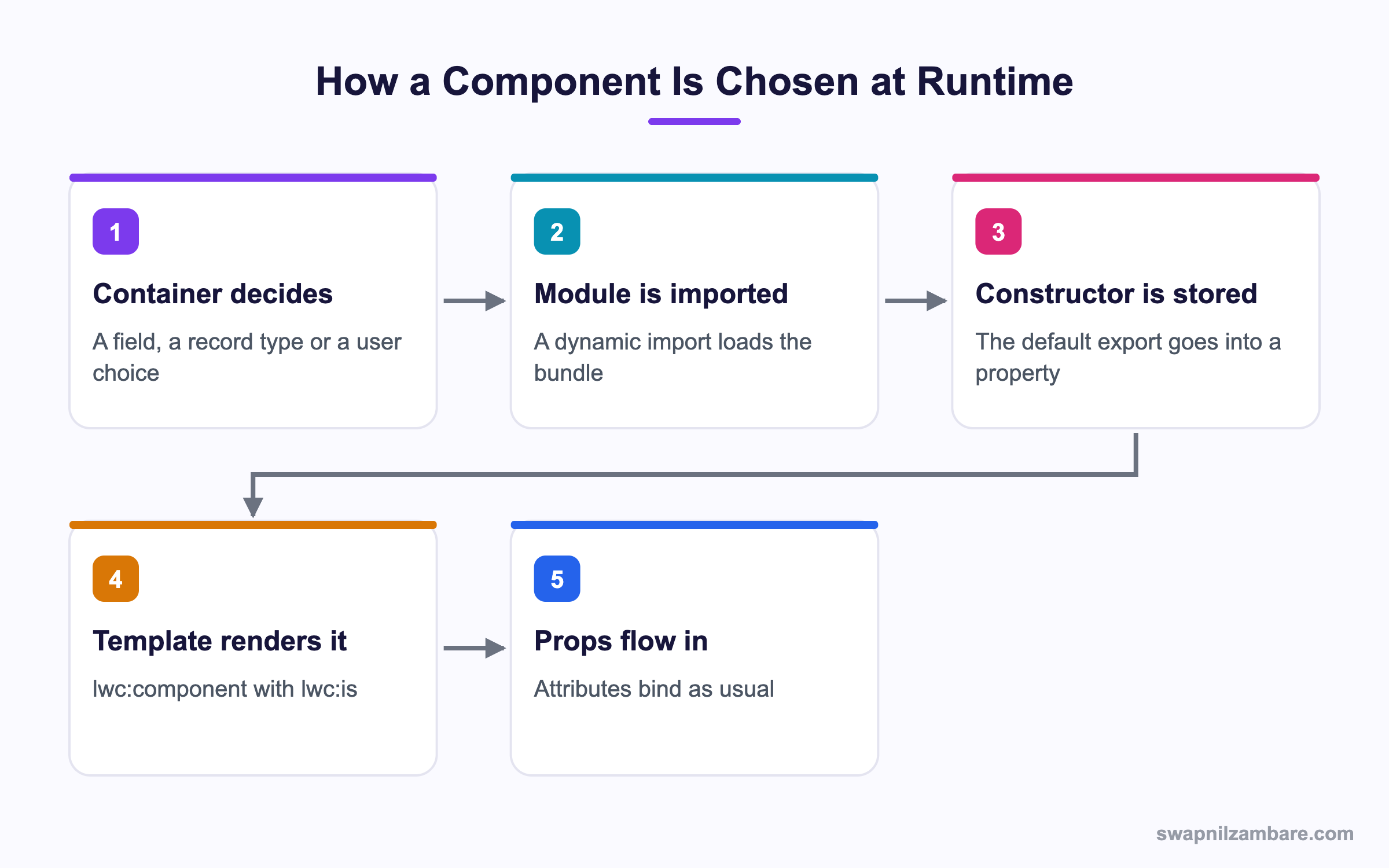
Caption: The import happens once per module, and the constructor is reused on every later render.
What Are LWC Dynamic Components
A dynamic component is a component whose class is chosen by code. The template holds a placeholder, and the placeholder points at a constructor you supply.
<template>
  <lwc:component lwc:is={stepCtor}></lwc:component>
</template>
The lwc:is directive takes a constructor, not a name. You get that constructor from a dynamic import.
async loadStep(name) {
  const mod = await import(name);
  this.stepCtor = mod.default;
}
Compare that with a static import, which always pulls the bundle into the page even when the user never opens that step. With LWC Dynamic Components the bundle arrives only when it is needed.
Why a Map Beats a String
A dynamic import needs a value the build can see, so a fully free form string is risky. Keep a small map from a key to an import call.
const STEPS = {
  fee: () => import('c/feeStep'),
  schedule: () => import('c/scheduleStep'),
  review: () => import('c/reviewStep')
};

async show(key) {
  const loader = STEPS[key];
  if (!loader) {
    this.error = 'Unknown step';
    return;
  }
  const mod = await loader();
  this.stepCtor = mod.default;
}
The map gives LWC Dynamic Components three things. The build knows every bundle that may load. An unknown key fails with a clear message. And a reviewer can read the whole list of options in one place.
Why LWC Dynamic Components Matter
| Benefit | What it gives you |
|---|---|
| Smaller first load | Only the chosen bundle is fetched |
| Open design | New options plug in without touching the container |
| Cleaner templates | No stack of conditional blocks |
| Config driven screens | A custom metadata record can name the component |
That last row is the one admins like. Put the component name in a custom metadata type, read it in the container, and an admin changes the screen with no deployment. If you need a refresher on when each hook runs during all this, the post on lifecycle hooks covers the order.
Passing Data In and Out
A dynamic component takes attributes exactly like a normal one.
<lwc:component
  lwc:is={stepCtor}
  course-id={courseId}
  onstepdone={handleStepDone}>
</lwc:component>
Two rules keep this sane. Every option must accept the same public properties, and every option must fire the same events. That shared shape is a contract, and writing it down in a comment saves the next developer an hour.
Events from LWC Dynamic Components bubble the same way as always, so the container listens with a normal handler. The post on custom events has the full event pattern.
LWC Dynamic Components vs a Conditional Template
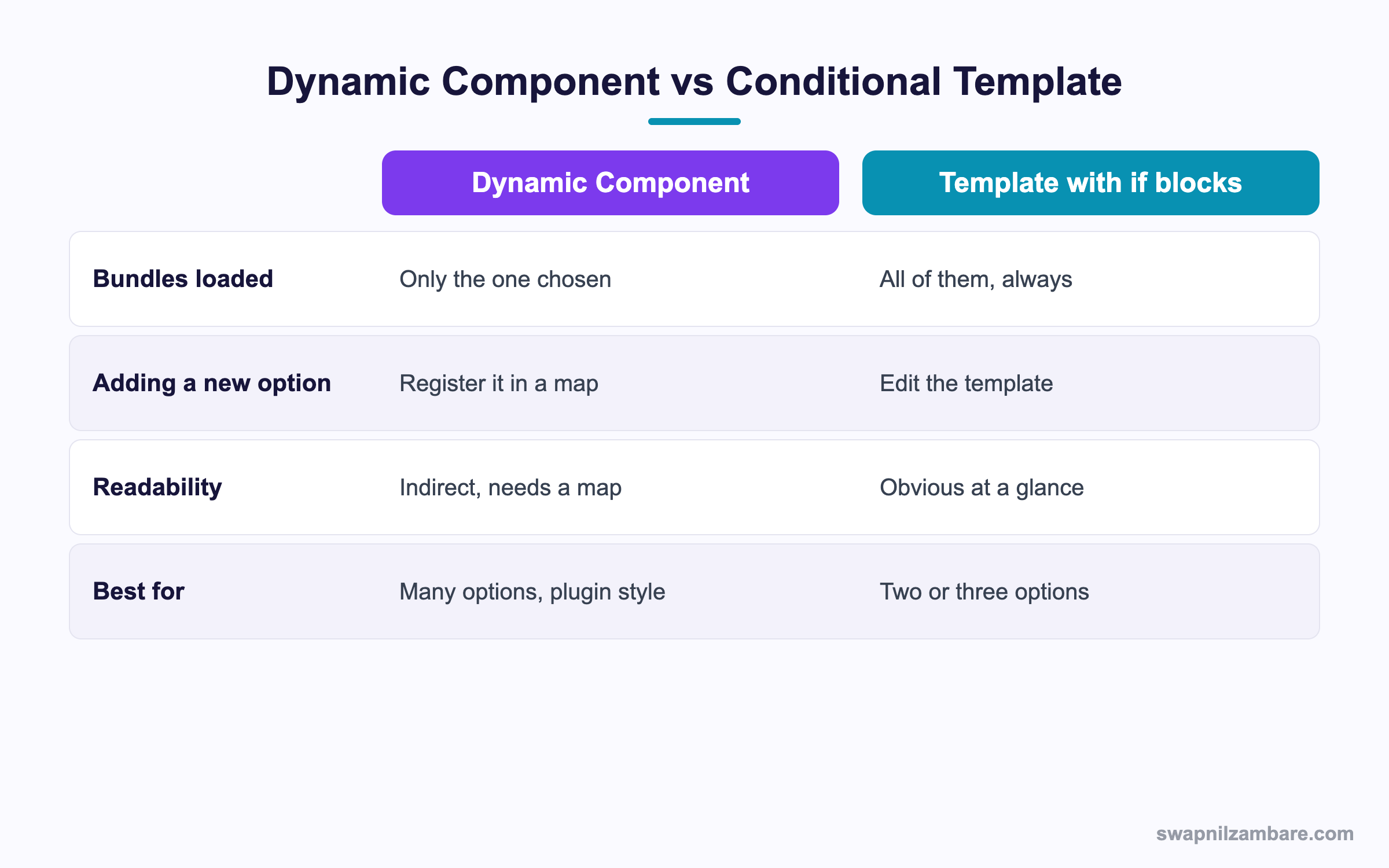
Caption: Two or three options stay clearer as plain conditional blocks.
LWC Dynamic Components are not always the answer. A template with conditional blocks is easier to read, and for two options it is the better answer.
<template>
  <template lwc:if={isFee}>
    <c-fee-step course-id={courseId}></c-fee-step>
  </template>
  <template lwc:else>
    <c-review-step course-id={courseId}></c-review-step>
  </template>
</template>
The cost appears as the list grows. Every option is imported whether used or not, the template gets longer, and adding a step means editing markup. Around five options, LWC Dynamic Components start to win.
| Number of options | Reasonable choice |
|---|---|
| Two | Conditional blocks |
| Three or four | Either, pick for readability |
| Five or more | Dynamic components |
| Unknown, set by config | Dynamic components |
| Supplied by a partner package | Dynamic components |
A Real LWC Dynamic Components Example
Bright Path Tutors runs an enrolment wizard, and LWC Dynamic Components rebuilt it. The middle step differs by course level, because an advanced course asks for a prerequisite check that a beginner course does not.
The first build used conditional blocks for three levels. Then a fourth level arrived, then a fifth, and the container template reached 180 lines with five imports at the top.
We moved to a map and a custom metadata type.
| Piece | What it holds |
|---|---|
| Step_Config__mdt | Level, component name, sort order |
| Container component | Reads the config and loads the module |
| Step components | Same public properties, same events |
| Measure | Before | After |
|---|---|---|
| Container template lines | 180 | 12 |
| Bundles loaded on open | 5 | 1 |
| Work to add a level | Code change and deployment | One metadata record |
The win was not only the smaller load. The team stopped editing the container, which meant fewer merge conflicts on a shared file.
Error Handling and Loading States
LWC Dynamic Components rely on a network call, so an import can fail. Show something useful while it runs and something honest if it breaks.
async show(key) {
  this.loading = true;
  this.error = undefined;
  try {
    const mod = await STEPS[key]();
    this.stepCtor = mod.default;
  } catch (e) {
    this.error = 'This step could not be loaded';
    this.stepCtor = undefined;
  } finally {
    this.loading = false;
  }
}
LWC Dynamic Components give no warning on their own. Without the catch, a failed import leaves an empty area with no explanation, and the user has no idea whether to wait or reload.
What LWC Dynamic Components Cannot Do
- They cannot render a component from a different namespace you do not have access to
- They cannot be used to bypass component permissions or security
- They do not work with a template string of markup, only with real components
- They cannot change the public property names a component expects
- They add no new way to style the child, so the usual boundary rules apply
That last point matters in review. The child still sits behind its own shadow boundary, so the container cannot style its internals. The post on shadow DOM and light DOM explains what crosses and what does not.
Common Mistakes with LWC Dynamic Components
| Mistake | What you see | Fix |
|---|---|---|
| Passing a name to lwc:is | Nothing renders | Pass the constructor from mod.default |
| A free form import string | A build warning or a failed load | Use a map of import calls |
| No loading state | A blank panel for a second | Set a loading flag around the import |
| No catch on the import | Silent empty area | Catch and show a message |
| Options with different property names | One option works, others do not | Agree a shared public interface |
| Importing on every render | Repeat network calls | Cache the constructor in a property |
Best Practices for LWC Dynamic Components
- Keep a single map of key to import call at the top of the container
- Write the shared public interface in a comment and hold every option to it
- Cache the constructor so a re-render does not import again
- Always handle the loading and error states
- Put the component name in custom metadata when admins should control it
- Prefer conditional blocks while you still have only two or three options
- Name bundles consistently so the map reads clearly
Most Asked LWC Dynamic Components Interview Questions
Q1: What is a dynamic component?
A component whose class is chosen by code at runtime rather than written in the template.
Q2: Which directive renders one?
The lwc:component tag with the lwc:is directive.
Q3: What does lwc:is expect?
A component constructor, which is the default export of the module.
Q4: How do you get that constructor?
With a dynamic import, then reading the default property of the resolved module.
Q5: Why not pass the component name as a string?
Because lwc:is takes a constructor. A name alone renders nothing.
Q6: Why keep a map of import calls?
So the build knows every bundle that may load and an unknown key fails with a clear message.
Q7: What is the main performance benefit?
Only the chosen bundle is fetched, so the first load stays small.
Q8: When is a conditional template the better choice?
With two or three options, since the markup is clearer and the saving is tiny.
Q9: How do you pass data into a dynamic component?
With normal attributes on the lwc:component tag, bound to public properties.
Q10: How does the container receive data back?
Through the same custom events any child would fire.
Q11: What is the shared interface rule?
Every option must accept the same public properties and fire the same events.
Q12: What happens if one option expects a different property name?
That option receives nothing for it, so the screen looks broken only for that choice.
Q13: Can an admin choose the component without a deployment?
Yes. Store the component name in a custom metadata record and read it in the container.
Q14: Why cache the constructor?
Because a re-render would otherwise trigger the import again and add a network call.
Q15: What should happen while the import runs?
Show a spinner or a skeleton, since the import is a network call.
Q16: What happens if the import fails and you have no catch?
The area stays blank with no explanation, so always catch and show a message.
Q17: Do LWC Dynamic Components break the shadow boundary?
No. The child keeps its own boundary, so the container still cannot style its internals.
Q18: Can you render markup from a string this way?
No. Only real components can be rendered, which is deliberate for security.
Q19: Does this let you load a component you have no access to?
No. Normal component and namespace access rules still apply.
Q20: Scenario: nothing renders and there is no console error. What is the usual cause?
A name was assigned to lwc:is rather than the constructor from mod.default.
Q21: Scenario: switching options is slow every time. Why?
The import runs on each switch. Cache each constructor after the first load.
Q22: Scenario: the container file keeps causing merge conflicts. How does this pattern help?
New options are added as config records or new bundles, so the container stops changing.
Q23: How many options justify the pattern?
Around five, or any number when configuration rather than code picks the option.
Q24: Where should the map live?
At the top of the container module, so the full option list is visible in one place.
Q25: Can a partner package supply an option?
Yes, which is why this pattern suits plugin style designs.
Q26: How do you test a container that loads modules dynamically?
Mock the modules in Jest and assert that the right one was requested for each key.
Q27: Do lifecycle hooks behave differently in a dynamic child?
No. The child runs its hooks in the normal order once it is rendered.
Q28: What is the single habit that keeps this pattern clean?
Treat the shared public interface as a contract and never let one option drift from it.
Official Resources
- Lightning Web Components Developer Guide
- Lightning Web Components Recipes
- Lightning Web Components Basics on Trailhead
What Is Next
Next, read LWC Headless Quick Actions Explained with Examples.


