LWC Headless Quick Actions run a piece of work on a record without opening a modal at all. The user clicks a button, something happens, a toast appears, and the record refreshes. No form, no extra click to close a window.
That is the whole appeal of LWC Headless Quick Actions. Plenty of actions need no input. Approving a record, recalculating a total, cloning with a fixed pattern, sending a standard reminder. A modal for any of those is a step the user never asked for.
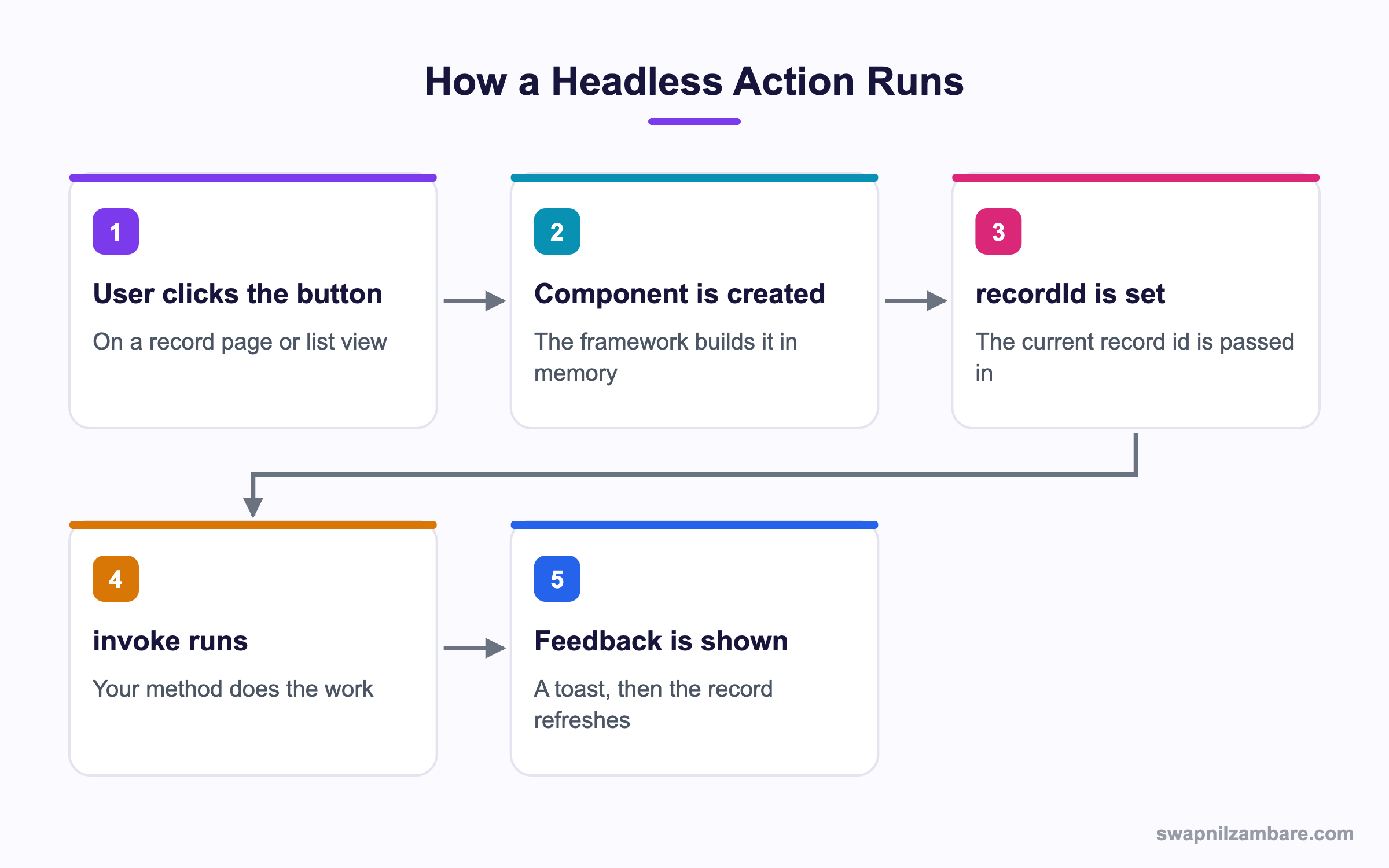
Caption: The component is never rendered, so there is no template and no visible markup.
What Are LWC Headless Quick Actions
A headless quick action is a Lightning Web Component configured as a screen action in metadata, with one public method named invoke. The framework creates the component, sets recordId, calls invoke, and then throws the component away.
LWC Headless Quick Actions have no template that the user sees. You can ship an empty template file, and nothing will render.
import { LightningElement, api } from 'lwc';
import { ShowToastEvent } from 'lightning/platformShowToastEvent';
import approve from '@salesforce/apex/CourseActions.approve';

export default class ApproveCourse extends LightningElement {
  @api recordId;

  @api async invoke() {
    try {
      await approve({ courseId: this.recordId });
      this.toast('Course approved', 'success');
    } catch (e) {
      this.toast(e.body ? e.body.message : 'Something went wrong', 'error');
    }
  }

  toast(message, variant) {
    this.dispatchEvent(new ShowToastEvent({ message, variant }));
  }
}
The Metadata That Makes It Headless
Two files turn a normal component into one of the LWC Headless Quick Actions. First, the component meta file has to expose the right target.
<targets>
  <target>lightning__RecordAction</target>
</targets>
<targetConfigs>
  <targetConfig targets="lightning__RecordAction">
    <actionType>Action</actionType>
  </targetConfig>
</targetConfigs>
The actionType value is the switch. Action means headless, so the framework calls invoke. ScreenAction means a modal, so the framework renders your template instead.
Second, you create a Quick Action record of type Lightning Web Component, point it at the bundle, and add it to the page layout or the Lightning record page.
| Setting | Value for a headless action |
|---|---|
| Quick Action type | Lightning Web Component |
| Lightning Web Component | Your bundle name |
| Target | Record action |
| actionType in meta | Action |
| Label and icon | What the user sees on the button |
Why LWC Headless Quick Actions Matter
| Benefit | What it gives the user |
|---|---|
| No modal | One click instead of click, confirm, close |
| Faster work | Bulk approvals stop feeling slow |
| Clear feedback | A toast that says what happened |
| Less markup | No template to maintain or test |
Compare this with the old route. A button that called an Apex method used to need a Visualforce page or an Aura component with a modal, and the user still had to close something. The post on migrating from Visualforce covers that move in detail.
LWC Headless Quick Actions vs Screen Actions
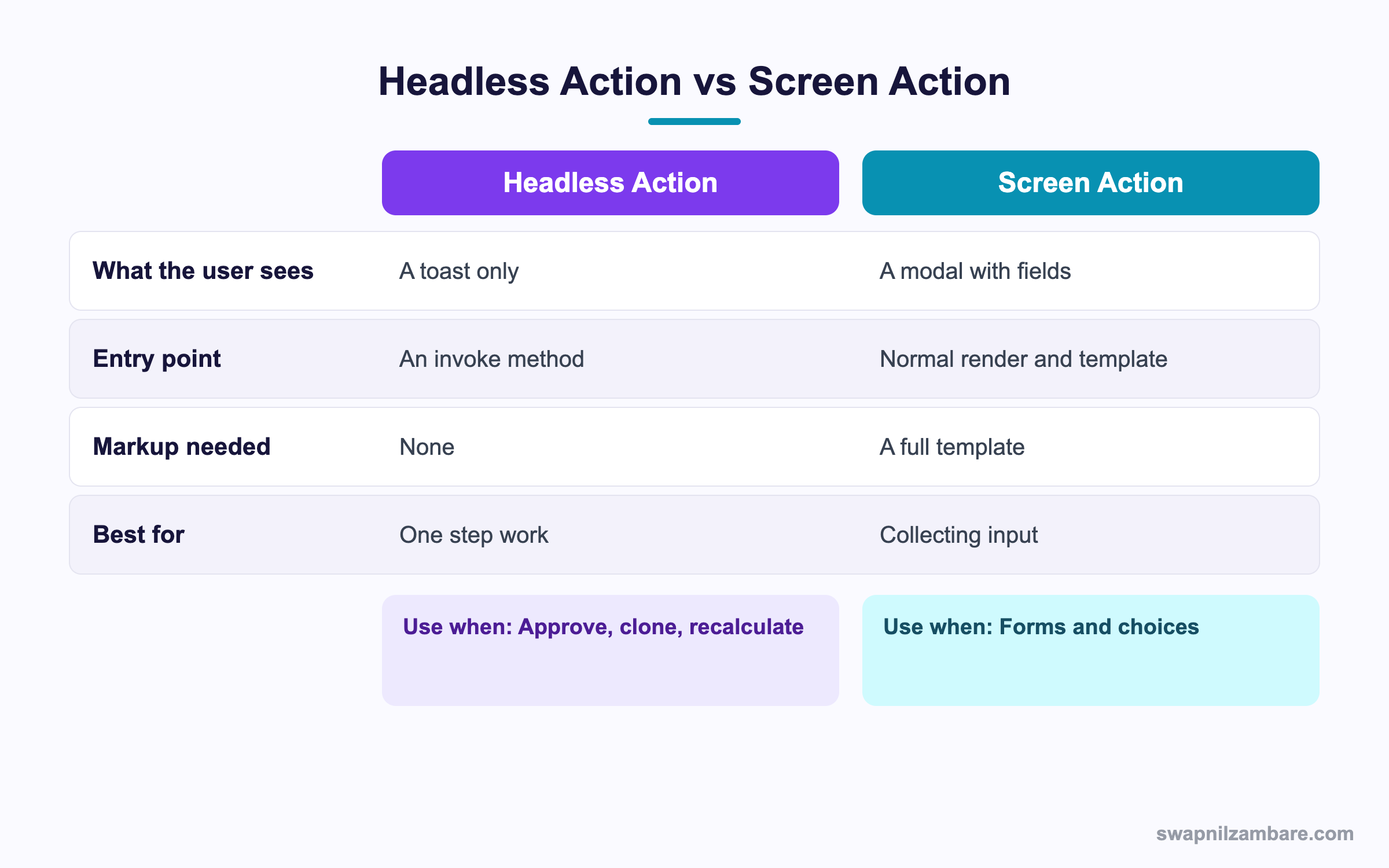
Caption: If the user has to choose or type anything, you need a screen action.
Choosing between LWC Headless Quick Actions and screen actions is simple once you ask one question. Does the work need input from the user?
| Situation | Pick |
|---|---|
| Approve the current record | Headless |
| Recalculate a rollup | Headless |
| Clone with fixed values | Headless |
| Send a standard reminder | Headless |
| Pick a reason before rejecting | Screen action |
| Enter a discount amount | Screen action |
| Choose from a list of templates | Screen action |
LWC Headless Quick Actions have a middle case worth naming. Sometimes an action is headless most of the time and only needs a confirmation on risky records. Handle that inside invoke by checking the record first and firing a toast that explains why nothing happened, rather than building a modal you rarely show.
Refreshing the Record After the Work
LWC Headless Quick Actions do not reload the record page on their own. Fire the refresh event so the user sees the new values.
import { RefreshEvent } from 'lightning/refresh';

@api async invoke() {
  await approve({ courseId: this.recordId });
  this.dispatchEvent(new RefreshEvent());
  this.toast('Course approved', 'success');
}
Without that event the field still shows the old value, and the user clicks the button again. Two clicks, two Apex calls, one confused user.
A Real LWC Headless Quick Actions Example
Bright Path Tutors has a Course__c record with an Is_Online__c checkbox and a Fee__c field. When a course moves online, the fee drops by a fixed percentage and a note is added to the description.
The original build was a screen action with a confirm button. Support kept hearing the same complaint, which was that the modal added nothing.
| Version | Clicks | What the user saw |
|---|---|---|
| Screen action | 3 | Button, modal, confirm, close |
| Headless action | 1 | Button, then a toast |
The Apex behind it does the real work, including the validation.
public with sharing class CourseActions {
    @AuraEnabled
    public static void moveOnline(Id courseId) {
        Course__c c = [
            SELECT Id, Fee__c, Is_Online__c
            FROM Course__c
            WHERE Id = :courseId
            WITH USER_MODE
            LIMIT 1
        ];
        if (c.Is_Online__c) {
            throw new AuraHandledException('This course is already online');
        }
        c.Is_Online__c = true;
        c.Fee__c = (c.Fee__c == null) ? null : c.Fee__c * 0.85;
        update as user c;
    }
}
Notice where the rules live. The component shows messages, and Apex decides what is allowed. That split keeps the same rule working when a Flow or an integration calls the method later. The post on CRUD and field level security explains the user mode syntax used above.
Where These Actions Can Appear
- A record page, as a highlights panel button
- A page layout, in the mobile and Lightning actions section
- A list view row action, when the action supports it
- A related list, through the related list quick actions
- The Salesforce mobile app, with no extra work
Mobile support is the quiet benefit of LWC Headless Quick Actions. A headless action needs no layout thinking, so it behaves the same on a phone as on a laptop.
Limits and Things to Watch
- LWC Headless Quick Actions must name the method
invokeand marked with the api decorator - Only
recordIdandobjectApiNameare passed in automatically - There is no return value the platform reads, so feedback is your job
- A long running job will hold the click, so send heavy work to a queueable
- The component is discarded after
invoke, so do not store state on it - List view support depends on the object and the action setup
For anything that may take more than a second or two, hand the work to an asynchronous job and tell the user it has started. The post on queueable jobs covers that pattern.
Common Mistakes with LWC Headless Quick Actions
| Mistake | What you see | Fix |
|---|---|---|
| Method not named invoke | The button does nothing | Rename the method to invoke |
| Missing the api decorator | The framework cannot call it | Add api above invoke |
| actionType set to ScreenAction | A blank modal opens | Set actionType to Action |
| No toast | The user cannot tell if it worked | Fire a toast on success and on error |
| No refresh event | Stale field values on screen | Dispatch RefreshEvent after the work |
| Long synchronous Apex | The click feels frozen | Move the work to a queueable job |
| State kept on the component | Lost between clicks | Keep state in the record or a setting |
Best Practices for LWC Headless Quick Actions
- Keep
invokeshort and let Apex hold the business rules - Always show a toast, on success and on failure
- Dispatch the refresh event so the page shows the new values
- Throw an AuraHandledException in Apex so the message reaches the user
- Send anything slow to a queueable and tell the user it has started
- Name the bundle after the action so the quick action setup reads clearly
- Write a Jest test that calls invoke directly and asserts the Apex call
Most Asked LWC Headless Quick Actions Interview Questions
Q1: What is a headless quick action?
A quick action built from a Lightning Web Component that does work without rendering a modal.
Q2: Which method does the framework call?
A public method named invoke, marked with the api decorator.
Q3: What happens if the method has another name?
Nothing runs, because the framework looks for invoke specifically.
Q4: Which metadata value makes an action headless?
The actionType value Action, rather than ScreenAction.
Q5: Which target does the component need?
The lightning__RecordAction target in the component meta file.
Q6: What is passed into the component automatically?
The recordId, and objectApiName when you declare it.
Q7: Does the template render?
No. The component is created, invoke runs, and it is discarded with nothing drawn.
Q8: How does the user know the work succeeded?
Through a toast you fire yourself, since the platform shows nothing on its own.
Q9: How do you refresh the record page afterwards?
Dispatch a RefreshEvent from the lightning/refresh module.
Q10: What happens if you skip the refresh?
The page keeps the old values, so users often click the button twice.
Q11: Can a headless action collect input?
No. Anything that needs typing or choosing belongs in a screen action.
Q12: Can you show a confirmation before acting?
Not without a modal. Instead check the record in Apex and return a clear message when the work is blocked.
Q13: How do you surface an Apex error message?
Throw an AuraHandledException, then read e.body.message in the catch and show a toast.
Q14: Should business rules live in the component?
No. Keep them in Apex so Flows and integrations follow the same rules.
Q15: What if the work takes ten seconds?
Enqueue a queueable job, show a toast saying it has started, and let the user carry on.
Q16: Can these actions appear on a list view?
Often yes, though support depends on the object and the action setup.
Q17: Do they work in the mobile app?
Yes, with no extra layout work, which is one of their strengths.
Q18: Can you store a counter on the component between clicks?
No. A new instance is created each time, so keep state in a record or a setting.
Q19: Scenario: the button appears but nothing happens and the console is clean. Why?
Usually the missing api decorator or a method named something other than invoke.
Q20: Scenario: the toast says success but the field looks unchanged. What is missing?
The refresh event. The record saved, but the page was never told to reload it.
Q21: Scenario: users report double approvals. What went wrong?
No refresh and no disabled state, so a second click fired before the first finished. Make the Apex method idempotent.
Q22: How do you test one of these in Jest?
Create the element, call invoke on it, and assert that the mocked Apex method was called with the record id.
Q23: Can a headless action call a Flow?
Yes, through an invocable Apex method or a REST call, though a record triggered Flow is often simpler.
Q24: Is there a limit on how long invoke can run?
The usual Apex limits apply to the call, and the user sees the wait, so keep it short.
Q25: Can one component serve both action types?
Not cleanly. The actionType is fixed in metadata, so build two bundles if you need both.
Q26: Why prefer this over a formula field button?
Because it runs real Apex with security checks, and the old style buttons are a legacy pattern.
Q27: What is the one habit that avoids most support tickets?
Always pair the work with a toast and a refresh event, so the user sees what changed.
Official Resources
- Lightning Web Components Developer Guide
- Quick Actions in Salesforce Help
- Lightning Web Components Basics on Trailhead
What Is Next
Next, read LWC Custom Property Editor for Flow Explained.


