Migrating Visualforce to LWC is work most Salesforce teams face, because Salesforce builds new features only for Lightning Web Components. The risk is doing it all at once and breaking a page the business depends on. A phased plan avoids that.
This post builds on Visualforce Basics, Custom Controllers and LWC fundamentals. We will migrate the Bright Path course list.
What does Migrating Visualforce to LWC mean?
Migrating Visualforce to LWC means rebuilding a server rendered page as a browser rendered component. The markup changes from apex tags to HTML, the controller becomes static @AuraEnabled methods, and view state disappears entirely.
Think of moving house. The furniture is your business logic and it comes with you. The rooms are the markup, and they get rebuilt to a new plan.
Why Migrating Visualforce to LWC Matters
Visualforce still runs, so there is no deadline forcing you. However, new platform features, Dynamic Forms, mobile performance and Agentforce components all target LWC.
Migrating Visualforce to LWC also removes the view state limit, which is the single most common cause of errors on old pages. Pages become faster because only data crosses the network, not whole rendered pages.
How to Plan the Migration
Doing it in order keeps production safe.
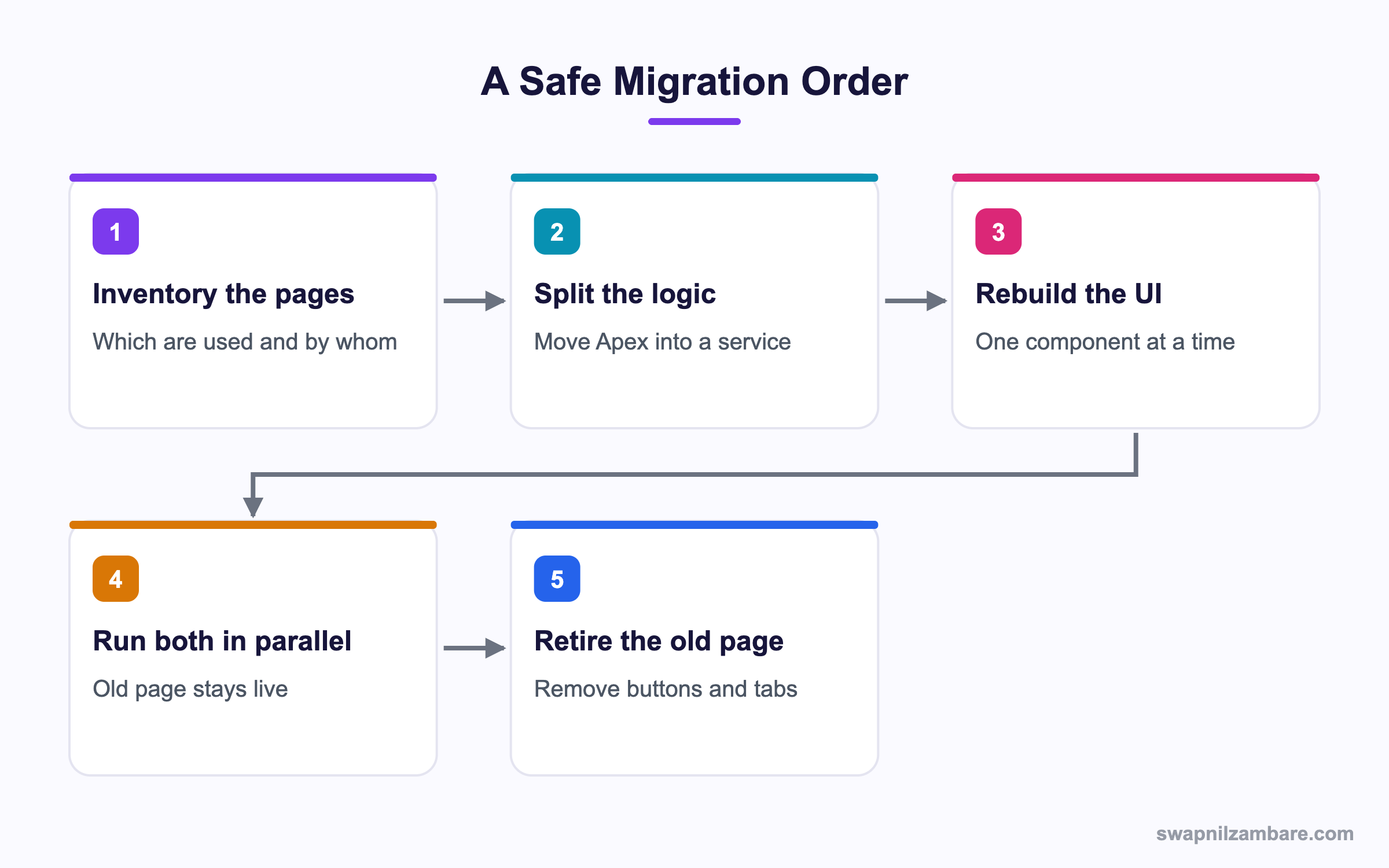
Step 1: Inventory What You Have
Before writing anything, find out what is actually used.
SELECT Id, Name, ApiVersion, IsAvailableInTouch
FROM ApexPage
ORDER BY Name
Then check usage. Many orgs find a third of their pages are dead and can simply be deleted.
| Finding | Action |
|---|---|
| Page not referenced anywhere | Delete it |
| Page used by one admin yearly | Replace with a report |
| Page used daily by many | Migrate properly |
| Page renders a PDF | Keep it as Visualforce |
Step 2: Split the Logic Out
This is the step that saves the most time. Move the data work into a service class that both the old page and the new component can call.
public with sharing class CourseService {
    public static List<Course__c> search(String keyword) {
        String like = '%' + String.escapeSingleQuotes(
            keyword == null ? '' : keyword) + '%';
        return [SELECT Id, Name, Fee__c FROM Course__c
                WHERE Name LIKE :like ORDER BY Name LIMIT 200];
    }
}
Now the old controller just calls it, and nothing has changed for users yet.
Step 3: Expose It for LWC
public with sharing class CourseCtrl {
    @AuraEnabled(cacheable=true)
    public static List<Course__c> getRows(String keyword) {
        return CourseService.search(keyword);
    }
}
cacheable=true lets the component use a wire adapter, which caches results in the browser.
Step 4: Build the Component
import { LightningElement, wire } from 'lwc';
import getRows from '@salesforce/apex/CourseCtrl.getRows';

const COLUMNS = [
    { label: 'Course', fieldName: 'Name' },
    { label: 'Fee', fieldName: 'Fee__c', type: 'currency' }
];

export default class CourseList extends LightningElement {
    keyword = '';
    columns = COLUMNS;

    @wire(getRows, { keyword: '$keyword' })
    rows;

    handleChange(event) {
        this.keyword = event.target.value;
    }
}
The dollar sign in '$keyword' makes the wire re-run whenever the value changes. That replaces the whole postback cycle.
<template>
    <lightning-card title="Courses">
        <lightning-input label="Search" onchange={handleChange}></lightning-input>
        <template lwc:if={rows.data}>
            <lightning-datatable
                key-field="Id"
                data={rows.data}
                columns={columns}
                hide-checkbox-column>
            </lightning-datatable>
        </template>
    </lightning-card>
</template>
Tag Mapping Reference
This table maps the markup you will replace.
| Visualforce | LWC equivalent |
|---|---|
| apex:pageBlock | lightning-card |
| apex:pageBlockTable | lightning-datatable |
| apex:inputField | lightning-input-field |
| apex:outputField | lightning-output-field |
| apex:inputText | lightning-input |
| apex:commandButton | lightning-button |
| apex:repeat | template for:each |
| apex:pageMessages | ShowToastEvent or inline markup |
| apex:form | Not needed, no postback |
Visualforce vs LWC
This table shows what actually changes.
| Feature | Visualforce | LWC |
|---|---|---|
| Rendering | Server | Browser |
| View state | Yes, 170 KB cap | None |
| Data access | Controller getters | Wire or imperative Apex |
| Reusable | Page level | Component level |
| PDF output | Supported | Not supported |
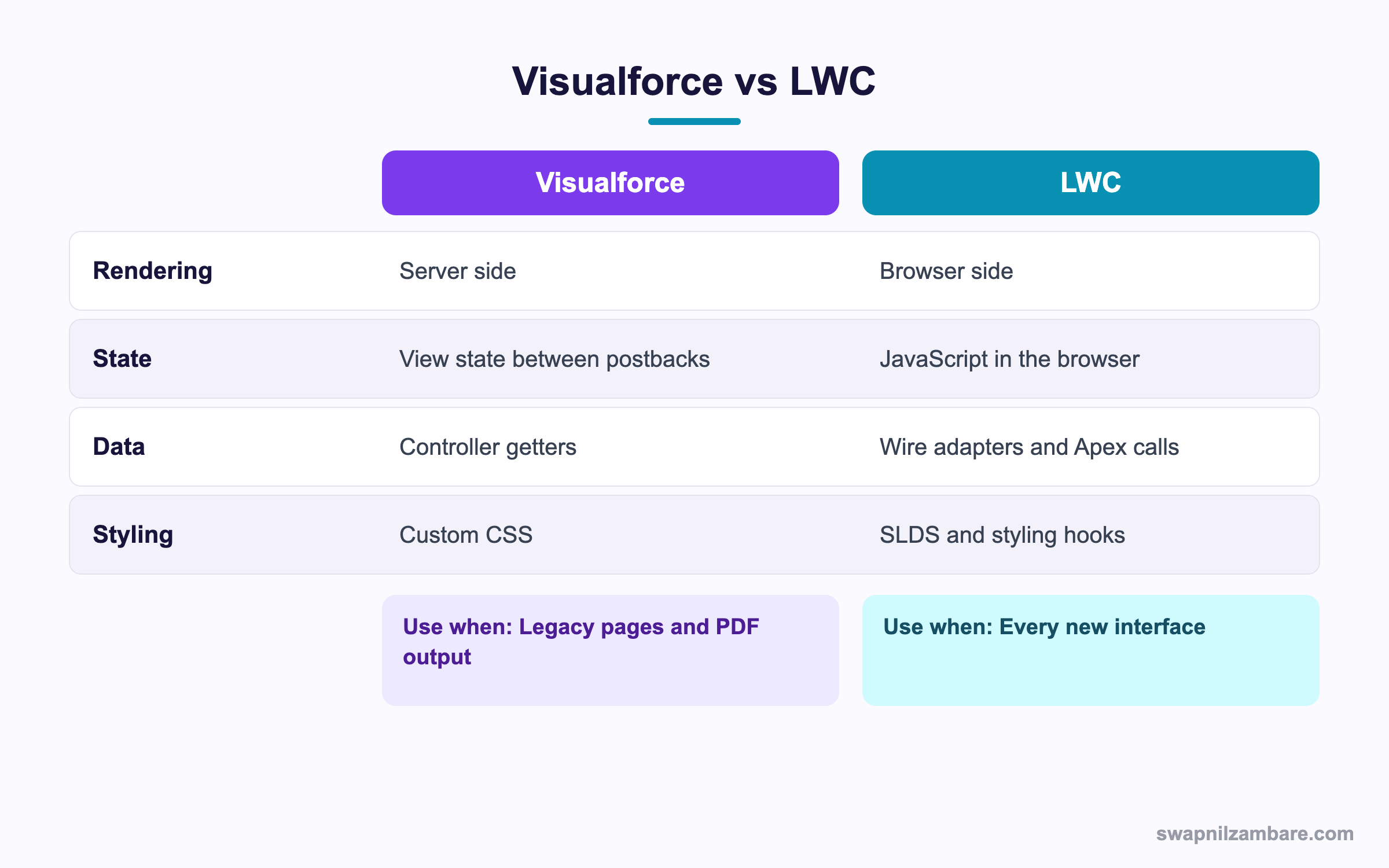
In short, almost everything moves across except PDF generation. Keep those pages.
Running Both Side by Side
You do not have to switch in one release. Lightning Out lets you drop an LWC into an existing Visualforce page, so you migrate a section at a time.
<apex:page>
    <apex:includeLightning />
    <div id="container"></div>
    <script>
        $Lightning.use("c:courseApp", function() {
            $Lightning.createComponent("c:courseList", {},
                "container", function(cmp) { });
        });
    </script>
</apex:page>
This needs a small Aura application that declares your component as a dependency. It is a useful bridge for a large page you cannot rewrite in one go.
Common Mistakes when Migrating Visualforce to LWC
- Rewriting the markup first and leaving the Apex tangled in the controller.
- Migrating pages nobody uses, instead of deleting them.
- Forgetting @AuraEnabled on wrapper fields, so data arrives empty.
- Trying to move a PDF page, which LWC cannot replace.
- Switching everyone at once with no fallback.
Best Practices when Migrating Visualforce to LWC
- Move logic into a service class before touching any markup.
- Migrate the most used pages first, since they return the most value.
- Keep the old page live until the new one is proven.
- Use lightning base components rather than rebuilding inputs by hand.
- Delete the old page, button and tab once usage reaches zero.
Practice Task
Take any Visualforce page in your org with a table. Write the service class and the @AuraEnabled method for it, without building the component yet. Hint: mark the method cacheable when it only reads data.
Most Asked Migrating Visualforce to LWC Interview Questions
These Migrating Visualforce to LWC questions come up in modernisation projects.
Basic Migrating Visualforce to LWC Interview Questions
Q1: Why migrate from Visualforce to LWC?
Migrating Visualforce to LWC gives faster pages, no view state limit and access to new platform features that only support components.
Q2: What replaces a Visualforce controller?
When Migrating Visualforce to LWC, static Apex methods marked @AuraEnabled replace it, called from the component.
Q3: What replaces apex:pageBlockTable?
The lightning-datatable base component replaces it, with columns defined in JavaScript.
Q4: Does LWC have view state?
No. State lives in JavaScript in the browser, so Migrating Visualforce to LWC removes the 170 KB limit.
Q5: Can LWC generate a PDF?
No. Keep a Visualforce page for that, or call an external service.
Q6: What does cacheable true mean?
The Apex method only reads data, so results can be cached and used with a wire adapter.
Q7: What is Lightning Out?
A way to run a Lightning component inside a Visualforce page or an external site.
Q8: Which should new development use?
LWC, because Salesforce builds all new capability there. So every new screen should start as a component.
Intermediate Migrating Visualforce to LWC Interview Questions
Q9: What is the first step in a migration?
Inventory the pages and find which are actually used, since many can simply be deleted.
Q10: Why move logic to a service class first?
Because both the old page and the new component can then call the same code, so the switch is low risk.
Q11: What replaces a postback?
A wire adapter that re-runs when its parameters change, or an imperative Apex call.
Q12: How do you show messages in LWC?
Fire a ShowToastEvent, or render the message in the template.
Q13: What happens to a wrapper class in the move?
Each field needs @AuraEnabled, otherwise it does not reach JavaScript.
Q14: Can both versions run at once?
Yes. Keep the Visualforce button and add the component elsewhere until users have moved.
Q15: How do you handle a multi-step wizard?
Hold the state in the component and call Apex only at the end, which removes the view state problem entirely.
Q16: What about JavaScript already on the page?
Rewrite it inside the component. Direct DOM manipulation across components is not allowed in LWC.
Advanced Migrating Visualforce to LWC Interview Questions
Q17: Scenario: a page has 4,000 lines of markup and logic. How do you approach it?
Break it into sections, migrate one section at a time with Lightning Out, and keep the old page as the container until the last piece moves.
Q18: How do you prove the new page is correct?
Run both against the same records and compare outputs, then pilot with a small group before the full switch.
Q19: What performance gains should you expect?
Less data over the network and no view state, so pages load faster. However, badly written Apex is still slow in either framework.
Q20: Scenario: users report the component is slower than the old page. What do you check?
Too many wire calls, uncached Apex, large datatables without paging and work done in renderedCallback.
Q21: How do you handle sharing differences?
Standard controllers enforced user access automatically. So your Apex methods now need with sharing and explicit field checks.
Q22: When is it right not to migrate?
PDF pages, rarely used internal tools and anything scheduled for retirement. Spending effort there wins nothing.
Q23: How do you measure progress?
Track page views on the old pages each month and aim for zero before deleting them.
Q24: What governance helps a long migration?
A rule that no new Visualforce is written, plus a list of pages with an owner and a target date for each.
Q25: How long does Migrating Visualforce to LWC usually take?
It depends on page count and complexity, not on a fixed figure. However, splitting logic out first makes each later page much faster to move.
Q26: Does Migrating Visualforce to LWC break existing buttons?
Only if you remove the page. So keep the button pointing at the old page until the component is proven, then switch it.
Q27: Can a component be added to a record page without code?
Yes. Once it is exposed in its meta XML, admins drag it onto the page in Lightning App Builder.
Q28: What is the biggest hidden cost in Migrating Visualforce to LWC?
Retesting business rules that lived quietly in the old controller. Therefore write tests on the service class before you move anything.
Q29: Should you migrate email templates built in Visualforce?
Not usually, since Lightning email templates cover most cases. For complex merges, keep the Visualforce template.
Official Resources
- Lightning Web Components Developer Guide
- Visualforce Guide: Lightning Out
- Trailhead: Lightning Web Components Basics
Quick Recap
- Migrating Visualforce to LWC removes view state and speeds up pages.
- Move Apex into a service class before changing any markup.
- Expose data through @AuraEnabled methods, cacheable for reads.
- Lightning Out lets both run side by side during the change.
- Keep Visualforce for PDF generation, which LWC cannot do.
What’s Next?
Next, we start the LWC block with Lightning Base Components.


