Visualforce Basics start with one idea: a page of tags that Salesforce turns into HTML on the server. You write markup like apex:page and apex:pageBlock, bind it to data with expressions, and the platform renders it. Many orgs still run Visualforce pages, so developers need to read and maintain them.
This post builds on Apex classes and LWC fundamentals. We will build a course page for Bright Path Tutors.
What are Visualforce Basics?
Visualforce is a markup language for building pages inside Salesforce. A page file ends in .page, uses tags in the apex namespace, and runs on the server. It can be bound to a controller that supplies data and actions.
Think of a mail merge document. The template has placeholders, the data fills them in, and the finished letter is what the reader sees. Visualforce works the same way, but the result is a web page.
Why Visualforce Basics Still Matter
Salesforce builds new features for Lightning Web Components, not Visualforce. However, large orgs have hundreds of existing pages, and PDF generation still depends on Visualforce.
So Visualforce Basics remain part of most developer jobs. You will maintain old pages, migrate them, or build a quick PDF that LWC cannot produce.
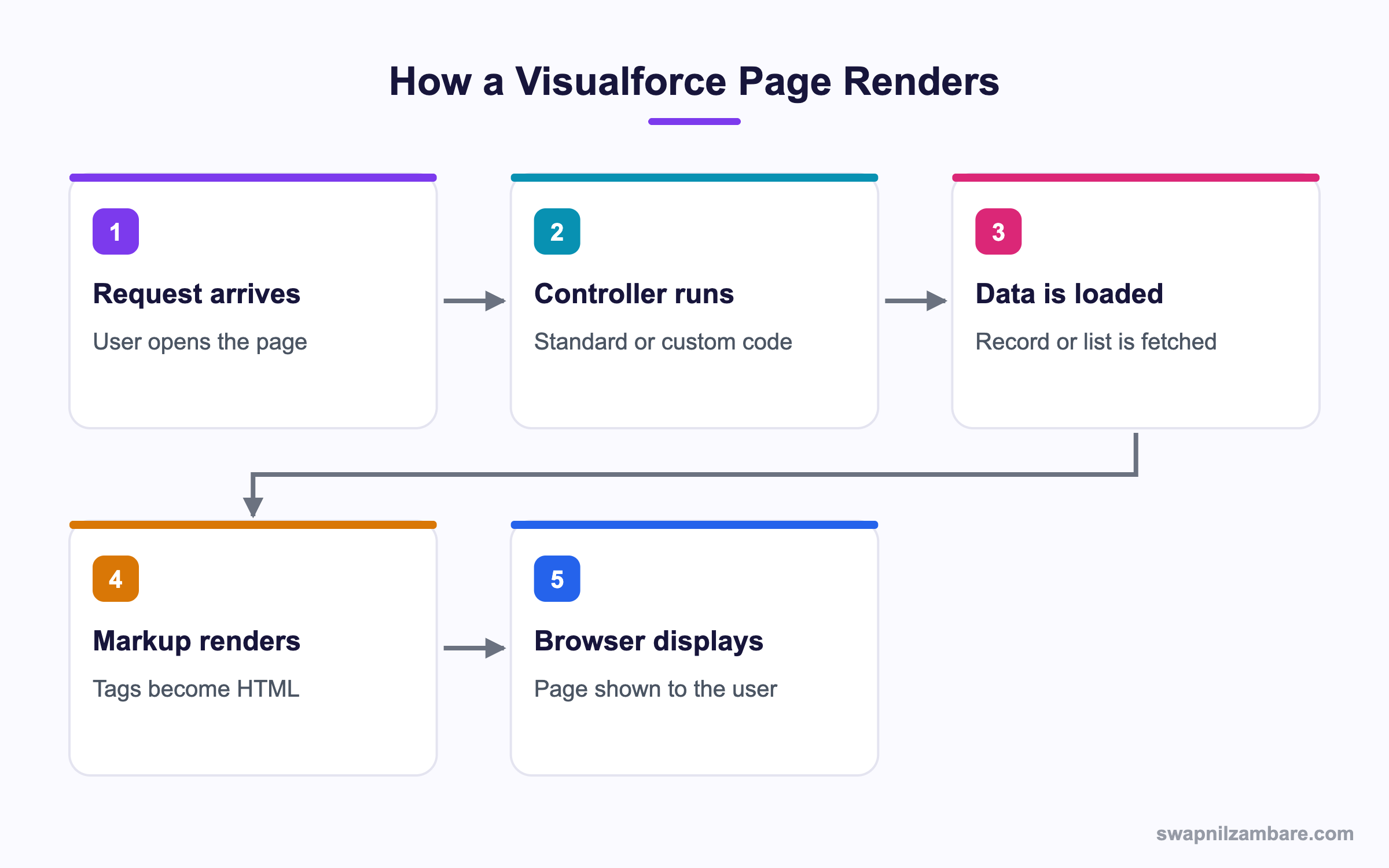
How Visualforce Basics Work in a Page Request
Every request runs on the server, builds the HTML and sends it back.
The Simplest Page
<apex:page standardController="Course__c">
    <apex:pageBlock title="Course details">
        <apex:pageBlockSection>
            <apex:outputField value="{!Course__c.Name}"/>
            <apex:outputField value="{!Course__c.Fee__c}"/>
        </apex:pageBlockSection>
    </apex:pageBlock>
</apex:page>
Opening it with a record Id in the URL shows that course. The expression {!Course__c.Name} reads the field.
Standard Controllers
A standard controller gives you a record plus free actions, with no Apex at all.
<apex:page standardController="Course__c">
    <apex:form>
        <apex:pageBlock mode="edit">
            <apex:pageBlockSection>
                <apex:inputField value="{!Course__c.Name}"/>
                <apex:inputField value="{!Course__c.Fee__c}"/>
            </apex:pageBlockSection>
            <apex:pageBlockButtons>
                <apex:commandButton action="{!save}" value="Save"/>
                <apex:commandButton action="{!cancel}" value="Cancel"/>
            </apex:pageBlockButtons>
        </apex:pageBlock>
    </apex:form>
</apex:page>
You wrote no Apex, yet save, cancel, edit and delete all work. The controller also respects the user’s field level security.
Standard List Controllers
Add recordSetVar and you get a list instead of one record.
<apex:page standardController="Course__c" recordSetVar="courses">
    <apex:pageBlock title="Courses">
        <apex:pageBlockTable value="{!courses}" var="c">
            <apex:column value="{!c.Name}"/>
            <apex:column value="{!c.Fee__c}"/>
        </apex:pageBlockTable>
    </apex:pageBlock>
</apex:page>
This gives paging, list view filtering and mass actions for free.
Expression Syntax
Everything dynamic uses {! }. The table below shows the common forms.
| Expression | Meaning |
|---|---|
| {!Course__c.Name} | A field on the record |
| {!courses} | A list from the controller |
| {!save} | An action method |
| {!$User.FirstName} | Global user information |
| {!$Label.Fee_Help} | A custom label |
| {!IF(x, ‘a’, ‘b’)} | A formula expression |
Common Visualforce Tags
These are the tags you will meet most often.
| Tag | Job |
|---|---|
| apex:page | The page itself and its controller |
| apex:form | Wraps anything that posts back |
| apex:pageBlock | A styled container |
| apex:pageBlockTable | A table styled like Salesforce |
| apex:repeat | A loop with no styling |
| apex:inputField | An editable field with its type |
| apex:outputField | A read-only field with formatting |
| apex:commandButton | A button that calls an action |
Standard vs Custom Controllers
This table shows when each fits.
| Feature | Standard controller | Custom controller |
|---|---|---|
| Apex needed | None | Yes |
| Record loading | Automatic | You query |
| Default actions | Provided | You write them |
| Sharing | User mode | System mode by default |
| Flexibility | Low | High |
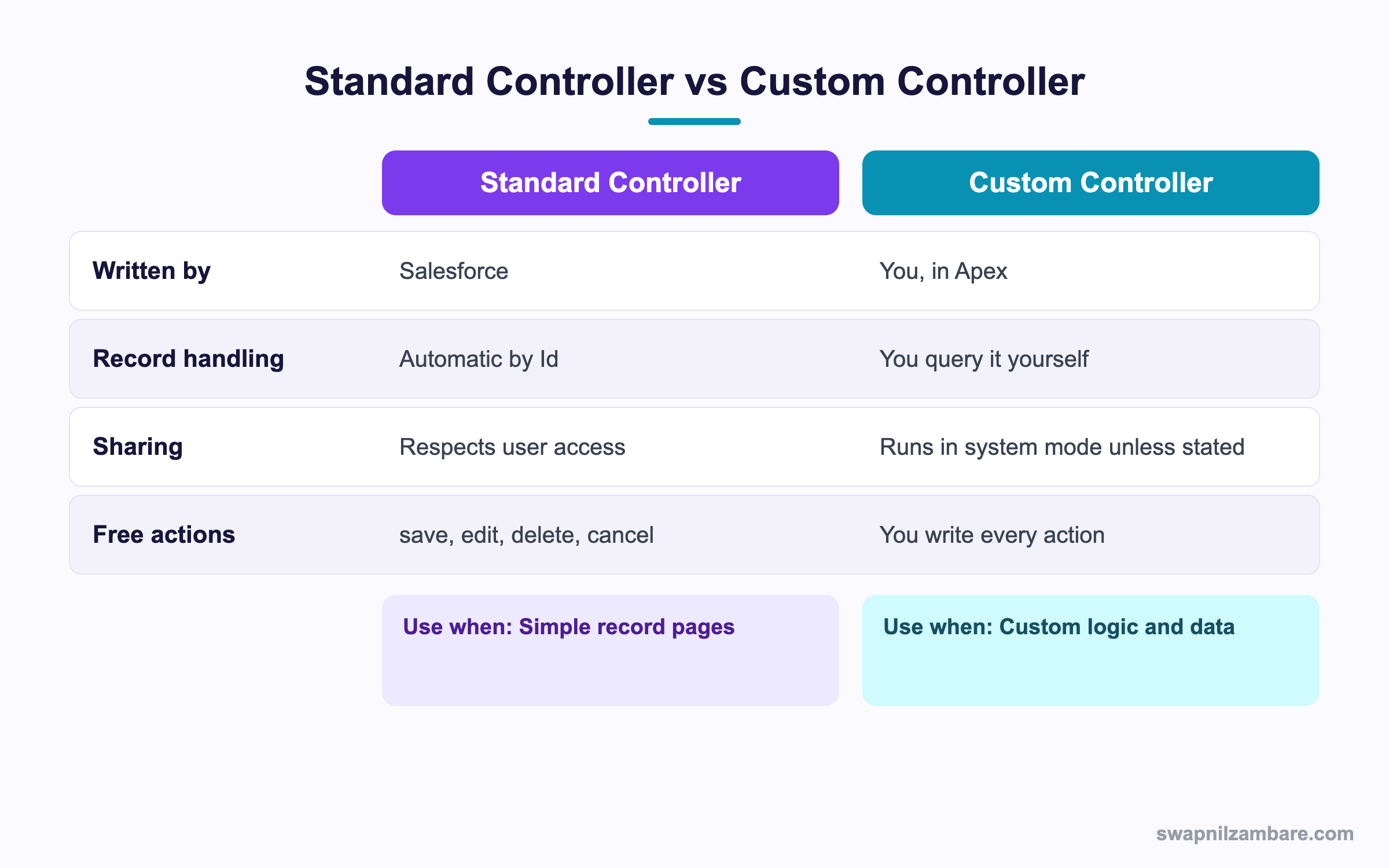
In short, start with a standard controller. Move to a custom one only when you need data or logic it cannot give you.
A Real Visualforce Basics Example
Bright Path wants a printable course sheet that parents can save as a PDF. LWC cannot generate a PDF, so Visualforce is the right tool.
Step 1: Build the Page
<apex:page standardController="Course__c" renderAs="pdf" applyBodyTag="false">
    <head>
        <style type="text/css">
            body { font-family: Arial, sans-serif; font-size: 12pt; }
            h1 { color: #17153B; }
            table { width: 100%; border-collapse: collapse; }
            td { border: 1px solid #ccc; padding: 6px; }
        </style>
    </head>
    <body>
        <h1>{!Course__c.Name}</h1>
        <table>
            <tr><td>Fee</td><td>{!Course__c.Fee__c}</td></tr>
            <tr><td>Level</td><td>{!Course__c.Level__c}</td></tr>
            <tr><td>Starts</td><td>{!Course__c.Start_Date__c}</td></tr>
        </table>
    </body>
</apex:page>
The renderAs="pdf" attribute is the whole trick. Salesforce renders the HTML and returns a PDF file.
Step 2: Add a Button
- Open Setup, then Object Manager, then Course.
- Click Buttons, Links, and Actions, then New Button or Link.
- Set Display Type to Detail Page Button.
- Set Content Source to Visualforce Page and pick your page.
- Save, then add the button to the Course page layout.
Step 3: Handle Missing Data
PDF rendering fails on broken markup, so guard your fields.
<apex:outputText value="{!IF(ISBLANK(Course__c.Fee__c), 'Not set', TEXT(Course__c.Fee__c))}"/>These are the settings that matter for PDF pages.
| Attribute | Why |
|---|---|
| renderAs=”pdf” | Produces a PDF instead of HTML |
| applyBodyTag=”false” | Lets you write your own head and body |
| showHeader=”false” | Removes the Salesforce chrome |
| standardStylesheets=”false” | Avoids layout clashes in print |
Common Mistakes with Visualforce Basics
- Forgetting apex:form, so buttons do nothing.
- Using inputField without a standard controller record to bind to.
- Writing SOQL inside a getter, which runs on every render.
- Building new user interfaces in Visualforce when LWC is the current tool.
- Leaving standard stylesheets on in a PDF, which breaks the layout.
Best Practices for Visualforce Basics
- Prefer a standard controller, since it respects user access for free.
- Use an extension rather than a full custom controller when you only add a little.
- Keep queries out of getters and load data once in the constructor.
- Build new screens in LWC and keep Visualforce for PDFs and legacy pages.
- Use custom labels for text so pages can be translated.
Practice Task
Build a page for the Course object using a standard list controller and a pageBlockTable with three columns. Hint: set recordSetVar on apex:page.
Most Asked Visualforce Basics Interview Questions
These Visualforce Basics questions still appear in interviews, especially for maintenance roles.
Basic Visualforce Basics Interview Questions
Q1: What is Visualforce?
Visualforce Basics cover a server side markup language for building Salesforce pages, using tags in the apex namespace.
Q2: What is a standard controller?
In Visualforce Basics, it is a controller Salesforce provides for an object, giving record loading plus save, edit, delete and cancel actions.
Q3: How do you show a field on a page?
Use apex:outputField for read only, or apex:inputField for editable. Then bind it with an expression.
Q4: What is the expression syntax?
It is curly braces with an exclamation mark, such as {!Course__c.Name}.
Q5: What does recordSetVar do?
It turns a standard controller into a standard list controller, giving you a list of records.
Q6: Which tag is needed for buttons to work?
apex:form. Without it, command buttons do not post back.
Q7: How do you render a page as PDF?
Set renderAs equal to pdf on the apex:page tag.
Q8: What file extension does a page use?
It uses the .page extension, with a matching .page-meta.xml file.
Intermediate Visualforce Basics Interview Questions
Q9: What is a controller extension?
An Apex class that adds methods to a standard controller, while keeping its built-in behaviour.
Q10: Does a standard controller enforce sharing?
Yes. It runs in user mode, so record and field access are respected automatically.
Q11: Does a custom controller enforce sharing?
Not by default. It runs in system mode unless you declare with sharing.
Q12: What is a view state?
The encrypted data Visualforce stores between postbacks. It is capped at 170 KB, so large collections cause errors.
Q13: How do you reduce view state?
Mark variables transient, query fewer fields and avoid holding large lists in the controller.
Q14: What is the difference between apex:repeat and apex:pageBlockTable?
Repeat is a plain loop with no styling. PageBlockTable renders a Salesforce styled table with headers.
Q15: Can a Visualforce page run in Lightning Experience?
Yes, if it is marked available for Lightning Experience. Some older markup may still look out of place.
Q16: What is an action function?
A tag that lets JavaScript call an Apex controller method without a full page submit.
Advanced Visualforce Basics Interview Questions
Q17: Scenario: a page throws a view state error. How do you fix it?
Mark unneeded controller variables transient, trim the query, and move large work to a JavaScript remoting call.
Q18: What is JavaScript Remoting?
A way to call a static Apex method from JavaScript with no view state, which is far faster for large data.
Q19: Scenario: a PDF renders blank. What do you check?
Invalid markup, unsupported CSS, images needing full URLs, and whether standard stylesheets are interfering.
Q20: Why keep SOQL out of getters?
Because a getter can run several times per render, so each call repeats the query and burns limits.
Q21: When should you still choose Visualforce over LWC?
For PDF rendering, email templates that need markup, and small edits to existing legacy pages.
Q22: How do you migrate a Visualforce page to LWC?
Move the data access into an @AuraEnabled Apex method, rebuild the markup as a component, then replace the button or tab.
Q23: Can Visualforce and LWC work together?
Yes. You can embed a Lightning component in a Visualforce page using Lightning Out.
Q24: What are the governor limits on a page?
The usual Apex limits apply per request, plus the 170 KB view state cap and a 15 MB response size limit.
Q25: Are Visualforce Basics still worth learning in 2027?
Yes, for maintenance and PDFs. However, learn LWC first, because that is where all new development happens.
Q26: Can a Visualforce page be used in an Experience Cloud site?
Yes, older sites support them. Still, new site pages should use LWC or the site builder components.
Q27: How do you pass a parameter into a page?
Add it to the URL and read it with ApexPages.currentPage().getParameters().get(‘name’) in the controller.
Q28: What happens to Visualforce in a Salesforce mobile app?
Pages can render if marked available for the mobile app. However, they rarely feel native, so LWC is a better fit.
Q29: Scenario: a legacy page is slow. What do you look at first?
The view state size and any SOQL in getters. Those two account for most slow Visualforce pages.
Official Resources
Quick Recap
- Visualforce Basics cover server rendered pages built from apex tags.
- Standard controllers give record handling and actions for free.
- recordSetVar turns one record into a list controller.
- renderAs pdf is still the simplest way to produce a PDF.
- Build new interfaces in LWC and keep Visualforce for legacy and PDFs.
What’s Next?
Next, we add our own logic with Custom Controllers and Controller Extensions.


