Apex Crypto gives you hashing, message signatures and AES encryption inside Salesforce. The most common real use is verifying that a webhook really came from your partner, by recomputing a signature over the body. So you can trust incoming data instead of hoping.
This post builds on Apex secure coding and Named Credentials. We will verify a payment webhook for Bright Path Tutors.
What is Apex Crypto?
Apex Crypto is the Crypto class plus EncodingUtil. Crypto handles digests, message authentication codes and AES encryption. EncodingUtil converts between Blob and text formats such as Base64 and hexadecimal.
Think of a wax seal on a letter. Anyone can read the letter, but the seal proves who sent it and that nobody opened it on the way. A signature works the same way for data.
Why Apex Crypto Matters
Integrations send data over the internet, and anyone can post to a public endpoint. Without a check, a fake request looks exactly like a real one.
Apex Crypto lets you verify the sender cheaply. It also covers hashing values for comparison and encrypting a field you must read back later, which Shield Platform Encryption does not cover for every case.
How Apex Crypto Works
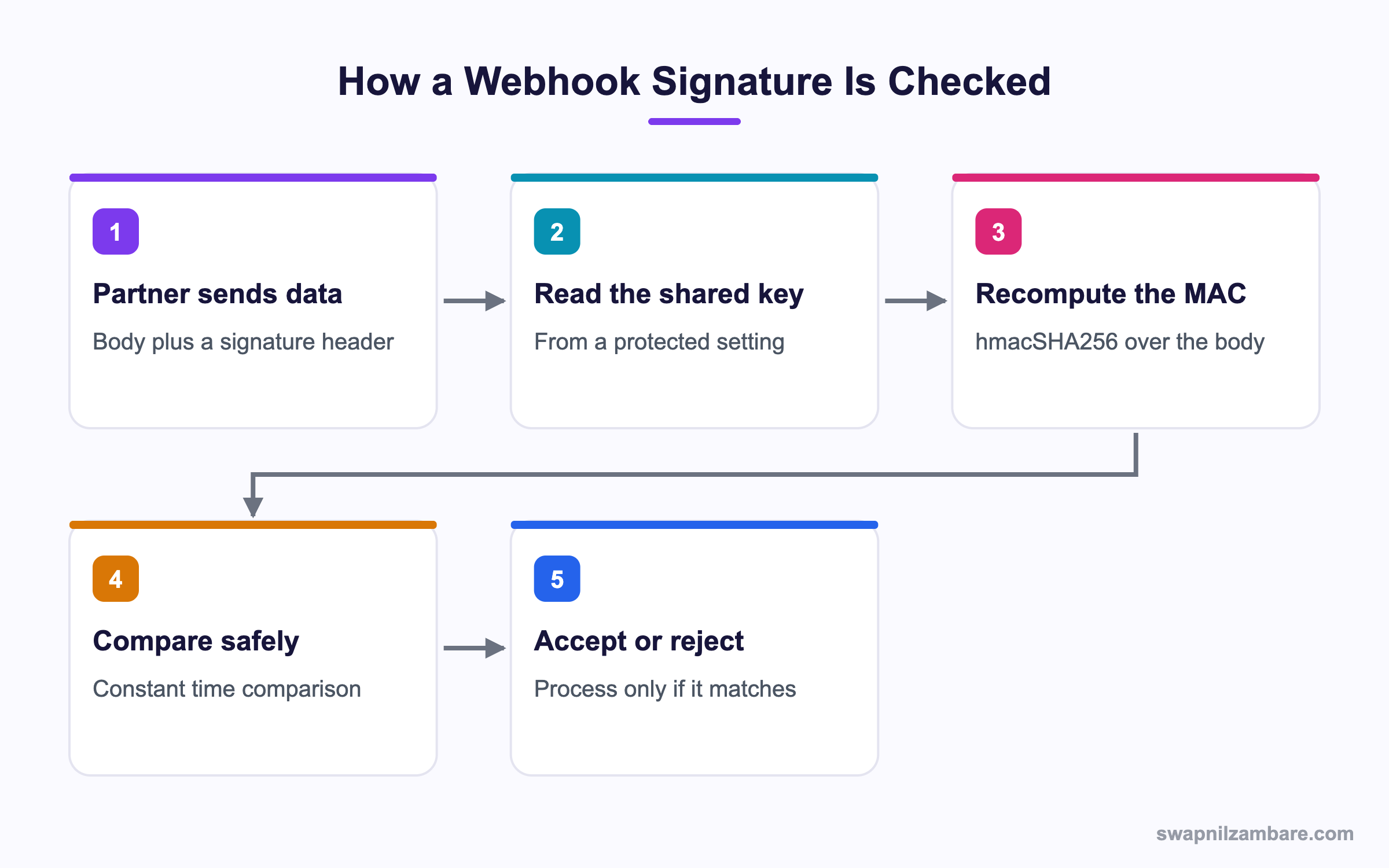
A signature check follows the same five steps every time.
Hashing a Value
A digest turns any input into a fixed-length Blob. It is one way, so you cannot get the original back.
Blob input = Blob.valueOf('PaymentRef-9981');
Blob digest = Crypto.generateDigest('SHA-256', input);
System.debug(EncodingUtil.convertToHex(digest));
The log shows a 64 character hexadecimal string.
4f8b2c1d9e...a07cSupported algorithms are MD5, SHA1, SHA-256 and SHA-512. Use SHA-256 or stronger, since MD5 and SHA1 are broken for security use.
Creating a Signature with HMAC
A plain hash proves nothing about who sent it, because anyone can compute it. A MAC mixes in a shared secret key.
String body = '{"ref":"9981","amount":5000}';
Blob key = Blob.valueOf(PaymentConfig__mdt.getInstance('Default').Secret__c);
Blob mac = Crypto.generateMac('hmacSHA256', Blob.valueOf(body), key);
String signature = EncodingUtil.base64Encode(mac);
Only someone holding the same key can produce that signature.
Comparing Safely
Comparing strings with == can leak timing information. Apex Crypto gives you a constant time comparison.
Boolean ok = Crypto.verifyHMac('hmacSHA256', Blob.valueOf(body), key,
                               EncodingUtil.base64Decode(headerSignature));
This returns true only when the signature matches, and it takes the same time either way.
Encrypting and Decrypting
AES encryption is two way, so you can read the value back.
Blob key = Crypto.generateAesKey(256);
Blob clear = Blob.valueOf('Account 1234');
Blob secret = Crypto.encryptWithManagedIV('AES256', key, clear);
Blob back = Crypto.decryptWithManagedIV('AES256', key, secret);
System.debug(back.toString());
The output returns the original text.
Account 1234The managed IV versions add a random initialisation vector for you, which is the safer choice unless you must match an external system.
Apex Crypto Method Summary
This table lists the methods you will reach for.
| Method | Purpose |
|---|---|
| Crypto.generateDigest | One way hash of data |
| Crypto.generateMac | Signature using a shared key |
| Crypto.verifyHMac | Safe signature comparison |
| Crypto.generateAesKey | Create a random AES key |
| Crypto.encryptWithManagedIV | Encrypt with a random IV |
| Crypto.decryptWithManagedIV | Decrypt data encrypted that way |
| EncodingUtil.base64Encode | Blob to Base64 text |
| EncodingUtil.convertToHex | Blob to hexadecimal text |
Hashing vs Encryption
People mix these up constantly. This table separates them.
| Feature | Hashing | Encryption |
|---|---|---|
| Reversible | No | Yes, with the key |
| Key required | Only for a MAC | Always |
| Output length | Fixed | Grows with input |
| Used for | Integrity and signatures | Confidentiality |
| Example | Verify a webhook | Store a token you must reuse |
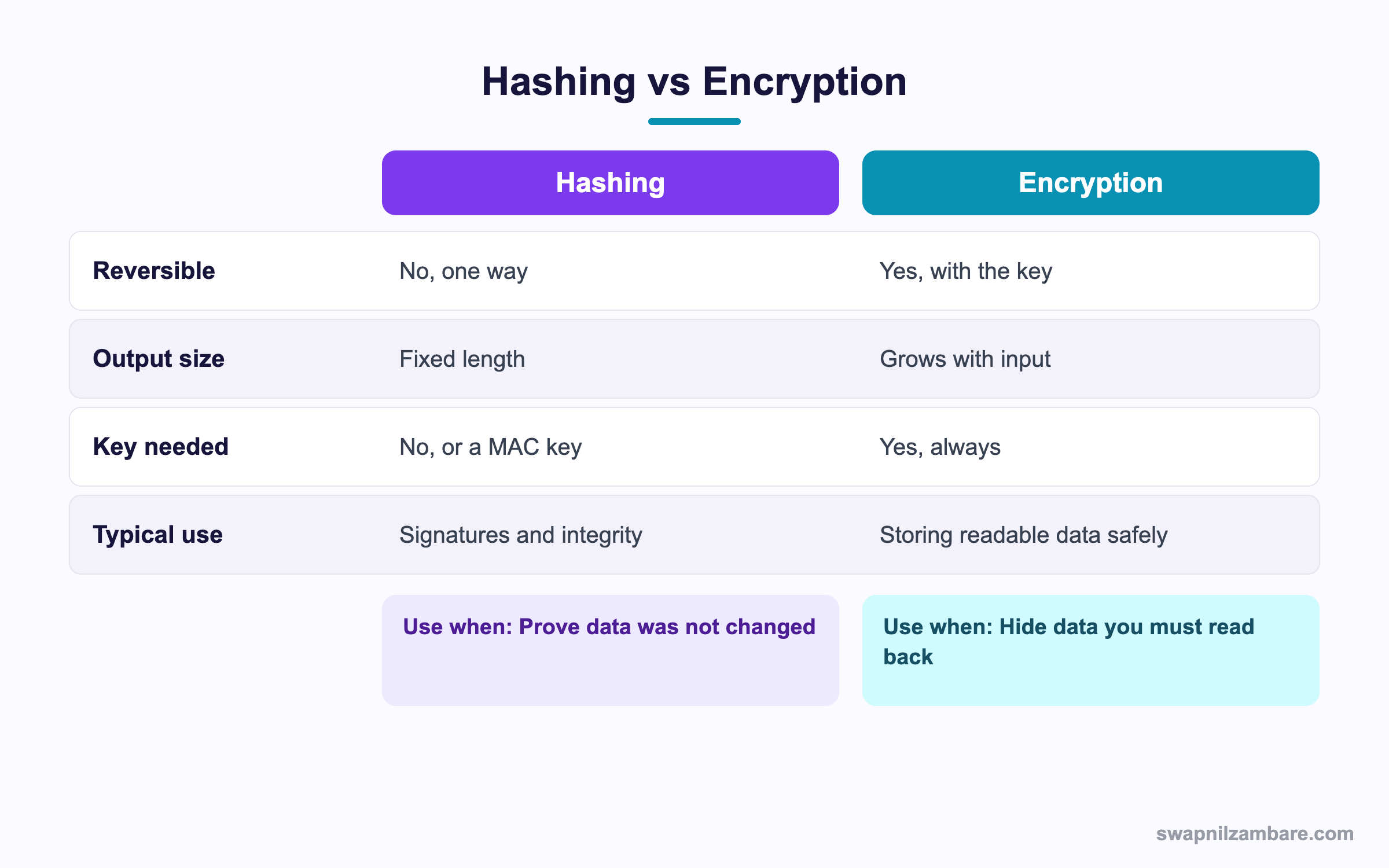
In short, hash when you only need to prove nothing changed. Encrypt when you must read the value back later.
A Real Apex Crypto Example
Bright Path receives payment confirmations from a gateway. Each request carries a signature header, and the endpoint must reject anything that does not match.
Step 1: Store the Key Safely
Keep the secret in protected Custom Metadata, never in the class file.
| Where | Suitable |
|---|---|
| Protected Custom Metadata | Yes, hidden from subscribers |
| Named Credential | Yes, for outbound auth |
| Custom Setting | Weak, many users can read it |
| Hard-coded in Apex | Never, it sits in source control |
Step 2: Verify the Request
@RestResource(urlMapping='/payment/*')
global with sharing class PaymentWebhook {

    @HttpPost
    global static void receive() {
        RestRequest req = RestContext.request;
        String body = req.requestBody.toString();
        String sent = req.headers.get('X-Signature');

        if (String.isBlank(sent)) {
            RestContext.response.statusCode = 401;
            return;
        }
        Blob key = Blob.valueOf(PaymentConfig__mdt.getInstance('Default').Secret__c);
        Boolean ok = Crypto.verifyHMac('hmacSHA256',
                                       Blob.valueOf(body),
                                       key,
                                       EncodingUtil.base64Decode(sent));
        if (!ok) {
            RestContext.response.statusCode = 401;
            return;
        }
        PaymentService.record(body);
        RestContext.response.statusCode = 200;
    }
}
The record is only created after the signature passes, so a forged call changes nothing.
Step 3: Test Both Paths
@isTest
private class PaymentWebhookTest {
    @isTest static void rejectsBadSignature() {
        RestRequest req = new RestRequest();
        req.requestBody = Blob.valueOf('{"ref":"1"}');
        req.headers.put('X-Signature', 'd3Jvbmc=');
        RestContext.request = req;
        RestContext.response = new RestResponse();

        Test.startTest();
        PaymentWebhook.receive();
        Test.stopTest();

        System.assertEquals(401, RestContext.response.statusCode);
    }
}
Always test the rejection path, because that is the one protecting you.
Common Mistakes with Apex Crypto
- Hard-coding the secret key in the Apex class.
- Comparing signatures with ==, which can leak timing details.
- Using MD5 or SHA1 for anything security related.
- Reusing one initialisation vector across messages.
- Storing an AES key in a readable custom setting.
Why Hashing Is Not Encryption
A hash cannot be reversed, so it is useless for anything you must read back. If someone suggests hashing a phone number so it can be shown later, that will not work.
Best Practices for Apex Crypto
- Use SHA-256 or SHA-512 for digests.
- Use verifyHMac rather than comparing strings yourself.
- Keep keys in protected Custom Metadata or Named Credentials.
- Prefer the managed IV methods unless an external system dictates otherwise.
- Consider Shield Platform Encryption before writing your own field encryption.
Practice Task
Write a method that takes a text body and a key, and returns a Base64 HMAC SHA-256 signature. Hint: Blob.valueOf, Crypto.generateMac and EncodingUtil.base64Encode.
Most Asked Apex Crypto Interview Questions
These Apex Crypto questions appear in security focused developer interviews.
Basic Apex Crypto Interview Questions
Q1: Which class handles encryption in Apex?
Apex Crypto work uses the Crypto class, with EncodingUtil for Base64 and hexadecimal conversion.
Q2: What does generateDigest do?
It creates a one way hash of a Blob, using an algorithm such as SHA-256.
Q3: What is the difference between a hash and a MAC?
A hash needs no key, so anyone can compute it. A MAC mixes in a shared secret, which proves who created it.
Q4: What is Base64 used for?
Turning binary data into text that is safe to put in a header, a JSON body or a URL.
Q5: Which algorithms does generateDigest support?
MD5, SHA1, SHA-256 and SHA-512, though only the last two are safe for security.
Q6: How do you create an AES key?
Call Crypto.generateAesKey with 128, 192 or 256 bits.
Q7: What does encryptWithManagedIV add?
A random initialisation vector, which Salesforce generates and stores with the output.
Q8: Is hashing reversible?
No. You cannot recover the input, which is exactly why it suits signatures.
Intermediate Apex Crypto Interview Questions
Q9: Why use verifyHMac instead of comparing strings?
Because it compares in constant time, so an attacker cannot learn the key from response timing.
Q10: Where should an API secret be stored?
In protected Custom Metadata or a Named Credential. Never in the class or a readable custom setting.
Q11: What is an initialisation vector?
A random block mixed into encryption so the same input does not always produce the same output.
Q12: Can Apex Crypto replace Shield Platform Encryption?
No. Shield encrypts fields at rest transparently, while Apex Crypto encrypts values you manage yourself.
Q13: What is the heap cost of encryption?
Blobs count against heap, so encrypting large files in one transaction can hit the limit.
Q14: How do you convert a Blob to readable text?
Use toString for plain text, or EncodingUtil.base64Encode and convertToHex for binary data.
Q15: What is a salt and does Apex add one?
A salt is random data added before hashing so identical inputs differ. Apex does not add one, so you append it yourself.
Q16: Can you decrypt data encrypted outside Salesforce?
Yes, if you use the same algorithm, key and IV. So you must agree the exact scheme with the other system.
Advanced Apex Crypto Interview Questions
Q17: Scenario: a partner webhook must be verified. Walk through your design.
Read the signature header, fetch the key from protected metadata, recompute the HMAC over the raw body and call verifyHMac. Process only on success, and return 401 otherwise.
Q18: Why must you sign the raw body, not a parsed object?
Because parsing and re-serialising can change spacing or key order, which breaks the signature.
Q19: How do you rotate a shared key without downtime?
Accept either the old or the new key for a short window, then remove the old one once the partner has switched.
Q20: What are the risks of writing your own field encryption?
Key management, searchability and reporting all break. Therefore Shield is usually the better answer.
Q21: How do you prevent replay attacks?
Include a timestamp and a unique id in the signed payload, reject old timestamps and store processed ids.
Q22: Why is MD5 still in the API?
For legacy checksum work, not security. So use it only when an old system requires that exact format.
Q23: How does Apex Crypto fit with Platform Events?
You can sign the payload before publishing, so a subscriber in another system can verify it came from your org.
Q24: What limits apply to Crypto calls?
There is no separate crypto limit, but CPU time and heap still apply. So avoid encrypting large volumes in one transaction.
Q25: Does Apex Crypto work in a Lightning Web Component?
Not directly, because it is server side. So the component calls an Apex method, and the crypto runs there.
Q26: Can Apex Crypto hash a password for login?
No, and you should never try. Salesforce handles authentication itself, so rolling your own login is both unsafe and unsupported.
Q27: How large a payload can Apex Crypto handle?
It is bound by the heap limit, which is 6 MB synchronous and 12 MB asynchronous. Therefore sign hashes of large files rather than the files themselves.
Q28: Scenario: two systems produce different signatures for the same body. What do you check?
The exact bytes being signed, the character encoding, the key format and whether one side trimmed whitespace. Usually the body differs by one character.
Q29: Is Base64 a form of encryption?
No. Base64 only changes how bytes are written, and anyone can decode it. So never use it to protect a secret.
Official Resources
- Apex Reference: Crypto Class
- Apex Reference: EncodingUtil Class
- Salesforce Help: Shield Platform Encryption
Quick Recap
- Apex Crypto covers hashing, MAC signatures and AES encryption.
- Hashing is one way, while encryption can be reversed with the key.
- Use verifyHMac for safe signature comparison.
- Keep keys in protected Custom Metadata, never in code.
- Prefer Shield Platform Encryption for encrypting stored fields.
What’s Next?
Next, we start the Visualforce block with Visualforce Basics and Standard Controllers.


