Hierarchy Custom Settings let you store a value once for the whole org, then override it for a profile or even a single user. So you can turn a feature off for everyone, leave it on for the admin team, and read the right answer in Apex with one line and no query.
This post builds on Custom Metadata Types vs Custom Settings and Apex classes. We will control fee rules at Bright Path Tutors.
What are Hierarchy Custom Settings?
Hierarchy Custom Settings are a custom setting type with three levels: organization, profile and user. Salesforce merges them for you, so the most specific value wins. They live in cache, which is why reading them costs no SOQL.
Think of a school dress code. The school sets one rule, a department may change part of it, and one student may have a medical exemption. You always follow the most specific rule that applies to you.
Why Hierarchy Custom Settings Matter
Hard-coded numbers age badly. A discount cap, a batch size or a debug switch written into Apex needs a deployment every time it changes.
Hierarchy Custom Settings move those values into Setup. Also, because they do not count against SOQL limits, you can read them inside loops and triggers without worry.
How Hierarchy Custom Settings Work
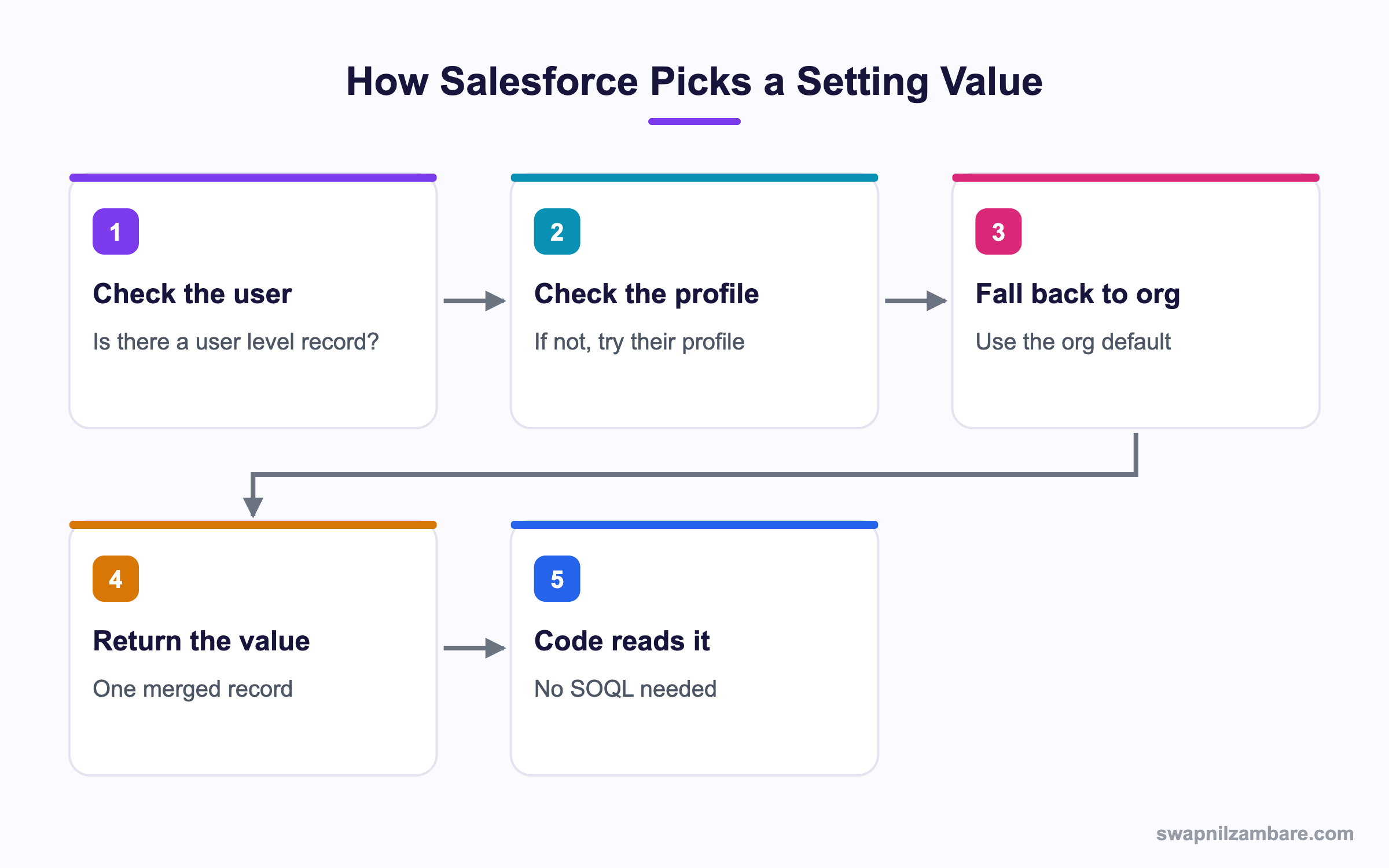
With Hierarchy Custom Settings, Salesforce looks for the most specific record and falls back if it does not find one.
Creating the Setting
An admin creates it in Setup under Custom Settings, choosing Hierarchy as the type. Each field becomes a value you can override.
| Field | Type | Purpose |
|---|---|---|
| Max_Discount__c | Percent | Highest discount this user may give |
| Enable_Auto_Email__c | Checkbox | Turns reminder emails on or off |
| Batch_Size__c | Number | Records per batch run |
Reading the Merged Value
// Merged for the running user
Fee_Setting__c s = Fee_Setting__c.getInstance(UserInfo.getUserId());
System.debug('Max discount: ' + s.Max_Discount__c);
System.debug('Auto email: ' + s.Enable_Auto_Email__c);
With no argument, getInstance() also returns the merged value for the current user, which is the common case.
Fee_Setting__c s = Fee_Setting__c.getInstance();Reading a Specific Level
Sometimes you want the org value even when the user has an override.
Fee_Setting__c org = Fee_Setting__c.getOrgDefaults();
Fee_Setting__c forProfile = Fee_Setting__c.getInstance(profileId);
Fee_Setting__c forUser = Fee_Setting__c.getInstance(userId);
The debug for a user whose profile allows more than the org default looks like this.
Org default: 10
Profile value: 20
Merged for user: 20
Writing a Setting from Apex
Custom settings are records, so normal DML works.
Fee_Setting__c s = Fee_Setting__c.getOrgDefaults();
if (s.Id == null) {
    s = new Fee_Setting__c(SetupOwnerId = UserInfo.getOrganizationId());
}
s.Max_Discount__c = 15;
upsert s;
SetupOwnerId is the field that decides the level. It holds the org Id, a profile Id or a user Id.
Hierarchy Custom Settings Methods
This table lists the methods you get for free.
| Method | Returns |
|---|---|
| getInstance() | Merged value for the running user |
| getInstance(userId) | Merged value for that user |
| getInstance(profileId) | Merged value for that profile |
| getOrgDefaults() | The organization level record only |
| getValues(name) | Used by list settings, not hierarchy |
Hierarchy vs List Custom Settings
Custom settings come in two types. This table compares them.
| Feature | Hierarchy | List |
|---|---|---|
| Levels | Org, profile, user | One flat list |
| Overrides | Yes | No |
| Lookup by | getInstance | getValues with a name |
| Best for | Switches and limits | Reference data |
| Counts against SOQL | No | No |
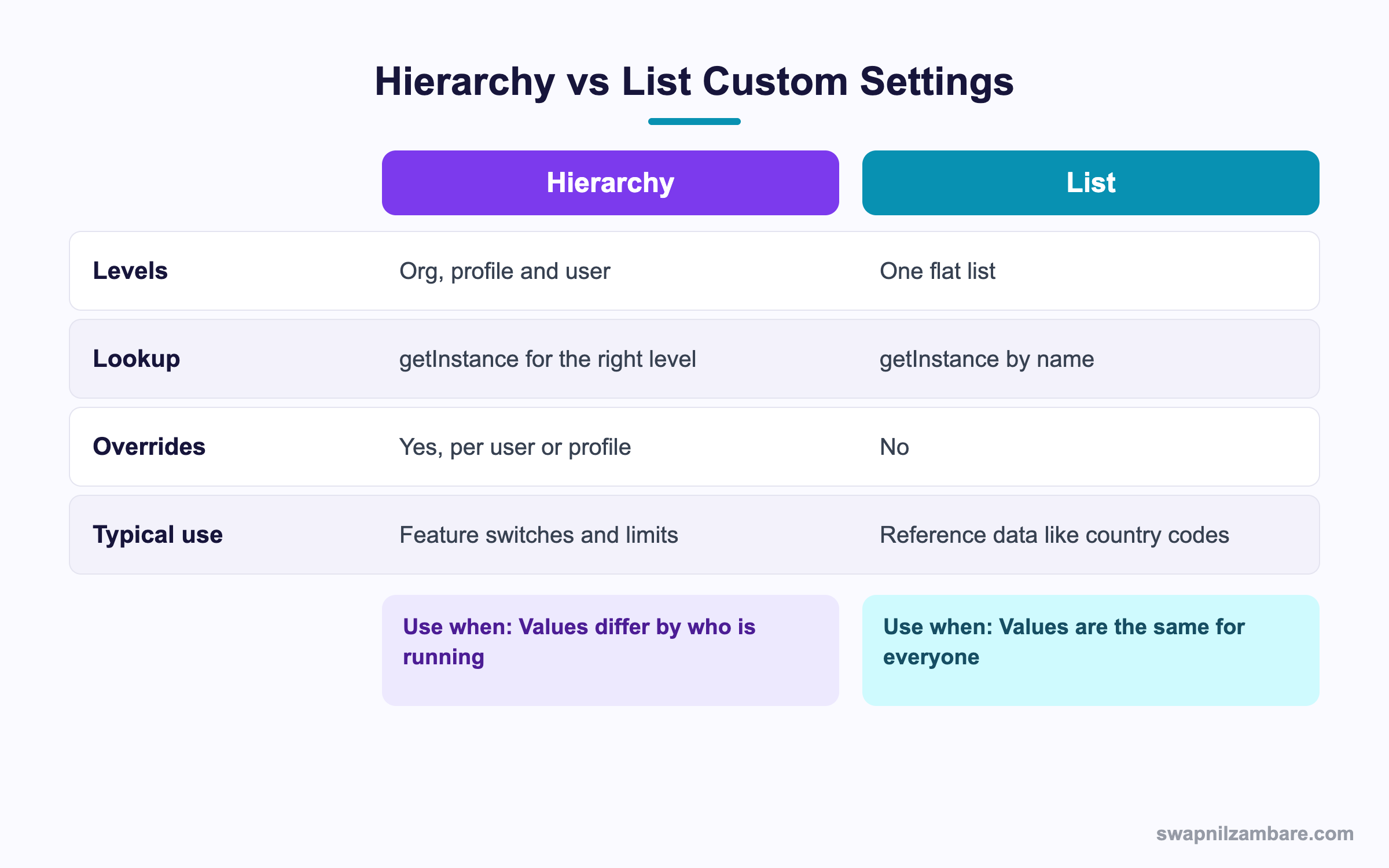
In short, use hierarchy when the answer depends on who is running the code. Use list settings for shared reference data.
A Real Hierarchy Custom Settings Example
Bright Path lets counsellors give a discount, but the cap differs. Normal staff may give 10%, team leads 20%, and one senior counsellor is allowed 25%.
Step 1: Set the Values
An admin enters three records in Setup.
| Level | Who | Max Discount |
|---|---|---|
| Organization | Everyone | 10 |
| Profile | Team Lead | 20 |
| User | Ravi Kumar | 25 |
Step 2: Enforce It in Apex
public with sharing class DiscountGuard {
    public static Boolean isAllowed(Decimal requested) {
        Fee_Setting__c s = Fee_Setting__c.getInstance();
        Decimal cap = (s != null && s.Max_Discount__c != null)
                      ? s.Max_Discount__c : 0;
        return requested <= cap;
    }
}
The null check matters. If no record exists at any level, getInstance returns an empty object rather than null, and the fields are null.
Step 3: Use It in a Trigger
for (Enrolment__c e : Trigger.new) {
    if (e.Discount_Percent__c != null && !DiscountGuard.isAllowed(e.Discount_Percent__c)) {
        e.addError('Discount above your allowed limit.');
    }
}
Because the read costs no SOQL, calling it inside the loop is safe. Even so, reading it once before the loop is tidier.
Step 4: Check the Result
System.debug(DiscountGuard.isAllowed(8));
System.debug(DiscountGuard.isAllowed(22));
Running as Ravi, who is capped at 25, both come back true.
true
true
Running as a normal counsellor, the second one is false.
Common Mistakes with Hierarchy Custom Settings
- Assuming getInstance returns null when nothing is set, instead of an empty record.
- Forgetting SetupOwnerId when creating a record in Apex.
- Storing secrets such as API keys, which are visible to anyone who can read the setting.
- Using a custom setting where Custom Metadata would deploy more cleanly.
- Creating a user level record for every user, which becomes hard to maintain.
Best Practices for Hierarchy Custom Settings
- Always set an organization default so there is a safe fallback.
- Keep overrides rare, usually at profile level rather than user level.
- Null check every field before you use it.
- Read the setting once per transaction and pass it around.
- Use Custom Metadata when the value should move between orgs with your code.
Practice Task
Create a hierarchy setting with a checkbox called Enable_Debug__c. Set it off at org level and on for your own user. Then write a method that returns its value. Hint: use getInstance with no arguments.
Most Asked Hierarchy Custom Settings Interview Questions
These Hierarchy Custom Settings questions test whether you know how configuration should be stored.
Basic Hierarchy Custom Settings Interview Questions
Q1: What are hierarchy custom settings?
Hierarchy Custom Settings store values at org, profile and user level, and Salesforce returns the most specific match.
Q2: What are the two types of custom setting?
Hierarchy Custom Settings and list settings. Hierarchy supports overrides, while list settings are a flat set of named records.
Q3: Which method returns the merged value?
getInstance, either with no argument for the running user or with a user or profile Id.
Q4: What does getOrgDefaults return?
Only the organization level record, ignoring any profile or user override.
Q5: Do custom settings count against SOQL limits?
No. They are held in cache, so reading them is free.
Q6: What field decides the level of a record?
SetupOwnerId, which holds an org, profile or user Id.
Q7: Can you update a custom setting in Apex?
Yes. They are records, so insert, update and upsert all work.
Q8: What does getInstance return when nothing is set?
An empty record with null fields, not null itself.
Intermediate Hierarchy Custom Settings Interview Questions
Q9: What is the order of precedence?
User beats profile, and profile beats the organization default.
Q10: Why read the setting once per transaction?
Although reads are cheap, repeated calls still cost CPU time. One read and a local variable is cleaner.
Q11: Can hierarchy settings be deployed with data?
The definition deploys, but the records do not. So you recreate values per org or load them with a script.
Q12: How is Custom Metadata different?
Custom Metadata records deploy with your code and can be referenced in formulas and validation rules. However, it has no user level override.
Q13: Should you store API keys in a custom setting?
No. Use Named Credentials or protected Custom Metadata, since custom settings are readable by many users.
Q14: Can a formula field reference a hierarchy setting?
Yes. Formulas and validation rules can reference custom setting fields, which is a common reason to choose them.
Q15: What happens when a user has no profile override?
The merged value falls back to the organization default automatically.
Q16: Are custom settings available in a Flow?
Yes. Flow can reference custom setting values directly in formulas and decisions.
Advanced Hierarchy Custom Settings Interview Questions
Q17: Scenario: a feature must be off in production but on for testers. How?
Set the checkbox off at org level, then add user level records for the testers. No deployment is needed to change it later.
Q18: What are the storage limits?
Custom settings share a cached data limit per org, often a few megabytes. So keep them small and avoid large lists.
Q19: Scenario: a setting is missing in a new sandbox. What breaks?
Any code that assumes a value. Therefore always null check and provide a code level default.
Q20: When would you choose Custom Metadata instead?
When values must travel with the deployment, be packaged, or be referenced across orgs without manual setup.
Q21: How do you test code that reads a custom setting?
Insert the setting record in the test with the right SetupOwnerId, so the test does not depend on org data.
Q22: Why is a user level record per user a bad pattern?
Because maintenance grows with headcount. Profile level overrides scale far better.
Q23: Can custom settings be protected in a package?
Yes. A protected setting is visible only to code in the package, which suits internal switches.
Q24: How do hierarchy settings behave for guest users?
They fall back to the guest user profile or the org default, so set a safe org value.
Q25: Are Hierarchy Custom Settings cached per user?
The cache is per org, but the merged result depends on who is running. So two users can read different values from the same setting.
Q26: Can a trigger write to Hierarchy Custom Settings?
Yes, since they are records and normal DML applies. However, writing on every save adds DML, so do it sparingly.
Q27: Do Hierarchy Custom Settings respect field level security?
Setup access controls who can edit them, and code reading them runs in system context. Therefore do not rely on them to hide sensitive values.
Q28: Scenario: a batch size must differ per environment. Which tool?
Hierarchy Custom Settings work, since the value stays per org. Alternatively Custom Metadata with an environment field also fits.
Q29: How do you migrate Hierarchy Custom Settings data to production?
Export the records and load them with Data Loader, or create them in a post-deployment script, because the data does not deploy.
Official Resources
- Apex Developer Guide: Custom Settings
- Salesforce Help: Custom Settings
- Salesforce Help: Custom Metadata Types
Quick Recap
- Hierarchy Custom Settings merge org, profile and user values.
- getInstance returns the most specific match for the running user.
- Reads cost no SOQL, so they are safe inside loops.
- getInstance never returns null, so null check the fields.
- Use Custom Metadata when values must deploy with your code.
What’s Next?
Next, we protect data in code with Apex Crypto and Encoding.


