Custom Controllers give a Visualforce page its own Apex class, so you decide what data it loads and what its buttons do. A standard controller handles one record, but a dashboard page that joins three objects needs real code behind it.
This post builds on Visualforce Basics and Apex sharing keywords. We will build an enrolment summary page for Bright Path Tutors.
What are Custom Controllers?
Custom Controllers are Apex classes attached to a Visualforce page with the controller attribute. The class supplies data through getters and handles clicks through action methods. Nothing is provided for you, so you write the queries and the save logic yourself.
Think of a restaurant. A standard controller is the set menu, already planned. A custom controller is the kitchen, where you decide every dish.
Why Custom Controllers Matter
Standard controllers only understand one object and one record. Many real pages need totals across several objects, a filtered list or a wizard spanning multiple steps.
Custom Controllers handle all of that. Extensions sit in between, letting you keep the standard behaviour and add just the extra you need.
How Custom Controllers Work
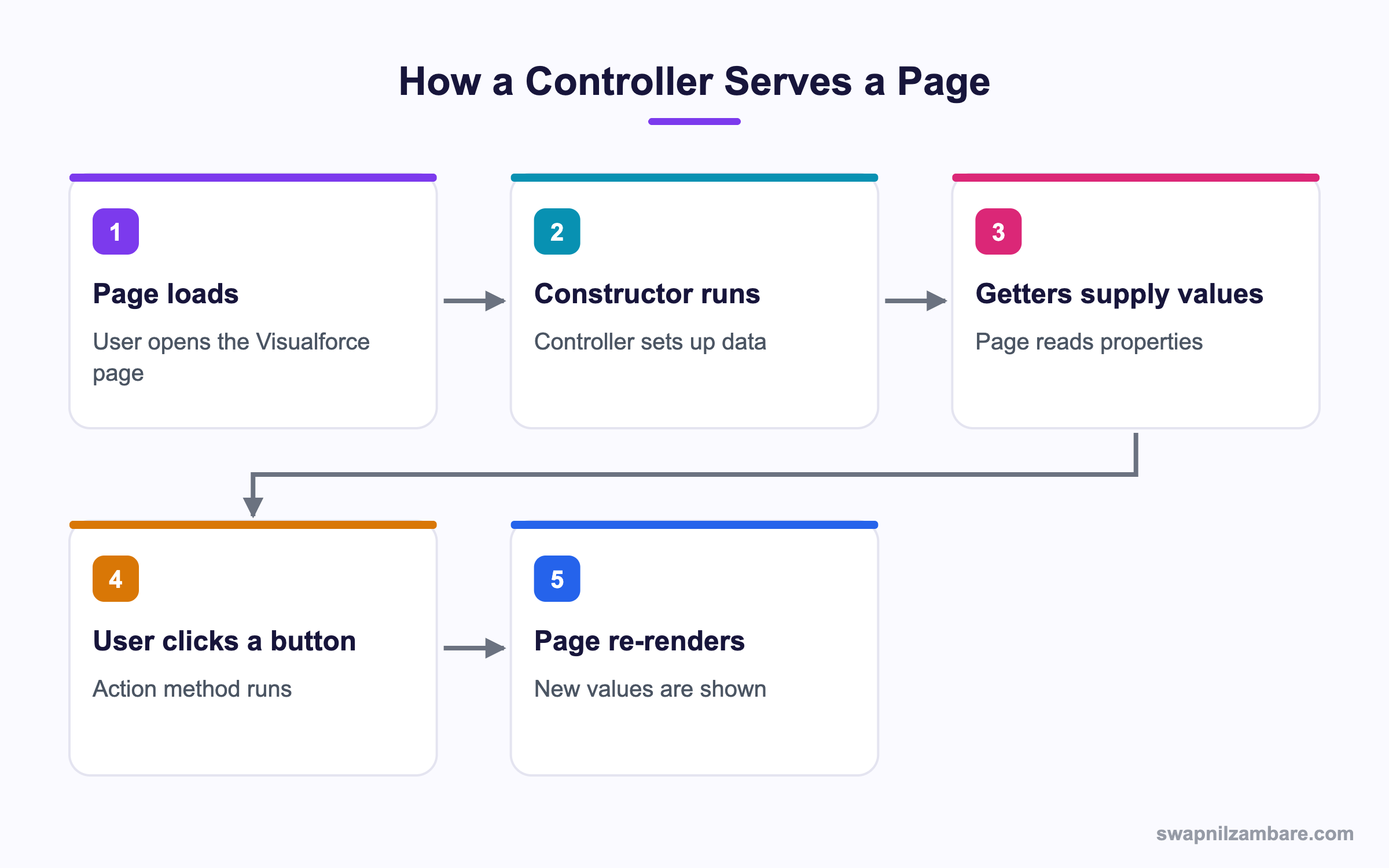
The page and the controller talk in a cycle on every request.
A Basic Custom Controller
public with sharing class CourseListController {
    public List<Course__c> courses { get; private set; }
    public String keyword { get; set; }

    public CourseListController() {
        loadCourses();
    }

    public PageReference search() {
        loadCourses();
        return null;
    }

    private void loadCourses() {
        String like = '%' + String.escapeSingleQuotes(
            keyword == null ? '' : keyword) + '%';
        courses = [SELECT Id, Name, Fee__c FROM Course__c
                   WHERE Name LIKE :like ORDER BY Name LIMIT 100];
    }
}
The constructor runs once when the page loads. The search method runs when a button calls it, and returning null keeps the user on the same page.
The Matching Page
<apex:page controller="CourseListController">
    <apex:form>
        <apex:pageBlock title="Courses">
            <apex:inputText value="{!keyword}"/>
            <apex:commandButton action="{!search}" value="Search" reRender="results"/>
            <apex:pageBlockTable value="{!courses}" var="c" id="results">
                <apex:column value="{!c.Name}"/>
                <apex:column value="{!c.Fee__c}"/>
            </apex:pageBlockTable>
        </apex:pageBlock>
    </apex:form>
</apex:page>
reRender updates only the table, which is faster than reloading the whole page.
Controller Extensions
An extension keeps the standard controller and adds to it. Its constructor must take a StandardController.
public with sharing class CourseExtension {
    private final Course__c course;
    public Integer seatsTaken { get; private set; }

    public CourseExtension(ApexPages.StandardController c) {
        this.course = (Course__c) c.getRecord();
        seatsTaken = [SELECT COUNT() FROM Enrolment__c
                      WHERE Course__c = :course.Id];
    }

    public PageReference closeCourse() {
        course.Status__c = 'Closed';
        update course;
        return null;
    }
}
The page then names both.
<apex:page standardController="Course__c" extensions="CourseExtension">
    <apex:outputText value="Seats taken: {!seatsTaken}"/>
    <apex:form>
        <apex:commandButton action="{!save}" value="Save"/>
        <apex:commandButton action="{!closeCourse}" value="Close course"/>
    </apex:form>
</apex:page>
Both the standard save and your closeCourse work on the same page.
Showing Messages to the User
public PageReference closeCourse() {
    if (seatsTaken > 0) {
        ApexPages.addMessage(new ApexPages.Message(
            ApexPages.Severity.ERROR, 'Cannot close a course with enrolments.'));
        return null;
    }
    course.Status__c = 'Closed';
    update course;
    return null;
}
Add apex:pageMessages to the page and the error appears in the standard Salesforce style. Because you returned null, the user stays on the page with their input intact. That is the normal pattern for a validation failure, since sending them away would lose their work.
Controller Member Reference
This table shows what each piece does.
| Piece | Purpose |
|---|---|
| Constructor | Runs once on page load |
| Property with get | Supplies a value to the page |
| Action method | Runs when a button is clicked |
| PageReference return | Sends the user elsewhere, or null to stay |
| transient keyword | Keeps a variable out of view state |
| ApexPages.addMessage | Shows a message on the page |
Custom Controller vs Extension
This table shows when each fits.
| Feature | Custom controller | Extension |
|---|---|---|
| Standard actions | None | Inherited |
| Record supplied | No | Yes |
| Constructor argument | None | StandardController |
| Page attribute | controller | extensions |
| Best for | Pages with their own data | Adding to a record page |
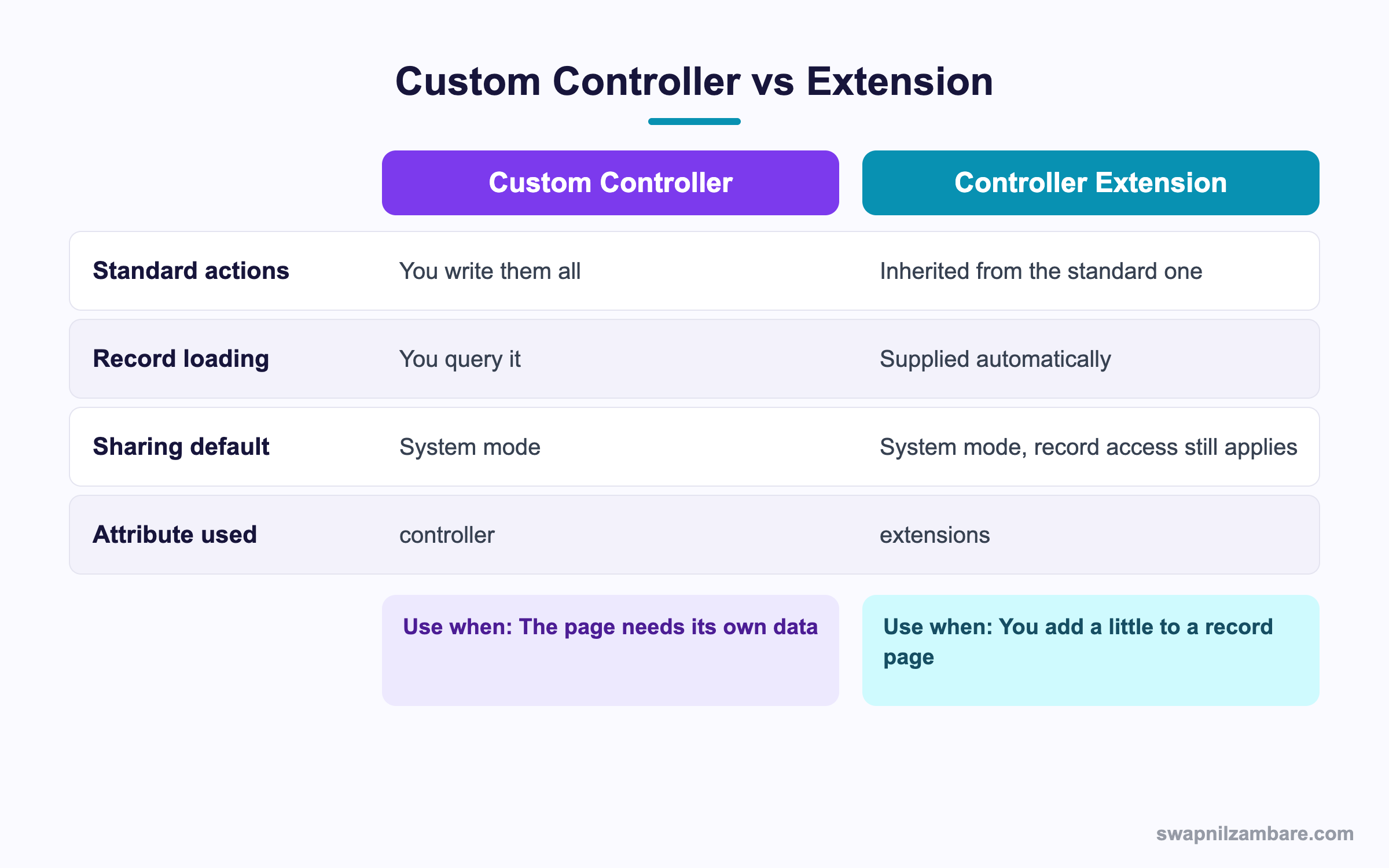
In short, use an extension when the page is still about one record. Use a full controller when it is not.
A Real Custom Controllers Example
Bright Path wants a page showing one course with its enrolments and a running total of fees collected.
Step 1: The Extension
public with sharing class CourseSummaryExt {
    private final Course__c course;
    public List<Enrolment__c> enrolments { get; private set; }
    public Decimal collected { get; private set; }

    public CourseSummaryExt(ApexPages.StandardController sc) {
        course = (Course__c) sc.getRecord();
        enrolments = [SELECT Id, Student_Name__c, Amount_Paid__c
                      FROM Enrolment__c
                      WHERE Course__c = :course.Id
                      ORDER BY Student_Name__c
                      LIMIT 500];
        collected = 0;
        for (Enrolment__c e : enrolments) {
            collected += (e.Amount_Paid__c == null) ? 0 : e.Amount_Paid__c;
        }
    }
}
The total is worked out once in the constructor, not in a getter, so it does not repeat on every render.
Step 2: The Page
<apex:page standardController="Course__c" extensions="CourseSummaryExt">
    <apex:pageMessages/>
    <apex:pageBlock title="{!Course__c.Name}">
        <apex:outputText value="Collected so far: {!collected}"/>
        <apex:pageBlockTable value="{!enrolments}" var="e">
            <apex:column value="{!e.Student_Name__c}"/>
            <apex:column value="{!e.Amount_Paid__c}"/>
        </apex:pageBlockTable>
    </apex:pageBlock>
</apex:page>
Step 3: Test It
Tests must set the page context, which is the part people forget.
@isTest
private class CourseSummaryExtTest {
    @isTest static void totalsPaidAmounts() {
        Course__c c = new Course__c(Name = 'Python Basics');
        insert c;
        insert new Enrolment__c(Course__c = c.Id, Amount_Paid__c = 5000);

        Test.setCurrentPage(Page.CourseSummary);
        ApexPages.StandardController sc = new ApexPages.StandardController(c);
        CourseSummaryExt ext = new CourseSummaryExt(sc);

        System.assertEquals(5000, ext.collected);
    }
}
These are the pieces a controller test needs.
| Step | Why |
|---|---|
| Test.setCurrentPage | Gives the test a page context |
| new StandardController(record) | Supplies the record |
| new Extension(sc) | Runs the constructor |
| Call action methods | Covers the button logic |
| Assert on properties | Proves the data is right |
Common Mistakes with Custom Controllers
- Querying inside a getter, which repeats on every render.
- Holding large lists in the controller, which blows the view state limit.
- Forgetting with sharing, so the page shows records the user should not see.
- Returning a PageReference when you meant to stay on the page.
- Testing the class without setting the page context.
Best Practices for Custom Controllers
- Declare with sharing unless you have a reason not to.
- Load data in the constructor and store it in a property.
- Mark large or temporary variables transient.
- Use an extension when the standard behaviour is still useful.
- Keep business logic in a service class, so it is testable without a page.
Practice Task
Write an extension for Course that counts enrolments and exposes the number as a property. Hint: the constructor must accept an ApexPages.StandardController.
Most Asked Custom Controllers Interview Questions
These Custom Controllers questions appear whenever an interviewer covers Visualforce.
Basic Custom Controllers Interview Questions
Q1: What is a custom controller?
Custom Controllers are Apex classes attached to a Visualforce page, supplying all its data and actions.
Q2: What is a controller extension?
An Apex class that adds methods to a standard controller while keeping its built-in behaviour.
Q3: What argument does an extension constructor take?
An ApexPages.StandardController, or a StandardSetController for list pages.
Q4: Which page attribute attaches each one?
controller for a custom controller and extensions for one or more extensions.
Q5: Can a page have several extensions?
Yes. List them comma separated, and the first matching method wins.
Q6: What does an action method return?
A PageReference that sends the user to another page, or null to stay on the same one.
Q7: How do you show an error on the page?
Call ApexPages.addMessage and include apex:pageMessages in the markup.
Q8: When does the constructor run?
Once when the page is first loaded, before any getters.
Intermediate Custom Controllers Interview Questions
Q9: Do custom controllers enforce sharing?
Not by default. They run in system mode, so declare with sharing to respect record access.
Q10: Do extensions enforce sharing?
The standard controller still checks record access, but your extension code follows the class sharing declaration.
Q11: What is view state and why does it matter?
It is the data kept between postbacks, capped at 170 KB. Large collections in the controller cause errors.
Q12: How do you reduce view state?
Mark variables transient, query fewer fields and avoid storing big lists.
Q13: Why should a getter not contain SOQL?
Because getters can run several times per render, repeating the query each time.
Q14: What is reRender used for?
It refreshes only part of the page after an action, which is faster than a full reload.
Q15: How do you read a URL parameter?
With ApexPages.currentPage().getParameters().get(‘name’).
Q16: What does StandardSetController give you?
List handling with paging, selection and mass actions for an extension on a list page.
Advanced Custom Controllers Interview Questions
Q17: Scenario: a page errors with Maximum view state size exceeded. What do you do?
Mark unneeded fields transient, trim the query to needed columns, and move heavy work to JavaScript Remoting.
Q18: What is JavaScript Remoting and when is it better?
A static Apex method called from JavaScript with no view state. It suits large data and responsive pages.
Q19: How would you build a multi-step wizard?
Hold the in-progress record in the controller, return a PageReference per step, and only commit DML at the end.
Q20: Why keep logic out of the controller?
Because a service class can be tested without a page context and reused by triggers, Flow and LWC.
Q21: Scenario: a user sees records they should not. What is the likely cause?
The controller is declared without sharing, or no sharing declaration at all, so it runs in system mode.
Q22: How do you migrate a controller to support LWC?
Move the queries into static @AuraEnabled methods, then call them from the component and retire the page.
Q23: What happens to controller state between requests?
Non-transient member variables are serialised into view state and restored on the next postback.
Q24: How do you test an action method properly?
Set the page, build the controller, call the method, then assert on the returned PageReference and the data.
Q25: Can Custom Controllers be used by more than one page?
Yes. Several pages can name the same class, which is handy for a shared search screen.
Q26: How do Custom Controllers handle bulk data?
Query with a LIMIT and page the results. Because everything sits in view state, large lists quickly break the page.
Q27: Scenario: a button works for admins but fails for users. What do you check?
The sharing declaration first, then field level security on every field the page writes. System mode hides those problems from you.
Q28: Do Custom Controllers work with Lightning Experience?
Yes, if the page is marked available for Lightning Experience. Still, the styling may need work to look right.
Q29: What is the first thing to check when a page shows stale data?
Whether the value is cached in a property set in the constructor. So an action method must refresh it explicitly.
Q30: Should new projects use Custom Controllers?
Only for Visualforce work that must stay. Otherwise build in LWC, because that is where Salesforce invests.
Official Resources
- Visualforce Guide: Custom Controllers and Extensions
- Visualforce Guide: View State
- Apex Reference: ApexPages Namespace
Quick Recap
- Custom Controllers supply all the data and actions for a page.
- Extensions add to a standard controller and keep its behaviour.
- Load data in the constructor, never in a getter.
- Declare with sharing, since controllers default to system mode.
- Watch view state and mark large variables transient.
What’s Next?
Next, we produce documents with Visualforce to PDF and Visualforce in Lightning.


