Sending Email from Apex gives you full control over who gets a message, what it says and when it goes out. A scheduled job can email every parent whose fee is overdue, with the student name and amount merged in. So you automate messages that no point-and-click tool quite covers.
This post builds on Lightning Email Templates and org-wide email addresses. We will build a fee reminder for Bright Path Tutors.
What is Sending Email from Apex?
Sending Email from Apex means using the Messaging class to build and send messages in code. You create a SingleEmailMessage, set its fields, then pass it to Messaging.sendEmail. There is also MassEmailMessage for many recipients at once.
Think of writing a letter by hand versus using a printing press. A flow or alert is the handwritten letter for one simple case. Apex is the press, where you decide the paper, the wording and how many go out.
Why Sending Email from Apex Matters
Flows and workflow alerts cover most simple cases. However, they struggle when the recipient list is calculated, when you need an attachment built in code, or when one job must email hundreds of different people with different totals.
Sending Email from Apex handles all three. It also gives you the result of each send, so you can log failures instead of guessing.
How Sending Email from Apex Works
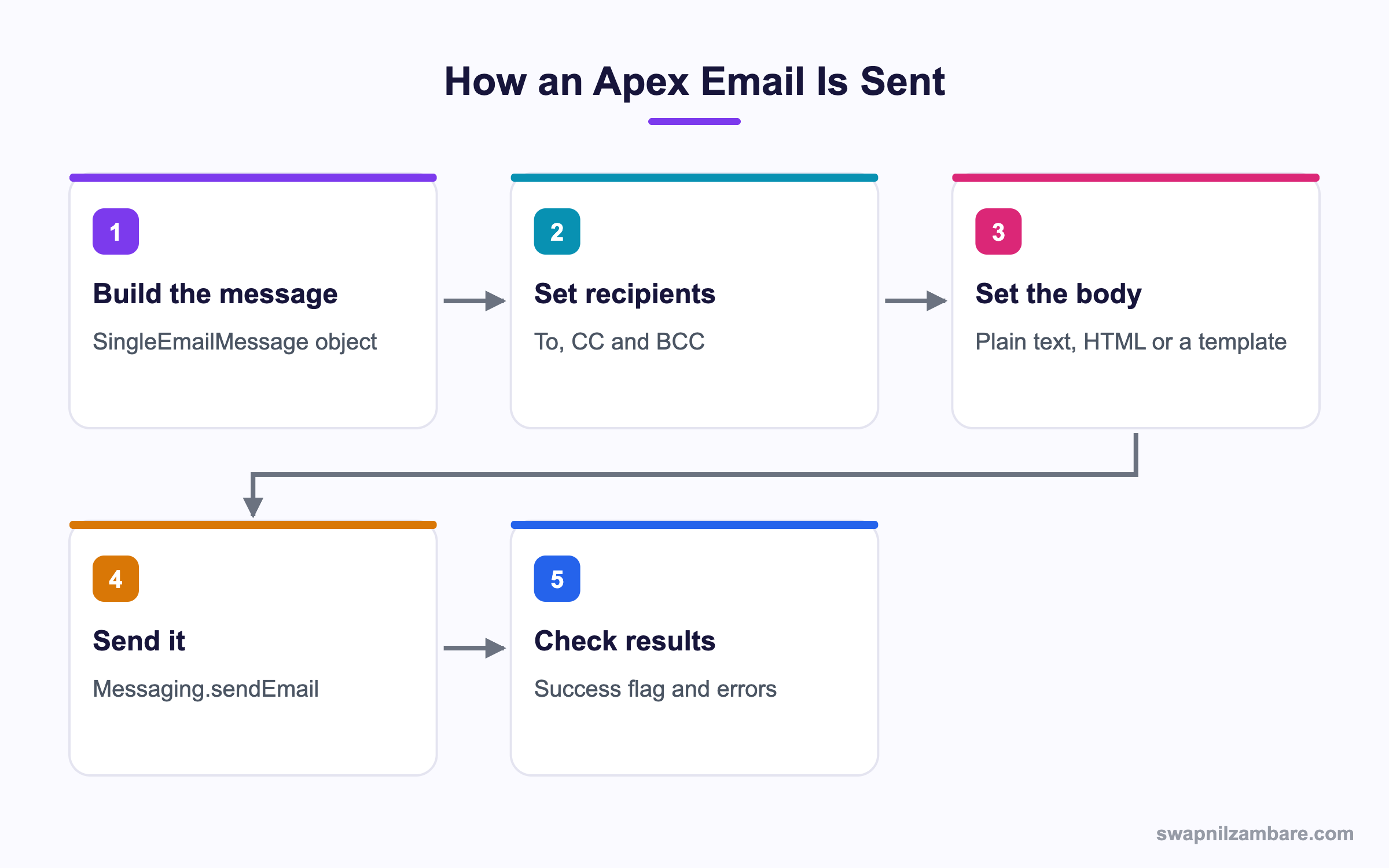
Sending Email from Apex follows the same five steps every time, whatever the content.
A Basic Message
Messaging.SingleEmailMessage mail = new Messaging.SingleEmailMessage();
mail.setToAddresses(new List<String>{ 'parent@example.com' });
mail.setSubject('Fee reminder');
mail.setPlainTextBody('Your fee of 5000 is due on Friday.');
Messaging.sendEmail(new List<Messaging.SingleEmailMessage>{ mail });
sendEmail always takes a List, even for one message. That is because sending in bulk is the cheaper path.
Reading the Result
Sending Email from Apex returns a result per message, which you should check.
List<Messaging.SendEmailResult> results =
    Messaging.sendEmail(new List<Messaging.SingleEmailMessage>{ mail }, false);

for (Messaging.SendEmailResult r : results) {
    if (!r.isSuccess()) {
        System.debug('Failed: ' + r.getErrors()[0].getMessage());
    }
}
The second argument is allOrNone. Passing false lets good messages go even if one fails.
Using a Template
Merge fields only fill when you set a target object, because Salesforce needs a record to merge from.
EmailTemplate t = [SELECT Id FROM EmailTemplate WHERE DeveloperName = 'Fee_Reminder' LIMIT 1];

Messaging.SingleEmailMessage mail = new Messaging.SingleEmailMessage();
mail.setTemplateId(t.Id);
mail.setTargetObjectId(contactId);     // who the merge fields come from
mail.setWhatId(enrolmentId);           // the related record for merge fields
mail.setSaveAsActivity(true);
Without setTargetObjectId, the template sends but every merge field comes out blank.
Sending From the Right Address
By default the email shows the running user. An org-wide address makes it come from the company.
OrgWideEmailAddress owa = [SELECT Id FROM OrgWideEmailAddress
                           WHERE Address = 'support@brightpath.example' LIMIT 1];
mail.setOrgWideEmailAddressId(owa.Id);
Adding an Attachment
Messaging.EmailFileAttachment att = new Messaging.EmailFileAttachment();
att.setFileName('receipt.txt');
att.setBody(Blob.valueOf('Receipt for 5000'));
mail.setFileAttachments(new List<Messaging.EmailFileAttachment>{ att });
Key Methods for Sending Email from Apex
This table lists the methods you will use most.
| Method | What it sets |
|---|---|
| setToAddresses | Plain email addresses |
| setTargetObjectId | Contact, lead or user for merge fields |
| setWhatId | Related record for template merges |
| setTemplateId | The email template to use |
| setSubject and setPlainTextBody | Content without a template |
| setOrgWideEmailAddressId | The From address |
| setSaveAsActivity | Logs the email on the record |
| setFileAttachments | Files to send |
setTargetObjectId vs setToAddresses
These two decide who receives the email, and they behave differently.
| Feature | setTargetObjectId | setToAddresses |
|---|---|---|
| Recipient | A record | Any address |
| Merge fields | Work | Do not fill |
| Activity logging | Possible | Not available |
| Daily limit | Often exempt when logged | Counts |
| Bounce handling | Tracked on the record | Not tracked |
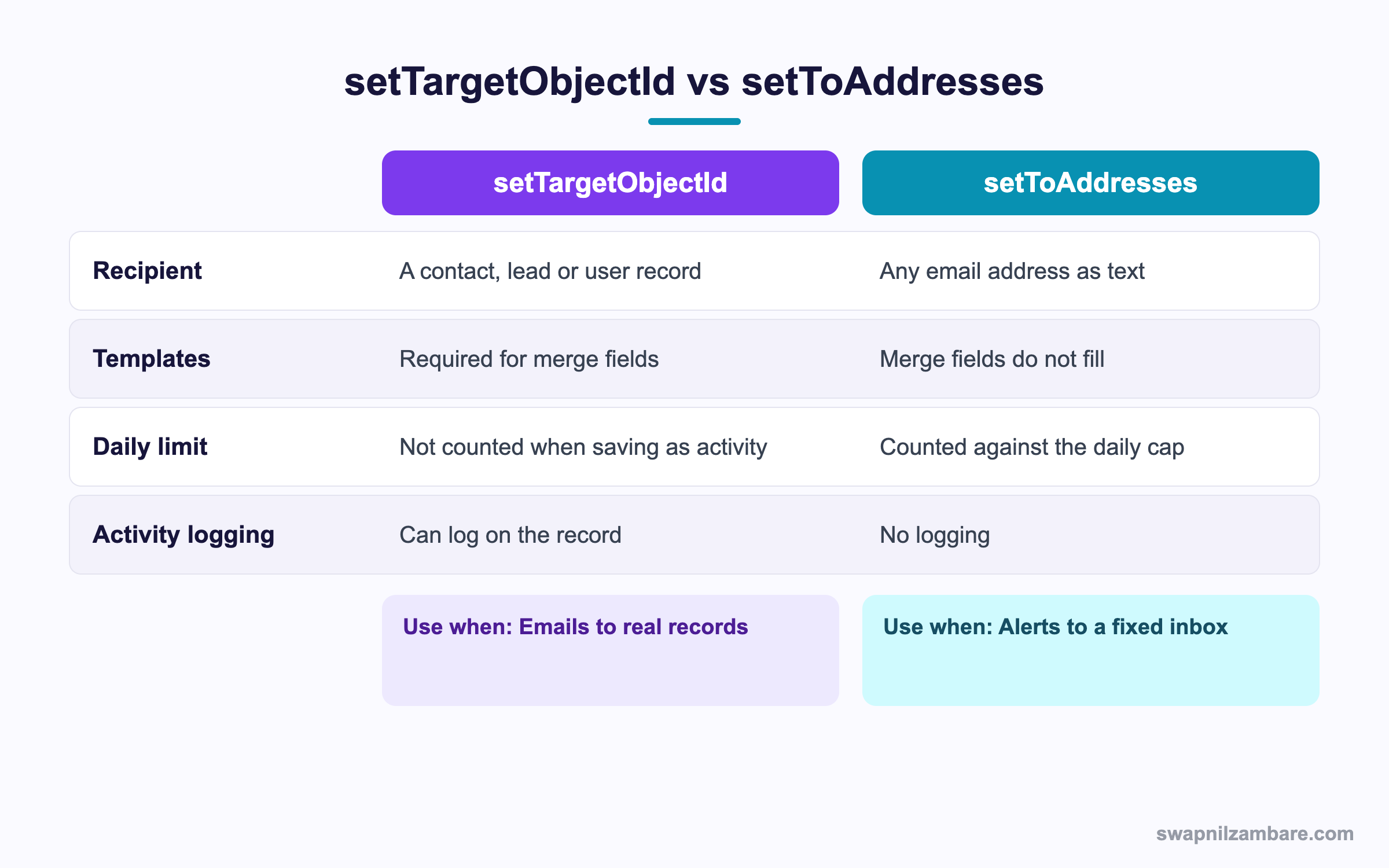
In short, use a target object when you email a real contact. Use addresses for internal alerts to a fixed inbox.
A Real Sending Email from Apex Example
Bright Path wants a nightly job that emails every parent whose fee is overdue, using one approved template.
Step 1: Build the Service
public with sharing class FeeReminderService {
    public static void sendReminders() {
        List<Enrolment__c> due = [
            SELECT Id, Student__c, Amount_Due__c
            FROM Enrolment__c
            WHERE Fee_Status__c = 'Overdue' AND Student__c != null
            LIMIT 500
        ];
        if (due.isEmpty()) { return; }

        EmailTemplate t = [SELECT Id FROM EmailTemplate
                           WHERE DeveloperName = 'Fee_Reminder' LIMIT 1];
        OrgWideEmailAddress owa = [SELECT Id FROM OrgWideEmailAddress LIMIT 1];

        List<Messaging.SingleEmailMessage> batch = new List<Messaging.SingleEmailMessage>();
        for (Enrolment__c e : due) {
            Messaging.SingleEmailMessage m = new Messaging.SingleEmailMessage();
            m.setTemplateId(t.Id);
            m.setTargetObjectId(e.Student__c);
            m.setWhatId(e.Id);
            m.setOrgWideEmailAddressId(owa.Id);
            m.setSaveAsActivity(true);
            batch.add(m);
        }
        Messaging.sendEmail(batch, false);
    }
}
All the messages go in one sendEmail call, which counts as a single email invocation.
Step 2: Test Without Real Sends
Tests never deliver mail, so you assert on the invocation count instead.
@isTest
private class FeeReminderServiceTest {
    @isTest static void sendsOneBatch() {
        Integer before = Limits.getEmailInvocations();
        Test.startTest();
        FeeReminderService.sendReminders();
        Test.stopTest();
        System.assert(Limits.getEmailInvocations() >= before, 'Should attempt a send');
    }
}
Step 3: Watch the Limits
These are the limits that matter when Sending Email from Apex.
| Limit | Value |
|---|---|
| Email invocations per transaction | 10 |
| Recipients per SingleEmailMessage | 100 total across to, cc and bcc |
| External single emails per day | 5,000 per org on most editions |
| Mass email recipients per day | Edition dependent |
| Emails in a test context | Never actually delivered |
Common Mistakes with Sending Email from Apex
- Calling sendEmail inside a loop, which burns the 10 invocation limit.
- Forgetting setTargetObjectId, so template merge fields come out blank.
- Using allOrNone true, so one bad address blocks every other message.
- Sending without an org-wide address, so mail appears from the running user.
- Ignoring the daily limit, which silently stops later sends.
Best Practices for Sending Email from Apex
- Build a List of messages and send once per transaction.
- Use templates so marketing controls the wording, not your code.
- Set an org-wide address for anything customer facing.
- Pass false for allOrNone and log the failures.
- Check Limits.getEmailInvocations in long jobs before sending again.
Practice Task
Write a method that emails a single contact using a template and logs the send as an activity. Hint: you need both setTemplateId and setTargetObjectId.
Most Asked Sending Email from Apex Interview Questions
These Sending Email from Apex questions come up in integration and automation interviews.
Basic Sending Email from Apex Interview Questions
Q1: Which class sends email in Apex?
Sending Email from Apex uses the Messaging class, with SingleEmailMessage for individual sends or MassEmailMessage for bulk.
Q2: How do you send a message once it is built?
Call Messaging.sendEmail and pass a List of messages, even if there is only one.
Q3: What does setToAddresses do?
It sets plain email addresses as recipients, so there is no record behind them.
Q4: What does setTargetObjectId do?
It names the contact, lead or user that merge fields read from.
Q5: Why would merge fields come out blank?
Because no target object was set, so there is no record to merge from.
Q6: What is setWhatId used for?
It names the related record, such as an opportunity, that a template can merge from.
Q7: What does setSaveAsActivity do?
It logs the email as an activity on the recipient’s record.
Q8: Are emails really sent in tests?
No. Tests never deliver mail, so you assert on limits or the code path instead.
Intermediate Sending Email from Apex Interview Questions
Q9: How many email invocations are allowed per transaction?
Ten. So build a List and send once rather than looping.
Q10: How many recipients can one SingleEmailMessage have?
Up to 100 across the to, cc and bcc fields combined.
Q11: What is an org-wide email address used for?
It sets a shared From address, so mail appears from the company rather than the running user.
Q12: What does the allOrNone parameter control?
Whether one failure rolls back the whole send. Passing false lets the good messages go.
Q13: How do you attach a file?
Build an EmailFileAttachment with a file name and a Blob body, then set it on the message.
Q14: What is the difference between SingleEmailMessage and MassEmailMessage?
SingleEmailMessage sends one message with full control. MassEmailMessage targets many records with one template and fewer options.
Q15: Can Apex send email to an address outside your org?
Yes, but it counts against the daily external email limit.
Q16: How do you check whether a send succeeded?
Read the SendEmailResult list, calling isSuccess and getErrors on each result.
Advanced Sending Email from Apex Interview Questions
Q17: Scenario: a batch job must email 10,000 parents. How do you design it?
Use Batch Apex with a scope of about 100, build one List per batch and send once in each execute. Then the invocation limit is never reached.
Q18: Why is the daily email limit a deployment risk?
Because it is per org, not per job. So a test data load can exhaust it and silently stop production mail.
Q19: How do you keep email wording out of Apex?
Use email templates and reference them by DeveloperName, so admins change wording without a release.
Q20: Scenario: emails send but never arrive. What do you check?
Deliverability settings, whether the org is in System email only mode, bounce status on the contact and the daily limit.
Q21: How do you handle bounced addresses?
Turn on bounce management, then check the bounce fields before sending and skip those records.
Q22: Can you send email from a trigger?
You can, but it is risky. Better to queue the work with a Queueable so the save is not slowed or rolled back by an email failure.
Q23: How do you test template merges without sending?
Call Messaging.renderStoredEmailTemplate, which returns the merged subject and body for inspection.
Q24: What governs email in a scratch or sandbox org?
Email deliverability is often set to No access or System email only, so no mail leaves until an admin changes it.
Q25: Does Sending Email from Apex work in a Flow?
Flow has its own Send Email action for simple cases. However, an invocable method is the usual way to reuse Apex email logic from a Flow.
Q26: Can you schedule Sending Email from Apex?
Yes. A Schedulable class can call your email service nightly, which is how most reminder jobs run.
Q27: How do you avoid emailing the same person twice?
Track what you sent, usually with a date field or a log record. Then filter those records out of the next run.
Q28: Scenario: the daily email limit is hit at noon. What happens?
Later sends fail with a limit error for the rest of the day. So large jobs should run at night and check the limit first.
Q29: Is Sending Email from Apex the right choice for marketing blasts?
No. Marketing Cloud or Account Engagement handle consent, tracking and volume far better, so keep Apex for transactional mail.
Official Resources
- Apex Reference: Messaging Namespace
- Apex Reference: SingleEmailMessage Class
- Salesforce Help: Email Deliverability
Quick Recap
- Sending Email from Apex uses the Messaging class and SingleEmailMessage.
- Always pass a List to sendEmail, even for one message.
- setTargetObjectId is what makes template merge fields fill.
- Ten email invocations per transaction, so send in bulk.
- Tests never deliver mail, so assert on limits instead.
What’s Next?
Next, we receive mail instead of sending it, with Inbound Email Services in Apex.


