An Apex Custom Iterator lets you decide how a for loop moves through data. Instead of looping a list that already exists, you supply items one at a time. So you can page through a long result, skip rows by a rule, or feed Batch Apex from something other than a query.
This post builds on Apex collections and Batch Apex. We will page through course records for Bright Path Tutors.
What is an Apex Custom Iterator?
An Apex Custom Iterator is a class that implements Iterator<T> with two methods. hasNext() answers whether another item exists, and next() returns the current item and moves forward.
Think of a ticket counter. The clerk checks whether anyone is still in the queue, then calls the next person. Your iterator is the clerk, and the queue is your data.
Why an Apex Custom Iterator Matters
Most of the time a plain List is fine. You need an iterator when the data does not already sit in memory, or when the rule for what comes next is not a simple position.
Common cases are paging through an external API, walking a parent-child tree, or giving Batch Apex a scope that SOQL cannot express. An Apex Custom Iterator also keeps that logic in one class, instead of spreading index maths through your code.
How an Apex Custom Iterator Works
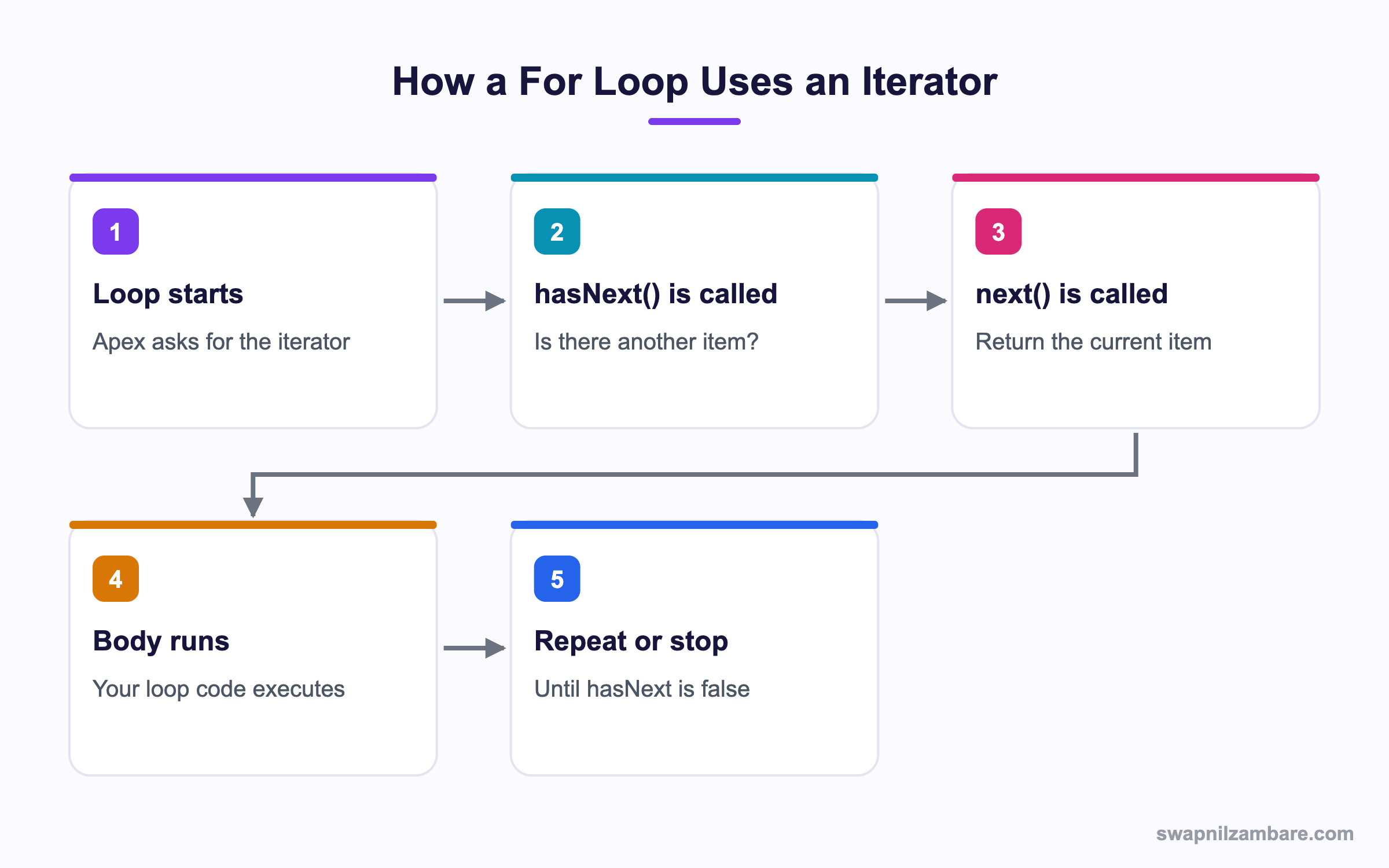
With an Apex Custom Iterator, a for loop does not read your data directly. It asks for an iterator, then calls two methods in a cycle until the first one returns false.
The Iterator Class
public class CourseIterator implements Iterator<Course__c> {
    private List<Course__c> items;
    private Integer index = 0;

    public CourseIterator(List<Course__c> items) {
        this.items = items;
    }
    public Boolean hasNext() {
        return index < items.size();
    }
    public Course__c next() {
        return items[index++];
    }
}
The index++ returns the current value and then adds one, so each call moves forward.
Making a Class Loopable
A for loop cannot take an iterator directly. It needs an Iterable, which is a class that knows how to hand one out.
public class CourseBag implements Iterable<Course__c> {
    private List<Course__c> items;
    public CourseBag(List<Course__c> items) { this.items = items; }
    public Iterator<Course__c> iterator() {
        return new CourseIterator(items);
    }
}
Now the loop reads naturally.
CourseBag bag = new CourseBag([SELECT Id, Name FROM Course__c LIMIT 5]);
for (Course__c c : bag) {
    System.debug(c.Name);
}
The log prints each course name in turn.
Python Basics
SQL Basics
Statistics
Skipping Items with a Rule
The real value shows when next does more than return the next slot.
public class PaidOnlyIterator implements Iterator<Enrolment__c> {
    private List<Enrolment__c> items;
    private Integer i = 0;
    public PaidOnlyIterator(List<Enrolment__c> items) { this.items = items; }

    public Boolean hasNext() {
        // Look ahead past unpaid rows
        while (i < items.size() && items[i].Fee_Status__c != 'Paid') { i++; }
        return i < items.size();
    }
    public Enrolment__c next() { return items[i++]; }
}
The loop that uses this never sees an unpaid record, and the calling code stays clean.
Iterator and Iterable Methods
This table lists what each interface asks you to write.
| Interface | Method | Returns |
|---|---|---|
| Iterator | hasNext() | Boolean, is there another item |
| Iterator | next() | The next item, then moves on |
| Iterable | iterator() | A fresh Iterator for this data |
Using Iterable with Batch Apex
Batch Apex normally takes a QueryLocator. When your scope cannot be written as SOQL, return an Iterable instead.
public class FeeBatch implements Database.Batchable<Course__c> {
    public Iterable<Course__c> start(Database.BatchableContext bc) {
        return new CourseBag([SELECT Id, Name, Fee__c FROM Course__c LIMIT 1000]);
    }
    public void execute(Database.BatchableContext bc, List<Course__c> scope) {
        for (Course__c c : scope) { c.Fee__c = c.Fee__c * 1.05; }
        update scope;
    }
    public void finish(Database.BatchableContext bc) {
        System.debug('Fee batch finished');
    }
}
There is a trade-off. A QueryLocator can return up to 50 million records, while an Iterable is built in memory and is limited to the normal 50,000 query rows.
Iterator vs Iterable
These two names confuse most developers. This table separates them.
| Feature | Iterator | Iterable |
|---|---|---|
| Purpose | Walks the data | Supplies a walker |
| Methods | hasNext, next | iterator |
| Keeps position | Yes | No |
| Works in a for loop | No | Yes |
| Batch start method | Not alone | Yes |
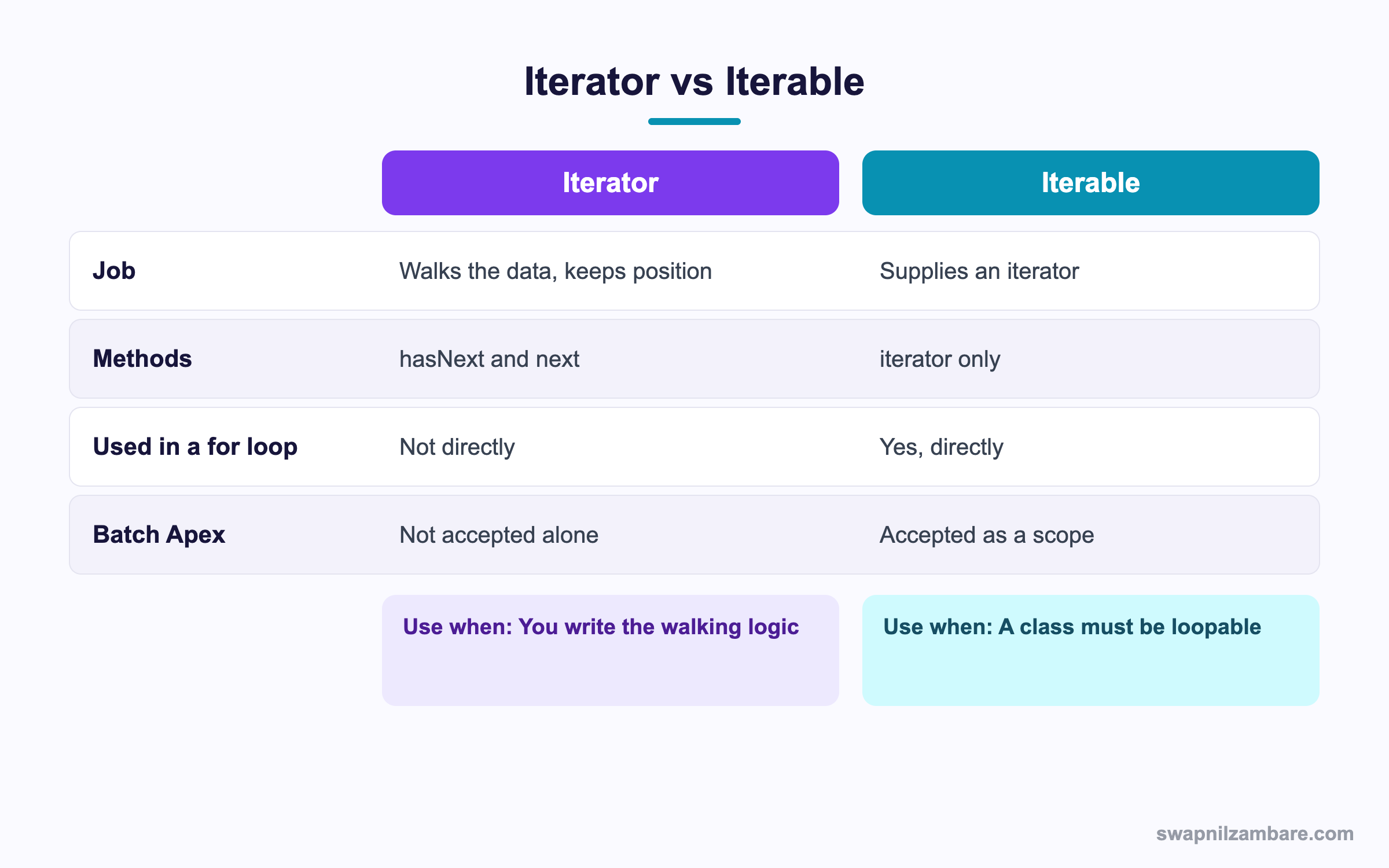
In short, the Iterable is the book and the Iterator is your finger on the page. You need both for a custom loop.
A Real Apex Custom Iterator Example
Bright Path pulls courses from a partner API that returns 50 records per page. The code should loop through all of them as if they were one list.
Step 1: The Paging Iterator
public class ApiPageIterator implements Iterator<String> {
    private List<String> page = new List<String>();
    private Integer pos = 0;
    private Integer pageNo = 1;
    private Boolean more = true;

    public Boolean hasNext() {
        if (pos < page.size()) { return true; }
        if (!more) { return false; }
        loadPage();
        return pos < page.size();
    }
    public String next() { return page[pos++]; }

    private void loadPage() {
        // In real code this would be an HTTP callout
        page = MockApi.fetch(pageNo);
        pos = 0;
        pageNo++;
        if (page.isEmpty()) { more = false; }
    }
}
The caller never knows that pages exist. The iterator fetches the next page only when the current one runs out.
Step 2: Wrap It
public class ApiCourses implements Iterable<String> {
    public Iterator<String> iterator() { return new ApiPageIterator(); }
}
Step 3: Loop It
Integer count = 0;
for (String name : new ApiCourses()) {
    count++;
}
System.debug('Total courses from API: ' + count);
The output shows one number, even though several pages were fetched.
Total courses from API: 128These are the pieces and their jobs.
| Class | Interface | Job |
|---|---|---|
| ApiPageIterator | Iterator | Fetches pages and hands out items |
| ApiCourses | Iterable | Gives the loop a fresh iterator |
| MockApi | Helper | Stands in for the real callout |
Common Mistakes with an Apex Custom Iterator
- Implementing Iterator but trying to use it directly in a for loop.
- Moving the index inside hasNext, which can skip items.
- Forgetting to reset position, so a second loop finds nothing.
- Putting SOQL inside next, which runs a query per record.
- Using an Iterable in Batch Apex for millions of rows, which breaks the row limit.
Best Practices for an Apex Custom Iterator
- Keep hasNext free of side effects where you can.
- Return a new iterator each time iterator() is called.
- Prefer a plain List when the data already fits in memory.
- Use QueryLocator in Batch Apex unless your scope cannot be queried.
- Write a test that loops the iterator twice to prove it resets.
Practice Task
Write an iterator that returns only even numbers from a List of Integers. Then wrap it in an Iterable and loop it. Hint: do the skipping inside hasNext.
Most Asked Apex Custom Iterator Interview Questions
These Apex Custom Iterator questions appear in advanced developer interviews.
Basic Apex Custom Iterator Interview Questions
Q1: What is an iterator in Apex?
An Apex Custom Iterator is a class implementing Iterator with hasNext and next, which controls how a loop walks data.
Q2: What two methods does Iterator need?
An Apex Custom Iterator needs hasNext, which returns a Boolean, and next, which returns the next item.
Q3: What does the Iterable interface require?
It needs one method called iterator, which returns a fresh Iterator.
Q4: Can you use an Iterator directly in a for loop?
No. The loop needs an Iterable, so you wrap the iterator in one.
Q5: Why would you write a custom iterator?
You write one to page through data, skip items by a rule, or walk a source that is not a simple list.
Q6: Does a List already support looping?
Yes. Lists, sets and maps all work in for loops without any extra code.
Q7: Where is Iterable used besides loops?
In the start method of Batch Apex, when the scope cannot be a SOQL query.
Q8: What does next return?
It returns the current item, and it also moves the position forward for the following call.
Intermediate Apex Custom Iterator Interview Questions
Q9: What is the row limit when Batch Apex uses an Iterable?
The normal query limit of 50,000 rows, because the collection is built in memory.
Q10: What is the limit with a QueryLocator instead?
Up to 50 million records, since the platform streams them in chunks.
Q11: Why should hasNext avoid changing state?
Because a loop may call it more than once. Changing position there can skip records.
Q12: How do you make an iterator reusable?
Return a new iterator object from iterator() each time, rather than sharing one instance.
Q13: Can an iterator return sObjects?
Yes. Iterator is generic, so it can return any type, including sObjects and wrappers.
Q14: What happens if next is called when hasNext is false?
You get a list index out of bounds error. So the loop must always check first.
Q15: Can one class implement both Iterator and Iterable?
Yes, and it is common for small cases. The iterator method then returns this.
Q16: Is a custom iterator faster than a list loop?
Usually not. Its value is control over the source, not raw speed.
Advanced Apex Custom Iterator Interview Questions
Q17: Scenario: you must process records from a REST API in Batch Apex. How?
Write an Iterable whose iterator makes callouts page by page, then return it from start and mark the batch Database.AllowsCallouts.
Q18: How would you iterate a parent-child tree?
Keep a stack inside the iterator. Pop a node in next, then push its children so they come later.
Q19: What are the heap risks with iterators?
Loading every page into one list uses heap. So drop processed pages and keep only the current one.
Q20: How do you test an iterator properly?
Test an empty source, a single item, several items and a second full loop to prove it resets.
Q21: Scenario: the loop silently skips every other record. What is wrong?
The position is probably being moved in both hasNext and next. So move it in next only.
Q22: When is an iterator the wrong tool?
When a simple query with ORDER BY and LIMIT gives the same result. Then plain SOQL is clearer and cheaper.
Q23: Can you combine an iterator with the Stub API?
Yes. You can stub the Iterable so tests supply fixed items without any callout.
Q24: How does Iterable help a managed package?
Subscribers can pass their own Iterable, so your batch runs on data you never anticipated.
Q25: Does an Apex Custom Iterator count against SOQL limits?
Only the queries inside it count. So one query in the constructor is fine, while a query inside next is not.
Q26: Can an Apex Custom Iterator be used in a Flow?
Not directly. Instead, expose an invocable method that returns a List, because Flow works with collections.
Q27: How does an iterator differ from a wrapper class?
A wrapper carries data for one row. However, an iterator decides the order and supply of many rows.
Q28: Scenario: memory errors while looping a large API result. What do you change?
Keep only the current page in the iterator and clear the previous one. Then heap stays flat as the loop runs.
Q29: Should every list get a custom iterator?
No. Use one only when the supply rule is unusual, because plain lists are simpler for readers to follow.
Official Resources
- Apex Developer Guide: Custom Iterators
- Apex Reference: Iterator Interface
- Apex Developer Guide: Using Batch Apex
Quick Recap
- An Apex Custom Iterator controls how a loop walks your data.
- Iterator needs hasNext and next, and Iterable needs iterator.
- A for loop takes an Iterable, not an Iterator.
- Batch Apex accepts an Iterable, but with the 50,000 row limit.
- Use a plain List when the data already fits in memory.
What’s Next?
Next, we send messages from code with Sending Email from Apex.


